
Telegram Notify MT5

Telegram Notify MT5


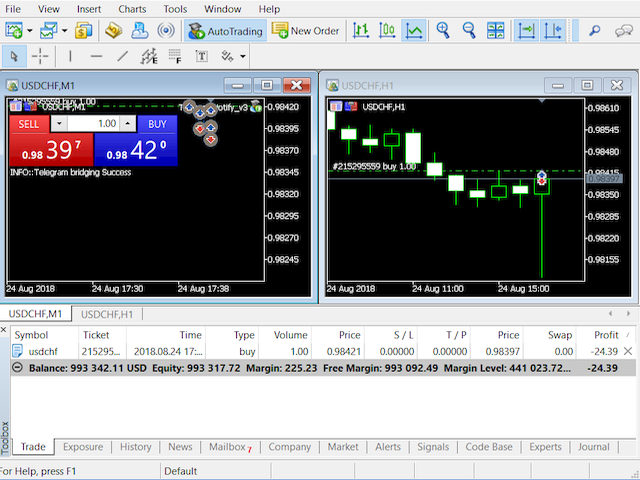
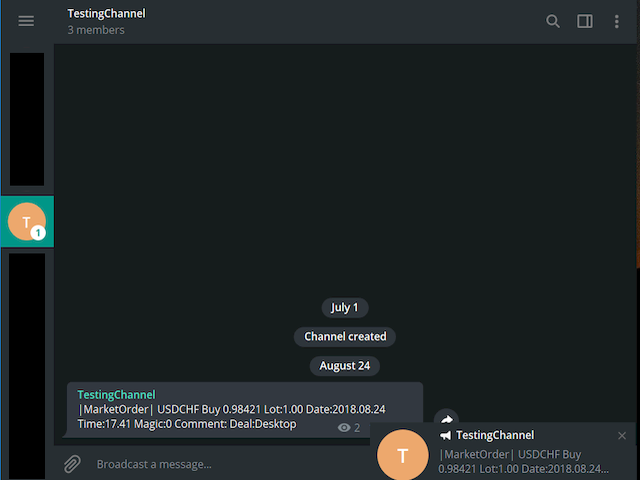
Telegram Notify MT5 is an utility tool to bridge your MetaTrader 5 activities to your Telegram chat/channel. It is useful for monitoring your MetaTrader 5 account by sending a notification to your particular Telegram chat/channel when someone/EA is placing trades, modifying order's TP/SL, closing trades and etc. This EA does not place any trade for your account. This EA also could be a convenient tool for monitoring other's EA trading activities or a tool for publishing your trading signal through the particular Telegram channel.


Parameters

  • Token="" - enter your bot API token
  • ChatID=0 - enter your Chat ID or Channel ID
  • AlertOnTelegram=true - function On/Off
  • NotifyInitialSetup=true - send notification during the initial setup
  • NotifyOrderClosed=true - send notification when an order is closed
  • NotifyPendingFilled=true - send notification when a pending order is filled
  • NotifyNewPending=true - send notification when placing a new pending order
  • NotifyNewOrder=true - send notification when placing a new order
  • NotifyPendingDeleted=true - send notification when a pending order is deleted
  • NotifyModifiedOrder=true - send notification when a trade is being modified


Setup guideline

  1. Open your Telegram APP and search for "BotFather".
  2. Type /start and click/type /newbot to create a new bot.
  3. Give your bot a nickname and username (e.g., nickname: TestingABC and username: TestingABCbot <-- username has to be ended by 'bot').
  4. Congratulations! You have created your Telegram bot.
  5. Save your bot API token (e.g. 227330911:AAEWHnT9B9bAARDiKhESwXd7hk-G4nxmEpI) and click t.me/TestingABCbot to chat with it.
  6. Go back to Telegram APP and search for 'userinfobot'.
  7. Type /start and retrieve your personal Telegram Chat ID (e.g., 12345678).
  8. Back in MetaTrader 4, go to Tools > Options > Expert Advisors > tick 'Allowed WebRequest for listed URL' and add 'https://api.telegram.org'.
  9. Attach the utility into your MetaTrader 4 chart and fill up the Token (from step 5) and ChatID (from step 7).
  10. Hooray! Your Notify Telegram utility is ready to work for you.
  11. Fill up the Chat ID with your Channel ID and set your bot as a channel administrator in order for your bot to work in the channel.





















































推荐产品
Smart EA Summary
Abderrahmane Benali
Smart EA Summary MT5 – EA Profit Panel by Magic Number Do you run multiple Expert Advisors and want to track their individual performance? Smart EA Summary is a smart visual tool that displays the net profit/loss of all closed trades, grouped by Magic Number and Symbol, directly on your chart in a clean, responsive panel. Click Here for MT4 Version * Introductory Offer : the current price is only   49 USD   After the first 10 purchases, the price will increase to   75 USD , and gradually up to
Hybrid Assisted Trading Engine Manual Trading. Machine Discipline. The Hybrid Assisted Trading Engine is an institutional-grade manual trade management system designed to protect traders from emotional mistakes — without taking control away from them. You decide when to enter . The engine decides how the trade is managed . What It Does This system continuously monitors your manual trades and enforces professional-level trade management rules in real time: Smart Breakeven logic R-based trai
各位交易员好!我是您的交易助手。话不多说,让我来告诉你我的专长: 1. 我擅长管理您的持仓,不论你在哪一端下单,我都能第一时间帮你加上合理的止损线以及移动止损。 2. 我能帮你规避追涨杀跌,从根源根除守不住原则的人性弱点。 3. 我会在最佳点位给你发出通知消息到您移动端的MT5客户端,供您参考,当然,您需要将您移动设备内 MetaTrader 5 APP里 的  MetaQuotes ID 注册到  MetaTrader 5 客户端-->选项-->通知--> MetaQuotes ID的编辑框内并勾选开启通知点确定 。 4. 我很好地支持在策略测试中进行手动模拟操盘练习。 5. 联系我您还能获得一个配套的附加AI辅助客户端超级助理程序。 备注:本 项目不承诺您一定能盈利,它只是交易助理工具。 消息通知的效果展示请参阅截图效果。 期待您选择我成为您的助理,让我们共同奔赴财务自由!!!
You can see Binance Spot data instantly in Metatrader 5 and it allows you to use all the features that Metatrader has provided to you. You can access the data of all symbols listed on Binance Futures. Don't forget to set the timezone. Binance it's 00:00 UTC. You need to fix it according to your own country You need to install the free Binance Spot Symbol List plugin. https://www.mql5.com/tr/market/product/83507 After loading, it automatically downloads the data of the cryptos in the market obser
点差成本 是指交易中由点差造成的损失金额, 隔夜息收益 是指隔夜持仓获得的收益金额。 点差成本 对于短线交易者尤其是超短线交易者来说是一个重要的指标, 隔夜息收益 则对长线交易者来说是一个很重要的指标。由于MT5平台中得到的点差及隔夜息都是以点表示的,我们需要将它转换成以账户货币计价的金额 。本工具可以在不同的账户类型(美元账户、欧元账户等等)下,通过面板表格展示平台报价中所有外汇货币对(包括黄金XAU、白银XAG)的 点差成本 及 隔夜息收益 。面板表格中所有的数据都是实时更新的。 计算方法 点差成本 = Lots × OnePointValue × Spreads 隔夜息收益 = Lots × OnePointValue × Swaps 其中: Lots: 交易手数 OnePointValue: 以账户货币表示,一个点代表的金额 Spreads: 点差(以点表示) Swaps: 隔夜息(以点表示) 注意:在每周按“三日隔夜息”结算的那天,通常为每周周三, 隔夜息收益 的结果要再乘以3。 有关OnePointValue的详细计算方法,见文章: 外汇货币对的交易成本 Part1 如
Professional-Grade Chart Analysis – AI-Powered & Visually Enhanced The AInalyzer is an Expert Advisor for MetaTrader 5 that leverages artificial intelligence to analyze market structures and automatically places visual objects directly on your charts. Instead of spending hours manually examining charts, you'll get a clear overview of support levels, resistance zones, trend structures, and potential trading opportunities in no time – all logically presented, visually marked, and available at you
Lock Bot
Artem Alekseev
This utility is designed to automatically maintain a "locking" position and reopen it when necessary, which is suitable for position maintenance and protection strategies. A simple utility (hereinafter referred to as the bot) that implements a locking strategy with an infinitely reloadable locking trade. How the bot works: - When launched, select a buy or sell order with a specified TP - Set the SL parameter for the locking trade - The bot monitors the distance between the opening price of the f
该智能交易顾问(EA)会在 MetaTrader 5 中监控所有交易品种上的所有持仓。一旦在任意持仓上 手动设置或调整 了止损(SL)或止盈(TP),EA 会将该值 自动应用于其他所有未平仓头寸 ,无论是买单还是卖单、哪个交易品种。这确保整个账户的 SL 和 TP 水平始终保持同步。 非常适合通过平板或智能手机进行移动交易!    ......................................................................................................................................................
使用革命性的交易时间管理器轻松控制您的交易程序。这个强大的工具可以在指定时间自动执行订单,从而改变您的交易方式。 为不同的交易行为(从购买到设置订单)制定个性化任务列表,所有这些都无需人工干预。 交易时间管理器安装和输入指南 如果您想获取有关 EA 的通知,请将我们的 URL 添加到 MT4/MT5 终端(参见屏幕截图)。 MT4版本     https://www.mql5.com/en/market/product/103716 MT5版本     https://www.mql5.com/en/market/product/103715 告别人工监控,拥抱精简效率。直观的界面允许您设置精确的参数,包括交易品种、执行时间、价格、止损 (SL)、止盈 (TP) 点和手数大小。 该工具的灵活性通过与市场行为相匹配的适应性重复选项来凸显。通过视觉主题个性化您的体验,并减少长时间交易期间的眼睛疲劳。 摆脱手动交易程序,拥抱“交易时间管理器”的强大功能。提高交易的准确性、组织性和自由度。简化您的日常工作并重新体验交易。 主要特点: 自动订单执行:按指定时间间隔无缝自动执行订单,从而节省您的
Smart Risk Manager
Abderrahmane Benali
5 (1)
Smart Risk Manager – Master Your Trades with Precision and Confidence! Take full control of your manual trading with a sleek, powerful, and intuitive panel designed for traders who value speed, accuracy, and smart risk management. Smart Risk Manager lets you place trades or pending orders in seconds — all while automatically calculating the optimal lot size based on your predefined risk percentage. No more guesswork. Just clean execution. ــــــــــــــــــــــــــــــــــــــــــــــــــــــــ
Fast Manager (MT5 Manager) is a high-speed utility designed for traders who need rapid execution and automated trade management. Built to streamline manual trading, this EA provides on-chart buttons for instant Buy/Sell execution and "Close All" functions, while automatically handling risk management behind the scenes. MT4 Version: https://www.mql5.com/en/market/product/132477?source=Site+Profile+Seller Key Features: One-Click Trading Panel: execute trades instantly using the on-chart Buy, Sel
BatchLoaderGUIApp
Adebayo Bisiriyu Adewole
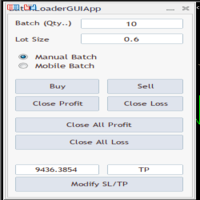
BatchLoaderGUIApp is a Utility tool that allows TRADERS to efficiently manage their trade with "ONE CLICK" such as "Closing All Positions In Profit or Loss", "Closing A Single or Batch Position In Loss or Profit" and "Modifying Positions". A Mobile Batch option enables a trader Batch Load a single Mobile Execution.. "Experience the ultimate trading efficiency with BatchLoaderGUIApp for MetaTrader - one-click management for opening, closing, and modifying positions, plus mobile batch execution fo
# Higher-Lower Pending Bot - Advanced Multi-Pending Orders System ## Revolutionize Your Trading with Smart Pending Order Automation Welcome to the **Higher-Lower Pending Bot** - the most sophisticated pending order management system available on MQL5. Designed for traders who want to maximize opportunities while minimizing manual effort, this EA combines intelligent order placement with comprehensive profit tracking in one powerful package. ## What Makes Our Bot Unique? ### Smart D
Signals Executor for Telegram is a Utility that allows you to execute and manage positions from messages sent in Telegram Chats. Chat messages are processed to check for the existence of commands, and the command will be executed if its parameters are valid. You need the Telegram Bot Token and Chat Id to configure the input parameters. It is possible to restrict the sending of commands through the User Id, which must be configured in the input parameters. Valid Commands: Buy and Sell: Market or
Orders Executor
Claudio Aguiar De Aragao
Introducing Orders Executor , your powerful and efficient trading companion designed to seamlessly execute orders directly from a user-specified text file . This innovative trading tool streamlines your trading process, providing a convenient and automated solution for executing trades with precision and speed. Key Features : **Text File Integration:**     Orders Executor is designed to effortlessly read and interpret orders from a plain text file, eliminating the need for manual input. Simpl
介绍适用于 MT5 的 NAS100 Auto SL 和 TP Maker: 有了我们的 NAS100 Auto SL 和 TP Maker,再也不会错过止损和止盈的设置,这是交易者在 MetaTrader 5 上浏览纳斯达克 100 市场时不可或缺的助手。该工具专为寻求自动管理止损和止盈水平的无缝解决方案的用户而设计。 主要功能 轻松实现自动化: 自动监控无止损和/或止盈的纳斯达克 100 指数交易。 根据用户配置设置动态调整水平。 订单类型的多样性: 兼容纳斯达克 100 指数的市价订单和挂单。 支持 MetaTrader 5 中的各种订单类型。 定制配置: 用户友好的参数设置允许自定义跟踪偏好和止损/止盈水平。 范围灵活: 可选择为其运行的特定 NAS100 工具或所有交易工具设置止损和止盈。 快速执行: 确保快速设置所需的 StopLoss 和/或 TakeProfit 值,无需等待新的 tick 即可迅速响应。 MetaTrader 5 兼容性: 与 MetaTrader 5 中的所有订单类型兼容,实现无缝集成。 使用 NAS100 Auto SL 和 TP Maker
FREE
Click Trade Manager MT5
Hispraise Chinedum Abraham
点击交易经理是我们到目前为止最好的产品! 对初级和专业道具公司交易员来说都是最好的解决方案! 保护您的FTMO/MFF道具公司或个人账户不突破缩减限额。EA自动关闭所有交易,因此它们永远不会触及您的缩减限额。 如果某笔交易可能突破您的缩减限额,会向您发出警告。 当您的利润目标被击中时,自动关闭交易。 可设置为向经纪人隐藏神奇数字。 计算风险,只需点击一下就可以用SL和TP进行交易。 一键下达止损和限价订单。 一键设置多个纤维级别的交易,每个交易都有不同的SL和TP。 只需按下键盘上的一个键,就可以进行部分交易,将SL移至BE,关闭所有未结交易,删除所有挂单。 在一天中预先设定的时间内关闭所有交易。 向Telegram发送所有交易的警报。 高度可定制 - 选择最适合您交易风格的设置   首次设置。为了实现正确的功能,在第一次使用之前,请确保你设置以下内容 重置全局设置=True(在EA设置并运行后,回到输入设置并设置为False。除非你得到一个新账户,否则你不需要再次设置)。 在保护设置中。 保护模式 = True (打开保护模式) 开始账户大小 = 输入你的道具公司账户的原
Blues Protector
Andtle Austin Dube
Boost your forex profits with Blues Protector, an advanced MQL5 Expert Advisor designed for MetaTrader 5. This automated trading bot dynamically manages your stop-loss levels to secure gains and reduce risks. Blues Protector EA - User Manual   (For MT5 - Ready-to-Use EX5 File)   1. What This EA Does    The Blues Protector EA automatically secures your profits by smartly adjusting stop-loss levels when your trade reaches a predefined profit level. It works silently in the background, protecting
Trade Assistant 38 in 1
Makarii Gubaydullin
4.91 (22)
多功能工具:手数计算器,网格订单,风险回报比,交易管理器,供求区域,价格行为等等 演示版本   |   用户手册 交易助手   不能在策略测试器中工作 :您可以下载   此处的演示版本  来测试此 工具 。 联系我   如有任何问题  / 改进建议 / 发现错误 如需MT4版本,请访问 此处 简化、加速并自动化您的交易   流程 。通过此   仪表板 扩展标准终端功能。 交易面板  适用于任何交易品种:外汇、股票、指数、加密货币等。 1. 开立新交易 :手数 / 风险 / 风险回报比计算 :手动交易的风险管理 手数计算器(根据风险大小计算交易量) 风险计算器(根据手数大小计算风险金额) 风险回报   比率 网格订单:  + 动态距离选项,及拆分手数选项 订单激活触发器,+ 买入止损限价 / 卖出止损限价 虚拟止损,虚拟止盈(隐藏止损,隐藏止盈:经纪商不可见) 智能止损 / 入场价位:若K线收盘突破则避免虚假触发 隐藏订单(虚拟挂单) 计划订单:即使市场休市也可挂单交易(周末计划器) 额外多级止盈价位 具有不同ID的OCO(一单取消另一单)订单 图表上的交易可视化 + 调整 止损 /
Professional Footprint Chart EA - Complete Order Flow Trading Suite DEMO USERS - PLEASE SELECT EVERY TICK WHEN TESTING  See What Market Makers See! The most comprehensive order flow analysis tool for MetaTrader 5. Get institutional-grade volume analysis, real-time DOM, Time & Sales, and intelligent trade signals - all in one powerful EA. 6 Professional Panels - Complete order flow analysis suite Real-Time Tick Data - Live bid/ask volume at every price level Automatic Imbalance Detection - Spot
The TELEGRAM BROADCAST utility helps to instantly publish your trading in the Telegram channel. If you have long wanted to create your Telegram channel with FOREX signals, then this is what you need. ATTENTION. This is a DEMO version, it has limitations - sending messages no more than 1 time in 300 seconds PAID version:  https://www.mql5.com/en/market/product/46865 https://t.me/moneystrategy_mql TELEGRAM BROADCAST can send messages: Opening and closing deals; Placing and deleting pending o
FREE
"Hukan" is a Japanese word meaning hawk's eye, and this system is software that allows you to monitor the entire MT5 with a hawk's eye. You can check the real-time chart of the system by clicking the link.  (Forex, commodities, Bitcoin, stock CFDs, etc.) Short period Long period Stock CFD This product enables all the functions that I felt necessary while trading in one system. If you attach it to a single chart with a tool based on the Dow theory, it will calculate the Dow theory of the chart
Get news5
Aleksander Gladkov
Utility for reading news from investing.com To access the site, you need to add WebRequest in the Options terminal menu on the Expert Advisors tab: https://sslecal2.investing.com If reading is successful, a message about writing the file is displayed. The INV_week_this.txt file is written to the MQL5\Files folder of the terminal and is kept up to date, updating data according to its own timer You can attach the utility to any chart with any time frame; just one is enough to support indicators
**Bneu Prop Firm Challenge Manager Pro** is a trading utility for MetaTrader 5 designed to assist traders participating in proprietary trading firm evaluation challenges. The utility monitors account metrics, tracks challenge progress, and provides protection features to help maintain compliance with challenge rules. **Main Features** **Prop Firm Presets** - Pre-configured rule sets for common proprietary trading firms - FTMO preset with corresponding rule parameters - MyForexFunds (MFF) pres
VR MultiPrice Analysis (VR多元价格分析) - 货币对中货币力量强度的指示器以欧元/美元为例。如何确定这一货币对中哪种货币是弱的,哪种货币是强的? 最简单、最可靠的方法是将欧元与除美元以外的其他货币进行比较。 力量分布选项: 欧元兑其他货币升值——这种迹象表明,欧元对交易员和投资者更具吸引力,或有好消息传出。 欧元兑其他货币贬值——这种迹象表明,大多数交易者和投资者正在出手欧元并购买其他货币,或有坏消息传出。 该指示器根据不同的货币显示不同的值——这表明欧元货币市场存在不确定性。 对于欧元货币力量强度,该指标会分析美元与其他货币的关系。 因此,通过VR MultiPrice Analysis (VR多元价格分析),交易者获得了对欧元/美元货币对的综合分析,并看到了这一货币对的全貌。 这款指示器可以分析设置的货币对,或设置中指定的货币对。 借助这款指示器,您可以在某种货币强劲走势开始时提高精准入场的机会。 您可以分析历史上的货币力量走势。为此,您需要设定两条垂直线,即开始日期和结束日期。 指示器的所有管理都在图表上完成,您可以选择需要分析的货币对中的第一种货币和分
通過 Telegram 渠道複製交易。它將幫助您立即將您的交易發佈到 Telegram 頻道或從 Telegram 頻道複製交易。該實用程序可以在兩個方向上工作:在 MT5 中接收信號和將信號傳輸到 Telegram。 不再錯過優惠 不再恐慌 資本管理 便於使用 演示 https://www.mql5.com/ru/market/product/54083 你可以找到它的用途: 通過 Telegram 頻道(通過互聯網)複製您自己的交易; 將交易從 MT5 複製到 MT4,反之亦然。 MT4 版本 https://www.mql5.com/ru/market/product/56142 通過 Telegram 頻道為其客戶分發信號; 這個怎麼運作: 您可以在測試頻道 https://t.me/moneystrategy_mql 中查看該實用程序的工作原理 在 PROVIDER 模式下,該實用程序在 Telegram 頻道中發布交易:訂單號、開盤時間、交易品種、交易類型、交易手數以及止損和止盈水平。 在 RECEIVER 模式下,該實用程序將交易從 Telegram
Use for risk management and opening positions as per the user settings. The user is allowed to set the stop loss and take profits in pips. The user can also choose the risk percentage per trade that he/she wants to use while opening the trade. The volume of the trade that the user wants to sent shall be calculator according to the stoploss and the risk percentage that the user has selected.
MT5 to Telegram Notification Hub   is a user-friendly tool that connects MetaTrader 5 (MT5) with Telegram, enabling seamless transmission of trade alerts, updates, and custom messages directly from MT5 to your Telegram account or channel. You can easily adjust and enable or disable specific parts of the notifications, making it ideal for signal providers and traders who want to keep their audience informed with real-time updates Setup guide A setup guide is available here . Key Features: Instan
Minions Labs Recalibrator
Flavio Javier Jarabeck
5 (1)
Once again, We Nailed It! Imagine a faster and smoother way to recalibrate ANY Indicator using just obvious and intuitive mouse clicks, realtime, real fast, real results on your chart just right after the Click... Instead of the boring "Open Settings dialog / Change one setting / Click OK / See what happens on Chart...",  then repeat this process endlessly until you kill yourself! Well... No More... Welcome to the Minions Labs Recalibrator tool! Now you can Study, Trial, Experiment and Play with
该产品的买家也购买
HINN Lazy Trader
ALGOFLOW OÜ
5 (2)
Lazy Trader is your personal risk management assistant that independently finds the best market entries, manages positions, and helps you extract maximum profit from every trading idea! It monitors charts from M1 to W1 , finds optimal entry points based on your parameters, and manages trades without your involvement: - Got an idea on the daily chart? No need to wait for lower timeframes to form a signal — Lazy Trader will check everything and open all necessary positions while you live your lif
YuClusters
Yury Kulikov
4.93 (43)
Attention: You can view the program operation in the free version  YuClusters DEMO .  YuClusters is a professional market analysis system. The trader has unique opportunities to analyze the flow of orders, trade volumes, price movements using various charts, profiles, indicators, and graphical objects. YuClusters operates on data based on Time&Sales or ticks information, depending on what is available in the quotes of a financial instrument. YuClusters allows you to build graphs by combining da
LAUNCH PROMOTION - 50% OFF! Regular Price: $599 Launch Price: $299 (Limited Time!) FarmHedge Yield Farming - Professional Pair Trading Dashboard (Manual - Hybrid - Fully Automated EA) FarmHedge is a powerful statistical arbitrage Expert Advisor designed for pair trading. It analyzes correlations between currency pairs and identifies mean-reversion opportunities using Farm Index analysis. VERIFIED TRADING RESULTS Farmed Hedge Yield O: https://www.mql5.com/en/signals/2354372 Farme
Unlimited Trade Copier Pro MT5 is a tool to copy trade remotely to multiple MT4, MT5 and cTrader accounts at different computers/locations over internet. This is an ideal solution for you if you are a signal provider and want to copy your trades to other receivers globally on your own rules. One provider can copy trades to multiple receivers and one receiver can get trade from multiple providers as well. The provider can even set the subscription expiry for each receiver, so that receiver will n
FiboPlusWaves MT5
Sergey Malysh
5 (1)
FiboPlusWave Series products Ready-made trading system based on Elliott waves and Fibonacci retracement levels . It is simple and affordable. Display of the marking of Elliott waves (main or alternative option) on the chart. Construction of horizontal levels, support and resistance lines, a channel. Superposition of Fibonacci levels on waves 1, 3, 5, A Alert system (on-screen, E-Mail, Push notifications).    Features: without delving into the Elliott wave theory, you can immediately open one of
Mentfx Mmanage mt5
Anton Jere Calmes
4.25 (8)
The added video will showcase all functionality, effectiveness, and uses of the trade manager. Drag and Drop Trade Manager. Draw your entry and have the tool calculate the rest. Advanced targeting and close portions of a trade directly available in tool (manage trades while you sleep). Market order or limit order on either side with factored spread. Just draw the entry, the tool does the rest. Hotkey setup to make it simple. Draw where you want to enter, and the stop loss, the tool calculates al
The  Easy Strategy Builder (ESB)  is a " Do It Yourself " solution that allows you to create a wide range of the automated trading strategies without any line of codes. This is the world’s easiest method to automate your strategies that can be used in STP, ECN and FIFO brokers. No drag and drop is needed. Just by set conditions of your trading strategy and change settings on desired values and let it work in your account. ESB has hundreds of modules to define unlimited possibilities of strategi
Gold instrument scanner is the chart pattern scanner to detect the triangle pattern, falling wedge pattern, rising wedge pattern, channel pattern and so on. Gold instrument scanner uses highly sophisticated pattern detection algorithm. However, we have designed it in the easy to use and intuitive manner. Advanced Price Pattern Scanner will show all the patterns in your chart in the most efficient format for your trading. You do not have to do tedious manual pattern detection any more. Plus you
GRat Crypto
Ivan Titov
4.5 (2)
Trade on crypto exchanges in MT5! GRat_Crypto is a tool for manual and automated trading , including ANY available EA, ANY  cryptocurrency  on most popular crypto exchanges in the familiar MT5 environment 24/7. Features 1. ALL instruments of the 9 most popular crypto exchanges are available: Binance, BingX, Bybit, Coinbase, CoinEx, Kraken,   KuCoin, MEXC and OKX . 2. The ability to place ANY type of order available in MT5, both market and pending, to modify orders and positions, to delete order
FTMO Protector 8
Vyacheslav Izvarin
PROTECT YOUR FTMO Account in a simplest way Must-Have Account Protector for any Prop-trading Account and Challenge MT4 / MT5 Expert Advisor that protects your Forex Prop Trading account from an unexpected drawdown! FTMO Protector  is a Tool that lets you manage trades and control your profit and loss across multiple Robots and currency pairs using a simple parameters and settings. Use as many EAs and Instruments you need, the Protector will: 1.   Calculate your midnight (01:00 System time) Balan
Live Forex Signals 专为现场信号交易而设计   https://live-forex-signals.com/en 和  https://foresignal.com/en . Live Forex Signal for MetaTrader 4   https://www.mql5.com/en/market/product/81445 参数 如果您已订阅网站,则用户名和密码live-forex-signals.com/foresignal.com ,然后您应该使用您的凭据填写这些参数;如果没有订阅,则将字段留空; 评论对正在开启的交易的评论 风险风险作为交易存款的百分比,如果风险=0,则使用价值地段 固定交易量 使用获利使用从网站获利 UseStopLoss从网站使用止损 FrequencySignalUpdateInMinute顾问访问网站的频率 交易的最大点差交易的最大允许点差,如果点差较高,则设置的挂单被取消 使用追踪止损 TrailingStop跟踪止损的值以点为单位 为了使实时外汇信号正常工作,您需要放置网站地址 https://live-forex
Trading Chaos Expert
Gennadiy Stanilevych
5 (11)
世界上没有本软件的同等产品,它代表一个覆盖交易信号的通用交易 "控制台",自动入场,设置止损和止盈,还有在单一窗口里同时进行多交易尾随终止。EA 的 "三次点击" 直观控制,确保在不同计算机上全方位使用所有功能,包括平板电脑。 与附加的信号指标交互来标记图标,给出实际市场的全貌,EA 令您做出正确的选择,以及在大多数情况下成为胜者一方。内置资金管理算法, 还有自动计算手数, 虚拟订单交易, 以及一些其它从崩溃账户里挽救交易者的 "诀窍"。它不是一个 "黑盒子"。而是一个深思熟虑的交易员的不可或缺的助理, 至少要尝试一次它的动作。 注,在面板上形成的 EA 不能在策略测试员中测试。可以在您的模拟账户里以实时模式检查它, 您可以下载本 EA 的免费版 - 混沌交易 EA 演示 。 EA 表现为一个面板,带有内置功能的交易机器人的,自动基于交易者可直观检查的交易信号入场,完全按照比尔·威廉姆斯的策略“混沌交易:第二版”和“新贸易维度”。在单独的窗口里,EA 识别价格走势的导向,用于指定品种和时间帧的全自动交易模式,也可以多品种并发。 它同时分析 MetaTrader 5“市场观察”窗口中显示
Best Renko Chart Generator
Mohammad Taher Halimi Tabrizi
5 (1)
This is the Best Renko chart generator ever in the market you can set the box sizes based on ATR or Fixed Size: 1. Fixed Box Size 2. Current ATR Size 3. ATR size of the Chart Start Time. also you can set the Renko chart cut of date and time to start as reference of creating renko charts. you need to attach to a symbol chart that want the renko chart of it, then immediately a new chart will be opened which is based on renko, you can use this generated chart and attach your EA to trade on or you e
ClusterSecond
Rafil Nurmukhametov
4.78 (32)
该工具允许绘制不同类型的图表。 秒图从1秒到86400秒 从1滴答开始的滴答图 成交量图 三角洲图 仁科图 范围图 用于体积分析的内置指标。 该工具的演示版 https://www.mql5.com/ru/channels/clustersecond 每日市场概况和所选时间框架的市场概况。 集群搜索。 不平衡。 VWAP。 动态POC、VAH、VAL 价格窗口简介 具有不同表现形式的垂直体积。 δ,有不同的可视化选项。 当前的和高的时间框架极 地下室指标烛台显示 也可以从图表中进行交易。 注意:该工具是为具有真实(交换)量的市场设计的。 它不适合外汇市场。它在VPS上不起作用。它在策略测试器中不起作用。 为了控制该图表,我们使用了 鼠标左键 - 移动图表,在设置中选择不同的模式,调用位于屏幕左下角带螺丝刀的钥匙图标下的主设置窗口。 鼠标右键 - 用于输入位于屏幕左上角图标下的图形结构的设置,以及绘制垂直、水平、趋势线和矩形的单独设置。 在图表区域旋转鼠标滚轮--左右移动图表,按住Ctrl键--上下移动图表,在价格比例区域--按价格比例,在时间轴区域--按时间比例。 H键--在
GT Trade Manager
Alexander Martin Koenig
This Utility is designed for price action strategies, trading flags and retests, such as Guerrilla Trading and similar strategies It allows to: place pending orders for retests (on the Retest line or x PIPs away from the retest line) place orders for flag formations calculate lotsizes based on account size, currency pair and risk percentage split trades and place multiple trades if lot size exceeds max lot size given by broker manage trades with a trailing SL/TP behind the most recent highs/lows
TradePad
Ruslan Khasanov
5 (1)
TradePad 是一種既可用於手動交易又可用於演算法交易的工具。我們為您提供一個簡單的解決方案,用於快速交易操作和控制多種交易工具的持股。 注意,該應用程式不適用於策略測試器! 模擬帳戶應用程式的試用版和所有工具的描述 應用程式介面適應高解析度顯示器,簡單直覺。為了方便工作,我們為交易者提供了以下工具: 熱鍵管理器,用於管理交易操作、在主圖表的週期之間切換、在 TradePad 工具之間切換; 標記交易等級的工具,用於在開倉或設定掛單時評估虧損風險並計算潛在利潤; MultiCharts 工具用於直觀地監控多個交易符號,以及接收演算法交易的交易訊號。為了方便起見,您可以組織交易對的集合,這將使您有機會在多個時間範圍內監控價格並進行多幣種交易; 用於查看任何歷史時期的交易統計資料的資訊模組,能夠產生擴展的 HTML 報告、查看交易符號的特徵和有關交易帳戶的資訊; 掛單管理器用於管理掛單 - 設定單一或一組(網路)掛單,可按訂單類型和單一符號或交易帳戶上的所有類型進行分組刪除; 設定賣出停損限價和買入停損限價掛單的工具; 頭寸管理器用於管理一個或多個頭寸(取決於帳戶類型) - 全部
News Trader Pro is a unique robot that allows you to trade the news by your predefined strategy. It loads every piece of news from several popular Forex websites. You can choose any news and preset the strategy to trade it, and then News Trader Pro will trade that news by selected strategy automatically when the news comes. News release gives opportunity to have pips since the price usually has big move at that time. Now, with this tool, trading news becomes easier, more flexible and more exciti
If you wish to draw Support and Resistance lines, view: daily market opening, classical pivot levels, Fibonacci pivot levels, trend lines, Fibonacci levels, the remaining time to candle closing, and current spread. If you seek to place your orders with the exact lot that meets your desired stop loss risk. If you wish to do all this and more with just one click, then this is the perfect tool to use. This tool will allow you to feel more relaxed when deciding to open orders, as well as predicting
The new version of  MirrorSoftware 2021  has been completely rewriten and optimized.  This version requires to be loaded only on a single chart because  it can detect all actions on every symbol and not only the actions of symbol where it is loaded. Even the  graphics and the configuration mode  have been completely redesigned. The MirrorSoftware is composed of two components (all components are required to work):  MirrorController  (free indicator): This component must be loaded into the MASTER
The script displays info about the share's corporate reports and dividends. The data is downloaded from   investing.com : Report date Profit per share (EPS) Revenue Market capitalization Amount of dividends Date of payment of dividends Dividend income The product cannot be tested in the tester (since it is not possible to receive data from the Internet). Before launching:  Add 2   URL   https://ru.investing.com/earnings-calendar/Service/getCalendarFilteredData  and   https://ru.investing.com/di
Virtual Grid MT5
Volodymyr Hrybachov
用於半自動交易的實用程序。應用動態水平來設置經紀人不可見的止損、止損、止盈和追踪止損。適合與任何經紀人合作,包括具有 FIFO 要求的美國經紀人。 MT4 版顧問鏈接 可以使用按鈕或線條打開交易。為了讓顧問沿著這條線開倉:在圖表上畫一條線並重命名。當價格穿過它時,EA 將執行相應的命令。 OPEN_SELL - 開一個賣單 CLOSE_SELL - 關閉所有賣單 OPEN_BUY - 未結買單 CLOSE_BUY - 關閉所有買單 命令執行後,寫註釋“OK”,該行只執行一次命令。 該圖表顯示有關收到的利潤、當前未平倉頭寸(訂單數量、手數和利潤)、開倉訂單按鈕、執行速度和滑點的信息。 選項: MAGIC_NUMBER - 幻數; LOT_SIZE_MULTIPLY - 平均訂單的手數乘數; MIN_GRID_STEP - 平均訂單之間的最小步長; GRID_PRICE_STEP - 打開平均訂單前的最小步長; STOPLOSS - 一籃子訂單的止損; TAKEPROFIT - 一籃子訂單的獲利; TRAILING_STOP - 追踪期間的最低利潤; TRAILING_S
快捷操作,快速买,卖,清空操作。 提供三个按钮:Buy,Sell,清空。 Buy:点击后快速下多单,默认1手,盈利点和止损点都是110点,下单成功后可手动修改。 Sell:点击后快速下空单,默认1手,盈利点和止损点都是110点,下单成功后可手动修改。 清空:快速全部订单清仓,包括买,卖订单。 提供快速操作,默认大小,盈利点和止损点都可以单独找我,定制开发。    图表可以自行设定品种,时间周期。 快捷操作,快速买,卖,清空操作。 提供三个按钮:Buy,Sell,清空。 Buy:点击后快速下多单,默认1手,盈利点和止损点都是110点,下单成功后可手动修改。 Sell:点击后快速下空单,默认1手,盈利点和止损点都是110点,下单成功后可手动修改。 清空:快速全部订单清仓,包括买,卖订单。 
GRID for MT5
Volodymyr Hrybachov
GRID for MT5 是一種方便的工具,適用於那些使用訂單網格進行交易的人,專為在外匯金融市場上進行快速而舒適的交易而設計。 MT5 的 GRID 有一個可定制的面板,其中包含所有必要的參數。適合有經驗的交易者和初學者。與任何經紀商合作,包括有 FIFO 要求的美國經紀商 - 首先,關閉之前打開的交易。訂單網格可以是固定的——訂單以固定的步長開倉,或者有動態的開倉水平——以更好的價格開倉,它只適用於市價單。 GRID for MT5 交易面板具備開倉、平倉和追踪訂單功能。訂單由一籃子關閉,可以是單向 - 僅買入或賣出,或雙向買入和賣出。要平倉,可以使用止損、止盈、盈虧平衡和追踪止損功能。止損和止盈可以設置為餘額的百分比。具有最短持倉時間和新訂單開倉最小間隔(秒)功能。 MT4 版本: https://www.mql5.com/en/market/product/46234 選項: MULTIDIRECTIONAL_MODE - 同時關閉雙向訂單,如果為 true - 關閉一籃子訂單,如果為 false - 買入和賣出訂單分別關閉; MIN_HOLDING_SEC - 最小持
1.   记录每一个Tick交易的价格数据。     数据文件内容:“Tick时间”、“ASK价格”、“BID价格”、“SPREAD价差”、“Tick报价数量”。 2.   同时,生成一个1分钟周期的报价数据文件。     1min数据文件内容:“ASK时间”、“ ASK OPEN价格 ”、“ASK HIGH 价格”、“ASK LOW 价格”、“ASK CLOSE 价格”、 “ BID 时间”、“BID OPEN价格 ”、“ BID HIGH 价格”、“ BID LOW 价格”、“ BID CLOSE 价格”、 “Tick报价数量”。 3. 每天将所有报价数据保存在一个文件中,方便使用者进行数据分析和数据整理。 4.这个EA程序,任何时刻加载到MT5图表中,就可以直接开始价格数据的记录。确保记录下市场中出现的每一个报价。 5.文件存储位置:MQL4/Files/
Mt5BridgeBinary
Leandro Sanchez Marino
我自动其商业策略的使用二进制 MT5 和我们 Mt5BridgeBinary 我发送的命令其二进制账户和我名单: 开始使用这种方式容易! 专家顾问也容易形成、优化和实现抗寒试验; 还在测试中我们可以预测其长期盈利能力,所以我们创造了 Mt5BridgeBinary 连接其最佳战略二进制文件。 特点: 它可以使用很多战略如我所愿。 (专家顾问)。 他不需要额外的程序。 随函附上我方- EA 没有导入的时限。 它可以想象所有的公开行动。 他只需要执行我们 EA 只在一个图形采取所有的订单。 -它不需要复杂的配置,以使我们的就业工作。 输入参数: 电子邮件: 有关其电子邮件帐户的二进制文件。 -标记: 代码访问它生成的二进制来操作。 -数量操作: 该合同价值。 位置警报: 会启用/禁用警报作业时开放。 -小组菲尔斯滕: 它显示所有打开的行动。 注: -期限的合同: 请参阅《资产指数来了解这笔总额中,最小和最大期限的合同。 - Volatile 性质指标不能在德国、法国、西班牙、新加坡、澳大利亚、意大利和卢森堡。
Xrade EA
Yao Maxime Kayi
Xrade EA is an expert advisor as technical indicator. For short period trade it's the best for next previsions of the trend of the market. +--------------------------------------------------------------------------------------- Very Important Our robot(data anylizer) does'nt take a trade procedure. If using only our robot you must take positions by yoursels +--------------------------------------------------------------------------------------- The technical indiator provide for a given sma
Grid MT5
Volodymyr Hrybachov
5 (1)
用於半自動交易、訂單管理的實用程序也可用於恢復賬戶上無利可圖的頭寸。它具有通過重疊無利可圖的訂單來減少賬戶回撤的功能。它可以處理手動訂單、從面板打開的訂單或由另一個“EA 交易”打開的訂單。它具有最少的參數,易於配置,可處理任意數量的訂單。對於測試,請使用策略測試器中的可視化模式。 MT4 版本 https://www.mql5.com/en/market/product/56492 選項: START_LOT - 初始手數; LOT_MULTIPLIER - 訂單網格中的手數乘數; MAX_LOT - 最大手數; STEP_ORDERS - 訂單網格步驟; STEP_MULTIPLIER - 階步倍增因子,如果 = -1 則不使用; MAX_STEP - 最大階網格步長; OVERLAP_ORDERS - 從哪個訂單啟用訂單重疊功能; OVERLAP_PIPS - 關閉無利可圖訂單的最小利潤點數; STOPLOSS, TAKEPROFIT - 止損和止盈點數,如果 = -1 未使用; BREAKEVEN_STOP, BREAKEVEN_STEP - 盈虧平衡水平和步長,如果
News: IDEA 2.0 is out with lot of features, like telegram bot notifications and Limits order! Check the changelog at bottom of page (*). Hi all, here you can find my Expert Advisor, called IDEA  (Intelligent Detection & managEr Algorithm) . In short, with this software you can: Have   a clear view of market status , with an indication of current trend. Simply add symbols you want to monitor to your market watch, and IDEA will notify you if some of them are in trend; Have an   automatic lots ca
The stocks that make up the index are one of the drivers of the movement. Analyzing the financial performance of all elements of the index, we can assume further development of the situation. The program (script) displays corporate reports of shares that are part of the index selected in the settings.   "Indexes" cannot be tested in the tester (since there is no way to get information from the Internet). Information is downloaded from the site investing.com: Report Date Earnings per share (E
Oracle
Denis Sotnikov
5 (2)
Эксперт - торговый помощник, созданный по одноимённой торговой стратегии Оракул в сотрудничестве с ее автором Нео. Определяет на графиках в автоматическом режиме разворотные импульсные модели и строит по ним Вилки Нео - авторский инструмент, позволяющий определять циклы движения цены и указывающий на ожидаемую цель TakeProfit . Поиск ведется на всех заданных периодах графиков одновременно с фильтрацией совпадений. Осуществляется фильтрация неверных Вилок с указанием кода ошибки. Утилита имеет
作者的更多信息
Telegram ChartSnap MT5 is an utility tool to bridge your MetaTrader 5 activities to your Telegram chat/group/channel. It will screen shot your MetaTrader 5 chart and send it to your dedicated Telegram chat/group/channel through a Telegram bot. The whole process will keep repeating based on a time cycle that predetermined by the user. It is a convenient tool for those who like to get access to their favorite system/dashboard that only available at MetaTrader Desktop. Beside that, trader can easi
FREE
Telegram ChartSnap is an utility tool to bridge your MetaTrader 4 activities to your Telegram chat/group/channel. It will screen shot your MetaTrader 4 chart and send it to your dedicated Telegram chat/group/channel through a Telegram bot. The whole process will keep repeating based on a time cycle that predetermined by the user. It is a convenient tool for those who like to get access to their favorite system/dashboard that only available at MetaTrader Desktop. Beside that, trader can easily s
FREE
Telegram Notify
Kin Hang Tan
1 (1)
简介 Notify Telegram 是一个链接 MT4 和 Telegram 的 EA 。这个 EA 会监控您 MT4 的活动例如下单,修改盈利止损,关单等并透过 Telegram 机器人发送通知至您的 Telegram 户口/频道。这个 EA 不会在您的 MT4 户口上进行任何交易活动。这个 EA 适合用来监控其它 EA 在您的 MT4 上的交易活动又或者透过 MT4 上的交易在您的 Telegram 频道上进行喊单。 设置 Token =""; - 输入您的 Telegram 机器人 API token ChatID =0; - 输入您的 Telegram Chat ID 或者 Channel ID AlertOnTelegram =true; - 服务开/关 NotifyInitialSetup =true; - 启用初始化发送通知 NotifyOrderClosed =true; - 启用关单通知 NotifyPendingFilled =true; - 启用挂单开单通知 NotifyNewPending =true; - 启用新增挂单通知 NotifyNewOrder =
Telegram ChartSnap is an utility tool to bridge your MetaTrader 4 activities to your Telegram chat/group/channel. It will screen shot your MetaTrader 4 chart and send it to your dedicated Telegram chat/group/channel through a Telegram bot. The whole process will keep repeating based on a time cycle that predetermined by the user. It is a convenient tool for those who like to get access to their favorite system/dashboard that only available at MetaTrader Desktop. Beside that, trader can easily s
Telegram ChartSnap MT5 is an utility tool to bridge your MetaTrader 5 activities to your Telegram chat/group/channel. It will screen shot your MetaTrader 5 chart and send it to your dedicated Telegram chat/group/channel through a Telegram bot. The whole process will keep repeating based on a time cycle that predetermined by the user. It is a convenient tool for those who like to get access to their favorite system/dashboard that only available at MetaTrader Desktop. Beside that, trader can easi
筛选:
无评论
回复评论