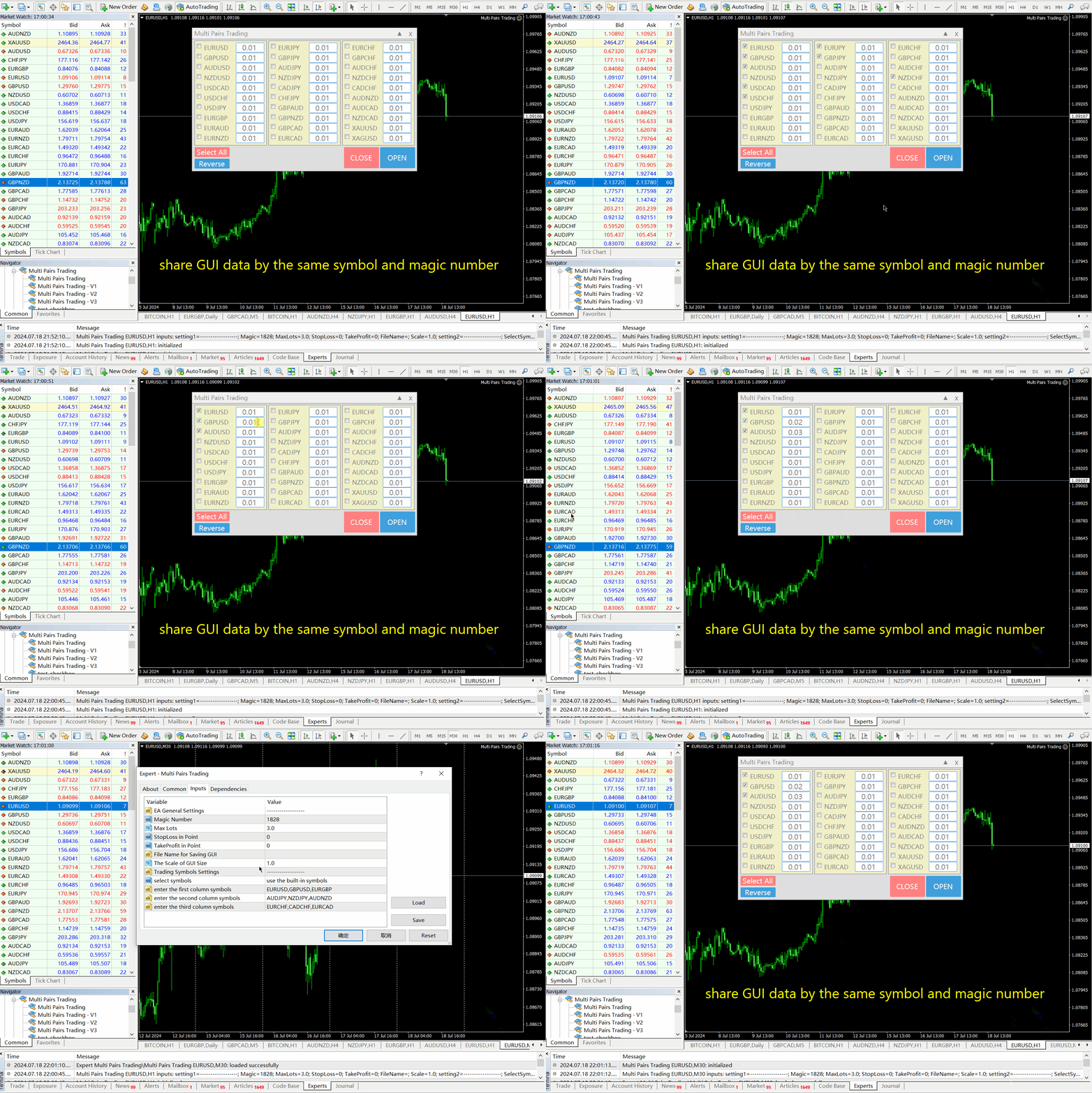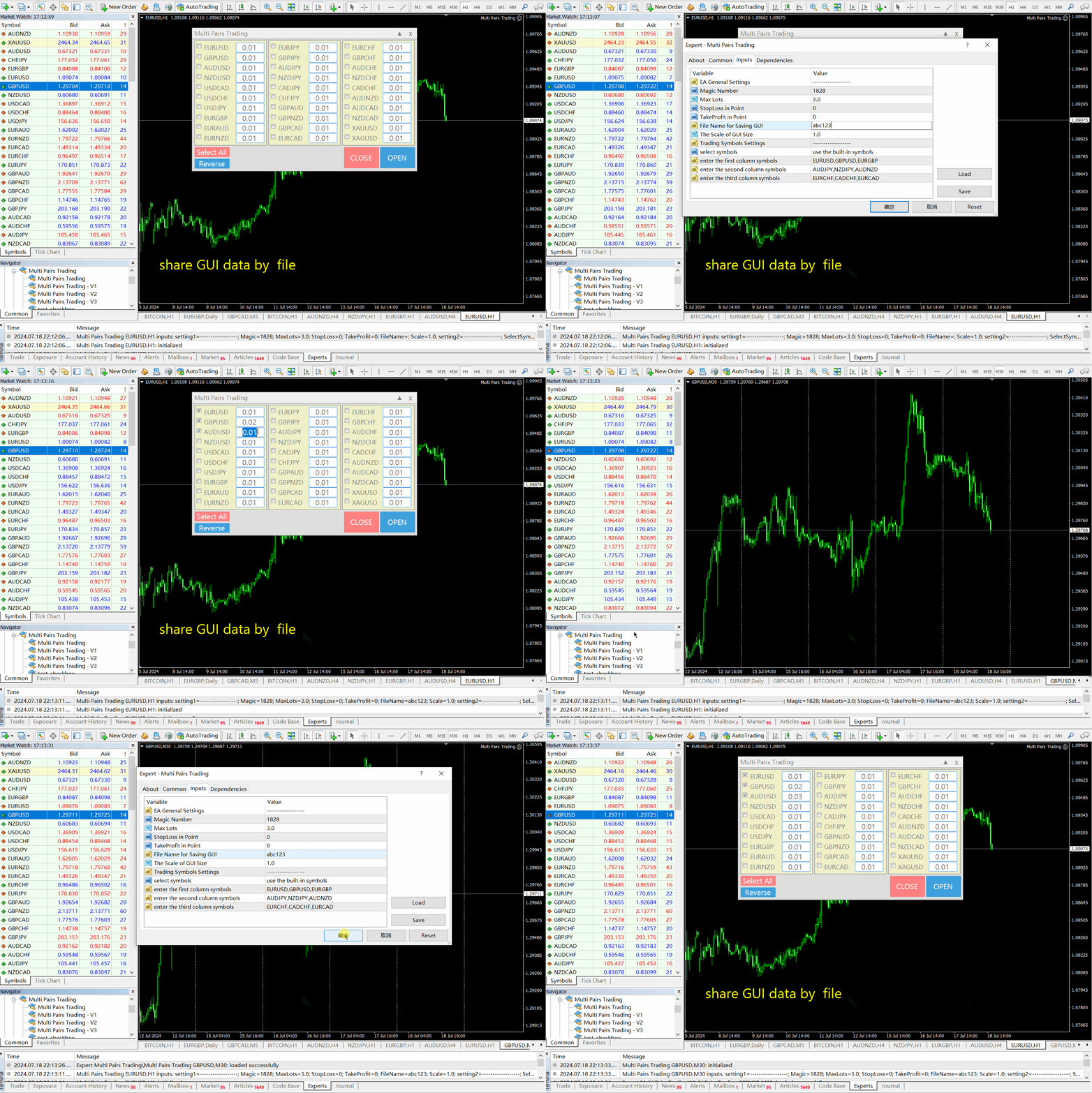
Multi Pairs Trading

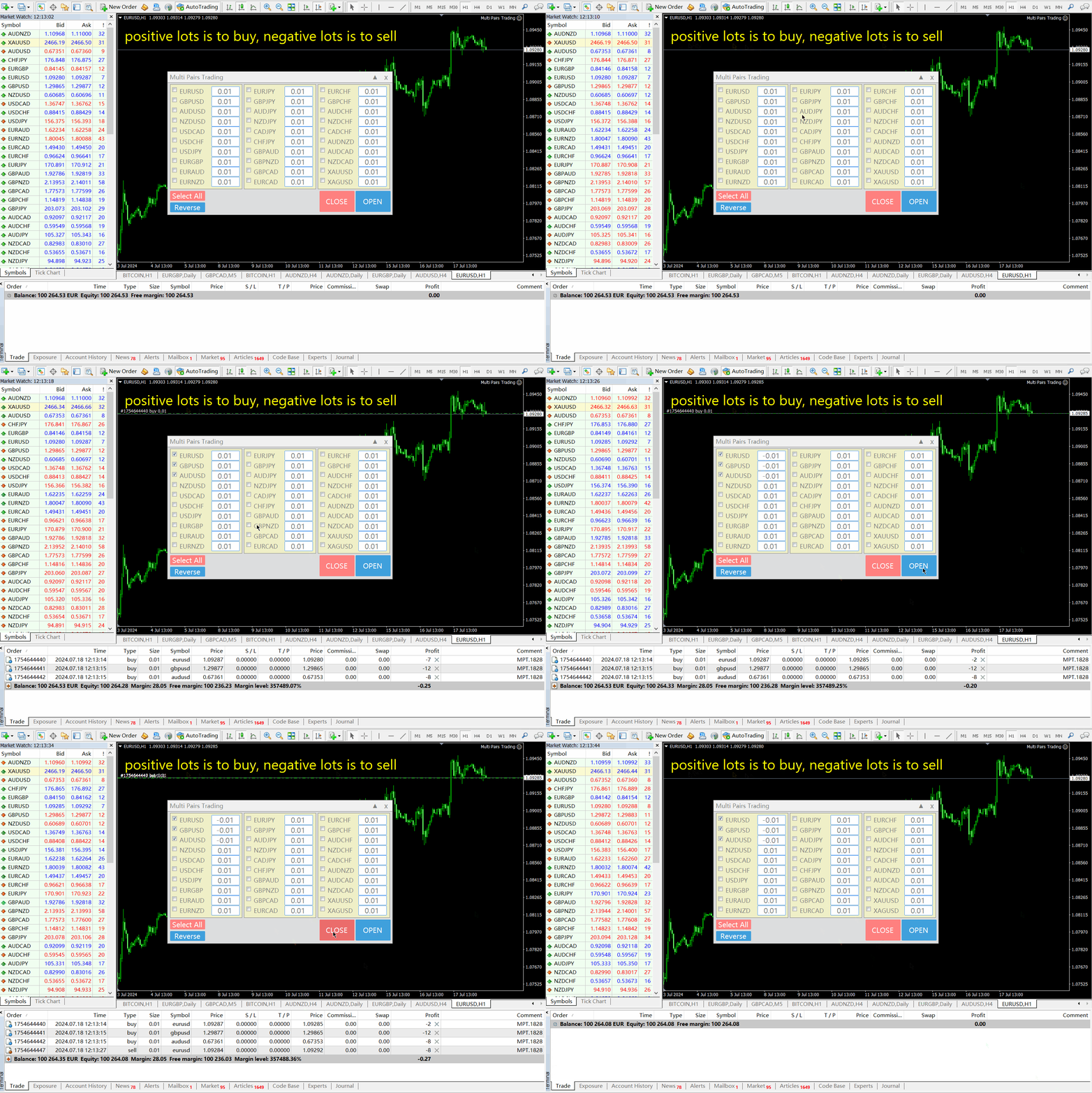
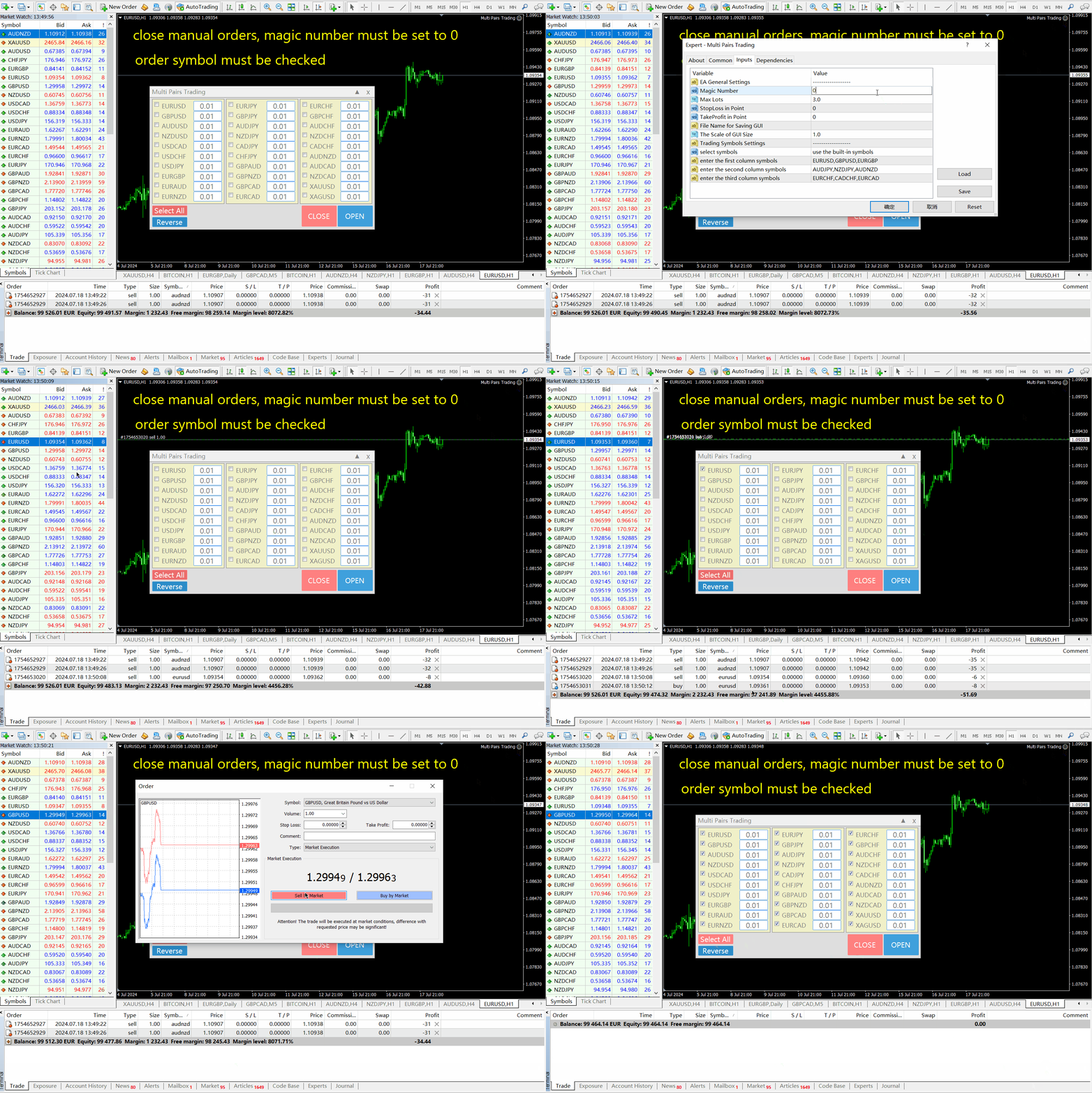
多品种一键开仓与平仓的操盘面板
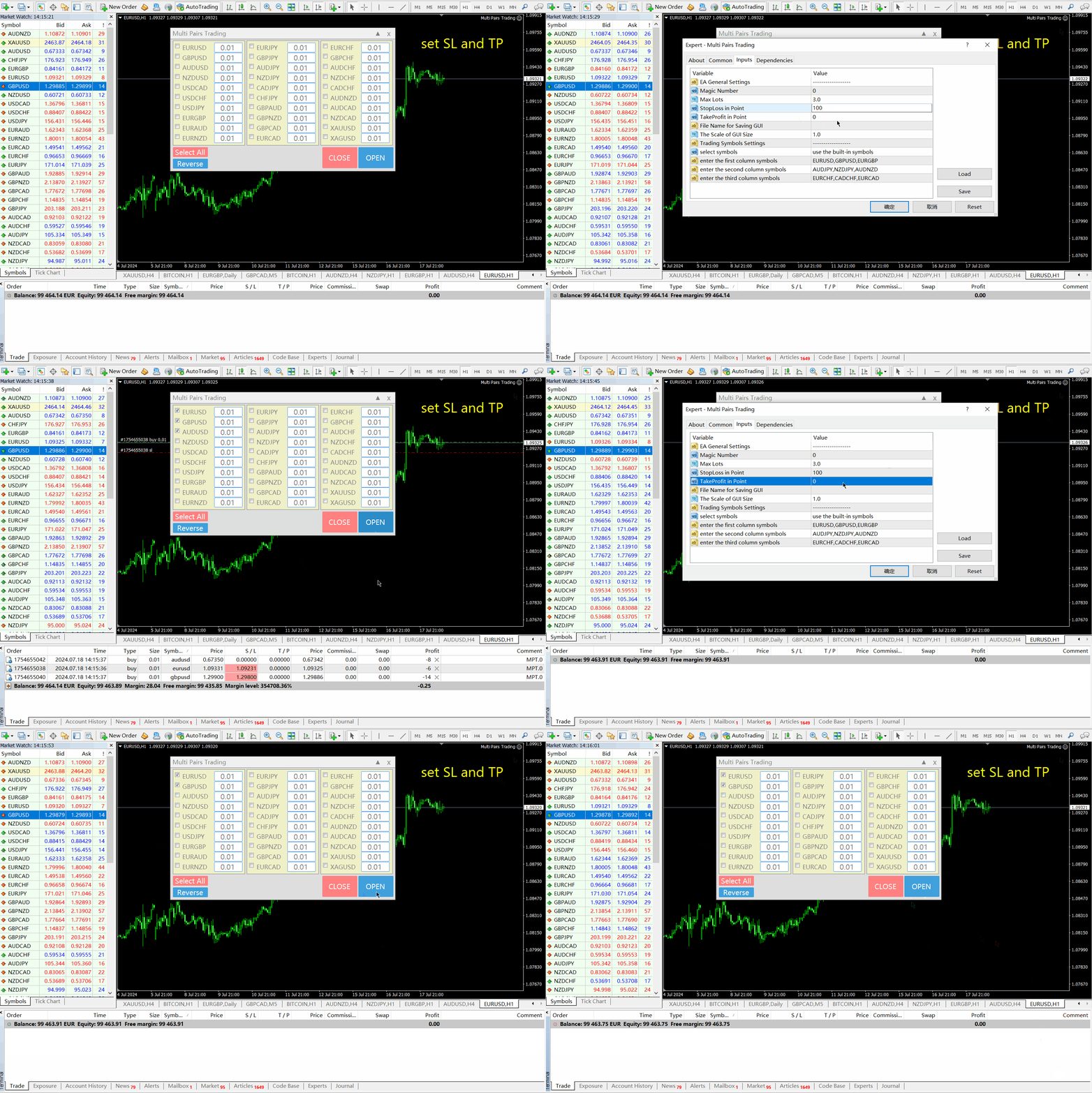
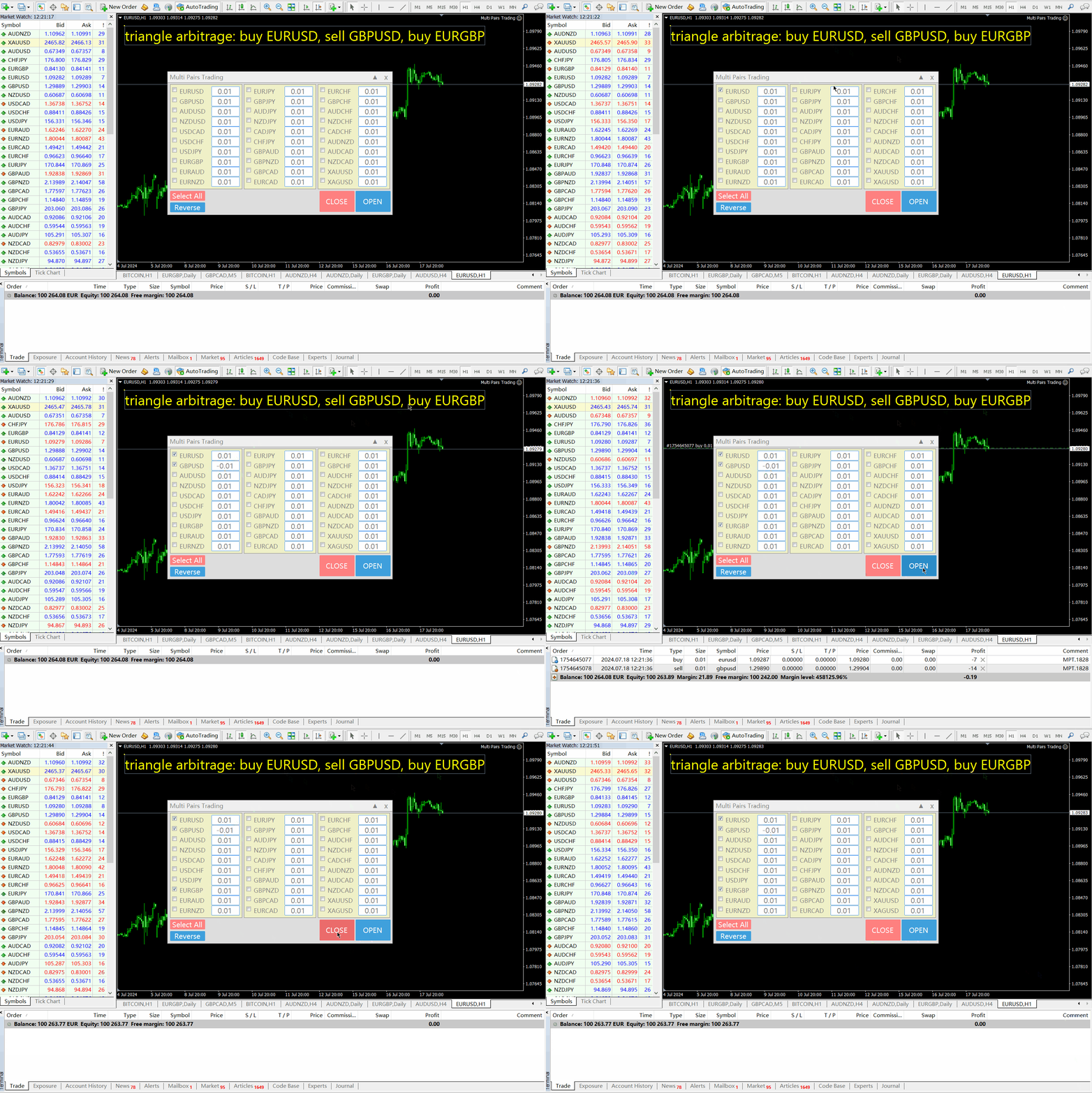
  1. 点击 开仓(OPEN) 按钮,则为选择的品种开仓。
  2. 点击 平仓(CLOSE) 按钮,则为选择的品种平仓。
  3. 开仓手数就是用户输入的数,正数开多单,负数开空单。
  4. 点击平仓(CLOSE) 按钮,平掉的是整个单子,而不是部分平仓,所以平仓与后面输入的手数无关。
  5. 把参数Magic设置为0,则可以用本EA来帮助你同时平掉多个手工单。
  6. 把参数Magic设置为其他EA的magic,则可用用本EA来同时平掉其他EA的多个单子。
  7. 一键开三角对冲单。
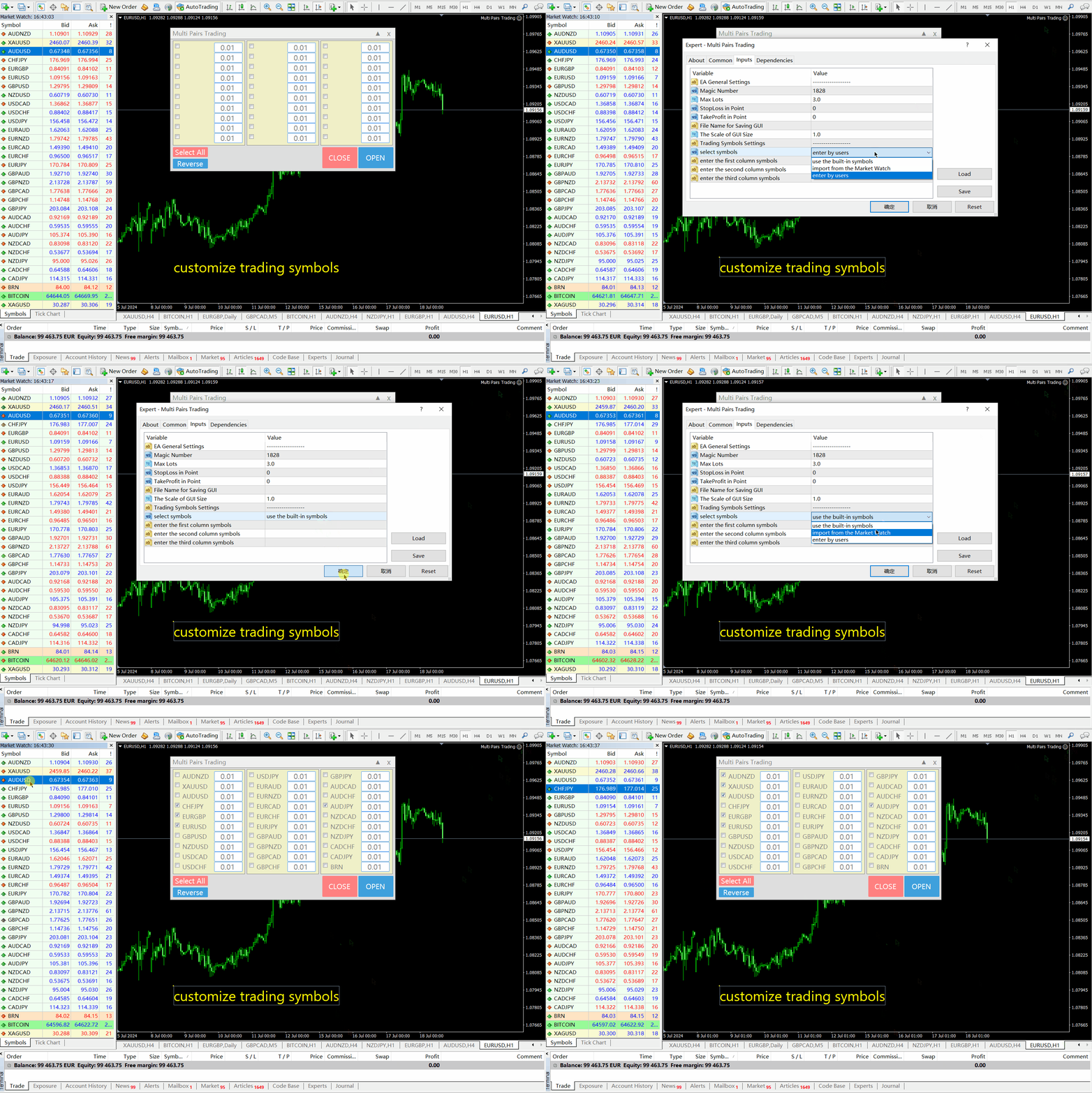
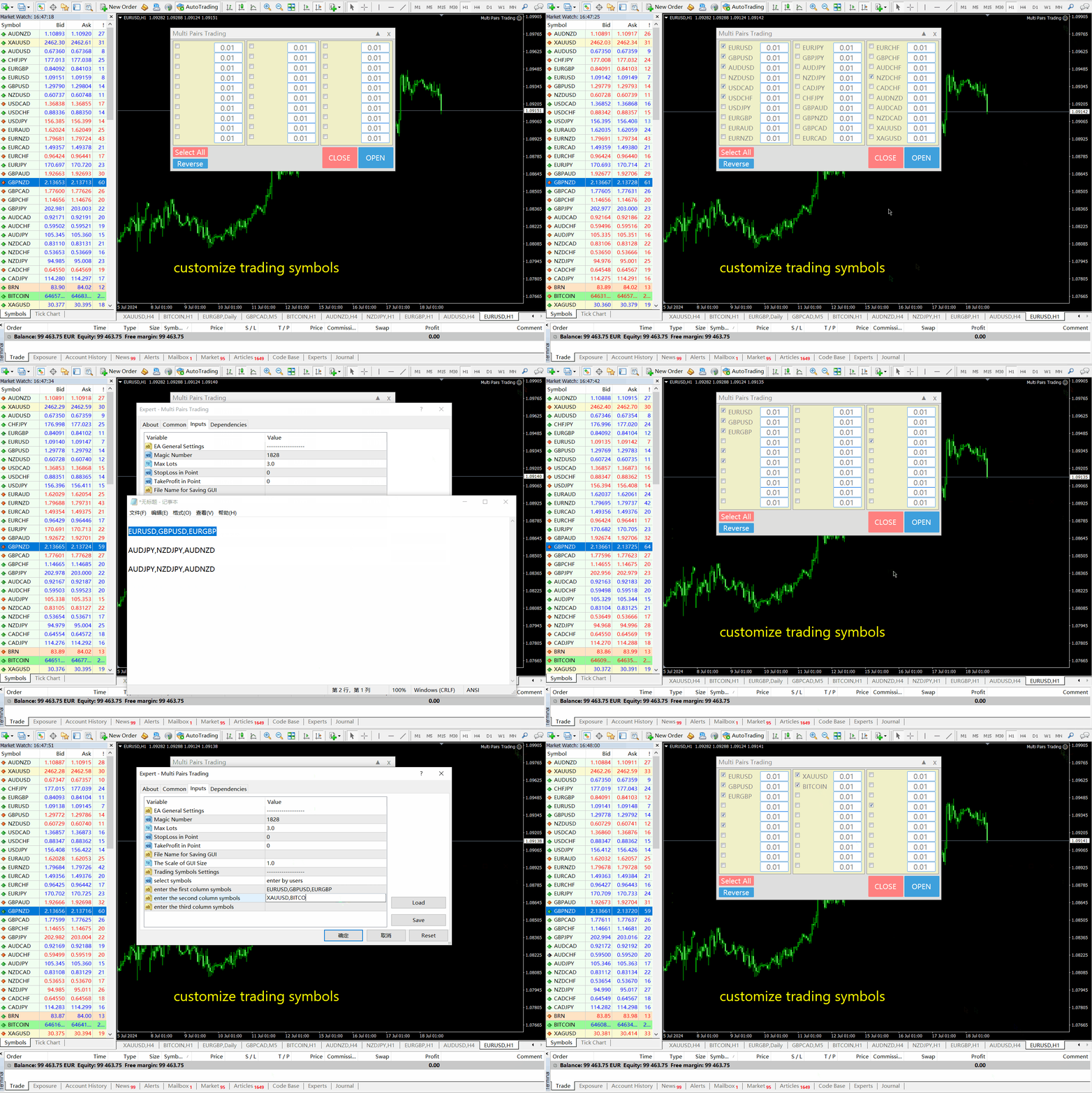
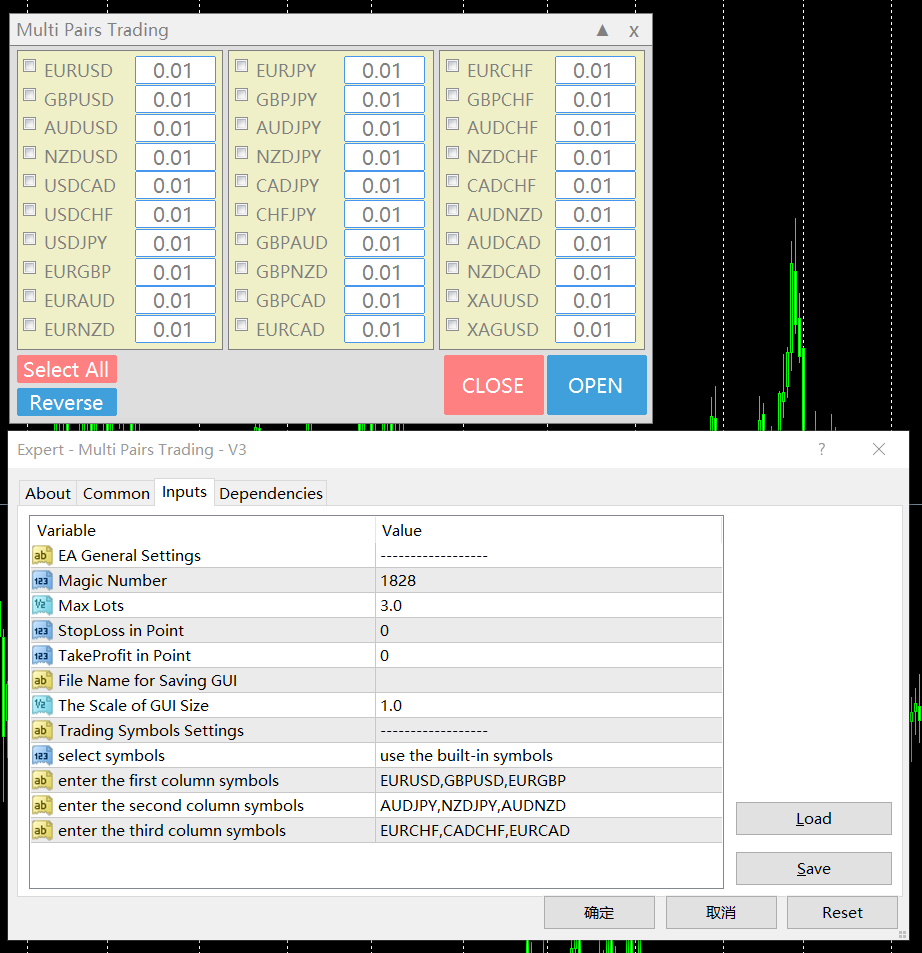
  8. 交易品种可以定制: 从市场窗口(Market Watch),或者用户输入.


参数设置:

  • Magic - 本EA的Magic Number
  • MaxLots - 最大手数设置参数,如果用户在操盘面板上输入的手数大于这个设定参数,则以这个设置参数为开仓手数。
  • StopLoss - 止损点数,以Point计算(即报价最后一位)。
  • TakePofit - 止盈点数,以Point计算(即报价最后一位)。
  • File Name-  保存图形界面GUI的文件名,如果为空,EA将自动使用文件名,类似于 "MTP-账号.品种名.魔术号", 比如 "MPT - 61342454.EURUSD.magic1828"
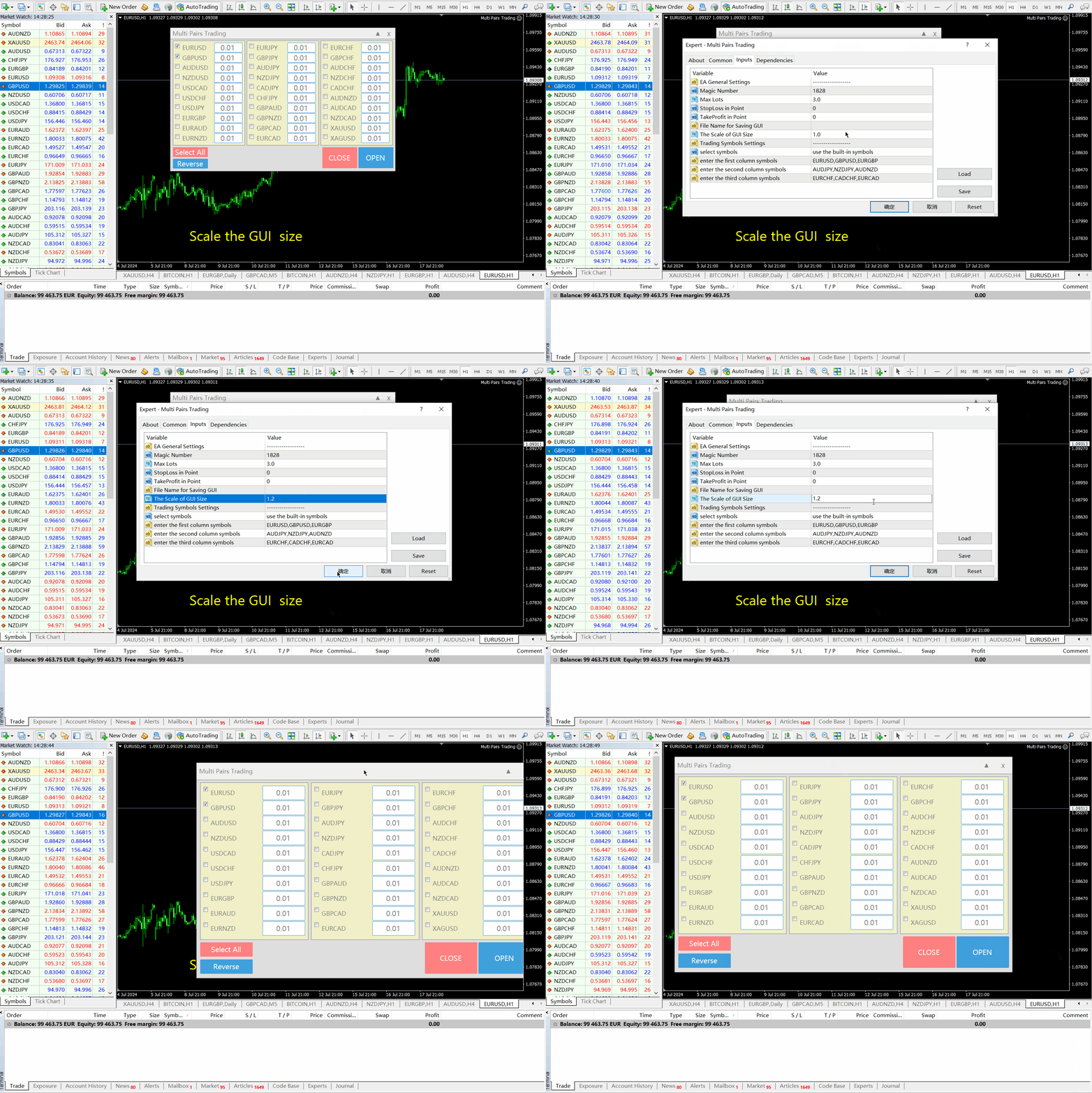
  • Scale -  按比例放大用户图形界面(GUI)
  • Select Symbols - 有三个选项可以定制交易品种: "the built-in symbols","import from the market watch",and "enter by users"
  • enter the first column symbols - 输入第一列的交易品种, 用逗号隔开
  • enter the second column symbols - 输入第二列的交易品种,用逗号隔开
  • enter the third column symbols - 输入第三列的交易品种,用逗号隔开

注:  如果参数MaxLots 设置为0,则该参数不用于限制交易手数。

MT5 Multi Pairs Trading: https://www.mql5.com/zh/market/product/120525


推荐产品
Horizontal Line Trade Assistant EA  Semi-Automated Trading Assistant    IMPORTANT :   On the main/purchased program a user can click on the Horizontal line and change it to Buy or Sell, and drag by double clicking on it. Please keep in mind that this option is not available on demo version, due to some restrictions/limitations of Strategy Tester, some Object related operations are not available in the  Strategy Tester. But, it will not prevent you from Testing, please drop an Object to chart an
News Hedging Pro  is a unique robot that allows you to trade during the most critical news announcement periods by your predefined strategy. You can preset the strategy to trade, and then it will trade that news automatically when the news comes. News release gives opportunity to have pips since the price usually has big move at that time. Now with this tool, trading news become easier, more flexible and more exciting than ever. No waiting, no confusing anymore. Product Links Fully  Description
LayerStop
Norhisham Mohd Rudin
LayerStop EA only performs an action open pending order BUYSTOP or SELLSTOP, thus only monitor the trailing stoploss. No specific conditions are used to open pending order. Pending order BUYSTOP or SELLSTOP will generated immediately after an Expert Advisor is attach in the chart. Suitable for News High Impact. If you already attach LayerStop EA in the chart, and want LayerStop EA performs new one an action open pending order BUYSTOP or SELLSTOP, you need to remove LayerStop EA from chart a
Trend Line Trade Assistant EA  Semi-Automated Trading Assistant     IMPORTANT :   On the main/purchased program a user can click on the Trend line and change it to Buy or Sell, and drag by double clicking on it. Please keep in mind that this option is not available on demo version, due to some restrictions/limitations of Strategy Tester, some Object related operations are not available in the  Strategy Tester. But, it will not prevent you from Testing, please drop an Object to chart and it will
AiGoldx
MUHAMMAD IHSAN BIN ARIFIN
AiGoldx EA — Product Description & Parameters * use Timeframe 15m Only Overview AiGoldx is an automated Expert Advisor (EA) for MetaTrader 4, designed specifically for trading XAUUSD (Gold). It combines multi-timeframe Bollinger Bands analysis with a suite of smart filters to identify high-probability trade entries while avoiding false signals. AiGoldx EA — Key Features Multi-Timeframe Silver Confirmation  MA100 Trend Gate  S/R Auto-Detect  Sideways Filter  Smart Close  Weekend Auto-Close  Adx
Undefeated Triangle MT4
Nauris Zukas
4.56 (9)
描述 该产品属于项目 "PULSE OF MARKET" 。 EA "Undefeated Triangle" 基于 AUD、CAD 和 NZD 货币之间的价格关系运行。根据历史观察,这些货币对通常表现出一定的相关性,在强烈波动后可能出现回归。这种特性可用于网格交易管理。 该EA使用3个货币对:AUDCAD、AUDNZD、NZDCAD。 MT5版本 优点 相对较低的价格 支持小资金账户 参数简单 易于设置 参数 Short Name – 交易备注 Print Logs On Chart – 信息面板 Display Options – 显示设置 One Chart Setup Pairs – 交易品种列表 Magic – 标识符 No more Initial Trades – 禁止新初始订单 Symbols open same time – 同时交易数量 Lot Sizing Method – 风险选择 Fixed Lot – 固定手数 Deposit load % – 仓位控制 手数模式 Fixed Lot Low Risk – 低风险 Mid Risk – 中等风险 Signif
Account Profit & Loss Killer 全账户级智能风控 EA(MT4 ) ⸻ 产品简介 Account Profit & Loss Killer 是一款真正意义上的 “账户总控风控工具”。 它不参与任何交易策略,只专注于一件事: 当账户内所有持仓的总浮动盈利或总浮动亏损达到你设定的金额时,立即毫秒级强制平仓账户中的全部订单。 这是一个真正意义上的 “账户总控风控工具”。 ⸻ 核心功能 全账户级风控(Account-Level)     •    实时监控账户内 所有持仓     •    本 EA 下的订单     •    其他 EA 下的订单     •    人工手动下的订单     •    不区分品种     •    不区分方向     •    不区分 Magic     •    条件触发后 → 全部立即处理 ⸻ 账户级盈利止盈     •    当 所有持仓的总浮动盈利 ≥ 设定金额     •    自动 一键全平     •    锁定利润,防止回吐 适合:     •    日
FREE
Pisces CloseAllOrders
Nuttawut Khiawkiri
Close all Positions by one click with Fast system strategy, work with every pairs. By the way you can set to "Close all Sell", "Close all Buy" and Close all Orders on a Common Setting. This is a MetaTrader 4 Expert Advisor, Not working on MetaTrader 5. Thank You FxGangster Powered by TheFxInvestment.com Twitter : @FxGangsterClub Email : Admin@TheFxinvestment.com
Master MA EA MT4
Nguyen Nghiem Duy
Master MA EA MT4  is an advisor with an adaptive system for "Resolving" a basket of orders   can also be used   to restore unprofitable positions on the account. The signal uses the direction of the exponential moving averages, average daily volatility, then   builds an order grid if the price deviates. The grid step is configurable, and if the price goes against us, then after a certain number of orders, the account recovery function (Drawdown Reduction) is activated, the most distant unprofita
RSI Strategies EA
Tonny Obare
4.33 (3)
RSI strategies EA supports multiple RSI based strategies. Purchasing this EA can save you the time taken to automate your existing RSI strategy, through coding a custom EA and it also helps you discover profitable RSI strategies as its fully compatible with the strategy tester and all settings are editable. The EA supports both scalping, short term and long term strategies. The various supported settings are explained below: NOTE:   The default settings in the EA are simply place holders. Before
North Star EA is a trend EA, not  a Martin  EA,  non optimized EA.  just use fix lot size, auto get fix stop loss and take profit value, Max 3 open positions.EA has passed multiple platform tests.  Small capital withdrawal and no risk of exposure !        North Star EA is a complex algorithm that uses Artificial Intelligence in combination with traditional technical analysis to predict market movements. This Expert Advisor makes use of Combination of Vector calculus and trend indicators an
Drawdown Guardian
Khachik Babayans
Drawdown Guardian is a risk-control utility for MetaTrader 4 designed to help traders monitor and enforce daily and overall loss limits through configurable protective actions. This product is not a trading strategy, does not generate entry signals, and does not promise profits. Its purpose is to reduce the risk of breaching the limits defined by the user by applying warnings, trade restrictions, pending-order cleanup, and emergency actions when thresholds are reached. Supported preset profil
Limit Scalper
Heiko Kendziorra
5 (1)
Buy the dip - sell the spike. This simple strategy, executed with limit orders, makes slippage your friend. The extended Take Profit sets no limits to profits, often profits far above the normal scalping profit are achieved. See screenshots below. No martingale, no grid, always just one order open with StopLoss.  Live Signal:  https://www.mql5.com/en/signals/1495331   The default settings   are for   GBPUSD M5   chart.   Timing is important!   Set   SetUTC   (GMT) according to the timezone of
| Seamless portfolio of trading systems in your palm - Powered by ONNX Neural network | Built by a grid trader >> for grid traders.  This is MT4 version, click  here  for  Blue GAIA MT5  (settings and logics are same in both versions)     Real monitoring signal  --> Cosmic 2 | GAIA Intro Blue GAIA EA   (' GAIA ') - is the latest edition of BlueAlgos family, uniting all the best algos and features under one-roof. Its is the true 4xMulti Systems: +------------------------------------------------
横盘交易专业版 EA - 是一款高级单货币对网格交易系统! 这款EA是一款功能强大的NZDCAD货币对交易系统,盈利稳定。M5时间框架! 下载 EA 设置文件进行测试和交易: NZDCAD Set_file EA 的突出特点: - EA 会根据市场波动自动调整入场点和出场点。 - EA 可以同时管理买单和卖单。 - EA 还会根据波动自动构建动态网格。 - 无点差要求 - EA 可用于任何账户。 - 系统不会像许多短线交易者那样浪费资金支付佣金,只需使用标准账户即可。 - 根据账户余额自动计算手数。 - 时间框架:M5。 - 交易货币对:NZDCAD。 - 运行时间:EA 每周 5 天、每天 24 小时运行。 - EA 带有信息显示功能 - 显示当前所连接外汇货币对的点差和隔夜利息。 - 显示屏还会显示账户余额、净值和保证金。 - 信息显示可以位于图表的任意角落。 安装方法: - 打开以下图表:NZDCAD。 - 在图表上选择 M5 时间周期。 - 将智能交易系统 (EA) 附加到图表。 - 将相应的“Set_file”文件应用到 EA。 - 让电脑 24/7 全天候运行(或者使用
Big Drawdown Swap Hunter
Chathusanka Yamasinghe
Hello guys, This is my New EA. You can try this. But first note few things.  This EA has high risk, high drawdown. So your deposit should be large enough to use this EA.  This EA use only pending orders. No complex strategy. Only use this EA for positive swap charge trades . Because some orders must hold for long term for hit TP. Use minimum lot size(0.01) to trades and use a trading account that can open 1000 open position or more. minimum deposit 10000USD or if you use cent account you can sta
Qiwi EA
Valiantsin Pyrkin
5 (1)
Qiwi EA   is a fully automatic Forex trading system. The system monitors the trend, tracks the actions of large traders in the Asian session and trades with them. The expert does not use dangerous trading methods, does not use a high frequency of transactions, and most importantly, is not sensitive to the spread. An expert is also suitable for dispersal of a deposit. Several trading modes: aggressive, calm. It all depends on your preference. I am ready to help you set up an expert for a
Plug and Play
Bogdan Mihail Moise
BM Plug&Play Easy to use, convenient and efficient!  No input from you required,  no messing with settings or optimization processes ,   just attached on chart and let it do its magic. Recommended Time Frame: Day (This expert advisor works on all timeframes, but it’s build with the daily one in mind); Account balance: it doesn't matter, but I recommend at least 1000 EUR or 1500 USD; Tested and optimized currency pairs: EURUSD; EURCHF; EURJPY; EURAUD;   EURCAD; EURNZD; USDCHF; USDCAD; USDJPY; G
Wardtrade17
Ahmed Wardan Atik
5 (1)
Your feedback is very important , Please submit your review and contact me to get a settings for other pairs !! This Expert advisor is a very logical, it does not promise irrational wealth as in many advisors offered for sale, it gives an annual profit ranging from 10% to 42%, the expert advisor is intended to work only on one pair, which is the EURUSD Time frame H1 ,  and in only one day, which is Monday  . Just run the expert advisor on the EURUSD pair on Monday and earn a minimum of 10% As
XETERA MULTI TP MANAGER Xetera Multi TP Manager for FX is an Expert Advisor specially designed for Forex on the Meta Trader 4 platform to manage trades even while you are away or asleep. Many Forex Signal Services out there use multiple take profit levels such as TP1, TP2, and TP3. The signal services give you multiple target levels to increase your profit, but the problem is you always need to monitor your trades and move the Stop Loss, trailing.   So, we fixed this issue by developing our EA t
This EA opens any combination of Pending Orders (Buy Stop, Sell Stop, Buy Limit and Sell Limit) at any particular Time (Hour and Minutes) and closes all existing pending orders in case you do not need them. Input Parameters Before placing all pending orders, the input window is opened allowing you to modify all input parameters: nHour: at what Hour you want to open any Pending Orders. nMinotes: at what Minute of Hour you want to open any Pending Orders. DeleteAllPendings : if true , then all pe
Situational
Tatiana Savkevych
Situational   bot, built for clean work. Without any unnecessary operations. The bot works without trailing stops, breakevens or anything like that. The principle of operation - there is a signal, then there is an entry into the market, there is an opposite signal, then the closing of a reverse position and entry in a new direction. Situational works on a safe principle - there is only one position that you can protect with stops. Situational is always in operation - after the first position, p
MT4 Alert to Telegram
Heka Maju Online Trading
MT4 Alert to Telegram   MT4 Alert to Telegram is tool, which sends selected trades to telegram channel. Tool sends trades when open and close with chart to telegram channel. Tool can send multiple charts and pairs from a single chart. Send information of all type of orders: Opened (including Pending Orders), and closed triggered. functions - user can custom self-sending message text even in their native language - user can send own advertisement text periodically - attach expert in one chart an
NitroFX
Paranchai Tensit
NitroFX is a fully automated Expert Advisor.  NitroFX is a systematic trading system that involves planning, trading strategies, conducting multiple back tests, and collecting statistics, which will help the system to be more accurate and increase profitability. NitroFX uses effective risk management tools, Trailing stop and Breakeven point . A trailing stop is a stop that automatically adjusts to market movement. This means it will follow your position when the market moves in your favor, and
GoldieFX
Mohammed Shadman Abdul Khadir
GoldieFX EA is a MT4 EA with a live track record, many years of stable trading, and a low drawdown. GoldieFX is the advanced grid system which already worked on real accounts for years. Instead of fitting the system to reflect historical data (like most people do), it was designed to exploit existing market inefficiencies. Therefore it is not a simple “hit and miss” system that only survives by using a grid. Instead, it uses actual market mechanics to its advantage to make a profit. Because of
Architect
Tomoyuki Nakazima
Feature No Martingale, grid trading or averaging in this EA. Logic is original,sound and robust. Augmented by machine learning. ProfitFactor is over 7. Perfect EA The Ultimate EA Finally,the EA with real edge has come to MQL5 Market. This EA is easy to use.No Optimization is needed. Your money will increase so fast,I promise you. Currency Pairs This EA works on USDJPY. On strategy tester and live trading,choose symbol "USDJPY". Parameters Parameter name Description LotsMethod There are two
Dolphin
Salman A A A T Bakhash
Live results: - Click Here . - Click Here . Manual File: you can find it Here in Telegram Group . What's new ... Click Here . Set files ... Click Here . By using Dolphin Expert you open a lot of new possibilities to your trading. It has a lot of customization and flexibility that no other expert in the markets offers! You can choose the strategy  based on rules or sequence of rules you define than  assign this rules to enter 1st order or/and enter cooling orders or/and enter boosting order
Intelligent Moving Bot — Adaptive EA with Neural Optimization Intelligent Moving Bot is a fully autonomous EA built on the Intelligent Moving indicator. It uses a dynamic MA, ATR-based deviation bands, and virtual trades with a perceptron to optimize parameters on the fly — with no repainting and no manual curve-fitting. This product is also available for MetaTrader 5 =>  https://www.mql5.com/en/market/product/148151 Intelligent Moving indicator is available here =>  https://www.mql5.com/en/
The Effective Advisor is your trading assistant. It can be used in fully automated or semi-automated mode. You can trade with one order or several, setting specific position averaging. Trading is based on the MACD indicator. The indicator settings are standard and built into the Advisor (they can be displayed in the Advisor upon request). Averaging occurs without a multiplier (you can only manually increase the lot size). The lot size, distance, and Take Profit can be customized to suit y
FREE
Hunting Cat EA
Alexandra Sivill Muedra
Hunting Cat “Forex Grid Trading Strategy”   Maximize your profits while the in-built Grid system minimizes the risks regardless of how big a move the market makes.  It includes a safety feature for Draw Down reduction for safer profits. Divide the market into many levels and place  <<buy and sell<<  orders at each level at the same time taking profit of every movement of the Market.  How to use it?  Set up your Timeframe and Currency  The grid can be based on your trader preference.  Manage you
该产品的买家也购买
The Gold Reaper MT4
Profalgo Limited
4.61 (33)
道具準備就緒! ( 下載SETFILE ) 推出促銷活動: 目前價格只剩幾本! 最終價格:990$ 免費取得 1 個 EA(適用於 2 個交易帳號)-> 購買後聯絡我 Ultimate Combo Deal   ->   click here JOIN PUBLIC GROUP:   Click here Live Signal LATEST MANUAL 歡迎來到黃金收割者! 該 EA 以非常成功的 Goldtrade Pro 為基礎,設計為同時在多個時間框架上運行,並且可以選擇將交易頻率從非常保守到極端波動設定。 EA 使用多種確認演算法來找到最佳入場價格,並在內部運行多種策略來分散交易風險。 所有交易都有停損和止盈,但也使用追蹤停損和追蹤停盈來最小化風險並最大化每筆交易的潛力。 該系統建立在非常流行且經過驗證的策略之上:交易突破重要的支撐位和阻力位。   黃金非常適合這種策略,因為它是一種波動性很大的貨幣對。 系統根據您的帳戶規模和最大允許提款設定自動調整交易頻率和手數! 回測顯示出非常穩定的成長曲線,回撤非常可控且恢復很快。  該 EA 已針對黃金的最長可用期限進行了壓
AI Golden Life MT4
MQL TOOLS SL
5 (1)
AI GOLDEN LIFE is a professional AI-powered trading system developed exclusively for XAUUSD (Gold) on the H1 timeframe. It represents a new generation of automated Gold trading, combining advanced technical analysis, intelligent market filtering, adaptive trade management, and innovative geopolitical risk protection. Unlike traditional scalping systems that focus on rapid market fluctuations, AI GOLDEN LIFE operates on the H1 timeframe , analyzing broader market structures, price action, moment
Scalping Robot Pro MT4
MQL TOOLS SL
4.29 (17)
Scalping Robot Pro is a  professional trading system  designed specifically for fast and precise scalping on XAUUSD using the M1 timeframe. The system is built to capture short term market movements with accurate execution and controlled risk management. It focuses on real time price behavior, momentum shifts, short term volatility, and selective trade management techniques to identify high probability  trading opportunities  in the gold market. Scalping Robot Pro is optimized for traders who pr
Tokyo EA mt4
Vasiliy Strukov
5 (12)
Tokyo EA 是一款趋势跟踪交易系统,旨在识别市场方向的变化,并针对已确认的看涨或看跌信号自动进行交易。该 EA 在收到 Tokyo 指标发出的买入或卖出箭头信号后的下一根 K 线开盘时入场,并采用网格或马丁格尔(Martingale)策略进行交易。它适用于任何货币对和时间周期,但在强趋势品种(例如 M15 周期下的 XAUUSD)上的表现尤为出色。 即時結果可在此處查看。 購買後立即聯絡我,即可獲得個人獎勵!您可以免費獲得我們的強力支撐和趨勢掃描器指標, 請私訊我 ! 設定和手冊在此處 請注意,我不在 Telegram 上出售我的 EA 或特殊套件,它們僅適用於 MQL5,我的套件檔案僅在我的部落格上提供。請小心詐騙者,不要從其他人那裡購買任何套件! 設定 Open new series – true/false - 真/假 - 新一系列订单的开始 Trade Buy - 允许EA购买。 Trade Sell - 允许EA出售。 Support manual orders – true/false –  允许EA控制手动订单 Use hedge - 允许EA进行双向交易(买入和卖
AW Recovery EA
AW Trading Software Limited
4.35 (84)
智能交易系统是一个旨在恢复无利可图头寸的系统。 作者的算法锁定了一个亏损仓位,将其拆分为多个独立的部分,并分别平仓。简单的设置、在回撤的情况下延迟启动、锁定、禁用其他 EA 交易、使用趋势过滤进行平均以及部分关闭亏损头寸都内置在一个工具中。 与仅在整个组中关闭订单的网格策略相比,使用部分关闭损失可以让您以较低的存款负载减少损失,从而确保更安全地处理损失。 如何恢复订单: 1 EA 关闭所选工具的其他窗口以关闭无利可图的 EA(可选)。 2 EA 重置所有已处理订单的止盈和止损水平,并删除具有相应标识符的挂单。 3 EA 关闭所有已处理的盈利订单,以便使用其利润来弥补部分非盈利订单并减少总头寸量(可选)。 4 EA 通过打开锁定订单来锁定亏损头寸。 5 然后,通过打开恢复订单,它开始通过部分关闭不盈利的订单来减少损失。 6 当部分关闭时,算法首先恢复定位最不成功的订单,或者最接近盈利的无利润订单。每个无利可图的订单都分为许多部分,顾问分别关闭每个部分。恢复订单以小量开仓,以免大幅增加入金负担 包含注释、设置和测试说明的完整输入设置列表  ->   这里  MT5 版本 ->   这里
Waka Waka EA
Valeriia Mishchenko
4.25 (48)
8+ years of live track record with +12,000% account growth: Live performance MT 5 version can be found here Waka Waka is the advanced grid system which already works on real accounts for years. Instead of fitting the system to reflect historical data (like most people do) it was designed to exploit existing market inefficiencies. Therefore it is not a simple "hit and miss" system which only survives by using grid. Instead it uses real market mechanics to its advantage to make profit Supported cu

Big Forex Players MT4
MQL TOOLS SL
4.63 (43)
We proudly present our cutting-edge robot, the  Big Forex Players EA  designed to maximize your trading potential, minimize emotional trading, and make smarter decisions powered by cutting-edge technology. The whole system in this EA took us many months to build, and then we spent a lot of time testing it. This unique EA includes three distinct strategies that can be used independently or in together. The robot receives the positions of the  biggest Banks  (positions are sent from our database t
EA Budak Ubat
Syarief Azman Bin Rosli
4 (3)
免费试用 EA Budak Ubat 频道 限时特价! 每购买10次后价格将增加10美元! 工作原理 当 EA 激活时,它会根据执行模式参数分析图表。 如果图表上没有现有仓位,EA 将根据参数输入交易。如果趋势是看涨的,它将进入买入交易,如果是看跌的,它将进入卖出交易。如果止损变量大于0,则还会设置距离已打开交易价格一定距离的止损订单。0表示没有止损。 如果图表上存在现有仓位,且最后一个仓位处于亏损状态,EA 将检查当前市场价格与订单之间的距离是否至少为用户设置的最小距离,然后将根据蜡烛图输入交易,仓位大小将使用马丁格尔方法计算,并且将设置离已打开交易价格一定距离的止损订单,如果止损变量大于0。 如果未启用套期保值,EA 一次只会进入一个方向的交易。如果第一个仓位是买入交易,则所有后续的马丁格尔仓位也必须是买入交易。如果第一个仓位是卖出交易,则所有后续的马丁格尔仓位也必须是卖出交易。如果启用套期保值,EA 将进入双向交易。 EA 将修改相同方向的所有仓位的获利点为单一的保本点,再加上用户设置的获利水平。 EA 参数 执行模式: 在每个新 K 线上:当 EA 激活时,它会在每个新的
PolyGold Scalper MT4
Connor Michael Woodson
PolyGold Scalper 是一套用于 XAUUSD 的短线剥头皮交易系统,可基于与 Polymarket API 的集成来做出交易决策。 实时信号: 点击这里 所有交易均在 MetaTrader 内完成,无需 API 密钥或 Polymarket 账户。 图表包含一个面板,用于显示来自 Polymarket 的数据流,并每隔几秒刷新一次。 EA 只开立单次独立仓位,并在不使用网格或马丁格尔策略的情况下进行管理。平仓基于动态虚拟止损和根据每日波动率设置的移动止损。 设置非常简单,只需几秒即可完成。只需将 API URL 添加到允许使用的 WebRequest 列表中。 来自 Polymarket 的持续数据流本质上是一个代表市场情绪的数值。 EA 使用该数值做出判断:市场共识是在确认还是背离当前黄金价格? 这不是滞后指标,而是面向未来的预测数据,可以帮助发现高概率入场机会。 例如,当 Polymarket 市场情绪与实际 XAUUSD 价格出现背离时,意味着黄金可能即将出现剧烈反转。 建议 : 图表: XAUUSD 时间周期: H1 建议存款: 200 USD 账户类型 :Sta
BioBot
Andriy Sydoruk
Here is the corrected and adapted description for your BioBot scalping system in English , fully aligned with the actual input parameters from your code: BioBot Scalping System Description BioBot is a high-performance automated scalping trading system designed for trading various financial instruments (currency pairs, metals, etc.), primarily on M1 – M15 timeframes. Optimizing BioBot just once (for example, over a one-month period) is sufficient to deliver strong results on a forward period sev
Xyron Edge MT4
Ahmad Sidik
3 (2)
Xyron Edge is a Professional breakout Expert Advisor (EA) designed to trade market structures by utilizing swing high and swing low levels. The EA places pending orders above resistance areas and below support areas to capture breakout movements while maintaining controlled risk management. --------- EA Setting & Preset :  EA Input Settings Guide Live Signal :  https://www.mql5.com/en/signals/2395361 --------- Key Features Fully automated trading Dynamic support and resistance detection Pen
Btcusd Consensus mt4
Leonid Arkhipov
5 (1)
认识一下 BTCUSD CONSENSUS 这是我为 BITCOIN 打造的新项目 我想为 BTCUSD 做的,不是又一个建立在几个指标上的普通 EA,而是一套真正完整、认真的交易系统。 所以这里不是只有一个策略,也不是只有一个信号。 BTCUSD Consensus 内部运行着 5 个独立训练的模型和 1360 棵决策树 。 D LONG • D SHORT • U LONG • U SHORT • SELL META 每个模型都有自己的任务、自己的训练过程和自己的优化过程。 在入场之前,EA 还会先判断当前 Bitcoin 所处的市场状态: UP • DOWN • FLAT • COMPRESSION • EXPANSION • TRANSITION 然后所有结果才会汇总成最终决定 — CONSENSUS 。 如果确认条件不够,系统就不会交易。 这正是我想要的工作方式: 不是不停地进入市场,而是等待真正有质量的入场机会。 我是怎样训练和调校 BTCUSD CONSENSUS 的 整个开发过程都基于 从 2017 年开始的 Dukascopy BTCUSD Tick 历
Trend Radar — Expert Advisor for MetaTrader 4 Overview Trend Radar is an Expert Advisor (EA) for MetaTrader 4 that opens trades based on a proprietary price-channel analysis model, filtered by slope angle and corridor width. The EA combines clear signal logic with flexible risk management and full control over every stage of trade management — from entry to trailing stop. How It Works Channel analysis. The EA builds a price channel from the last SignalBarCount bars and determines its overall dir
Quantum Scalperr Gold
Ignacio Agustin Mene Franco
Quantum Scalper GOLD v2.00 High-Precision Scalping for XAUUSD (Gold) Quantum Scalper GOLD is an advanced and fully automated Expert Advisor designed exclusively for trading XAUUSD (Gold) on the M5 timeframe. Key Features: Intelligent Hybrid Strategy: Combines RSI signals (overbought/overbold detection), Envelopes (volatility filter), and a real-time trained MLP Neural Network using price, EMA, MACD, and ATR features. Dynamic Risk Management: Adaptive Stop Loss based on ATR, intelligent traili
The Gold Space MT4
Ayush V Jain
5 (1)
Version 3 is live now. LIVE SIGNAL REACHED 250% on Version 2 and market shifted. Live Signal of Version 3 on Vantage Version 3 Live signal https://www.mql5.com/en/signals/2393691 Join telegram group   https://t.me/+UaALtDiYMb4xYTk1 The Gold Space v3 – Built on a New Engine The Gold Space v3 is a complete rebuild of our XAUUSD breakout system. It runs on a new engine designed around one idea: place fewer, cleaner orders and manage every trade with discipline. The New Engine Virtual levels: Every
Fortune MT4
Shane Lee
5 (3)
Real Trading Account LIVE SIGNAL 100K:   https://www.mql5.com/en/signals/2388151 Real Trading Account  LIVE SIGNAL 3K:  https://www.mql5.com/en/signals/2363526 Check Out All Our Products :   Click Here Fortune is an automated breakout Expert Advisor for MetaTrader 4 & 5, developed primarily for XAUUSD. The EA identifies potential breakout and breakdown zones based on recent market structure, then manages each trade according to the risk percentage set by the user. Every position is opened wit
AW Double Grids EA
AW Trading Software Limited
4.5 (8)
AW Double Grids MT5 智能交易系统是一款激进的、全自动的基于网格的智能交易系统,具有信息交易面板和简单的设置。该策略包括同时进行的两侧工作,将一个方向的体积相乘。内置自动计算手数,以及订单乘法的变化。 说明 -> 此处  /  问题解决 ->   此处 / MT4 版本 ->   此处 顾问如何交易: AW 双网格通过一对方向相反的订单进行双向交易。 AW Double Grids 通过开立两个反向订单开始交易。在关闭盈利订单后,顾问会再次开立两个订单,将开仓方向的交易量乘以倍数。如果有未结订单,顾问可以根据设置更改获利点数。获利点可以是动态的,也可以是固定的。 输入参数: 主要设置 Size_of_the_first_order - 定义第一个订单大小的变量。 在“Enable_Autolot_calculation”禁用时使用。 Enable_Autolot_calculation - 使用自动手数计算。此功能允许您在更改存款时保存风险设置。     如果您使用 autolot,则不使用“   Size_of_the_first_order”   。 Autol
Fortress MT4
Shane Lee
5 (2)
Real Trading Account LIVE SIGNAL 100K:   https://www.mql5.com/en/signals/2388151 Real Trading Account  LIVE SIGNAL 1K:  https://www.mql5.com/en/signals/2378166 Check Out All Our Products :   Click Here Fortress is an automated breakout Expert Advisor for MetaTrader 4 & 5, developed primarily for XAUUSD. The EA utilizes multiple confirmation algorithms and internal strategies to identify optimal breakout points at key support and resistance levels. Position sizing and trade frequency automatic
AW Prime Oscillator EA
AW Trading Software Limited
AW Prime Oscillator EA 是一款按 AW Prime Oscillator 指标信号进行交易的智能交易系统。振荡器的快线在超买和超卖水平给出入场点,慢线确定趋势,并过滤掉逆势信号。 信号从已收盘K线读取,每根K线只读取一次,不会重绘,订单在下一根K线开仓。TakeProfit 是虚拟的,按同一方向整个订单篮子的盈亏平衡价计算,而不是按首单的开仓价计算:补仓单会带动目标价随之移动。 智能交易系统如何开仓和平仓: 1 在K线收盘时,智能交易系统读取指标信号。买入信号:快线自下而上穿越 Low level of indicator;卖出信号:快线自上而下穿越 High level of indicator。 2 Signal by current trend 模式只接受与慢线趋势同向的信号,Fast oscillator signal 模式接受每一次穿越。 3 如果信号方向上没有订单且过滤条件允许,则开出首单,手数为 Size of the order,或为按余额计算的自动手数。 4 启用网格时,价格逆向移动达到设定间距即开出补仓单,后续订单的间距和手数按倍数递增。 5
Gold Trade Pro
Profalgo Limited
4.61 (23)
推出促銷活動! 僅剩幾本,449 美元! 下一個價格: 599$ 最終售價:999$ 免費取得 1 個 EA(適用於 2 個交易帳號)-> 購買後聯絡我 Ultimate Combo Deal   ->   click here New live signal:   https://www.mql5.com/en/signals/2084890 Live Signal high risk :  https://www.mql5.com/en/signals/2242498 Live Signal Set Prop Firm Set JOIN PUBLIC GROUP:   Click here Parameter overview Gold Trade Pro 加入了黃金交易 EA 俱樂部,但有一個很大的區別:這是一種真正的交易策略。 “真實交易策略”是什麼意思? 您可能已經註意到,市場上幾乎所有黃金 EA 都是簡單的網格/鞅系統,當市場與初始倉位相反時,該系統會添加交易。  它們通常偽裝成“神經網絡/人工智能/機器學習”,但如果您對外彙和 EA 有一點經驗,您可以輕鬆地將
EA Gold Stuff
Vasiliy Strukov
4.7 (1095)
EA Gold Stuff是专为黄金交易设计的专家顾问。 该工作基于使用Gold Stuff指标打开订单,因此顾问根据"趋势跟随"策略工作,这意味着跟随趋势。 重要! 购买后立即与我联系,以获得说明和奖金! 您可以免费收到我们的强力支持和趋势扫描指标的副本,请私信。大部头书! 实时结果可以在这里查看 参数 打开新系列-打开/关闭新系列订单的开始。 起始地段-起始地段。 交易买入-允许Ea交易买入。 交易卖出-允许智能交易系统卖出。 使用对冲-当功能启用时,顾问将交易买入和卖出方向,当功能禁用时,顾问将只交易一个方向。 使用货币Manadgement-开/关使用自动手数计算。 自动旋转 每0.01手的可用保证金-每0.01手单位开仓的可用保证金金额。 Lot miltiplier-以下订单的手数乘法系数。 TP-止盈,以点为单位。 SL-止损,以点为单位从第一个订单。 跟踪开始-跟踪止损的激活。 Trail Step-追踪止损激活时与价格的距离。 DD减少算法是一种减少回撤的算法,其中具有利润的最后一个订单被关闭,系列的第一个订单处于亏损状态。 DD缩减算法的编号顺序-
Apex Gold MT4
Dmitriq Evgenoeviz Ko
Apex Gold Advisor: Accuracy and Efficiency for MT4 In the fast-paced world of forex trading, where every second and every pip counts, Apex Gold Advisor stands out as a tool designed to provide high accuracy of market entries. Designed specifically for the MetaTrader 4 (MT4) platform, this advisor is a powerful solution for traders looking to maximize their profitability while minimizing risk. the full list for your convenience is available https://www.mql5.com/ru/users/pants-dmi/seller Apex G
Mirror EA mt4
Vasiliy Strukov
5 (3)
Mirror EA 是一款基于 SmaSRS196 指标的自动交易系统。该指标结合了简单移动平均线 (SMA) 和相对强弱指数 (RSI),并采用 96 周期优化框架。该 EA 持续分析市场状况,通过 SMA 确认趋势方向,同时利用 RSI 检测动能强度和潜在的超买/超卖情况,从而识别高概率交易机会。当指标变为红色时,EA 会在移动平均线下方卖出;当指标变为绿色时,EA 会在移动平均线上方买入。 该策略旨在通过要求趋势和动能一致才能建仓,从而减少虚假信号。其可配置参数允许针对不同的金融工具和时间框架进行优化,同时保持执行的一致性。该 EA 适用于任何货币对和任何时间框架,但在 M15 时间框架下,例如 XAUUSD 等强趋势工具上表现尤为出色。这是一款马丁格尔/网格策略 EA。 即時結果可在此處查看。 購買後立即聯絡我,即可獲得個人獎勵!您可以免費獲得我們的強力支撐和趨勢掃描器指標, 請私訊我 ! 設定和手冊在此處 請注意,我不在 Telegram 上出售我的 EA 或特殊套件,它們僅適用於 MQL5,我的套件檔案僅在我的部落格上提供。請小心詐騙者,不要從其他人那裡購買任何套件!
ToTheMoon MT4
Daniel Moraes Da Silva
5 (1)
ONE OF THE FEW ROBOTS WITH A SIGNAL HISTORY OF MORE THAN 3 YEARS AND AMONG THE TOP 10.   LINK TO MY ROBOTS AND SIGNAL PRESETS: In my profile there is a link to download the PRESETS that I use in my SIGNALS, you can download and Backtest for free, there are explanations in the my WebSite. https://www.mql5.com/en/users/tec_daniel   LINK TO OTHER ROBOT VERSIONS: MT4:  https://www.mql5.com/en/market/product/97963 MT5:  https://www.mql5.com/en/market/product/97962   SOME EXAMPLES OF SIGNALS ON “mql5.
Trend Catcher Exp
Ramil Minniakhmetov
5 (2)
Trend Catcher EA 使用作者自主研发的自适应趋势分析指标来分析市场价格走势。它通过过滤掉短期噪音,专注于潜在的动能强度、波动性扩张和价格结构行为,从而识别真实的市场方向。该 EA 结合了移动平均线、RSI 和波动率过滤器等特殊定制指标的平滑和趋势过滤功能,可以根据预设的交易条件自动执行交易。 该系统会等待趋势确认,而不是对每一次价格波动都做出反应,然后在进入动态均衡区域之前寻找可控的回调机会,并顺势而为。这是一款马丁格尔/网格交易 EA。 货币对和时间框架: 该 EA 在 15 分钟或更高时间框架(例如 H1)下运行良好,适用于 xauusd 或主要货币对,例如 eurusd、gbpusd、usdcad、audusd、audcad、nzdcad、nzdusd 等,以获得更高的准确性。 设置: 开启新系列 – 真/假 – 允许开启新系列 买入交易 – 真/假 – 允许买入 卖出交易 – 真/假 – 允许卖出 管理手动订单 – 真/假 – 如果交易者手动输入新订单,EA 将自动执行 使用对冲 – 真/假 – 允许对冲 订单备注 – EA 趋势 AI 最
EA Sweet Dreams
Vasiliy Strukov
5 (1)
EA Sweet Dreams 是一款基于我自主研发指标的趋势跟踪交易系统,采用马丁格尔网格策略。该 EA 适用于任何货币对和任何时间框架,但在 M15 时间框架下,例如 XAUUSD 等趋势强劲的货币对上表现尤为出色。 即時結果可在此處查看。 購買後立即聯絡我,即可獲得個人獎勵!您可以免費獲得我們的強力支撐和趨勢掃描器指標, 請私訊我 ! 設定和手冊在此處 請注意,我不在 Telegram 上出售我的 EA 或特殊套件,它們僅適用於 MQL5,我的套件檔案僅在我的部落格上提供。請小心詐騙者,不要從其他人那裡購買任何套件! 設定 Open new series – true/false - 真/假 - 新一系列订单的开始 Trade Buy - 允许EA购买。 Trade Sell - 允许EA出售。 Support manual orders – true/false –  允许EA控制手动订单 Use hedge - 允许EA进行双向交易(买入和卖出)。如果设置为否,则仅允许进行单向交易。 Max Orders – 允许的最大订单数量。 Order Comment – 系统名称的描
Adaptive Gold Scalper Important Pre-notice: This strategy requires a long period of practical verification, and favorable trading returns cannot be guaranteed in the short run. Traders must select brokers with ultra-low order latency, minimal slippage and zero/low stop level requirement; poor broker conditions will lead to disastrous trading results. I have over 14 years of professional trading experience.   With proper brokerage conditions and sufficient running time, this fully automated scalp
NewsSpeed
Anatoliy Lukanin
Written for currency pairs: GBPUSD, USDJPY, XAUUSD There is a built-in function to return the stop to its place after slipping, an example of slipping in the last screenshot., in a similar situation, the function tries to return the stop to the place indicated when placing the order. The number of transactions in the strategy tester, demo account, real account is almost the same, the result depends on: the size of the spread, slippage, Stop Level and the speed of execution of the broker. Availab
市场在变化,EUR MACHINE PRO 也会随之调整。 不是用一套策略应对所有行情。不是单一信号。也不是固定不变的一套规则。 EUR MACHINE PRO 会先判断当前市场处于什么状态, 然后再决定应该使用哪一种交易逻辑。 震荡?趋势?低波动?高波动? 不同的市场状态,会启用不同的模型、不同的入场条件以及不同的交易管理方式。 这正是许多传统 EA 所缺少的地方: 即使市场环境已经发生变化,它们仍然继续使用同一套固定公式。 限时首发价格 EUR MACHINE PRO 首发价格:$390。 该价格仅限 前 10 位购买者 。 前 10 份售出后,产品价格将上调。 核心优势 经过训练的机器学习模型 — 模型逻辑已基于历史市场数据完成训练,并直接集成在 EA 内部。 115 个市场特征 用于评估当前市场环境。 4 种市场状态 — 震荡 / 趋势,并结合低波动 / 高波动。 独立的 BUY 和 SELL 模型 — 买入和卖出方向分别独立评估,而不是简单镜像。 不同的 SL、TP 和 MAX HOLD 配置 — 根据不同市场状态和交易方向使用不同的持仓管理方案。 同一时间只持有 1 个
Quantum King MT4
Bogdan Ion Puscasu
5 (6)
量子之王EA——智能力量,专为每位交易者打造 IMPORTANT! After the purchase please send me a private message to receive the installation manual and the setup instructions. 特价上市 实时信号:       点击这里 MT5版本:   点击此处 量子之王频道:       点击这里 ***购买 Quantum King MT4,即有机会免费获得 Quantum Queen X、Quantum Athena X、Quantum Commander、Quantum Emperor、Quantum Baron、Quantum OmniGold 或 Quantum StarMan!*** 详情请私信咨询! 规则   你的交易精准而自律。 量子之王 EA     将结构化网格的优势和自适应马丁格尔策略的智能性融合到一个无缝系统中——专为 M5 上的 AUDCAD 而设计,适合希望实现稳定、可控增长的初学者和专业人士。 量子之王 EA     是一个为澳
作者的更多信息
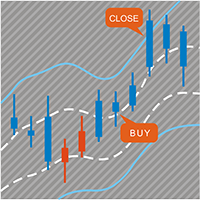
变色K线通道指标 这个指标包括两个部分 部分I : 变色K线标 通过变色K线来指示当前市场状况。如果是青色,则是多头市场,如果是红色则是空头市场。 如果颜色正在交替变化中,最好等它变完后,即等K线收盘。 部分II: 通道指标 通道包括内外两层,内层定义为安全区域,外层用了平仓。 交易策略: 如果是颜色是青色,即多头,等价格位于内层通道时开多,价格触及外层轨道则平仓。 如果颜色是红色,即空头,等价格位于内层通道是开空,价格触及外层轨道则平仓。 提示:当且仅当价格位于内层通道时才入场,这点非常重要。 在EA中调用该指标的参考代码 :   https://www.mql5.com/en/blogs/post/730475 参数解释 ShowColorCandle --- true 则画变色K线 BullColor ---Aqua.默认是青色,你也可以选择多头颜色 BearColor --- Tomato.默认是红色,你也可以选择空头颜色 AlertColorChange --- true.当颜色完成变换后会有弹窗报警 EmailColorChange --- true.当颜色完成变换后会发
Slippage Monitor MT5
Ziheng Zhuang
4.33 (3)
本EA设计用于监控开仓时的滑点,和平仓时的滑点,并以文件形式记录保存在csv文件中。 本EA对记录交易滑点,统计损失,以及评估平台是很有用的。 记录文件保存在MT5数据文件夹中,比如 MT5_Data_Folder\MQL5\Files. 通过菜单栏的 “文件”->“数据文件夹”   进去。 警告 :  不要直接打开文件,否则会影响EA记录,把文件拷贝到别处再打开。 使用方法: 打开图表加载EA即可,只需要加载一个EA。EA会监控所有品种的单子。 参数: Show in brief -   如果是true,EA显示最近5单开仓/平仓的记录,滑点以点数计。 开仓滑点记录示例:   文件名是Slippage Monitor( 50495414 )-open.csv.  Prior Time Ticket Position Ticket Deal Symbol Type Lots Prior Price Open Price Slippage Open Time 2021.11.17 15:47:00 96788016 73740574 XAUUSD Buy 0.05 1862.81 186
FREE
Slippage Monitor
Ziheng Zhuang
4.8 (5)
本EA设计用于监控开仓时的滑点,和平仓时的滑点,并以文件形式记录保存。 本EA对记录交易滑点,统计损失,以及评估平台是很有用的。 记录文件保存在MT4数据文件夹中,比如 MT4_Data_Folder\MQL4\Files. 通过菜单栏的 “文件”->“数据文件夹” 进去。 警告 :  不要直接打开文件,否则会影响EA记录,把文件拷贝到别处再打开。 使用方法: 打开图表加载EA即可,只需要加载一个EA。EA会监控所有品种的单子。 参数: Show in brief -   如果是true,EA显示最近5单开仓/平仓的记录,滑点以点数计。 Record File Type - 选择哪种格式的文件,TXT 或者CSV,我建议用TXT 开仓滑点记录示例:   文件名是Slippage Monitor(60249928)-open.csv.  Prior Time Ticket Symbol Type Lots Prior Price Open Price Slippage Open Time 2019.4.3 04:45 1546535151 CADCHF SEL 0.12 0.749 0.
FREE
Account Export
Ziheng Zhuang
5 (1)
这是一个MT4的脚本,帮助把交易记录导出到CSV文件,依照品种,以及时段选择。 参数 Select Symbol: 这是个二选一的选择,选当前品种或者所有品种。 Select Period: 这是7个选项的参数,分别是上个月,本月,上周,本周,今天,指定日期。 Specify Starting Date: 输入一个起始日期,如果上面参数你选择的是指定日期的话。 Specify Ending Date: 输入一个截止日期,如果上面参数你选择的是指定日期的话。 File Name Prefix: 为输出文件名称取个前缀。 如果参数Select Period 选择的不是 指定日期,那么后面的两个参数就不用填写了。 脚本会有弹窗提示结果,并且有一个文件输出结果,文件保存在MQL4\Files文件夹中。 希望对你有帮助,真心希望对你有帮助,我觉得会有帮助。 必须满足300个字,我必须说些废话,好了,希望对你有帮助。
FREE
这是一个MT5的脚本,帮助把交易记录按照品种分类统计。 参数 Select Period: 这是7个选项的参数,分别是上个月,本月,上周,本周,今天,指定日期。 Specify Starting Date: 输入一个起始日期,如果上面参数你选择的是指定日期的话。 Specify Ending Date: 输入一个截止日期,如果上面参数你选择的是指定日期的话。 如果参数Select Period 选择的不是 指定日期,那么后面的两个参数就不用填写了。 脚本会有一个文件输出结果,文件保存在MQL5\Files文件夹中。 希望对你有帮助,真心希望对你有帮助,我觉得会有帮助。 必须满足300个字,我必须说些废话,好了好了,希望对你有帮助。 MT4 Version:   https://www.mql5.com/zh/market/product/23802
FREE
这是一个MT4的脚本,帮助把交易记录按照品种分类统计。 参数 Select Period: 这是7个选项的参数,分别是上个月,本月,上周,本周,今天,指定日期。 Specify Starting Date: 输入一个起始日期,如果上面参数你选择的是指定日期的话。 Specify Ending Date:   输入一个截止日期,如果上面参数你选择的是指定日期的话。 如果参数Select Period 选择的不是 指定日期,那么后面的两个参数就不用填写了。 脚本会有弹窗提示结果,并且有一个文件输出结果,文件保存在MQL4\Files文件夹中。 希望对你有帮助,真心希望对你有帮助,我觉得会有帮助。 必须满足300个字,我必须说些废话,好了,希望对你有帮助。 MT5 Version: https://www.mql5.com/zh/market/product/23949
FREE
本EA提供以下功能: 开仓: 价格穿越趋势线时,开多单或者空单 平仓: 价格穿越趋势线时,平多单或者空单 追踪止损: EA会沿着趋势线,不停的提升多单的止损或者降低空单的止损 线可以是趋势线也可以是水平线, 趋势线可是射线或者线段,线段有个特别作用就是只在线所在的时段内交易。 这些能开仓和平仓的线都是有特定名称的线,EA提供了画线面板代替手工画线. 所有开仓,平仓都会有截图保存在MQL4/Files/Cross Trend Line to Trade文件夹中. EA可以在复盘测试终端使用, 付费购买之前请先下载, 在复盘测试中试用. МТ5 版本:   https://www.mql5.com/zh/market/product/107557 画线面板: 点击绿色的"+"按钮,会逐一生成6组面板,每组面板可以点击相应的按钮来绘制趋势线或者水平线 点击紫色按钮,可以选择线类型: Trend Line(趋势线) 或者水平线(Horizontal Line) 点击Del可以删除所有画线 点击X可以关闭面板,回到最初的状态. 点击按钮B1,B2,B3,B4,B5则会绘制五条线, 当价格穿越这
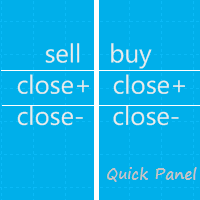
这个面板是个EA,提供6组交易面板。 MT5 版本: Quick Panel Hedging 特性: 交易面板包含大多数交易操作(如多单全平,空单全平仓,平盈利单,平亏损单,等等),点击相应按钮就搞定。 六组面板之间切换也很方便,点击绿色按钮即可。 EA 可以在复查测试visual chart 图表上运行,这样复盘,交易训练等都很方便。 鼠标点击快速修改止损和止盈(不能用于复盘测试) 在一个黄色背景的面板上显示平均价格,以及画平均价格水平线。 点这里查看 面板解释: 面板包含两列,左列是与空单相关,右边则是与多单相关。 sell: 开一个空单 first: 平第一个空单,指的是开仓时间第一的那个空单 last:平最后的空单,指的是开仓时间最后的那个空单 all+: 平空单中的所有盈利的单子 all-: 平空单中的所有亏损的单子 max+: 平空单中盈利最大的那个单子 max-: 平空单中亏损最大的那个单子 min+: 平空单中盈利最小的那个单子 min-: 平空单中亏损最小的那个单子 All: 平所有空单 buy:开一个多单 first: 平第一个多单,指的是开仓时间第一的那个多单
Quick Panel Pro
Ziheng Zhuang
5 (1)
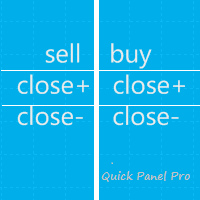
这个EA是一个专业交易工具,让交易简易便捷, 整合了灵活的风险管理模块与六组交易面板。 MT5 版本: Quick Panel Pro Hedging 特性: 手数计算既简单又快,移动止损线StopLine时,手数就计算完了。 交易面板包含大多数交易操作(如多单全平,空单全平仓,平盈利单,平亏损单,等等),点击相应按钮就搞定。 六组面板之间切换也很方便,点击绿色按钮即可。 EA 可以在复查测试visual chart 图表上运行,这样复盘,交易训练等都很方便。 鼠标点击快速修改止损和止盈(不能用于复盘测试) 在一个黄色背景的面板上显示平均价格,以及画平均价格水平线。 点这里查看 面板解释: 面板包含两列,左列是与空单相关,右边则是与多单相关。 sell: 开一个空单 first: 平第一个空单,指的是开仓时间第一的那个空单 last:平最后的空单,指的是开仓时间最后的那个空单 all+: 平空单中的所有盈利的单子 all-: 平空单中的所有亏损的单子 max+: 平空单中盈利最大的那个单子 max-: 平空单中亏损最大的那个单子 min+: 平空单中盈利最小的那个单子 min-: 平
这个指标显示8个主要货币的相对强弱:USD, EUR, GBP, AUD, NZD, CAD, CHF and JPY. 强弱值规范到了 0-100之间 60以上是强。 40以下是弱. 基本原理 八个主要货币 USD,EUR,GBP,AUD,NZD,CAD,CHF,JPY, 他们每两个配对, 一共组成28对货币对, 利用逆向算法从28个货币对中提取到8个货币的强度 EURUSD,GBPUSD,AUDUSD,NZDUSD, USDCAD,USDCHF,USDJPY,EURGBP, EURAUD,EURNZD,EURCAD,EURCHF, EURJPY,GBPAUD,GBPNZD,GBPCAD, GBPCHF,GBPJPY,AUDNZD,AUDCAD, AUDCHF,AUDJPY,NZDCAD,NZDCHF, NZDJPY,CADCHF,CADJPY,CHFJPY 基本用法:  60以上为强, 40以下为弱 买最强的货币, 空做弱的货币 如果所有货币强度曲线位于40到60之间, 意味着市场处于震荡行情中 长线交易者, 最好等到两货币交叉之后 如果货币从60向上穿越60, 意味着它真正走
Alpha Bands
Ziheng Zhuang
这个指标就是在当前图表上显示主要趋势。 特色:      里层的白色通道交叉时意味着趋势改变。      如果白色点画线向下交叉白色实线,表示趋势变为空头趋势。      如果白色点画线向上交叉白色实线,表示趋势变为多头趋势      交叉发生后不会重绘。 参数设置: ShowColorCandle: 如果是true,则显示变色K线 BullColor: 多头趋势时K线的颜色,默认是Aqua. BearColor: 空头趋势时K线的颜色,默认是Tomato. 用法:     价格位于内层白色通道时入场, 价格触及外层通道则出场。     交易的关键在于选择合适的时间框架。     当然你也可以在这个指标基础上构建你的策略。 Of course, you may create your strategy based on this indicator.
Beta Bands
Ziheng Zhuang
5 (1)
这个指标在当前图表显示主要趋势,入场区间(安全),离场区间(超买超卖)。 这个指标是个跨周期指标,因此在当下的高级别时间框架的一个周期内,指标是一直重绘的。 特色 彩色直方柱: 显示当下市场趋势,西红色意味着空头趋势,天蓝色意味着多头趋势。 内层蓝色通道: 安全区间,价格位于该区间时入场,是相对安全的入场区间。 外层黄色通道: 离场区间,价格已经超买或者超卖。 参数设置 AutoMatchTimeFrame : 如果是true,指标会自动选择一个高级别的时间框架。 InpTimeFrame : 如果AutoMatchTimeFrame设置为false,用户应该自己选择一个时间框架。 BullColor : 多头趋势时直方柱的颜色(默认是天蓝色)。 BearColor : 空头趋势时直方柱的颜色(默认是西红色)。 用法 价格位于内层天蓝色通道时入场, 价格触及外层黄色通道则出场。 交易的关键在于选择合适的时间框架。 当然你也可以在这个指标基础上构建你的策略。
Gamma Bands
Ziheng Zhuang
这个指标用变色柱子来显示趋势。简单易用。 使用方法: 如果柱子从青色变成紫红色,意味着趋势向上了。 如果柱子从紫红色变成青色,意味着趋势向下了。 参数: MaPeriods: 移动均线周期。 f1: 内层通道扩展系数。 f2: 外层通道扩展系数。 Popup Window Alert Email Alert Mobile Push Alert 报警: 当趋势发生改变后,从多头改成空头,或者空头改成多头 当价格从下向上穿越最上边的外层通道时,报警平多单 当价格从上向下穿越最下边的外层通道时,报警平空单 MT5版本:  Gamma Bands 简单易用,回调是加仓做多,反弹是加仓做空.可以根据内层通道设置较小的止损,可以达到以以小博大的目的. 我们知道,没有完美的指标,需要配合你的策略,最终是依赖资金管理. 盈亏比和胜率就像鱼和熊掌不可兼得, 也就是盈亏比和胜率你只能搞定其中之一.
Pair Power Matrix
Ziheng Zhuang
3.67 (3)
本指标设计用于显示28个主要货币对,在三个常用指标RSI,Stochastic,CCI中的强弱顺序。 三个指标的强弱值由弱到强排序,从最弱到最强。 较弱货币对:   出现在顶排三行内至少2次。 较强货币对:   出现在顶排三行内至少2次。 用户可以附加一个品种,即本指标可以计算 28+1 个品种。 使用建议: https://www.mql5.com/zh/blogs/post/729879 基于本指标的免费EA:  https://www.mql5.com/zh/blogs/post/732968 参数: Forex Suffix -- 28个主要品种的后缀,如果有则填写,没有则不写 Additional Symbol Settings  ---  附加品种的设置 Additional Symbol(without suffix)  -- 附加品种名称,不要包括后缀,后缀单独写 Suffix for Additional Symbol -- 附加品种的后缀,没有则不写 Hide CandleStick -- 是否隐藏图表K线,true则隐藏。 =========RSI Setti
本指标的目的是识别反转点. 蓝色箭头是做多信号,它对应的黄色星是止损. 红色箭头是多空信号,它对应的黄色星是止损. 报警功能: 如果产生了信号,指标会发送三种报警:弹窗,邮件,或者手机推送 Inputs: Popup Window Alert: 弹窗报警,默认是关闭的 Email Alert : 邮件报警,默认是关闭的 Mobile Push Alert: 手机推送报警,默认是关闭的. MetaTrader 5 Version: Reversal Point 请注意,这个信号是逆势的,可能会连续失败.   请注意,这个信号是逆势的,可能会连续失败.   请注意,这个信号是逆势的,可能会连续失败.   请注意,这个信号是逆势的,可能会连续失败.   请注意,这个信号是逆势的,可能会连续失败.  
变色K线通道指标 这个指标包括两个部分 部分I : 变色K线标 通过变色K线来指示当前市场状况。如果是青色,则是多头市场,如果是红色则是空头市场。 如果颜色正在交替变化中,最好等它变完后,即等K线收盘。 部分II: 通道指标 通道包括内外两层,内层定义为安全区域,外层用了平仓。 交易策略: 如果是颜色是青色,即多头,等价格位于内层通道时开多,价格触及外层轨道则平仓。 如果颜色是红色,即空头,等价格位于内层通道是开空,价格触及外层轨道则平仓。 提示:当且仅当价格位于内层通道时才入场,这点非常重要。 参数解释 ShowColorCandle - true 则画变色K线 AlertColorChange - true.当颜色完成变换后会有弹窗报警 EmailColorChange - true.当颜色完成变换后会发送email提醒 ShowBands - true 则画通道指标 AlertCrossOuterBands - true 价格触及外通道则弹窗报警 AlertCrossOuttrBands - true 价格触及外通道则会发送email提醒 MT4 版本:   https://w
注: 这个EA只能在对冲类型的帐号上使用。MT4 版本: Quick Panel Pro 特性: 手数计算既简单又快,移动止损线StopLine时,手数就计算完了。 交易面板包含大多数交易操作(如多单全平,空单全平仓,平盈利单,平亏损单,等等),点击相应按钮就搞定。 六组面板之间切换也很方便,点击绿色按钮即可。 鼠标点击快速修改止损和止盈(不能用于复盘测试) 在一个黄色背景的面板上显示平均价格,以及画平均价格水平线。 点这里查看 面板解释: 面板包含两列,左列是与空单相关,右边则是与多单相关。 sell: 开一个空单 first: 平第一个空单,指的是开仓时间第一的那个空单 last:平最后的空单,指的是开仓时间最后的那个空单 all+: 平空单中的所有盈利的单子 all-: 平空单中的所有亏损的单子 max+: 平空单中盈利最大的那个单子 max-: 平空单中亏损最大的那个单子 min+: 平空单中盈利最小的那个单子 min-: 平空单中亏损最小的那个单子 All: 平所有空单 buy:开一个多单 first: 平第一个多单,指的是开仓时间第一的那个多单 last: 平最后的多单
注: 这个EA只能在对冲类型的帐号上使用。MT4 版本: Quick Panel 这个面板是个EA,提供6组交易面板。 特性: 交易面板包含大多数交易操作(如多单全平,空单全平仓,平盈利单,平亏损单,等等),点击相应按钮就搞定。 六组面板之间切换也很方便,点击绿色按钮即可。 EA 可以在复查测试visual chart 图表上运行,这样复盘,交易训练等都很方便。 鼠标点击快速修改止损和止盈(不能用于复盘测试) 在一个黄色背景的面板上显示平均价格,以及画平均价格水平线。 点这里查看 面板解释: 面板包含两列,左列是与空单相关,右边则是与多单相关。 sell: 开一个空单 first: 平第一个空单,指的是开仓时间第一的那个空单 last:平最后的空单,指的是开仓时间最后的那个空单 all+: 平空单中的所有盈利的单子 all-: 平空单中的所有亏损的单子 max+: 平空单中盈利最大的那个单子 max-: 平空单中亏损最大的那个单子 min+: 平空单中盈利最小的那个单子 min-: 平空单中亏损最小的那个单子 All: 平所有空单 buy:开一个多单 first: 平第一个多单,
Gamma Bands   这个指标用变色柱子来显示趋势。简单易用。 使用方法: 如果柱子从青色变成紫红色,意味着趋势向上了。 如果柱子从紫红色变成青色,意味着趋势向下了。 参数: MaPeriods: 移动均线周期。 f1: 内层通道扩展系数。 f2: 外层通道扩展系数。   Popup Window Alert Email Alert Mobile Push Alert 报警: 当趋势发生改变后,从多头改成空头,或者空头改成多头 当价格从下向上穿越最上边的外层通道时,报警平多单 当价格从上向下穿越最下边的外层通道时,报警平空单 MT4版本:  Gamma Bands 简单易用,回调是加仓做多,反弹是加仓做空.可以根据内层通道设置较小的止损,可以达到以以小博大的目的. 我们知道,没有完美的指标,需要配合你的策略,最终是依赖资金管理. 盈亏比和胜率就像鱼和熊掌不可兼得,   也就是盈亏比和胜率你只能搞定其中之一.
本指标的目的是识别反转点. 蓝色箭头是做多信号,它对应的黄色星是止损. 红色箭头是多空信号,它对应的黄色星是止损. 报警功能: 如果产生了信号,指标会发送三种报警:弹窗,邮件,或者手机推送 Inputs: Popup Window Alert: 弹窗报警,默认是关闭的 Email Alert : 邮件报警,默认是关闭的 Mobile Push Alert: 手机推送报警,默认是关闭的. MetaTrader 4 Version : Reversal Point   请注意,这个信号是逆势的,可能会连续失败.   请注意,这个信号是逆势的,可能会连续失败.   请注意,这个信号是逆势的,可能会连续失败.   请注意,这个信号是逆势的,可能会连续失败.   请注意,这个信号是逆势的,可能会连续失败.   请注意,这个信号是逆势的,可能会连续失败.  
本EA提供以下功能: 开仓: 价格穿越趋势线时,开多单或者空单 平仓: 价格穿越趋势线时,平多单或者空单 追踪止损: EA会沿着趋势线,不停的提升多单的止损或者降低空单的止损 线可以是趋势线也可以是水平线,   趋势线可是射线或者线段,线段有个特别作用就是只在线所在的时段内交易。 这些能开仓和平仓的线都是有特定名称的线,EA提供了画线面板代替手工画线. 所有开仓,平仓都会有截图保存在MQL5/Files/Cross Trend Line to Trade文件夹中. 本EA只能用于对冲类型账号   MT4 版本:   https://www.mql5.com/zh/market/product/4439 画线面板: 点击绿色的"+"按钮,会逐一生成6组面板,每组面板可以点击相应的按钮来绘制趋势线或者水平线 点击紫色按钮,可以选择线类型: Trend Line(趋势线) 或者水平线(Horizontal Line) 点击Del可以删除所有画线 点击X可以关闭面板,回到最初的状态. 点击按钮B1,B2,B3,B4,B5则会绘制五条线, 当价格穿越这五条线中的任何一条时开一个多单 点击按钮
多品种一键开仓与平仓的操盘面板 点击   开仓(OPEN)   按钮,则为选择的品种开仓。 点击   平仓(CLOSE)   按钮,则为选择的品种平仓。 开仓手数就是用户输入的数,正数开多单,负数开空单。 点击 平仓(CLOSE)   按钮,平掉的是整个单子,而不是部分平仓,所以平仓与后面输入的手数无关。 把参数Magic设置为0,则可以用本EA来帮助你同时平掉多个手工单。 把参数Magic设置为其他EA的magic,则可用用本EA来同时平掉其他EA的多个单子。 一键开三角对冲单。 交易品种可以定制: 从市场窗口(Market Watch),或者用户输入. 参数设置: Magic - 本EA的Magic Number MaxLots - 最大手数设置参数,如果用户在操盘面板上输入的手数大于这个设定参数,则以这个设置参数为开仓手数。 StopLoss - 止损点数,以Point计算(即报价最后一位)。 TakePofit - 止盈点数,以Point计算(即报价最后一位)。 File Name-  保存图形界面GUI的文件名,如果为空,EA将自动使用文件名,类似于 "MTP-账号.品
这个指标显示8个主要货币的相对强弱:USD, EUR, GBP, AUD, NZD, CAD, CHF and JPY. 强弱值规范到了 0-100之间 60以上是强。 40以下是弱. 参数  Only Show Current Pairs -    如果是true, 只显示当前图表的两个货币曲线,否则显示8个货币的曲线。 Bars To Show  - 显示多数根K线 Ma Periods To Smooth Curves  - 对强弱曲线做平滑处理的移动平均周期. Suffix   - 品种后缀, 最新版本现在不需要填写,会自动获取 Font Size   - 字体大小,默认是13. Row Space   - 行距,默认是17. 下面两个参数是关于货币强弱曲线交叉的报警,八条货币曲线中,任意某两条交叉的报警功能: Select Cross at which bar -  选择交叉发送在 当前K线(Current Bar) 还是前一个K线(Previous Bar) Alert Type   - 这是八选一的选项,选择交叉后报警类型. Never 意思是不报警. 其他则是交叉后报
筛选:
Zhen Bin Tan
276
Zhen Bin Tan 2022.07.23 08:25 

用户没有留下任何评级信息

Ziheng Zhuang
41072
来自开发人员的回复 Ziheng Zhuang 2022.07.24 05:41
你好,止盈点数(止损点数)是每个单子的止盈点数(止损点数). 在参数止盈点数(止损点数)大于0的前提下, 每次开仓时EA自动给单子设置相应的止盈点数(止损点数).
回复评论