Risk Manager Sent22
- 实用工具
- 版本: 1.43
- 激活: 20

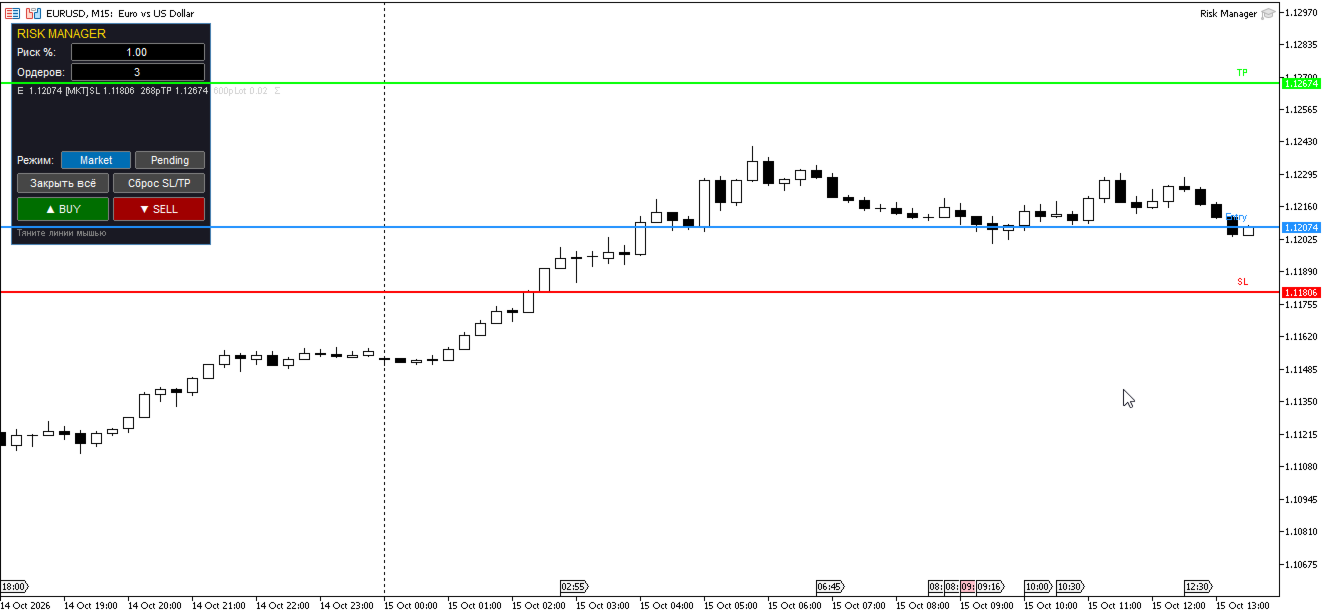
Risk Manager — a trading assistant with visual trade planning and total risk control. Set your overall risk percentage, number of orders, drag the Entry/SL/TP lines directly on the chart — the EA calculates the lot and opens a series of market or pending orders.
Full description
Risk Manager is a trading companion for MetaTrader 5 that turns routine position sizing into a visual, error-proof process. Instead of manually calculating lots for each order, you simply set your total risk in percent, specify the number of orders, and place three lines on the chart: Entry (entry price), SL (stop loss) and TP (take profit). The EA instantly recalculates the lot size and opens a series of trades so that the total risk never exceeds your limit.
✨ Key features
🎯 Full risk control
-
Set the total risk as a percentage of balance — the EA automatically splits it across the number of orders.
-
Lot size is calculated from the actual distance to the stop loss. No "approximate" values — precise math for any symbol and broker.
-
Lot is rounded down to the broker's step, so the actual risk never exceeds your target.
📐 Visual trade planning
-
Three draggable lines on the chart: Entry, SL, TP. Move them and the panel instantly recalculates lot size and potential profit.
-
Colored line labels on the right edge of the chart — you always see what's where.
-
Grab a line with a single mouse movement, no prior selection required.
⚡ Market and pending orders
-
One toggle — Market / Pending — lets you trade either "right now" or with pre-placed limit/stop orders.
-
In Pending mode the order type is determined automatically by the Entry line position: below the market → Buy Limit, above → Buy Stop, and vice versa for sells.
-
All orders open with the same SL and TP calculated from the entry price.
🛡️ Error protection
-
Free-margin check before opening the series.
-
Minimum market distance check ( SYMBOL_TRADE_STOPS_LEVEL ) for pending orders.
-
Position isolation via Magic Number — the "Close All" button never touches your manual trades.
-
Info panel shows current risk in deposit currency, R:R ratio, total lot, and lot per order.
🎛️ Compact interface
-
Compact 200×222 px panel — never blocks your chart view.
-
Translucent background, dark theme, minimal clutter.
-
Works with any screen resolution and Windows font scaling.
📋 How to use
-
Attach the EA to any chart.
-
Set the total risk % and number of orders on the panel.
-
Drag the Entry, SL, TP lines to the desired positions.
-
Check the info panel — it shows lot per order, total lot, risk amount, and potential profit.
-
Choose mode: Market or Pending.
-
Click ▲ BUY or ▼ SELL.
Done. A series of orders is opened with your chosen total risk.
⚙️ Parameters
| Parameter | Description | Default |
|---|---|---|
| InpRiskPercent | Initial total risk (%) | 1.0 |
| InpOrderCount | Initial number of orders | 3 |
| InpMagicNumber | Unique EA order identifier | 20241009 |
| InpSlippage | Allowed slippage (points) | 20 |
| InpDefaultSLPoints | Initial SL distance (points) | 300 |
| InpDefaultTPPoints | Initial TP distance (points) | 600 |
| InpConfirmOpen | Ask for confirmation before opening | false |
| InpStartPendingMode | Start in Pending mode | false |
| InpLabelOffset | Label offset above the line (px) | 4 |
| InpDragTolerance | Line grab tolerance (px) | 6 |
💡 Usage examples
Buy the dip (Buy Limit):
Drag Entry below the current price, SL below a support level, TP near resistance. Switch to Pending, click ▲ BUY.
Buy the breakout (Buy Stop):
Drag Entry above the current price. Switch to Pending — the type becomes Buy Stop automatically. Click ▲ BUY.
Series of 5 orders with 2% total risk:
Set risk = 2.00, orders = 5. The EA opens 5 trades with 0.4% risk each. Total = 2%.
🖥️ Requirements
-
Platform: MetaTrader 5 build 3000+
-
Symbols: any (Forex, CFDs, metals, crypto)
-
Timeframe: any
-
Account type: hedging or netting
-
Recommended: market-execution account with defined SYMBOL_TRADE_STOPS_LEVEL
This EA is not a fully automated trading system. It is a manual trading tool with mathematically strict risk control.
📌 Important notes
-
Always review the calculated lot before opening a series.
-
On floating-spread accounts the actual risk may slightly differ from the calculated one due to Ask/Bid spread at execution time.
-
Use confirmation ( InpConfirmOpen = true ) when trading the news or in low-liquidity conditions