 MetaTrader 5
 专家
专家 指标
指标 程序库
程序库 实用工具
实用工具 窗口小部件
窗口小部件 规则
规则MetaTrader 4 交易实用工具
 以下是可在MetaTrader 4中简化外汇交易的交易程序。将鼠标悬停在下面列表中的工具上,阅读它的描述和用途。
Trade Indicator Assistant is a powerful MT4 utility designed to turn indicators into automated trading systems. Its main feature is the ability to automatically detect an indicator’s BUY and SELL signal buffers , without requiring you to know the buffer numbers, search through indicator settings, or modify the indicator source code. Bonus Indicator: After purchasing Trade Indicator Assistant, contact me to receive Trade Signal Pro completely free as a bonus indicator.
[Download Demo Version]

Local Trade Copier EA MT4 是一款快速、灵活的交易复制工具,用于在同一台 Windows 电脑或 Windows VPS 上的多个 MetaTrader 4 账户之间复制和管理交易。 它将本地交易同步与 Receiver 端的手数管理、风险管理、交易过滤、品种映射、交易管理和账户保护功能结合在一起。 只需约 1 分钟 即可完成 Transmitter 和 Receiver 终端的设置,并可在同一经纪商或不同经纪商的账户之间复制手动交易或 EA 交易。在合适的条件下,本地 MetaTrader 终端之间的交易信息可以在 0.5 秒以内 完成同步。实际交易执行速度取决于经纪商延迟、网络状况、电脑/VPS 性能以及终端负载。 购买前先试用免费演示版 您可以在 MT4 模拟账户上测试 功能完整的 Local Trade Copier EA MT4 免费演示版 ,每次可使用 4 小时 : 下载 Local Trade Copier EA MT4 免费演示版 将下载的文件放入: MT4 → 文件 → 打开数据文件夹 → MQL4 → Experts 然后重新启动 MT

欢迎来到 Trade Manager EA——这是一个终极风险管理工具,旨在使交易变得更直观、精准和高效。它不仅仅是一个下单工具,而是一个用于无缝交易计划、仓位管理和风险控制的全面解决方案。不论您是新手交易员、资深交易员,还是需要快速执行的剥头皮交易员,Trade Manager EA 都可以满足您的需求,适用于外汇、指数、大宗商品、加密货币等各种市场。 借助 Trade Manager EA,复杂的计算已成过去。只需分析市场,在图表上用水平线标记入场、止损和止盈,设置您的风险水平,Trade Manager 就会立即计算出理想的头寸规模,并实时显示以点、账户货币计价的止损和止盈。每笔交易都得以轻松管理。 主要功能: 头寸规模计算器 :根据定义的风险瞬间确定交易规模。 简单的交易计划 :在图表上用可拖动的水平线直接计划交易,设置入场、止损和止盈。 实时显示 SL 和 TP :以账户货币、点或分显示止损和止盈,便于分析。 高级保护工具 盈亏平衡选项 : 基本盈亏平衡 :当您的交易达到设定水平时自动保护利润。 多级盈亏平衡 :设置多达 4 个级别以逐步保护利润。 尾随止损选项 : 基本尾随

MetaTrader 4 专业交易复制器 快速、专业、可靠的 MetaTrader 4 交易复制器。 COPYLOT 可在 MetaTrader 4 与 MetaTrader 5 终端之间复制外汇交易,并为不同账户类型和交易场景提供灵活的同步方案。 COPYLOT MT4 版本支持: MetaTrader 4 → MetaTrader 4 MetaTrader 5 Hedge → MetaTrader 4 MetaTrader 5 Netting → MetaTrader 4 MT5 版本 完整说明 + DEMO + PDF 如何购买 如何安装 如何获取日志文件 如何测试与优化 Expforex 的全部产品 您也可以使用 MetaTrader 5 版本,在 MetaTrader 5 → MetaTrader 5 和 MetaTrader 4 → MetaTrader 5 之间进行复制: COPYLOT CLIENT for MT5 COPYLOT 是一款专业级交易复制器,可稳定运行于 2、3 甚至 10 个终端之间。 支持从模拟账户和投资者密码账户进行复制 可同时运行在多个终端上

它有助于计算每笔交易的风险,容易安装新的订单,具有部分关闭功能的订单管理, 7 种类型的追踪止损和其他有用的功能。
附加材料和说明 安装说明 - 应用程序说明 - 模拟账户应用程序的试用版
线条功能 - 在图表上显示开仓线、止损线、止盈线。 有了这个功能,就可以很容易地设置一个新的订单,并在开仓前看到它的附加特性。 风险管理 - 风险计算功能在考虑到设定的风险和止损单的大小的情况下,计算新订单的成交量。它允许你设置任何大小的止损,同时观察设定的风险。 批量计算按钮 - 启用 / 禁用风险计算。 在 " 风险 " 一栏中设置必要的风险值,从 0 到 100 的百分比或存款的货币。 在 " 设置 " 选项卡上选择风险计算的变量: $ 货币, % 余额, % 资产, % 自由保证金, % 自定义, %AB 前一天, %AB 前一周, %AB 前一个月。 R/TP 和 R/SL - 设置止盈和止损的关系。 这允许你设置相对于损失的利润大小。 例如, 1 : 1 - 这决定了 TP = SL 的大小。 2 : 1 - 这意味着 TP 是 SL 的两倍。 RR - 它禁用比率。

交易面板是一款多功能交易助手。该应用包含超过50种手动交易功能,并允许您自动执行大多数交易任务。 应用程序说明 + 视频教程: https://www.mql5.com/zh/blogs/post/761102 用于模拟账户的应用程序试用版: https://www.mql5.com/zh/blogs/post/762579 如何安装应用程序: https://www.mql5.com/zh/blogs/post/762580 如何在可视化模式下测试应用程序: https://www.mql5.com/zh/blogs/post/770278 如何在VPS MetaTrader上安装应用程序: https://www.mql5.com/zh/blogs/post/770196 贸易. 只需单击一下即可执行交易操作: 打開掛單和頭寸,並自動計算風險。 一鍵打開多個訂單和頭寸。 打開訂單網格。 按組別關閉掛單和頭寸。 反轉頭寸方向(關閉買入>打開賣出,關閉賣出>打開買入)。 鎖定頭寸(通過開啟缺少的頭寸,使買入和賣出頭寸的數量相等)。 一鍵部分關閉所有頭寸。 將所有頭寸的止盈和止損設置在同

Telegram to MT4 Multi-Channel Copier 可将您 Telegram 频道中的交易信号自动复制到 MetaTrader 4。无需机器人、无需浏览器扩展、无需手动复制。信号一到 Telegram,EA 几秒内就在您的终端开仓。 在复制某个频道之前,内置回测器还能告诉您该频道在您的账户上会有怎样的表现。 产品包含两个组件:一个监听您 Telegram 频道的 Windows 应用程序,以及在 MT4 终端执行信号的本 EA。同时提供 MT5 版本 点此 . 设置指南与应用下载: https://www.mql5.com/en/blogs/post/768988 当前价格将来会上调。 工作原理 应用通过您自己的 Telegram 账号连接,因此能看到您关注的所有频道、群组、话题和机器人,包括私密和 VIP 频道。信号到达时,应用读取它,EA 按您的手数和设置在终端中开仓。 整个过程全自动,无需守在电脑前。专为 24/7 无人值守运行设计:Telegram 连接断开时,应用会自动重连。 打开应用并登录 Telegram(仅首次)。 选择要监听的频道或话

MetaTrader 4 货币强弱指标 这款 货币强弱指标 分析多达 28 个主要货币对,为 8 种主要货币各给出一个数值:USD、EUR、GBP、JPY、CHF、CAD、AUD 和 NZD。您不必逐个打开图表去判断谁在主导,只需查看 MetaTrader 4 图表上的一个面板,就能知道哪种货币被买入、哪种被卖出。 面板显示什么 8 种货币各自的强弱条和百分比,按强弱排序 多时间周期 矩阵:每种货币并排显示三个时间周期,入场前可确认 M15、H1 和 H4 是否一致 每行的强弱历史:从 20 升到 60 的货币,与从 90 回落到 60 的货币并不相同 最佳货币对 :强弱差值最大的组合,已排序。点击即可打开该货币对的图表 应避开的货币对 :两种货币同向移动就没有交易空间,它们会被列出而不是隐藏 一键打开 28 货币对面板,一次查看所有差值 将当前数值导出为 CSV,保存到您的 MQL4 Files 文件夹 如何使用 将指标拖到任意图表上。它读取的是市场,而不是图表品种 根据您的交易方式设置计算周期和计算根数 寻找强势货币与弱势货币之间的较大差值,再确认三个时间周期方块是否一致 用强弱历

Partial Closure EA MT4 允许您部分平仓账户中的任何交易,可以根据选择的手数百分比和/或交易票号手动执行,也可以在指定的止盈/止损水平按设定的百分比自动执行,在最多10个止盈和10个止损级别中平掉初始手数的部分比例。它可以通过指定或排除特定的魔术编号、备注或交易品种,管理您账户中的全部或部分交易。
提示: 下载部分关闭 EA MT4 的免费演示版并在您的演示账户上试用: 这里 将下载的免费演示文件粘贴到您的 MT4 >> 文件 >> 打开数据文件夹 >> MQL4 >> 专家文件夹并重新启动您的终端。 免费演示版本每次可在 4 小时内发挥全部功能,仅限演示帐户。 要重置试用期,请转至 MT4 >> 工具 >> 全局变量 >> Control + A >> 删除。 请仅在非关键模拟账户上执行此操作,不要在挑战道具公司账户中执行此操作。
部分关闭 EA MT4 安装和用户指南 | 购买产品的更新
特征 极其简单明了的界面 适用于任何图表、账户类型或经纪商,运行流畅 在指定的止盈/止损水平自动部分平仓,按独立百分比关闭初始手数,最多支持10

The product will copy all telegram signal to MT4 ( which you are member ) , also it can work as remote copier. Easy to set up, copy order instant, can work with almost signal formats, image signal, s upport to translate other language to English Work with all type of channel or group, even channel have "Restrict Saving Content", work with multi channel, multi MT5 Work as remote copier: with signal have ticket number, it will copy exactly via ticket number. Support to backtest signal. How to

King Trade Copier MT4 – Lightning-Fast Local Trade Copier (Master + Slave in ONE file)
King Trade Copier is a professional local trade copier that mirrors every trading action from one Master account to unlimited Slave accounts on the same PC or VPS — with an internal copy latency of just a few milliseconds. It was built by a real trader for daily real-money use, with one goal: whatever happens on the Master must happen on the Slave, instantly and without exceptions.
Watch the demo video to s

Second and Custom Timeframe Charts See the market between standard timeframes. Second and Custom Timeframe Charts is a professional chart utility for MetaTrader 4 that creates synthetic candles for non-standard timeframes directly from market data. It is designed for traders who need more flexibility than the default MT4 timeframe set can provide. Standard charts show only fixed periods. But the market does not always move in standard blocks. Sometimes the most important structure is visible on

Telegram 到 MT4: 终极信号复制解决方案 使用 Telegram 转 MT4 简化您的交易流程,这款先进的实用程序旨在将交易信号直接从 Telegram 频道和聊天复制到您的 MetaTrader 4 平台,无需 DLL 文件。这款强大的解决方案确保信号执行的无缝衔接,拥有无与伦比的精度和丰富的自定义选项,从而节省您的时间并提高您的效率。 [ Instructions and DEMO ] 主要特点 直接 Telegram API 集成 通过电话号码和安全码进行身份验证。 使用用户友好的 EXE 桥轻松获取和管理聊天 ID。 添加、删除和刷新多个频道/聊天以同时复制信号。 使用高级过滤器进行信号解析 跳过包含自定义例外词(例如“报告”、“摘要”)的不需要的信号。 支持灵活的 SL 和 TP 格式:价格、点数或点数。 当信号指定点而不是价格时自动计算入场点。 订单定制和灵活性 使用多种模式定制订单规模:固定手数、动态手数(% 风险)或特定符号手数。 使用信号数据或自定义参数调整 SL/TP。 配置滑点、挂单到期和重试设置以实现完美执行。 综合符号管理 排除特定符号或匹配自定义

交易管理器可帮助您快速进入和退出交易,同时自动计算风险。 包括帮助您防止过度交易、报复性交易和情绪化交易的功能。 交易可以自动管理,账户绩效指标可以在图表中可视化。 这些功能使该面板成为所有手动交易者的理想选择,并有助于增强 MetaTrader 4 平台。多语言支持。 MT5版本 | 用户指南+演示 交易经理在策略测试器中不起作用。 如需演示,请参阅用户指南 风险管理 根据%或$自动调整风险 可选择使用固定手数或根据交易量和点自动计算手数 使用 RR、点数或价格设置盈亏平衡止损 追踪止损设置 最大每日损失百分比,在达到目标时自动平仓所有交易。 保护账户免遭过多提款并阻止您过度交易 最大每日损失(以美元为单位)在达到目标时自动关闭所有交易。 保护账户免遭过多提款并阻止您过度交易 一键实现所有交易的盈亏平衡 自动计算从手机/电话发送的交易的风险 OCO 在设置中可用
交易和头寸管理 通过设置每月、每周、每天、每小时或每分钟的最大交易次数,停止过度交易和报复性交易。 高级挂单管理。 调整何时关闭挂单的规则 追踪挂单 支持市价订单和挂单 每日最大利润目标(以美元为单位)以确保头寸并停止

Trade Copier 是一种专业实用程序,旨在复制和同步交易账户之间的交易。 复制发生从供应商的帐户/终端到收件人的帐户/终端,安装在同一台计算机或 vps 上。 促销活动 - 如果您已经购买了“Trade copier MT4”,您可以免费获取“Trade copier MT5”(用于 MT4 > MT5 和 MT4 < MT5 的复制)。欲了解更多详细条款,请通过私人消息与我们联系! 在购买之前,您可以在演示帐户上测试演示版本。 演示 这里 。 完整说明 这里 。 主要功能和优点: 支持复制MT4>MT4、MT4>MT5、MT5>MT4,包括МТ5 netting账户。 供应商和收件人模式在同一产品中实现。 简单直观的界面,允许您直接从图表中实时控制复制。 连接中断或终端重新启动时不会丢失设置和位置。 允许您选择要复制的符号,也可以替换接收者的符号,例如 EURUSD> USDJPY。 允许为每个符号设置个性化的复制设置。 支持回拷贝。 能够仅复制某些订单。 允许您设置开仓交易价格的最大差异和最大时间延迟。 正确复制部分订单关闭的执行。 计算复制手数的几种方法。 同步止盈和止损

手动交易面板 EA MT4 是您可以找到的最简单易用的 MT4 交易面板。它的所有选项和功能都集中在一个表面上,无需打开额外的窗户或面板。它是一个订单管理、风险计算器、部分关闭和帐户保护实用程序,都在一个极其方便的界面中使用!
通过使用 手动交易面板 EA MT4 ,您可以比传统的手动交易方法更快、更准确地进行多次交易,这让您有更多时间和更清晰的头脑专注于您的交易决策。
账户保护是我们的首要任务,因此 手动交易面板 EA MT4 也是一个很好的账户保护实用程序,它可以在账户止盈或止损后关闭所有未平仓交易、删除所有挂单并关闭所有附加有任何 EA 的终端图表已达到亏损净额。这在盈利情况下非常方便,当您的资产低于您想要的止损水平时,可以避免您的交易账户进一步亏损。 提示: 您可以在您的模拟账户中下载并试用 手动交易面板 EA MT4 模拟版: 这里 将下载的免费演示文件粘贴到您的 MT4 >> 文件 >> 打开数据文件夹 >> MQL4 >> 专家文件夹并重新启动您的终端。 免费演示版本每次可在 4 小时内发挥全部功能,仅限演示帐户。 要重置试用期,请转至 MT4 >> 工具 >>

Trailing Stop and Breakeven Manager - Trail Architect MT4
Auto Trailing Stop and Breakeven Manager for MT4. Protect profit with automatic break even, then trail your stop loss using Classic, Step, ATR or Candle trailing - all from one professional panel.
Every trader knows the pain: a winning trade turns into a loss because the stop loss was never moved. Watching the chart all day just to move your stop to break even and trail the stop loss by hand is exhausting - and one missed move can wipe o

The work of the utility is directed at opening new market orders, maintaining them, transferring the unprofitable orders into profit using an internal loss handling algorithm, trend filtering and various types of trailing stop and take profit. Suitable for any instruments and timeframes. The algorithm works separately for buys and sells, which allows simultaneously working in both directions as well. For the event when the additional orders opened by the utility do not become profitable, a Stop

Don't purchase before testing the Demo version first. DEMO version: https://www.mql5.com/en/market/product/76917 __________________________________________________ This EA - Tool allow you replay bar in Meta Trader 4 for back test. This Tool can back test in multi timeframe in only one chart. This Tool is very useful for Price action trader. It can work with Indicators, some indicators cannot works. So please download Demo to test before purchase. Demo Version We do not accept refund in any

This product can be used to synchronize multiple Charts, and each Chart can be set to a different sync mode. With this product you can better view and manipulate charts: different time frames for a single Symbol, the same time frame for multiple Symbols... and more. PS: The link below is the FreeDemo product, you can use it on EURUSD/XUAUSD/USDCNH symbol: https://www.mql5.com/en/market/product/38557
Feature: Chart settings can be synchronized, including : background, indentation, size, etc. M

试用版下载
Copy Cat More (跟单猫) MT4 交易跟单器 (Trade Copier) 不仅仅是一个简单的本地交易跟单器;它是一套 完整的风险管理与执行框架 (risk management and execution framework), 专为当今的交易挑战而设计。从自营公司 (prop firm) 挑战到个人投资组合管理,它凭借 稳健的执行、资金保护、灵活的配置和先进的交易处理的结合,适应各种情况。 该跟单器同时支持 主控端 (Master,发送方) 与 受控端 (Slave,接收方) 两种模式,可实时同步市价单与挂单、交易修改、部分平仓以及对锁平仓 (Close By) 操作。它兼容模拟与真实账户、交易或投资者登录,并通过持久化交易记忆 (Persistent Trade Memory) 系统确保恢复——即使 EA、终端或 VPS 重启也不例外。可借助唯一 ID 同时管理多个主控端与受控端,跨经纪商差异则通过前缀/后缀调整或自定义品种映射自动处理。
试用版: 先试用看看 : 你可以从下方链接下载并体验 Copy Cat More (跟单猫

跟单->方便快捷的界面交互,用户上手即用 ->>>> 推荐在windows电脑,或者VPS Windows上使用 特色功能: 多样化个性跟单设置: 1.对不同的信号源可以设置不同的手数模式 2.不同的信号源分别设置正向反向跟单 3.信号分别设置注释 4.是否根据合约手数校准手数 多样化个性跟单设置2: 1.对不同的品种可以设置不同的手数模式 2.不同的品种分别设置正向反向跟单 3.信号分别设置注释 4.是否根据合约手数校准手数
注释过滤,MAGIC过滤,信号手数过滤,本地品种过滤 净持仓模式(该模式下手数计算仅支持倍率) 工作时间设置 反向同步接收端的平仓 订单绑定功能:任意订单可以绑定到设置信号源订单上 (双击表格更改) 账户风险控制 基本功能: 跟单正常交互速度0.5s以下 自动检测信号源,并显示信号源账号列表 自动匹配品种,不同平台常用交易品种(后缀不同等特殊情况)95%自动匹配,基本无需手动设置,品种映射表可随意双击更改对应品种.(映射表具有快速搜索品种功能) 4种手数计算模式(1.倍率 2.固定手数 3.自适应资金风险 4.源账户资金比例风险) 特殊手数模式

News Filter EA: Advanced Algo Trading Assistant News Filter EA is an advanced algo trading assistant designed to enhance your trading experience. By using the News Filter EA , you can integrate a Forex economic news filter into your existing expert advisor, even if you do not have access to its source code. In addition to the news filter, you can also specify trading days and hours for your expert. The News Filter EA also includes risk management and equity protection features

Prop Guardian Risk Manager MT4 – Drawdown, Risk & Hedge Protection for Prop Firm and Managed Accounts Prop Guardian Risk Manager is a professional risk-control utility for MetaTrader 4, designed for prop firm traders, money managers and anyone who wants strict account-level risk protection. It does not generate trading signals, strategy entries or trading decisions. Instead, it runs in the background, monitors your account risk and can automatically block new exposure, close managed trades or ac

快速。精准。创新。技术驱动。使用革命性的 X2 Copy MT4 体验即时交易复制。只需 10 秒简单设置,您将获得一个强大的工具,用于在单台计算机或 Windows VPS 上的 MetaTrader 终端之间以空前的速度同步交易。 无论您是管理多个账户、跟随信号还是扩展策略,X2 Copy MT4 都能以前所未有的精度和控制力适应您的工作流程。使用最技术驱动的交易复制解决方案,更快、更可靠地工作。尝试免费试用版,在您的系统上测试其速度。 *重要提示:使用MT5终端需要单独的X2 Copy MT5版本 X2 Copy MT4/5 设置和功能说明 | 如何安装 X2 Copy 试用版 功能特点 高速复制 — 交易传输时间小于0.1秒 全面支持所有复制类型:MT4>MT4, MT4>MT5, MT5>MT4, MT5>MT5 10秒即时设置,界面直观 24/7稳定运行 — 与Windows PC和Windows VPS完全兼容 灵活复制于任何账户类型之间:所有经纪商均可进行真实>真实、真实>模拟、模拟>真实、模拟>模拟账户复制 多通道复制 — 支持从一个或多个发送账户复制到一个或多个接收

跟单->方便快捷的界面交互,用户上手即用 ->>>> 推荐在windows电脑,或者VPS Windows上使用 基本功能: 跟单正常交互速度0.5s以下 自动检测信号源,并显示信号源账号列表 自动匹配品种,不同平台常用交易品种(后缀不同等特殊情况)95%自动匹配,基本无需手动设置,品种映射表可随意双击更改对应品种.(映射表具有快速搜索品种功能) 4种手数计算模式(1.倍率 2.固定手数 3.自适应资金风险 4.源账户资金比例风险) 特殊手数模式:可以根据止损资金风险反算手数(可能止损过小计算的手数过大,请谨慎使用) 多个平台,多组信号源,多组接收端随意组合( MT4 和MT5数据可互通, 需分别购买安装 ) 发送端接收端二合一,加载的时候选择模式 接收减仓信号,可以进行减仓操作. 可以反向跟单 可以分别控制跟单类型,是否跟随止损止盈 提供4种跟单开仓价格模式设置(1.开仓价格范围 2.跟单比信号更有优势的价格 3.跟单开仓在比信号劣势的价格 4.不限制开仓价格) 支持语言自动识别[中文,英文] 常见使用小技巧: 一个账户仅加载一个接收端即可自动交易所有

这是趋势线PRO指标的自动参数优化器 轻松快速地为您最喜爱的趋势线PRO指标选择最佳参数。 优化只需几秒钟。 优化器允许您找到每对和周期的最佳参数:振幅,TP1-TP3,止损,以及所选历史部分(天)上的时间过滤器和HTF过滤器的值
要优化不同的时间框架,您需要不同的历史范围:
M5-M15设置计算范围参数(天)=60(三个月) M30-H1设置计算范围参数(天)=120(6个月) H4设置参数计算范围(天)=240(一年) D1-W1设置参数计算范围(天)=720(三年) MN1设置参数计算范围(天)=1200(五年) 优化后,参数自动保存到文件夹中的现成设置文件中:MQL4>Files>trendlineoptimizedsettings
如何使用优化器实用程序:
在需要优化的符号和时间的图形上运行优化器实用程序。 优化结束后单击保存按钮 将趋势线PRO指标添加到图表,然后将趋势线PRO扫描仪 Trend Line PRO指标面板上TP1、TP2、TP3、止损和利润指标的值将变得更好,Trend Line PRO 扫描仪中会出现一个按钮(红色或蓝色 Manual G

Risk manager
Risk manager - it will simplify the tracking of drawdown and will notify you (alert) when the specified risk is reached, and close/lock orders when the critical DD risk level is reached.
If the specified drawdown is exceeded, you can choose two options for actions: All orders will be closed that mean loss will be fixed on depo. The terminal also closes. Instead of fixing the loss on depo, the opposite order will be opened - orders locking will occure. Not a single order will be c
大家好
又一个免费! 交易者的工具。
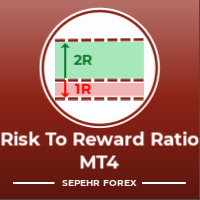
风险回报比:
对于每个交易者来说,根据利润的大小来计算损失的大小是很有用的,这样他就可以判断这是否是一笔好的交易。 此外,它还以点数和百分比显示损失和利润。
您可以设置所需的每个部分的颜色以及文本的位置。 如果你也可以用这个面板进行交易怎么办?! 请参阅下面的链接 Trader Assistant Mini MT4 您可以通過以下鏈接查看 MT5 版本:
Risk to Reward Ratio MT5
您可以查看我的新產品,了解該工具的更專業版本。
Pro Risk Management Panel MT5
希望能享受它;) 终于:
我强烈鼓励您分享您的想法和反馈。
提供您认为交易者可能需要的任何信息至关重要。
作者:
我是一名 MQL 语言程序员,三年来我一直在做各种项目。
我是一名电气工程师,我喜欢解决难题。 Join My Group to Talk Together ;) SEPEHR FOREX. MQL Group
Sepehr(Faran)
FREE

Trade Copier Local MT4 is a fast local trade copier for copying trades between multiple MT4 and MT5 accounts.
One EA works in both Master and Slave modes. Simply select the required Copier Mode and use the same product on your MetaTrader terminals.
Copy trades between:
• MT5 → MT5 • MT5 → MT4 • MT4 → MT5 • MT4 → MT4
Perfect for:
• Trading multiple accounts at once • Linking multiple trading accounts • Personal account mirroring • Signal providers • Account managers • Prop trading setups
#

TPSpro 风险管理器 是一个独特的专业风险控制系统,适用于任何培训和任何资本的交易者。让您避免交易中的损失和交易中的严重错误。
TPSpro 风险管理器对于风险管理是必要的,主要是对于剥头皮交易者和日间交易者而言,但任何交易风格的交易者都可以成功使用。 该面板有 3 列,每一列都包含有用的信息。
第一列显示截至当月初的账户信息,即以百分比和存款币种显示总体结果。 第二列显示设置中指定日期的风险。 第三列显示当前账户情况。 如果一天超过规定的风险或超过订单数量,顾问将关闭所有订单,并且不允许开设新订单,从而保护交易者免受“情绪交易”的影响。 “风险管理器”允许您根据以下参数控制交易: 每日损失限额 余额损失限额 交易数量限制 单一方向交易数量限制(网格保护) 连续亏损交易后被迫止损
连续两天亏损后,交易将被锁定一天
风险管理系统允许交易者: 保持每日利润 在线查看您的交易统计数据 理顺交易纪律,显着提高盈利能力(摆脱“倾斜”和“网格”) 查看当前资金并考虑经纪佣金 为了使风险经理能够满负荷工作,它必须位于远程 VPS 或任何其他偏远的地方,在情绪爆发时交易者无法快速到达并干扰

Feel free to contact me for any extra features :) [SEE MT5 VERSION https://www.mql5.com/en/market/product/128846
The Local Reverse Copier is an Expert Advisor designed to synchronize positions between a Master account and a Slave account with a twist: it reverses the trades. When a buy position is opened on the Master account, the EA opens a sell position on the Slave account, and vice versa. This allows for a unique form of trade copying where positions are mirrored in opposite directions bet

Lot Architect — Trade Panel and Position Size Calculator for MT4 Lot Architect is a trade panel and risk-based position size calculator for MetaTrader 4. It helps calculate lot size from the selected risk, displays trade parameters before entry, and supports Market, Limit and Stop orders from the chart. The utility is designed for traders who want a structured workflow for position sizing, stop-loss placement, take-profit planning and order execution. Purpose Before opening a trade, a trader nee

EA Local Trade Copier Pro MT4: The Ultimate DLL-Free Trade Duplicator Are you tired of complicated trade copiers that require unsafe external DLLs, crash your terminal, or confuse you with separate "Master" and "Client" files? Experience the next generation of trade copying with EA Local Trade Copier Pro MT4. Engineered for maximum stability, lightning-fast execution, and ultimate simplicity, this utility allows you to seamlessly copy trades between multiple MetaTrader terminals on the same Wind

Basket EA MT4 是一款强大的盈利收割工具兼全方位账户保护系统,结合简洁易用的设计。其核心作用在于通过对所有持仓的“组合级”管理,而非单笔交易,全面掌控账户盈亏。该 EA 提供了组合级止盈、止损、保本和移动止损功能,支持设定为账户余额百分比、固定货币金额或所有管理交易的平均点数目标。这种灵活性让交易者能够依据自身需求制定风险和盈利策略。 Basket EA MT4 还支持智能交易过滤,可以根据 Magic Number、交易品种或备注选取要管理的交易,确保 EA 只影响您选择的持仓。 为进一步提升安全性,该 EA 内置先进的账户保护机制。当账户权益达到设定的止盈/止损水平,或从历史最高余额达到最大回撤时,EA 会自动平掉所有交易,删除所有挂单,并关闭所有图表,移除其上的所有 EA。这一功能有助于在市场波动或达到预设目标时保护账户资金。 提示 :您可以下载 篮子 EA MT4 演示版并在您的模拟账户上试用: 这里 将下载的免费演示文件粘贴到您的 MT4 >> 文件 >> 打开数据文件夹 >> MQL4 >> 专家文件夹并重新启动您的终端。 免费演示版本每次可在 4 小时内发

MT4 至 Telegram 信号提供者 是一款易用、可完全自定义的工具,它使发送信号到 Telegram 成为可能,将您的账户变成信号提供者。 消息的格式 可以完全自定义! 但是,为了简便使用,您也可以选择一个预设模板,并能够启用或禁用消息的特定部分。 [ 演示 ] [ 手册 ] [ MT5 版本 ] [ Discord 版本 ] [ Telegram 频道 ] New: [ Telegram To MT5 ]
设置
可通过 用户指南 获取逐步说明。 无需了解 Telegram API;开发者提供所需的一切。
主要特性 自定义发送给订阅者的订单详情的能力 您可以创建分层订阅模型,例如铜牌、银牌、金牌。金牌订阅可获得所有信号等。
按订单号、符号或备注过滤订单
包括执行订单的图表的屏幕截图 在发送的屏幕截图上绘制已关闭的订单,以便额外验证 推迟发送新订单消息的可能性,以便在发送前对位置进行调整
订单详情的全透明度:
新的市场订单 *附带屏幕截图 订单修改(止损、获利点) 已关闭订单 *附带屏幕截图 部分关闭订单 ** 新的挂起订单 修改的挂起订单(进场价格) 挂起订单激活(

This trading panel has been developed for fast and comfortable operation of the financial markets. It is equipped with the necessary functions for manual and semi-automated trading. Due to the presence of the order trailing feature, trailing stop and automatic closure by equity, profit, time. You can use it to automate your trading system. All you have to do is open a position and set the parameters for maintenance, everything else will be handled by the EA. If you want to limit your losses, set

LMBFWatchlist is an interactive tool for Metatrader 4 that lets you create and manage watch lists directly on your Metatrader charts. Functionality includes: Add an unlimited number of watch lists with names of your choice Add different groups of watchlists for different time frames Add comments for symbols that always appear on the chart when that symbol is selected. Easily identify which symbols have comments against them. See watch lists instantly synchronise across all open charts that hav

The Trade Manager Interface is a free utility designed to simplify manual trading in MetaTrader. Please leave a review, if you like the trade manager. It allows traders to visualize trades directly on the chart, calculate position size automatically, and manage orders with advanced features such as partial take profits, automatic breakeven, and trailing stops.
This tool focuses on risk control and execution precision, making trade management faster and more efficient. For the advanced trade
FREE

X1 Copy MT4 是一款简单可靠的解决方案,用于在单台电脑或 Windows VPS 上的 MetaTrader 终端之间快速同步交易。只需一分钟,您即可获得一个现成的工具,处理跟单过程中的所有技术繁琐事务,让您专注于交易本身。无论是跟单信号还是管理自己的账户,X1 都能确保极高的执行速度和精准度。 X1 Copy MT4 是一个完全独立的程序,包含了高质量跟单所需的所有基础工具。该程序专为在日常工作中追求可靠性和简洁性的交易者而设计。如果您的交易策略需要特定的风险管理工具(例如:自动手数缩放、自定义止损/止盈偏移或高级交易过滤),请关注我们的专业版 —— X2 Copy MT4,它专为处理更复杂的资金管理任务而设计。 功能特性 极速执行 — 终端间的交易传输延迟低于 1 秒 跨平台支持 — 完美兼容 MT4>MT4, MT4>MT5, MT5>MT4, MT5>MT5 之间的跟单 即时设置 — 直观的界面让您在 1 分钟内即可开启跟单 账户通用性 — 支持所有经纪商的任何账户类型(实盘、模拟、净额、锁仓)之间的跟单 多通道模式 — 支持从一个或多个 Master 账户跟单至一个
FREE

本程序是为交易者和投资者设计的简单图表播放器,旨在帮助您回放历史市场数据,从而更好地理解市场的动态和价格走势。
使用本播放器,您可以逐根推进K线,按顺序确认市场走势, 并可以分析特定交易策略在不同市场情况下的表现。
通过反复观察关键价格点和趋势变化, 您能够有效地提升交易决策的准确性和操作信心。
播放过程中可以暂停, 并在需要时继续播放。
【功能特点】 从过去向未来方向自动播放 以固定间隔逐根K线推进 支持播放中的暂停 【播放规格】 播放方向:过去 → 未来 播放速度:固定 移动K线数量:1根固定 播放暂停 / 继续 使用END结束播放 【操作方法】 Pause / Restart:暂停或继续播放 END:结束播放并停止程序 版本比较 下表显示了本产品(Player版)与高端型号(Full Version)之间的功能差异。虽然用户界面(控制面板)的布局完全相同,但可用的模式和设置范围有所不同。
功能项目 Player版 (本产品) Full Version (完整版) 用户界面 完全相同 (通用
FREE

交易头寸和回测工具:
“交易头寸和回测工具”又称“风险收益比工具”,是一款全面而创新的指标,旨在提升您的技术分析和交易策略。 风险工具是外汇交易中有效风险管理的全面而用户友好的解决方案。它具有预览交易头寸的能力,包括入场价格、止损(SL)和获利水平(TP),为即将进行的交易提供透明的视图。用户友好的面板配备了自动余额和自定义余额选项,以及自动手数和风险计算。它支持各种交易预览,包括市场买入和卖出、买入止损和卖出止损订单。该工具包括高级的风险收益比特性,允许在图表上任意定制移动,包括买入和卖出设置。交易信息的智能显示包括关键细节,如开仓手数、止损、TP和订单类型。它还提供了在移动SL或TP水平时自动调整风险的便利性,一个按钮将当前价格吸引过来的功能,以及一个热键用于轻松隐藏和显示风险工具。此外,该工具提供了进行彻底分析交易策略的回测能力。
特点:
- 预览交易头寸,包括入场价格、止损(SL)和获利(TP)水平的详细信息。 - 用户友好的面板:提供自动余额和自定义余额。 - 自动手数计算和风险计算。 - 各种类型的交易预览:市场买入和卖出、买入止损和卖出止损订单等。 - 高级风险收
FREE

每一位 MetaTrader 交易者都应该运行,却很多人还没有使用的一款 EA。
大多数账户爆仓,并不是因为策略本身错了。真正的原因往往是在某个糟糕的时刻,交易者让亏损继续扩大、加仓硬扛、把订单留到周末、把一整周的盈利还给市场,或者因为一次错误点击而忘记了 prop firm 的每日亏损限制。 KT Equity Protector 就是那个不会让这种事情发生的自动账户守护者。
把它安装在任意一个图表上。通过清晰易懂的引导式设置向导,一次性设定你的规则:每日亏损、最大回撤、盈利目标、净值追踪止盈、周末前平仓。从那一刻开始,这款 EA 会实时监控你的整个 MetaTrader 账户。每一笔持仓。每一个交易品种。每一个 tick。当某条红线被触发时,它会立即执行你选择的动作:提醒、关闭亏损订单、关闭盈利订单、关闭全部订单,或者关闭全部订单并从终端中移除所有其他 EA,防止任何程序重新开仓。 没有情绪。没有延迟。没有犹豫。只有你每天都希望自己能够严格遵守的自动化纪律规则。
KT Equity Protector 实际上做什么 KT Equity Protector 不是交易机器人。它不会开

Trade Simulator 不只是一个交易面板。 它允许您使用历史数据进行真实感十足的交易练习,并通过交互式图表进行控制。您可以下单、调整止损水平,并像实盘交易一样监控交易结果。您还可以直接在 MT4 的策略测试器中下单和管理订单。 相同的工具和界面也可以用于实时图表进行真实交易。 有关详细信息,请访问 设置和用户指南 。 此外,还可以查看 MT5 版本 和 高级版 。 主要功能: 可通过策略测试器在模拟环境中进行交易 一键 BUY / SELL / CLOSE 操作 自动显示盈亏平衡点和止盈/止损线 可拖动调整止盈/止损线 支持移动止损功能 也可用于实盘图表进行真实交易 使用方法 – 策略测试器(模拟模式) 打开 MT4 策略测试器 在 EA 列表中选择“Trade Simulator” 选择交易品种和时间周期,然后点击开始 图表会自动开始播放 就是这么简单 — 您已经准备好在模拟环境中进行交互式交易。 使用方法 – 实时图表模式 将 EA 附加到任意 MT4 实时图表 与模拟器相同的直观界面,EA 附加后即可立即开始实盘交易。只需点击即可下单和平仓 — 无需复杂设置。
FREE

这是一个可视化的交易面板,可帮助您轻松进行交易管理,避免人为错误并增强交易活动。它结合了易于使用的视觉界面以及完善的风险和位置管理方法。 [ 安装指南 | 更新指南 | 故障排除 | 常见问题 | 所有产品 ] 易于使用 从图表轻松交易 精确的风险管理交易,无忧 保本是重中之重 让利润不受您的关注 尽快享受无风险交易 所有已开通交易的自动追踪止损 交易开始后立即设置初始止损 进行交易后,EA将执行以下任务: 初始止损/获利被自动放置 它会尽快锁定自由行(可选) 它将止损首次移动到盈亏平衡点(可选) 它使用您所需的方法跟踪止损,直到止损为止 其他很酷的功能是: 出色的终端活动报告 单一但功能强大的尾随止损方法 干净的图表界面 没有输入参数
我进行交易后会怎样? 这是您进行交易后EA的操作: 它放置初始止损并获利订单。 尽快搭便车并确保保本。默认情况下,这是通过在达到盈亏平衡点时关闭50%的交易来完成的,默认情况下为5点。这意味着,如果您日后被淘汰,您将一无所获(可选)。 盈亏平衡后,跟踪止损开始运行。 它跟踪止损,直到止损为止,让利润运行。
尾随止损如何运作? 追踪止损表示为所管

Trade Manager 4 Lite is trading panel developed with a goal to make manual trading in some (routine) task easier.
Trade Manager 4 Lite also works in Strategy Tester. Version for Meta Trader 5 is here: Trade Manager 5 Lite
Main features of Trade Manager 4 Lite Trading for Forex and CFDs Support for 4 and 5 digit brokers 65 combinations to set order Set Take Profit, Stop Loss and entry level for Pending Order with lines positioned on the chart Break Even Trailing Stop Loss Multiple Orders at one

ONE DRAG SETS THE LOT SIZE - RISK STAYS WITHIN YOUR LIMIT Risk-first position sizing for traders who protect their capital
Introductory offer — first 30 copies at $35, then $45. Early buyers keep the lower price forever!
Also available for MT5 : https://www.mql5.com/en/market/product/185711 New on version 2.1: RR box Transparency Slider
Risk Sentinel is a risk-first position sizing and risk management tool for MT4, built for discretionary traders who size every trade to the same disciplined

有了这款产品,您无需再使用第三方计算器计算交易量,也无需手动将数据导入图表。风险回报工具可直接在图表上计算交易。此面板用于标记和输入交易。将入场线、止损线和止盈线拖动到您认为合适的交易位置,面板将立即显示交易量、现金风险和风险占账户余额的百分比、预期利润以及风险回报比。点击入场按钮,该工具将根据入场线的位置,选择市价单或挂单类型,并发送包含这些价位的订单。
实用链接:其他更新 - 链接 ,MT4 版本 - 链接
主值可以是风险或交易量。点击面板中的标签即可切换。如果设置的是风险,则交易量将根据与止损线的距离计算:如果您将线拖动得更远,手数会减小,但风险金额保持不变。如果设置的是交易量,则面板会显示此手数下止损的成本占账户余额的百分比。点值取自交易品种规格,交易量则根据经纪商的增量、最小值和最大值进行四舍五入,以确保面板上显示的交易手数与终端确认的交易手数一致。
面板提供多种工具用于调整加价:
- RR 锁定:保持指定的比率,止损位和止盈位会随之移动,反之亦然。当锁定解除时,RR 会根据您绘制的图表重新计算。
- 磁力线:入场点锁定在当前价格并跟随其移动,止损位和止盈位保持其
FREE

Kalifx Trade Manager is a smart on-chart trading and risk-management panel for MetaTrader 4. It replaces manual order tickets and spreadsheet risk math with a compact, draggable panel that lets you place, size, and manage trades directly from the chart — including automatic breakeven, trailing stops, and a 3-level partial close (multi-TP) system with draggable on-chart lines. Built for discretionary traders who want the speed of a one-click panel with the discipline of automated risk rules runn
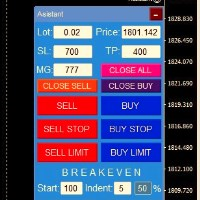
交易面板一鍵開倉! 為了幫助交易者,設定止盈、停損、掛單停損和限價訂單、轉移至損益平衡、追蹤。 還有訂單的部分平倉(%)
所有參數均可自訂。 裝高手!
設定
手數 -- 0.02 手 停損 --- 700 停損 止盈 --- 400 止盈 UseBreekeven ---- false 損益兩平關閉 ClosePersent--- 訂單的 50 關閉百分比 brStart ---- 100 損益平衡開始 brIndent ---- 5 損益平衡步驟 UseSTtrall ---- 假拖網停止 UseTPtrall ----真正的Tral Take On TrStart ---- 150 拖網開始 trstep ---- 5 拖網步驟
訂單管理
此面板支援市價訂單和掛單。 部分平倉 - 按設定交易量的百分比平倉部分訂單。 追蹤停損 - 管理停損
FREE

Unlimited Trade Copier Pro is a tool to copy trade remotely to multiple MT4, MT5 and cTrader accounts at different computers/locations over internet. This is an ideal solution for you if you are a signal provider and want to copy your trades to other receivers globally on your own rules. One provider can copy trades to multiple receivers and one receiver can get trade from multiple providers as well. The provider can even set the subscription expiry for each receiver, so that receiver will not b

Equity Protect Pro:全方位账户保护专家,让您的交易更安心 如果您正在寻找账户保护、净值保护、投资组合保护、多策略保护、利润保护、利润收割、交易安全、风控程序、自动风控、自动清仓、条件清仓、定时清仓、动态清仓、跟踪止损、一键关闭、一键清仓、一键还原等功能,Equity Protect Pro 就是您要找的程序。 它配置简单,当到达预设条件时,可关闭所有图表,同时支持关闭信号订阅(这意味着所有交易程序也将停止运行)。此时,将不再有新订单产生,最后再关闭所有订单,有效防止意外损失,让您在交易过程中高枕无忧。 Equity Protect Pro (Technical Manual) Equity Protect Pro Demo Version for yo u to test Equity Protect Pro MT4 Demo.ex4 Equity Protect Pro MT5 Demo.ex5 Equity Protect Pro 拥有 14 个核心功能,它们都是独立运行的。您可以根据您的交易策略,选择合适的功能组合使用。这些功能默认为关闭状态

Eagle Local Trade Copier MT4 Eagle Local Trade Copier MT4 is a local trade synchronization utility for MetaTrader terminals running on the same Windows computer or Windows VPS. The same Expert Advisor can operate as a Master or a Slave . Communication is performed locally through the shared MetaTrader Common Files folder. No external server, DLL, WebRequest, subscription, or third-party account is required. Main Features Master and Slave modes in one Expert Advisor Multiple Master and Slave ter
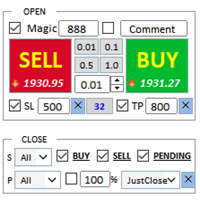
交易助手 : 购买 交易助手-MT4(点击下载) 购买 交易助手-MT5(点击下载)
操作说明文档,请仔细阅读
基本使用设置 基本: 支持语言的选择切换(目前支持中文和英文) 自动识别语言 支持 热键开平仓 绑定, 使用快捷键进行快速开平仓...... 快捷键平仓.支持最大30多种热键 解锁支持大部分功能 复盘 操作,可以在 测试环境下使用 开仓平仓区域: 一键开仓( 包含止盈止损的便捷设置,手数自动计算等便捷功能) 一键平仓 (锁仓),极简的风格设计,可以自由选择平仓品种,平仓类型(多单,空单,或者挂单),是否平仓盈利大于0的订单,是否平仓亏损订单,平仓比例的设置(0~100%),且是否平仓反向,以及锁仓功能,均在选项中可以直接实现操作. 多键平仓 划线开单控件 计算出多单或者空单的 平均持仓价格 并划线 止盈止损等自动 设置 多品种,多,空,分类平仓 .. 挂单区: 批量间隔挂单 功能。
批量挂单删除 功能 自动化功能区: 止损保护功能 移动止损功能 账户风控 利润保护 批量图表打开 商品信息显示区: 显示商品重要信息 全品种信息显示 商品信息显示区: 显示商品重
FREE

A simple script that closes all current orders.
Terminate once close all positions, so please don't worry about constantly closing your order.
How to use :
Drag the script from the navigator to the chart to activate it. Do remember to enable algo trading to use this script. There are different versions of the script that can choose whether to close all buy/sell posiitons, if you need this, do contact me in MQL5.

Smart Copy is an Easy-to-Use EA that supports Multi Copying Metatrader4 and Metatrader5 and Local/Remote Copying. (Remote Version is coming soon)
Free version is available on Smart Copy Local Free MT4
Specifications :
Real Time, Multi Terminal - Multi Account - MT4/MT5 trade copying Copy from netting to hedge and hedge to netting is supported.
Fast and instant copy
All settings are input visually. Easy modifying symbol names, prefix, suffix Enable/Disable copying s

A utility for managing open positions using virtual (invisible to the broker) stops. Virtual stop loss and virtual take profit can be freely moved around the chart. If the price touches the virtual stop line (TP, SL, TS), the EA will close all orders of the same direction on the current chart. Closing orders by virtual take profit is possible only if there is a profit.
With the help of the built-in trading simulator, you can, in the strategy tester, see how the adviser works. Parameters Block

RS Trade Copier - 超快 本地跟单系统,配备 真正的 图形界面。别再手动输入账号了。告别200多个晦涩的参数设置。 一款可靠且灵活的工具,用于在 MT4 和 MT5 多个终端之间复制交易操作。适合专业交易员、信号服务商以及个人投资者使用。能够以高精度和低延迟将一个或多个信号源(Provider)的 交易操作同步 到一个或多个接收端(Client)。支持简单自动配置和高级手动设置。不会干扰手动或其他 EA 开的订单。完全 在 MT4 本地运行 ,无需第三方服务器。 RS Trade Copier 与其他解决方案的对比 RS Trade Copier 其他解决方案 设置 可视化分步向导。
设置大约需要 1 分钟。 200 多个晦涩的输入参数。
设置大约需要 20 分钟。 速度 异步交易操作。*
批量平仓 50 个头寸仅需 ~1 秒。 缓慢的顺序执行。
批量平仓 50 个头寸需要约 25 秒。 界面 真正的图形界面,支持 11 种语言的工具提示。
无需手册即可上手。 EA 属性中“输入参数”选项卡下的长长参数列表。
需要阅读所有文档。 批量操作 完全支持。
接收端上的批量平仓

Close If Profit or Loss with Trailing for MetaTrader 4 — 按总盈利或总亏损自动平仓 这是一款适用于 MetaTrader 4 的实用型交易管理工具。当总盈利或总亏损达到您设置的水平时,EA 可以自动关闭选定的持仓。 Expert Advisor 会监控当前交易,计算浮动盈亏,并可使用利润跟踪功能,帮助交易者比手动操作更快地管理风险和锁定结果。 MetaTrader 4 仍然被大量手动交易者、剥头皮交易者、网格交易者和 EA 用户使用。但 MT4 本身没有一个方便的内置工具,可以按一组订单的总结果来自动平仓。这个工具正是为了解决这个问题。 Close If Profit or Loss with Trailing 可用于手动交易,也可以与其他 Expert Advisors、网格系统、加仓策略、恢复策略和多品种交易一起使用。您设置规则,EA 负责监控结果,并在条件达到时执行平仓。 MT5 版本 | 完整说明 + DEMO + PDF | 如何购买 | 如何安装 | 如何获取日志文件 | Expforex 的所有产品 为什么 MT4

Strategy Builder offers an incredible amount of functionality. It combines a trade panel with configurable automation (covert indicators into an EA), real-time statistics (profit & draw down) plus automatic optimization of SL, TP/exit, trading hours, indicator inputs. Multiple indicators can be combined into an single alert/trade signal and can include custom indicators, even if just have ex4 file or purchased from Market. The system is easily configured via a CONFIG button and associated pop-up

VirtualTradePad PRO SE MT4 — MetaTrader 4 高级交易面板和图表工作区 VirtualTradePad PRO SE 是一款适用于 MetaTrader 4 的专业交易面板和交易管理工作区。它帮助交易者通过一个基于图表的界面,更快速地开仓、管理、保护、平仓和分析交易。 该产品专为需要的不只是简单按钮集合的活跃手动交易者而创建。PRO SE 将一键执行、挂单、持仓控制、部分平仓、篮子利润/亏损逻辑、加仓均价层级、ATM 规则、信号监控、市场信息、策略测试器流程和面向 VPS 的准备整合到一个结构化工作区中。 MT5 版本 | 完整说明和截图 | 如何购买 | 如何安装 | 如何获取日志文件 | 如何测试与优化 | Expforex 的所有产品 为什么交易者会选择这套面板 图表一键交易 ,并支持键盘快速操作 快速完成开仓、平仓、修改、反转、锁仓与部分平仓 深度控制仓位、挂单、总利润与风控逻辑 自动参数计算,减少手动输入与重复劳动 相对于普通手动交易的优势 一个工作区替代多个窗口 — 交易执行、持仓控制、风险信息和管理工具都保留在图表上。 更快处理交易
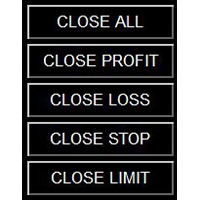
所有MQL5 EA产品,付费100RMB加入VIP会员即可全部无限制使用,详情请咨询客服QQ407776353 所有MQL5 EA产品,付费100RMB加入VIP会员即可全部无限制使用,详情请咨询客服QQ407776353 所有MQL5 EA产品,付费100RMB加入VIP会员即可全部无限制使用,详情请咨询客服QQ407776353 所有MQL5 EA产品,付费100RMB加入VIP会员即可全部无限制使用,详情请咨询客服QQ407776353 所有MQL5 EA产品,付费100RMB加入VIP会员即可全部无限制使用,详情请咨询客服QQ407776353 所有MQL5 EA产品,付费100RMB加入VIP会员即可全部无限制使用,详情请咨询客服QQ407776353 所有MQL5 EA产品,付费100RMB加入VIP会员即可全部无限制使用,详情请咨询客服QQ407776353
FREE

SyncObjects 是一个工具,允许您在 MetaTrader 中实时同步绘制在多个图表上的对象。趋势线、水平线和文本标签等对象可以自动反映在其他图表上。这使得跨不同时间框架和货币对的无缝分析成为可能,从而提高了您的交易效率。此外,它与诸如 PracticeSimulator 等交易练习和测试工具配合良好,可以更高效地进行图表分析和模拟测试。
主要功能 实时同步:在一个图表上绘制的对象将自动同步到同一平台内的其他图表上。您可以在不同的时间框架和货币对之间共享分析。 支持多种对象类型:同步各种对象,包括趋势线、水平线、箭头、文本标签等。 策略测试器支持:与 MetaTrader 的策略测试器配合使用,轻松进行回测和分析。 离线图表支持:可与离线图表一起使用,使其在自定义时间框架和测试中具有更大的灵活性。 与 PracticeSimulator 兼容:SyncObjects 与 PracticeSimulator 工具高度集成,增强了模拟交易测试和验证的功能。 参数设置 仅同步相同的符号:设置为 true 时,对象仅在相同货币对的图表之间同步。设置为 false 时,仅垂直线将在不同
FREE

Title : Trade Assistant Manager for MT4
Trade Assistant Manager — See your risk before you click Trade Assistant Manager is a MetaTrader 4 chart utility for discretionary traders who want a clear, visual way to size positions . Place your Entry, Stop Loss, and Take Profit directly on the chart. The panel shows the lot size, the money at risk, the profit target in money, and the reward-to-risk ratio — updated as you move the lines.
What you gain Faster decisions : - Automatically calcu
FREE

MQL5 博客: https://www.mql5.com/en/blogs/post/770814
MT4 版本: https://www.mql5.com/en/market/product/107986
上涨基线上涨 (RBR)、下跌基线上涨 (DBR)、下跌基线下跌 (DBD)、上涨基线下跌 (RBD)、公允价值缺口 (FVG) / 不平衡、隐藏基线
隆重推出“供需助手”(EA) 智能交易系统——助您精准自信地驾驭瞬息万变的金融市场。这款尖端智能交易系统经过精心设计,旨在为交易者提供实时供需动态洞察,助力其做出明智决策,并最大限度地发挥交易潜力。
主要功能:
自动区域识别:该智能交易系统采用先进的算法,自动检测并绘制价格图表上的关键供需区域。这些区域包括#rallybaserally、#rallybasedrop、#dropbaserally 和 #dropbasedrop,为交易者提供重要的参考点,帮助他们了解市场情绪和潜在的价格反转。
风险回报比计算:通过利用已识别的供需区域,该智能交易系统能够动态计算每个交易机会的风险回报比。这一关键指标使交易者能够评估交易
FREE

一键交易的交易面板。处理头寸和订单!通过图表或键盘进行交易
交易小组进行人工交易。您可以从图表(图表窗口)或键盘进行交易。打开和关闭,反向和锁定。处理职位和订单! МetaТrader4中主要订单的交易控制面板:买入,卖出,买入,买入,卖出,卖出限制,收盘,删除,修改,追踪止损,止损,止损。 全新高级版本现已推出: 使用 VirtualTradePad PRO SE 升级您的交易流程 — 适用于 MetaTrader 5 和 MetaTrader 4 的新一代专业交易面板。 MT5版本
详细描述 +DEMO +PDF 如何购买
如何安装
如何获取日志文件 如何测试和优化 Expforex 的所有产品 从符号窗口交易并从键盘交易! 您正在为MetaTrader 4终端提供一个独特的插件 - 虚拟控制面板VirtualTradePad。 Description on English 注意!如果您想学习如何交易 策略测试器 ,请查看我们的免费 TesterPad 实用程序 VirtualTradePad在“ MQL5语言最佳图形面板 ”竞

Crystal CopyCat Pro Trade Copier Ultra-Fast Master–Slave Copier with Zero-Delay Execution and Cross-Platform MT5 Compatibility
Architecture: MT4 → MT4 and MT4 → MT5 Full Compatibility
MT5 Version Free : https://www.mql5.com/en/market/product/144569
MT5 Version Pro : https://www.mql5.com/en/market/product/165051
Complete User Setup Guide:- https://www.mql5.com/en/blogs/post/764222
1. Overview
Crystal CopyCat Ultimate 5.0 is a next-generation trade copy engine engineered for professi

Backtest Trade Simulator (BTS) — MT4/MT5 手工模拟交易面板
本产品是用于 MetaTrader 4 与 MetaTrader 5 的图表工具(Utility),在策略测试器的可视化(Visual)模式下,于历史行情中进行手动模拟下单、挂单管理与成交统计。产品不自动开仓,不构成投资建议,也不保证任何实盘或未来交易结果。
适用场景 - 在策略测试器中练习手动交易流程 - 检查挂单价格、手数、止损/止盈设置是否合理 - 查看模拟成交后的统计指标(胜率、盈亏比、最大回撤等)
重要说明 - 所有订单与统计均来自测试器内的模拟环境,与真实账户表现可能不同 - 面板依赖图表对象与测试器事件,请按下方设置启用可视化模式
策略测试器建议设置
MT5 - Modelling:1 minute OHLC 或 Open prices only - 勾选 Visual mode(显示图表的可视化模式)
MT4 - Model:Open prices only - 勾选 Visual Mode
主要功能 - 手数、价格、止损价、止盈价:只读输入框配合 +/-
FREE

疲于复杂的订单下达和手动计算?Trade Dashboard 是您的解决方案。凭借其用户友好的界面,订单下达变得轻而易举,只需点击一下,您就可以开设交易、设置止损和止盈水平、管理交易手数,并计算风险回报比,让您只需专注于您的策略。告别手动计算,使用 Trade Dashboard 简化您的交易体验。
立即下载演示版本 。 您可以在这里找到仪表盘功能和特性的详细信息 。 加入 Telegram 频道 。 购买后请给我发消息以获取支持。如果您需要添加更多功能,可以在产品的评论区留下您的想法,我愿意听取任何建议,希望您能在使用我的产品时获得最佳体验 。 这是 MT5 版本。
风险管理:使用 Trade Dashboard,可以将您的风险设置为账户余额或权益的百分比,或将风险设置为总金额。在图表上直观地定义您的止损,让工具准确计算每个货币对的适当手数。该工具还可以根据您期望的风险回报比自动设置止盈水平。它甚至可以在手数计算中涵盖佣金和点差费用。此外,您的止损和止盈可以转变为虚拟水平,隐藏于经纪商。通过 Trade Dashboard 的高级风险管理功能,掌控风险,保护您的资本。
交易线

Break Even Trailing EA|自动化建仓保本与跟踪止损工具 Break Even Trailing EA 是一款适用于 MetaTrader 4/5 的实用型智能交易顾问(EA),专为手动交易者自动保护盈利而开发。该工具可在您手动开仓后,自动进行风控和盈利保护,让交易更加高效和省心。
本EA支持 两种可自由切换的盈利保护模式 ,可单独或组合使用,灵活满足不同交易风格。 1. 保本功能(止损自动移动到开仓价或加点) 当持仓达到预设盈利(以点为单位)时,EA会自动将止损位移动到开仓价,或者开仓价加指定点数(用于覆盖手续费、点差等)。 有效防止盈利回吐,确保不会让盈利单变为亏损。 支持自定义“保本+偏移”,让每笔交易即使止损也能锁定一定利润。 2. 跟踪止损功能 当盈利达到一定水平后,EA会自动启用跟踪止损,随着行情的有利波动自动推高止损位。 随着利润的增加,止损线也会动态跟随,让您在抓住趋势时自动锁定更多利润、及时防范回撤。 启动条件和跟踪点数均可自定义设置,实现精细化风控。 这两项功能可以 通过参数分别开启/关闭,或灵活组合使用 。例如,可先自动保本,再在盈利进一步扩大后
FREE
MetaTrader市场是 出售自动交易和技术指标的最好地方。
您只需要以一个有吸引力的设计和良好的描述为MetaTrader平台开发应用程序。我们将为您解释如何在市场发布您的产品将它提供给数以百万计的MetaTrader用户。
