
ORCAS Trend Detector
- 指标
- 版本: 1.0
- 激活: 10

𝐎𝐑𝐂𝐀𝐒 𝐓𝐑𝐄𝐍𝐃 𝐃𝐄𝐓𝐄𝐂𝐓𝐎𝐑
━━━━━━━━━━━━━━━━━━━━━━━━━━━━━━━━━━━━
𝐂𝐥𝐞𝐚𝐧 𝐭𝐫𝐞𝐧𝐝 𝐝𝐞𝐭𝐞𝐜𝐭𝐢𝐨𝐧. 𝐒𝐢𝐦𝐩𝐥𝐞 𝐯𝐢𝐬𝐮𝐚𝐥 𝐝𝐞𝐜𝐢𝐬𝐢𝐨𝐧𝐬.
𝐎𝐑𝐂𝐀𝐒 𝐓𝐫𝐞𝐧𝐝 𝐃𝐞𝐭𝐞𝐜𝐭𝐨𝐫 is designed for traders who want a clean and practical way to identify bullish and bearish trend changes directly on the MT5 chart.
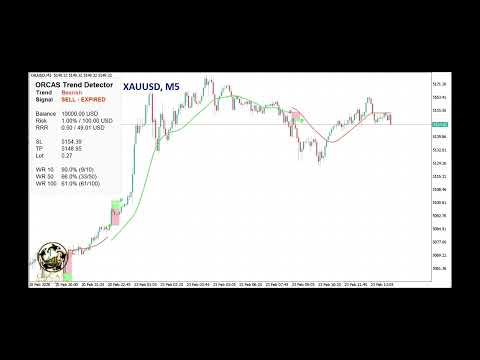
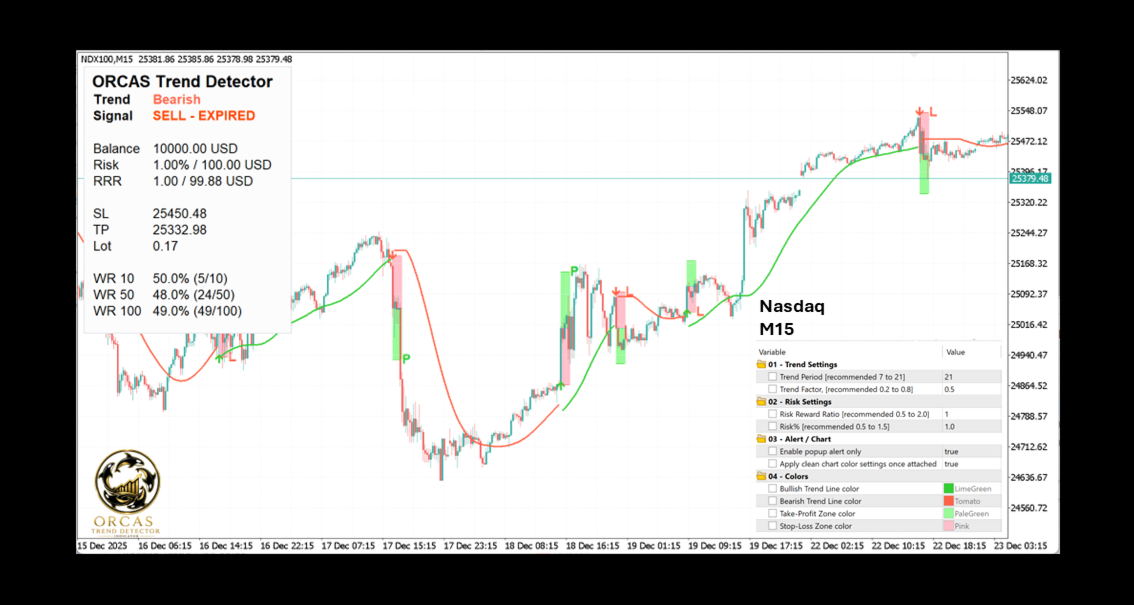
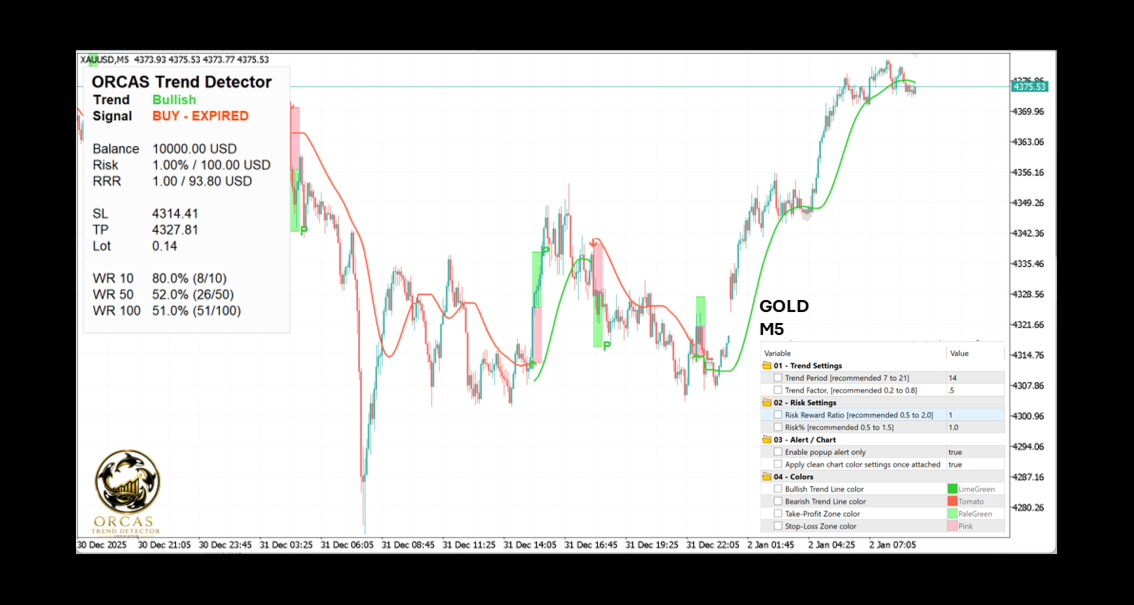
The indicator uses a dual high/low smoothing engine to detect market direction and show a clear active trend line. When the market confirms a bullish or bearish flip, the indicator displays a visual signal, simulated Entry, SL, TP, risk-based lot size, and a clean trading box on the chart.
𝐓𝐡𝐞 𝐢𝐝𝐞𝐚 𝐢𝐬 𝐬𝐢𝐦𝐩𝐥𝐞:
✅ Follow the active trend line
✅ Wait for a confirmed BUY or SELL signal
✅ Review the simulated Entry, SL, TP, RRR, and lot size
✅ Check whether the signal is ACTIVE or EXPIRED
✅ Use the panel to review risk, balance, and historical simulated win rate
ORCAS Trend Detector does not open or manage real trades. It is an indicator only. It is designed to help traders read trend direction, understand possible trade structure, and avoid late entries using a clean visual layout.
The goal of ORCAS Trend Detector is to keep chart analysis simple while giving the trader more useful information than a basic trend line or arrow indicator.
✨ 𝐊𝐄𝐘 𝐅𝐄𝐀𝐓𝐔𝐑𝐄𝐒
━━━━━━━━━━━━━━━━━━━━━━━━━━━━━━━━━━━━
𝐁𝐮𝐢𝐥𝐭 𝐟𝐨𝐫 𝐜𝐥𝐚𝐫𝐢𝐭𝐲. 𝐃𝐞𝐬𝐢𝐠𝐧𝐞𝐝 𝐟𝐨𝐫 𝐭𝐫𝐞𝐧𝐝 𝐝𝐞𝐭𝐞𝐜𝐭𝐢𝐨𝐧.
✅ 𝐂𝐥𝐞𝐚𝐧 𝐛𝐮𝐥𝐥𝐢𝐬𝐡 𝐚𝐧𝐝 𝐛𝐞𝐚𝐫𝐢𝐬𝐡 𝐭𝐫𝐞𝐧𝐝 𝐝𝐞𝐭𝐞𝐜𝐭𝐢𝐨𝐧
✅ 𝐃𝐮𝐚𝐥 𝐡𝐢𝐠𝐡/𝐥𝐨𝐰 𝐬𝐦𝐨𝐨𝐭𝐡𝐢𝐧𝐠 𝐞𝐧𝐠𝐢𝐧𝐞
✅ 𝐀𝐜𝐭𝐢𝐯𝐞 𝐭𝐫𝐞𝐧𝐝 𝐥𝐢𝐧𝐞 𝐨𝐧 𝐭𝐡𝐞 𝐜𝐡𝐚𝐫𝐭
✅ 𝐁𝐔𝐘 𝐚𝐧𝐝 𝐒𝐄𝐋𝐋 𝐬𝐢𝐠𝐧𝐚𝐥 𝐚𝐫𝐫𝐨𝐰𝐬
✅ 𝐒𝐢𝐦𝐮𝐥𝐚𝐭𝐞𝐝 𝐄𝐧𝐭𝐫𝐲, 𝐒𝐋, 𝐚𝐧𝐝 𝐓𝐏 𝐥𝐞𝐯𝐞𝐥𝐬
✅ 𝐒𝐢𝐠𝐧𝐚𝐥 𝐜𝐚𝐧𝐝𝐥𝐞 𝐡𝐢𝐠𝐡/𝐥𝐨𝐰 𝐒𝐋 𝐥𝐨𝐠𝐢𝐜
✅ 𝐑𝐢𝐬𝐤-𝐛𝐚𝐬𝐞𝐝 𝐬𝐢𝐦𝐮𝐥𝐚𝐭𝐞𝐝 𝐥𝐨𝐭 𝐜𝐚𝐥𝐜𝐮𝐥𝐚𝐭𝐢𝐨𝐧
✅ 𝐂𝐥𝐞𝐚𝐧 𝐢𝐧𝐟𝐨𝐫𝐦𝐚𝐭𝐢𝐨𝐧 𝐩𝐚𝐧𝐞𝐥
✅ 𝐒𝐢𝐠𝐧𝐚𝐥 𝐬𝐭𝐚𝐭𝐮𝐬: 𝐀𝐂𝐓𝐈𝐕𝐄 / 𝐄𝐗𝐏𝐈𝐑𝐄𝐃
✅ 𝐇𝐢𝐬𝐭𝐨𝐫𝐢𝐜𝐚𝐥 𝐬𝐢𝐦𝐮𝐥𝐚𝐭𝐞𝐝 𝐭𝐫𝐚𝐝𝐞 𝐛𝐨𝐱𝐞𝐬
✅ 𝐏 / 𝐋 𝐨𝐮𝐭𝐜𝐨𝐦𝐞 𝐦𝐚𝐫𝐤𝐞𝐫𝐬
✅ 𝐒𝐢𝐦𝐮𝐥𝐚𝐭𝐞𝐝 𝐰𝐢𝐧 𝐫𝐚𝐭𝐞 𝐟𝐨𝐫 𝐥𝐚𝐬𝐭 𝟏𝟎, 𝟓𝟎, 𝐚𝐧𝐝 𝟏𝟎𝟎 𝐬𝐢𝐠𝐧𝐚𝐥𝐬
✅ 𝐏𝐨𝐩𝐮𝐩 𝐚𝐥𝐞𝐫𝐭𝐬
✅ 𝐄𝐀-𝐟𝐫𝐢𝐞𝐧𝐝𝐥𝐲 𝐝𝐚𝐭𝐚 𝐛𝐮𝐟𝐟𝐞𝐫𝐬
✅ 𝐍𝐨 𝐞𝐱𝐭𝐞𝐫𝐧𝐚𝐥 𝐢𝐧𝐝𝐢𝐜𝐚𝐭𝐨𝐫𝐬 𝐫𝐞𝐪𝐮𝐢𝐫𝐞𝐝
✅ 𝐒𝐢𝐦𝐩𝐥𝐞 𝐚𝐧𝐝 𝐨𝐫𝐠𝐚𝐧𝐢𝐳𝐞𝐝 𝐢𝐧𝐩𝐮𝐭𝐬
⚙️ 𝐇𝐎𝐖 𝐓𝐎 𝐔𝐒𝐄
━━━━━━━━━━━━━━━━━━━━━━━━━━━━━━━━━━━━
𝐒𝐢𝐦𝐩𝐥𝐞 𝐬𝐞𝐭𝐮𝐩. 𝐂𝐥𝐞𝐚𝐫 𝐯𝐢𝐬𝐮𝐚𝐥𝐬.
Before using ORCAS Trend Detector, please follow these steps:
✅ 𝐒𝐭𝐞𝐩 𝟏 — 𝐀𝐭𝐭𝐚𝐜𝐡 𝐭𝐡𝐞 𝐢𝐧𝐝𝐢𝐜𝐚𝐭𝐨𝐫 𝐭𝐨 𝐲𝐨𝐮𝐫 𝐜𝐡𝐚𝐫𝐭
Add ORCAS Trend Detector to the symbol and timeframe you want to analyze.
✅ 𝐒𝐭𝐞𝐩 𝟐 — 𝐂𝐡𝐨𝐨𝐬𝐞 𝐲𝐨𝐮𝐫 𝐭𝐫𝐞𝐧𝐝 𝐬𝐞𝐭𝐭𝐢𝐧𝐠𝐬
Use the Trend Period and Trend Factor inputs to adjust how smooth or responsive the trend detection should be.
For better signal quality, the recommended timeframes are 𝐌𝟓 and 𝐌𝟏𝟓. These timeframes usually provide a good balance between clean trend detection and practical trading opportunities.
✅ 𝐒𝐭𝐞𝐩 𝟑 — 𝐒𝐞𝐭 𝐲𝐨𝐮𝐫 𝐫𝐢𝐬𝐤 𝐥𝐞𝐯𝐞𝐥
Set your preferred risk percentage. The indicator uses your account balance and the simulated SL distance to calculate an estimated lot size.
✅ 𝐒𝐭𝐞𝐩 𝟒 — 𝐖𝐚𝐢𝐭 𝐟𝐨𝐫 𝐚 𝐜𝐨𝐧𝐟𝐢𝐫𝐦𝐞𝐝 𝐬𝐢𝐠𝐧𝐚𝐥
When the indicator detects a confirmed trend flip, it shows a BUY or SELL arrow, simulated Entry, SL, TP, and a visual trading box.
✅ 𝐒𝐭𝐞𝐩 𝟓 — 𝐂𝐡𝐞𝐜𝐤 𝐭𝐡𝐞 𝐩𝐚𝐧𝐞𝐥
The panel shows the current trend, signal status, balance, risk, RRR, SL, TP, lot size, and simulated win rate.
✅ 𝐒𝐭𝐞𝐩 𝟔 — 𝐀𝐯𝐨𝐢𝐝 𝐥𝐚𝐭𝐞 𝐞𝐧𝐭𝐫𝐢𝐞𝐬
After a signal is no longer fresh, the panel marks it as EXPIRED. This helps traders avoid entering late after the original signal candle has already passed.
✅ 𝐒𝐭𝐞𝐩 𝟕 — 𝐑𝐞𝐯𝐢𝐞𝐰 𝐡𝐢𝐬𝐭𝐨𝐫𝐢𝐜𝐚𝐥 𝐬𝐢𝐠𝐧𝐚𝐥𝐬
The indicator keeps historical simulated trade boxes on the chart and marks resolved outcomes using P for profit and L for loss.
📊 𝐄𝐀 𝐁𝐔𝐅𝐅𝐄𝐑𝐒
━━━━━━━━━━━━━━━━━━━━━━━━━━━━━━━━━━━━
ORCAS Trend Detector includes EA-friendly buffers for traders or developers who want to use the indicator inside an Expert Advisor.
Use only these data buffers for EA integration:
Buffer 0 = Signal: 1 BUY, -1 SELL, 0 no signal
Buffer 1 = Simulated Entry price
Buffer 2 = Simulated Stop Loss price
Buffer 3 = Simulated Take Profit price
Buffer 4 = Simulated actual risk money after lot normalization
Buffer 5 = Simulated lot size
🛡️ 𝐈𝐌𝐏𝐎𝐑𝐓𝐀𝐍𝐓 𝐍𝐎𝐓𝐄𝐒
━━━━━━━━━━━━━━━━━━━━━━━━━━━━━━━━━━━━
ORCAS Trend Detector is an indicator only. It does not open, close, or manage real trades.
The Entry, SL, TP, lot size, P/L markers, and win rate shown by the indicator are simulated visual calculations based on the indicator’s internal signal logic. They are designed to help with analysis and should not be treated as guaranteed trading results.
Trading involves risk. Market conditions, spread, slippage, broker execution, account type, and symbol specifications can all affect real trading results.
If you are not sure how to set up or use the indicator, please feel free to reach out and I will help you.


































用户没有留下任何评级信息