Account Info Free for MT4

Overview

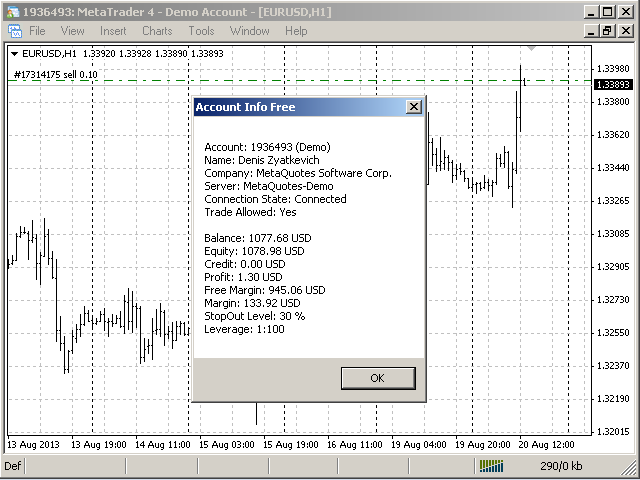
The script displays information about the trade account:

  • Account - account number and type (Real or Demo);
  • Name - name of the account owner;
  • Company - name of a company that provide the access to trading;
  • Server - trade server name;
  • Connection State - connection state;
  • Trade Allowed - shows whether trading is allowed on the account at the moment;
  • Balance - account balance;
  • Equity - account equity;
  • Credit - amount of credit;
  • Profit - profit size;
  • Free Margin - free margin on the account;
  • Margin - current margin size;
  • StopOut Level - level at which the account falls under Stop Out (compulsory closing of positions by the broker in case there is not enough free margin on the account;
  • Leverage - leverage.

The script doesn't have input parameters and it doesn't trade.


Full Version and Version for MetaTrader 5

There is a full version of this app. Unlike the free version, it additionally displays the information about the current financial instrument. There is also a free version and a full version of the application for MetaTrader 5 that have the same features.


Warning

The developer of Account Info Free for MT4 is not responsible for possible modification or termination of the program's operation due to changes in MQL4 used for developing it made by the trading terminal and language developer - MetaQuotes company. The developer of Account Info Free for MT4 is not responsible for any loss, damage or missed profits caused by the use of the program, its work or malfunction.


Contact Information

If you have any questions about the application, comments on its operation or suggestions for future improvements, please send them by email or leave your personal messages via this web site. Let me know what products (Expert Advisors, indicators, scripts) you would like to see.
推荐产品
Bands Plus
Alexander Chertnik
4.46 (13)
Designed mainly for  USDCAD 1H market. Minimum trading account 100 $. Expert advisor operates by unique   Bands strategy and transaction algorithm. settings: minBalance - minimum account balance for trading maxSpread - maximum allowed spread for trading  maxLoss - maximum loss for stop trading lotControl - lot control and auto lot activation bandsPeriod - indicator period tradeProfit - profit for exit USEtradeRange - if true, will operate with range between trades tradeRange - range distance
FREE
ForexBob 1 Click Button is very impresive forex tool for scalpers: 1. Helpful in Closing multiple trades in just Single Click. 2. Scalper can benefits the most who always eager to close multiple trades in averaging and lock the profits fast. 3. It helps to avoid latency and so profits can be locked where we need. 4. Easy to Install, same as we install any expert advisor. 5. Speed of closing trades depends on your broker's server speed. If you find any improvements we are open to your feedback
FREE
TickChart Indicator plots the tick line on the main window of MetaTrader. In the Lite version, the number of ticks is limited to 20 and the alert function described below is omitted.  The "tick-line" shows the most detailed, fastest and real-time activities of the market, which are usually hidden in bars or candles longer than 1 minute. Usually, several new tick-line segments appear while a bar of M1 time frame is completed. After the release of an important economic indicator, the number of tic

FREE
Edward Teach Fx
Denis Kudryashov
Edward Teach Fx Это советник для краткосрочной торговли с использованием серии ордеров с их усреднением  и последующим увеличением. Советник торгует в обе стороны, выбирая более подходящую сторону в процессе торговли. Используется скрытые профиты и виртуальный скользящий стоп в виде трала.Так же советник имеет возможность останавливать торговлю (не открывать новые ордера) перед важными новостями, как   при ручной установке, так и получая информацию от индикатора "News provider" . Имеется несколь
Objects synchronization for mt4
Andrej Hermann
4.25 (12)
The indicator synchronizes eight types of markings on several charts of one trading instrument. This indicator is convenient to use in conjunction with "Multichart Dashboard" or other similar assistant that allows you to work with several charts at the same time. "Multichart Dashboard" can be found under the link on my youtube channel. Settings: enable vertical line synchronization enable horizontal line synchronization enable Trend Line synchronization enabling Fibonacci Retracement synchron
FREE
EasyClose MT4
Nina Yermolenko
4 (1)
A simple and convenient utility for closing orders. It can close both all orders together as well as buy, sell or pending orders separately. Has an intuitive graphical interface. MT5 version of the utility -  https://www.mql5.com/en/market/product/78599 If you like this utility, take a look at my other products -   https://www.mql5.com/en/users/nina_yermolenko/seller
FREE
Target Profit All
Mr Nukool Chanchingchit
5 (1)
What is a tool ? Used for monitoring profit summary in your portfolio, by setting profit target. The tool will automatically close all open orders. When the profits meet the target set. How to use Place the tool on any currency pair, any timeframe and set profit target. Easy... Currency Pair : Any Timeframe : Any Input Parameter Summary profit for auto close all orders ($) Meaning : Input your profit target here. Visit my products Target Profit Magic Target Profit All The Profit Tracker Currenc
FREE
This is a basic tool that displays the Pip Value and Margin  required for each symbol. It displays the same information for both a standard lot and the amount based on lot amount entered in the input section. It allows you to use different colors for each line Font Size FontType (Based on what fonts are installed in the system folder on the pc. Set to Ariel by default if the font entered is not available.) Allows X &Y coordinates so you can decide where on the chart the info is displayed.
FREE
本版本仅支持 单个订单 交易 手数 =0.01 的订单,如果 单个订单 交易 手数 >0.01 ,请订阅更高版本   本 EA 并非主动盈利,只利用交易时间增加交易次数达到节省掉期费用的目的。 工作原理:本 EA 在当日交易截止前,会生成 \MQL4\Experts\Orderhis_today.csv 文件用于记录当天已开仓的信息,生成 \MQL4\Experts\Orderhis.csv 文件用于记录运行本 EA 后所有的需要平仓的开仓信息,对需支付掉期费用的已开仓订单进行平仓,然后在交易次日开盘后读取 Orderhis_today.csv 补回前日已关闭的仓位,这样避免产生掉期费用。 1、 注意市场交易时间。市场报价 - 相应品种 - 规格,查看交易时间,根据券商的交易时间调整 EA 参数 2、 本 EA 仅平仓已开仓订单,对于 limit 和 stop 的挂单不做处理 免责声明: 1、 由于交易商、网络等不可控的原因过多,所以本产品不保证每个订单的交易都可以成功。 2、 挂单补仓价格由使用者通过设定回补价差参数自行调整   预期节省测算 以掉期 -9.4 测算,总交易量达 1
FREE
StatsBar
Maksim Kalachev
StatBar 1.6 Indicator showing balance, earnings for today, yesterday and the day before yesterday. The indicator also shows: - Server; - GMT; - Server time; - Shoulder; - Spread. Description of variables: extern int Magic = "-1"; // Magic for statistics -1 = all 0 = manual extern string Symboll = "-1"; // Symbol for statistics -1 = all 0 = current EURUSD = for EURUSD
FREE
Jerk Indicator
Safwan Rushdi Khalil Arekat
5 (1)
In physics, "Jerk" is the third time-derivative of position, with acceleration being the second derivative and velocity the first derivative. In technical analysis, the first derivative of price is the price momentum, with the second derivative,acceleration, being seldom used and the third derivative virtually unknown. The magnitude frequency response of a digital differentiator is a positive-slope straight line passing through zero frequency. Therefore, every instance of a digital signal differ
FREE
FREE TopClock  Indicator: This indicator is   an Analog Clock That Shows: Local Time Of Pc or Time Of Broker Server or sessions(Sydney -Tokyo London -NewYork)Time or custom Time( with GMT -Base) this can  shows Candle Time Remainer with Spread live. You can run this indicator several times for different times and move it to different places on the chart. If you would like, this indicator can be customized for brokers and their  IB based on customer needs.  For more information contact us if you
FREE
** I am currently providing this great EA for free in a limit time. Please download while it is still free ** Tired of emotional trading decisions? Live monitor: TBD Introducing our mql4 Expert Advisor , engineered for stable profit with acceptable risk using a genuinely intelligent Dollar-Cost Averaging (DCA) method. This isn't just another EA; it's a long-time tested solution designed to navigate the forex markets with precision. Whether you trade with a standard USD account or a Cent ac
FREE
Squeeze Indicator
Federico Quintieri
The one and only indicator that identifies Volatility Squeeze. A Squeeze is a compression of volatility in the market. If this compression of volatility reaches a certain percentage it means that the market could explode in moments. I highly recommend using the indicator in conjunction with the economic calendar. If there are important news and the indicator shows a  BLUE HISTOGRAM  on the exchange in question, a sign of a powerful compression of volatility. Then get ready to grasp the next
FREE
Colored Candle Time
Saeed Hatam Mahmoudi
Candle Time (MT4) The Candle Time indicator shows the remaining time for the current candle on the active chart timeframe. It adapts automatically to the chart period and updates on every tick. This is a charting utility; it does not provide trading signals and does not guarantee any profit. Main functions Display the time remaining for the current candle on any timeframe (M1 to MN). Color-coded state: green when price is above the open (up), gray when unchanged, and red when below the open (do
FREE
ExportCSV
Etsushi Ishizuka
概述 ExportCSVFile 是一款适用于 MetaTrader 4 的脚本,可在指定时间段内导出账户历史记录,并保存为 CSV 文件。 该工具可用于分析交易表现、制作 Excel 报告或整理手动交易记录。 脚本不会执行任何交易操作,使用安全可靠。 主要功能 按指定时间范围导出账户历史 保存为 CSV(逗号分隔)格式,可直接在 Excel 中打开 输出主要字段:Ticket、Type、Symbol、OpenTime、CloseTime、Lots、价格、Profit、Swap、Commission、Magic、Comment 采用 UTF-8(带 BOM)编码,防止中文或其他字符乱码 执行前显示确认对话框,防止误操作 输出字段 CSV 文件包含以下列: Ticket, Type, Symbol, OpenTime, CloseTime, Lots, OpenPrice, ClosePrice, SL, TP, Profit, Commission, Swap, NetProfit, Pips, Magic, Comment 使用方法 从 导航器(Navigator) 窗口中将脚本拖放
FREE
Averager NEW
Oleg Popov
4 (7)
Expert Advisor Features trailing profit in the deposit currency (Trailing Stop Money) closing by a profit or loss in the deposit currency opening orders at a specified time managing positions opened manually or by another Expert Advisor calculating initial lot based on the current balance limiting the maximum lot volume choosing trading type several types and methods of averaging visually displays the current breakeven price, draws horizontal lines "Line break even BUY"-blue, "Line break even S
FREE
特徴: このツールはDOWやNIKKEIなど500や1000ポイントがラウンドナンバーの 指数を取引する際に表示するように開発しました。 もちろんメジャー通貨でも表示はされます。 更新頻度を制限しているのでチャート表示が遅くなるということは ありません。 XMでDOWを取引される場合、Main Levelsを10000 Sub Levelsを5000にしてください。 各パラメータの説明: Number to display lines:表示するライン数を設定します。 Main Levels:メインレベルをポイントで指定します。 Main Line Color:メインラインの色を設定します。 Main Line Style:メインラインで使用されるラインを設定します。 Show Sub Lines:サブラインを表示するか設定します。 Sub Levels:サブレベルをポイントで指定します。 Sub Line Color:サブラインの色を設定します。 Sub Line Style:サブラインで使用されるラインを設定します。 Update Frequency(600
FREE
Relative Volume MT4
Alberto Gauer Borrego
4 (1)
Relative Volume or RVOL is an indicator that averages the volume of X amount of days, making it easy to compare sessions volumes. The histogram only has 3 colors: Green - Above average volume Yellow - Average volume Red - Below average volume The default setting is 20 days, which corresponds more or less to a month of trading. With the data obtained from this indicator you can better gauge the commitment behind a move. For example, you will be better equipped to judge if a breakout of a r
FREE
IceFX ProfitInfo
Norbert Mereg
4.6 (10)
本指标的目标是令您快速、全面的查看当前盈利。IceFX 的 ProfitInfo 是一款工具指标,计算并显示图表上品种的实际交易盈利。指标显示按照日 / 周 / 月和年分离,单位点数,货币和百分比。 主要特征: 您可以很容易的调整 IceFX ProfitInfo 来显示当前打开图表指定交易货币对的盈利,甚或整个账户盈利。 可定制在图表上的全部位置。 定制字号。 显示日和月的平均盈利。 MagicNumber 过滤器。 评论过滤器。
FREE
TequilaEA
Kun Jiao
1 (1)
龙舌兰 TequilaEA 交易策略说明文档 一、基本信息 名称 :TequilaEA 版本 :1.0 适用品种 :XAUUSD(黄金 / 美元) 适用周期 :M1(1 分钟图表) 开发商 :Tulip Financial Technology 二、核心交易逻辑 该 EA 基于技术指标组合和价格形态识别进行交易决策,核心逻辑如下: 趋势判断 通过 MACD 指标(参数 12,26,9)判断整体趋势方向: 当 MACD 主线>0 时,判定为多头趋势 当 MACD 主线<0 时,判定为空头趋势 入场条件 多头入场 : MACD 主线>0(符合多头趋势) 价格连续 15 个 M1 周期收于 MA1(10 期)、MA2(20 期)、MA3(30 期)均线上方 空头入场 : MACD 主线<0(符合空头趋势) 价格连续 20 个 M1 周期收于 MA1(10 期)、MA2(20 期)、MA3(30 期)均线下方 订单管理规则 最大同时持仓订单数:3 单(多空方向一致,反向订单需先平仓) 订单间隔:相邻两单开仓时间至少间隔 1440 分钟(24 小时) 方向切换机制:开新方向订单前,自动平掉所有
FREE
The Magic EMA indicator is of great help in determining trend direction. It can be an excellent addition to your existing strategy or the basis of a new one. We humans can make better decisions when we see better visually. So we designed it to show a different color for rising and falling trends. Everyone can customize this in the way that suits them best. By setting the Trend Period, we can optimize it for longer or shorter trends for our strategy. It is great for all time frames. IF YOU NEED
FREE
该智能交易系统不进行任何交易,但它会扫描您的市场观察中的整个交易品种,并在不同的时间范围内逐一扫描每个股票,最后它会向您显示哪个交易品种在哪个时间范围内具有强大的吞没蜡烛。 此外,您可以定义 MA 周期和 RSI 上限和下限,它会显示哪个时间范围内的交易品种将穿越调整后的移动平均线,以及哪个时间范围内的交易品种将穿越移动平均线的上限或下限。 相对强弱指数。 Gāi zhìnéng jiāoyì xìtǒng bù jìnxíng rènhé jiāoyì, dàn tā huì sǎomiáo nín de shìchǎng guānchá zhōng de zhěnggè jiāoyì pǐnzhǒng, bìng zài bùtóng de shíjiān fànwéi nèi zhúyī sǎomiáo měi gè gǔpiào, zuìhòu tā huì xiàng nín xiǎnshì nǎge jiāoyì pǐnzhǒng zài nǎge shíjiān fànwéi nèi jùyǒu qiángdà de tūnmò làzhú. Cǐwài, nín
FREE
Arlene Sessions Backgrounds 2
Joaquin Nicolas Metayer
Arlene Sessions Background is an indicator that draws colored vertical background on the chart depending on your session. You can see the version 1 here: https://www.mql5.com/en/market/product/68822 You can see more of my publications here: https://www.mql5.com/en/users/joaquinmetayer/seller If you only want to paint a session on your chart, you must set the color "none" to deactivate it.
FREE
Mejore la precisión de sus operaciones con el       Sesiones de trading de   WH   MT4       Indicador para MetaTrader 4. Esta potente herramienta te ayuda a visualizar y gestionar sesiones clave del mercado sin esfuerzo. Basado en:   Indicador WH SMC MT4 Versión MT5:   WH Trading Sessions MT5 Características principales: Panel GUI interactivo       – Seleccione y alterne fácilmente entre       Asia, Londres y Nueva York       sesiones de negociación. Alertas y configuraciones personalizables
FREE
MACD Scanner With Alerts
Niravkumar Maganbhai Patel
4 (2)
MACD仪表盘面板   该指标可帮助您扫描Market Watch窗口中的交易品种并根据MACD过滤趋势。 移动平均线趋同散度(MACD)是一种趋势跟踪动量指标,它显示了证券价格的两个移动平均线之间的关系。通过从12个周期EMA减去26个周期的指数移动平均线(EMA)来计算MACD。 该计算的结果是MACD行。然后在MACD线上方绘制MACD的为期9天的EMA,称为“信号线”,它可以触发买入和卖出信号。当MACD越过信号线上方时,交易者可以买入该证券;当MACD越过信号线下方时,交易者可以卖出或做空该证券。移动平均趋同散度(MACD)指标可以用几种方法来解释,但更常见的方法是交叉,散度和快速上升/下降。 它显示了单个窗口中每个时间帧的MACD趋势。您也可以通过单击值来打开图表
FREE
YY Mono Waves
Yuryi Yatsenko
The Mono Waves indicator is designed to display the wave behavior of the market on a chart. Its appearance is presented on slide 1.   This indicator uses the PPPC (Point-Percent Price Channel) indicator, which can be downloaded for free from the Market .             When the market moves up, the upper border of the price channel is built on High candlestick prices (for more details, see the description of the PPPC indicator at the link given above). The higher the High prices rise, t
FREE
The Telegram EA can be used in conjunction with Abiroid Dashboard products. Detailed blog post with screenshots explained: https://www.mql5.com/en/blogs/post/758932 1. Abiroid Dashboards Setting: Within the Dashboard you have to set “File Alerts” to true. No need to give it a custom file name. It will use default file name and File will be created inside MQL4/Files folder. They will use “Prefix” setting as prefix by default. Unless you specify a Custom File Name. Then use this EA, and it will
FREE
-------------------------------------------------------------------------------------------------------------------------------------------------- New version of this product is here :  https://www.mql5.com/en/market/product/59924?source=Site+Profile+Seller -------------------------------------------------------------------------------------------------------------------------------------------------- TOTAL TAKE PROFIT & TOTAL TRAILING STOP. Average Take Profit & Average Trailing Stop. Setup  TO
FREE
Auto SL TP
Henry Lee Taylor
3.25 (4)
Number one rule to investing is to protect your capital. Never worry about trading without stop loss or take profit with Auto S/L T/P. Auto S/L T/P will automatically  add your preset default stop loss and take profit to any order on the chart it's installed. Be sure to enable auto trading in order for the EA to work. Entering a trade on the go from your mobile is breeze with Auto S/L T/P running on the chart on your desktop. Just enter a trade and your default stop loss and take profit will be
FREE
该产品的买家也购买
Local Trade Copier EA MT4
Juvenille Emperor Limited
4.96 (108)
通过 Local Trade Copier EA MT4 获得非常快速的交易复制体验。它的简单1分钟设置,使您可以在同一台Windows计算机或Windows VPS上在多个MetaTrader终端之间复制交易,具有闪电般快速的复制速度,低于0.5秒。 无论您是初学者还是专业交易者, Local Trade Copier EA MT4 都提供了广泛的选项,可根据您的特定需求进行自定义。对于任何希望增加利润潜力的人来说,这都是终极解决方案。 今天就尝试一下,看看为什么它是市场上最快、最简单的贸易复印机! 提示: 您可以在您的模拟账户中下载并试用 Local Trade Copier EA MT4 模拟版: 这里 将下载的免费演示文件粘贴到您的 MT4 >> 文件 >> 打开数据文件夹 >> MQL4 >> 专家文件夹并重新启动您的终端。  免费演示版本每次可在 4 小时内发挥全部功能,仅限演示帐户。 要重置试用期,请转至 MT4 >> 工具 >> 全局变量 >> Control + A >> 删除。 请仅在非关键模拟账户上执行此操作,不要在挑战道具公司账户中执行此操作。 如果您无法在
Trade Assistant MT4
Evgeniy Kravchenko
4.42 (193)
它有助于计算每笔交易的风险,容易安装新的订单,具有部分关闭功能的订单管理, 7 种类型的追踪止损和其他有用的功能。 附加材料和说明 安装说明 - 应用程序说明 - 模拟账户应用程序的试用版 线条功能  - 在图表上显示开仓线、止损线、止盈线。 有了这个功能,就可以很容易地设置一个新的订单,并在开仓前看到它的附加特性。   风险管理  - 风险计算功能在考虑到设定的风险和止损单的大小的情况下,计算新订单的成交量。它允许你设置任何大小的止损,同时观察设定的风险。 批量计算按钮 - 启用 / 禁用风险计算。 在 " 风险 " 一栏中设置必要的风险值,从 0 到 100 的百分比或存款的货币。 在 " 设置 " 选项卡上选择风险计算的变量: $ 货币, % 余额, % 资产, % 自由保证金, % 自定义, %AB 前一天, %AB 前一周, %AB 前一个月。   R/TP 和 R/SL - 设置止盈和止损的关系。 这允许你设置相对于损失的利润大小。 例如, 1 : 1 - 这决定了 TP = SL 的大小。 2 : 1 - 这意味着 TP 是 SL 的两倍。 RR - 它禁用比率。  
欢迎来到 Trade Manager EA——这是一个终极风险管理工具,旨在使交易变得更直观、精准和高效。它不仅仅是一个下单工具,而是一个用于无缝交易计划、仓位管理和风险控制的全面解决方案。不论您是新手交易员、资深交易员,还是需要快速执行的剥头皮交易员,Trade Manager EA 都可以满足您的需求,适用于外汇、指数、大宗商品、加密货币等各种市场。 借助 Trade Manager EA,复杂的计算已成过去。只需分析市场,在图表上用水平线标记入场、止损和止盈,设置您的风险水平,Trade Manager 就会立即计算出理想的头寸规模,并实时显示以点、账户货币计价的止损和止盈。每笔交易都得以轻松管理。 主要功能: 头寸规模计算器 :根据定义的风险瞬间确定交易规模。 简单的交易计划 :在图表上用可拖动的水平线直接计划交易,设置入场、止损和止盈。 实时显示 SL 和 TP :以账户货币、点或分显示止损和止盈,便于分析。 高级保护工具 盈亏平衡选项 : 基本盈亏平衡 :当您的交易达到设定水平时自动保护利润。 多级盈亏平衡 :设置多达 4 个级别以逐步保护利润。 尾随止损选项 : 基本尾随
The product will copy all telegram signal to MT4   ( which you are member  ) , also it can work as remote copier.  Easy to set up, copy order instant, can work with almost signal formats, image signal, s upport to translate other language to English Work with all type of channel or group, even channel have "Restrict Saving Content", work with  multi channel, multi MT5 Work as remote copier: with signal have ticket number, it will copy exactly via ticket number. Support to backtest signal. How to
Copy Cat More Trade Copier MT4 (复制猫MT4) 不仅仅是一个简单的本地交易复制工具;它是一个为当今交易挑战而设计的完整风险管理与执行框架。从 prop firm 挑战到个人账户管理,它都能通过强大的执行力、资本保护、灵活配置以及先进的交易处理来适应各种情况。 该复制器同时支持 Master(发送端) 和 Slave(接收端) 模式,能够实时同步市价单与挂单、交易修改、部分平仓以及 Close By 操作。它兼容模拟账户与真实账户,支持交易或投资者密码,并通过持久交易记忆系统(Persistent Trade Memory)确保即使 EA、终端或 VPS 重启后也能恢复。可同时管理多个 Master 与 Slave,并通过前缀/后缀自动调整或自定义符号映射来处理跨平台或跨经纪商差异。 使用手册/设置: Copy Cat Trading Copier 使用手册 Copy Cat More MT5: https://www.mql5.com/en/market/product/139088 加入频道: https://www.mql5.com/en/cha
Crystal Trade Manager PRO – 高级 MT4 风险与交易控制系统 免费版: https://www.mql5.com/en/market/product/150632 概述 Crystal Trade Manager PRO(CTM)是一款为 MetaTrader 4 打造的完整专业级风险管理与交易控制工具。 它专为需要严格执行、稳定风险保护和智能自动化的交易者而设计。 系统可全面管理风险、保护账户权益、执行每日限制、自动设置 SL/TP,并提供专业级的一键式快速交易面板。 非常适合参与 prop firm 挑战、日内交易、剥头皮交易以及专业资金管理的交易者。 同时提供完整的 MT5 版本。 核心亮点功能 1. 高级风险与回撤保护 支持每日回撤限制 1%–70% 。 一旦达到回撤上限,系统将立即平掉 所有仓位 。 可选:突破后自动删除 所有挂单 。 每日锁仓模式:当天达到限制后阻止新下单,次日自动恢复。 完全符合各大 prop firm 的规则与要求。 2. 日内盈利与亏损目标自动化 可设置每日 盈利目标 与 亏损限制 (账户货币,例如 USD)。 达到任何目
Exp COPYLOT CLIENT for MT4
Vladislav Andruschenko
4.65 (66)
MetaTrader 4 的交易复制器。     它从任何账户复制外汇交易、头寸、订单。 它是最好的贸易复印机之一     MT4 - MT4,MT5 - MT4     为了   复制 MT4     版本(或     MT4 - MT5 MT5 - MT5     为了   复制MT5     版本)。 MT5版本 详细描述   +DEMO +PDF 如何购买 如何安装     如何获取日志文件     如何测试和优化     Expforex 的所有产品 复印机 版本       MetaTrader 5 终端 (   МТ5 - МТ5, МТ4 - МТ5   )-   Copylot 客户端 MT5 独特的复制算法将所有交易从主账户准确复制到您的客户账户。 该产品还以其高运行速度而著称,并且具有强大的错误处理能力。 一组强大的功能。 该程序可以在多个终端绑定上运行。 使用它作为您在一个账户上交易的多个账户的交易 的同步器 , - COPYLOT 会将您的交易复制到其他终端。 从已关闭的账户中复制 Invest 密码; 部分关闭仅从 mt4 到 mt4 从模拟账户复制到
Trade copier MT4
Alfiya Fazylova
4.58 (33)
Trade Copier 是一种专业实用程序,旨在复制和同步交易账户之间的交易。 复制发生从供应商的帐户/终端到收件人的帐户/终端,安装在同一台计算机或 vps 上。 在购买之前,您可以在演示帐户上测试演示版本。 演示 这里 。 完整说明 这里 。 主要功能和优点: 支持复制MT4>MT4、MT4>MT5、MT5>MT4,包括МТ5 netting账户。 供应商和收件人模式在同一产品中实现。 简单直观的界面,允许您直接从图表中实时控制复制。 连接中断或终端重新启动时不会丢失设置和位置。 允许您选择要复制的符号,也可以替换接收者的符号,例如 EURUSD> USDJPY。 支持回拷贝。 能够仅复制某些订单。 允许您设置开仓交易价格的最大差异和最大时间延迟。 正确复制部分订单关闭的执行。 计算复制手数的几种方法。 同步止盈和止损。有几种方法可以计算它们的位置。 支持通过执行在“Market account”上工作,其中 SL / TP 仅在开仓后设置。 如何使用简单的设置复制交易 将供应商终端和接收终端安装在同一台计算机或 VPS 上。 在供应商终端上以“Master”模式安装复印机,然后
Trade Dashboard MT4
Fatemeh Ameri
4.96 (53)
疲于复杂的订单下达和手动计算?Trade Dashboard 是您的解决方案。凭借其用户友好的界面,订单下达变得轻而易举,只需点击一下,您就可以开设交易、设置止损和止盈水平、管理交易手数,并计算风险回报比,让您只需专注于您的策略。告别手动计算,使用 Trade Dashboard 简化您的交易体验。 立即下载演示版本 。 您可以在这里找到仪表盘功能和特性的详细信息 。 加入 Telegram 频道 。 购买后请给我发消息以获取支持。如果您需要添加更多功能,可以在产品的评论区留下您的想法,我愿意听取任何建议,希望您能在使用我的产品时获得最佳体验 。 这是 MT5 版本。 风险管理:使用 Trade Dashboard,可以将您的风险设置为账户余额或权益的百分比,或将风险设置为总金额。在图表上直观地定义您的止损,让工具准确计算每个货币对的适当手数。该工具还可以根据您期望的风险回报比自动设置止盈水平。它甚至可以在手数计算中涵盖佣金和点差费用。此外,您的止损和止盈可以转变为虚拟水平,隐藏于经纪商。通过 Trade Dashboard 的高级风险管理功能,掌控风险,保护您的资本。 交易线
TradePanel MT4
Alfiya Fazylova
4.85 (92)
交易面板是一个多功能的交易助手。该应用程序包含超过 50 个用于手动交易的交易功能,并允许您自动化大多数交易操作。 注意,该应用程序在策略测试器中不起作用。购买之前,您可以在模拟帐户上测试演示版本。演示版 这里 。 完整说明 这里 。 贸易。 让您一键执行交易操作: 通过自动风险计算打开挂单和仓位。 一键打开多个订单和仓位。 打开订单网格。 按组关闭挂单和持仓。 头寸反转(关闭买入并打开卖出或关闭卖出并打开买入)。 锁定头寸(开立额外头寸,以平衡买入和卖出头寸的交易量)。 一键部分平仓所有仓位。 为同一价格水平的所有头寸设置止盈和止损。 将所有头寸的止损设置为该头寸的盈亏平衡水平。 开单建仓时,您可以应用以下功能: 计算交易量的多个订单或仓位之间的分布(一键开仓多个订单或仓位时)。 图表上未来订单交易水平的可视化。 设置开仓时允许的最大点差大小。 止盈和止损之间的自动比率。 虚拟止损和止盈。 根据当前点差的大小自动增加止损和止盈的大小。 根据 ATR 指标的读数计算止盈和止损。 设置挂单的到期日期。 挂单设置为“追踪”(挂单自动跟随当前价格移动指定距离)。 管理通过移动终端(手机)开立
Equity Protect Pro:全方位账户保护专家,让您的交易更安心 如果您正在寻找账户保护、净值保护、投资组合保护、多策略保护、利润保护、利润收割、交易安全、风控程序、自动风控、自动清仓、条件清仓、定时清仓、动态清仓、跟踪止损、一键关闭、一键清仓、一键还原等功能,Equity Protect Pro 就是您要找的程序。 它配置简单,当到达预设条件时,可关闭所有图表,同时支持关闭信号订阅(这意味着所有交易程序也将停止运行)。此时,将不再有新订单产生,最后再关闭所有订单,有效防止意外损失,让您在交易过程中高枕无忧。 Equity Protect Pro Demo Version for yo u to test   Equity Protect Pro MT4 Demo.ex4 Equity Protect Pro MT5 Demo.ex5 Equity Protect Pro 拥有 14 个核心功能,它们都是独立运行的。您可以根据您的交易策略,选择合适的功能组合使用。这些功能默认为关闭状态,不使用时无需修改。需要使用时,只需将“enable (function)”设置为 tru
Take a Break
Eric Emmrich
5 (31)
One tool to protect all your EAs — news filter, equity protection, time filter and more — free demo available Take a Break has evolved from a basic news filter into a comprehensive account protection solution. It pauses your other Expert Advisors during news events or based on custom filters. When trading resumes, it automatically restores your entire chart setup , including all EA settings. Typical use cases: One news filter for all your EAs. Pause trading during news or high volatility — and c
立即在一張圖表上查看按日和按週的已平倉交易歷史記錄、當前未平倉交易以及外匯風險敞口!使用熱圖來識別有利可圖的交易以及您交易組合中的當前虧損情況。 快速關閉按鈕 使用快速關閉按鈕可以關閉單一符號的每筆交易、全部關閉單筆交易,或點擊按鈕以取得部分利潤或損失。不再需要在清單中尋找交易並研究如何關閉部分交易。儀表板還會顯示您在交易外匯對時目前對每種貨幣符號的風險敞口,這可以幫助您識別重大新聞事件發生前可能過度暴露的領域。您可以使用按鈕在新聞發布前立即快速降低您的風險,或者如果新聞已經發生並為您帶來利潤,只需單擊即可快速獲得該利潤! 開放交易熱圖 交易熱圖是一種視覺化工具,專為使用頭寸交易或波段交易策略的交易者設計,使用美元成本平均法來擴大和縮小交易規模。您可以快速識別您的投資組合中可以存入的單一交易,以及您可以部分平倉的虧損交易。只需使用全部或部分關閉按鈕即可立即賺錢並降低風險。 快速識別控制回撤的機會 虧損控制切換「D 按鈕」將突出顯示您的投資組合中所有虧損高於每個交易符號平均價格的交易。這是透過在所有符號的單一交易周圍添加一個矩形來實現的,這樣您就可以看到首先要關注哪些交易。 這使
News Filter EA: Advanced Algo Trading Assistant News Filter EA is an advanced algo trading assistant designed to enhance your trading experience. By using the   News Filter EA , you can integrate a Forex economic news filter into your existing expert advisor, even if you do not have access to its source code. In addition to the news filter, you can also specify   trading days   and   hours   for your expert. The News Filter EA also includes   risk management   and   equity protection   features
Ultimate MT4 to Telegram (UMT) sends controlled trades (via symbol, magic, comment) to your telegram channel. It sends open and closed trades, including pending orders and TP/SL modifications, along with chart screenshots, to any telegram channel. Additionally, you can send trade reports of open trades and summary profit/pip reports for day, week, or month. You can customize the design of the trade actions or reports with variables and emoticons.  A beautiful panel allows you to visualize all t
Risk/Reward Tool是一款专业级EA(智能交易系统),旨在彻底改变您在MetaTrader 4中规划、可视化和执行交易的方式。无论您是重视精确风险管理的自主交易者,还是需要直观测试交易设置的策略开发者,这款工具都能在一个优雅直观的界面中提供您所需的一切。 与基础的仓位计算器不同,Risk/Reward Tool将可视化交易规划与即时执行功能、实时盈亏监控和全面的交易管理功能相结合。该工具与MT4策略测试器完全兼容,让您能够练习交易策略并完善方法,无需冒真实资金的风险。 完整使用手册请访问: https://www.mql5.com/en/blogs/post/766244 MT5 version:  https://www.mql5.com/en/market/product/158601 主要功能 可视化交易规划 可拖拽调整的入场、止损和止盈线 随交易参数调整实时更新的彩色风险/收益区域 基于ATR的自动止损计算,实现波动率调整的仓位管理 可配置的风险收益比,带可视化显示 支持市价单和挂单(限价单/止损单),根据入场线位置自动判断 智能仓位计算 以账户余额百分比或固定金
MT4 至 Telegram 信号提供者 是一款易用、可完全自定义的工具,它使发送信号到 Telegram 成为可能,将您的账户变成信号提供者。 消息的格式 可以完全自定义! 但是,为了简便使用,您也可以选择一个预设模板,并能够启用或禁用消息的特定部分。 [ 演示 ]  [ 手册 ] [ MT5 版本 ] [ Discord 版本 ] [ Telegram 频道 ]  New: [ Telegram To MT5 ] 设置 可通过 用户指南 获取逐步说明。 无需了解 Telegram API;开发者提供所需的一切。 主要特性 自定义发送给订阅者的订单详情的能力 您可以创建分层订阅模型,例如铜牌、银牌、金牌。金牌订阅可获得所有信号等。 按订单号、符号或备注过滤订单 包括执行订单的图表的屏幕截图 在发送的屏幕截图上绘制已关闭的订单,以便额外验证 推迟发送新订单消息的可能性,以便在发送前对位置进行调整 订单详情的全透明度: 新的市场订单 *附带屏幕截图 订单修改(止损、获利点) 已关闭订单 *附带屏幕截图 部分关闭订单 ** 新的挂起订单 修改的挂起订单(进场价格) 挂起订单激活(
OrderManager MT4
Lukas Roth
4.73 (26)
介绍 OrderManager :MT4的革命性工具 使用全新的Order Manager实用程序,像专业人士一样管理您在MetaTrader 4上的交易。Order Manager设计简单,易于使用,可让您轻松定义和可视化每笔交易的风险,从而做出明智的决策并优化您的交易策略。有关OrderManager的更多信息,请参阅手册。 [ 手册 ] [ MT5版本 ] [ Telegram 频道 ]  New: [ Telegram To MT5 ] 主要功能: 风险管理:快速轻松地定义您交易的风险,让您做出更好的决策并提高交易性能。 视觉表示:图形化地查看您的交易和相关风险,以清晰简洁地了解您的开放头寸。 订单修改:只需几次点击即可轻松修改或关闭您的订单,简化您的交易过程,为您节省宝贵的时间。 掌握新闻:一键获取最新市场新闻。 不要错过这个MT4交易员的必备工具。用Order Manager提升您的交易体验,将您的交易游戏提升到新的水平。 OrderManager在startegyTester中 不 工作! OrderManager 仅与 Windows 兼容。 请考虑给这个产品一
Telegram Signal pro
Sara Sabaghi
4.86 (7)
What is it? Think about it, you can send all the orders/positions info to your telegram channel or group to create your community or VIP signals on telegram. Position info means this EA forward all of your new positions open details (Open price, Open time, Position Type, position Symbol and volume), positions changes ( SL or TP modifying or pending price changes) and position close (Close price, profit or loss, position duration time) and also EA Send NEWS alert (Economic calendar event) on you
Rocket FX Trading Manager PRO Note: Once you download the manager, message me for the background files The Ultimate All-in-One Trade Management Solution for MetaTrader 4 Version:   4.5 |   Platform:   MetaTrader 4 |   Category:   Utility / Trade Manager   Overview Rocket Fx Trading Manager v4.5 is a comprehensive, all-in-one trade management system designed to transform your trading experience. This powerful utility combines   intelligent position sizing ,   multi-target order placement
This EA is fully automated , it is built based on  the method of catching the pop-up Alert event and forwarding them to Telegram Channel/Group. Parameters of the EA: -------- <EA Settings> -------- Magic Number:   The identifying (magic) number of the currently selected order. Bot name:   Name of the Expert Advisor. Allow forward Alert: Enable/ Disable Forward Alert. Do not send messages after the current time (seconds) . Number of rows to read from list (>= 4...| affect processing speed). --
Trend Line Optimizer
Evgenii Aksenov
4.11 (19)
这是趋势线PRO指标的自动参数优化器 轻松快速地为您最喜爱的趋势线PRO指标选择最佳参数。  优化只需几秒钟。 优化器允许您找到每对和周期的最佳参数:振幅,TP1-TP3,止损,以及所选历史部分(天)上的时间过滤器和HTF过滤器的值  要优化不同的时间框架,您需要不同的历史范围: M5-M15设置计算范围参数(天)=60(三个月) M30-H1设置计算范围参数(天)=120(6个月) H4设置参数计算范围(天)=240(一年) D1-W1设置参数计算范围(天)=720(三年) MN1设置参数计算范围(天)=1200(五年) 优化后,参数自动保存到文件夹中的现成设置文件中:MQL4>Files>trendlineoptimizedsettings  如何使用优化器实用程序: 在需要优化的符号和时间的图形上运行优化器实用程序。 优化结束后单击保存按钮 将趋势线PRO指标添加到图表,然后将趋势线PRO扫描仪 Trend Line PRO指标面板上TP1、TP2、TP3、止损和利润指标的值将变得更好,Trend Line PRO 扫描仪中会出现一个按钮(红色或蓝色  Manual G
DrawDown Limiter MT4
Haidar Lionel Haj Ali
5 (8)
Drawdown Limiter EA You are in the right place if you were searching for Drawdown control, Drawdown limiter, Balance protection, Equity Protection or Daily Drawdown Limit related to Prop Firm, FTMO, or Funded account trading, or if you want to protect your trading account. Have you suffered from controlling your drawdown when trading funded accounts? This EA is meant for you. Prop firms usually set a rule called “Trader Daily Drawdown”, and if it is not respected, you are disqualified.  I am an
Copier4Fee Advanced
Vladimir Tkach
4.75 (16)
The utility copies trades from the signal provider accounts (master accounts, one or multiple providers) to unlimited number of receiver accounts (slave accounts).  Attention! Y ou need to use identifiers (Provider number) of the same length if you use several master copiers. For example. 1, 2, 3 or 11, 13, 22. The copying can be set in the opposite direction. The comments with all the recently performed actions are displayed on the screen to monitor the utility actions in slave mode. To avoid p
AW Grids Maker
AW Trading Software Limited
4.33 (3)
AW网格生成器   用于根据挂单构建网格交易。该工具功能通用,设置灵活,界面直观。程序可根据必要的步长,利用持仓量倍数,根据止损单和限价单构建交易网络。 MT5 版本 -> 点击此处 / 问题解决 -> 点击此处 优势 使用所有类型的待处理订单。 配置简单灵活。 设计精良且功能齐全的配电盘。 一个精心设计的信息模块 工作特点: 适用于金字塔式拉锯战、经典平均法拉锯战或马丁格尔拉锯战。 自动开启网格、跟踪订单和关闭网格。 它既可以是交易系统的组成部分,也可以是独立的策略。 构建各种类型订单的网络,并可调整距离和交易量增长系数。 面板详细描述: 交易者可以使用“Open_Buy”按钮开设挂单买入限价单和买入止损单。 要开立待处理的卖出止损单和卖出限价单,请使用“Open_Sell”按钮。 买入限价单的挂单价格低于当前价格,而卖出限价单的挂单价格高于当前市场价格。当交易者预期价格将从某个特定水平反转时,就会使用这些订单。当达到指定的挂单价格时,交易将以不低于所要求价格的价格执行。 买入止损单设置在当前价格上方,而卖出止损单设置在当前市场价格下方。它最常用于突破交易策略。当价格达到指定价格
Comprehensive on chart trade panel with the unique ability to be controllable from mobile as well. Plus has a library of downloadable configuration, e.g. exit rules, extra panel buttons, pending order setup and more. Please see our product video. Works with all symbols not just currency pairs. Features On chart panel plus controllable from free app for Windows, iPhone and Android Built-in script engine with library of downloadable configuration, e.g. add 'Close All Trades in Profit' button, exit
Exp4 Duplicator
Vladislav Andruschenko
4.5 (22)
EA 在您的帐户 MetaTrader 4 上重复 交易和头寸或发出预设次数的信号。 它复制所有手动或由另一个“EA 交易”打开的交易。 复制信号并增加信号的数量 ! 增加其他 EA 的数量。 支持以下功能:复制交易的自定义手数、复制止损、获利、使用追踪止损。 MT5版本 详细描述 +DEMO +PDF 如何购买 如何安装     如何获取日志文件     如何测试和优化     Expforex 的所有产品 链接 MetaTrader 的交易复印机可在此处获得:   COPYLOT 注意力 注意:这不是终端之间交易的复印机。 您可以在策略测试器中测试“EA 交易”,并在可视模式下使用我们的 EAPADPRO 工具栏进行交易! 在 1 个货币对上安装 EA 就足够了。默认情况下,它将监视所有打开的符号。 这个怎么运作? Duplicator/Dublicator 助手 EA 重复在终端中打开的头寸。 EA 能够复制头寸和挂单。 要复制的位置或顺序称为 源 。重复位置是一个 副本 。 The EA repeats the source the specified number o
Custom Alerts:监控多个市场,绝不错过关键交易信号 概述 Custom Alerts 是一款动态工具,专为希望集中监控多个交易品种潜在机会的交易者设计。通过整合我们旗舰工具(如 FX Power、FX Volume、FX Dynamic、FX Levels 和 IX Power)提供的数据, Custom Alerts 可自动通知您关键的市场变化,无需频繁切换图表,也不会错过交易良机。现在,它支持您的经纪商提供的所有资产类别,只需在设置中选择相应的资产类别即可,无需手动输入任何品种名称。 1. 为什么 Custom Alerts 对交易者非常有帮助 一体化市场监控 • Custom Alerts 收集并整合来自外汇、贵金属、加密货币、指数,甚至(若经纪商支持)股票市场的信号。 • 无需频繁切换图表,一切通知集中呈现。 根据策略定制提醒 • 精准设置提醒条件。无论是追踪成交量激增、强度突破,还是极端价格波动, Custom Alerts 都能确保您不会错过任何关键信号。 • 可与 Stein Investments 工具无缝集成,助您更深入分析与优化交易决策。 节省时
交易特惠 – 40% 折扣 高级交易管理器 – 终极一体化解决方案,助您更快、更智能、更安全地进行手动交易。 使用 NextGen Trade Manager AI 革新您的手动交易体验。这款专业的图表面板将即时执行、可视化交易计划和强大的风险管理功能整合到一个直观易用的工具中。无需离开图表,即可比以往更快地执行订单、管理风险并保护利润。完美满足所有希望提升交易精准度和效率的交易者的需求。 在 MT4 策略测试器中无风险测试 下载演示版本,解锁模拟交易功能。这是在安全模拟的环境中练习执行、测试风险管理规则和完善策略的理想方式,让您在实盘交易前做好充分准备。 如需完整的用户手册和分步指南,请访问: https://www.mql5.com/en/blogs/post/764217 主要优势: 快速交易:一键执行订单、设置止损和平仓。 更智能的风险管理:根据固定风险、账户余额或净值自动调整手数。轻松验证止损是否符合经纪商规则。 内置保护:自动设置盈亏平衡点、启用追踪止损,并使用部分平仓来锁定利润并最大限度地降低风险。 避免代价高昂的错误:市价单和平仓功能的安全确认确保
KT Renko Live Chart MT4
KEENBASE SOFTWARE SOLUTIONS
KT Renko Live Chart 工具可在 MT5 平台中生成 Renko 图表,这些图表可用于技术分析、实盘交易或策略研究。该工具所创建的 Renko 图支持大多数自定义指标和自动化交易专家顾问(EA)。 完全兼容我们的 Renko Patterns 指标和 Renko Patterns EA。 功能特点 一款简单明了的 Renko 图表工具,在 MT5 上创建 Renko 图表,无需复杂设置。 支持大多数自定义指标和 EA,可实现 100% 自动化交易。 可在策略测试器中对 Renko 图进行回测,提升策略开发效率。  可启用或关闭 Renko 的影线显示功能。 输入参数 Renko 砖块大小(点): 输入用于生成 Renko 图的砖块/箱体大小(单位为点)。 显示影线: 启用或关闭 Renko 图的影线显示。 故障排查 问:  Renko 图没有接收到新的行情数据。 答:  请关闭主图和离线图,重新启动 MetaTrader,再次生成图表。 问:  生成的图表显示不完整或变形。 答:  请确保主图表中有足够的历史数据,数据量应与设定的砖块大小匹配。 问: 为什么
作者的更多信息
Overview The Expert Advisor allows you to receive notifications to the mobile phone (or tablet PC), mailbox or play the sound alert when some events occured: opening or closing position (also closing all positions), placing or deleting pending order; changing open price, stop loss or take profit; the account balance, equity, margin level, free margin or drawdown has reached the user specified level. You can specify a notification interval, notification text template and audio file for sound aler
NotifyMe Free for MT5
Denis Zyatkevich
5 (5)
Overview The Expert Advisor sends notifications to a mobile phone, via e-mail or activates an audio alarm in case any changes are detected on the trading account: opening/closing positions, changing order parameters, balance or leverage. Also, the Expert Advisor can inform that Equity on the trading account has dropped below a specified value or Free Margin is small compared to Margin. The Expert does not trade, it only monitors your account and orders. Launching the Expert Advisor You should a
FREE
Overview The script displays information about the trade account: Information about the trade account: Account - account number and type (Real, Contest or Demo); Name - name of the account owner; Company - name of a company that provide the access to trading; Server - trade server name; Connection State - connection state; Trade Allowed - shows whether trading is allowed on the account at the moment; Experts Allowed - shows whether it is allowed to trade using Expert Advisors; Balance - account
FREE
NotifyMe Free for MT4
Denis Zyatkevich
5 (4)
概览 此 EA 发送通知到移动电话, 通过邮件或激活声音提示交易账户内的开仓或平仓。此 EA 不进行交易, 它仅监视您的账户和订单。 启动 EA 为了让 EA 工作,将文件 NotifyMe_free.ex4 保存在终端的/experts 目录 (可能它会自动放在那里)。NotifyMe_free 应该出现在导航窗口的 EA 板块。如果没有, 重启 MetaTrader 4 终端。 为了让 EA 工作,在 MetaTrader4 的设置中允许使用 EA。为此,进入工具菜单,之后选项,之后选择 EA 选栏。启用允许 EA 选项 (接受定制指标和脚本)。 要启动 EA,在导航器窗口鼠标右键点击其名称,然后选择 "挂载到图表",或者用鼠标拖放到图表上。EA 的参数窗口将会出现:设置所需的参数,然后点击确定。 此 EA 可以挂载到任意金融工具的图表上,因为 EA 在每次即时报价来到时分析交易账户状态,为了降低通知的延迟,建议在报价比较活跃的品种里运行此 EA (例如, 以下货币对之一: EURUSD, GBPUSD, USDCHF 或 USDJPY)。时间帧任意。 EA 的输入参数 Pus
FREE
NotifyMe for MT4
Denis Zyatkevich
5 (4)
概览 本 EA 在检测到交易账户的任何变化时,发送通知到移动终端,通过邮件或激活声音警报: 开仓/平仓,改变订单参数,余额或杠杆。此外,EA 在交易账户的净值跌至低于指定值或可用保证金相比保证金很小的时候发送通知。本 EA 不进行交易, 它仅监控您的账户。 启动 EA 为了 EA 的工作,将文件 NotifyMe.ex4 放置 终端文件夹/experts (可能它会自动放在那里)。NotifyMe 应该会出现在导航窗口的 EA 区域。如果没有, 重启 MetaTrader 4 终端。 为了让 EA 工作,在 MetaTrader 4 的设置中允许使用 EA。为此,进入工具菜单,之后选项,之后选择 EA 选栏。启用允许 EA 选项 (接受定制指标和脚本)。 要启动 EA,在导航器窗口鼠标右键点击其名称,然后选择 "挂载到图表",或者用鼠标拖放到图表上。EA 的参数窗口将会出现:设置所需的参数,然后点击确定。 此 EA 可以挂载到任意金融工具的图表上,因为 EA 在每次即时报价来到时分析交易账户状态,为了降低通知的延迟,建议在报价比较活跃的品种里运行此 EA (例如, 以下货币对之一:
Overview The script displays information about the trade account and the current financial instrument. Information about the trade account: Account - account number and type (Real or Demo); Name - name of the account owner; Company - name of a company that provide the access to trading; Server - trade server name; Connection State - connection state; Trade Allowed - shows whether trading is allowed on the account at the moment; Balance - account balance; Equity - account equity; Credit - amount
Overview The Expert Advisor allows you to receive notifications to the mobile phone (or tablet PC), mailbox or play the sound alert when some events occured: opening or closing position, placing or deleting pending order; changing open price, stop loss or take profit; the account balance, equity, margin level, free margin or drawdown has reached the user specified level. You can specify a notification interval, notification text template and audio file for sound alerts. Expert Advisor saves the
This is Advanced NotifyMe version with large interface. Overview The Expert Advisor allows you to receive notifications to the mobile phone (or tablet PC), mailbox or play the sound alert when some events occured: opening or closing position, placing or deleting pending order; changing open price, stop loss or take profit; the account balance, equity, margin level, free margin or drawdown has reached the user specified level. You can specify a notification interval, notification text template an
Overview The Expert Advisor sends notifications to a mobile phone, via e-mail or plays a sound in case any changes are detected on the trading account: opening/closing positions, changing order parameters, balance or leverage. Also, the Expert Advisor can inform that Equity on the trading account has dropped below a specified value or Free Margin is small compared to Margin. The Expert does not trade, it only monitors your account. Launching the Expert Advisor For the Expert Advisor to work, pl
NotifyMe for MT5
Denis Zyatkevich
5 (4)
Overview The Expert Advisor sends notifications to a mobile phone, via e-mail or activates an audio alarm in case any changes are detected on the trading account: opening/closing positions, changing order and position parameters, balance or leverage. Also, the Expert Advisor can inform that Equity on the trading account has dropped below a specified value or Free Margin is small compared to Margin. The Expert Advisor does not trade, it only monitors your account and orders. Launching the Expert
Overview The script displays information about the trade account and the current financial instrument. Information about the trade account: Account - account number and type (Real, Contest or Demo); Name - name of the account owner; Company - name of a company that provide the access to trading; Server - trade server name; Connection State - connection state; Trade Allowed - shows whether trading is allowed on the account at the moment; Experts Allowed - shows whether it is allowed to trade usin
This is Advanced NotifyMe version with large interface. Overview The Expert Advisor allows you to receive notifications to the mobile phone (or tablet PC), mailbox or play the sound alert when some events occured: opening or closing position (also closing all positions), placing or deleting pending order; changing open price, stop loss or take profit; the account balance, equity, margin level, free margin or drawdown has reached the user specified level. You can specify a notification interval,
Overview The Expert Advisor sends notifications to a mobile phone, via e-mail or plays a sound in case any changes are detected on the trading account: opening/closing positions, changing order or position parameters, balance or leverage. Also, the Expert Advisor can inform that Equity on the trading account has dropped below a specified value or Free Margin is small compared to Margin. The Expert Advisor does not trade, it only monitors your account. Launching the Expert Advisor You should all
筛选:
Vadim Strelkov
7710
Vadim Strelkov 2014.05.13 13:18 
 

用户没有留下任何评级信息

回复评论