
LL Hedge EA MT5
- Uzmanlar
- Sürüm: 5.9
- Güncellendi: 9 Temmuz 2026
- Etkinleştirmeler: 5

LL Hedge EA is a structured hedge recovery system for MT5 designed for controlled drawdown and stable execution.
Trader's guide available here.
Built for disciplined traders who prioritize risk control over aggressive exposure.Engine optimized with centralized position cache to reduce CPU load and improve execution efficiency.
Suitable for:
• Traders familiar with hedge strategies
• VPS users seeking stable execution
• Users who understand lot and risk control
🔹 Core Features
-
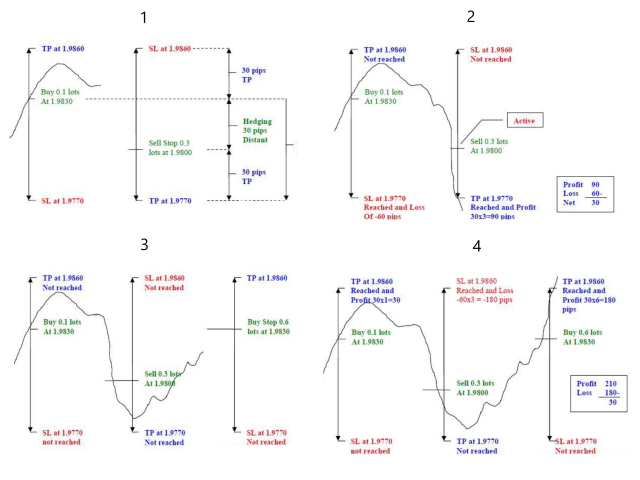
✔ Dynamic hedge recovery logic
-
✔ Virtual Take Profit system
-
✔ Progressive lot management
-
✔ Volume limit protection (broker compliant)
-
✔ Stable lot reset after cycle close
-
✔ Optimized position cache engine (low CPU usage)
🔹 Trading Logic
The EA uses a structured hedge approach:
• Initial stable entry logic
• Progressive recovery based on market movement
• Virtual TP management per cycle
• Automatic cycle reset after full close
The system is designed to avoid unnecessary calculations and maintain efficient execution even on VPS environments.
🔹 Risk Disclaimer (important for long-term reputation)
This is a hedge recovery system.
Proper lot sizing and risk control are essential.
The EA does not guarantee profits and should be used with responsible risk management.
🔹 Recommended Usage
Default set is optimized for XAUUSD M5.
Best performance achieved with disciplined lot settings and controlled exposure.
🆕 Trading Modes
Version 5.5 introduces four selectable operating modes:
Auto
Fully automated trading with fixed Take Profit defined by the user.
Auto ATR
Fully automated trading with dynamic Take Profit calculated using ATR (14), adapting to current market volatility.
Manual
Manual entries via dashboard buttons with fixed Take Profit.
No automatic first entry.
Manual ATR
Manual entries with dynamic ATR-based Take Profit.
All manual trades respect the trading session filter.
🎛 Integrated Dashboard
The EA includes an optimized control panel with:
-
BUY and SELL buttons
-
Pause / Resume control
-
Close All positions button
-
Real-time status display:
-
ACTIVE
-
OUT OF SESSION
-
WAITING SIGNAL
-
-
Daily profit display with account currency symbol
-
Visual TP and BE levels on chart
The interface is lightweight and VPS optimized.
⚡ Performance Optimization
-
Optimized OnTick structure for reduced CPU usage
-
Position cache system to minimize internal loops
-
Timed UI updates to avoid unnecessary refresh
-
Instant multi-position closure with MagicNumber filtering
Designed for stability even when running on multiple charts.
🛡 Risk Management Features
-
Equity Hard Stop (percentage-based drawdown control)
-
Minimum Free Margin protection
-
Maximum orders per cycle
-
Trading session time filter
-
Optional “Trade only on new bar” function
Full control over exposure and trading behavior.
⚙ Take Profit Options
-
Fixed TP (user defined)
-
ATR-based dynamic TP
Allows adaptation to different market conditions without changing core parameters.
Important
This product does not guarantee profits.
Automated trading involves risk, especially when using multi-position or progressive lot strategies.
Always test on demo before using on a live account.

































I have started using this EA again after version upgrading. It works since this time EA closes all orders together at once. EA can make good profit with optimized setting. The support is also very good.