AurumGamma Gold Options Gamma Levels
- Yardımcı programlar
-
Zakariya El Alj
 Founder of AurumGamma — gold market analytics built on institutional options and positioning data.
What I build for MetaTrader 5 traders:
• Gamma exposure levels for gold (XAUUSD / GC): Call Wall, Put Wall, Zero Gamma Flip and High-OI strike, computed from CME COMEX gold options open interest - Sürüm: 1.0
- Etkinleştirmeler: 5
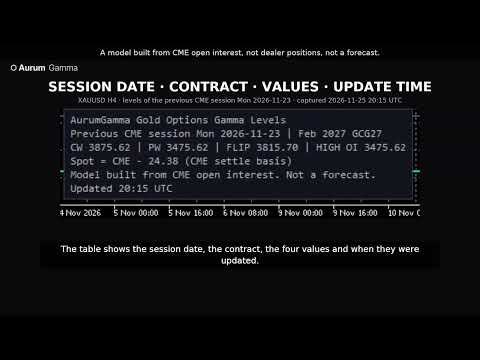
AurumGamma Gold Options Gamma Levels draws four price levels for gold on your MetaTrader 5 chart. They come from a model built from CME gold option open interest and settlement prices of the previous CME session. They are reference levels, not a forecast and not trading advice. The levels are computed by AurumGamma each morning from data that CME Group publishes: the daily open interest and settlement prices of COMEX gold options and gold futures.
The four levels
Call wall: the strike at or above the futures settle with the largest call gamma exposure in the model.
Put wall: the strike at or below the futures settle with the largest put gamma exposure in the model.
Gamma flip: the price nearest the settle where the model's total net gamma exposure changes sign.
High open interest strike: the strike with the most open contracts (calls plus puts).
A small table shows the CME session the levels belong to (date and futures contract), the four values in your chart's prices, how they were converted and when they were last updated.
Prices on your chart
On spot gold symbols (names containing XAU or GOLD) the CME futures values are converted with the CME settle basis of that session (futures settle minus spot at the settle). On GC and MGC futures symbols the CME values are shown unchanged; they belong to the contract named in the table, which can be a later month than your chart's contract. The Broker Price Offset input adds a fixed amount if your broker's gold price differs from the market.
Updates
The utility loads the levels when it starts and then every 60 minutes (minimum 30). New levels are published once a day, the morning after each CME session. If an update fails, the table says so and keeps the last levels. After 4 days without a newer session (long weekends, CME holidays) the lines stay and the table says it is waiting for a newer file; levels older than 7 days are removed and the table says why. If the data does not pass its checks, nothing is drawn.
Setup (required once)
MetaTrader 5 only lets a program download data from addresses you allow:
1. Tools > Options > Expert Advisors.
2. Tick "Allow WebRequest for listed URL".
3. Add https://aurumgamma.cloud and press OK.
4. Drag the utility onto an XAUUSD, GOLD, GC or MGC chart.
Without step 3 the table shows the setup line and nothing else.
Strategy Tester
Downloads do not run in the Strategy Tester, so the tester shows one built-in sample session (2026-11-20), marked as a sample in the table.
Inputs
Refresh Interval (minutes, minimum 30); Broker Price Offset; Allow Other Symbols; Show Levels Table; Levels Table Position; Show Level Labels at the Right Edge; Auto-adapt Colors to Dark / Light Charts; Call Wall Color; Put Wall Color; Gamma Flip Color; High Open Interest Strike Color; Line Width.
Known limits: the levels are those of the previous CME session; four levels only; the table and labels are in English. The utility does not open, modify or close any position. Questions and support: through the comments of this product or MQL5 private messages.