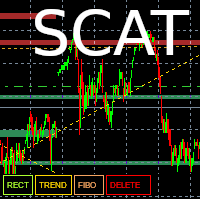
Shared Chart Analysis Tool

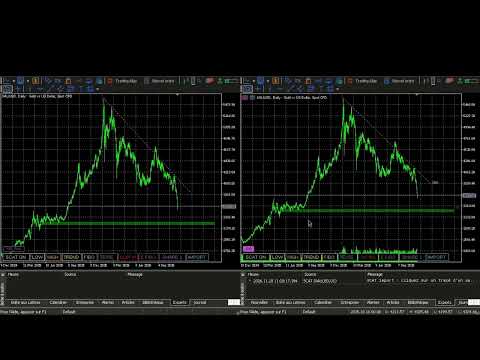
SCAT (Shared Chart Analysis Tool) shares your chart analysis live with your other accounts and your trading group, and keeps it.

DRAW IN ONE CLICK
- LOW / HIGH: support and resistance zones (filled rectangles, one colour each).
- TREND: trend lines.
- FIBO: Fibonacci retracement with 38.2 / 50 / 61.8 / 100 levels.
- E-FIBO: 3-point Fibonacci expansion.
- TEXT: notes typed directly on the chart (double-click to edit).
- DELETE: removes the selected drawing.
A live preview follows the mouse while you draw; the active tool button lights up; click it again to cancel.

YOUR ANALYSIS IS NEVER LOST
Every drawing is saved per symbol and per broker and comes back after a timeframe change or a terminal restart. One file per template lets you keep separate analyses (e.g. demo and real accounts). Charts of the same symbol stay in sync: draw on M5, see it on H1 instantly. Drawings stay visible on every timeframe, even when they start before the loaded history or reach far into the future.

SHARE YOUR ANALYSIS LIVE
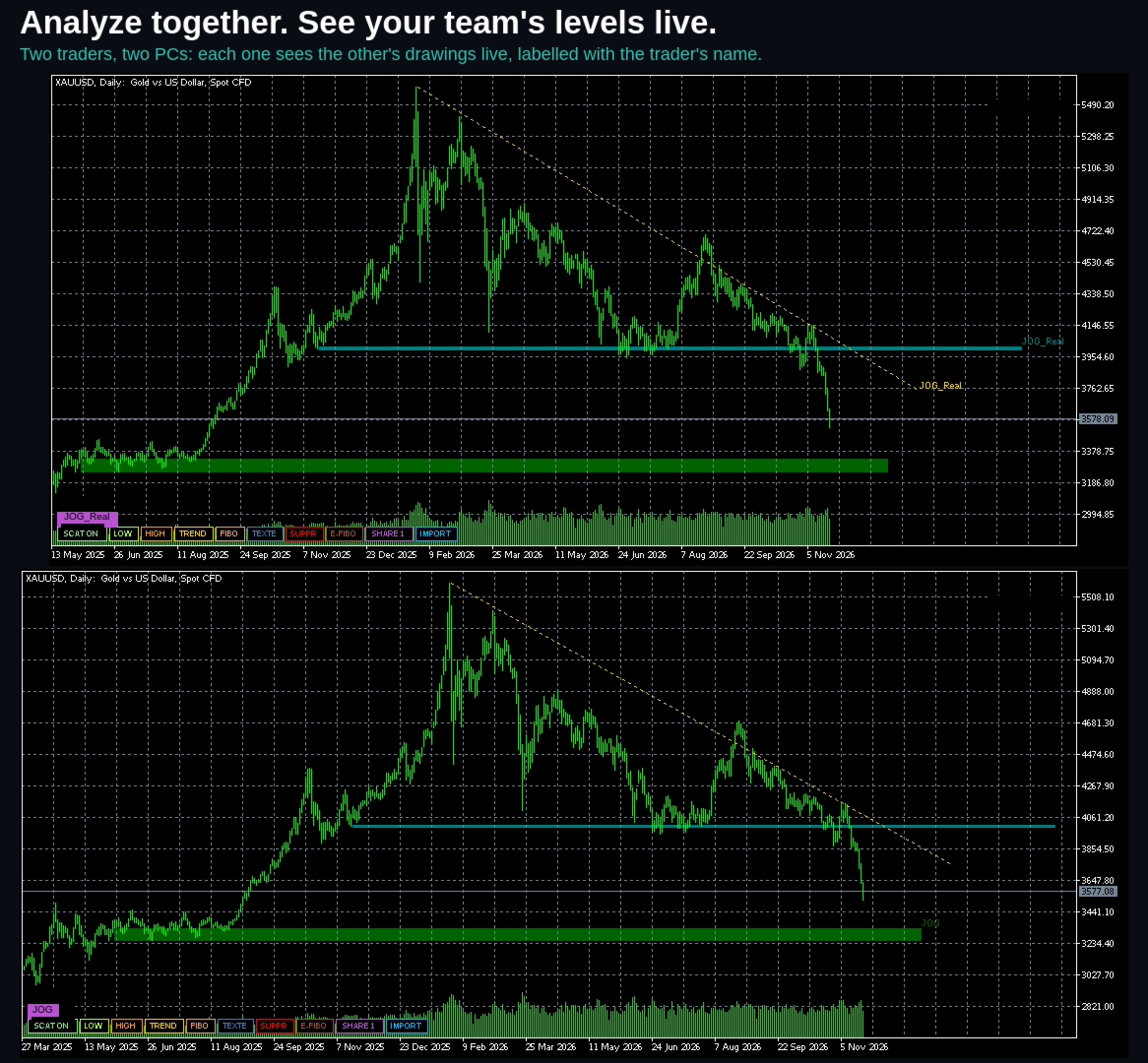
With a synchronised folder (free tool such as Syncthing, PC to PC, no server), each trader publishes his analysis and sees the others' within seconds:
- one SHARE button turns sharing on or off for all your charts;
- one button per trader shows who is online and lets you show or hide his drawings;
- optional colour per trader, and even per tool (e.g. Paul in blue, his LOW zones in orange);
- IMPORT copies a trader's drawing into your own analysis, in your colours; each trader can forbid import of his drawings.
Shared drawings keep their author's look, are labelled with his name and cannot be moved by mistake.

GOOD TO KNOW

- Works on any symbol and timeframe; shared drawings are shown for the same symbol at the same broker.
- No DLL, no web requests: everything stays in your terminal files and the shared folder.
- Sharing is optional: SCAT is a complete drawing tool on its own.
- The SCAT ON / OFF button (or the C key) hides or shows all your drawings; the choice is kept when you change timeframe or symbol.
- Buttons and tooltips in English or French, following the terminal language.
- While a drawing is selected, the SL / TP lines of your positions cannot be dragged by mistake.


/**********************************************************************************************************************************************/

SCAT — Sharing chart analysis with Syncthing: Windows and Linux setup


How it works

With SCAT (Shared Chart Analysis Tool), each trader sees the other traders' SCAT drawings on their own charts, a few seconds after they are made, through a folder kept in sync by Syncthing.

  • Publishing: each time you draw, move or delete a figure, your SCAT copies your analysis file into the SCAT_Share folder as <your name>.csv .
  • Syncing: Syncthing copies this folder to the other members' PCs, directly from PC to PC, with no server and no online account.
  • Display: every 5 seconds, each SCAT checks whether another member's file has changed. If so, it redraws that member's figures as they drew them (same colors and levels), with the trader's name, read-only.

Three conditions to see another member's drawings:

  1. Same broker: SCAT only shows drawings made with the same broker as you (same account company), so the quotes match.
  2. Same symbol name: US30.cash and US30 are two different symbols for SCAT.
  3. A unique name per trader: two members with the same name would write the same file and overwrite each other.

Requirements

Item

Details

MetaTrader 5

Installed and logged in to an account. On Linux, MT5 runs under Wine.

SCAT

Version 2.22 or later, SCAT.ex5 file copied into MQL5\Indicators .

Broker

The same for every member of the group.

Syncthing

Free and open source, to install on each PC (step 1).

Network

Internet on each PC. The PCs do not need to be on at the same time: files update as soon as two PCs are online.

Allow 15 minutes per PC, plus 2 minutes per member to link.

Step 1 — Install Syncthing on Windows

We use “Syncthing Windows Setup”, the installer listed on the official website: it installs Syncthing for your account and starts it at every logon.

  1. Open github.com/Bill-Stewart/SyncthingWindowsSetup/releases/latest, Assets section, and download the .exe installer.
  2. Run it and keep the default choices: install for the current user, start at logon.
  3. When the installer offers to create a Windows Firewall rule, accept (administrator rights required). Without it, the other PCs cannot connect directly to yours.
  4. At the end, open the Syncthing interface: “Syncthing Configuration Page” shortcut in the Start menu, or http://127.0.0.1:8384 in your browser.
  5. If the interface shows a “GUI Authentication” warning, set a user name and password in Actions > Settings > GUI.

Alternative: download the “Intel/AMD (64-bit)” zip from syncthing.net/downloads, unzip it and run syncthing.exe ; you then have to set up automatic start yourself (Task Scheduler or the shell:startup folder).

Step 1 — Install Syncthing on Linux (Debian, Ubuntu)

We install Syncthing from its official repository (current version) and run it as a service of your user, started at every logon.

  1. Add the official key and repository, then install:

sudo mkdir -p /etc/apt/keyrings

sudo curl -L -o /etc/apt/keyrings/syncthing-archive-keyring.gpg https://syncthing.net/release-key.gpg

echo "deb [signed-by=/etc/apt/keyrings/syncthing-archive-keyring.gpg] https://apt.syncthing.net/ syncthing stable-v2" | sudo tee /etc/apt/sources.list.d/syncthing.list sudo apt-get update sudo apt-get install syncthing

  1. Start Syncthing now and at every logon (without sudo ):

systemctl --user enable --now syncthing.service systemctl --user status syncthing.service

  1. Open the interface: http://127.0.0.1:8384 in your browser. If a “GUI Authentication” warning appears, set a user name and password in Actions > Settings > GUI.
  2. Firewall: if ufw is active, open the sync ports with sudo ufw allow syncthing .

Simpler but sometimes older: sudo apt install syncthing with the distribution's package, then points 2 to 4.

Ports to open in the firewall (Windows and Linux, inbound and outbound): useful with a firewall other than Windows Firewall or ufw (nftables, firewalld, antivirus), or on a corporate network.

Port

Protocol

Purpose

Open?

22000

TCP

Sync

Yes

22000

UDP

Sync (QUIC)

Yes

21027

UDP

Discovery of PCs on the local network

Yes

8384

TCP

Syncthing web interface

No: it stays on 127.0.0.1

sudo ufw allow syncthing opens the first three;

do not enable the syncthing-gui profile, it is not needed here.

Without 21027/UDP, Syncthing still works through its discovery and relay servers (slower).

Source: Syncthing — Firewall Setup.

Step 2 — Create the SCAT_Share folder

The shared folder is SCAT_Share , inside the common MetaTrader 5 folder ( Terminal\Common\Files ), the same for all your MT5 terminals.

System

Path of the folder to create

Windows

%APPDATA%\MetaQuotes\Terminal\Common\Files\SCAT_Share

Linux (Wine, default prefix)

~/.wine/drive_c/users/<your user>/AppData/Roaming/MetaQuotes/Terminal/Common/Files/SCAT_Share

  • Windows: paste %APPDATA%\MetaQuotes\Terminal\Common\Files into the File Explorer address bar, then create the SCAT_Share folder.
  • Linux: mkdir -p ~/.wine/drive_c/users/$USER/AppData/Roaming/MetaQuotes/Terminal/Common/Files/SCAT_Share . If MT5 was installed in another Wine prefix (for example ~/.mt5 ), replace ~/.wine with that prefix.
  • To find the path from MT5: File > Open Data Folder, go up one level ( Terminal folder), then open Common\Files .

SCAT also creates this folder by itself on the first publish; creating it beforehand lets you give it to Syncthing right away.

Step 3 — Link the PCs and share the folder

Each PC has an identifier (Device ID); two PCs sync once each one has added the other.

On every PC: get its ID

  1. Actions > Show ID: copy the long string of letters and send it to the other members (message, email).

On the organizer's PC: create the share

  1. Add Remote Device for each member: paste their ID, give it a name (their first name), save.
  2. Add Folder:
    • Folder Label: SCAT_Share
    • Folder ID: scat-share — the same for everyone
    • Folder Path: the path from step 2
    • Sharing tab: tick all members
    • File Versioning tab: No File Versioning
  3. Save.

On each member's PC: accept

  1. A banner offers to add the organizer's device: Add. Tick Introducer: your PC will then be linked automatically to the other members the organizer knows.
  2. A second banner offers the SCAT_Share folder: Add, then replace the Folder Path with your own path from step 2 before saving.

The folder turns Up to Date once the PCs are connected.

Step 4 — Tune Syncthing for fast sharing

By default, Syncthing waits 10 seconds after a change before sending the file; we lower this delay to 1 second on this folder only.

  1. Actions > Advanced: a warning reminds you to change only what you understand.
  2. Folders section, open SCAT_Share .
  3. Fs Watcher Delay S: replace 10 with 1 . Check that Fs Watcher Enabled is ticked.
  4. Save.

Do this on every PC. With this setting and SCAT checking every 5 seconds (step 5), a drawing shows up on the other PCs in under 10 seconds when they are online.

Step 5 — Turn on sharing in SCAT

Sharing is set once for all charts of the terminal: a name in the settings of one chart, then one click on the SHARE button.

Setting

Where

Value

Your name

SCAT inputs (Ctrl+I > SCAT > Edit), on one chart only

Your first name, unique in the group. It applies to all your charts.

Turn sharing on

SHARE button, on any chart

One click: SHARE (purple) = on for all charts; SHARE off (grey) = off everywhere.

Shared folder

SCAT inputs

SCAT_Share (default value, the folder from step 2).

Refresh (s)

SCAT inputs

5 seconds (minimum 2) between two checks of the other members' files.

Leave the name empty on the other charts: they take the common name automatically. If you change your name, SCAT removes the old published file from the shared folder.

Turning sharing off stops publishing and hides the other members' drawings on all your charts; your published file is removed from the shared folder, and the other members no longer see your drawings until you turn it back on.

Choose whom to display: above the SCAT buttons, one button per member shows their name, followed by “(2 h ago)” when they are offline. Button lit: their drawings are shown; one click hides them, a second click shows them again. You can look at a single member or overlay several. The choice applies to all charts of your account. The SHARE 2 button means two other members are online: a member is online when their MT5 is open with SCAT and sharing on (their SCAT drops a <name>.presence file every minute; they go offline after 3 minutes without news). PC clocks must be on time.

Choose the other members' colors (optional): by default, a member's drawings keep their own colors. Turn on Trader colors and write your rules in Color rules , separated by a comma or a semicolon. This setting only changes your display: the others see your drawings in your colors.

Rule

Effect

Paul=Blue

all of Paul's drawings in blue, even if exceptions are written next to it

(Paul=Blue), Paul_LOW=clrOrange

Paul in blue by default, his LOWs in orange (the parentheses allow exceptions)

Paul_LOW=clrOrange

only Paul's LOWs in orange, the rest in his colors

Tools: _LOW , _HIGH , _TREND , _FIBO , _TEXT , _EFIBO . Colors: clrOrange , Orange or 255,128,0 . To go back to “all in blue”, just remove the parentheses.

Import another member's drawings: click IMPORT (the button lights up), then click a displayed drawing of another member to copy that figure, or the button with their name to copy all their drawings on the displayed symbol. Copied figures become yours and take your SCAT colors, as if you had drawn them: you can move, edit or delete them, and they are published with your analysis. A hidden member cannot be imported, and a figure already imported is not copied twice. Each member can forbid imports of their own drawings with the Allow import input (allowed by default): their button tooltip then says so. The result is shown in the MT5 Experts tab.

Two-person check

Sharing works when a drawing by A shows up on B's chart, with A's name, in under 10 seconds.

  1. A and B open a chart of the same symbol, with the same broker, with SCAT set up as in step 5.
  2. A draws a LOW (rectangle).
  3. In B's SCAT_Share folder, the file <A's name>.csv appears or its time changes.
  4. On B's chart, A's rectangle shows up: same look as on A's chart, with A's name at its end. It cannot be selected: B can neither move nor delete it.
  5. A moves the rectangle: it moves on B's chart a few seconds later.
  6. B clicks SHARE: A's rectangle disappears; click again, it comes back.

Troubleshooting

Symptom

Likely cause

Fix

The other member's file is in SCAT_Share but nothing shows

Different broker, or different symbol name ( US30.cash / US30 )

Use the same broker and symbol as them.

The other member's file does not arrive

PCs not linked, or folder not accepted

In Syncthing, the device must be Connected and the folder Up to Date; otherwise redo step 3.

The device stays Disconnected

Firewall or corporate network

Accept the firewall rule (Windows) or sudo ufw allow syncthing (Linux). Syncthing then goes through a relay if a direct connection is impossible.

My own drawings do not show up for the others

Sharing off (SHARE off), or wrong folder

SHARE button purple (on) and Shared folder = SCAT_Share ; a <your name>.csv file must be in the folder.

A .sync-conflict file appears

Two members with the same name

Give each member a unique name ( Your name ), then delete the conflict file.

Drawings take more than 10 seconds to arrive

Syncthing delay left at 10 seconds

Redo step 4 on every PC.

Önerilen ürünler
CosmiCLab SMC FIBO CosmiCLab SMC FIBO is a professional trading indicator designed for traders who use Smart Money Concepts (SMC), market structure analysis and Fibonacci retracement levels. The indicator automatically detects market swings and builds Fibonacci levels based on the latest impulse movement. It also identifies market structure changes such as BOS (Break of Structure) and CHOCH (Change of Character), helping traders understand the current market direction. CosmiCLab SMC FIBO also pr
RBreaker
Zhong Long Wu
RBreaker Gold Indicators is a short-term intraday trading strategy for gold futures that combines trend following and intraday reversal approaches. It not only captures profits during trending markets but also enables timely profit-taking and counter-trend trading during market reversals. This strategy has been ranked among the top ten most profitable trading strategies by the American magazine   Futures Truth   for 15 consecutive years. It boasts a long lifecycle and remains widely used and st
Momentumu daha net görün ve birden fazla piyasayı izlemeye yönelik araçlardan yararlanın. WaveTrend SuperSmoother Signals PRO, MetaTrader 5 için yumuşatılmış bir WaveTrend osilatörü, filtrelenmiş Buy/Sell sinyalleri ve tıklanabilir bir piyasa tarayıcısı sunar. Grafiğinizde momentumu inceleyin, sinyalleri daha yüksek bir zaman dilimiyle uyumlu hale getirin ve ilgilenmeniz gereken piyasalara doğrudan geçin. PRO, WaveTrend SuperSmoother Signals IRABC ile aynı sinyal motorunu kullanır ve iki pratik
Gold Pullback Signals marks bullish and bearish pullback breakouts on an M30 chart. It compares the signal candle with the preceding three candles, checks the direction of the last completed H1 candle against its moving average and recent trend, and scales its entry filters and stop buffer to recent volatility. It was evaluated on XAUUSD. The indicator displays setups and sends optional alerts. It does not place orders. Arrow direction identifies a long or short setup. Arrow color grades the co
STRICTLY FOR BOOM INDEX ONLY!!!!! Here I bring the Maximum Trend Arrows OT1.0 MT5 indicator. This indicator is made up of a combination of different trend indicators for entries and exits, for entries an orange arrow will paint on the chart below the current market and a red flag for closing of trades and it produces buy arrows only. When the orange arrow appears, it will appear along with it's sound to notify you. The 1H timeframe is recommended, don't use it anywhere else than on the 1H timefr
Noize Absorption Index - is the manual trading system that measures the difference of pressure between bears forces and bulls forces. Green line - is a noize free index that showing curent situation. Zero value of index shows totally choppy/flat market.Values above zero level shows how powerfull bullish wave is and values below zero measures bearish forces.Up arrow appears on bearish market when it's ready to reverse, dn arrow appears on weak bullish market, as a result of reverse expectation.
HAS RSI Signal — Otomatik SL/TP Hesaplamalı Profesyonel Trend Göstergesi HAS RSI Signal , kanıtlanmış klasik yöntemleri modern gürültü filtreleme algoritmalarıyla birleştiren güçlü bir ticaret aracıdır. Gösterge, piyasayı Heiken Ashi Smoothed (HAS) mumları ve RSI osilatörü merceğinden analiz ederek, trend dönüşlerinde veya aşırı alım/satım bölgelerinden çıkışlarda yatırımcıya net giriş sinyalleri sağlar. Temel Avantajlar: Çift Filtreleme: Heiken Ashi Smoothed kullanımı piyasadaki "gürültüyü" ort
Trend Monitor MT5
Pavel Zamoshnikov
4.5 (2)
The indicator generates early signals basing on ADX reading data combined with elements of price patterns. Works on all symbols and timeframes. The indicator does not redraw its signals. You see the same things on history and in real time. For better visual perception signals are displayed as arrows (in order not to overload the chart). Features The best results are obtained when the indicator works on two timeframes. For example: M30 – the indicator shows the main trend; M5 – the indicator gen
VWAP Analytics Advanced Suite for MetaTrader 5 Gain institutional-grade market insight with the VWAP Analytics Advanced Suite , a professional Volume Weighted Average Price indicator built exclusively for MetaTrader 5. This tool goes beyond a simple VWAP line; it is a complete analytical ecosystem designed to identify trend bias, measure market deviation, and provide high-probability entry and exit signals with precision timing. Whether you are a day trader, scalper, or swing trader, this su
AURUM Chart Patterns (XAUUSD) Chart pattern and local trendline indicator for gold. It finds 13 classic patterns and draws rising support and falling resistance lines while they are still forming, before the breakout . Confirmed swing points and lines are fixed and never move to fit later price. [Please leave a review if you find the indicator useful and how we can improve it further] Patterns (each with its own on/off switch) Ascending, descending and symmetrical triangles Ascending and descend
Structure King AI Signal Structure King AI Signal is a professional MetaTrader 5 trading indicator designed to help traders analyze market structure, trend direction, multi-timeframe confirmation and trade management from one clean dashboard. Key Features • Market Structure & Trend Analysis • BUY / SELL Signals • Multi-Timeframe (HTF) Confirmation • Entry Price Levels • Dynamic Stop Loss (SL) • TP1 / TP2 / TP3 Levels • ATR Volatility Analysis • ADX Trend Strength Filter • Adaptive Market Filter
Heiken_Ashi_Bars - MT5 için Gelişmiş Trend Görselleştirici Genel Bakış Heiken_Ashi_Bars , piyasa gürültüsünü filtrelemek ve temel trendi vurgulamak için tasarlanmış güçlü, görsel olarak sezgisel bir özel göstergedir (indicator). Geleneksel mum grafikler genellikle düzensiz olabilir. Bu gösterge fiyat verilerinin ortalamasını alarak fiyat hareketini pürüzsüzleştirir, böylece trend devamlılıklarını, geri dönüşleri ve karlı giriş bölgelerini tespit etmeyi çok daha kolay hale getirir. Temel Özellikl
Caicai L&S Yield Histogram Important Notice: This indicator is an integral tool of the automated EA Caicai Long and Short Pair Trading . This indicator visually displays the percentage deviation (Yield %) of a pair's current spread relative to its own historical mean. It is an excellent tool for quickly visualizing the gross financial potential of a market distortion in Long & Short operations. Main Features: Percentage Visualization: Understand the size of the distortion in palpable percentage
Professional Renko Chart MT5 Professional Renko Chart MT5, Renko tuğlalarını ayrı bir gösterge penceresinde görüntülemek için tasarlanmış temiz bir MetaTrader 5 Renko grafik göstergesidir. Ayrıca isteğe bağlı olarak Renko kutularını doğrudan ana fiyat grafiği üzerinde de görselleştirebilir. Bu gösterge, MetaTrader 5 içinde tanıdık bir Renko grafik stili kullanmak isteyen yatırımcılar için geliştirilmiştir. TradingView gibi popüler modern grafik platformlarında bulunan Renko grafik görünümüne ben
Your Trend Friend
Luigi Nunes Labigalini
5 (1)
The trend is your friend! Look at the color of the indicator and trade on that direction. It does not  repaint. After each candle is closed, that's the color of the trend. You can focus on shorter faster trends or major trends, just test what's most suitable for the symbol and timeframe you trade. Simply change the "Length" parameter and the indicator will automatically adapt. You can also change the color, thickness and style of the lines. Download and give it a try! There are big movements w
HMA Trend Professional MT5
Pavel Zamoshnikov
4.25 (4)
Improved version of the free HMA Trend indicator (for MetaTrader 4) with statistical analysis. HMA Trend is a trend indicator based on the Hull Moving Average (HMA) with two periods. HMA with a slow period identifies the trend, while HMA with a fast period determines the short-term movements and signals in the trend direction. The main differences from the free version: Ability to predict the probability of a trend reversal using analysis of history data. Plotting statistical charts for analyzi
An indicator of pattern #31 ("Long Island") from Encyclopedia of Chart Patterns by Thomas N. Bulkowski. The second gap is in the opposite direction. Parameters: Alerts - show alert when an arrow appears   Push - send a push notification when an arrow appears (requires configuration in the terminal) GapSize - minimum gap size in points ArrowType - a symbol from 1 to 17 ArrowVShift - vertical shift of arrows in points   ShowLevels - show levels ColUp - color of an upward line ColDn - color of a d
Inverted_Chart_EA Utility Expert Advisor Inverted_Chart_EA creates and maintains a mirror-inverted chart of any symbol and timeframe. It automatically generates a custom instrument (e.g. US30_INV ) and keeps its price history updated in real time, with bars mirrored around a chosen pivot. This utility gives traders a new way to analyze the market from a different perspective by flipping the chart upside down. Why use an inverted chart? Highlight hidden patterns – price formations that look ordin
The Rainbow Dragon Indicator by Quant Atlas Creator:  https://www.quant-atlas.com/ The Rainbow Dragon is a composite signal engine that aggregates the seven Rainbow indicators — Blue, Green, Indigo, Red, Violet, Yellow, and Orange — into a single confluence-based reading. Rather than relying on any one model, it treats each Rainbow component as an independent voter and fires only when enough of them agree, giving you a diversified, multi-method read on the market instead of a single point of vie
Ortalama geri dönüş ticareti için profesyonel ve nicel bir yaklaşım uygulayan benzersiz gösterge. Fiyatın tahmin edilebilir ve ölçülebilir bir şekilde ortalamaya döndüğü ve yön değiştirdiği gerçeğinden yararlanır, bu da nicel olmayan ticaret stratejilerinden büyük ölçüde daha iyi performans gösteren net giriş ve çıkış kurallarına izin verir. [ Installation Guide | Update Guide | Troubleshooting | FAQ | All Products ] Ticaret sinyallerini temizle Ticaret yapmak inanılmaz derecede kolay Özelleşt
NQX Smooth Trend Flip Weekly Bias, MetaTrader 5 için bir sinyal göstergesidir: yumuşatılmış trend dönüşü sinyalleri (yalnızca haftalık eğilim yönünde sinyal verir). Bir hareketin ardından yumuşatılmış mumların renk değiştirmesini tespit eden özel NQX mantığı. Yalnızca haftalık eğilim yönünde sinyal verir. Önerilen girişi, kısa bir stopu ve uzak hedefleri (3:1, 5:1, 10:1, swing'de 20:1'e kadar) çizer; kararı siz verirsiniz. Grafikte neler çizer - Kapanmış sinyal mumunun üzerinde bir ok (kapanmış
NQX Range Edge Hook Weekly Bias, MetaTrader 5 için bir sinyal göstergesidir: aralık kenarı kancası sinyalleri (yalnızca haftalık eğilim yönünde sinyal verir). Fiyatın son aralığının kenarından ayrılmasını mum ile teyit edilmiş şekilde tespit eden özel NQX mantığı. Yalnızca haftalık eğilim yönünde sinyal verir. Önerilen girişi, kısa bir stopu ve uzak hedefleri (3:1, 5:1, 10:1, swing'de 20:1'e kadar) çizer; kararı siz verirsiniz. Grafikte neler çizer - Kapanmış sinyal mumunun üzerinde bir ok (kapa
EMA256 Fourier Cycle Trader EMA256 Fourier Cycle Trader is an advanced MetaTrader 5 Expert Advisor combining a long-term EMA or TEMA trend model, causal Fourier cycle analysis, configurable averaging and a unified basket take-profit system. The Expert Advisor is designed primarily for CENT accounts and for traders who understand basket recovery strategies, geometric lot progression and the risks associated with trading without a mandatory Stop Loss. RECOMMENDED STARTING CONFIGURATION Recommended
GOLD FIBONACCI SNIPER M5 Description GOLD FIBONACCI SNIPER M5 is a professional MetaTrader 5 indicator specially developed for XAUUSD (Gold) on the M5 timeframe. The indicator uses Fibonacci retracements combined with trend analysis, volatility filters, candle rejection patterns, and market strength confirmation to identify high-probability entry opportunities. The system automatically detects retracement zones between the 38.2, 50, and 61.8 Fibonacci levels, which are commonly considered instit
What Is Trend Master Pro? Trend Master Pro   is a professional-grade trend trading indicator built for MetaTrader 5. It was designed with one goal in mind — to keep you on the right side of the market at all times by combining three powerful technical tools into a single, clean, easy-to-read display directly on your price chart. Instead of cluttering your screen with multiple separate indicators, Trend Master Pro fuses an   EMA Ribbon trend filter , a   ZigZag swing point engine , and a   breako
SMC Indicator BOS & CHoCH analyze market structure using Smart Money Concepts The indicator combines BOS (Break of Structure), CHoCH (Change of Character), Fair Value Gaps (FVG), Liquidity Sweep logic and ATR filtering to provide a structured view of market movements and potential trading opportunities. The indicator automatically identifies swing highs and swing lows and monitors structural breaks in the market. BOS (Break of Structure) identifies potential continuation of the current market st
Candle Fusion Pro
Martin Alejandro Bamonte
Candle Fusion Pro — Formasyon Tanıma + Trend Filtresi + Momentum Filtresi (Repaint Yok) Güçlü mum formasyonlarını tespit edin ve trend ile momentum analizini canlı olarak yaparak güvenilirliğini doğrulayın. Candle Fusion Pro , fiyat hareketi hassasiyetine , trend yapısına ve çok katmanlı onaylara güvenen traderlar için nihai görsel araçtır. Temel Özellikler Formasyona Dayalı Giriş : 10'dan fazla gelişmiş Japon mum formasyonu algılar: Yıldız kayması (seviye 2, 3, 4) Boğa / Ayı Yutan Mumlar Saba
Divergent Stochastic Filter II Catch Reversals Early, Filter Noise, Trade with Confidence The Edge: Why This Stochastic is Different  Every trader knows the Stochastic oscillator. But knowing when to trust its signals, that's the real challenge. The Divergent Stochastic Filter II transforms this classic indicator into a precision reversal detection system by adding critical elements: divergence intelligence, signal filtering and exhaustion detection.  While standard Stochastic oscillators fire s
BlueBoat – Prime Cycle is a technical indicator for MetaTrader 5 that visualizes market cycles based on the Fimathe cycle model (Marcelo Ferreira) . It identifies and displays historic and live cycle structures such as CA, C1, C2, C3, etc., helping traders understand the rhythm and timing of price movement across multiple sessions. This tool is ideal for manual analysis or as a supporting signal in discretionary strategies. Key Features Historical Cycle Analysis – Backtest and visualize as many
C88 Projected Candle See the Bigger Picture Before the Candle Closes C88 Projected Candle is a professional market visualization indicator that projects the current higher timeframe candle directly onto your active chart. It helps traders understand the evolving market structure without constantly switching between timeframes. Whether you trade Price Action, ICT, Smart Money Concepts (SMC), or Volume Profile, this indicator provides a cleaner and more intuitive way to read market context. Key Fe
Bu ürünün alıcıları ayrıca şunları da satın alıyor
Trend Sniper X
Sarvarbek Abduvoxobov
4.87 (46)
Trend Sniper X , tüccarların trend yönünü ve olası dönüş noktalarını netlik ve hassasiyetle belirlemelerine yardımcı olan MetaTrader 5 için çoklu zaman dilimli bir trend takip göstergesidir. MT4 için: https://www.mql5.com/en/market/product/193245 Fiyat Bilgisi: Mevcut fiyat tanıtım amaçlıdır ve gelecek güncellemeler ile yeni özellikler yayınlandıkça değişebilir. Bonus Fırsatı: Bu indikatör için ÜCRETSİZ Oto-Trade Assistant EA'yı almak için lütfen satın aldıktan sonra yazara mesaj gönderin. Code
ScalpPoint
Temirlan Kdyrkhan
ScalpPoint is a powerful trading companion designed to generate high-probability entry signals with dynamic TP/SL/DP levels based on volatility. Built-in performance tracking shows win/loss stats, PP1/PP2 hits, and success rates — all updated live. Key Features: Buy/Sell signals with adaptive volatility bands Real-time TP/SL/DP levels based on ATR Built-in MA Filter with optional ATR/StdDev volatility Performance stats panel (Success, Profit/Loss, PP1/PP2) Alerts via popup, sound, push, or emai
Entry Points Pro, siz emir vermeden önce giriş fiyatını, stop-loss'u, lot büyüklüğünü ve para cinsinden tahmini riski gösteren, repaint olmayan bir MT5 indikatörüdür. Depozitonuzu ve işlem başına riskinizi ayarlayın. Lot büyüklüğünü panel sizin için hesaplar. Ekran görüntüsünde 4357.65 kırılım giriş seviyesi, 4324.53 stop seviyesidir; 0.04 lotla tahmini risk $132 olur. MT5 Strateji Sınayıcı'da ücretsiz deneyin. Entry Points Pro'yu seçin, XAUUSD H1'i belirleyin ve görsel modda başlatın. Satın ald
Şehre yeni bir Kral geldi - Gösterge + Emir Yönetimi göstergeleri (TP1 + TP2 + TP3) + Opsiyonel Telegram Sinyal Gönderici DAHİL (ÜCRETSİZ) (TAM TRADING ve SİNYAL SİSTEMİ) Altın için en iyi EA’mız: Gold Slayer Bu gösterge; gelişmiş bir strateji, özelleştirilebilir emir yönetimine sahip bir trading sistemi ve envelope uzantılarını birleştiren bir mean reversion sistemi içerir. Ayrıca RSI gibi birçok akıllı onay filtresiyle desteklenerek yüksek olasılıklı dönüş girişlerini AL ve SAT sinyalleriyle y
SuperScalp Pro
Van Minh Nguyen
4.5 (38)
SuperScalp Pro - Professional Multi-Layer Confluence Scalping System SuperScalp Pro, klasik Supertrend sistemini birden fazla akıllı doğrulama filtresiyle geliştiren ileri düzey bir scalping göstergesidir. Yanlış sinyalleri önemli ölçüde azaltırken başarı olasılığı daha yüksek Buy/Sell işlem fırsatlarını belirlemenize yardımcı olur. Buy ve Sell okları doğrudan grafik üzerinde net bir şekilde görüntülenir. ATR tabanlı Stop Loss ve Take Profit seviyeleri de gerçek zamanlı olarak otomatik hesaplanı
Ultra Indicator
Ihor Otkydach
5 (1)
ULTRA, “hepsi bir arada” prensibiyle çalışan bir teknik göstergedir; piyasayı bağımsız olarak analiz eder, işlem sinyalleri üretir, stop-loss emirlerinin verileceği seviyeleri gösterir ve kârı garantilemek ya da zararı en aza indirmek için işlemlerin ne zaman kapatılması gerektiğini önerir. Başka bir deyişle, piyasayı nasıl analiz edeceğinizi bilmeseniz, seviyeleri (stop-loss'unuzu nereye koyacağınızı) belirleyemeseniz ya da para yönetimi konusunda zorluk yaşasanız da fark etmez. ULTRA tüm bunla
Gann Made Easy , bay teorisini kullanarak ticaretin en iyi ilkelerine dayanan, profesyonel ve kullanımı kolay bir Forex ticaret sistemidir. WD Gann. Gösterge, Zararı Durdur ve Kâr Al Seviyeleri dahil olmak üzere doğru SATIN AL ve SAT sinyalleri sağlar. PUSH bildirimlerini kullanarak hareket halindeyken bile işlem yapabilirsiniz. Satın alma işleminden sonra, alım satım talimatlarını ve harika ek göstergeleri ücretsiz olarak almak için lütfen benimle iletişime geçin! Muhtemelen Gann ticaret yöntem
FX Power MT5 NG
Daniel Stein
5 (32)
FX Power: Daha Akıllı Ticaret Kararları için Para Birimlerinin Gücünü Analiz Edin Genel Bakış FX Power , her piyasa koşulunda başlıca para birimlerinin ve altının gerçek gücünü anlamak için vazgeçilmez bir araçtır. Güçlü para birimlerini alıp zayıf olanları satarak, FX Power ticaret kararlarınızı basitleştirir ve yüksek olasılıklı fırsatları ortaya çıkarır. İster trendlere sadık kalın ister Delta'nın aşırı değerlerini kullanarak tersine dönüşleri öngörün, bu araç ticaret tarzınıza mükemmel bir
The Oracle Pro
Ottaviano De Cicco
5 (1)
The Oracle Pro: Synthetic Multi-Timeframe Bias Engine for MT5 The Oracle Pro is a premium multi-timeframe bias engine for MetaTrader 5, built for demanding and professional traders. It answers one question with discipline: what is the directional bias on each timeframe right now, how strong is it, and how much do the timeframes agree? Everything is computed on closed bars only - no repainting. The Oracle Pro is a multi-factor consensus system. It combines proprietary indicators and optimized alg
Çoklu Para Birimi Güç ve Momentum Göstergesi MT5 Dynamic Forex28 Navigator, uzun süredir popüler olan göstergelerimizin evrimidir ve beşinin gücünü bir arada sunar: Advanced Currency Strength28 Indicator (700 inceleme) Advanced Currency IMPULSE with ALERT (530 inceleme) Currency Strength EXOTICS GOLD Impulse with Alert CS28 Combo Signals (son Bonus) Dört gösterge satın alıp grafiklerinizde üst üste yığmanıza gerek yok. Hepsi tek bir güçlü göstergede birleşiyor: 28 Forex paritesinin gücü, onları
FX Trend MT5 NG
Daniel Stein
5 (6)
FX Trend NG: Yeni Nesil Çoklu Piyasa Trend Zekâsı Genel Bakış FX Trend NG , çoklu zaman dilimlerinde çalışan profesyonel bir trend analiz ve piyasa izleme aracıdır. Piyasanın yapısını saniyeler içinde anlamanızı sağlar. Birden fazla grafik arasında geçiş yapmak yerine, hangi enstrümanların trendde olduğunu, momentumun nerede zayıfladığını ve hangi zaman dilimlerinin uyumlu olduğunu anında görebilirsiniz. Lansman Teklifi – FX Trend NG sadece $30 (6 Ay) veya $80 Ömür Boyu Lisans ile edinin. Zate
Currency Strength Wizard , başarılı ticaret için size hepsi bir arada çözüm sağlayan çok güçlü bir göstergedir. Gösterge, birden çok zaman dilimindeki tüm para birimlerinin verilerini kullanarak şu veya bu forex çiftinin gücünü hesaplar. Bu veriler, şu veya bu para biriminin gücünü görmek için kullanabileceğiniz, kullanımı kolay para birimi endeksi ve para birimi güç hatları biçiminde temsil edilir. İhtiyacınız olan tek şey, işlem yapmak istediğiniz tabloya göstergeyi eklemektir ve gösterge size
RelicusRoad Pro MT5
Relicus LLC
4.96 (25)
İşlemlerinizi tahminle yapmayı bırakın. Ne zaman gireceğinizi, nereden çıkacağınızı ve piyasanın hangi yöne eğildiğini, hepsini tek grafikte görün. RelicusRoad Pro, neredeyse yirmi aracı tek bir göstergede toplar; işlem tarzınıza uyan araçları açarsınız. Net girişler. Net çıkışlar. Her grafikte bir plan. Tanıdık geliyor mu? Alım yaparsınız, bir dakika sonra fiyat aleyhinize döner. Erken kapatırsınız, sonra hareketin sizsiz devam ettiğini izlersiniz. Grafikte beş gösterge, beş farklı cevap. Zarar
Sonraki Güncelleme — Sürüm 2.52 Çok Yakında! [YENİ] Piyasa Analizinizi ve İşlem Sürecinizi Geliştirmek İçin Tasarlanmış 4 Büyük Yeni Özelliğe Hazır Olun İşlem ihtiyaçlarınızı karşılamak üzere tasarlanmış 4 yeni özellikle piyasa analizini bir üst seviyeye taşıyoruz. İşte yeni özellikler: 1. TRADE OVERVIEW DASHBOARD 2. CONFLUENCE AT ZONE 3. STRONG & WEAK HIGH/LOW 4. OTE 1. TRADE OVERVIEW DASHBOARD Piyasanın genel görünümünü daha kolay anlamanıza yardımcı olan, işlem kararlarınızı desteklemek için
Scalper Vault, gün içi işlemlerde istikrar yakalamak isteyen yatırımcılar için tasarlanmış, güçlü ve tam donanımlı bir alım satım sistemidir. Bu yüksek hassasiyetli gösterge; hem Forex hem de İkili Opsiyon yatırımcıları için kurumsal düzeyde analizler sunan, bağımsız ve eksiksiz bir alım satım sistemi işlevi görür. SATIN ALIM İŞLEMİNDEN SONRA BENİMLE İLETİŞİME GEÇİN; ALIM SATIM İPUÇLARIMI VE HARİKA BİR BONUSU ALIN! Tahmin yürütme zorunluluğunu ve karmaşık manuel analiz süreçlerini ortadan kaldı
M1 Sniper MT5
Oleg Rodin
5 (7)
M1 SNIPER   kullanımı kolay bir işlem göstergesi sistemidir. M1 zaman dilimi için tasarlanmış bir ok göstergesidir. Gösterge, M1 zaman diliminde scalping için bağımsız bir sistem olarak kullanılabilir ve mevcut işlem sisteminizin bir parçası olarak kullanılabilir. Bu işlem sistemi özellikle M1'de işlem yapmak için tasarlanmış olsa da, diğer zaman dilimleriyle de kullanılabilir. Başlangıçta bu yöntemi XAUUSD ve BTCUSD ticareti için tasarladım. Ancak bu yöntemi diğer piyasalarda işlem yaparken de
HyperPOWER
Alfred Charano
HyperPOWER — See the Power. Ride the Trend. Stop guessing direction. See which currency is driving the move, ride the trend and get clean BUY/SELL arrows — all in one beautiful indicator. Full PDF Setup Guide is available :    https://www.mql5.com/en/blogs/post/779799 HyperPILOT EA :  https://www.mql5.com/en/blogs/post/781404 Description Too many indicators. Too many signals. Still no idea where to enter? HyperPOWER replaces the clutter with one clear answer: who is strong, who is weak, and wh
SIO Oscillator: Kendi Kendini Optimize Eden Yarı Varyans Dengesizlik Osilatörü İndikatörü satın alın, ona dayalı Uzman Danışmanı (EA) ÜCRETSİZ edinin. Çoğu osilatör, tüm fiyat hareketlerini aynı şekilde değerlendirir. SIO ise yükseliş ve düşüş baskısını birbirinden ayırır ve aralarındaki dengesizliği ölçerek piyasayı gerçekte kimin kontrol ettiğini gösterir: alıcılar mı, satıcılar mı. Dengesizlik bir uç noktaya ulaştığında SIO, giriş, Stop Loss ve Take Profit seviyeleriyle birlikte net bir sinya
Azimuth Pro
Ottaviano De Cicco
5 (7)
Azimuth Pro V2: Synthetic Fractal Structure and Confirmed Entries for MT5 Overview Azimuth Pro is a multi-level swing structure indicator by Merkava Labs . Four nested swing layers, swing-anchored VWAP, ABC pattern detection, three-timeframe structural filtering, and closed-bar confirmed entries — one chart, one workflow from micro-swings to macro-cycles. This is not a blind signal product. It is a structure-first workflow for traders who care about location, context, and timing. 1. What Change
Protect against whipsaws: revolutionize your swing trading approach Swing Trading is the first indicator designed to detect swings in the direction of the trend and possible reversal swings. It uses the baseline swing trading approach, widely described in trading literature. The indicator studies several price and time vectors to track the aggregate trend direction and detects situations in which the market is oversold or overbought and ready to correct. [ Installation Guide | Update Guide | Tro
ARICoins
Temirlan Kdyrkhan
ARICoin is a powerful trading companion designed to generate high-probability entry signals with dynamic TP/SL/DP levels based on volatility. Built-in performance tracking shows win/loss stats, PP1/PP2 hits, and success rates all updated live. Key Features: Buy/Sell signals with adaptive volatility bands Real-time TP/SL/DP levels based on ATR Built-in MA Filter with optional ATR/StdDev volatility Performance stats panel (Success, Profit/Loss, PP1/PP2) Alerts via popup, sound, push, or email Cust
FiboSniper Pro
Van Minh Nguyen
4.6 (5)
FiboSniper Pro – Multi-Filter Fibonacci System with Auto SL/TP and Control Panel FiboSniper Pro, seçilmiş Buy ve Sell sinyalleri üretmek için dinamik Fibonacci Envelopes ile birden fazla doğrulama filtresini birleştiren teknik bir göstergedir. Fibonacci seviyeleri Moving Average ve ATR temel alınarak hesaplanır ve ardından ADX, EMA, RSI, ATR, Volume, Time ve Candle yapısı ile filtrelenir. Gösterge, ATR tabanlı otomatik Stop Loss ve Take Profit seviyelerini doğrudan grafik üzerinde görüntüler ve
General Information. The SWT basic indicator is the main indicator of the SWT method — a method for quantitative analysis of financial markets. The method is based on decomposing the price chart of a financial instrument into a basis of Stochastic Wave Trends (SWT-Method). The complete toolkit of the method includes: the SWT basic indicator — the main indicator of the system; the SWTch peak volatility channel indicator; the SWTsr support/resistance channel indicator; the SWTtr digital trend ind
Boba Analysis Suite
Trade Ready Solutions LLC
5 (2)
Boba Analysis Suite Boba Analysis Suite, MetaTrader 5 için geliştirilmiş bir analiz göstergesidir. Piyasa yapısını, önemli fiyat bölgelerini ve genel piyasa bağlamını tek bir grafik görünümünde bir araya getirir. Trader ve trading eğitmeni olarak edinilen uygulamalı deneyimden yola çıkarak geliştirilmiştir. Piyasanın yönünü değerlendirme, önemli seviyeleri belirleme ve birden fazla zaman dilimini birlikte inceleme gibi adımlardan oluşan sistematik bir analiz sürecini destekler. Piyasa Bağlamını
Advanced Supply Demand MT5
Bernhard Schweigert
4.53 (15)
Herhangi bir Acemi veya Uzman Tüccar için En İyi Çözüm! Bu gösterge benzersiz, yüksek kaliteli ve uygun fiyatlı bir ticaret aracıdır çünkü bir dizi tescilli özelliği ve yeni bir formülü bir araya getirdik. Bu güncelleme ile çift zaman dilimi dilimlerini gösterebileceksiniz. Yalnızca daha yüksek bir TF gösteremeyeceksiniz, aynı zamanda TF grafiğini ve ARTIK daha yüksek TF'yi de gösterebileceksiniz: YUVARLAK BÖLGELERİ GÖSTERMEK. Tüm Arz Talebi tüccarları buna bayılacak. :) Önemli Bilgiler Açıkland
WaveSniper
Alessandro Farinella
Wave Sniper One indicator. Adaptive baseline, multi-layer signal engine, and closed-bar confirmed entries — designed for traders who want precision without complexity. I tried to build the perfect indicator. I ended up deleting most of them. I used, studied and coded hundreds of indicators. I analyzed and converted entire libraries from PineScript, ProRealCode, EasyLanguage, MQL. Oscillators, moving averages, bands, candlestick pattern: you name it! I spent weeks, even months optimizing param
Neuro Poseidon MT5
Daria Rezueva
4.68 (53)
Neuro Poseidon is a new indicator by Daria Rezueva. It combines precise trading signals with adaptive TP/SL levels - creating best possible trades as a result! Message me and get  Neuro Poseidon Assistant  as a gift to automize your trading process! What makes it stand out? 1. Proven profitability on all assets and timeframes 2. Only confirmed BUY and SELL signals present on the chart 3. Adaptive TP & SL levels generated by the software for each trade 4. Easy to understand - suitable for al
Crystal Quantum Pro
Muhammad Jawad Shabir
5 (4)
CRYSTAL QUANTUM PRO Institutional Signal & Trade Intelligence for MetaTrader 5 Final Price: 199 USD ----> Price goes up 10 USD after every 10 sales. Limited launch slots available, act fast. Most indicators give you an arrow and leave you alone. A naked arrow is a gamble. Winning consistently requires CONFLUENCE , a clear STOP and TARGET , and honest PROOF that the system works. Crystal Quantum Pro delivers all three in one clean, no-repaint package. Crystal Quantum Pro is a complete decision sy
Auto Optimized SpeedAngle , sürekli İleriye Dönük Optimizasyon (Walk-Forward Optimization, WFO) yoluyla eğri uydurmayı (curve-fitting) ortadan kaldıran kurumsal düzeyde bir momentum vektörleme sistemidir. Piyasa rejimleri değiştiğinde etkinliğini yitiren statik girdilere güvenmek yerine, gösterge, örneklem dışı (Out-of-Sample, OOS) doğrulama kullanarak parametrelerini dinamik olarak yeniden kalibre eder ve böylece gösterilen sinyallerin geçmişteki rastgele anomalileri değil, gerçek bir istatisti
IX Power MT5
Daniel Stein
4.92 (12)
IX Power: Endeksler, Emtialar, Kripto Paralar ve Forex Piyasaları için İçgörüler Genel Bakış IX Power , endeksler, emtialar, kripto paralar ve forex sembollerinin gücünü analiz etmek için tasarlanmış çok yönlü bir araçtır. FX Power , tüm kullanılabilir döviz çiftlerinin verilerini kullanarak döviz çiftleri için maksimum doğruluk sağlarken, IX Power yalnızca temel sembolün piyasa verilerine odaklanır. Bu, IX Power 'ı forex dışındaki piyasalar için ideal ve daha basit forex analizleri için güven
Yazarın diğer ürünleri
Indicateur Moving Average Filling Affiche deux moyennes mobiles (une courte et une longue) dont la durée et le type (Simple, exponentielle) est paramétrable. L'espace entre les deux moyennes mobiles est alors colorié (rempli) :     - Vert si courte > longue     - Rouge si courte < longue Il est possible de changer les couleurs selon les préférences de chacun / chacune.
This tool allows you to draw trend lines, polarity zones, supports and resistances, Fibonacci retracements and save them. The user has 4 buttons which are displayed in their default configuration at the bottom left of the main window : - A "Level" button allowing you to draw support and resistance zones - A “Trend” button allowing you to draw a trend line - A “Fibo” button allowing you to display a Fibonacci retracement - A “DELETE” button which allows you to delete the selected object. A
Flow MTF
Guillaume Jouans
This indicator takes as parameters the periods for three moving averages (Short, Long, Very_Long) and displays them for the current timeframe: - in the form of a cloud (green if Short is greater than Long, red if Short is less than Long) - as a line for the Very_Long moving average. It also allows you to display the status (BUY or SELL) of these same moving averages but for the M15, H1, H4, W1 and MN1 timeframes. This information is summarized in the window titled "TREND", where, for each timefr
Pivots Points
Guillaume Jouans
Pivots Points Indicator: Displays the Pivots Points lines for the Daily, Weekly or Monthly periods Several parameters are possible: 1 - Choice of calculation method: - Classic - Woodie - Camarilla - Fibonacci 2 - The choice of the period for calculating the pivot points ( Daily, Weekly or Monthly   ) 3 - The display or not of the price labels (to the right of each line) as well as the size of the associated font 4 - The number of pivot points (previous) that we want to display 5 - Po
Filtrele:
Değerlendirme yok
Değerlendirmeye yanıt