Gold Pullback Signals
- Göstergeler
- Sürüm: 1.0
- Etkinleştirmeler: 5

Gold Pullback Signals marks bullish and bearish pullback breakouts on an M30 chart. It compares the signal candle with the preceding three candles, checks the direction of the last completed H1 candle against its moving average and recent trend, and scales its entry filters and stop buffer to recent volatility. It was evaluated on XAUUSD. The indicator displays setups and sends optional alerts. It does not place orders.
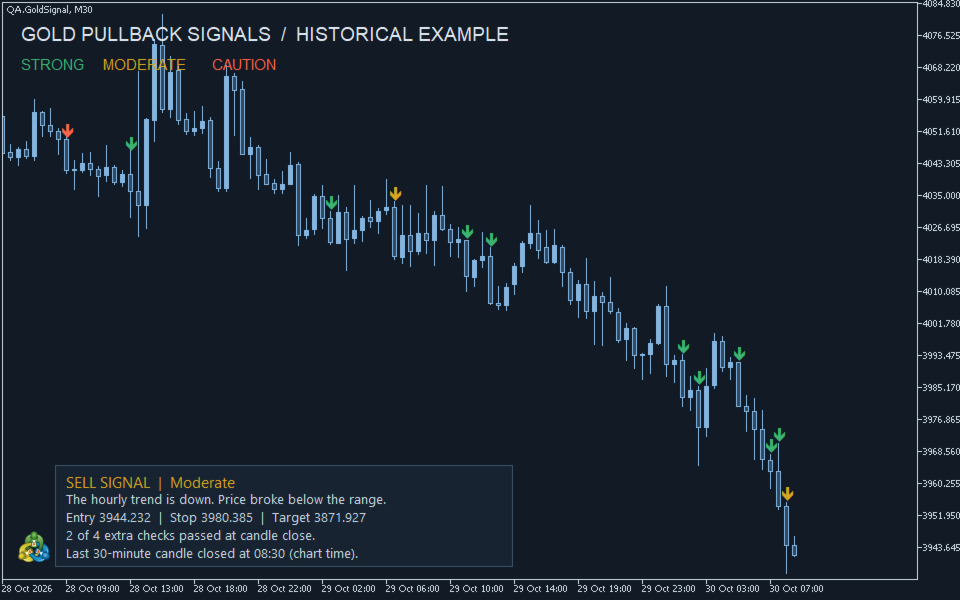
Arrow direction identifies a long or short setup. Arrow color grades the conditions at the close of the signal candle.
- Green — strong setup. Three or four quality checks passed.
- Amber — moderate setup. Two quality checks passed.
- Red — caution. The directional setup is present, but only zero or one of the quality checks passed.
The four checks measure signal candle body size, confirmation strength on H1, the distance price has moved beyond the breakout level, and the distance to the reference stop. The colors are a rule-based assessment of the setup, not an estimated probability of winning. A green downward arrow is a short setup with strong confirmation.
The Data Window displays the reference entry, stop and target. The target is twice the initial stop distance. An alert is evaluated when the next M30 candle begins and includes the current quote when spread and entry distance pass the filters. Historical arrows show chart setups irrespective of the execution quote at the time.
The panel at the bottom of the chart updates after each M30 candle closes. It shows BUY, SELL or WAIT and explains the result in plain language. A signal includes reference prices for entry, stop and target. Turn on ShowTechnicalDetails to see the H1 trend and SMA20, the M30 SMA10 and average true range, the breakout range, and the four grading measurements.
HistoryBars controls the number of closed candles displayed. PopupAlerts enables terminal alerts. PushAlerts enables mobile alerts when MetaTrader push notifications are configured. ShowAnalysisPanel controls the panel.