ICT Daily Bias Atlas Starter
- Göstergeler
- Sürüm: 1.0

ICT Daily Bias Atlas Starter shows the bias of today from the last two completed days, the previous day high and low with their status, and the Asian range. It is the free part of ICT Daily Bias Atlas Pro.
How the bias is decided
The last completed day is compared with the day before it. Taking a high or a low means a price strictly beyond it. There are eight cases: took the high and closed above it (bullish), took the high but closed back inside (bearish), took the low and closed below it (bearish), took the low but closed back inside (bullish), took both sides and closed above the old high (bullish), took both sides and closed below the old low (bearish), took both sides and closed inside (no bias), and an inside day (no bias). The target is the previous day high for a bullish bias and the previous day low for a bearish one. The bias of a day is fixed from completed days only and does not change during the day.
What you get
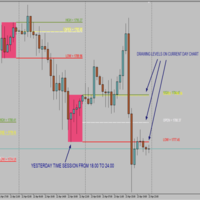
- Previous day high and low across each of the last days, with the bias and the case written at the start of each day
- Panel: bias and the reason, previous day high and low and whether they are taken today, the target, and where the price is inside the previous range (premium or discount)
- The Asian range (20:00 to 24:00 New York) as an outline box
- One alert: the bias of the new day. Attaching the indicator never fires old events
- A buffer for Expert Advisors: 0 = bias (1, -1, 0; EMPTY_VALUE on bars without a bias)
Days that follow the clock you trade by
A day can start at New York 17:00 (the forex trading day), at New York midnight (the ICT daily open) or at the broker's midnight. The broker's clock is found from the Friday closes of the chart symbol, or, when it has none (crypto), of the other symbols of the Market Watch (it also works in the Strategy Tester); you can also set it by hand. If no clock can be found, the panel says so and nothing is calculated until you set it, so you never get a bias from a wrong clock. Summer time of New York is handled for every date. Days are built from the M15 bars of the chart symbol.
Please read
- This is a reading of rules, not a forecast and not a trade signal. No result is promised.
- The terminal needs M15 history of the symbol (it loads it by itself). Test it first on a demo account.
- The automatic search of the broker's clock reads the Friday closes of a currency pair. If it finds none (some indices), the panel says "NOT found" and you set the clock by hand in the inputs.
- In the Strategy Tester the indicator draws only in the visual mode.
The full version
ICT Daily Bias Atlas Pro adds: weekly and monthly bias with the previous week and month levels, the London range and the liquidity cascade, CRT on H1, H4, D1 or W1, a scanner of up to 30 symbols, an accuracy table that shows how often the bias was right on past days, all alert types with push and e-mail, and five buffers for EAs.