Grid Accumulation Distribution EA
- Uzmanlar
- Sürüm: 3.12
- Etkinleştirmeler: 5

FOLLOW THE VOLUME, THEN BUILD THE LADDER
Grid Accumulation Distribution EA starts a grid cycle only when real buying or selling pressure shows up in the Accumulation/Distribution line, then hands the trade to a disciplined ladder engine that banks small net gains and trims old exposure piece by piece.
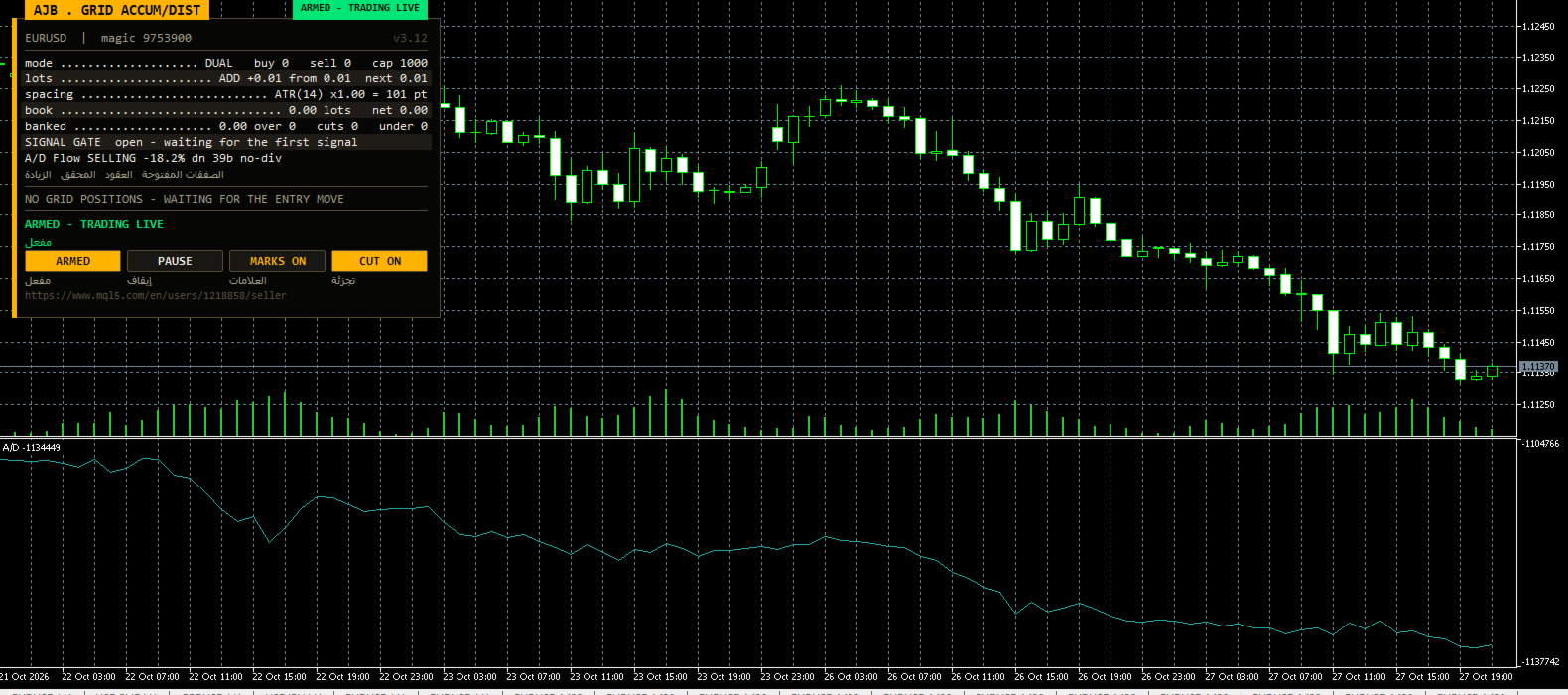
See it before you trust it: open the MetaTrader 5 Strategy Tester, pick your symbol, tick visual mode and press Start. The A/D line appears in its own window, arrows mark every candle that armed a cycle, and the new A/D Flow row on the panel tells you, bar by bar, which side is in control. Your broker, your data, zero cost.
- Trigger: the A/D line crosses its own moving average, and its recent slope must point the same way; up means accumulation (buy), down means distribution (sell).
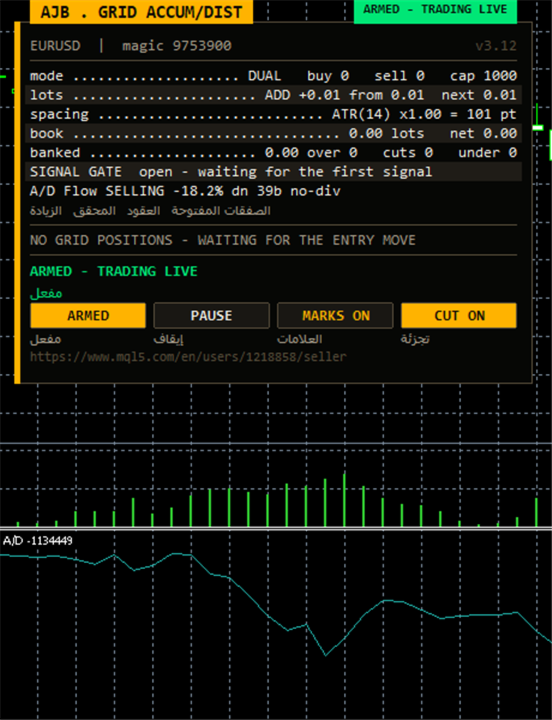
- Panel upgrade: an "A/D Flow" row reports BUYING or SELLING pressure, the gap to the signal average, slope, bars since the last cross and a divergence hint.
- Engine: buy and sell ladders side by side, volatility-based spacing, grouped net closures and partial slicing of the heaviest order.
- Every limit is an input you can see: lot ceiling, level ceiling, margin and drawdown blocks, spread filter, observation mode.
- Each chart keeps its own memory keyed to symbol and both magic numbers, so many instances can share one account safely.
QUICK START
- Where: EURUSD H1 and XAUUSD H1 are friendly first charts. Any instrument and any timeframe is accepted.
- What to change: nothing at first. The shipped values open 0.01, grow by 0.01 per level and never exceed 1.0 lot per order.
- How much capital: size the account so it can hold a long one-directional move at the lot you pick. Small accounts should stay at 0.01.
- First day: set RunMode to scan only, let the EA draw its plans without trading, then arm it with the panel button when you are comfortable.
- Hedge cycle: keep it switched off until the grid alone feels familiar.
WHY VOLUME FLOW IS A GOOD STARTING SIGNAL
Most grids get into trouble because their first order is placed at an arbitrary moment. Price alone can mislead: a candle may print a new high while the money behind it is quietly leaving. The Accumulation/Distribution line, created by Marc Chaikin, looks at where each bar closes inside its own range and weights that location by volume. A close near the top adds volume to the running total, a close near the bottom subtracts it. Over time the line shows whether participants are collecting a market or handing it off.
This EA smooths the A/D line with a moving average you choose and waits for the raw line to cross that average on a finished candle. A crossing on its own can be noise, so by default the line must also have risen (for a buy) or fallen (for a sell) across a short slope window. Only then does the cycle arm, after your direction permissions and the spacing between signals have been respected. Because only completed bars are read, arrows already drawn stay where they are. Tick volume is used by default so the signal works on every forex and CFD feed; real exchange volume can be selected where your broker supplies it.
NEW IN VERSION 3.12
A/D Flow on the main card. A single compact line answers the question every grid trader asks: who is pushing right now? It names BUYING or SELLING pressure, prints the distance between the A/D line and its average as a percentage of the recent A/D range, shows whether the slope is up, down or flat, counts how many bars the current side has held, and flags a bullish or bearish divergence when price and the A/D line have travelled in opposite directions over your chosen window. The data is live, read from the same indicator handles that drive the trades.
Indicator window and entry arrows. On a live chart the A/D line is attached under the price and removed cleanly when the EA stops; arrows sit on the candles that started each cycle.
Instance isolation. Saved state, retry queues and the hedge fund are stored under keys made from account, symbol and both magic numbers. At start-up a lock prevents a second chart from reusing a magic already taken, and every scan of open positions filters by symbol and its own magic.
Honest margin check. Before a level is opened the terminal computes the real margin of that order and compares it, with a safety cushion, to the free margin available. Large balances are no longer refused valid orders.
Stop-out minded defaults. The lot ceiling, level ceiling and netting margin cap ship with conservative values, so an installation left untouched stays within sensible limits.
LIFE OF A CYCLE
1. Listening. While neither side shows conviction, the EA does nothing. The A/D Flow row and the signal gate on the panel show the current pressure and how many bars remain before a new signal may count.
2. Arming. When the A/D line crosses its average with a matching slope, the EA checks your buy/sell switches and the minimum bar gap, then opens the first level and marks the candle.
3. Laddering. As price moves away from the anchor, further levels are added. Buy and sell ladders can work at the same time with separate anchors and counters, or a single side can run alone. Spacing follows ATR between a floor and a cap, or stays fixed in points.
4. Collecting. A scanner combines the oldest and newest orders of each side and closes a group as soon as its net result, after swap and commission, clears your target. When the oldest position is too heavy, only part of it is closed, paid for by profit already sitting on newer orders. Repeated swings wear the largest position down.
5. Protecting the rhythm. A reopen guard rejects closures that would immediately reopen the same level. Each closure is confirmed in deal history, failed legs are retried, and a plan is abandoned if the open positions changed between scan and send.
6. Optional hedge cycle. Disabled by default. Once enabled, it keeps a balanced pair on a symbol you choose and retires it in equal slices financed by a small surcharge on grid closures. Its purpose is trading volume; its own cost is spread, commission and swap.
THE PANEL
The panel keeps the proven card layout on the left side of the chart, leaving the price scale and right side free. The main card lists symbol and magic, a status badge, grid mode, lot step, spacing, banked result, the signal gate and the A/D Flow row. Plan cards show each side's next closure with a dedicated close button, and a table lists open orders. Buttons switch armed or scan-only mode, pause, chart marks and slicing. The panel can be moved and minimised, sizes itself to its text on any screen, and is not drawn at all during non-visual optimisation, so test runs stay fast.
ALL SETTINGS EXPLAINED
Grid - how levels are opened
- TradeMode - dual buy-and-sell ladders or one direction only; dual is the default.
- GridSpacePoints - level distance in points when fixed spacing is selected.
- GridSpaceMultiplier - stretches each next gap by this factor; 1.0 keeps gaps equal.
- MaxGridLevels - upper limit of levels in one ladder.
- UpDirectionIsBuy - assigns rising price to the buy side (or the opposite when false).
- EAMagicNumber - grid identifier, 9753900 by default; use a different one on every chart.
- GridOrderComment - label written on each grid order.
- OneOrderPerBar - at most one new level per candle.
Lot ladder
- InitialLotSize - size of the opening level.
- LotSizingMode - add a fixed step or multiply per level; adding is the default.
- LotMultiplier - growth factor, used only when multiplying.
- LotAddStep - amount added for each new level in additive mode; 0 repeats the opening size.
- MaxOrderVolume - largest volume any single order may carry.
- UseAutoLot - lets the opening size follow your balance.
- AutoLotBaseBalance - balance that matches the opening size when auto lot is on.
- AutoLotAllowDecrease - permits auto lot to shrink below the opening size after losses.
ATR spacing
- GridSpacingMode - volatility (ATR) spacing or fixed spacing.
- ATRTimeframe, ATRPeriod, ATRBarShift - chart period, length and bar used to measure ATR; shift 1 reads the last closed bar.
- ATRSpacingFactor - turns the ATR value into a distance between levels.
- ATRMinSpacingPts, ATRMaxSpacingPts - smallest and largest allowed distance.
- ATRFreezeOnStart - keeps the opening distance for the entire cycle.
Profit target
- DesiredProfitPerClosure - base amount of money a closure should lock in.
- ProfitMultiplier - overall multiplier on that amount.
- ProfitTargetMode - constant target or one that scales with the book.
- ProfitVolumePower, ProfitDepthBonus, ProfitMaxMultiple - how the scaled target rises with volume and ladder depth, and its maximum.
- ProfitMaxReachFraction - ensures the target stays reachable within a portion of one step.
Fragment scanner and target slicing
- UseMultiLegScan - evaluates larger groups before the basic oldest/newest pair.
- MaxOldestLegs, MaxNewestLegs - number of orders a group may take from each end.
- ScanPriority - rule for choosing between several qualifying groups.
- NeverBankLessThanPair - a group must also beat what the simple pair would bank.
- RequireCloseVolumeExceedsTarget, MinCloseVolumeRatio - the closing orders must outweigh the old one by at least this ratio.
- EnableTargetSlicing - allows part of the oldest order to be closed.
- FragProfitWeightPower, FragMinSlicePercent - profit weighting per closing lot and the minimum slice size.
- FragAllowMultiCloser - several newer orders may jointly pay for one slice.
- FragPreferFullClosure - chooses a full closure over a slice when both are possible.
Reopen guard and account protection
- ReopenGuard, ReopenGuardCushion - stop closures that would reopen a level straight away; the cushion is a share of one step.
- MinMarginLevelPercent - pauses new levels under this margin level; 0 turns it off.
- MaxAccountRiskPercent - pauses new levels past this floating loss in percent of balance; 0 turns it off.
- NetMaxMarginPercent - netting accounts only: margin cap of the combined position against equity.
- MaxTotalOrders - hard limit on grid orders per side.
Execution and verification
- RunMode - live trading (armed) or watch-only scanning.
- CloseSequence - which leg of a closure is sent first.
- MaxSlippagePoints, MaxSpreadPoints - allowed slippage and the widest spread at which the EA trades.
- MinSecondsBetweenClosures - pause between two closures on the same side.
- CloseAttemptsPerLeg, VerifyTimeoutSeconds - retries per leg and how long a pending leg is checked.
- DeferWhenMarketClosed, MarketClosedRetrySeconds - wait for the session to reopen instead of stopping.
- AutoResumeAfterSeconds - automatically lifts a halt after this time; 0 waits for you.
- AbortIfBookChanged - drops a plan if positions changed before it was sent.
- UseFullCommission, CommissionPerLot - commission counting and a manual value if the broker does not report it.
- CloseOrderComment - label on closing deals.
Hedge cycle
- EnableHedgeCycle - turns the hedge engine on; off by default.
- HedgeSymbols, HedgeSymbolRotation, HedgeMaxSymbolsInTester - candidate symbols for the pair, how the next one is picked, and a limit used only in the tester.
- HedgeCycleLots, HedgeSliceLots - volume of each side and of each retired slice.
- HedgeFragmentBonus, HedgeBonusIsPercent - extra charged above slice cost, in percent or money.
- HedgeMaxSurcharge, HedgeMaxSurchargePercent - limits on how far a closure target may be lifted.
- HedgeMagicNumber - hedge identifier, 9753901 by default; must not equal the grid magic.
- HedgeReopenOnFinish, HedgeStartRequiresTrade - open a fresh pair when one ends, and wait for grid activity before the first pair.
- HedgeIntegritySeconds, HedgeAutoRepair, HedgeNakedAction - check interval for both legs and the response when one is missing.
- HedgeMaxSpreadPoints, HedgeSlippagePoints, HedgeAttemptsPerLeg, HedgeVerifyTimeout - execution limits for hedge orders.
- HedgeCommissionPerLot, HedgeOrderComment - commission fallback and deal label for the pair.
Weekly cash day
- WeeklyCashDay, CashDayOfWeek, CashCutoffHour - hold back new cycles and slices around the weekday and hour you usually withdraw.
Panel and chart
- ShowPanel, PanelX, PanelY, PanelFontSize, PanelCorner - show or hide, position offsets, font size and preferred corner.
- ShowArabic - adds Arabic text under each English label.
- ShowChartMarks - draws levels and closure plans on the price chart.
- MaxTableRows - how many open orders each ladder table lists.
Entry trigger
- EntryTriggerMode - use the A/D signal to arm the first level, or another trigger mode.
- SignalBarShift - bar that is evaluated; 1 is the most recent closed candle.
- SignalBarsDelay - minimum number of bars between accepted signals (30 by default).
- SignalValidBars - how long a signal stays usable, in bars.
- SignalAllowBuy, SignalAllowSell - allow or block each direction.
- SignalReverse - inverts every signal.
Accumulation/Distribution signal
- InpADTF - timeframe on which the A/D line and its average are calculated.
- InpADVolume - tick volume (default, available everywhere) or real volume where the broker provides it.
- InpADMAPeriod - length of the moving average drawn over the A/D line (21).
- InpADMAMethod - averaging type for that line; exponential by default.
- InpADSlopeBars - number of bars over which the A/D slope is measured (5).
- InpADRequireSlope - when on, a crossing counts only if the slope agrees with its direction.
- InpADDivergenceBars - window used by the panel to compare price and A/D for the divergence hint (20); display only.
- InpShowADWindow - attaches the A/D line in a subwindow on live charts.
- InpShowSignalArrows - marks each candle that armed a cycle with an arrow.
Debug
- DebugMode - prints detailed reasoning to the Experts tab for troubleshooting.
EVERYDAY USE
Drop the EA on a chart, enable algo trading and check that the panel loads. Read the A/D Flow row first: SELLING with a down slope while you hold a buy ladder simply means the market is still against you, and the plan cards will show what a closure needs. Pause before events you prefer to skip, switch to scan only when you want to watch without risk, and give every chart its own pair of magic numbers; the start-up lock warns you if two charts collide.
WHAT TO REALISTICALLY EXPECT
Volume flow improves timing; it does not remove risk. A persistent trend against an open ladder can create large floating losses, and this EA has no stop loss that liquidates everything for you; its protection is to stop adding levels. Spread, swap, commission, the symbol and your lot size all shape the outcome, and tester history is no guarantee of live results. Run the free test with your own settings, begin small and increase only after you know how far your instrument usually stretches. Works on hedging and netting accounts, with no DLLs and no external files.
Once you have traded or tested Grid Accumulation Distribution EA, a review describing your genuine experience, positive or negative, would be appreciated. It helps other traders choose and guides the next improvements.