Spent Force
- Uzmanlar
-
Alex Amuyunzu Raymond
 I’m an experienced MQL5 developer and software engineer specializing in building robust, high-performance algorithmic trading systems for MetaTrader 5. My work goes beyond standard EA development — I design intelligent, scalable solutions that combine market logic, automation, and external
 - Sürüm: 1.10
- Etkinleştirmeler: 5
Spent Force: Trade the Moment the Market Runs Out of Fuel
Every move in the market runs on participation. When volume swells, price travels, and when volume collapses, the move that was running on it is finished, even if the candle on your screen still looks strong. Spent Force is built around that single observation. It does not chase momentum, and it does not guess tops and bottoms with lagging indicators. It watches for the exact moment a candle closes on sharply reduced volume compared with the one before it, treats that as exhaustion, and positions for the fade with a precise, patient limit entry instead of a panicked market order.
The trigger is simple and transparent. On every new bar of your chosen calculation timeframe, Spent Force compares the volume of the candle that just closed with the volume of the candle before it. If volume has dropped by at least your chosen percentage, which defaults to thirty percent, the market is flagged as exhausted. The direction of the fade is taken from the exhausted candle itself: after a bearish candle the EA prepares to buy, and after a bullish candle it prepares to sell. If the EA is already holding a position when a new exhaustion signal appears, it reads that as the move being over and prepares the opposite side, closing the old trade before the new one is prepared.
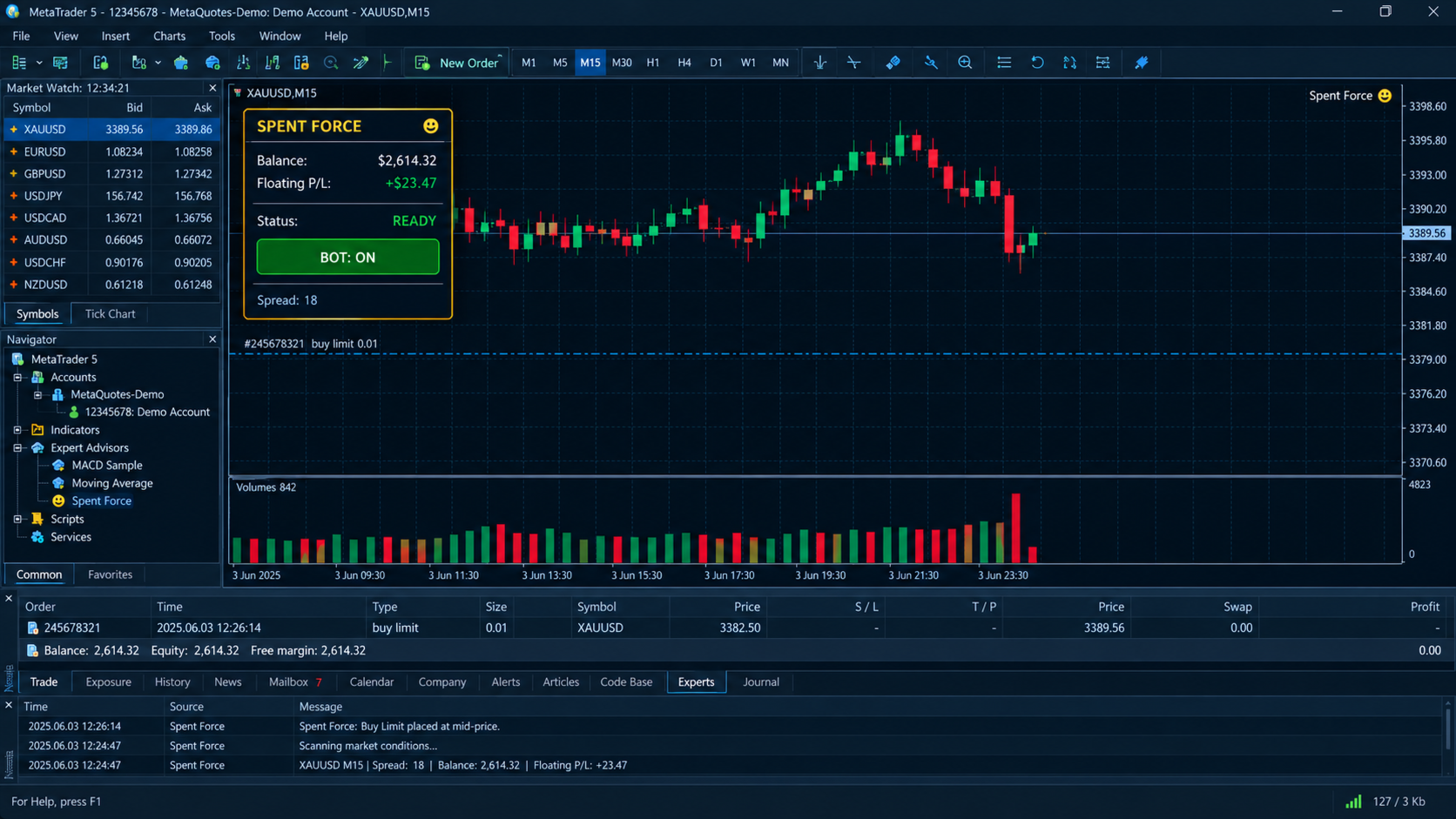
What makes Spent Force different is what happens next. Instead of entering at once, the EA starts a timed observation window. From the open of the new candle until exactly half of its duration has passed, it samples the price every second and records the highest and lowest levels reached. At the halfway mark it calculates the mid-price of that first-half range and places a pending limit order there. The idea is to let the market show its hand, then make it come to you. Buying a limit at the middle of the early range means you enter at a fair price, with a natural cushion against the first impulsive spike, rather than at the worst point of the move. If the pending order is not filled by the time the candle ends, it is cleared and the EA waits for the next signal, so you never carry stale orders into a changed market.
Real markets do not always cooperate, and Spent Force is written for that reality. If the mid-price is too close to the current price or on the wrong side of it to be a valid limit order under your broker's minimum stop distance, you decide what happens. You can skip the trade, which is the default and the most conservative choice, enter at market, or place a stop order at the nearest valid level. Each behavior is explained in the input list, and the EA logs its decision every time so you can always see why a trade was or was not taken.
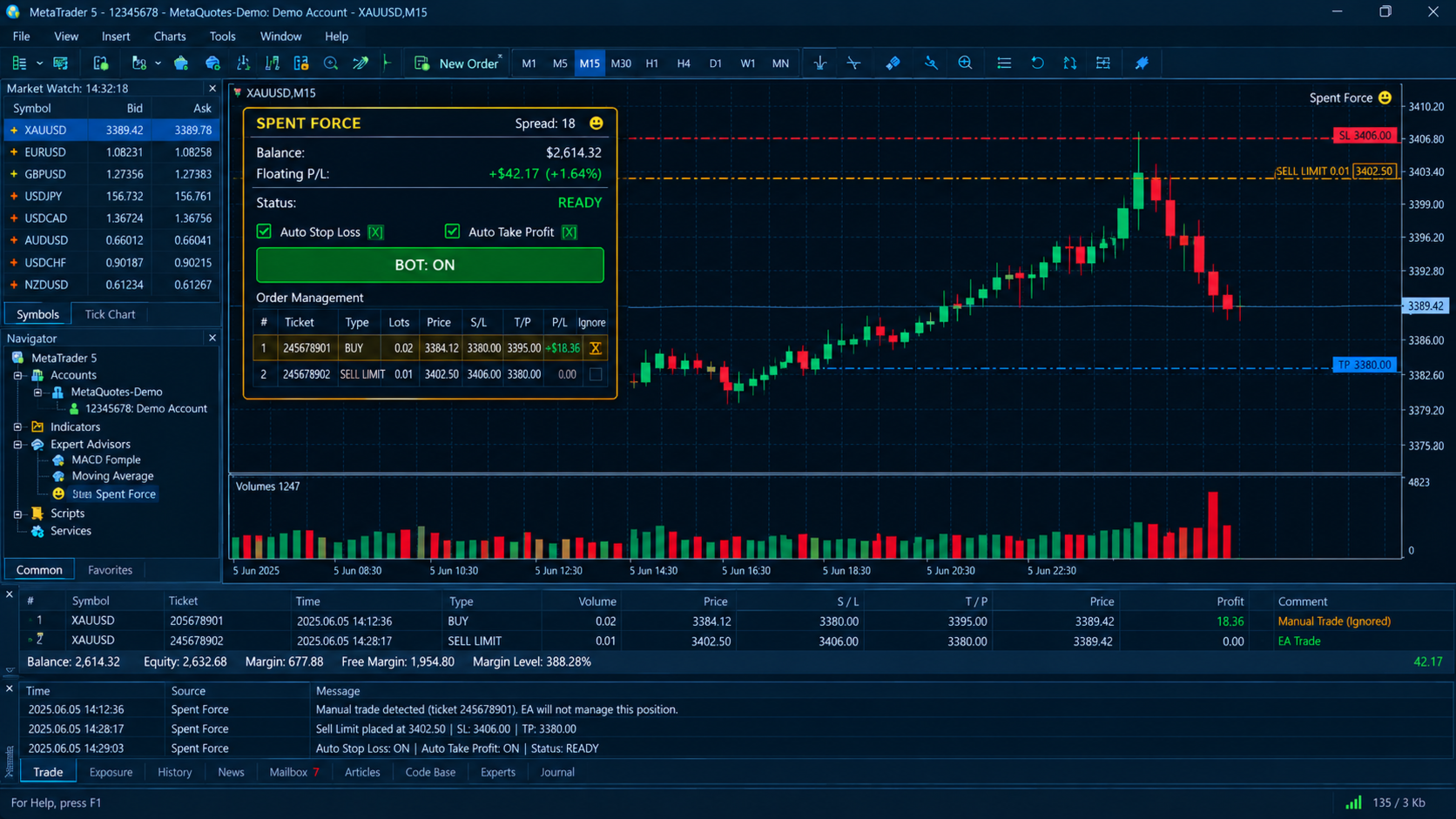
Risk is handled as carefully as entry. Stop loss and take profit are calculated as percentages of the entry price, which keeps the EA consistent across gold, forex pairs, indices and any instrument with a different price scale. Both can be switched on or off live from the chart panel. Before any stop level is sent, the EA checks the broker's minimum stop distance and freeze level, pushes levels out to a safe distance when needed, and never resends values that are already in place, which is what prevents the invalid stops and modification errors that plague many EAs. Position sizing is also protected. Before every single order, whether limit, stop or market, Spent Force calculates the margin the order would need, using both the platform calculation and an independent contract-size and leverage formula, and takes the more conservative figure. If your requested lot would use more of your free margin than the cap you have set, the lot is stepped down automatically to the largest size that fits, and if even the minimum lot cannot be afforded, the trade is skipped instead of failing with a "not enough money" error.
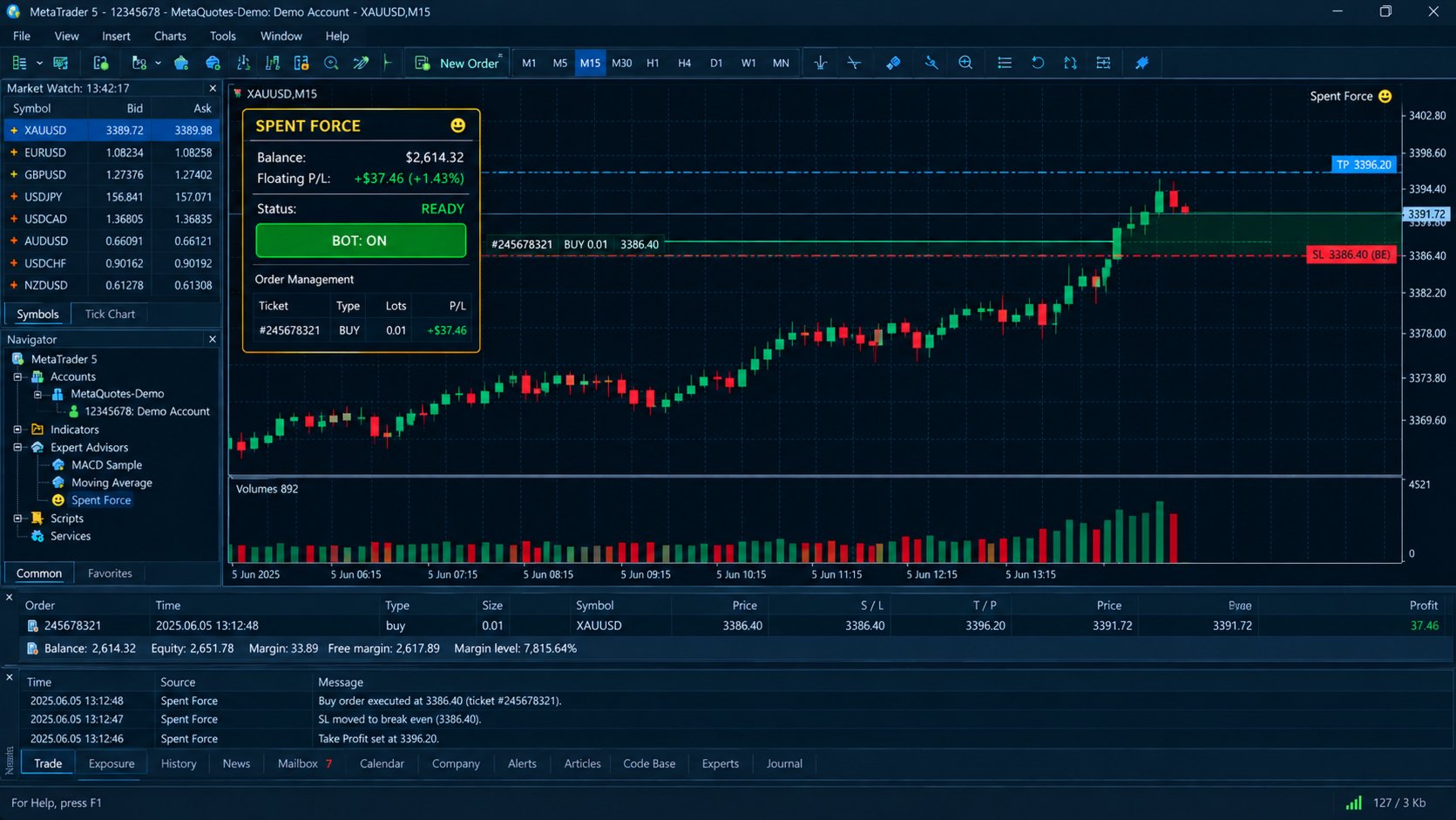
Trade management is built in. The break-even module moves your stop loss to the entry price once the trade has covered a chosen share of the distance to take profit, with optional extra points locked beyond entry. The optional trailing stop follows price at a percentage distance after a start threshold you define. Both only ever tighten the stop, never widen it, and both skip any position you have marked to be ignored. A hard take profit level lets you define a price at which all positions and orders are closed the moment price crosses it in either direction, a useful safeguard when you have a specific target level in mind.
Protection filters keep the EA out of poor conditions. The spread filter blocks new entries whenever the live spread exceeds the limit you set, which matters around news and the daily rollover. The session filter restricts entries to a window of server time, including windows that cross midnight. The daily loss guard totals the realized and floating result of this EA on the current symbol for the day, and once the loss reaches your chosen percentage of balance, it stops opening new trades until the next day. A session-aware market check uses the actual trading sessions your broker publishes for the symbol, so the EA does not try to close or open trades when the market is shut.
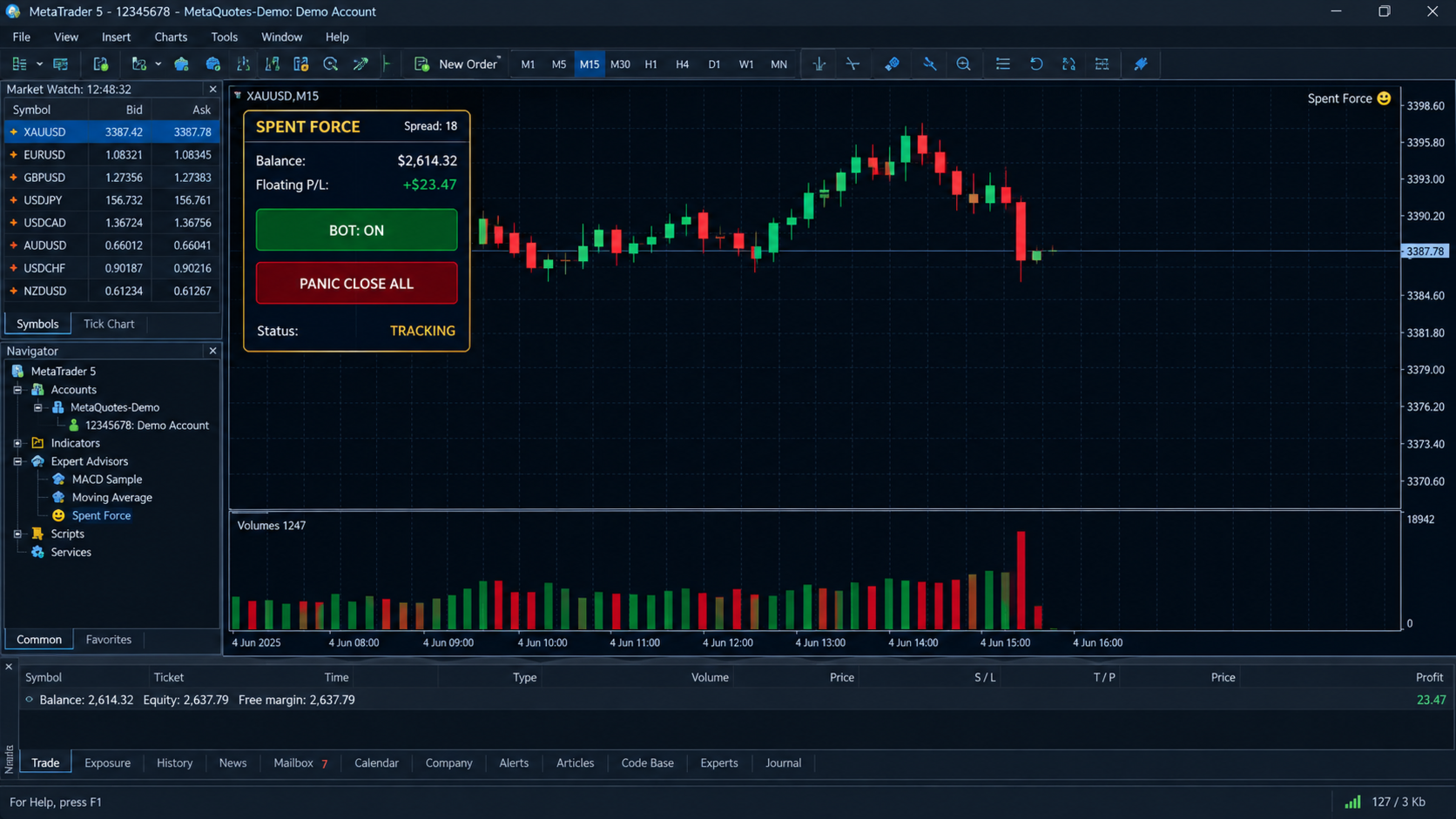
Everything is controlled from a clean, dark on-chart panel with a gold and blue design. The header shows the live spread. The main block displays your balance, floating profit and loss in money and percent, and a status field that tells you at a glance whether the EA is ready, tracking a candle, waiting out of session, blocked by spread, stopped by the daily loss limit, in manual mode, or switched off. A single button turns the bot on or off. A panic button, protected by a confirmation step, closes every position and order on the symbol instantly. Check boxes toggle automatic stop loss and take profit. The order management area lists your open positions with ticket, direction, volume and live profit, and each row has an ignore box, so you can take a manual trade under your own control and the EA will leave it alone. Manage Manual mode goes further: the EA stops opening trades and only manages what you place.
Spent Force remembers its state. Switches, the current tracking window and pending order references are stored as terminal global variables per account and symbol, so a platform restart, a chart change or a VPS reboot does not lose the plot. It works on both hedging and netting accounts, uses a magic number so it never interferes with your other EAs, and adapts its lot size to the volume limits of the symbol.
For best results, start with gold or a liquid major on the fifteen-minute timeframe, which is the default, choose a broker with tight spreads and reliable volume data, and run it on a VPS. Begin with the minimum lot on a demo account, watch the panel and the Experts tab, and learn how the volume threshold affects trade frequency before going live. A lower threshold gives more trades and a higher one gives fewer, more selective ones. Volume in MetaTrader is tick volume for most instruments, and the concept works on that basis.
Spent Force is a disciplined tool, not a promise. No EA wins every trade, and trading leveraged products carries a high risk of loss. Test it thoroughly in the Strategy Tester and on demo, size positions responsibly, and never risk money you cannot afford to lose.