CC Cent
- Uzmanlar
- Sürüm: 3.4
- Etkinleştirmeler: 10

LAUNCH PRICE: $99 FOR THE FIRST 20 COPIES.
Then $149 for the next 30 copies. Final price: $199.
Rent: 1 month $39 · 3 months $79.
Cash Cow Cent: Milk it daily. It won't live forever.
A high-risk gold grid EA for cent accounts, built around daily profit withdrawal.
Most grid EAs pretend they will run forever. Cash Cow Cent doesn't. It is an aggressive martingale grid for XAUUSD that collects small basket profits over and over, all day long. Like every martingale, one bad enough move can take the whole account.
That's why the rule is simple: WITHDRAW YOUR PROFIT EVERY DAY. Run it on a cent account with money you can afford to lose, take out what it earns, and let the cow keep producing. When the day comes that it doesn't survive, the money you've already withdrawn is yours.
Quick Facts
- Symbol: XAUUSD (Gold)
- Timeframe: attach to any chart timeframe. The EA works on M1 internally by default.
- Direction: buy only by default. Can be switched to sell only or both directions.
- Account: cent (USC), hedging (netting accounts are not supported), ECN / RAW spread recommended
- Leverage: 1:500 or higher
- Minimum deposit: 10,000 USC ($100). Below this the EA opens no new baskets (open baskets are still managed). Always leave at least 10,000 in the account after withdrawing.
- Starting lot: 0.02 fixed by default. Optional auto lot scales it with your balance (0.02 per 10,000 USC)
- Trading hours: automatic, from 3 hours after gold's daily open to 4 hours before its close. The same for every trader in every timezone.
- VPS: strongly recommended
How It Works
Cash Cow Cent opens a first position and, if price moves against it, adds layers at a distance based on current volatility (ATR). Each new layer is larger than the last, so the basket's average price is pulled toward the market and a small retracement is enough to close the whole basket in profit.
- Basket take profit: the whole basket closes together at a target distance from its average price.
- Spread and commission compensation: the target automatically adds the live spread and your broker's real commission, so a "90-point TP" is 90 points of real profit on ECN accounts, not 90 points minus costs.
- ATR-dynamic grid: layer spacing widens in fast markets and tightens in quiet ones.
Use the Default Settings
The default settings are the tested configuration. The starting lot, grid spacing, trading hours, news blocking and the minimum-balance guard are tuned together to reduce the risk of a stop-out. They lower that risk; they don't remove it.
Every setting can be changed, but changing lot size, multiplier or grid distance can greatly increase the risk of blowing the account. If you're unsure, leave them at their defaults.
Features
Protection and filters
- News filter: blocks new baskets around high-impact US releases, using the ForexFactory calendar with the MT5 calendar as automatic backup. The panel shows which event is blocking and where the data came from.
- Trading hours tied to the market: they follow gold's own session as published by your broker, including daylight-saving shifts.
- Minimum-balance guard: no new baskets below 10,000 USC.
- Emergency exit before stop-out: if the margin level falls to twice your broker's stop-out level, the EA closes its baskets itself instead of letting the broker liquidate the account position by position. The loss is still real; this only decides who closes.
- Broker-side failsafe TP: a real TP is placed on the broker's server as a backup if your terminal or VPS disconnects.
- Optional: basket stop loss, drawdown protection, and blackout hours for advanced users.
Visibility
- Clean dashboard with a cow theme: balance, equity, today's and this month's profit, one card per basket, and trading status. The chart's own colours are restored when you remove the EA.
- Liquidation price: see the price at which this basket would hit stop-out.
- Mobile TP display: a special pending order shows layers, floating profit and liquidation price in the MT5 mobile app, e.g. "L:7 | P:+1638.00 | Liq:4210.55".
Reliability
- State recovery: after a terminal restart or EA reattach the EA carries on where it left off. On a new VPS it rebuilds the basket from your open positions.
- Automatic broker point detection for 2- and 3-digit gold quotes.
- Multiple instances on one terminal via magic numbers.
About Backtesting (please read)
News in the Strategy Tester. MT5 gives EAs no access to the economic calendar during a backtest. Without special handling, a backtest would run with no news filter at all, which is very different from live trading. In testing, one unfiltered news release was the difference between a strong result and a blown account.
To keep backtests honest, Cash Cow Cent has past US high-impact release dates built in (2025 to 2026), and uses them to simulate the news filter in the tester. This is on by default (Backtest_Simulate_News). You can switch it off to see what happens without a news filter. Live trading always uses the real calendar. If your broker's server is not on GMT+3 all year, set Broker_GMT_Offset and Broker_DST_Rule to your broker's server time so the news windows line up with the real release times.
Test 2026 data. Cash Cow Cent is tuned for gold's 2026 market behaviour: its price level, volatility and spread conditions. Older periods had very different conditions, and backtests before 2026 are not expected to perform well. That reflects how the EA is built, not a fault. The built-in news dates also only cover 2025 onwards.
Reading results:
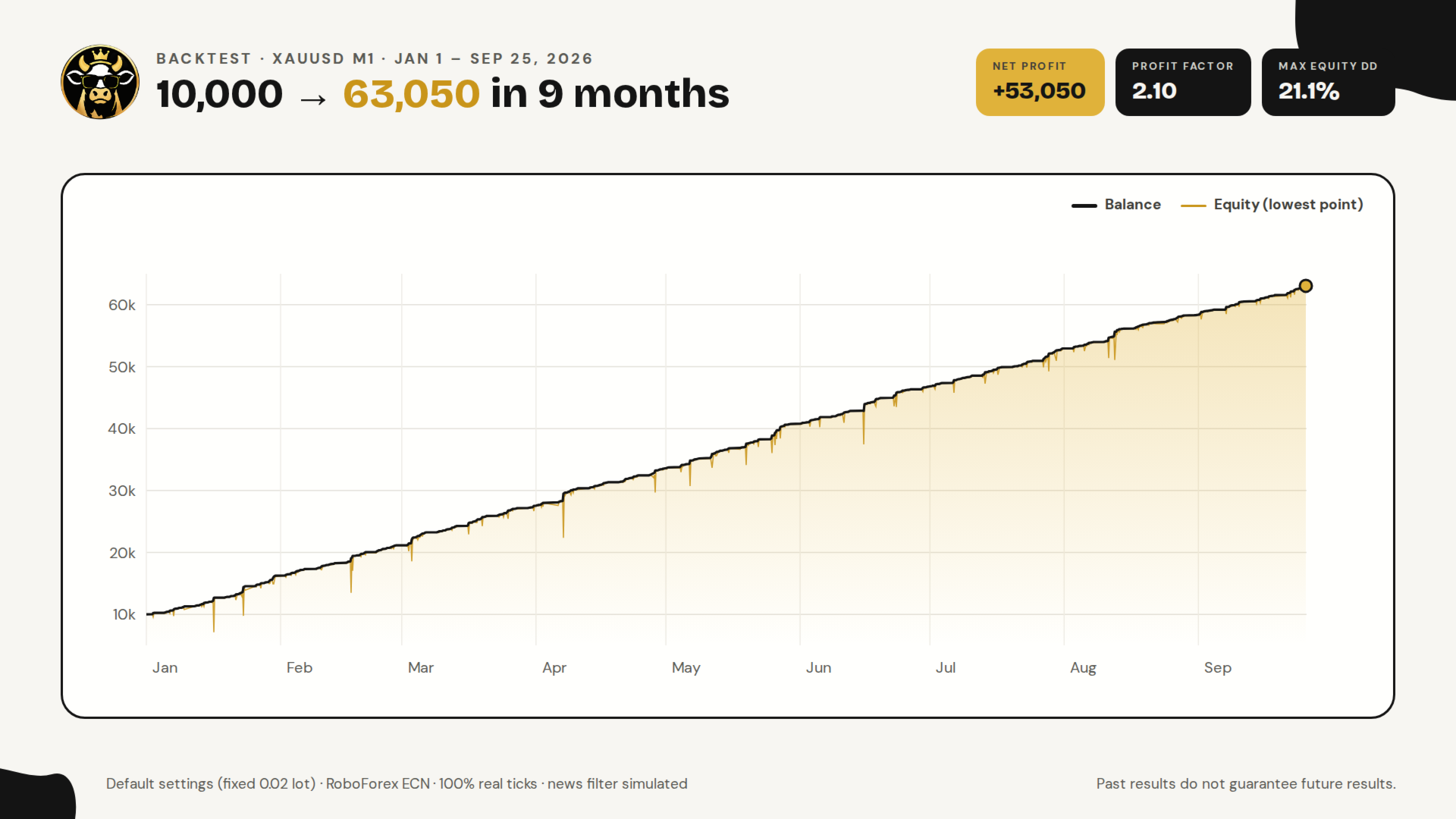
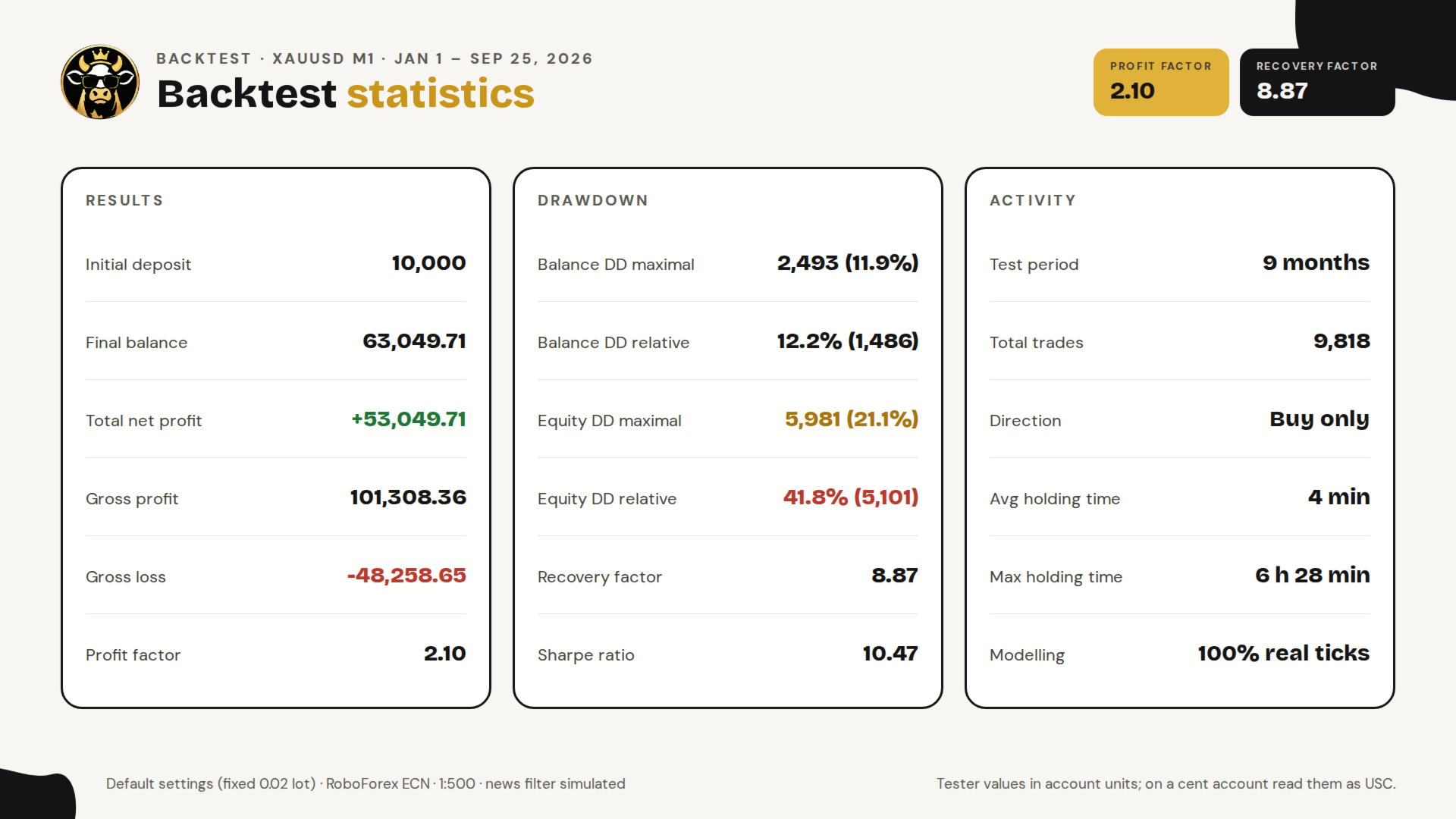
- Grid EAs produce smooth-looking curves right up until they don't. Look at the drawdown, not the profit.
- Auto lot compounds, which makes profits look enormous. Test with a fixed lot to see the real per-basket behaviour.
- Use real ticks and your broker's own spread and commission.
Free Companion Tools
- Cash Cow Cent Monitor: a read-only dashboard in the same cow theme for a second terminal, laptop or VPS. It reads the EA's settings automatically and shows balance, profit, each basket, liquidation price, direction mode and trading hours. It never opens, closes or modifies trades.
- Cash Cow Cent News Export: optional. It saves the MT5 calendar to a file for backtesting with the very latest news dates.
How to get them: MQL5 delivers only one program per purchase. After purchase, send a private message on MQL5 to receive both tools.
Setup
- Open a cent, hedging, ECN/RAW account with 1:500 leverage and at least 10,000 USC.
- Attach Cash Cow Cent to an XAUUSD chart. Any timeframe works.
- Allow WebRequest for nfs.faireconomy.media (Tools > Options > Expert Advisors).
- Keep the default settings.
- Withdraw profit daily, leaving at least 10,000 USC in the account.
- Running more than one chart? Give each its own Magic Number, at least 10 apart (e.g. 888888, 888898).
Read This Before You Buy
This is not a safe EA, and it doesn't pretend to be.
- Cash Cow Cent is a martingale grid. Lot size grows with every layer. A strong one-directional move can open many layers and lose the entire account in a single basket.
- The starting lot is not your maximum exposure. A basket starting at 0.02 lots holds about 4 lots by layer 10, 200 times the first position.
- It is designed for cent accounts and money you can afford to lose completely.
- The strategy only makes sense with regular withdrawals. Profit left in the account is profit at risk.
- Past performance, backtests included, does not guarantee future results. Trading leveraged CFDs carries a high risk of losing all of your capital.
If that sounds scary, good. You understand the product. Milk it daily.