Obv Breakout
- Göstergeler
-
Ich Khiem Nguyen
 AlphaOnChart is now available on Android! If you trade and use an Android phone, do not miss this.
I just launched the Android version to help traders get ready-to-execute daily trade plans, key levels, and real-time M15 chart alerts right on their phones. - Sürüm: 1.0
- Etkinleştirmeler: 10
OBV Breakout MT5
Quantitative Price Breakout Engine with On-Balance Volume Confirmation
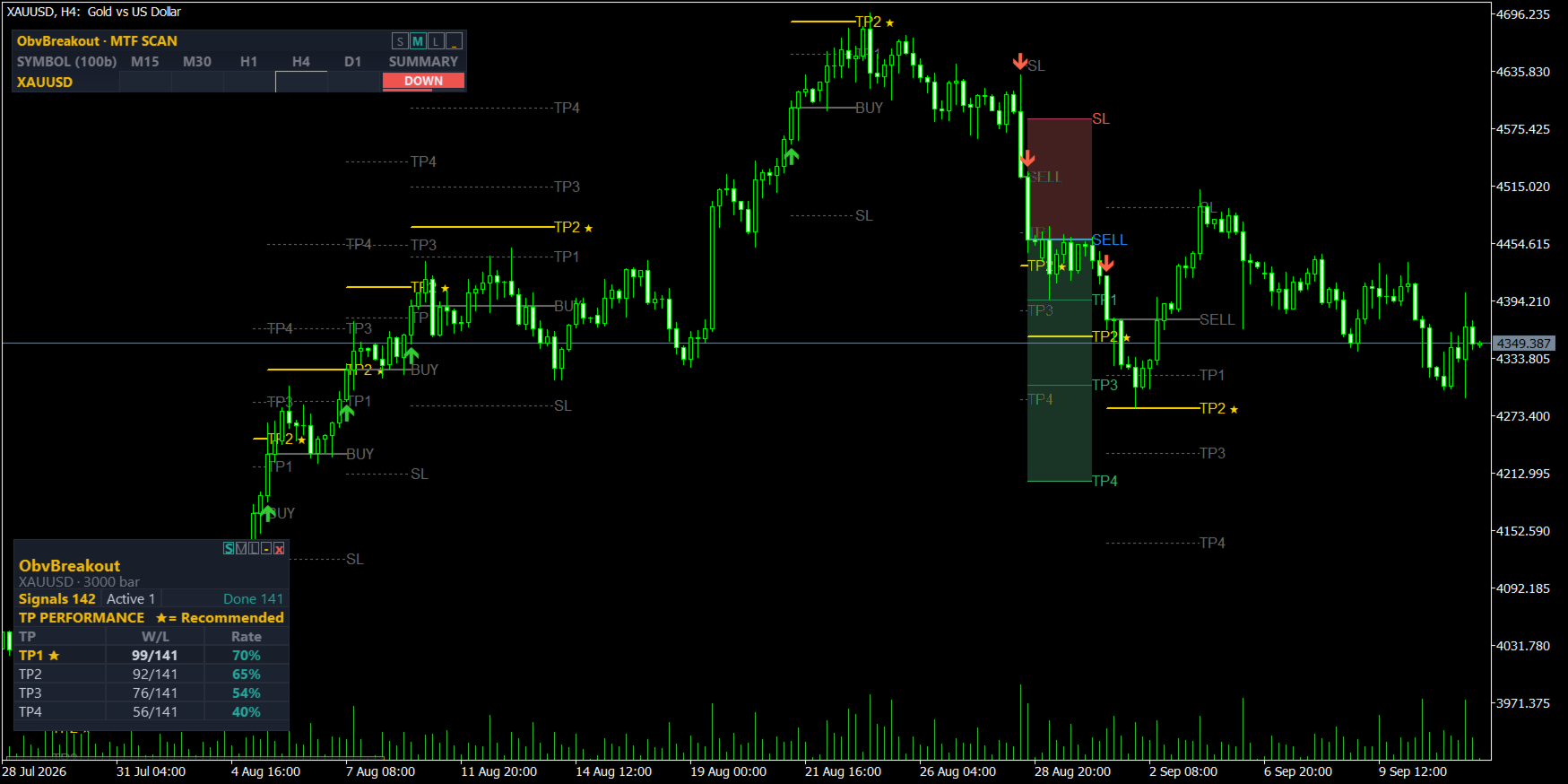
The OBV Breakout indicator for MetaTrader 5 provides an algorithmic trading framework engineered to detect directional expansion moves confirmed by underlying volume momentum. Financial markets frequently generate deceptive price breakouts (bull and bear traps) during low-volume consolidation intervals. To filter out low-liquidity market noise, the OBV Breakout engine couples structural high/low price breaks with On-Balance Volume (OBV) progression, ensuring directional triggers occur only when market participation actively supports price direction.
Calculations operate strictly on completed candle bars. Once a signal is confirmed at candle close, the visual markers and projected levels remain fixed on historical data and will never repaint, vanish, or recalculate.
Algorithmic Logic and Trade Validation
The core engine continuously compares price structure against the cumulative OBV momentum line relative to recent fractal swing pivots.
Bullish Breakout Setup (BUY)
- Structural Price Break: The current candle closes strictly higher than the highest high of the preceding breakout lookback window.
- Fractal Pivot Identification: The algorithm scans backward to locate the most recent confirmed structural swing high.
- Volume Confluence: The running OBV at the current signal candle close must print a higher value than the OBV level recorded at that identified swing high.
- Entry Reference: The operational entry is benchmarked at the exact closing price of the signal candle.
Bearish Breakdown Setup (SELL)
- Structural Price Break: The current candle closes strictly lower than the lowest low of the preceding breakout lookback window.
- Fractal Pivot Identification: The algorithm scans backward to locate the most recent confirmed structural swing low.
- Volume Confluence: The running OBV at the current signal candle close must print a lower value than the OBV level recorded at that identified swing low.
- Entry Reference: The operational entry is benchmarked at the exact closing price of the signal candle.
Integrated Risk Architecture and Trade Lifecycle
Upon trigger confirmation, the indicator automatically plots an integrated risk framework directly onto the active chart:
- Structural Stop Loss: Anchored beyond the recent swing structure, augmented with dynamic ATR volatility padding to mitigate premature stop-outs during spread widening.
- Standardized R-Multiple Take Profit Ladders: Four objective reward-to-risk levels (TP1 through TP4) calculated as fixed multiples of the primary structural risk distance.
- Visual Lifecycle Machine: Renders entry lines, protective stop levels, projected target rungs, and optional risk/reward zone shading on the chart. Historical setups remain preserved for objective visual audit.
Core Modules and Analytical Features
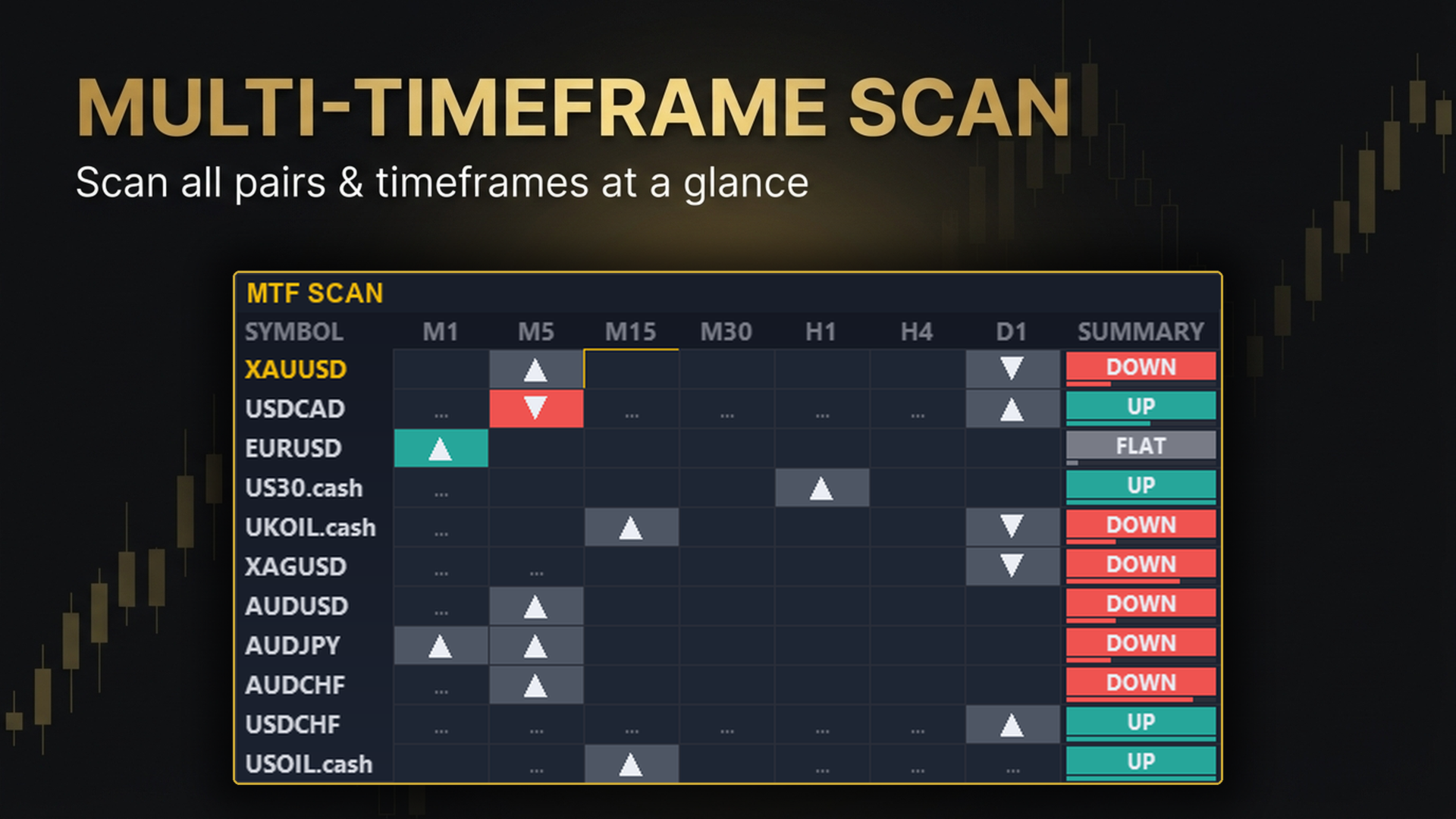
- Multi-Symbol & Multi-Timeframe Scan Radar: A built-in dashboard scans designated instruments across multiple horizons (M15, M30, H1, H4, D1) simultaneously, highlighting active setups and trend alignment from a single workspace.
- Trend Bias Confluence Gate: An optional dual Exponential Moving Average module enables traders to restrict breakout signals strictly to the dominant market trend.
- Whipsaw Mitigation Filter (Signal Brake): Prevents repetitive signal clustering and overexposure within tight consolidation bands.
- Comprehensive Notification Dispatcher: Native terminal alerts, acoustic alerts (.wav), and push notifications delivered directly to the MetaQuotes mobile app.
Complete Input Parameters & Trader Manual
All parameters are organized below by functional groups exactly as they appear in your MetaTrader 5 Inputs tab. Use this guide to customize the indicator to your personal trading style and asset class.
1. Trend Bias & Volatility (EMA & ATR)
Defines the market regime filter and the dynamic volatility buffer used for trade protection.
| Setting Name (In MT5) | Default | How It Affects Your Trading & Setup Guide |
|---|---|---|
| Fast EMA (trend colour) | 8 | Short-term directional moving average. Colors the scanner dashboard cells (Green = Bullish, Red = Bearish). Lower values react quicker; higher values filter noise. |
| Slow EMA (trend colour) | 21 | Baseline trend filter. When Fast EMA is above Slow EMA, the overall momentum is upward. Recommended values: 21 (intraday) or 50 (swing). |
| ATR period | 14 | Measures market volatility. Used to calculate the protective padding around Stop Loss levels to prevent premature stop-outs during spread spikes. |
2. Core OBV & Breakout Detection Engine
Controls the strictness of the volume-confirmed structural price breakout.
| Setting Name (In MT5) | Default | How It Affects Your Trading & Setup Guide |
|---|---|---|
| OBV accumulation window (bars) | 50 | Historical candle depth used to compute continuous On-Balance Volume flow. Increasing this (e.g. to 70–100) provides a stronger institutional volume baseline; decreasing it (30–40) is ideal for fast M5–M15 scalping. |
| N-bar high/low breakout window | 20 | Number of previous candles that price must break above (BUY) or below (SELL). 20 bars represents typical standard structural swing breakout. Increase to 50 for major multi-session breakouts. |
| Fractal pivot strength (bars each side) | 3 | Validation threshold for swing highs and lows. Requires 3 completed lower candles on both sides of a peak to confirm a genuine structural pivot (strictly non-repainting). |
| Max bars to search for fractal pivot | 60 | Maximum historical range the indicator searches back to find the reference swing pivot. If market structure lacks clear swing points within this window, the setup is safely skipped. |
| SL swing lookback | 20 | Lookback range used to locate the structural invalidation point. The protective Stop Loss line will automatically anchor to the lowest low (for BUY) or highest high (for SELL) within this window. |
3. Stop Loss & Take Profit R-Multiple Ladder
Defines how the on-chart trade management levels and reward-to-risk (R:R) targets are projected.
| Setting Name (In MT5) | Default | How It Affects Your Trading & Setup Guide |
|---|---|---|
| Stop Loss distance (x ATR) | 3.0 | Maximum stop-loss ceiling distance expressed in ATR multiples. Serves as a volatility guard rail when structural swings are excessively far away. |
| Early-exit SL (x R) | 1.0 | Fraction of risk distance at which a trade setup is considered invalid if price moves against the entry before hitting targets. |
| Take Profit 1 (R:R) | 1.0 | First target level at 1.0x initial risk distance. Recommended for taking initial partial profits or moving protective stops to Breakeven (0 = disabled). |
| Take Profit 2 (R:R) | 2.0 | Second target level at 2.0x initial risk distance. The primary liquidity target for balanced risk/reward setups. |
| Take Profit 3 (R:R) | 3.0 | Extended target (3.0x risk distance) designed for strong trend expansion phases. |
| Take Profit 4 (R:R) | 4.0 | Maximum continuation runner target (4.0x risk distance). Marks the completion of the projected setup lifecycle. |
| Enable TP1 ping-pong re-entry | true | When enabled, allows the system to recognize secondary breakout continuation cycles after TP1 has been successfully achieved. |
4. Multi-Symbol & Multi-Timeframe Scan Radar
Controls the interactive dashboard matrix for scanning your entire watchlist from one chart.
| Setting Name (In MT5) | Default | How It Affects Your Trading & Setup Guide |
|---|---|---|
| Scan multiple symbols & timeframes | true | Enables or disables the on-chart scan table. Set to false if you prefer a clean single-chart view without background multi-asset scanning. |
| Scan all Market Watch symbols | false | When set to true, the dashboard automatically scans every instrument listed in your Market Watch window (up to the safety cap). When false, it scans the specific symbols defined in the list below. |
| Symbol list, comma separated | (Empty) | Custom list of pairs to monitor (e.g. EURUSD,GBPUSD,USDJPY,XAUUSD,BTCUSD ). Leave empty to scan the current chart symbol only. |
| Hard cap on the symbol list | 100 | Safety throttle to prevent terminal resource overload when scanning large broker watchlists. |
| Timeframes | M15,M30,H1,H4,D1 | Comma-separated list of timeframes monitored simultaneously across the dashboard matrix. |
| Only take signals in trend direction | false | Trend Filter Gate: When set to true, the indicator will suppress counter-trend breakouts (BUY triggers only allowed if Fast EMA > Slow EMA; SELL triggers only if Fast EMA < Slow EMA). |
5. Visual Interface & Chart Display
Controls on-screen graphical elements, trade zones, and historical display depth.
| Setting Name (In MT5) | Default | How It Affects Your Trading & Setup Guide |
|---|---|---|
| Chart history to scan (bars) | 3000 | Maximum historical bars processed upon initialization. Lowering this value (e.g. to 1000) improves terminal load time on slower computers. |
| Show last N setups | 0 | Number of historical trade setups retained on the chart. Set to 0 to show all setups across the scanned history; set to 5 or 10 to keep chart uncluttered. |
| Shade risk/reward zones | true | Draws visual color-shaded rectangles for the risk zone (red) and profit progression zones (green) directly on the chart. |
| Draw ONLY recommended TP line | false | When set to true, hides TP2–TP4 and only renders the primary TP1 line for minimalist chart setups. |
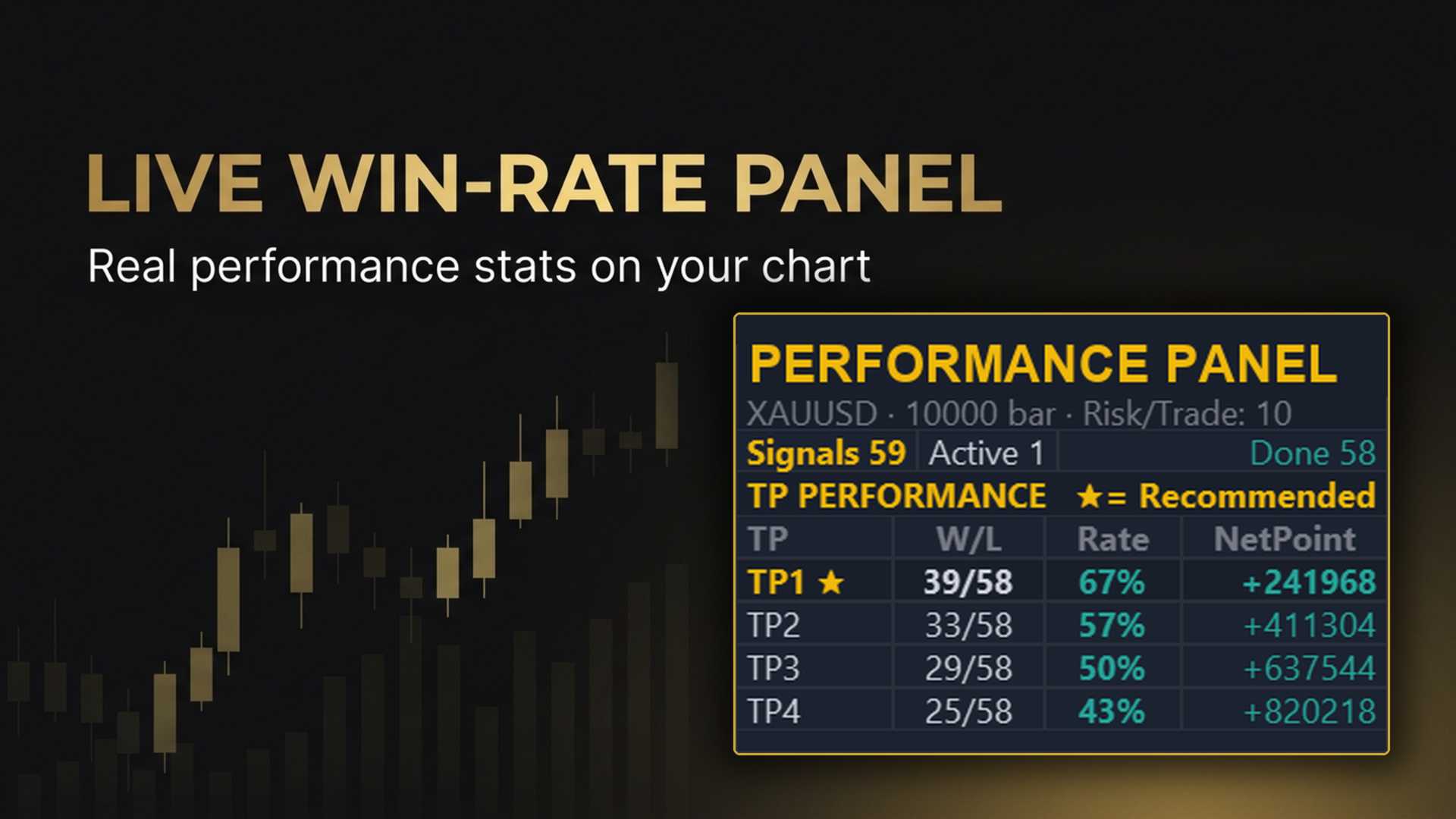
| Show win-rate panel | true | Toggles the floating stats summary box displaying historical hit-rate distribution across targets. |
6. Alerts & Notifications
Instant notification delivery when a non-repainting signal confirms at candle close.
| Setting Name (In MT5) | Default | How It Affects Your Trading & Setup Guide |
|---|---|---|
| Enable alerts | false | Master toggle for all alerts. Set to true when you are ready to receive real-time signal notifications. |
| Popup window | true | Triggers a standard MetaTrader 5 dialog pop-up on your screen with symbol, timeframe, and entry details. |
| Sound | false | Plays an audible sound alert (.wav file) upon trigger confirmation. |
| Push to phone | false | Sends instant push notifications directly to your MetaTrader mobile app (requires MetaQuotes ID configured in MT5 Options). |
7. Automated Trading Integration (Companion EA)
Parameters used when connecting the indicator to an automated execution robot.
| Setting Name (In MT5) | Default | How It Affects Your Trading & Setup Guide |
|---|---|---|
| Send signals to the auto-trade EA | true | Publishes confirmed signal data into terminal memory (GlobalVariables) so that compatible execution EAs can place orders instantly. |
| Signal ID (Magic Number) | 924070 | Unique identifier matching the indicator with your automated trading bot. Must match the Producer Magic in your EA settings. |
Operational Environment and Technical Notices
- Volume Source Transparency: In decentralized foreign exchange and CFD markets without a centralized tape, the On-Balance Volume calculation utilizes broker tick volume (frequency of price updates) as a high-fidelity proxy for order-flow participation.
- Recommended Assets: Liquid assets exhibiting clean price progression, such as major currency pairs (EURUSD, GBPUSD, USDJPY) and Spot Gold (XAUUSD).
- Recommended Timeframes: Optimized for M15, H1, and H4. Higher timeframes provide higher signal stability with reduced market noise.
- Account Compatibility: Fully compatible with both Netting and Hedging MetaTrader 5 accounts.
- Notice on Performance: Technical indicators are decision-support analytical tools. Historical or simulated backtest results do not constitute a guarantee of future operational performance. Always implement sound position sizing and risk management protocols.
Technical Support and Demo Evaluation
- Traders are invited to evaluate functionality in the built-in MetaTrader 5 Strategy Tester using the official free demo version available directly on this page.
- For inquiries, feature explanations, or setup guidance, please communicate exclusively through the MQL5 Comments tab or via MQL5 Direct Messaging.