Easy Pro
- Uzmanlar
- Sürüm: 1.0
- Etkinleştirmeler: 5
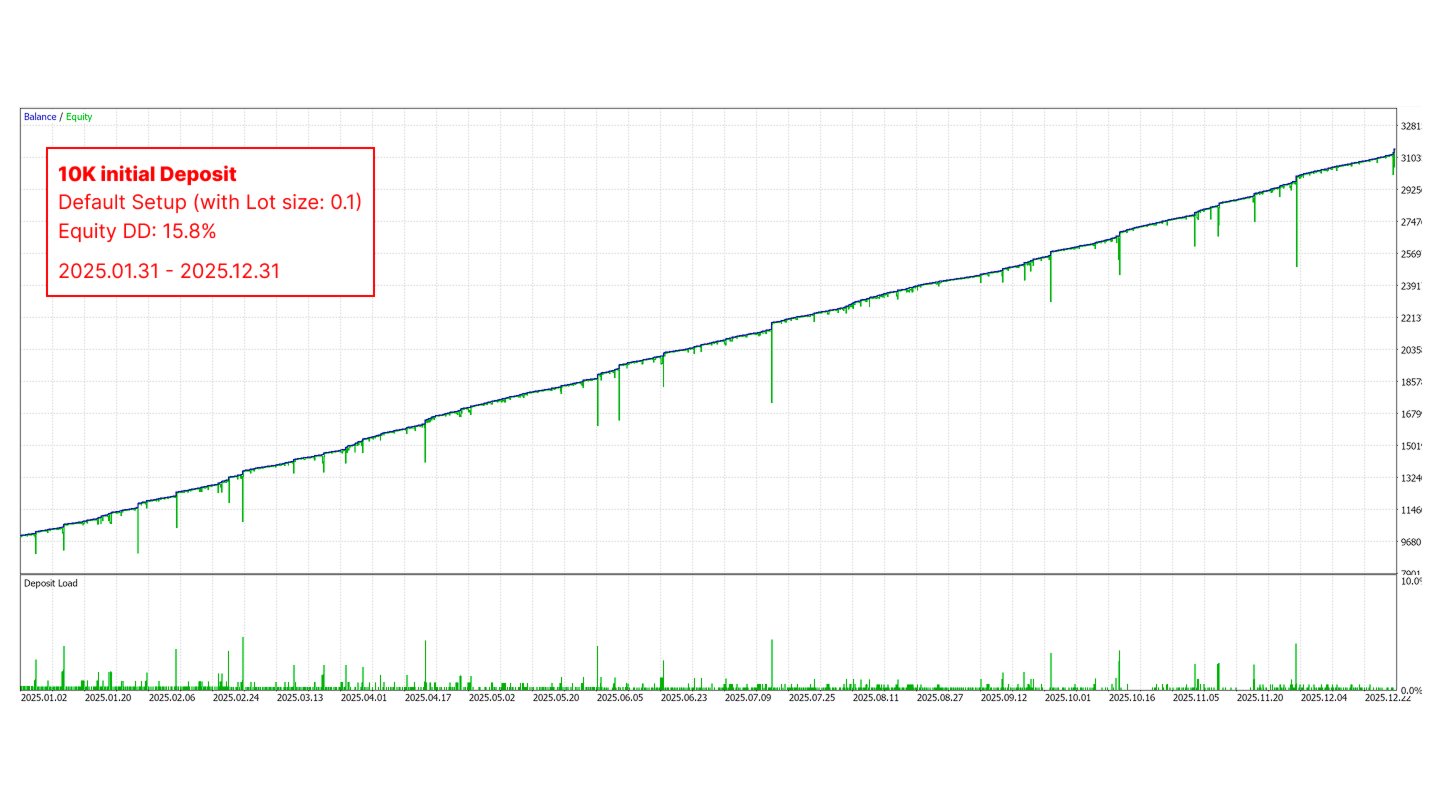
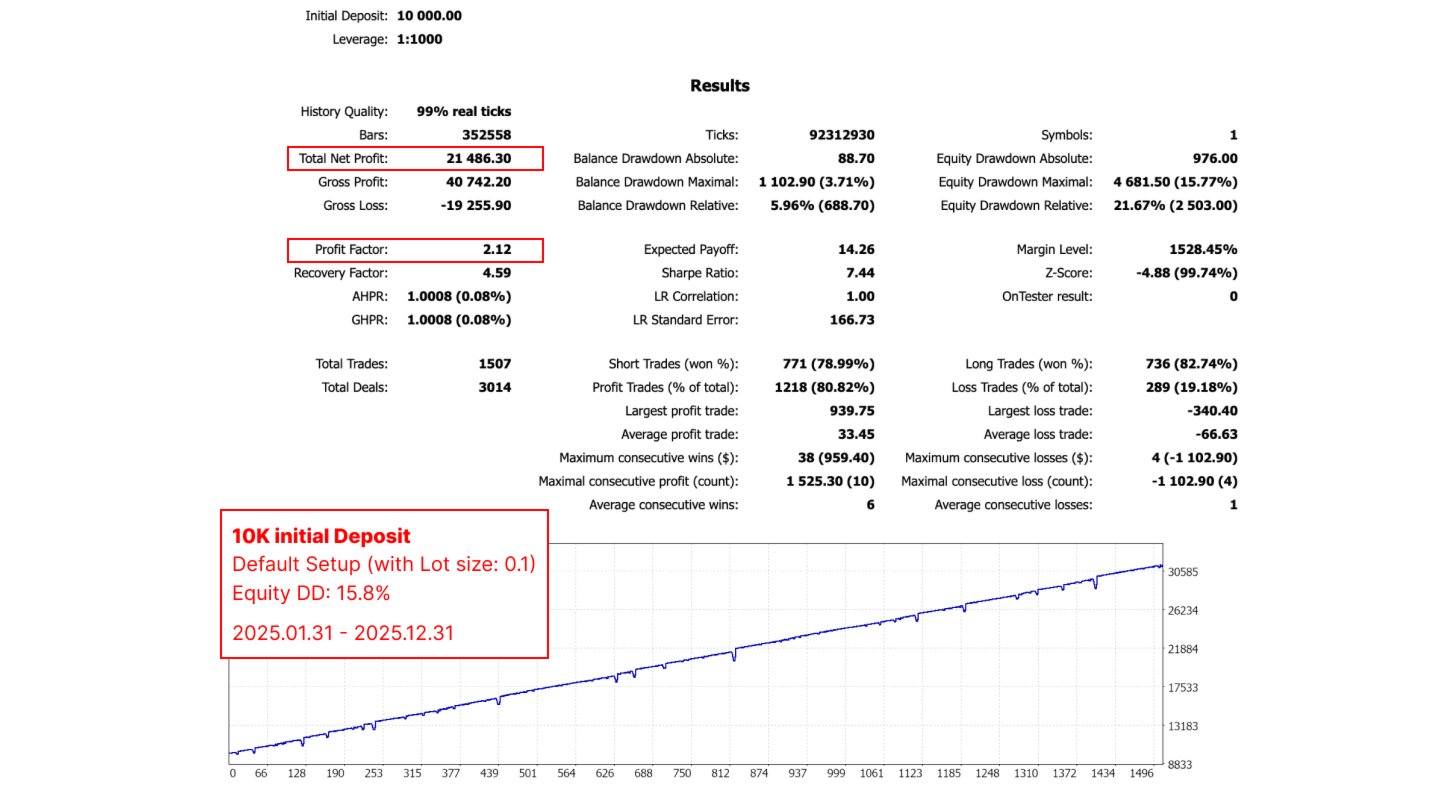
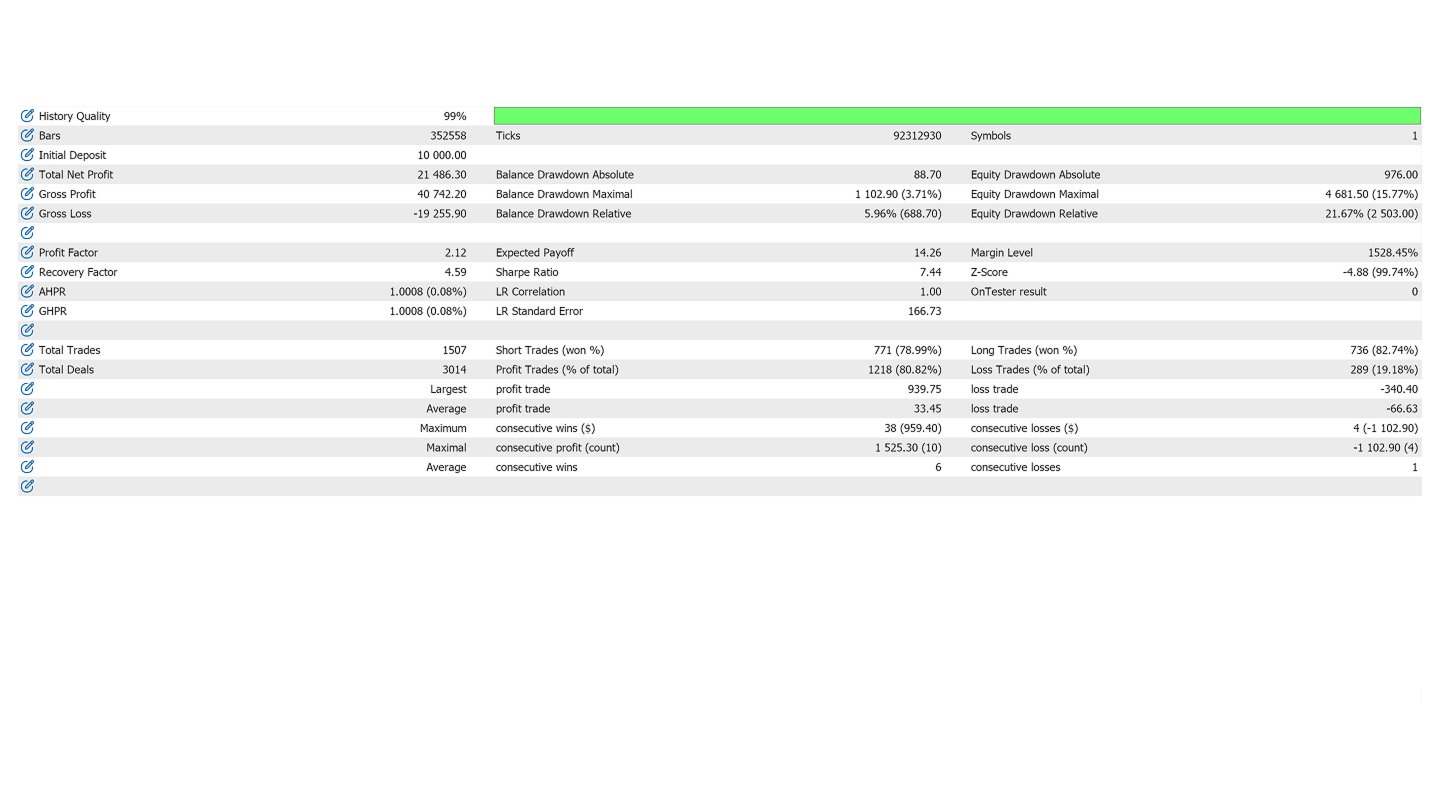
Easy Pro v1.0 is an automated frequency-scalping Expert Advisor designed primarily for Gold (XAUUSD) on the M1 timeframe.
The EA combines EMA trend detection, RSI market-condition filtering, Bollinger Bands, and structured multi-level position management to look for short-term trading opportunities while managing entries as a sequence rather than relying on a single order.
⭐ Designed for Gold M1
Easy Pro is optimized for fast-moving instruments, especially XAUUSD (Gold) on the 1-minute timeframe.
Gold can provide frequent short-term price movements, making M1 suitable for a frequency-scalping approach. For best results, use a broker with competitive spreads and stable execution.
🔥 Frequency Scalping System
Instead of treating every trade as an isolated position, Easy Pro organizes trading into waves and rounds.
After a valid trading signal appears:
-
The EA opens an initial position.
-
Additional pending orders can be placed at predefined price intervals.
-
Position size can increase according to the selected martingale power.
-
When the basket reaches its calculated profit target, the positions are closed.
-
If the wave has not yet reached its overall profit target, the EA can wait for the next valid market condition and continue with another round.
-
Once the wave reaches the configured Period Profit Target, the EA stops the current wave and waits for a new EMA crossover.
This structure allows the EA to seek multiple small profit opportunities during favorable market conditions.
📊 Multi-Indicator Entry Logic
Easy Pro uses several technical conditions to determine when a new trading wave can begin.
EMA Trend & Crossover
The EA monitors:
-
Fast EMA
-
Slow EMA
-
EMA crossover
-
Minimum EMA separation
-
Optional M5 trend confirmation
The EMA crossover acts as the primary trigger for starting a new trading wave.
RSI Market Condition
RSI is used to determine whether the current market condition is suitable for continuation or potential reversal.
Depending on the EMA trend, the EA can look for:
-
Trend-continuation conditions
-
Extreme RSI reversal conditions
-
Buy or Sell confirmation
This helps avoid opening every signal indiscriminately.
Bollinger Bands
Bollinger Bands are displayed directly on the chart and can be used together with the EA's other market information when monitoring XAUUSD.
📈 Structured Martingale Management
Easy Pro uses a predefined position-sizing sequence rather than randomly adding positions.
The following parameters can be configured:
-
Starting Lot
-
Martingale Power
-
Martingale Space
-
Number of pending levels
-
Batch profit target
-
Overall period profit target
The EA automatically calculates the basket's weighted average price and adjusts the basket Take Profit accordingly.
Important: Martingale strategies can significantly increase exposure during extended adverse price movements. Proper capital allocation and testing are essential.
💰 Flexible Profit Target
Easy Pro supports two basket-profit calculation modes:
Scaled Profit Mode
The target increases according to the number of active positions.
Fixed Profit Mode
A fixed monetary target is used for the basket.
This allows traders to choose the profit-management approach that better fits their trading plan.
🖥️ Built-in Trading Dashboard
Easy Pro includes an on-chart dashboard showing important account and EA information, including:
-
Account Balance
-
Profit Today
-
Maximum Drawdown Today
-
Current Drawdown
-
Drawdown Percentage
-
Current Period Profit
-
Period Status
-
Online / Offline status
The dashboard is designed to make monitoring the EA easier without constantly opening the terminal's trading panels.
🎮 Manual Control
Although Easy Pro is an automated EA, traders can also interact with the system directly from the chart.
Available controls include:
BUY
Manually start a Buy basket or add to an existing Buy sequence.
SELL
Manually start a Sell basket or add to an existing Sell sequence.
ONLINE / OFFLINE
Temporarily enable or disable automatic trading.
CLOSE ALL
Close the EA's active positions and cancel its pending orders.
This provides additional control when market conditions change rapidly.
⚙️ Flexible Settings
Easy Pro provides configurable parameters for different trading styles:
-
Starting Lot Size
-
EMA Minimum Distance
-
EMA Crossover Delay
-
Optional M5 Trend Filter
-
Profit Target Mode
-
Martingale Power
-
Martingale Space
-
Period Profit Target
-
Fixed Basket Profit
-
Trading Time Filter
-
Buy/Sell Direction Control
-
Bollinger Band Period & Deviation
-
Fast EMA Period
-
Slow EMA Period
-
RSI Period
-
Slippage
-
Magic Number
🥇 Recommended Setup
Symbol: XAUUSD / Gold
Timeframe: M1
Trading Style: Frequency Scalping
Recommended Environment: Low-spread broker with reliable execution
For XAUUSD M1, spread and execution quality can have a significant effect on scalping performance. Results can therefore vary between brokers.
⚠️ Risk Warning
Easy Pro uses a multi-position / martingale-style position management system. This means exposure can increase when the market moves against the initial position.
The EA can experience substantial drawdown during strong one-directional movements, abnormal volatility, market gaps, or unexpected news events.
Do not use a lot size or account balance that you cannot afford to lose.

We strongly recommend:
-
Test the EA on a Demo Account first.
-
Perform backtests using high-quality tick data.
-
Test different market periods and volatility conditions.
-
Choose an appropriate starting lot for your account size.
-
Avoid excessive leverage.
-
Monitor the EA during major economic news and extreme market conditions.
Past backtest or demo performance does not guarantee future results.
🚀 Easy Pro v1.0
Trade Gold.
Trade the Trend.
Manage the Basket.
Let the EA handle the execution.
Designed for traders looking for an automated XAUUSD M1 frequency-scalping system with structured basket and position management.