Price Action 6 Pattern Pro
- Göstergeler
- Sürüm: 1.101

Price Action 6 Pattern Pro is a MetaTrader 5 technical indicator that automatically detects and visualizes six classical Price Action patterns directly on the chart.
The indicator is designed for market analysis. It does not open, modify or close trades. Signals are generated from confirmed price structures and can be displayed as arrows, text labels and optional graphical pattern structures.
The indicator detects:
- Inside Bar Breakout
- Outside Bar
- Pivot Point Reversal (PPR)
- Move-Congestion-Move (MCM)
- 1-2-3 Reversal
- 2B Reversal
Signals are evaluated on closed bars.
Main Features
- 6 Price Action pattern models in one indicator
- Bullish and bearish signal detection
- Closed-bar signal confirmation
- Interactive on-chart control panel
- Individual ON/OFF control for every pattern
- Global BULL and BEAR filters
- Confluence mode
- Signal counters for each pattern
- Last detected signal information
- Optional pattern structure visualization
- Signal label modes: OFF, RECENT and ALL
- Popup, push and email notifications
- Historical signal display
- Panel state memory when changing timeframe
- Collapsible control panel
- Indicator buffers for external access
Inside Bar Breakout
The Inside Bar model identifies a candle whose range is contained within the range of a previous mother bar.
After the Inside Bar structure is detected, the indicator waits for a breakout of the reference range.
A bullish pattern is confirmed when price breaks above the relevant upper boundary.
A bearish pattern is confirmed when price breaks below the relevant lower boundary.
The maximum number of bars allowed between the Inside Bar and the breakout can be configured.
Main parameters:
- InsideBreakoutMaxBars
- InsideRequireCloseBreak
When structure visualization is enabled, the reference range can be displayed directly on the chart.
Outside Bar
The Outside Bar model identifies a candle that expands beyond the high and low of the previous candle.
The indicator can additionally require the candle to close beyond the previous range before the signal is confirmed.
Bullish and bearish Outside Bar signals are evaluated separately.
Main parameter:
- OutsideRequireCloseBeyond
PPR — Pivot Point Reversal
PPR is a three-bar reversal structure.
The middle candle forms the relevant local extreme, while the following candle provides confirmation of the reversal structure.
The model can be configured to require the middle candle to form the actual local high or low of the three-bar sequence.
Main parameter:
- PPRRequireMiddleExtreme
The indicator detects bullish and bearish PPR structures independently.
MCM — Move-Congestion-Move
MCM is a continuation structure consisting of three stages:
Move → Congestion → Move
The first stage represents a directional impulse.
The second stage represents temporary price compression or congestion.
The final stage represents continuation in the direction of the original move.
The detector evaluates both volatility and candle-body characteristics.
Main parameters:
- MCMMinMoveATR
- MCMMinBodyRatio
- MCMMaxCongestionRangeRatio
- MCMMaxCongestionBodyRatio
These settings define the required strength of the move and the maximum size of the congestion phase.
1-2-3 Reversal
The 1-2-3 model is based on three swing points.
For a bullish structure:
- Point 1 forms a market low.
- Point 2 forms a corrective high.
- Point 3 forms a higher low.
- The pattern is confirmed when price breaks above Point 2.
For a bearish structure, the logic is reversed.
The indicator automatically detects pivot points and evaluates the geometry of the complete structure.
Main parameters:
- PivotLeftBars
- PivotRightBars
- PivotSearchBars
- Min123LegATR
- Max123Bars
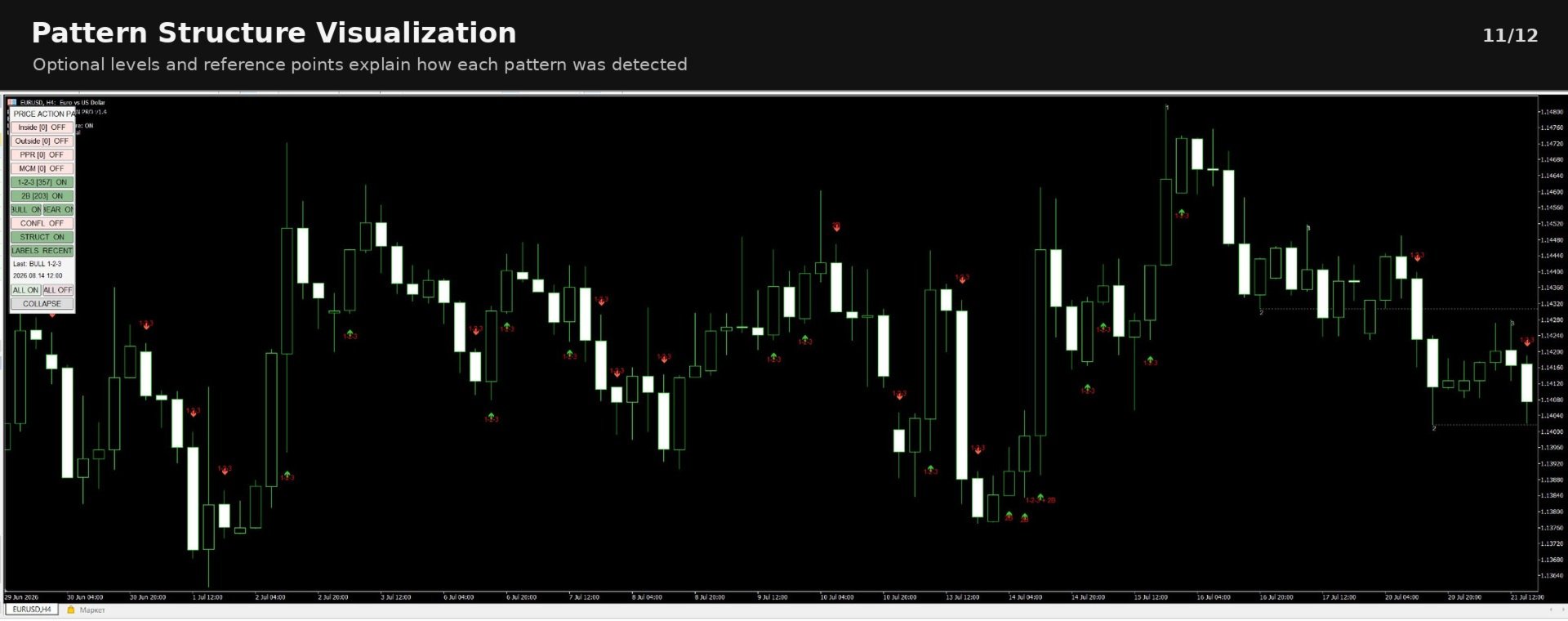
When structure visualization is enabled, Points 1, 2 and 3 and the Point 2 breakout level can be displayed on the chart.
2B Reversal
The 2B model detects a false breakout of a previous market extreme.
A bearish example:
- A previous high is identified.
- Price later trades above this high.
- The breakout fails.
- Price closes back below the previous high.
A bullish 2B uses the opposite logic around a previous low.
Main parameters:
- TwoBExtremeLookback
- TwoBMinPullbackBars
- TwoBMaxPullbackBars
- TwoBMinBreakATR
- TwoBRequireCloseBackInside
When structure visualization is enabled, the reference extreme and false-break level can be shown on the chart.
Interactive Control PanelThe indicator includes an on-chart control panel.
The following pattern models can be switched independently:
- Inside
- Outside
- PPR
- MCM
- 1-2-3
- 2B
Each button displays its current state:
ON — the pattern is visible and active in the display.
OFF — the pattern is hidden.
The number shown next to each pattern represents the number of currently displayed detections within the analyzed history.
Example:
Inside [48] ON
PPR [17] OFF
2B [23] ON
Bullish and Bearish FiltersThe panel contains global direction controls:
- BULL
- BEAR
These controls make it possible to display only bullish signals, only bearish signals, or both.
Example:
BULL ON
BEAR OFF
In this configuration only bullish detections remain visible.
These controls affect signal display and do not change the underlying pattern definitions.
Confluence ModeThe CONFL button enables Confluence Mode.
When Confluence Mode is active, the indicator displays only bars where several enabled pattern models detect a structure in the same direction.
The minimum required number of matching patterns is controlled by:
MinConfluencePatterns
Default:
2
Examples of possible confluence:
- PPR + 2B
- Inside Bar + 1-2-3
- Outside Bar + PPR
Bullish and bearish confluence are evaluated independently.
Confluence indicates agreement between several enabled detection models. It does not represent a guaranteed or statistically predefined probability of future price movement.
Pattern Structure VisualizationThe STRUCT button enables or disables graphical pattern structure.
When enabled, the indicator may display reference points or levels associated with the detected model.
Examples:
- mother-bar range for Inside Bar
- reference range for Outside Bar
- PPR three-bar structure
- Move/Congestion/Move elements
- Points 1, 2 and 3 for 1-2-3
- reference extreme for 2B
Historical structure depth is controlled by:
StructureHistoryBars
Structure visualization is disabled by default to keep the chart clean.
Signal LabelsThe LABELS button cycles between three modes:
OFF
Pattern names are hidden.
Signal arrows can remain visible.
RECENT
Pattern names are displayed only on the most recent part of the chart.
The historical depth is controlled by:
LabelHistoryBars
ALL
Pattern names are displayed throughout the analyzed history.
For performance protection, the maximum number of text objects can be limited by:
MaxLabelObjects
Last SignalThe control panel shows the most recent currently visible detection.
Example:
Last: BEAR 2B
2026.08.14 12:00
If several models detect confluence on the same bar, more than one pattern name can be displayed.
Example:
Last: BULL PPR + 2B
Panel State MemoryWhen:
RememberPanelState = true
the indicator remembers the current panel configuration when the chart timeframe is changed.
The following states are preserved:
- individual pattern switches
- BULL filter
- BEAR filter
- Confluence Mode
- Structure display
- Label mode
- collapsed or expanded panel state
The panel can be collapsed using the COLLAPSE button.
When collapsed, only a compact expand control remains visible.
This allows the user to keep the chart clear while keeping the indicator active.
AlertsThe indicator supports:
- MetaTrader popup alerts
- push notifications
- email notifications
Notification types can be enabled or disabled independently in the Inputs.
Push notifications and email require the corresponding MetaTrader 5 terminal settings to be configured by the user.
General InputsHistoryBars
Defines the number of historical bars used for pattern analysis and visualization.
A larger value provides a deeper signal history but may increase processing and graphical load.
ATRPeriod
ATR period used by models that normalize price movements relative to current volatility.
Default:
14
DetectBullish
Enables bullish pattern detection.
DetectBearish
Enables bearish pattern detection.
Common Detection ParametersEqualityToleranceATR
ATR-based tolerance used when comparing structural price levels.
It prevents pattern detection from depending on exact price equality.
BreakBufferATR
Optional ATR-based buffer required beyond a breakout level.
A value of 0 means no additional breakout distance is required.
ArrowOffsetATR
Controls the visual distance between a signal arrow and the corresponding candle.
This parameter affects chart appearance only.
Suggested UsePrice Action 6 Pattern Pro can be applied to different symbols and timeframes.
Lower timeframes generally produce a larger number of detected structures, while higher timeframes usually produce fewer and more widely separated patterns.
The appropriate timeframe and parameter configuration depend on the user's own analysis method, instrument and market conditions.
Important InformationPrice Action 6 Pattern Pro is a technical analysis tool.
It does not:
- open trades
- close trades
- modify positions
- manage money or risk
- guarantee profitable signals
- predict future price movement
- guarantee that a detected pattern will lead to a reversal or continuation
A displayed signal means only that the corresponding price structure satisfied the configured detection conditions.
Trading decisions and risk management remain the responsibility of the user.
Demo Version
The MQL5 Market demo version can be evaluated in the MetaTrader 5 Strategy Tester.
Use Visual Mode to inspect:
- historical pattern detection
- arrows and labels
- pattern structure
- control panel
- BULL and BEAR filters
- Confluence Mode
- pattern counters
- LABELS modes
- STRUCT mode
MQL5 Market demo products are restricted to the Strategy Tester by the platform.