Spread Shield
- Yardımcı programlar
- Sürüm: 1.4
- Güncellendi: 23 Ağustos 2026
- Etkinleştirmeler: 5

Spread Shield v1.2
Intelligent Spread Protection for MT5
Are you tired of Stop Losses being hunted during high-spread spikes? Worried about pending orders filling at terrible prices during rollover, news events, or overnight sessions? Spread Shield automatically protects your trades the moment spreads become dangerous — and restores everything the instant conditions normalise.
Designed for forex traders on standard brokers, ECN accounts, and Prop Firm challenges where spread spikes can wipe an otherwise winning trade.
How It Works
Spread Shield monitors the live spread every tick. When the spread exceeds your threshold, it instantly removes Stop Losses from open positions and cancels pending orders — protecting them from broker-side stop hunting and bad fills. Once the spread drops back to normal, everything is restored exactly as it was, with an optional delay to confirm the spread has genuinely stabilised.
A smart seeding algorithm automatically estimates a sensible starting threshold the moment it is attached — even if you start during rollover or a news spike — then refines itself continuously from live data over the following hours.
Key Features Smart Auto-Threshold
Set the spread threshold to 0 and Spread Shield automatically calculates the ideal remove and restore thresholds for your symbol and broker. It builds a clean 24-hour rolling average from live tick data, filters out spikes, and uses that average to anchor the thresholds. No guesswork, no manual tuning — it adapts to your pair automatically.
A dynamic pair-aware floor prevents false triggers. The floor scales with the pair's own baseline spread, so tight pairs like EURUSD get a tight floor and wider pairs like GBPCAD or CADJPY get an appropriately higher one.
Intelligent Startup Seeding
When first attached, Spread Shield compares the current live spread against the 24-hour CopySpread average to estimate where in the spread cycle you are. If you start during rollover, it knows — and seeds a conservative higher estimate rather than assuming calm conditions. A 2-hour warmup window gives live data time to replace the estimate.
Stop Loss Protection
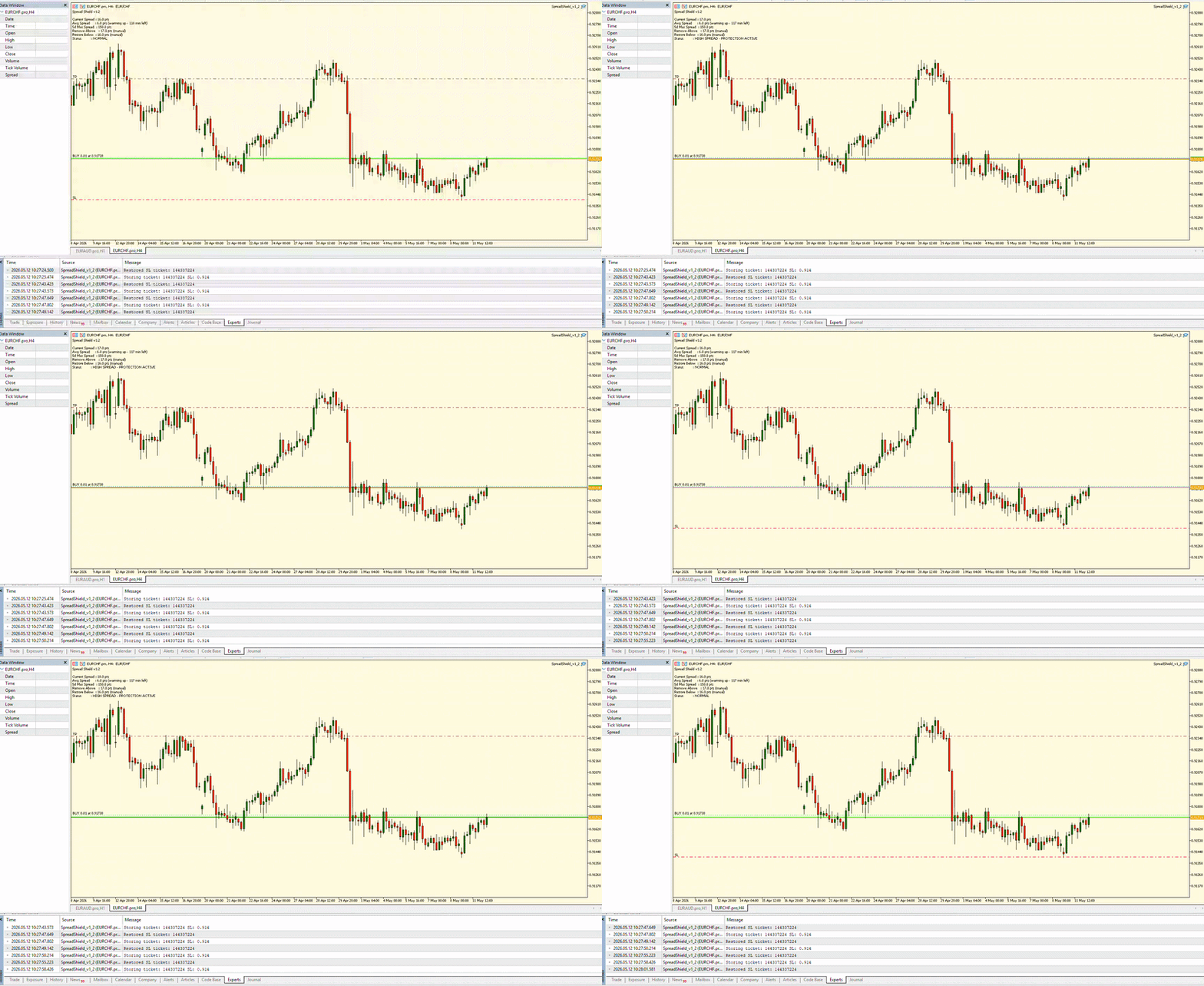
When spread is dangerously high, SL values are stored internally and removed from open positions to prevent broker-side stop hunting. They are fully restored once conditions normalise.
Pending Order Protection
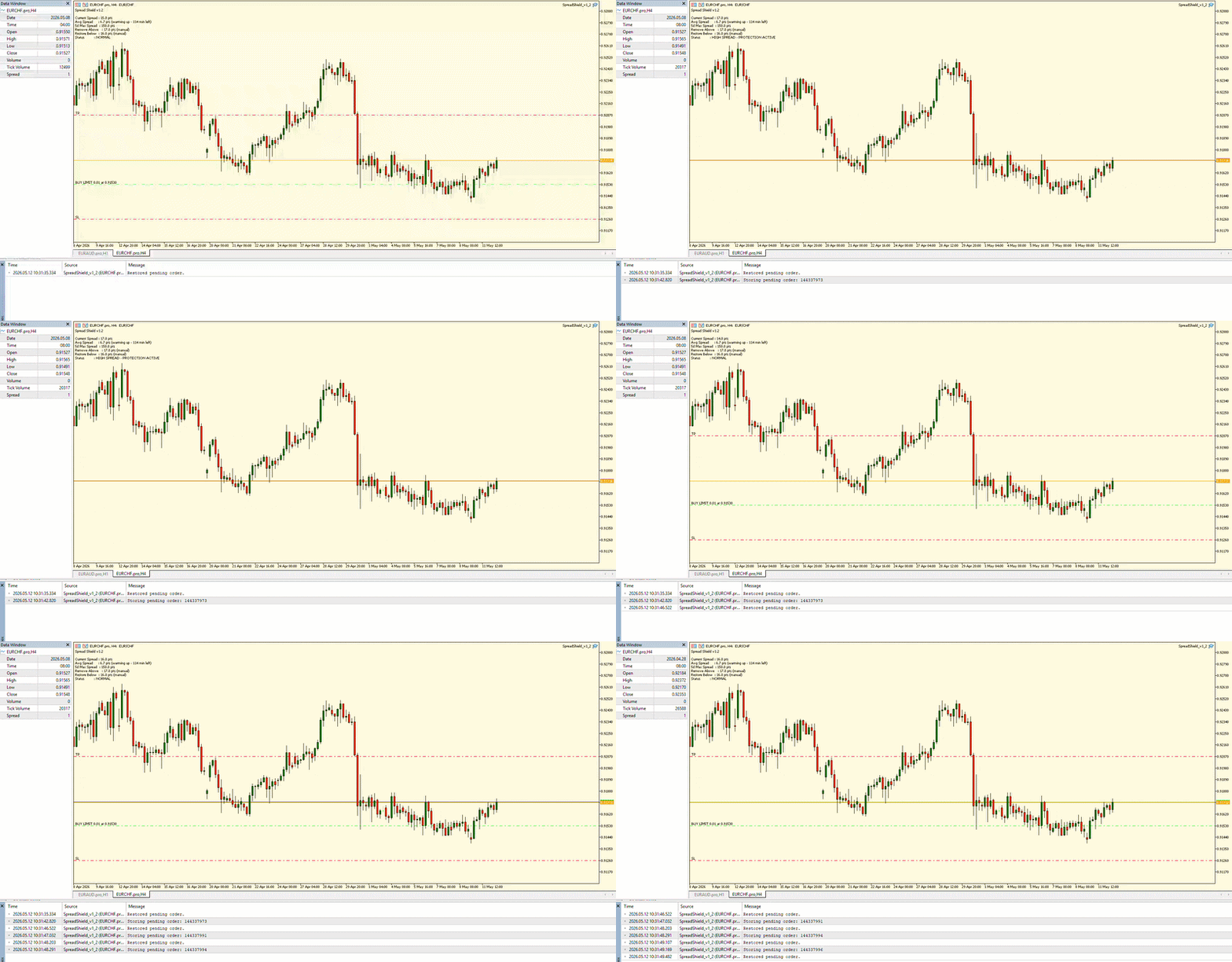
Stop and limit orders are captured and deleted during high spread events, then re-placed at the original price, volume, SL, and TP once spread recovers. Optionally skip re-placement if price has already crossed the entry level.
ECN / Pro Account Support (MinAvgSpread Override)
On ECN and raw spread accounts, the broker's spread can be near-zero at bar open, causing CopySpread to dramatically underestimate the true average. This makes auto thresholds too tight, triggering false protection during normal trading conditions.
Set MinAvgSpread_Points to a value reflecting the pair's realistic average spread on your account. Spread Shield will never calculate thresholds below this floor — even during warmup. Once the live rolling average naturally exceeds this value, the override becomes irrelevant and auto mode takes over correctly.
Example: On a pro/ECN account where EURAUD typically trades at 15-20pts, set MinAvgSpread_Points = 15. Remove threshold becomes 60pts, restore 26pts — sensible for that account type.
Pending Order Protection Toggle
Choose whether pending orders are removed during high spread events. When disabled, Spread Shield protects open position Stop Losses only and leaves pending orders untouched.
Hysteresis Band (Separate Remove & Restore Thresholds)
Spread Shield uses two separate thresholds — one to trigger removal, one to trigger restoration. This prevents the utility from flickering on and off when spread is hovering near the threshold. SLs are only restored once the spread has dropped meaningfully below where it was removed.
Restore Delay with Live Countdown
Add a configurable delay before restoring SLs and pending orders after spread normalises. The on-chart panel displays a live countdown in seconds so you always know when restoration is coming.
Push Notifications
Receive a push notification on your phone the moment Spread Shield activates protection, and again when everything is restored. One notification per event — no spam.
Scheduled Time-Based Removal
Independently of spread levels, configure a fixed daily time window during which all SLs and pending orders are removed and held — useful for traders who know their broker widens spreads at a specific time such as daily rollover. Midnight-crossing windows are fully supported.
Multiple Magic Number Support
Enter a comma-separated list of magic numbers to protect trades from multiple EAs simultaneously. Or enable ManageAllTrades to protect everything on the symbol regardless of magic number.
5-Day Maximum Spread Reference
The on-chart panel shows the 5-day maximum spread for your symbol. This gives you a clear picture of what the pair is capable of at its worst — useful context when setting manual thresholds or evaluating broker quality.
Session Statistics
When Spread Shield is removed from the chart, the journal logs a session summary: number of spread protection events, total positions protected, and peak spread seen during the session.
Live Status Panel
The on-chart panel shows at a glance:
• Current live spread
• 24-hour rolling average (with warmup countdown or filling progress on day 1)
• 5-day maximum spread
• Remove and restore thresholds (auto or manual)
• Restore delay countdown (when active)
• Scheduled window status (when enabled)
• Current protection status in plain language
Status states:
• NORMAL — spread is calm, nothing held
• HIGH SPREAD - MONITORING — spread is high but no trades present to protect
• HIGH SPREAD - PROTECTION ACTIVE — SLs and/or orders have been removed and are held
• SPREAD EASING - AWAITING RESTORATION — spread is dropping but not yet at restore level
• SCHEDULED REMOVAL ACTIVE — scheduled window is in effect
Ideal For
• Prop Firm traders facing overnight spread spikes
• Scalpers on volatile pairs during news events
• Swing traders leaving positions open through daily rollover
• Anyone running EAs that do not have built-in spread protection
• Anyone using a broker with variable or wide spreads
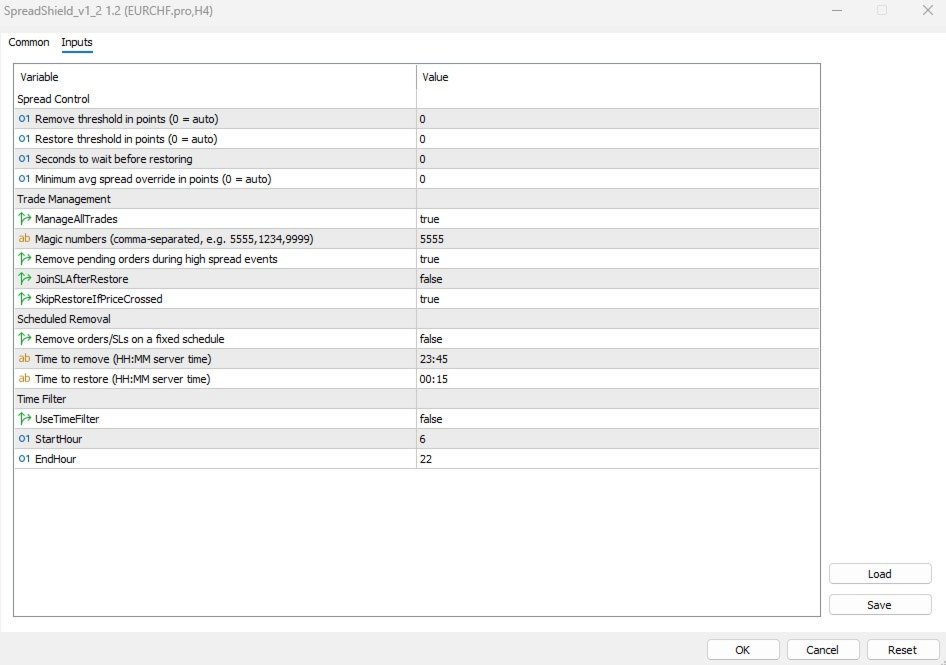
Input Parameters
Spread Control
| Parameter | Description |
| SpreadThreshold_Points | Remove threshold in points. Set to 0 for automatic calculation based on live average spread. |
| RestoreThreshold_Points | Restore threshold in points. Set to 0 for automatic calculation (hysteresis band below remove threshold). |
| RestoreDelaySeconds | Seconds to wait after spread normalises before restoring SLs and orders. 0 = restore immediately. |
| MinAvgSpread_Points | Minimum average spread floor in points. Set to 0 for fully automatic. Use on ECN/pro accounts where raw spreads are near-zero at bar open, causing the auto avg to be underestimated. |
Trade Management
| Parameter | Description |
| ManageAllTrades | If true, protects all trades on the symbol. If false, uses the MagicNumbers filter. |
| MagicNumbers | Comma-separated list of magic numbers to protect (e.g. 5555,1234,9999). Used when ManageAllTrades is false. |
| ProtectPendingOrders | If true, pending orders are removed and restored during spread events. If false, only open position Stop Losses are protected. |
| JoinSLAfterRestore | If true, all restored SLs are unified to a single level on restore (highest buy SL / lowest sell SL). |
| SkipRestoreIfPriceCrossed | If true, skips restoring a pending order if price has already passed its entry level. |
Scheduled Removal
| Parameter | Description |
| UseScheduledRemoval | Enable time-based removal window independent of spread levels. |
| ScheduledRemoveTime | Server time to begin scheduled removal (HH:MM format). |
| ScheduledRestoreTime | Server time to restore after scheduled removal (HH:MM format). Midnight-crossing windows supported. |
Time Filter
| Parameter | Description |
| UseTimeFilter | If true, Spread Shield only operates within the defined hour window. |
| StartHour | Start of operating window (server time, 0-23). |
| EndHour | End of operating window (server time, 0-23). |
Notes
• Compatible with all symbols and brokers on MetaTrader 5
• ECN/pro account users: set MinAvgSpread_Points to your pair's typical spread to prevent false triggers during warmup
• Push notifications require MetaQuotes ID configured in MT5 under Tools > Options > Notifications
• Auto-threshold recalculates every 60 seconds from live spread data
• The 2-hour warmup window on startup is normal — thresholds settle as live data accumulates
• At least 5 activations included
**The videos below shows this tool in action. The parameters have been tightened to extreme levels to ensure the removal and restorations take place.