SaToEA Pro
- Uzmanlar
- Sürüm: 1.12
- Etkinleştirmeler: 5

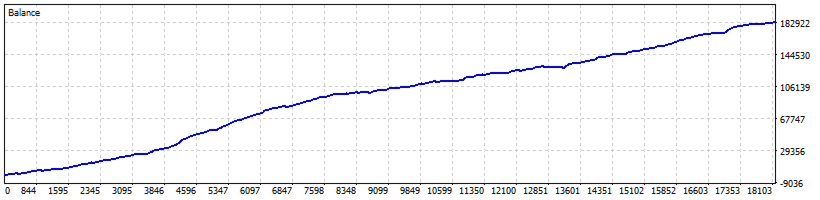
Tired of getting caught in heavy drawdowns? Missing out on massive trends? SaToEA Pro is the answer for Gold traders who demand high security combined with sustainable profits. This system is built on logic derived from a decade of market statistics.
Key Advantages of SaToEA Pro:
-
✅ Dynamic Grid 10Y Blueprint: Order spacing is calculated based on the 10-year High/Low extremes to ensure your account survives any market condition.
-
✅ Pyramiding Trend Following: Lock in profits during strong trends with a "Pyramiding" entry system, featuring independent Basket TP/SL for each side.
-
✅ Panic Filter (ADX Adaptive): An emergency brake system that pauses new orders during extreme volatility and resumes automatically when the market stabilizes.
-
✅ Intelligent Money Management: Automatically calculates Lot sizes and Max Orders relative to your Margin and Equity, preventing overtrading 100%.
-
✅ Fast Backtest Mode: Optimize your settings quickly with the option to disable the UI, speeding up historical testing significantly.
"SaToEA Pro – Professional Technology for Your Gold Portfolio"
📖 User Manual & Parameter Descriptions
1. Lot and Capital Management (Group 1)
-
Lot Control: Users can set independent Buy/Sell base lots. The Max Lot setting acts as a hard ceiling; no matter how much the dynamic lot calculation suggests, the EA will never exceed this limit for safety.
-
Dynamic Lot: The system automatically scales lot sizes as your account grows, based on your Ref Balance (Reference Balance).
-
Safety Factor: This determines the capital buffer. A higher value means the EA will be more conservative, saving more margin to endure potential market swings.
2. Grid Spacing Logic (Group 2)
-
Step Mode: The core engine of the EA. You can choose how the distance between orders is calculated: Fixed, ATR-based (volatility), or Balance-Based. The latter calculates distance based on your actual available capital.
-
Min Step Points: A safety lock that prevents the EA from opening orders too close together during high-speed price movements.
3. Basket Management (TP & SL) (Group 3)
-
Global Basket TP: The EA will close all positions and realize profits once the total floating profit reaches your target in USD.
-
Partial Profit: A risk-reduction feature that closes half of the open positions once a specific profit target is hit, freeing up margin.
-
Trend Basket SL/TP: Exclusive for the Trend Mode. You can set a "Surrender Point" (Stop Loss) or a "Profit Target" specifically for the trend-following side. If the trend reverses, the EA cuts only that portion of the trade to protect the majority of your capital.
4. Core Strategies (Group 4)
-
Strategy Selection: Highly flexible. You can set one side to Grid Mode (Averaging) while the other side runs Trend Mode (Pyramiding).
-
Hedge Entry: An optional feature to open the first Buy and Sell orders simultaneously at the same price. This creates an initial balance (Hedge) before the individual strategies take over for subsequent orders.
-
Max Drawdown: An automatic circuit breaker that stops new orders if the account drawdown exceeds your specified percentage.
5. Market Filters & Entry (Group 5, 6, 7)
-
Swap Filter: Trade only in directions that offer a swap advantage or avoid high overnight costs.
-
Trend Entry Logic: Uses high-sensitivity moving averages to detect "Micro-Entries," ensuring you enter trades at optimal price points.
-
Panic Filter: Monitors market volatility. If the price spikes too aggressively, the EA pauses entries to avoid "catching a falling knife."
6. UI & Performance (Group 8)
-
Show Dashboard: Toggle the on-screen display. Disabling this is highly recommended during Backtesting as it significantly reduces GPU load and increases processing speed.