
RAlabs Arbitrage Parser
- Uzmanlar
- Sürüm: 1.0

RAlabs Arbitrage Parser — High-Precision Market Data Collector
Reliable and efficient Expert Advisor for collecting real-time market data from MetaTrader 4 and MetaTrader 5 terminals.
Designed for traders, quantitative analysts, and developers who need clean, structured price data for analysis, arbitrage, or algorithmic trading.
🚀 Overview
RAlabs Arbitrage Parser is a lightweight and fully autonomous tool that records streaming Bid/Ask prices into CSV files with millisecond precision.
The EA runs on a single chart while collecting data from multiple symbols simultaneously, saving each instrument into a separate file for удобной дальнейшей обработки.
No need to open dozens of charts or use external DLL-based tools.
🎯 Use Cases
✔ Arbitrage trading (multi-broker comparison)
✔ Data collection for machine learning and AI models
✔ Backtesting and statistical analysis
✔ Real-time monitoring in Python / Excel / Google Sheets
🔥 Key Features
✔ Multi-symbol support
Collect data from multiple instruments at once (e.g. EURUSD, BTCUSD, XAUUSD)
✔ Multi-broker compatibility
Run the parser on different terminals — files are clearly separated and easy to compare
✔ MT4 + MT5 unified workflow
All data can be stored in a shared folder across platforms
✔ Real-time file access
CSV files can be opened while the EA is running (no file lock issues)
✔ Flexible data frequency
Set custom interval in milliseconds (e.g. 1000 = 1 second, 500 = 0.5 sec)
✔ Millisecond timestamps
Time format: HH:MM:SS.ms for precise synchronization
✔ Automatic daily file split
Prevents large file sizes and keeps data organized
✔ Safe for MQL5 Market
No DLL usage, fully compliant with platform rules
⚙️ Input Parameters
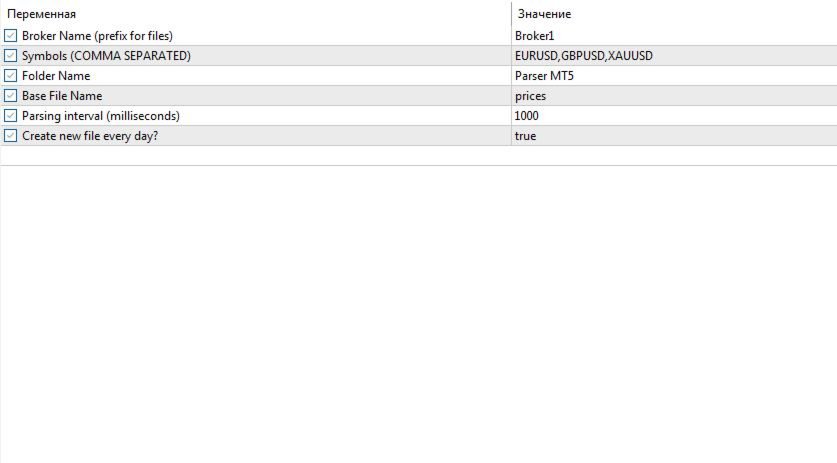
Broker Name — broker identifier added to file names
Symbols (comma separated) — list of instruments (e.g. EURUSD,XAUUSD)
Folder Name — output folder name
Base File Name — file prefix
Timer (milliseconds) — data recording interval
Create New File Every Day — enable/disable daily file split
📁 File Location (Important)
All data is stored in the Common Data Folder, shared between MT4 and MT5.
To access files:
MT5 → File → Open Common Data Folder
Then go to: Files → [Your Folder Name]
You can create a desktop shortcut for faster access.
💡 Notes
- The EA works efficiently even with multiple symbols
- Suitable for long-term data collection
- Designed for stability and continuous operation
⚠️ Important
This product is a data collection tool, not a trading system.
It does not open or manage trades.
🔗 More Products
Other free and paid tools:
https://www.mql5.com/ru/users/raprofit/seller











































Good EA sir. Thanks for making it available for free to everyone. I appreciate it.