PropProtectorTester
- Yardımcı programlar
- Alexander Berger
- Sürüm: 2.38
- Güncellendi: 25 Şubat 2026
🛡️ PropProtector for MetaTrader 4 Demo Version
Automated account protection for prop trading – monitors rules, closes trades, protects your capital.
Free demo version! Try PropProtector with full functionality – with just one restriction: The demo version only allows minimum lot size per symbol. Trades exceeding the minimum lot are automatically closed. This lets you test all protection features risk-free on a demo account.
Unlocked in the full version:
- Unlimited lot size
- Profit Lock (consistency rule protection)
- News pending order protection (automatic save & restore)
The full version is available here: Link
The manuals for the PropProtector:
PropProtector MT4 Manual Deutsch
PropProtector MT4 Manual English
⚠️ Important Note Before Installation
Never install PropProtector directly on a live account with open trades without verifying all settings on a demo account first.
Adjust min/max balance, loss limit, profit target and trade limits to match your account size and strategy. Incorrect settings may result in immediate closure of all open trades.
Why PropProtector?
Prop trading firms enforce strict rules: daily loss limits, maximum drawdowns, trade count restrictions and trading bans around news events. A single violation can cost you your account.
PropProtector monitors your account in real time and intervenes automatically before any rule is broken.
📊 Core Features
Daily Loss Limit
- Percentage or fixed amount
- Real-time monitoring (equity + closed P/L)
- Early warning at configurable threshold
- Automatic closure of all trades
- Configurable daily reset time
Risk Management
- Max risk per trade (SL-based)
- Max total risk across all positions
- Close priority: newest or riskiest trade
- Stop-loss enforcement with countdown
- Margin level protection
Profit Target & Profit Lock
- Daily profit target (% or $)
- Trailing profit lock for consistency rule
- Min/max equity limits
- Persistent state (survives restarts)
Trade Limits
- Max trades per symbol / per magic
- Max total trades & lot size
- Daily & weekly trade count limit
- Hedging control
Time-Based Close
- Monday through Friday individually
- Separate times per day
- Optional pending order deletion
- Broker server time
Autotrading Lock
- Blocks ALL EAs after limit violation
- 3 modes: Off / Until Reset / Until Manual
- Robust closing with retry mechanism
- GUI shows BLOCKED status
🔒 Profit Lock – Consistency Rule
Many prop firms require consistent daily profits. The Profit Lock automatically protects your daily gains with a trailing mechanism.
How It Works
- Define activation threshold (e.g. 1% daily profit)
- Lock activates automatically when reached
- Tracks peak daily profit in real time
- Configurable lock percentage (e.g. 50%)
Example
- Activation at 1%, lock at 50%
- Profit reaches $2,000 → lock = $1,000
- Profit grows to $3,000 → lock = $1,500
- Profit drops to $1,400 → all trades closed
📰 News Filter (ForexFactory)
Automatic protection from volatility around news events using ForexFactory as data source.
Trading Ban
- Configurable time windows before & after news
- Automatic closure of open trades
- Blocks new trades & pending orders
- Currency filter (USD, EUR, GBP, JPY, ...)
- Auto-detect currencies from symbol
- Manual broker GMT offset (optional, auto-detect as default)
Pending Order Protection New
- Save existing pending orders before news
- Automatic deletion during news window
- Automatic restoration after news window
- Price validation before restoration
- Crash-safe storage to disk
⚙️ One-time setup: Allow URL forexfactory.com in Tools → Options → Expert Advisors → WebRequest.
💾 Crash Safety & Persistence
Persistent Storage
- Daily balance, flags & status saved to disk
- Survives terminal crashes & restarts
- Pending orders stored crash-safe
- Automatic recovery on restart
Reset & Control
- Manual reset button in GUI
- Resets all restrictions
- Lifts autotrading lock
- Confirmation dialog for safety
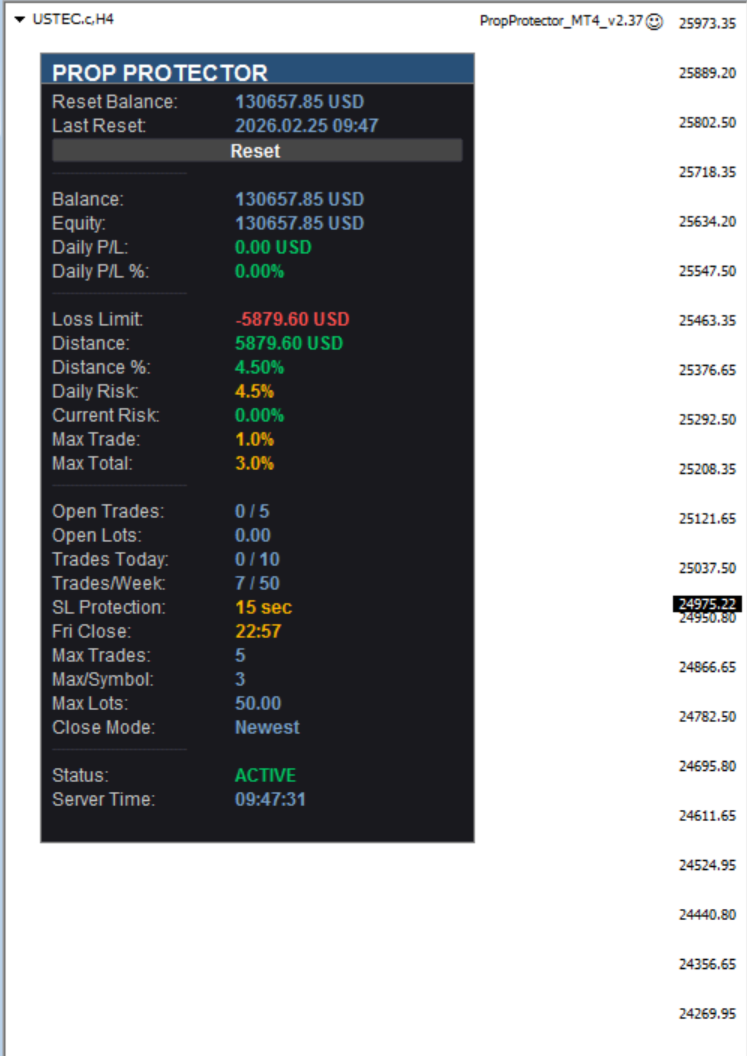
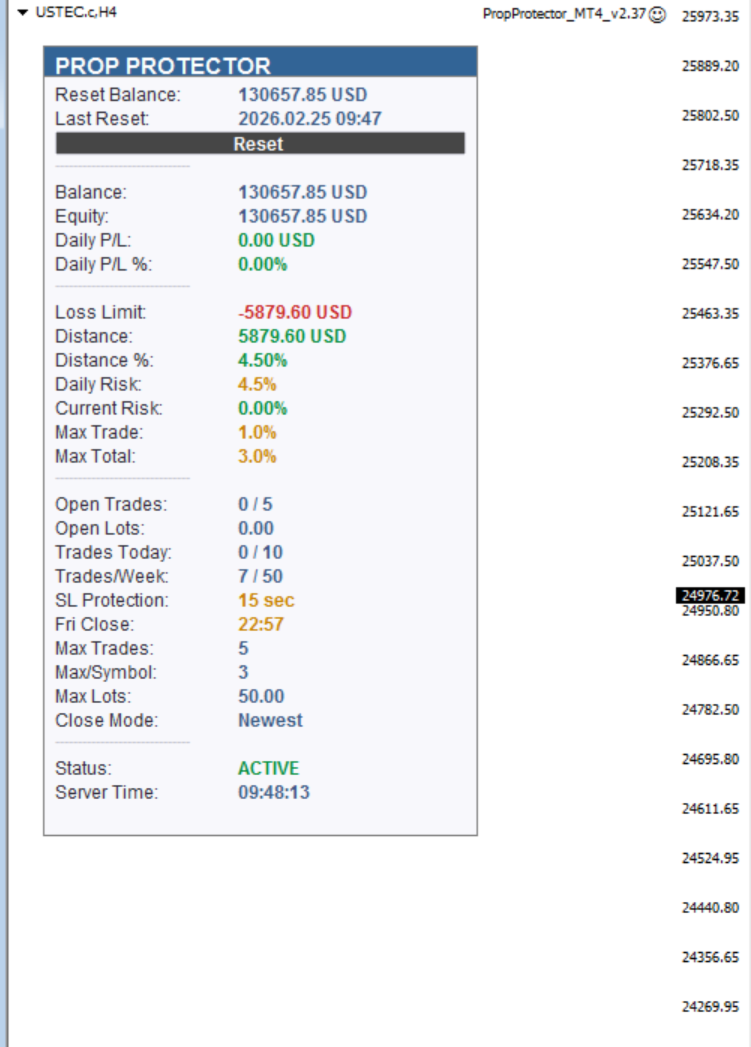
🖥️ Live Dashboard
Auto-scaling GUI – width and line spacing adapt dynamically to the configured font size (8–14). All sections can be shown/hidden individually. English & German.
⚠️ Important Note Before Installation
Never install PropProtector directly on a live account with open trades without verifying all settings on a demo account first.
Adjust min/max balance, loss limit, profit target and trade limits to match your account size and strategy. Incorrect settings may result in immediate closure of all open trades.