Volume Based Support Resistance With Alerts MT5
- Göstergeler
- Sürüm: 1.2
- Güncellendi: 18 Şubat 2026
- Etkinleştirmeler: 20

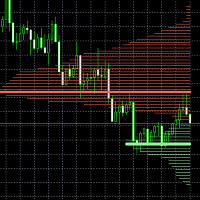
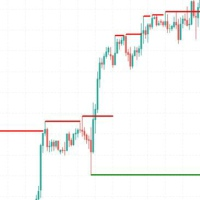
Volume Based Support Resistance With Alerts is an indicator that calculates volume profile for selected timeframe (not necessarily chart timeframe), finds local points of control (high volume zones) and low volume zones.
Low volume zones often serve as strong support / resistance. Between these zones lie zones with significantly higher volume and that is where most of the price action is taking place, culminating with point of control.
We can therefore use volume profile and it's structure to see the grand scheme of things - where price is and where it is likely going. We can also plan our movements. Indicator has Alerts buttons attached to each individual lowvolume zone and point of control, so you can be informed when price makes the move and gives you opportunity.
Practical tips:
* Once we are in high volume node (blue color on volume profile), the price will likely ride up and down many times, crossing point of control many times.
* Point of control is generally a magnet for price.
* We should aim to open buy position near support zone at the bottom of the node (red zone on profile), preferably after rejection from this zone.
* Alternatively sell at the high of the volume node, after rejection from resistance.
* Exit most of the trade around point of control and ride the rest risk-free.
* At some point price will attempt to exit the high volume node and move on to another. Low volume zone will show you why it is, for example, bad idea to open buy position at price X, but good idea at even higher price - price X might be just below low volume resistance and there is risk of rejection just above. Price that already crossed resistance (or even better - retested it) might be in lower part of whole another high volume node and will have open doors to even higher price.
* When we see steep volume cliff we can be sure it is important support / resistance and decisive price action will happen there. Either attack on top or hard reject. If you see no trigger that could push the price to high or even ATH, then probability rises of rejection.
* If you decide to open position around large point of control, be prepared for chop.
* Barely touched zones, ones that has been only ridden once or twice already have basic outline of structure. We can therefore deduct from it where future important zones will be.
* Big liquidity grab often go to one of these zones - either grab liquidity from point of control, or stop at low volume zones. Often times big candles can grab liquidity from 2 or 3 smaller levels below.
* Combine static support / resistance zone like this one with active support / resistance (like moving average, vwap, trend line, Bollinger Bands) for even stronger zones.
* There comes a time in a life cycle of low volume zone, when price goes and stays there for some time. Often time a preparation for a big move.