Control Panel MT5

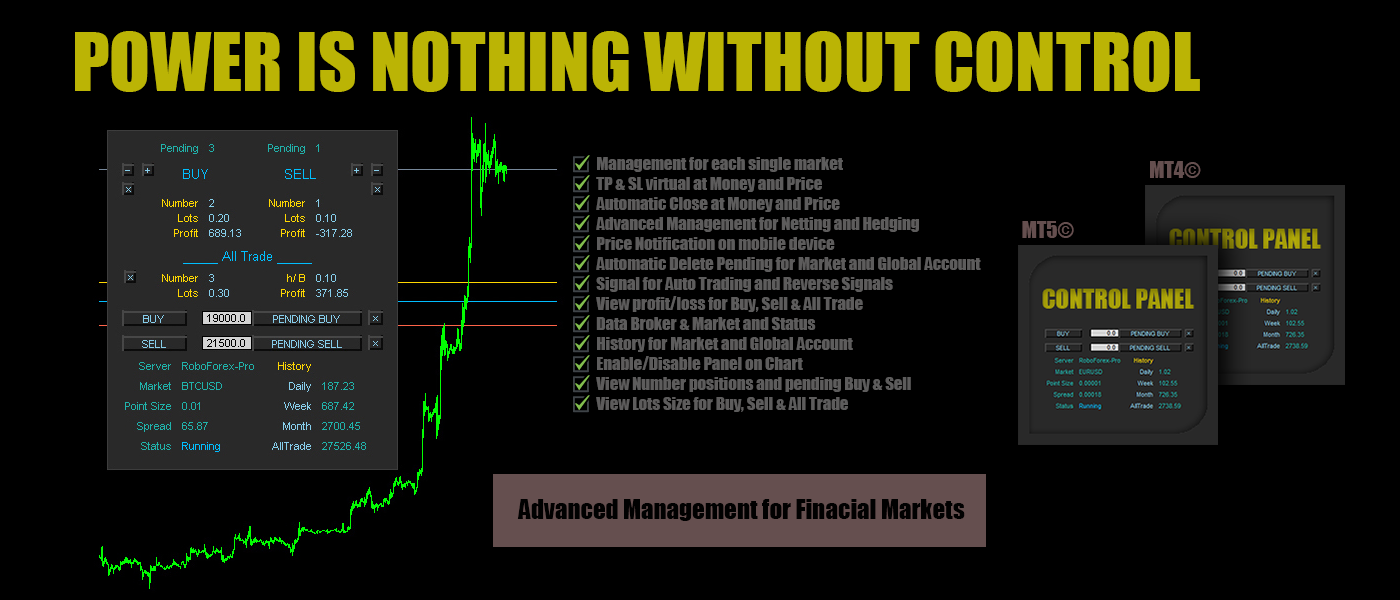
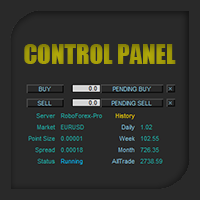
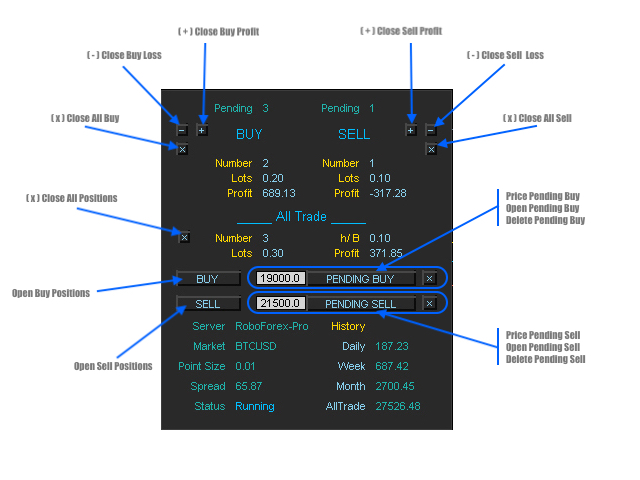
Control Panel mette a disposizione una semplificata ed avanzata gestione dedicata per ogni singolo mercato Forex, CFD, Materie Prime, Indici Azionari, Metalli Preziosi, Prodotti Energetici, Azioni & Crypto Valute, dal trade pad si posso aprire posizioni e ordini pendenti, visualizzare tutti i dati relativi alla quantità delle posizioni Buy, Sell e di tutti i trade oltre alla quantità espressa in lotti anche per i posizionamenti hedge indicando il valore espresso in lotti relativo all’esposizione, se la differenza di posizionamento misurata in lotti sarà di tipo Hedge Buy sul pannello di controllo sarà disponibile il dato h/B: e il valore di lotto, se di tipo Hedge Sell sarà disponibile il dato h/S: con il valore di lotto. Si possono chiudere posizioni in profitto o in perdita oppure passare alla chiusura totale in qualsiasi momento, impostare o cancellare ordini pendenti, tutte le funzioni sono disponibili in modalità manuale e automatica. Control Panel ha integrato un sistema di visualizzazione dei profitti/perdite con report giornaliero, settimanale e mensile ed il totale dei profitti per ogni singolo mercato o dell'intero account. Sul grafico sono disponibili le Open Price delle posizioni Buy ( linea blu ), Sell ( linea rossa ) e se presente del posizionamento Hedge ( linea oro ). Si possono impostare take profit ( linea blu tratteggiata ) e stop loss ( linea rossa tratteggiata ) virtuali basati sul raggiungimento di un determinato prezzo o profitto, impostare la cancellazione degli ordini pendenti al raggiungimento del target impostato ed impostare notifiche sullo smartphone per monitorare il profitto o la perdita ad un valore ed una frequenza impostati. Offre anche la possibilità di aprire una prima singola posizione per mercato basata sulla ricezione del segnale generato dall'indicatore Ichimoku, RSI e Moving Average su cui lavorare successivamente con il trade pad fino al raggiungimento del profitto.


Contro Panel possiede tutti i strumenti necessari per gestire ogni singolo mercato in modalità automatica e manuale nel breve e lungo periodo rendendo semplice e comprensibile la strategia da intraprendere per ottimizzare al massimo i propri investimenti, è uno strumento professionale dal codice pulito e stabile di cui sarà impossibile fare a meno non appena comprese le potenzialità che offre.


Input/impostazioni alle funzioni:

  • Market / inserire il simbolo del mercato come da grafico su cui attivare Control Panel ( esempio: EURUSD )
  • Lots Size / il lotto per il Trade Pad e per l'Auto Trading che attiva la sezione Signal
  • Auto Trading / true attiva, false disattiva la sezione Signal
  • Profit Control / true attiva, false disattiva la notifica mobile del profitto/perdita, è disponibile nella sezione Market per la notifica mobile di profitto/perdita relativa al solo Mercato impostato in Market oppure dell'intero Account
  • Money Move Up / invia una notifica sul mobile device quando il profitto è superiore al valore impostato ( esempio come da valore default impostato 50USD )
  • Money Move Down / invia una notifica sul mobile device quando il profitto è inferiore al valore impostato ( esempio come da valore default impostato -50USD )
  • Notification Mobile / la frequenza della ricezione delle notifiche, se ad esempio il valore è impostato come di default su 1 hour, Control Panel invierà una notifica ogni ora
  • Automatic Close / true attiva, false disattiva la chiusura di tutte le posizioni, è disponibile nella sezione Market per la chiusura automatica di tutte le posizioni relative al solo Mercato impostato e nella sezione Account per la chiusura automatica di tutte le posizioni presenti su ogni mercato
  • Close All Positions Market Move Up / true attiva, false disattiva il successivo input Take Profit: impostare un valore per la chiusura, esempio il valore di default è 500USD o altra valuta, quando il profitto relativo al market è uguale o superiore a 500 avvia il processo di chiusura automatica di tutte le posizioni relative al mercato o dell'intero account se attivo nella sezione Account
  • Close All Positions Market Move Down / true attiva, false disattiva il successivo input Stop Loss: impostare un valore per la chiusura, esempio ( il valore di default è impostato ad un valore alto per evitare chiusure errate prima dell'apprendimento delle funzioni ) -500USD o altra valuta, quando il profitto relativo al market è uguale o inferiore a -500 avvia il processo di chiusura automatica di tutte le posizioni relative al mercato o dell'intero account se attivo nella sezione Account
  • Delete Pending No Position Market / true attiva, false disattiva la cancellazione di tutti gli ordini pendenti quando non ci sono posizioni aperte sul mercato
  • Delete Pending No Position Account / true attiva, false disattiva la cancellazione di tutti gli ordini pendenti quando non ci sono posizioni aperte sull'intero account
  • Comment Order / il commento per le posizioni

Nella sezione (3) (4) (5) troviamo le impostazioni per la ricezione dei segnali Ichimoku, RSI e Moving Average con le relative impostazioni e il Reverse Signal, è possibile attivarle e disattivarle singolarmente ed è attiva solamente se il valore su Auto Trading nella sezione market e su true, se attiva aprirà un sola posizione per mercato alla ricezione del segnale attivo

Take Profit & Stop Loss i valori da inserire sono espressi in Points Digits, esempio: per impostare il Take Profit di 50 pips su EURUSD che ha un Point Size di 0.00001 ( calcolo: 1 pips = 10 points - 50 pips x 10 points = 500 points ) il valore da inserire sarà 500 a partire dall'ultimo decimale, quindi il valore da inserire sarà 0.00500

esempio per BTCUSD  che ha un Point Size di 0.01 ( calcolo: 1 pips = 10 points - 50 pips x 10 points = 500 points ) il valore da inserire sarà 500 a partire dall'ultimo decimale, quindi il valore da inserire sarà 5.00, lo stesso vale per tutti gli altri mercati partendo sempre dal l'ultimo decimale tenendo conto del ( Point Digits ) punto

  • Control Panel / true attiva, false disattiva il pannello dati sul grafico
  • Account Profit Stats / true attiva, false disattiva la cronologia dei profitti dell'intero account visibile sul grafico angolo destro superiore
  • Magic Number / il numero magico ( control panel è progettato per il supporto di tutte le posizioni, manuali o aperte da altri expert, quindi è possibile inserire il numero magico dell'expert su cui vogliamo applicare il supporto )


Control Panel offre funzioni aggiuntive non disponibili sulle comuni piattaforme, funzioni che i studi basati su anni di esperienza hanno rilevato fondamentali alla gestione del proprio portafoglio investiario!


#tag control panel gestione mercati finanziari dati hedge buy sell automatico manuale forex azioni metalli indici crypto valute notifiche mobili close profit control on pair signal reverse account history market stats trade pad pending delete
Produtos recomendados
Manus Pro
Itumeleng Mohlouwa Kgotso Tladi
MANUS PRO EA The Trading Revolution You've Been Waiting For Are you TIRED of watching other traders make consistent profits while your account bleeds red?   The financial markets don't wait for anyone – and neither should you. MANUS PRO isn't just another Expert Advisor... it's your   TICKET TO FINANCIAL FREEDOM . Why MANUS PRO is Different (And Why Everyone's Talking About It) FOR BEGINNERS: Your Trading Mentor That Never Sleeps Zero Learning Curve   – Install, activate, and watch it wo
Just Copier MT5
Agung Imaduddin
4.75 (4)
"Just copier" is designed to copy trading without any complicated settings. The copy can be done in one PC. One EA can be set as master (provider) or slave (receiver). The receiver lot can be set to multiple providers lots. Please also check this product at fxina.hostingerapp.com.  Any type of copy is available. MT4 -> MT5 MT4 -> MT4 MT5 -> MT5 MT5 -> MT4 If you want to copy MT4 -> MT5 or MT5 -> MT4, please purchase "Just copier" for MT4 and "Just copier" for MT5 separately. Just Copier can copy
Growth Guard Indicator – The Backbone of Precision Monitoring Stay in control of your trading portfolio with dynamic insights into your external EAs’ performance. The Growth Guard Indicator is an essential tool designed to work seamlessly with the Growth Guard EA , providing real-time data on your external Expert Advisors’ (EAs) performance. With its unique rolling profit factor feature, the Growth Guard Indicator helps you monitor profitability over a customizable time frame, ensuring your port
FREE
Trade Mirror Master
Nguyen Thanh Cong
5 (1)
Advanced Trade Mirror   is a powerful Forex tool designed for traders who need instant, seamless trade replication across multiple terminals on the same machine. With lightning-fast execution, it ensures zero lag in copying trades, maintaining precision and efficiency in high-speed trading environments. Get the Trade Mirror Follower here:  https://www.mql5.com/en/market/product/133890 Specification: Master ID: Identity value of master terminal, please use a unique value to prevent duplicated mas
FREE
Trade Mirror Follower
Nguyen Thanh Cong
5 (1)
Advanced Trade Mirror   is a powerful Forex tool designed for traders who need instant, seamless trade replication across multiple terminals on the same machine. With lightning-fast execution, it ensures zero lag in copying trades, maintaining precision and efficiency in high-speed trading environments. Get the Trade Mirror Master here:  https://www.mql5.com/en/market/product/133891 Specification: Master ID: Identity value of master terminal, please use a unique value to prevent duplicated mas
FREE
Free automatic Fibonacci is an indicator that automatically plots a Fibonacci retracement based on the number of bars you select on the BarsToScan setting in the indicator. The Fibonacci is automatically updated in real time as new highest and lowest values appears amongst the selected bars. You can select which level values to be displayed in the indicator settings. You can also select the color of the levels thus enabling the trader to be able to attach the indicator several times with differe
FREE
Get news5
Aleksander Gladkov
Utility for reading news from investing.com To access the site, you need to add WebRequest in the Options terminal menu on the Expert Advisors tab: https://sslecal2.investing.com If reading is successful, a message about writing the file is displayed. The INV_week_this.txt file is written to the MQL5\Files folder of the terminal and is kept up to date, updating data according to its own timer You can attach the utility to any chart with any time frame; just one is enough to support indicators
The new version of  MirrorSoftware 2021  has been completely rewriten and optimized.  This version requires to be loaded only on a single chart because  it can detect all actions on every symbol and not only the actions of symbol where it is loaded. Even the  graphics and the configuration mode  have been completely redesigned. The MirrorSoftware is composed of two components (all components are required to work):  MirrorController  (free indicator): This component must be loaded into the MASTER
N-second K-line chart, customizable, monitoring multiple seconds of multiple symbols simultaneously, all Chinese parameters, easy to use -------------------------------------------------------------------------------------------------------------- You can ask me any questions in private messages https://www.mql5.com/en/users/chaoping0326 Customization of indicators and EA for MT4 and MT5 is available Long term programming project (MT4 from 2012, MT5 from 2016). Good programming skills, reasonabl
Indicador único que implementa uma abordagem profissional e quantitativa para significar negociação de reversão. Ele capitaliza o fato de que o preço desvia e retorna à média de maneira previsível e mensurável, o que permite regras claras de entrada e saída que superam amplamente as estratégias de negociação não quantitativas. [ Installation Guide | Update Guide | Troubleshooting | FAQ | All Products ] Sinais de negociação claros Incrivelmente fácil de negociar Cores e tamanhos personalizáveis
Show Pips for MT5
Roman Podpora
4.65 (23)
Este indicador de informação será útil para quem quer estar sempre atento à situação atual da conta. -   Indicadores mais úteis O indicador exibe dados como lucro em pontos, porcentagem e moeda, bem como o spread do par atual e o tempo até o fechamento da barra no período atual. Existem várias opções para colocar a linha de informação no gráfico: À direita do preço (corre atrás do preço); Como comentário (no canto superior esquerdo do gráfico); No canto selecionado da tela. Também é possível se
FREE
Axilgo PipPiper CoPilot
Theory Y Technologies Pty Ltd
5 (2)
Axilgo Pip Piper CoPilot Elevate your trading game with the Axilgo Pip Piper CoPilot, the first in our revolutionary Pip Piper Series. This all-inclusive toolset is meticulously crafted for serious traders, focusing on key areas such as Risk Management, Trade Management, Prop Firm Rule Compliance, and Advanced Account Management . With CoPilot, you’re not just investing in a tool—you’re gaining a strategic partner in the intricate world of trading. Important Notice: To ensure you receive the fu
FREE
Эксперт собирает данные из биржевого стакана, суммируя отложенные ордера на покупку или продажу. Далее, по сумме ордеров определяется общее направление, куда смотрят участники рынка. Если суммарные покупки/продажи превышают определенный коэффициент, то производится сигнал. Настройки: Timer=5 // указывается как часто обновлять данные по рынку в секундах. Чаще чем раз в 10 секунд ставить не рекомендуется. X-size =700 // размер окна по оси Х. Y-size=650// размер окна по оси Y. Only "Market Watch"?=
High Low Open Close
Alexandre Borela
4.98 (42)
Se você gosta deste projeto, deixe uma revisão de 5 estrelas. Este indicador desenha os preços abertos, altos, baixos e finais para o especificado período e pode ser ajustado para um fuso horário específico. Estes são níveis importantes olhados por muitos institucional e profissional comerciantes e pode ser útil para você saber os lugares onde eles podem ser mais activa. Os períodos disponíveis são: Dia anterior. Semana anterior. Mês anterior. Quarto anterior. Ano anterior. Ou: Dia atual. Seman
FREE
Descrição geral Este indicador é uma versão aprimorada do Canal Donchian clássico, enriquecida com funções práticas para o trading real. Além das três linhas padrão (máxima, mínima e linha do meio), o sistema detecta breakouts e os mostra visualmente com setas no gráfico, exibindo apenas a linha oposta à direção da tendência atual para uma leitura mais limpa. O indicador inclui: Sinais visuais : setas coloridas nos breakouts Notificações automáticas : alerta pop-up, push e e-mail Filtro RSI : pa
FREE
Telegram Notify MT5 Telegram Notify MT5 is an utility tool to bridge your MetaTrader 5 activities to your Telegram chat/channel. It is useful for monitoring your MetaTrader 5 account by sending a notification to your particular Telegram chat/channel when someone/EA is placing trades, modifying order's TP/SL, closing trades and etc. This EA does not place any trade for your account. This EA also could be a convenient tool for monitoring other's EA trading activities or a tool for publishing your
Manyal trading system, CovEchoTrend Robot, focuses on reliability and flexibility. By employing statistical analysis methods to study the relationships between the base indicator and market patterns, the system enables a deeper understanding of market processes. Intelligent pattern analysis: The application of statistical data processing helps identify key trend reversal points more accurately, signaling significant market shifts. Informed decision-making is based on the intersection of indicato
The program is use to copy trading from MT5 to MT4 and MT5 on local PC or copy  over the Internet .  Now you can easy copy trades to any where or share to friends. Only run one Flash Server on VPS, also need allow the apps if you turn on Windows Firewall. Can not add more than 20 account copier to server at same time,  include both  MT4 and MT5 Get free Copier EA  for MT4 and MT5 (only  receive signal), download here Instants copy, speed smaller 0.1 seconds, easy to setup How to setup and guide
Inverted_Chart_EA Utility Expert Advisor Inverted_Chart_EA creates and maintains a mirror-inverted chart of any symbol and timeframe. It automatically generates a custom instrument (e.g. US30_INV ) and keeps its price history updated in real time, with bars mirrored around a chosen pivot. This utility gives traders a new way to analyze the market from a different perspective by flipping the chart upside down. Why use an inverted chart? Highlight hidden patterns – price formations that look ordin
This indicator is a zero-lag indicator and displays  strength of trend change . True Trend  Oscillator Pro works best in combination with True Trend Moving Average Pro that displays exact trend as is. Oscillator value is exact price change in given direction of the trend. True Trend Moving Average Pro: https://www.mql5.com/en/market/product/103586 If you set PERIOD input parameter to 1 this indicator becomes a sharpshooter for binary options. Developers can use True Trend Oscillator in Exper
FREE
Sonic R Pro Enhanced EA - Versão 2025 249$ Apenas para os primeiros 5 compradores! Sinal ao Vivo Verifique o desempenho ao vivo do Sonic R Pro Enhanced: Estratégia de Trading Sonic R Pro Enhanced é uma versão aprimorada da estratégia Sonic R, automatizando operações com base na Dragon Band (EMA 34 e EMA 89) e incorporando algoritmos avançados para maximizar o desempenho. Timeframes: M15, M30 Pares suportados: XAUUSD, BTCUSD, AUDJPY, USDJPY Estilo de Trading: Swing Trading - Retrações e
General Description In the simplest terms this is a contrarian intra-day scalping system. Built to try and let correct trades run as far as possible and flip the trade when indicated. The indicator looks at historical daily trading ranges to lay out levels at which it takes long and short positions based on the statistical levels. The indicator is built around index futures, mainly around S&P and the DOW but can be used an any futures contract mainly using AMP Futures to trade. The indicator is
Magic EA MT5
Kyra Nickaline Watson-gordon
Magic EA is an Expert Advisor based on Scalping, Elliot Waves and with filters such as RSI, Stochastic and 3 other strategies managed and decided with the robot smartly. Large number of inputs and settings are tested and optimized and embedded in the program thus inputs are limited and very simple. Using EA doesn't need any professional information or Forex Trading Knowledge. EA can trade on all symbols and all time frames, using special and unique strategies developed by the author. The EA w
VFI Quantum
Nikita Berdnikov
5 (1)
Introducing VFI (Volume Flow Indicator) – a trading indicator that analyzes the relationship between volume and price movement to identify key trading opportunities. The indicator displays the strength and direction of volume flow, providing clear signals about potential entry and exit points. Signals are formed based on zero line crossovers, crossovers between the VFI line and its exponential moving average (EMA), and when the indicator exits overbought and oversold zones. Attention! This stra
FREE
BoxFibo MT5
Sergei Kiriakov
It is just an alternative fibo lines. mt4 have is a very strange drawing of fibo lines, this utilites was written for mt4, but for mt5 it may not be particularly useful. A simple Box (Rectangle) graphic element with adjustable levels binding: it is possible to specify up to 17 custom levels, all rectangles on the chart with the given prefix in their name are processed. Levels are specified in % of the height of the rectangle. A convenient graphical element for analyzing charts by growth-correct
FREE
Follow The Line MT5
Oliver Gideon Amofa Appiah
4.53 (30)
This indicator obeys the popular maxim that: "THE TREND IS YOUR FRIEND" It paints a GREEN line for BUY and also paints a RED line for SELL. (you can change the colors). It gives alarms and alerts of all kinds. IT DOES NOT REPAINT and can be used for all currency pairs and timeframes. Yes, as easy and simple as that. Even a newbie can use it to make great and reliable trades. NB: For best results, get my other premium indicators for more powerful and reliable signals. Get them here: https://www.m
FREE
DF Fib Trader Pro O DF Fib Trader Pro é um sistema de negociação automatizado desenvolvido para o MetaTrader 5. Utiliza níveis de preços baseados em Fibonacci combinados com análise de tendências e estrutura para definir pontos de entrada e saída. O EA suporta posições longas e curtas e inclui parâmetros de gestão de risco integrados. Principais Recursos: • Utiliza a lógica de retração e extensão de Fibonacci para traçar pontos de entrada, SL e TP. • Tamanho de lote e níveis de stop loss/take
FREE
Introduction to the Manual Backtesting Indicator on MQL5 The MetaTrader platform provides an excellent backtesting tool for evaluating Expert Advisors (EAs). However, when it comes to manually backtesting a strategy to assess its effectiveness, this tool has some limitations: You cannot manually draw zones or trend lines while in backtesting mode. You cannot switch timeframes to check time alignment. For example, if my strategy requires additional confirmation from a higher timeframe (HTF), this
Click Trading
Jawad Tauheed
One Click Trading – Auto TP SL Developer TraderLinkz Version 1.00 Category Utility What it does Adds missing TP and SL to your manual trades and pending orders Sets them once per ticket Lets you move TP and SL afterward Works on hedging and nett ing accounts Scans on every tick and reacts on trade events Why you want it You place faster entries You get consistent risk and exit targets You reduce fat finger errors You keep full manual control Quick start Attach the EA to any chart Keep TP and SL
FREE
1. Overview The Scalping PullBack Signal indicator is a powerful technical analysis tool designed to help traders identify scalping opportunities based on potential pullback and reversal signals. This tool is particularly useful on lower timeframes (below 15 minutes) but can also be applied on higher timeframes for longer-term trades. This indicator integrates several key analytical components, providing a comprehensive view of trends and potential entry/exit points, helping you make quick and e
FREE
Os compradores deste produto também adquirem
GRat Crypto
Ivan Titov
4.5 (2)
Trade on crypto exchanges in MT5! GRat_Crypto is a tool for manual and automated trading , including ANY available EA, ANY  cryptocurrency  on most popular crypto exchanges in the familiar MT5 environment 24/7. Features 1. ALL instruments of the 9 most popular crypto exchanges are available: Binance, BingX, Bybit, Coinbase, CoinEx, Kraken,   KuCoin, MEXC and OKX . 2. The ability to place ANY type of order available in MT5, both market and pending, to modify orders and positions, to delete order

FTMO Protector 8
Vyacheslav Izvarin
PROTECT YOUR FTMO Account in a simplest way Must-Have Account Protector for any Prop-trading Account and Challenge MT4 / MT5 Expert Advisor that protects your Forex Prop Trading account from an unexpected drawdown! FTMO Protector  is a Tool that lets you manage trades and control your profit and loss across multiple Robots and currency pairs using a simple parameters and settings. Use as many EAs and Instruments you need, the Protector will: 1.   Calculate your midnight (01:00 System time) Balan
HINN Lazy Trader
ALGOFLOW OÜ
5 (2)
Lazy Trader is your personal risk management assistant that independently finds the best market entries, manages positions, and helps you extract maximum profit from every trading idea! It monitors charts from M1 to W1 , finds optimal entry points based on your parameters, and manages trades without your involvement: - Got an idea on the daily chart? No need to wait for lower timeframes to form a signal — Lazy Trader will check everything and open all necessary positions while you live your lif
YuClusters
Yury Kulikov
4.93 (41)
Atenção: A versão demo para revisão e teste está aqui . YuClusters é um sistema profissional de análise de mercado. O trader tem oportunidades únicas para analisar o fluxo de pedidos, volumes de negociação, movimentos de preços usando vários gráficos, perfis, indicadores e objetos gráficos. O YuClusters opera com base em dados de Tempos e Negócios ou informações de ticks, dependendo do que está disponível nas cotações de um instrumento financeiro. O YuClusters permite que você crie gráficos com
The  Easy Strategy Builder (ESB)  is a " Do It Yourself " solution that allows you to create a wide range of the automated trading strategies without any line of codes. This is the world’s easiest method to automate your strategies that can be used in STP, ECN and FIFO brokers. No drag and drop is needed. Just by set conditions of your trading strategy and change settings on desired values and let it work in your account. ESB has hundreds of modules to define unlimited possibilities of strategi
Unlimited Trade Copier Pro MT5 is a tool to copy trade remotely to multiple MT4, MT5 and cTrader accounts at different computers/locations over internet. This is an ideal solution for you if you are a signal provider and want to copy your trades to other receivers globally on your own rules. One provider can copy trades to multiple receivers and one receiver can get trade from multiple providers as well. The provider can even set the subscription expiry for each receiver, so that receiver will n
Mentfx Mmanage mt5
Anton Jere Calmes
4.25 (8)
The added video will showcase all functionality, effectiveness, and uses of the trade manager. Drag and Drop Trade Manager. Draw your entry and have the tool calculate the rest. Advanced targeting and close portions of a trade directly available in tool (manage trades while you sleep). Market order or limit order on either side with factored spread. Just draw the entry, the tool does the rest. Hotkey setup to make it simple. Draw where you want to enter, and the stop loss, the tool calculates al
GT Trade Manager
Alexander Martin Koenig
This Utility is designed for price action strategies, trading flags and retests, such as Guerrilla Trading and similar strategies It allows to: place pending orders for retests (on the Retest line or x PIPs away from the retest line) place orders for flag formations calculate lotsizes based on account size, currency pair and risk percentage split trades and place multiple trades if lot size exceeds max lot size given by broker manage trades with a trailing SL/TP behind the most recent highs/lows
FiboPlusWaves MT5
Sergey Malysh
5 (1)
Uma série de produtos sob marca FiboPlusWave Um sistema comercial pronto baseado nas  ondas de Elliott e níveis de Fibonacci . Simples e de fácil acesso. Exibição de marcação das ondas de Elliott (opção geral ou alternativa) em um gráfico. Construção dos níveis horizontais, linhas de apoio e resistência, canal. Sobreposição dos níveis de Fibonacci para as ondas 1, 3, 5, A Sistema de alerta (no ecrã, E-Mail, Push notificações).    Particularidade s : sem se aprofundar na teoria das ondas de Ellio
Wouldn't it be great if AI had a second look at your trading data — graphics, indicators, and beyond? Introducing AI Trading Station , a revolutionary utility seamlessly integrated with the MetaTrader platform. Powered by the advanced intelligence of OpenAI's ChatGPT, this complete solution covers every step of your trading journey, from data gathering to trade execution. The Complete Trading Process. Reinvented Data Gathering & Visualization: Collect and display vital market data on intuitive
I present to your attention a powerful utility for predicting the future movement of an asset based on W.D. Ganna’s law of vibration. This utility analyzes the selected market model and provides codes for future possible market movement patterns. If you enter the selected code into the appropriate box, you will receive a forecast of the potential market movement. The utility has the ability to display several potential forecast models. The forecast is not yet tied to time and price and gives th
Mt5 To InterativeBrokers Copier allows you to copy deals from MT5 account to Interactive Brokers. With this, you can run your EA strategy on a MT5 Demo/Real Account, then copy all the deals to Interactive Brokers account real time. Features: 1. Copy or Invert-Copy deals Realtime from MT5 to IB Account. 2. Synchronizing positions of both accounts periodicaly, in case any missing copying. 3. You can choose only Buy position or Sell position. Symbols Setup: General Format:  {MT Symbol} -> {IB S
Trading Chaos Expert
Gennadiy Stanilevych
5 (10)
Não existe software igual no mundo e que represente um "console" universal de negociação informando sinais para operar, entrada automatizada do mercado, configurando o Stop Loss e o Take Profit, assim como o Trailling Profit para diversas negociações em apenas uma janela aberta. O controle intuitivo do Expert Advisor em "três cliques" garante um uso abrangente de todas as suas funções em diferentes computadores, incluindo tablets. Interagindo com indicadores de sinal adicionais que marcam o gráf
CRT Pro Trading EA Ultimate v10 - Scanner Profissional de Padrões Visão Geral O CRT Pro Trading EA Ultimate v10 é um Expert Advisor multisímbolo avançado desenvolvido pela Helios Technologies que se especializa em detectar e negociar padrões CRT (Consolidação-Manipulação-Distribuição) com alinhamento inteligente de tendência. Este EA combina conceitos de negociação institucional com gestão inteligente de sinais para fornecer oportunidades de negociação de alta probabilidade em múltiplos mercad
Professional-Grade Chart Analysis – AI-Powered & Visually Enhanced The AInalyzer is an Expert Advisor for MetaTrader 5 that leverages artificial intelligence to analyze market structures and automatically places visual objects directly on your charts. Instead of spending hours manually examining charts, you'll get a clear overview of support levels, resistance zones, trend structures, and potential trading opportunities in no time – all logically presented, visually marked, and available at you
Best Renko Chart Generator
Mohammad Taher Halimi Tabrizi
5 (1)
This is the Best Renko chart generator ever in the market you can set the box sizes based on ATR or Fixed Size: 1. Fixed Box Size 2. Current ATR Size 3. ATR size of the Chart Start Time. also you can set the Renko chart cut of date and time to start as reference of creating renko charts. you need to attach to a symbol chart that want the renko chart of it, then immediately a new chart will be opened which is based on renko, you can use this generated chart and attach your EA to trade on or you e
Features   With MT5 to Interactive Brokers(IB) Trader, you can: 1. Load chart data from IB to MT5, and Analyze with all standard or customer Indicators. 2. Place Orders to IB Account Directly in MT5. 3. Make your Own EAs upon IB Securities by only making minus changes of the trading function. Usage 1) Installation Copy the "Mt5ToIBTraderEn.ex4" and sample files to [MT5 Data Folder]->MQL5->Experts.  2)  MT5 Settings Add the IP Address to the MT5 Allowed URLs in 'Tools->Options->Expert Adviso
HYT utility
Sergey Batudayev
HYT (Help Your Trading)   é uma ferramenta projetada para ajudar você   a reduzir   suas posições perdedoras usando duas técnicas principais: Média padrão. Hedge com posterior abertura de posições na direção da tendência. Esta ferramenta permite que você gerencie múltiplas posições abertas em diferentes direções, tanto para compra quanto para venda. O HYT calcula automaticamente o tamanho da próxima posição, o preço do pedido, a direção para a média e o fechamento da posição com um nível de lucr
News Trade EA MT5
Konstantin Kulikov
4.55 (11)
Apresento um robô útil que eu mesmo uso há vários anos. Pode ser usado nos modos semiautomático e totalmente automático. >>> Chat <<< O programa contém configurações flexíveis para negociação nas notícias do calendário econômico. Não pode ser verificado no testador de estratégia. Somente trabalho real. Nas configurações do terminal, você precisa adicionar o site de notícias à lista de URLs permitidos. Clique em Serviço > Opções > Conselheiros. Marque com V a caixa "Permitir WebRequest para os
This is a multipurpose indicator and has the following indicators in it with dashboard ( scanner) and chart indicator on multi time frames . Divergent Bar Market Profile  ( Daily Weekly Monthly Intraday and Custom Period , Market Profile Day type ) Order Block Inside Bars  Higher High Higher Close and Lower Low and Lower Close  Imbalance Finder Scalping Currency Strength Meter Momentum candles VSA Setups Much more  See for your self Who am I? - https://www.linkedin.com/in/adnanreh
News Trader Pro is a unique robot that allows you to trade the news by your predefined strategy. It loads every piece of news from several popular Forex websites. You can choose any news and preset the strategy to trade it, and then News Trader Pro will trade that news by selected strategy automatically when the news comes. News release gives opportunity to have pips since the price usually has big move at that time. Now, with this tool, trading news becomes easier, more flexible and more exciti
If you wish to draw Support and Resistance lines, view: daily market opening, classical pivot levels, Fibonacci pivot levels, trend lines, Fibonacci levels, the remaining time to candle closing, and current spread. If you seek to place your orders with the exact lot that meets your desired stop loss risk. If you wish to do all this and more with just one click, then this is the perfect tool to use. This tool will allow you to feel more relaxed when deciding to open orders, as well as predicting
ClusterSecond
Rafil Nurmukhametov
4.78 (32)
The utility allows you to build different types of graphs: Seconds chart from 1 second to 86400 seconds Tick chart from 1 tick and above The volume chart Delta chart Renko chart Range chart Demo version of the utility https://www.mql5.com/ru/channels/clustersecond Built-in indicators for volumetric analysis: daily market profile and market profile of the selected timeframe, Cluster Search Imbalance VWAP Dynamic POC, VAH, VAL the profile depth of the market vertical volume with various display op
The script displays info about the share's corporate reports and dividends. The data is downloaded from   investing.com : Report date Profit per share (EPS) Revenue Market capitalization Amount of dividends Date of payment of dividends Dividend income The product cannot be tested in the tester (since it is not possible to receive data from the Internet). Before launching:  Add 2   URL   https://ru.investing.com/earnings-calendar/Service/getCalendarFilteredData  and   https://ru.investing.com/di
Telegram ChartSnap MT5 is an utility tool to bridge your MetaTrader 5 activities to your Telegram chat/group/channel. It will screen shot your MetaTrader 5 chart and send it to your dedicated Telegram chat/group/channel through a Telegram bot. The whole process will keep repeating based on a time cycle that predetermined by the user. It is a convenient tool for those who like to get access to their favorite system/dashboard that only available at MetaTrader Desktop. Beside that, trader can easi
Quick operation, quick purchase, sale, empty operation. Provide three buttons: Buy, Sell, empty. Buy: Quickly place more orders after clicking, default 1 hand, profit point and stop-loss point are 110 points, after successful order can be manually modified. Sell: Quickly place an empty order after clicking, default 1 hand, profit point and stop-loss point are 110 points, can be manually modified after the order is successful. Empty: Quickly clear all orders, including purchase and s
1. Record the price data for each Tick transaction. Data file contents: "Tick time", "ASK price", "BID price", "SPREAD SPREAD", "Tick quoted quantity". 2. Meanwhile, generate a quotation data file with a 1-minute period. Content of 1min data file: "ASK time", "ASK OPEN price", "ASK HIGH price", "ASK LOW price", "ASK CLOSE price", "BID time", "BID OPEN price", "BID HIGH price", "BID LOW price", "BID CLOSE price", "Tick quoted quantity". 3. Save all quotation data in one file every day, which is c
Mt5BridgeBinary
Leandro Sanchez Marino
Automatizei as suas estratégias comerciais para o uso do binário em MT5 e com o nosso Mt5BridgeBinary enviei as ordens à sua conta Binária e inclino-me: comece a fazer funcionar este caminho do fácil! Os aconselhadores peritos são fáceis formar, otimizar e realizar testes de robustez; também no teste podemos projetar a sua rentabilidade de longo prazo, por isso criamos Mt5BridgeBinary para unir as suas estratégias melhores ao Binário. Características: - Pode usar tantas estratégias como desej
AnaliTick
Aleksandr Prozorov
AnaliTIck is a financial instrument analysis and testing program based on the Metatrader5 platform. The object of analysis is the sequence of changes in the prices of Bid and Ask - ticks. The program may be useful to developers of scalping advisers and strategies, those who work on the news. When the program is loaded, an array of ticks for the financial instrument, on the chart of which the program is installed, is filled for the current period. The analyzed period is 4 trading days. On this pe
Xrade EA
Yao Maxime Kayi
Xrade EA is an expert advisor as technical indicator. For short period trade it's the best for next previsions of the trend of the market. +--------------------------------------------------------------------------------------- Very Important Our robot(data anylizer) does'nt take a trade procedure. If using only our robot you must take positions by yoursels +--------------------------------------------------------------------------------------- The technical indiator provide for a given sma
Mais do autor
Hedge Pro MT4
Alessandro Grossi
Hedge Pro sfrutta la tecnica dell'hedging gestendo simultaneamente posizioni Buy e Sell e grazie al sistema di Recovery Integrato assegna alle posizioni successive un Size Lots proporzionale ai punti da recuperare sulla controtendenza affinché i Take Profit del Both Side siano sempre vicini al prezzo attuale di mercato. Hedge Pro è un expert dal codice stabile, professionale e pulito che crea dei profitti costanti nel tempo con un processo completamente automatico ed è  immune da falsi e ritard
Flat MT4
Alessandro Grossi
Flat è una utility pensata per chi ama operare con take profit e stop loss virtuali ed ordini di copertura come sistema di protezione del capitale, ma a volte ad esempio la notte non è possibile operare quindi si è costretti ad intervenire nel momento e nel modo sbagliato Facciamo un esempio, dopo aver ricevuto un segnale ti posizioni sul mercato con una posizione Long ma il mercato a bassi volumi e comprendi che il tuo posizionamento è valido ma bisogna attendere più di quanto pensavi fosse ne
Profit X MT4
Alessandro Grossi
Profit X invia notifiche sul tuo dispositivo mobile mantenendoti aggiornato sul profitto dei tuoi investimenti anche nei momenti in cui non puoi fisicamente controllare i mercati, ad esempio quando sei alla guida, sul posto di lavoro, in una riunione o con amici, con parenti e non puoi distrarti Può essere disattivata e attivata ed è possibile scegliere la frequenza del aggiornamenti in minuti, ore, giorni, settimanale o mensile La configurazione e personalizzazione è molto semplice, di default
Equity X MT4
Alessandro Grossi
Equity X è una utility che chiude tutte le posizioni ed eventuali ordini pendenti ad un importo prestabilito, è possibile fissare il bilancio del tuo conto quando il netto e uguale o superiore oppure uguale inferiore all'importo desiderato Ha integrato un sistema per la notifica mobile instantanea che genera il messaggio ad operazione avvenuta Uno strumento che permette di ottimizzare al massimo il rendimento del tuo investimento, è possibile utilizzarlo anche come gestore virtuale di take prof
Hedge Edit MT4
Alessandro Grossi
Hedge Edit sfrutta la tecnica dell’hedging gestendo simultaneamente posizioni Buy e Sell, grazie alla elaborazione del lotto impostato nell’input Lots multiplier applica una strategia di recupero alle successive posizioni che verranno aperte in base al valore impostato nell’input Step Grid Points e mantiene il take profit impostato nell’input Take Profit Points di entrambi sempre raggiungibili dal prezzo prezzo attuale di mercato. La ricezione del segnale di entrata è elaborata dalla chiusura d
Steel MT4
Alessandro Grossi
Steel è un potente expert advisor dal codice stabile e pulito che apre un singolo trade per mercato impostando  Take Profit  e  Stop Loss  e sfrutta il  Trailing Stop Loss  per ottenere il migliore profitto. Può essere utilizzato e configurato su qualsiasi mercato in quanto il segnale di acquisto o vendita viene elaborato dalla sola lettura delle candele rendendolo immune da falsi e ritardatari segnali generati dagli indicatori. Si può impostare la lettura di una singola candela o di un gruppo,
Control Panel mette a disposizione una semplificata ed avanzata gestione dedicata per ogni singolo mercato Forex, CFD, Materie Prime, Indici Azionari, Metalli Preziosi, Prodotti Energetici, Azioni & Crypto Valute, dal trade pad si posso aprire posizioni e ordini pendenti, visualizzare tutti i dati relativi alla quantità delle posizioni Buy, Sell e di tutti i trade oltre alla quantità espressa in lotti anche per i posizionamenti hedge indicando il valore espresso in lotti relativo all’esposizion
Gobbo MT4
Alessandro Grossi
Gobbo è un indicatore professionale che evidenzia il trend del mercato con un aspetto grafico chiaro e comprensibile, è basato sulla Moving Average e può essere impostato su qualsiasi periodo di intervallo, di default impostato sul periodo 14, scegliendo un periodo più alto evidenzierà meno cambi di tendenza per un approccio sul medio o lungo periodo, con un periodo più basso più cambi di tendenza per un approccio sul breve termine L'aggiornamento e l'adattamento al time frame scelto avviene in
Vision MT4
Alessandro Grossi
Vision è un indicatore professionale che legge i dati storici del periodo impostato e in base a tali elabora una previsione scrivendo l'andamento sul grafico, l'impatto visivo eccellente rende chiaro l'andamento del prossimo trend e mette a fuoco il prezzo d'ingresso il posizionamento di ordini e la distanza per SL e TP, di default è impostato con un rapporto bilanciato 24 a 24 ciò significa che in base alle ultime 24 candele prevederà scrivendo sul grafico l'andamento delle 24 candele successiv
Disuman MT4
Alessandro Grossi
Sai intercettare i prezzi di ingresso di un mercato e prevedere se saliranno o scenderanno nelle prossime ore? Sai stabilire quanto tempo tenere aperta una posizione e riconoscere se corretta o sbagliata? Se corretta sai decidere se incrementarla e incassarla entro i giusti termini? Nel caso la tua posizione si rilevi errata sei in grado di pianificare un recupero nelle giusta direzione con la giusta misura? Sei in grado di prendere una decisione in qualsiasi situazione che protegga il tuo capi
Combat MT4
Alessandro Grossi
Sei pronto a Combattere? Stop Loss fisico a protezione del capitale e take profit invisibile, virtuale a percentuale, elaborazione dei dati inclusi tra due time frame o in single mode Possibilità di regolare la frequenza dei segnai generati per impostare una strategia estrema di primo grado, moderata o placata Può essere attivato su qualsiasi time frame in quanto opera esclusivamente sui periodi selezionati negli input CombatFrom e CombatTo rendendo libera la navigazione per la consultazione e
Flat MT5
Alessandro Grossi
Flat è una utility pensata per chi ama operare con take profit e stop loss virtuali ed ordini di copertura come sistema di protezione del capitale, ma a volte ad esempio la notte non è possibile operare quindi si è costretti ad intervenire nel momento e nel modo sbagliato Facciamo un esempio, dopo aver ricevuto un segnale ti posizioni sul mercato con una posizione Long ma il mercato a bassi volumi e comprendi che il tuo posizionamento è valido ma bisogna attendere più di quanto pensavi fosse ne
Equity X MT5
Alessandro Grossi
Equity X è una utility che chiude tutte le posizioni ed eventuali ordini pendenti ad un importo prestabilito, è possibile fissare il bilancio del tuo conto quando il netto e uguale o superiore oppure uguale inferiore all'importo desiderato Ha integrato un sistema per la notifica mobile instantanea che genera il messaggio ad operazione avvenuta Uno strumento che permette di ottimizzare al massimo il rendimento del tuo investimento, è possibile utilizzarlo anche come gestore virtuale di take prof
Hedge Pro MT5
Alessandro Grossi
Hedge Pro sfrutta la tecnica dell'hedging gestendo simultaneamente posizioni Buy e Sell e grazie al sistema di Recovery Integrato assegna alle posizioni successive un Size Lots proporzionale ai punti da recuperare sulla controtendenza affinché i Take Profit del Both Side siano sempre vicini al prezzo attuale di mercato. Hedge Pro è un expert dal codice stabile, professionale e pulito che crea dei profitti costanti nel tempo con un processo completamente automatico ed è  immune da falsi e ritard
Profit X MT5
Alessandro Grossi
Profit X invia notifiche sul tuo dispositivo mobile mantenendoti aggiornato sul profitto dei tuoi investimenti anche nei momenti in cui non puoi fisicamente controllare i mercati, ad esempio quando sei alla guida, sul posto di lavoro, in una riunione o con amici, con parenti e non puoi distrarti Può essere disattivata e attivata ed è possibile scegliere la frequenza del aggiornamenti in minuti, ore, giorni, settimanale o mensile La configurazione e personalizzazione è molto semplice, di default
Hedge Edit MT5
Alessandro Grossi
Hedge Edit sfrutta la tecnica dell’hedging gestendo simultaneamente posizioni Buy e Sell, grazie alla elaborazione del lotto impostato nell’input Lots multiplier applica una strategia di recupero alle successive posizioni che verranno aperte in base al valore impostato nell’input Step Grid Points e mantiene il take profit impostato nell’input Take Profit Points di entrambi sempre raggiungibili dal prezzo prezzo attuale di mercato. La ricezione del segnale di entrata è elaborata dalla chiusura d
Steel MT5
Alessandro Grossi
Steel è un potente expert advisor dal codice stabile e pulito che apre un singolo trade per mercato impostando Take Profit e Stop Loss e sfrutta il Trailing Stop Loss per ottenere il migliore profitto. Può essere utilizzato e configurato su qualsiasi mercato in quanto il segnale di acquisto o vendita viene elaborato dalla sola lettura delle candele rendendolo immune da falsi e ritardatari segnali generati dagli indicatori. Si può impostare la lettura di una singola candela o di un gruppo, quand
Gobbo MT5
Alessandro Grossi
Gobbo è un indicatore professionale che evidenzia il trend del mercato con un aspetto grafico chiaro e comprensibile, è basato sulla Moving Average e può essere impostato su qualsiasi periodo di intervallo, di default impostato sul periodo 14, scegliendo un periodo più alto evidenzierà meno cambi di tendenza per un approccio sul medio o lungo periodo, con un periodo più basso più cambi di tendenza per un approccio sul breve termine L'aggiornamento e l'adattamento al time frame scelto avviene in
Vision MT5
Alessandro Grossi
Vision è un indicatore professionale che legge i dati storici del periodo impostato e in base a tali elabora una previsione scrivendo l'andamento sul grafico, l'impatto visivo eccellente rende chiaro l'andamento del prossimo trend e mette a fuoco il prezzo d'ingresso il posizionamento di ordini e la distanza per SL e TP, di default è impostato con un rapporto bilanciato 24 a 24 ciò significa che in base alle ultime 24 candele prevederà scrivendo sul grafico l'andamento delle 24 candele successi
Disuman MT5
Alessandro Grossi
Sai intercettare i prezzi di ingresso di un mercato e prevedere se saliranno o scenderanno nelle prossime ore? Sai stabilire quanto tempo tenere aperta una posizione e riconoscere se corretta o sbagliata? Se corretta sai decidere se incrementarla e incassarla entro i giusti termini? Nel caso la tua posizione si rilevi errata sei in grado di pianificare un recupero nelle giusta direzione con la giusta misura? Sei in grado di prendere una decisione in qualsiasi situazione che protegga il tuo capi
Combat MT5
Alessandro Grossi
Sei pronto a Combattere? Stop Loss fisico a protezione del capitale e take profit invisibile, virtuale a percentuale, elaborazione dei dati inclusi tra due time frame o in single mode Possibilità di regolare la frequenza dei segnai generati per impostare una strategia estrema di primo grado, moderata o placata Può essere attivato su qualsiasi time frame in quanto opera esclusivamente sui periodi selezionati negli input CombatFrom e CombatTo rendendo libera la navigazione per la consultazione e
Filtro:
Sem comentários
Responder ao comentário