Fox EA MT5
- Experts
-
AL MOOSAWI ABDULLAH JAFFER BAQER
 To trade successfully we need to go through the proven path that others had gone and reached!
Here are 17 quotes from such successful investors:
1- Limit your size in any position so that fear does not become the prevailing instinct guiding your judgment.
Joe Vidich - Versão: 3.0
- Atualizado: 12 novembro 2026
- Ativações: 5
FAST, PATIENT, TWO-SIDED: A STOCHASTIC GRID THAT KNOWS WHEN TO WAIT.
Built for traders who want a quiet two-sided grid. One job: wait for a smoothed Stochastic turn, ladder 40 pips apart, close each side as one basket. Try it free first in the Strategy Tester with visual mode on.
Reproduce it in two minutes: Strategy Tester, EURUSD H1, 2025.01.01 to 2026.09.30, 10,000 USD, leverage 1:100, 1 minute OHLC, default inputs. Our run on terminal data: +7.28 USD, 13 trades, profit factor 1.48, maximum equity drawdown 0.17 percent, no margin errors and no stop-out. Few trades at default settings is normal: Fox waits for its signal. Your broker's data will differ, so run it yourself.
At a glance
- Stochastic 60/99/26 (exponential) entry, read from closed bars only.
- Grid step 40 pips, slowly growing lot, one level per bar at most.
- Each side closes as one basket target sent to the broker.
- From the 4th order of a side, oldest and newest orders are closed together once their sum is positive.
- Margin check with a 50 percent buffer, at most 100 orders and 0.1 lot per order by default.
THEN vs NOW. Then: a SELL cycle could only start when BUY orders were switched on, and a refused order still moved the grid. Now: each side has its own switch, and the ladder moves only after the broker confirms a fill.
What changed for you: the console tells you in pips how far price is from each basket close and from the next level. New in this build, the SPREAD row turns red and says "too wide, entries wait" when your broker's spread blocks a first order, and the ORDERS row lights amber with "trim ON" the moment the drawdown trim starts working on a side. No more guessing why the EA is quiet.
Works with: hedging and netting accounts, manual trades and other EAs on the same symbol (everything is filtered by symbol and magic number), any broker lot step.
Why it is called Fox
A fox does not run after every sound. It waits, watches, and moves only when the chance is real, then it is quick and precise. Fox EA follows that habit. A smoothed Stochastic has to turn back out of an extreme zone on a closed bar before the first order is placed. From then on the grid is tighter and quicker than our slower Diamond, and the drawdown trim starts earlier, from the fourth order of a side.
One cycle in plain verbs
Waits for the Stochastic to cross back out of the oversold or overbought zone on a closed bar. Opens the first order of that side. Adds a level each time price moves 40 pips against the side, with a slowly growing lot and at most one level per bar. Moves the take profit of every order on that side to the shared basket target. From the fourth order, closes the oldest and the newest order together as soon as their combined result is positive, which shrinks the book without waiting for a full return. Then waits for the next turn.
Plain risk statement: this IS a grid. There is no stop loss by default and the book is never dumped at a loss. Protection works by blocking new levels: at most 100 orders, at most 0.1 lot per order, a free margin check with a 50 percent buffer, and optional margin level and netting caps.
The console panel
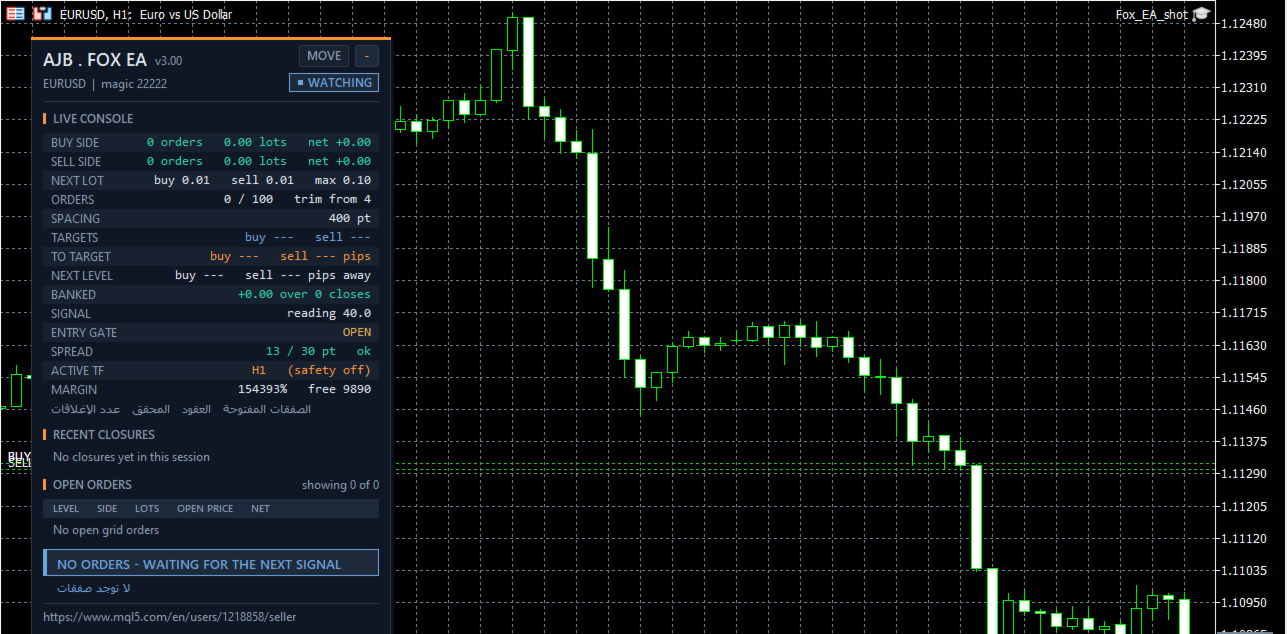
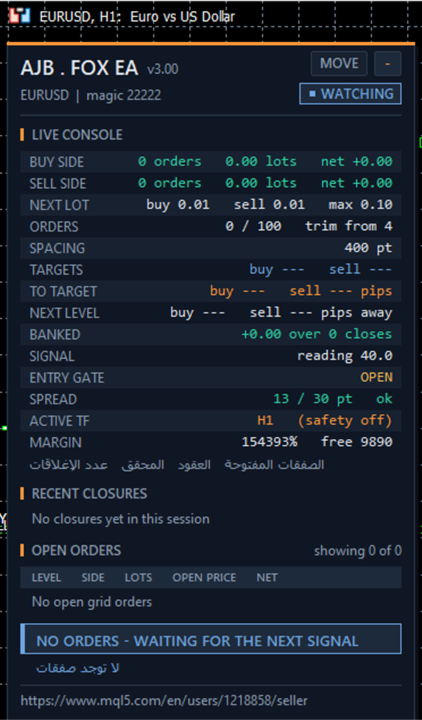
A dark console with fox-orange accents sits on the left of the chart and leaves the price scale clean. It shows a status pill (WATCHING, ACTIVE, SAFETY or MARKET CLOSED), each side's orders, lots and net, the next lot, order count with the trim status, spacing, basket targets, TO TARGET and NEXT LEVEL distances, banked profit, signal reading, entry gate, spread with an ok / too wide verdict, active timeframe and margin. Below it are the last five closures and the open order table. Drag it with MOVE, minimise it, and it sizes itself to its text. Nothing is drawn in non-visual tests, so optimisation stays fast.
What else is fixed in this build
- The sell-side cleanup used the buy ticket list; it now uses its own list.
- Lots follow your broker's minimum, maximum and step instead of being rounded to two decimals.
- Max Lot Per Order 0 now really means unlimited instead of stopping the grid.
- The opposite side is no longer blocked on brokers that report no volume limit.
- The Stochastic is created once and every read is checked, so short history cannot crash the EA.
- New bars are detected by time, not by bar count.
- After a restart, the ladder anchor and lot are rebuilt from the live positions.
- Orders wait while the session is closed, and the filling mode is chosen for your broker.
How to start
- Run it in the Strategy Tester on your broker's data first; EURUSD H1 is a good first chart.
- Keep the starting lot of 0.01 for every 1000 USD of balance.
- Attach it to one chart per symbol. Use a different magic number for a second copy on the same account; a second chart with the same magic is refused.
- Watch the SPREAD, TO TARGET and NEXT LEVEL rows for a few days before raising the lot.
Every setting explained
Orders
- Note_Orders - a label only.
- Lot - starting lot of each side (0.01). About 0.01 per 1000 USD is a sensible start.
- MaxSpread - no first order while the spread is above this many points (30). The panel shows the verdict live.
- OrderComments - comment written on every order.
- MagicNumber - identifies this EA's orders (22222).
- Max_Lot_PerOrder - largest lot any level may use (0.1); 0 means no cap.
- Max_lots_PerChart - total lots allowed on this symbol (0 = no cap).
- Max_Number_Orders - most open orders for this EA (100; 0 = no cap).
- OpenBuyOrders / OpenSellOrders - allow each side separately.
- SmallAccountMode - every level uses the minimum lot, no growth (off).
Execution
- FillingMode - Automatic asks the symbol which filling it accepts (recommended).
- MaxSlippagePoints - accepted slippage (30).
- CloseRetries - attempts before a close is tried again on the next tick (5).
- UseBrokerSideTPSL - keeps a broker copy of the target; Fox already sends its basket target to the broker.
- VerboseExecution - prints every trade reply in the journal (off).
Protection
- SignalBarsDelay - bars required between two first orders (30; 0 = off).
- OneOrderPerBar - at most one new level per bar on each side (on).
- MinMarginLevelPercent - no new order below this margin level (0 = off).
- NetMaxMarginPercent - netting accounts only: stop adding when used margin passes this percent of equity (5).
Margin timeframe safety (off by default)
- UseMarginTFSafety - when on, a falling margin level lifts the signal to a higher timeframe and widens the spacing by that timeframe's ATR.
- Level1MarginPct / Level1TF - first step (6000 percent, M15).
- Level2MarginPct / Level2TF - second step (5000 percent, H1). Never below the chart timeframe.
- MarginTFHysteresisPct - extra recovery needed before stepping back (500).
- MarginTFATRPeriod - ATR length for the wider spacing (14).
Panel
- ShowPanel, PanelCorner, PanelX, PanelY - show the panel and where it starts.
- PanelBgColor, PanelTextColor, PanelFontSize - look and size.
- MaxTableRows - open order rows shown (10).
- ShowArabic - Arabic labels under the console.
- ShowChartMarks - next level lines and entry arrows.
Honest expectations
A grid manages a position; it does not predict the market. A long one-way trend will deepen the book, so choose a lot your account can carry and test on your own broker first. Short tests only show a few levels, so judge it over a long period. Works on any symbol and timeframe, needs no DLLs and no extra files.
If you use Fox EA, a short honest review on this page, good or critical, helps other traders decide and tells me what to improve next.