Sea Conditions Panel
- Indicadores
-
Masako Katayama
 HT Star Trader — AI-partner tools for MetaTrader 5: an execution-only EA that connects your AI to MT5, and a fully customizable indicator set. Tools, not signals. Every trading decision stays yours.
- Versão: 1.22
- Ativações: 5
Sea Conditions Panel: an MT5 indicator that reads the current execution environment against the symbol's own normal, in three states, with the reason always in words — plus the full setup pack for your own AI (MUSE).
• Same trade, different hour, completely different cost — and nobody ever showed me the difference!
• I got caught by a news release and entered right into a widened spread!
• A red light with no reason is useless. Tell me why, in words!
• Is this spread high or low right now? Compare it with this symbol's own normal, not a fixed number!
• An indicator that alerts all the time trains me to ignore all of it!
• I scalp in seconds. I still want an environment check before I enter!
The panel is the sea check before you set sail.
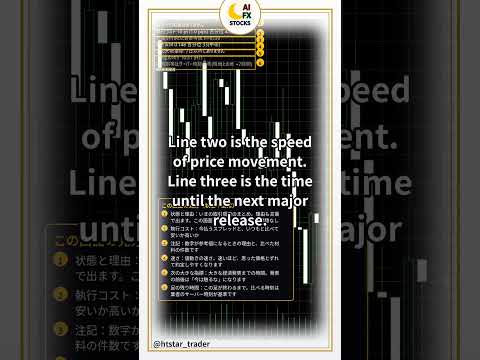
It reads the current execution environment in three states: Normal, Caution, and Don't touch it now.
For Caution and Don't touch it now, the reason always comes in words.
The comparison is always against the symbol's own normal, in the same hour band.
It never guesses with absolute values.
The indicator shows.
The ruler is the symbol's own distribution, in the same hour band.
You decide. This tool sends no signals and places no orders.
What it does
- Shows the current spread and its percentile position within the same hour band of the symbol's own history. "Higher than usual right now" becomes a number
- Shows the speed of price movement as a percentile and a band (Low / Mid / High) against the symbol's own ATR14 distribution. Confirmed candles only — no repainting
- Shows the next major event: name, currency, time remaining. Around releases, the state becomes "Don't touch it now"
- Alerts only on state changes, with a cooldown per reason. No alert fatigue by design
- When you enter only at the times the panel marks as cheap for that hour band, the spread you pay goes down substantially
- Panel and alerts in 6 languages: Japanese, English, Chinese, Spanish, Portuguese, Russian. Fonts switch automatically for Chinese and Russian
- When a percentile cannot be produced, the panel says why and shows the sample count. Never a silent blank
- Works as an execution-environment display for second scalping (tick updates on an M1 chart)
- 22 settings in three layers (Simple / Standard / Advanced). Only 9 are visible at first. Defaults are a measured combination — start by not touching them
- Full definitions published, formulas included: the percentile definition, the bands, the state rules, the event rules. You can reproduce every number by hand
Measured, not promised
• In a 10-year check over 20 symbols (1,234,309 bars), the "Don't touch it now" state appeared less than 10% of the time on long-term average. In some years it rose close to 20%
What is inside
- ExecutionPanel.ex5 — the MT5 indicator, version 1.22 (no source code)
- An entry file your AI reads first, so your AI leads the whole setup: interview, step-by-step installation, and a completion check based on what is actually on screen
- Setup guide, full manual (every setting with a plain three-point explanation), the complete definitions document, a support playbook, and a ledger-numbering pattern for AI-assisted work
Requirements
- MetaTrader 5 on Windows (home PC or VPS)
- Judgement is computed on H1 regardless of the chart timeframe. An H1 chart is recommended
- An AI environment (MUSE) is required separately for the setup pack
Please note
- Display only. This indicator does not place or close orders, and it gives no trading signals
- A percentile compares with the symbol's own normal. It is not a prediction of price movement
- MT5 only. It does not run on MT4
- The event line depends on the terminal's calendar feature. On brokers or terminals that do not provide the calendar, that line shows the reason ("Unavailable") and stays blank, and the overall state never shows green. What cannot be known is not shown as safe — by design
- Forward recording (the spread record taken while the panel is attached) accumulates only for the time the panel is attached. On symbols whose bar history carries no spread records, percentiles appear after this recording has accumulated
- On non-Japanese terminals, the major-event keywords may not match. Set them to words in your terminal's language (examples are in the manual)