Pinpoint Dual Scalper
- Experts
- Versão: 1.0
- Ativações: 10
PINPOINT DUAL SCALPER
Expert Advisor for MetaTrader 5 combining Automatic and Manual trading modes, progressive level management, configurable cycle management, and risk and profit controls.
DESCRIPTION
PINPOINT DUAL SCALPER is an Expert Advisor developed for MetaTrader 5 that combines Automatic and Manual trading in a single trading tool.
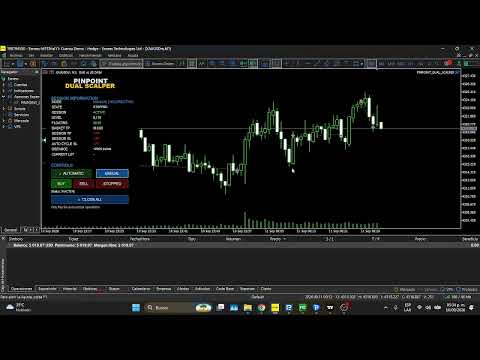
The EA includes an integrated chart control panel that allows users to monitor the current system status and manage the main trading functions directly from the chart.
The system uses a configurable progressive level structure to manage trades within each cycle. Users can configure the initial lot size, lot multiplier, distance between levels, and maximum number of levels.
AUTOMATIC MODE
In Automatic Mode, PINPOINT DUAL SCALPER uses the configured technical conditions to search for trading opportunities.
Once a cycle is started, the EA manages the trades according to the selected parameters.
Users can configure:
- Initial Lot
- Lot Multiplier
- Maximum Levels
- Grid Distance
- Basket Take Profit
- Cycle Stop Loss
- Session Take Profit
- Session Stop Loss
A cycle can be completed through the basket profit target or through the configured protection parameters.
After a cycle is completed, the system can prepare a new automatic cycle according to the selected settings.
MANUAL MODE
In Manual Mode, the user directly selects the trading direction: BUY or SELL.
After selecting the direction, PINPOINT DUAL SCALPER manages the cycle using the configured levels and parameters.
This mode allows users to use the EA's level management and risk control functions without relying on an automatic entry signal.
PROGRESSIVE LEVEL MANAGEMENT
PINPOINT DUAL SCALPER allows users to configure a progressive level structure for cycle management.
The main parameters include:
- Initial Lot
- Lot Multiplier
- Maximum Levels
- Grid Distance
The system manages levels according to the selected configuration and can progressively activate subsequent levels as the cycle develops.
Only the next required pending level is maintained during the cycle.
BASKET TAKE PROFIT
Basket Take Profit allows users to define a profit target for the group of trades belonging to the current cycle.
When the configured target is reached, the EA can close the cycle trades and prepare the next cycle according to the selected settings.
SESSION TAKE PROFIT
Session Take Profit allows users to define a realized profit target for the trading session.
When the configured target is reached:
- The current cycle is closed.
- Active pending orders are removed.
- The session is marked as TP REACHED.
- A new cycle is not started during that session.
- The system becomes available again for a new session.
CYCLE STOP LOSS
Cycle Stop Loss operates specifically at the current cycle level.
When the floating loss of the cycle reaches the configured limit:
- The cycle trades are closed.
- The active pending order is removed.
- The levels are reset.
- The system returns to the initial lot size.
- After the configured delay, a new automatic cycle can be started.
Cycle Stop Loss is designed to restart the cycle rather than permanently stop the trading session.
SESSION STOP LOSS
Session Stop Loss allows users to define a maximum loss limit for the trading session.
When the configured limit is reached, the EA stops trading activity for the session until the next session period.
This function operates independently from Cycle Stop Loss.
CONTROL PANEL
PINPOINT DUAL SCALPER includes an integrated control panel directly on the chart.
The panel provides information about the current system status, including:
- Trading Mode
- EA Status
- Session Status
- Current Cycle
- Current Level
- Basket Take Profit
- Cycle Stop Loss
- Session Take Profit
- Session Stop Loss
The panel also provides controls for activating, stopping, and managing trading activity.
INDICATORS AND FILTERS
Automatic Mode can use configurable technical filters based on:
- RSI
- EMA
- ATR
Each filter can be enabled or disabled through the Expert Advisor parameters.
These filters are part of the conditions used by Automatic Mode when searching for a new trading opportunity.
CONFIGURABLE PARAMETERS
PINPOINT DUAL SCALPER allows users to customize the EA through its input parameters.
The main settings include:
Trading
- Automatic Mode
- Manual Mode
- Initial Lot
- Lot Multiplier
- Maximum Levels
- Grid Distance
Profit Management
- Basket Take Profit
- Session Take Profit
Risk Management
- Cycle Stop Loss
- Session Stop Loss
Technical Filters
- RSI Filter
- EMA Filter
- ATR Filter
Cycle Management
- Cycle Restart Delay
The available parameters allow users to adapt the EA to different trading conditions and personal preferences.
METATRADER 5
PINPOINT DUAL SCALPER is developed for MetaTrader 5.
Symbol availability, minimum and maximum volume, contract specifications, spread, execution conditions, and other trading conditions depend on the broker and the selected instrument.
RECOMMENDED USE
Before using the Expert Advisor on a live trading account, it is recommended to test it using the Strategy Tester in MetaTrader 5 and use a demo account to become familiar with its parameters and operation.
The appropriate configuration depends on the trading instrument, broker conditions, market volatility, spread, execution, and the level of risk accepted by the user.
RISK DISCLAIMER
PINPOINT DUAL SCALPER is an automated trading tool and does not constitute financial advice.
Trading financial instruments involves the risk of losing capital.
Historical testing or demo account results do not guarantee future results.
EA performance may vary depending on market conditions, configuration, broker, spread, execution, liquidity, and other factors.
No level of profitability is guaranteed.
THANK YOU FOR CHOOSING PINPOINT DUAL SCALPER
We continue working to improve and evolve our system.
See you at the top of success.