 MetaTrader 5
 Experts
 Indicadores
 Bibliotecas
 Utilitários
 Widgets
 Regras
Conheça o Mercado MQL5 no YouTube, assista aos vídeos tutoriais
Como comprar um robô de negociação ou indicador?
Execute seu EA na
hospedagem virtual
hospedagem virtual
Teste indicadores/robôs de negociação antes de comprá-los
Quer ganhar dinheiro no Mercado?
Como apresentar um produto para o consumidor final?
Novas ferramentas de negociação para MetaTrader 4 - 40
 Abaixo estão os programas de negociação que simplificam o trading no MetaTrader 4. Passe o mouse sobre um produto para ler uma descrição mostrando seu propósito.
Waddah Attar Fastest Close All.
This utility will Close all your orders in fastest possible way.
say you have 100 EURUSD , 75 GBPUSD and 120 USDJPY orders ... and you decide to close all of them .
the expert will make hedge to all thats orders in three orders only .. one to eurusd and one to usdjpy and one to gbpusd .
then close this 100% hedge of your all orders by CloseBy method.
you can set ProfitDollar (more than zero) and LossDollar (less than zero) proprties to auto close all orders

Basket Recovery System : is useful for trading multiple pair on a single account, single chart.
Functions Of this Ea
with a simple click on a button in any Symbol row, this Utilities will,
Open new Order, Set Lot, Close Order, Reverse Order, Add new Symbol, Delete Symbol, with a simple click on a Navigation Button, this Utilities will,
Select all Symbol Available on Broker, ReSet Symbol Lots, Close all Order, Set Low Risk for all Symbol, Remove all Pair with spread above 2two.
FREE

This script can generated a text file including Account information such as Account Number Account Name Account Leverage Account Balance MT4 Location Data Folder Location Demo / Real Account Stop Out Mode Stop Out Level etc. Enjoy the script. Please leave a comment or send me an email if you have any idea. The Script is developed by Steve Wan (Eamil: fxac01@gmail.com)
FREE

this Ea is helpful for closing all variety of orders at the same time, you'll be able to opt for either all orders shut straightaway or victimization the within profit/loss rule. if the "total profit" or "total loss" of the account be bigger than nominal profit/loss, this Ea can mechanically shut all of your open position along.
Closing: you'll be able to opt for closing be straightaway when running Ea, or use the whole profit/loss rule, or use shut on a nominal time.
Features Include Swap Inc

Bot blocks trading when daily drawdown limit or maximum losing trades number are achieved. Bot makes sure that there is a 5-minute pause after each losing trade. Also Bot lets to place price alerts from mobile terminal (android/ios) and send it by Email, Push, or Terminal Alerts. Just place any pending order from your mobile device and delete it within 10 seconds, Bot will remember the order price and create Alert. If pending order don’t remove within 10 seconds, Bot set Stop Loss and Take Profi

This is a utility to allow you to quickly add and remove Elliot Wave numbers and letters to your charts allowing you to plot the main and sub Elliot waves for easy chart analysis. Please note, this is not an Indicator that adds the characters automatically, it is a utility to manually add them yourself with ease.
Elliot Characters and Buttons on screen: 0,1,2,3,4,5 A,B,C i,ii,iii,iv,v a,b,c Delete Input Parameters: Colors Font Size Font Type This is a free utility for MT4 only Check out th
FREE
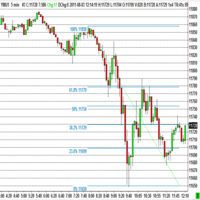
The program automatically draws fibonacci. This will save you a great deal of time in studying the chart. My intention is to facilitate those who carry out a study of the graph manually and use Fibonacci. In the screenshot you can see the result.The script applies to the chart of any currency pair or any stock. It will not open any purchase or sale operation because this program is limited only to drawing fibonacci.
FREE

Fibonacci will be designed by default based on the monthly candle but you can simultaneously view Fibonacci on a weekly candle or you can choose your two favorite timeframes. When you run this script, an input prompt will appear and the following input parameters can be configured: Input Parameters: Name Example Default Timeframe1 Monthly 43200 Timeframe2 Weekly 10080 TF1status 1 on 1 TF2status 0 off 0 candleID you can choose which candle to apply 1 Prefix1 It's is the prefix of the first object
FREE

R E F R E S H 28 C H A R T S For traders who use a tool like "Volatility Watcher" and "OBOS Watcher" that use the 28 pairs of 8 commonly traded currencies.
You can find "Volatility Watcher" here: https://www.mql5.com/en/market/product/46475 You can find "OBOS Watcher" here: https://www.mql5.com/en/market/product/47894 8 C O M M O N L Y T R A D E D C U R R E N C I E S EUR - Euro GBP - British Pound AUD - Australian Dollar NZD - New Zealand Dollar USD
FREE

Утилита-риск-менеджер для защиты вашего депозита от полной потери денег. Если вы инвестор и решили передать деньги в доверительное управление, вам нужен Trade Control. Так трейдер не нарушит свои же правила риск-менеджмента и не сольет все ваши деньги. Для этого Trade Control должен находится на вашем VPS. И у управляющего трейдера не должно быть доступа к настройкам данной улититы. В момент слабости, трейдер не сможет увеличить заложенные в торговлю риски. И не потеряет ваш депозит за один неуд

Reverse Trend Solution And Trade Panel For All Symbols In One Tool! MuteLight AK Trade Pro's smart algorithm monitor the markets price, filters out noise and gives recommendation of entry time. Monitor different pairs in one chart Support to open, monitor and close orders automatically Trade Panel allow to open market or hidden pending orders with preset parameters to best fit different market condition.
Advantages You Get Easy, visual and effective reverse trend detection. Gives you the abilit

Contact us for any custom order, CodeYourTrade.com .
Timed Close EA is used to close all the trades automatically at your specific time. You can set the EA using any of the 3 options: 1. OneTime: In this option EA will run only once. Execute at that date-time and stops. 2. Weekly: In this option EA will run at specific day-time every week. For example if you wanted to close all the trades before market close at Friday, you can use this option. 3. Daily: In this option EA will run da

Contact us for any custom order, CodeYourTrade.com .
Profit and Loss Manager EA is to close the running or pending trades when reached to a specified profit or loss. EA works fully on virtual mode i.e. no hard Stop Loss or Take profit set. You can run the EA in any of the 3 modes: 1. Per Trade : In this mode, actions are applied to all the trades separately. Rules are applied on a single trade separated, it’s profits/loss not combined with any other trades. 2. Per Pair : In this mode

Contact us for any custom order, CodeYourTrade.com .
Partial Close EA is used to partially close running trades. EA has an option to filter out the trades and works only on specific trades. Following are the filters for the EA: 1. Magic Number: Have an option to works on all orders with the given magic number 2. Order Number: Can work specifically on the single order with the given order number 3. Chart: Can work for all the trades of the current attached chart Example : Let’s say

The Simple Lot Size Calculator can help you with risk management. Just type risk percentage, stop loss points and click calculate to get required lot size. The Simple Lot Size Calculator calculates a current chart's instrument. It's lightweight. Just load it to your chart then The Simple Lot Size Calculator will apper in the left upper corner of your chart.

The EasyFX Trader is a very unique and customizable dashboard for manual trading. It is placed in the Expert folder but is not an auto trading robot. You input all the parameter and the dashboard will monitor and let you know when there is a good trading opportunity. The tool is simple to use whether you're experienced or just a beginner. It was designed for all types of trading styles including price action, day, swing, trend trader, or scalper. Each column is described below. When you load the

----------OVERVIEW--------- BORASO RISK CONTROLLER is an useful tool to record the equity gains and drawdown that your account reaches, so that you can adjust the level of power of investment. It is important if you trust a trader and you subscribe to a signal confident in never overcome a certain drawdown, saving big part of your capital if the bad day arrives. Please note that signal trades can be reopened after the "safety exit" but you can decide to stop the autocopying with a better protect

1. Record the price data for each Tick transaction. Data file contents: "Tick time", "ASK price", "BID price", "SPREAD SPREAD", "Tick quoted quantity". 2. Meanwhile, generate a quotation data file with a 1-minute period. Content of 1min data file: "ASK time", "ASK OPEN price", "ASK HIGH price", "ASK LOW price", "ASK CLOSE price", "BID time", "BID OPEN price", "BID HIGH price", "BID LOW price", "BID CLOSE price", "Tick quoted quantity". 3. Save all quotation data in one file every day, which is c

The panel for the MT4 terminal is designed to help the trader quickly set pending orders for a breakout of the previous bar.
The utility calculates the order lot itself at the specified stop loss price and maximum loss percentage.
The panel also has a button for converting to breakeven. When you click, the stop loss of an open position is converted to the order opening price.
FREE

In foreign exchange trading, the most important investment principle is to ensure the safety of the principal, and risk prevention and control is the primary operation concept. How to manage the account funds is to control the position size and the profit and loss of the order, this EA is designed based on this idea. It can directly manage the risk control of the trading account and realize two functions. One is to close the position according to the profit and loss ratio, and the other is to au

Advisor for semi-automatic trading with a virtual multi-level trail of take profit and stop loss, a trail of target profit, martingale functions, manual opening of orders, managing third-party orders, counting trading instruments, displaying current information and statistics on a chart. It is possible to set several levels of trailing take profit and stop loss and to each level to assign the percentage of partial closing of the order. The percentage of the lot when closing the level is calculat

This Bot lets to place price alerts from mobile terminal (android/ios) and send it by Email, Push, or Terminal Alerts. Just place any pending order from your mobile device and delete it within 10 seconds, Bot will remember the order price and create Alert: EURUSD Set ALERT at 1.1234 When the price reach target value, you will get Alert notification: EURUSD ALERT: BID>1.1234 If pending order don’t remove within 10 seconds, Bot set Stop Loss and Take Profit values: StopLoss = SL x ATR, TakeProf

This program is created by algorithm which economy based logic in the trading market.
1. The program able to work with all of currency and trading items 2. Take profit and loss are basically handled by EA program
Recommendation: EUR_USD is the most preferred. Please use this program only for MT4. LOT should be managed depends on own deposit. Otherwise, high risk will be driven(e.g 0.1~0.2 lot is recommended when the deposit is 10,000 dollar)

Save time and worries watching. This EA will do this job for you. Even you can configure some from this EA from your mobile instead of using the PC. To use this EA just drag from MetaTrader4 to any chart and timeframe (it will check continuosly no matter the timeframe). Configure some parameters according to the currency master to use configuration from your mobile and lots configuration but I would recommend to use the default ones. Features for your trades and account: Manage Account Cash /

This EA will support your open trades to have more possibilities to get profitable. Just keep in mind to use this EA you are taking RISKS as its method is a Martingale / Grid system controlled in automatic. This EA will start to open trades increasing your lots (open big lots in sell and buy positions normally doesn't decrease your free margin account but when you are red you are need for bigger margin and that's the risk also to use this EA). When reaching Take Profit you will have lost trades

This indicator allow users to navigate very quickly from one to another Forex cross. Very simple to use and very useful. You will not waste any more time and it will simplify your life as a trader. The color change every time that you click on other cross, so you will always know which is the open chart. To help your navigation, the majors have a slightly different color.

Beat Your Broker Track your broker's real (not advertised!) spreads. A no-brainer price for an essential tool for every legit trader. Load like a normal EA to track the average spread for up to 8 symbol_time periods. So for example, track the average spread for: EURUSD on 30m chart NAS100 on 5m chart GBPUSD on 15m chart etc Each symbol_time will generate its own .csv file that is easily accessible from the data folder, for you to download and manipulate. The file has three columns - Date, Time,

Assistant Keyboard Execution é uma ferramenta profissional para negociação manual e semiautomática.
Permite que você aplique estritamente as regras de uma negociação confiável em um botão.
Ao premir o botão, coloca stop loss e take profit ocultos de forma inteligente nos locais certos, assim como calcula automaticamente o lote de acordo com o risco escolhido.
O utilitário o ajudará a profissionalizar sua rotina de negociação, simplificando e estruturando seu trabalho, e será útil para trader

Trade and Account Information Panel The Trade Info Panel allows you to easily see the status of you trading by pair and account. Minimise the panel by clicking on it to reduce the display area. Easily Identify loosing pairs/ instruments traded by the change of header colour. The HEADER change colour should the months losses exceed the months gains.
Displayed information: General Account information Account Leverage Spread Bar Time remaining Account Balance Account Equity Margin Free Margin Acc

History Exporter can help to export your orders history from MT4 account. After that you can use another data analysis tools to get what you want. File format is .csv file, the content such as below OrderID,Symbol,Type,Lots,OpenTime,OpenPrice,StopLoss,TakeProfit,CloseTime,ClosePrice,Commission,Swap,MagicNo,Comment,ProfitUSD,ProfitPips,NetProfit,Duration,(Days),(HH:MM:SS), 21520206,EURCHF,buy,0.05,2020.03.10 08:06:15,1.06304,0.00000,0.00000,2020.03.11 13:37:38,1.06015,-0.60,-0.05,28282888,RedRab
FREE
Welcome to the Order Management EA
This EA manages your order. Doesnt Matter if you have placed one trade or 20. you can trail the order you can also set to close out all trades works on all FX pairs easy to install easy to drag on to the chart This is a perfect tool to manage your trades.
Risk warning: CFDs are complex instruments and come with a high risk of losing money rapidly due to leverage.
Please trade responsiple. Thank you

What is this?
This script not only can help you to place all type of orders, included market order " BUY " / " SELL " and pending order " BUYSTOP " / " BUYLIMIT " / " SELLSTOP " / " SELLLIMIT ", but also, it allow you to place order lots by money management concept.
How to use this script? 1. Open the chart you want to trade; 2. Drag and drop the script to that chart; 3. Input the parameter what you want to do; 4. Double check the order information, then click "Yes" to confirm to place order;

O SI Connect é um utilitário que estabelece a ligação aos nossos servidores para utilizar o Volume FX.
Instruções técnicas para preparar o seu terminal para a utilização do SI Connect Permitir pedidos na web e inserir https://stein.investments à lista de URLs permitidas no seu Terminal Options -> Subcategory Expert Advisors . Só precisa de uma instância EA em execução por terminal, mas tem de correr constantemente em segundo plano para obter os últimos dados do nosso centro de dados.
Em caso d
FREE

-------------------------------------------------------------------------------------------------------------------------------------------------- New version of this product is here : https://www.mql5.com/en/market/product/59924?source=Site+Profile+Seller -------------------------------------------------------------------------------------------------------------------------------------------------- TOTAL TAKE PROFIT & TOTAL TRAILING STOP. Average Take Profit & Average Trailing Stop. Setup TO
FREE

Hedge Trader is a panel that helps traders who use the hedging strategy in their trading. The panel style in simple and intuitive, and have the necessary shortcuts a fast trader would need for fast order execution.
Features: - Auto double the lot after executing an order. The user only specifies the initial order, then the panel will automatically double the lot after an order execution. - Using basket for auto closing all orders on a predefined floating profit (with the possibility to turn it

INVISIBLE BID MANAGER - invisible positions for my broker.
Entry for bid price into trading positions.
If you have a floating spread, you won't miss a deal.
Trade open, after reaching bid price. Suitable for floating spread, opening long position does not wait for ask price, but store entered at bid price.
SETUP
BuyLots - volume Buy trade in lots BuyOpenPrice - opening price Buy trade BuySLPrice - StopLoss Buy Buy Price BuyPTPrice - Profit Target Buy Buy Price
SellLots - volume Sel

Position Cloner (PC) is a helpful utility that can be used like an EA to duplicate specific positions within the same MT4 instance. This is valuable e.g. to increase the risk when copying a signal to your account. When trading big capital you can also decrease the original risk of your EAs or manually opened positions and then let PC duplicate them. This way you avoid negative slippage due to inordinate lot sizes.
You can choose between different, fully customizable options of how PC must clone
Operations Monitor It is a simple but powerful monitor, which allows not to use the Terminal to have a cleaner chart.
Informs about all the operations opened in that Asset: Number of Open Operations Lost / profit Account Percentage Volume operated Colors: RED: the sum of operations is lost BLUE: the sum of operations is in profits Fonts: Allows change the font size.
FREE

Flashkey - Professional Keyboard - Seteable Shortcuts for MT4 Professional investors do not use a mouse, use shortcuts FlashKey is a program that allows the user to operate very quickly in the financial markets trought HOTKEYS (shortcuts). With all functions executed DIRECTLY FROM THE KEYBOARD. Turn an ordinary computer into a PROFESSIONAL TRADING KEYBOARD Features: Quickly open orders to market Simultaneously send many pending orders Close all positions Covers positions to Breackeven Modify St

Expert Advisor for trading binary options in EA mt4. He has one step of a martingale with an adjustable coefficient. Displays its indicators on the chart. It can work on several currency pairs at the same time. It is possible to choose a working time frame. Trading greatly depends on the settings of the built-in indicator, so it is advisable to choose the most optimal settings, although you can also trade with the built-in ones. Also has built-in money management. successful bidding to all.

Простая в управлении Торговая панель обеспечит безопасную торговлю. Вычислит объём сделки от заданного уровня Stop Loss и величины убытка. Поможет рассчитать сейф, и в ноль закрыть неверную сделку. Интуитивно понятный интерфейс делает панель удобной в управлении, освобождая внимание трейдера для принятия решения о входе в сделку. Программа сделает все расчёты за вас. Поэтому работа с помощью панели Снайпер - оптимальное решение для торговли с соблюдением Мани-менеджмента. А это главный ключ к по

This EA Automatically sets stop loss and take profit levels on limit orders. It is fully adjustable : you can set the amount of pips for your SL or TP level Helps limit your risk Automatically Just drag and drop onto your MT4 chart and it start working for you You can save different pip levels to drag onto the chart You only have to drag it onto the chart once and it will automatically set your SL and TP level Every time you enter a Pending Order

Trade Copier é um utilitário profissional projetado para copiar e sincronizar negociações entre contas de negociação. A cópia ocorre da conta / terminal do fornecedor para a conta / terminal do destinatário, instalada no mesmo computador ou vps. PROMOÇÃO - Se você já adquiriu o "Trade copier MT4", pode receber o "Trade copier MT5" gratuitamente (para cópia MT4 > MT5 e MT4 < MT5). Para obter informações mais detalhadas sobre os termos, por favor, entre em contato conosco através de mensagens priv

The informer provides information on the current state of open market positions. The visual presentation consists of two parts. The left side contains the latest transactions executed on the account. Transactions are sorted by time. The right part shows the current state of the aggregate positions of the instruments. Sorting of positions is carried out in descending order of the margin load on the account. Updating and recalculating the status of positions is performed automatically and/or by

The EA automatically opens orders both when the price moves in the direction of an open position, and against it, depending on the settings. He will always open the necessary additional orders in time for you if you suddenly find yourself not at the terminal. And it will also automatically close them when the specified profit margin is reached. Functions: manual opening of any types of orders; automatic opening of market orders in accordance with the settings; the ability to set a lot multipli
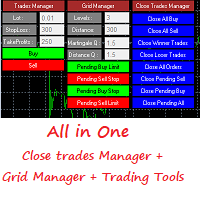
This is a demo version . Download the full version from this link https://www.mql5.com/fr/market/product/84850
Full version Allows you to : Set the number of levels (trades). Lot size and you can do Martingale to raise the lot size for each level. Set distance between levels, and you can manage the distance for each level using Distance Q. Static TP and SL for each level. You can open : BUY STOP / BUY LIMIT / SELL STOP / SELL LIMIT (levels in one click). Close all buy orders. Close all s
FREE

Expert for a binary options on mt4, he have two built-in a indicators and many different settings. The expert has one a level of martingale, but it is recommended to use it on the instruments with a yield of 85 percent. it can be used simultaneously on a variety of currency instruments. All settings have already been made, but you can also configure them yourself . Currency for do trading is a Russian ruble. Good trading to everyone.

What is it
PricerEA is a utility to help any trader to place pending orders (stop or limit) at a specific price. It is designed for easy use. There is a parameter to set the prices you want to place orders. The expert can calculate automatically the lot size for each order. In addition, there is the possibility run trailing stop (work only for market orders) if triggered a pending order.
How use it
Use BuyStop to open buy order over than current price. Use BuyLimit to open buy order under than
FREE

Открытие сделок с нужными вам параметрами занимает считанные секунды. Простая и удобная утилита для создания новых ордеров . С легкостью создавайте рыночные и отложенные ордера с автоматическими уровнями стоплосс, тейкпрофит. Автоматический расчет размера лота с заданным риском на сделку. Просто переместите уровнь стоплосс и тейкпрофит на графике на нужные ценовые уровни. Внимание! Если вы хотите протестировать все функции данной утилиты пожалуйста свяжитесь со мной и получите этого советника

You can try this EA in the strategy tester,
or you can try this demo version:
https://www.mql5.com/en/market/product/46367
Trade Manager This assistant automates various aspects of order handling in MT4. The assistant allows you to plan a trading strategy defining Entry Levels, Stop Loss, Take Profit, execution of orders on one level, partial closes, Break Even, etc. Basic characteristics Trades calculation 3 basic lines are drawn that define the entry level, SL and TP. You can move this line

UTILITÁRIO DE ORDENS MÚLTIPLAS O Utilitário de Ordens Múltiplas foi criado para facilitar operações lucrativas com pequenos movimentos de preço, sem a necessidade de esperar por grandes distâncias para alcançar o objetivo. Este utilitário abre várias ordens ao mesmo tempo, na mesma direção e no mesmo par de moedas, na quantidade definida pelo usuário ou na quantidade máxima permitida pelo seu corretor. A ideia é que, em vez de buscar 100–200 pips (o que pode não ser alcançável em pouco tempo ou

MULTIPLE ORDERS With Symbol and Time Frame Changer
Multiple Orders Utility is created to give easy profits-making trades with a little movements and without going long distance to get it all. This Utility opens multiple orders as many trades as the number specified by the User or as many as permitted by your Broker in the same direction on the same currency pair simultaneously.
The idea behind it, is that instead of running after 100 - 200 pips which may not likely be attainable in the record
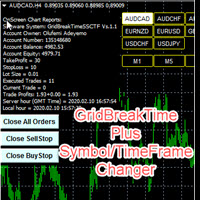
GridBreakTimeSuper SymbolChangerTF
GridBreakTimeSuper SymbolChangerTF is a Utility created based on grid trading strategies. This one was coded with Symbol and Time-frame Changer to remove the stress of opening a lot of chart windows.It opens any number of Buystops and Sellstops orders respectively as defined by the User with a predetermined gap up and down from the current price as also set by the User. This EA works based on time set by the User for opening and closing of all orders and trade

Simple and fast trade duplicator that copies trades on the same account with the reverse function.
The reverse can be used for locking. You can choose to duplicate transactions for the current or all instruments.
Parameters
Duplicate in reverse - the direction of duplication; Duplicate symbol - duplicate the selected tool; Manual lot size - hand size of the volume; Do not duplicate if spread > - do not duplicate a trade if the current spread is larger; List of magic to be duplicated - filte

Stop controller – утилита, которая следит за тем, чтобы у ордеров были установлены стоп-приказы и за уровнем просадки или прибыли. Стоп-приказы можно установить, как пользовательские, так и расчётные. Также она способна сопровождать рыночные ордера. Сопровождение выглядит следующим образом: утилита отслеживает промежуточные между ценой открытия и тейкпрофитом цели и частично закрывает сделки, при этом переводя стоплосс на уровень предыдущей цели. Частичное закрытие ордеров можно отключить. Чтобы
FREE

The software is suitable for two kinds of people: 1. If you already have a good indicator, then you can purchase the tool to call the indicator to place an order. The software has good risk control. 2. If you do not have a good ea or indicator, but think that a good indicator can bring benefits and are willing to look for it, then you can also buy the ea. After you purchase, 1. The author can help you modify the source code of an ea (due to the author's limited time, only one time and minor chan

When I was testing several EAs on my demo account I realised, that I could not distinguish between the running orders. There were simply too many orders opened. For this I wrote this EA. Normally I test over 10 EAs on one demo account at a time.
As you can see in the screenshot, there is one table with open positions. All orders are grouped by Magic Number. Now you see the opened orders, the profit and the drawdown of each Magic Number.
In addition there is an option to connect the Magic Num
This practical tool let you setup your keyboard to have shortcuts and hotkeys to change Chart TimeFrame.
Bring your trading to another level by actually take fast and smooth control of switching Time Frames without losing time clicking all over the Meta Trader Terminal. This tool is born due to scalping issues, where switching from higher timeframe and lower timeframes is really mandatory to make a multi timeframe analysis of the trading setup. Uplift your trading activity, by letting your ke
FREE

Apresentando o Period Separator Pro Utility, uma ferramenta poderosa projetada para aprimorar sua experiência de negociação, desenhando sessões de tempo de negociação de vários períodos de tempo em seu plano de fundo do gráfico. Este utilitário oferece experiências de usuário únicas por meio de um conveniente painel de botões rápidos, permitindo que você visualize e gerencie facilmente diferentes períodos de tempo. Com o utilitário Period Separator Pro, você pode facilmente visualizar vários

GridBreakTimeSuper is a Utility created based on grid trading strategies. It opens any number of Buystops and Sellstops orders respectively as defined by the User with a predetermined gap up and down from the current price as also set by the User. This EA works based on time set by the User for opening and closing of all orders and trades once in a day according to the time set by user. The general idea here is that each currency pair has specific time that breakout is always most likely as ther

Common information
Sniper Trade Panel - panel for manual trading, which automatically calculates the volume of an order depending on the stop loss value and the specified risk.
How it works
On the panel we set the risk value (%); Press the "SL" (Stoploss) button, a line appears on the chart (which shows where the stop loss of the new order will be); We move this line to the level where our future stop loss will be located (below the price level for the buy order, above the price level for the

The script is created to save all graphic objects to a file, restore them from a file and delete all objects on the chart. Data is saved in the .csv file in the client terminal folder in the MQL4\files subfolder. If you do not specify a file name when saving or restoring objects, then the name of the current trading instrument, for example, EURUSD or USDJPY, will be used as it. To use a script, just drag and drop it onto the chart.

Essa ferramenta automaticamente expõe parar a perda e тейкпрофиты ao abrir ordens.
Иформация é exibido no canto inferior direito do terminal exibe o tamanho do lote, níveis de stop loss e takeprofit, bem como o lucro/prejuízo em pontos para cada aberto de limite.
Há a possibilidade de fechar pedidos. para isso, é necessário destacar o duplo clique no canto inferior direito, o mandado e simplesmente transferi-lo para a esquerda.
Também é apresentada uma recomendação de instrumento atual na fo
FREE

The script changes the timeframe of all open charts on the MetaTrader platform in a simple click without having to do it manually by going through all the open charts and changing them one by one, it is handy when there are many open charts. The script lets you choose which timeframe to apply to the open charts. The timeframes available in the dropdown menu are the ones already available on the MetaTrader platform : M1, M5, M15, M30, H1, H4, D1, W1, MN1.
FREE

The Expert Advisor will help you forward all pop-up alert with screenshot from MetaTrader 4 to Telegram channel/ group, also forward all notifications to Telegram. Parameters - Telegram Bot Token - create bot on Telegram and get token. - Telegram Chat ID - input your Telegram user ID, group / channel ID - Forward Alert - default true, to forward alert. - Send message as caption of Screenshot - default false, set true to send message below Screenshot How to setup and guide - Telegram

Trading utilite (expert advisor) Global Breakeven and Trailingstop developed for: Automatic set StopLoss and TakeProfit for orders opened manually or by other expert advisers Transfer stoploss to breakeven Trailing stop You can setup utilite at any existing chart and it will manage all opened orders for all pairs, or just selected pairs from the list. Also, you can setup utilite for each trading chart separately, and apply the unique setting for each chart. Settings: StopLoss - stoploss size, p

The TradeExecutor
The „ TradeExecutor “ EA is designed to make your trading and especially the trade execution as easy as possible. It has a lot of useful features to help you execute and manage your trading strategy. This tool is immensely useful for traders who use multiple stacked orders with their strategy, because you can enter multiple orders with a single button click. Practical Buttons The TradeExecutor has four different buttons. First the “BUY” and the “SELL” buttons are used to trigg

MQL4 Expert parsing signals from Telegram bot and executing the orders. Install EA, Telegram. Create a telegram bot which will distribute signal and specify it's token in EA input settings as well as key words which will be used to parse a signal. You can change or add key words by your own. Default values (lot, stops) are used in case the incoming signal don't include them. Specify "Allow DLL imports" in EA Settings.

The TargetChanger
The TargetChanger Script is the easiest way to change the takeprofits of multiple open orders . It automatically changes the takeprofit of both open orders as well as limit orders on the current pair.
To change your target you simply drag the TargetChanger on the current chart, type in the new takeprofit level and click "ok". All the takeprofits get changed within seconds now. If you only trade with one single order each time, this tool might not be super useful for you, bu

The StopChanger
The StopChanger script is the easiest way to change the takeprofits of multiple open orders . It automatically changes the stoloss of both open orders as well as limit orders on the current pair.
To change your stoploss you simply drag the TargetChanger on the current chart, type in the new stoploss level and click "ok". All the stoploses get changed within seconds now. If you only trade with one single order each time, this tool might not be super useful for you, but trad
O Mercado MetaTrader é a única loja onde você pode baixar um robô demonstração de negociação gratuitamente para testes e otimização usando dados históricos.
Leia a visão geral e opiniões de outros clientes sobre os aplicativos, faça o download para o seu terminal e teste um robô de negociação antes de comprá-lo. Apenas no Mercado MetaTrader você pode testar um aplicativo de forma absolutamente gratuita.

Você está perdendo oportunidades de negociação:
- Aplicativos de negociação gratuitos
- 8 000+ sinais para cópia
- Notícias econômicas para análise dos mercados financeiros
Registro
Login
Você concorda com a política do site e com os termos de uso
Se você não tem uma conta, por favor registre-se