 MetaTrader 5
 Experts
 Indicatori
 librerie
 Utilità
 Widget
 Regole
Guarda i video tutorial del Market su YouTube
Come acquistare un Robot di Trading o un indicatore
Esegui il tuo EA
hosting virtuale
hosting virtuale
Prova un indicatore/robot di trading prima di acquistarlo
Vuoi guadagnare nel Market?
Come presentare un prodotto per venderlo con successo
Utilità di trading gratuite per MetaTrader 4 - 10
 Di seguito sono riportati i programmi di trading che semplificano il trading in MetaTrader 4. Passa il mouse su un'utilità nella lista qui sotto per leggerne la descrizione e la sua funzione.
For more info, questions and problems join to discord.gg/reitakfx
Very informative and detailed tool for your account. - pairs, number of trades, lot size, profit, lose, nett p/l, net pips - profit growth chart
Instalation : - open chart and delete every other indicator on it - put this report on chart
Setting : - magic number - filters (comment, symbols, currencies) - date (today, week, month custom) - Start / End date (this is for custom date) - report type (open - only active trades wi
FREE

• OrderInfo • Created by gyurix
Introduction
Are you tired of not knowing exactly how much can your orders win or lose and the complexity of figuring it out? With using this script you can get all of that information instantly.
Features Shows your open orders current • P&L •,• stop lose • and • take profit • levels Shows your pending orders and open positions potential wins and loses in your • accounts currency • for: the current market price your stop lose levels price your take profit leve
FREE

This is the Free Version of "Quick Copier MT4" (Please check : https://www.mql5.com/en/market/product/34184) This free version is available to be used within 2 hours only, and it has limited features. Please also check this product at fxina.hostingerapp.com.
"Quick Copier" is designed to copy trading without any complicated settings. It copies master orders faster than "Just Copier". The copy can be done in one PC. One EA can be set as master (provider) or slave (receiver). The receiver lot ca
FREE

Saved your Account Margin for multiple Trades Trading Robot Closing all second open Trades automatic Closing Trades that reached max. Lot Trading Robot built to avoid:
-Stop multiple Trades -Save overtrading -Hold Strategy -max. Lot -Prop conform
-long Account holding -Prop Firm Account holder - Robot allow one Trade per Symbol -Stop loosing by click multiple Times Trade Button -Robot needs to be Set on every Symbol that will be saved - no Settings configure OneRule OneFunktion Set on Chart
FREE

Una semplice utility per copiare i volumi di scambio da un conto MT5 o MT4 a un altro conto MT4. Puoi copiare le posizioni tra conti di compensazione e di copertura in qualsiasi combinazione. Per impostazione predefinita, verranno copiate le posizioni aperte da tutti i simboli corrispondenti con gli stessi volumi. Se i nomi dei simboli sono diversi o il volume delle posizioni copiate deve essere diverso o non tutte le posizioni devono essere copiate, è possibile specificare il comportamento desi
FREE

Rhino PDF Trade Report — esporta in PDF lo storico delle operazioni MT4
Trasforma lo storico del tuo conto MetaTrader 4 in un report di trading in PDF pulito e pronto da stampare, con un solo clic. Avvia lo script, scegli un intervallo di date o un numero di operazioni e ottieni un documento da inviare a un investitore, allegare a una candidatura in una prop firm, consegnare al commercialista o conservare come diario di trading.
Cosa ottieni
Pagina 1 — panoramica delle performance
Risulta
FREE

Very usefull expert advisor for ichimoku kinko hyo indicator. this expert advisor will notify you whenever there is a cross over/below the clouds or tenken sen /kijun crossing. All Ichimoku traders know the importance and valuable signals when crosses done below or above the clouds or tenkan and kijun crosses. Now you will be alerted quickly to make benefits from the markets This will help you to be alerted for possible trade action. it will simplify your chart observation and be notified wtith
FREE

DG Equity Monitor is a useful tool that keeps track of the daily transactions made on the account. The EA automatically and instantly closes all the trades running based on two conditions: 1. If the daily profit target is hit. 2. If the maximum drawdown is reached. An alert is sent immediately one of the above conditions are met.
Parameters: Show Account Info -Choose whether or not to display the Account Info on the chart.
Show Pop Up Alert -Show alert on chart when either condition 1 or 2 are
FREE

This is a technical indicator that put on strategy tester the buttons of the expert adviser "Control adora". Usually when applied the controladora to the strategy tester, the buttons do not appear and therefore its functions (like directly buy, sell, close orders or place stop loss indicator) can't be used. But now you can if have the Manual Backtest indicator. If you don't have Control adora, you can get it from here . This indicator get on the chart the buttons that can be of use in strategy t
FREE

Supports manual bi-directional orders. Once in floating profit, the system automatically executes partial take-profit based on set parameters, moves the stop-loss to the entry price (breakeven), and continues to hold the remaining position. Fully compatible with Teacher Zhang's trading system. Ideal for those with slower reaction times, seniors, beginners, and students in retraining. The full version features fully adjustable parameters.
FREE

EAsynRightNow - Professional Trading Expert Advisor for manual trading with advanced functionality
EAsyRightNow is a multifunctional trading Expert Advisor for MetaTrader 4, featuring a Trading Panel with a user-friendly interface and extensive trading position management capabilities. Perfect for scalping, it works on all timeframes.
Key Features
1. Trading Modes
- Single Orders: Management of one trading position
- Multiple Orders: Ability to open multiple orders in the same direction
- M
FREE

PendingOrderActivator manages pending orders in the forex market in a continuous cycle.
The user must configure the duration of the orders, stop loss levels, take profit levels, and the MagicNumber.
The expert advisor automatically places pending orders based on the distance from the current price and deletes them when the opposite order is triggered.
When an order is activated, the bot will take a break until the user reconfigures it or changes the timeframe, at which point the bot will reactiv
FREE

The scripts adds order tracing icons in the chart window. Trace orders are similar to the standard terminal tracing. Icons are added for both closed orders and current (market) orders. The Days of history to check parameter means the depth of the order history to be traced (number of days). If the parameter value = 0, all orders in the available history will be traced.
FREE

The panel displays the list of all orders (market and pending) along with their details, including magic numbers and commentaries. The panel can be moved around the chart. For market orders, the profit listed includes the associated commission and swaps. There aren't any important input parameters, but you can control the panel's initial location via them.
FREE

Simple Strategy Checklist Panel, as its name suggests, is a panel that works as a checklist, and can place up to twenty lines of text. This was created for traders who want to have their trading plan or to-do list at hand, a simple but useful product for many.
I will write this pointless paragraph since Metatrader asks me to put a minimum of 6300 characters, so I also explain that the list can also be used to make purchases from the supermarket! Example bread, milk, flour and much more... Enjo
FREE

This indicator provides essential information in a simple table about market range and identify whether the market has touched important pivot levels and breakout previous high/low. This version is still in the testing phase and is being offered for free and can only be used for a period of 3 months. We value your feedback to help us improve this application.
FREE
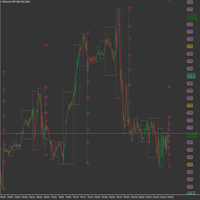
This product has been developed to complement various proven range expansion strategies, with features like the Fibonacci retracement and session/range definition along round numbers indicator. All coming together to provide a clear visual of areas which can potential present the trader with a position or even a quick scalping of price action. Download the full version, and check it out for yourself!!!
FREE
While using the Double Action EA, you can take advantage of this free tool available on the market to plan your trades and potentially double your account. Simply download it, attach it to a chart, fill in the input fields, and you’ll receive four breakeven points, and profit. Then, apply those levels to the Double Action EA. Trade with confidence, knowing your risk in advance.
The inputs include: • Lot Sizes: INITIAL TRADE : (Lot1), TOPUPS 1-3: (Lot2, Lot3, Lot4). • Grid Sizes: Grid1, Grid2,
FREE

Swift Symbol Switch MT4 adds a clean, convenient symbol-switching panel directly to your chart, allowing you to move between Forex pairs, cryptocurrencies, commodities, metals, and other broker-supported instruments with a single click. There is no need to type symbol names, search through Market Watch, or repeatedly open MetaTrader menus. Simply select a symbol from the on-chart panel and the current chart updates instantly. The utility is designed for traders who monitor multiple markets and w
FREE
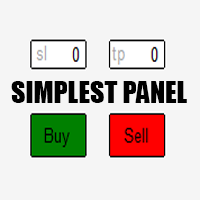
Just a simple panel that I created to make my trading life easier. Features: Buy and Sell with TP & SL right on chart Lot size is calculated by risk percentage Martingale - will open opposite position when SL hit (please don't enable unless you know what you are doing)
Will have more add-ons like Close-all button, Break-even, Trailing-Stop, etc. It's FREE so please leave your negative review somewhere else.
FREE

Automatic transmission is for the traders who are annoyed by constantly putting manual take profit and stop loss. This will take some of the burden. All you need is a laptop/pc at home or a VPS, so that you can press buy or sell on your phone and all will be automatically done for you. Check out parameters below.
This utility is for every symbol. Watch for oddities when trading crypto.
Other products Automatic Transmission MT5 XAU Breakout MT5
Parameters
-Manage Magic Number (0 = Disabled)
FREE
OrderSend Time - Automated Trading at Specified Time OrderSend Time is a convenient utility that allows you to schedule trade executions at specific times. Simply set the desired hour, minute, lot size, and order type (buy or sell), and the utility will automatically execute the trade at the designated time. IMPORTANT! Please note that this utility operates based on the broker's time in the 24-hour format, not your computer's time. Key Features: Select the hour, minute, lot size, and order type.
FREE

The AllClosedMT4 utility in the form of an expert. The utility is designed for closing all open positions simultaneously based on the total profit (in the deposit currency) of all open positions. The utility can be attached to any chart with any trading instrument.
Parameters Profit - the total positive profit in the deposit currency, at which all open positions are closed (profit). Stop - the total negative profit in the deposit currency, at which all open positions are closed (loss). The valu
FREE

A utility to close all orders automatically. There are simple options as follows: - Close orders created by EA . - Close manually created orders. - Close orders by Symbol . - Close buy order separately. - Close sell order separately. - Close all orders. Please refer to the video for more details about our products:
We are ready to help you with the use of EA, Please contact us.
FREE

ManageEquity - A Powerful Trading Utility for Risk Management ManageEquity is a simple yet powerful trading utility designed to enhance risk management strategies. By attaching this utility to a single chart and specifying the maximum dollar amount for both profit and loss, traders can effectively manage their open orders. With ManageEquity, traders can easily set their desired profit target and maximum acceptable loss for all open trades. Once the profit target is reached or the maximum loss th
FREE

OnBoard stats is a panel that show in a single view a lot of usefull information about working orders and trading account. It has 4 different sub-panels (from left to right): Symbols order statistics : it can be found symbols for which there are orders (market or pendings). Symbol with pendings are colored with "Pendings color". Clicking on a specific symbol row, chart will be changed to that symbol. Current symbol statistics : informations about the "current" symbol, the one which is opened in
FREE

Description: Automatic Equity Manager EA manages the whole account equity. You need to set it up on its own chart. -----------------------------------------------------------------------------------------------------------------------------------------
Parameters: EquityGainPercent = 3 (This automatically closes all trades when your equity shows a gain of X percent.) ---------------------------------------------------------------------------------------------------------------------------------
FREE

This expert is a tool to check broker execution and spread. Attach expert in any chart and wait to finish check. Expert sends a pending order (Buy Stop) away from the current price (100 pips) and then modifies it. When expert is removed from chart, pending orders expire and are deleted after 15 minutes.
You can to get source code from here .
Parameters OrdersID - Magic number for orders. ManualLotSize - Lot size for orders. TypeOfOrderUse - Type of order to place (pending or market). TimesModi
FREE

Risk Optimizer is the absolute solution for applying risk management on your account. Bad risk management is the main reason that causes traders to lose money. Risk Optimizer calculates and suggests the correct lot size for each position according to your personal, customized risk profile. You can give directly your preferred risk as percentage (%) for each position or you can trust our algorithms to calculate and optimize according to your risk category selection. But it is not only that! Selec
FREE

The Environment State Info Print is a script to display the constants that describe the current runtime environment of a MQL4 program. General Description
The constants are divided into four groups in the Environment State section of the MQL4 documentation and each group is divided into enumerations/subgroups (with designations “ Market Info”, “Integer”, “Double” or “String”). The script displays constants in two ways: a single constant or all group constants. The constants are obtained by
FREE

'BrokerInfo' is an indicator to show some information of account on the chart. You can to see on chart information about: GMT time. Broker time. Maximum simultaneously open orders. Leverage. Maximum lot size. Minimum lot size. Lot step. Stop level in pips. Symbol spread in pips.
You can to get source code from here .
Parameters SizeBackground – background size. PositionUpDn – position to show info on the chart.
FREE

Plain — Semi-Automatic Trading, Your Direction
Plain keeps you in control: you choose the direction, and the EA handles the execution automatically. A clean, semi-automatic Expert Advisor for traders who want to call the bias and let automation do the rest.
What it does for you You set the direction: the EA opens and manages trades the way you decide. Hands-off execution: automation handles the mechanics once you've chosen the bias. Simple and transparent: no black box — you stay in charge. Fu
FREE

The VR Object Delete All script solves the problem of garbage on the chart. it is often necessary to completely clear the chart of everything that is put on it, comments, lines, objects. The script completely deletes everything, even those objects that are not visible. When working, VR Object Delete All writes everything it does in the terminal log, as well as the names of objects to delete. Displays the number of deleted objects as a separate line. in case of any errors, it will display an erro
FREE
The world of prop firm trading is one filled with tension and excitement in equal measure, and FTMO is definitely the most reputable firm out there. On one hand is the prospect of making huge sums of money and on the other, losing all the money you have invested. The easiest way of the latter scenario occurring is drawdown , and more often than not daily drawdown . It's what keeps us constantly checking our phones, the pain of every traders existence.
What if there was a way of making
FREE

Советник Time Line Auto Close (TLAC) позволит вам создавать вертикальные линии (Time Lines, линии времени), которые будут автоматически закрывать все или некоторые из ваших открытых ордеров. Вы можете создавать и управлять несколькими линиями, настроить для каждой из них закрываемые ордера и оповещения. Ордера можно фильтровать по валюте, магическому номеру, номеру ордера и типу ордера. Также можно настроить отправку уведомлений перед активацией линий.
Как она работает? С помощью TLAC вы сможет
FREE

NEW : integration with Ofir Signals to send personalized alerts Ofir Notify is a tool which send alerts on trades to Telegram Alert on any event concerning a position : Opening, Closing, modification (SL, TP) Send alerts to Chats, Groups and Channel Alert on Equity change Display Risk, Reward and progress of profit/lost for each position Customization of alerts Sending charts screenshots with alerts Send signals from your indicators or experts Multi-lingual NEW : version 2 brings integratio
FREE

交易数据分析助手 : 这是一款交易数据统计分析工具,数据图表较多可供分析参考 . 语言: 支持语言的选择切换(目前支持中文和英文 主动识别不用人工选择) 主窗口显示: 余额显示 总盈亏显示 现在持仓盈亏金额显示 现在持仓盈亏比例显示 买单卖单总单量,总手数,以及盈亏情况显示. 仓位使用比例显示 按照目前持仓能够承受的亏损点数预计 (点击右下角可缩放)每日订单单量,手数,盈亏情况统计 (点击右下角可缩放) 当周盈亏数据
(点击右下角可缩放) 当月盈亏数据
(点击右下角可缩放) 当年盈亏数据
交易数据统计区: 详细订单统计,(可以选择按日,周,月,季度,年)(按品种,识别码)(现有持仓详细统计) 盈亏/手数/交易次数 柱状图 多/空持仓时间/获利水平情况 多货币盈利次数/盈利水平分布情况 余额净值曲线/余额曲线/盈利曲线等(注:加载余额净值曲线可能需要一定的数据处理时间,请耐心等待加载完成...) 每次订单盈亏利润柱状图 多货币对盈利曲线图 数据统计分析报告 关于版本更新 有任何问题,建议,欢迎交流.
FREE

MULTI TRADER TOOL - SUPPORT / RESISTANCE, ONE CLICK CLOSE / OPEN, AUTO CLOSE, GRID ORDERS, ALERTS.
You should use this Panel on FULL SCREEN MODE (F11).
HotKeys: B - Open Market Buy Order with OneClickOpen Settings. S - Open Market Sell Order with OneClickOpen Settings. G - Open Grid Orders with Grid Panel Settings. R - Add Support/Resistance Settings to selected trend and horizontal lines. If you have any questions, ask in a private message or in the comments section.
FREE

For more details, join with www.telegramtradecopier.com
TelegramTradeCopier is the world's first lifetime licensed telegram trade copier software for forex, crypto and commodity trading. Any signal format can be converted to a trading action by TTC. The system has two components Desktop app EA file You need to install and login to the desktop app with your telegram details. Then it will listen to channels configured by you and decode all messages into trading actions with proper validat
FREE

This EA (TRIAL VERSION) is designed for automatic placing of pending orders (sell limit, buy limit, sell stop, buy stop) including Stop Loss & Take Profit levels (editable) with only one button click. This EA can make order multi pending level / pending orders grid. So, with this EA placing pending orders will be faster, more accurate and more efficient.
Main Purposes Automation Pending orders grid style trading. Automation of the process of placing the Pending Orders: fast accurate efficient A
FREE

This is an Expert Adviser use for manual trading as a background EA or combine with external EA to open orders. Loss Recovery Trading is one of your options to handle the lose positions instead of using stop loss by setting a zone recovery area and target to exit the turn rounds sequence.
How It Work? If the market goes against your first positions direction at the specific of losing points, the EA will open an opposite direction position with calculated larger lot size and also keep the first
FREE

The Tickerly TV Connector allows seamless integration between TV strategies and your MT4 terminal.
With this tool, you can automate trade execution by linking TradingView’s powerful scripting environment to your MetaTrader Terminal. Features include fast trade execution via Tickerly’s engine and easy setup using webhooks.
This EA is perfect for traders who want to deploy custom TV strategies on MT4, keeping their terminals in sync with real-time market conditions. Requires minimal configurati
FREE

This is a very silly script but perhaps you find it useful. It deletes all objects from the chart. I recommend setting a hot key to call it just by pressing a couple of keys on your keyboard. To avoid accidental deletion of object, the script will ask you to confirm the action as you won't be available to restore them with "undo" (Ctrl+Z).
FREE

AllHere is a plug-in for Control-adora that works as information panel. Its main function is to show you all the Control-adora elements placed in the chart, like the Control-adora's orders or the exit lines. On the lower left corner, AllHere shows a collection of buttons classified by color (you can set them in the indicator's properties) for several elements used in Control-adora system: Stop loss indications (stop loss Arrows) Exit lines Above (Above trend lines) Exit lines Below (Below trend
FREE

The script analyzes the history of quotes and gives recommendations on the minimum deposit. The calculations take into account the variability of prices and the standard deviation. Margin requirements for the instrument are also taken into account. The result of the script is the minimum recommended deposit for trading the given currency pair.
FREE

4 pulsanti per la gestione dei tuoi trade.
Close All : chiuderà tutte le operazioni aperte sul grafico corrente Delete All : eliminerà eventuali ordini pendenti sul grafico corrente SL + 1 : avvicinerà lo stop loss di 1 pip al punto di pareggio su tutte le operazioni aperte sul grafico corrente Delete SL : rimuove lo stop loss per tutte le operazioni aperte sul grafico corrente
Utile per tutti coloro che aprono più operazioni sullo stesso asset per cui è necessaria una velocità operativa di es
FREE
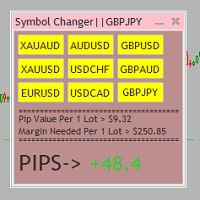
Tired of opening a new chart and applying a template for each Currency pair? So am I. That's why I created an indicator which gives you the option to switch between charts for the first 9 currencies in the Market Watch. In addition to changing between top 9 currencies, the value per 1 lot, the margin required and the amount of pips for any trade you have open for that currency pair are also displayed. Best of all, the colors can be changed!!!
FREE

Dear Friends, Practise master is a Utility program design to work in Live and Strategy Tester. But Main purpose is to work in Strategy Tester. With the help of this program you can take a good practise in strategy Tester. Please rate this application for the better
Benefits. 1. Save lot of time when using this program in Live or Strategy Tester. 2. Very useful to beginners. Demo account will not work in Sat & Sun Days(Market closed days). But for many users have office leave in Sat & Sun(h
FREE

This utility is a graphical shell for other Expert Advisors that do not have their own graphical shell or whose graphical shell you do not like. Just run the utility on a free chart of any currency pair, specify in the input parameters the "Magic Number" of the advisor to which you want to connect the utility, and a graphical shell will appear on the graph, containing information about the traded currency pairs, current positions and trading results of your advisor.
If you like this utility, ta
FREE

Simple setting Attach Magic SL TP Trailing to single fresh chart and to manage all orders please set SL TP 0 for other Expert advisor .
This is Free, if you found this useful please give feedback and 5 STAR (if you need more function on this please feel free do DM)
Chart Selection :- if select all chart then EA will manage all chart or if select single chart then EA will manage current chart only
Choose Trailing Method :- you can select trailing method how you want to trail
Choose SL & TP M
FREE

PositiveSwap
Легкий, бесплатный скрипт на языке MQL4, который выводит на график, в виде простой таблицы, все торговые пары с положительным свопом и указывает направление (покупка или продажа).
Скрипт автоматически просматривает все доступные торговые пары из окна "Обзор рынка". Поэтому, чтобы увидеть все возможные пары с положительным свопом, рекомендуется включить показ всех символов.
FREE

Утилита TSim позволяет симулировать ручную торговлю в Тестере Стратегий MetaTrader 4. В панеле можно устанавливать размеры лота, тейпрофита и стоплосса. Панель имеет кнопки Sell и Buy для выставления рыночных ордеров, а также кнопки CloseSell, CloseBuy и CloseAll для быстрого закрытия ордеров. Под панелью отображается список открытых ордеров. Внимание. Панель работает только в Визуальном режиме Тестера Стратегий MetaTrader 4.
FREE
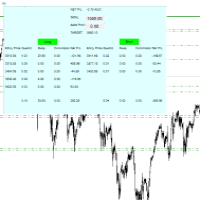
For all those traders who trade multiple positions , both long and short, in the one (or many) financial instruments, including grid trading, cost averaging, hedging, martingale, etc , by dragging it on to any chart from the navigator, this free and easy to use interactive panel utility will offer you the following benefits:
1. Live up to date visual data:
a. Shows live up to date details of all positions, both long and short, you have open in the particular financial instrument of the chart
FREE

### Description This Expert Advisor is designed to instantly close active positions and/or pending orders based on user-defined criteria. It supports filtering by trade type, magic number, and symbol scope, and is optimized for fast execution.
### Features - Close buy trades, sell trades, or both. - Filter by symbol: close trades on current chart only or across all symbols. - Filter by magic number or close all trades regardless of magic. - Set maximum allowed slippage for execution control. -
FREE

EA Follower Version any Follow Copy Account (Acc. Number) need a open MT Terminal, download multiple times Step1: Open Master MT5 Terminal = install master- Version (on any Symbol just one Time) Step2: Open Follower MT5 Terminal = install follower- Version (on any Symbol just one Time) Step3: all Trades from any Symbol or any Robot are copy now to follow- Terminal immediately for simple copy set on Chart and Start no optimization. This Robot is a Trade Copier for MT5 that auto
FREE

This indicator shows both GMT time and your broker's time on the chart.
Simply attach the indicator to a chart, and you will see the GMT time and your broker's time displayed in the top left corner, as shown in the screenshot. By using this indicator, you can always stay informed about your broker's time, which is especially useful during daylight saving changes.
You won't have to worry about whether your broker follows the US or EU schedule, as the indicator automatically adjusts to reflect an
FREE

The strategy used by this trading robot is placing stop orders (Pending) before the news event. The news event release time can be accessed from investment.com an app that the trader must download from play store into his/her mobile device. The robot places two stop orders, a Buy Stop and Sell Stop at the same time at least two minutes before news release time. For example, if the news release time is 15:30, the pending orders will be opened at 15:28(see how to insert the news time at screensho
FREE

The Expert Advisor allows to move the stop loss following the price, which gives you the ability to protect the floating profit from sudden price reversals. It is possible to use a simple trailing stop which moves the stop loss at the specified distance from the price, as well as based others based on various indicators.
Parameters Magic - unique magic number for identifying positions, if 0 - no number; Trailing - select the type of trailing stop: Simple, Fractals, ParabolicSar, ZigZag; Trailin
FREE

如果产品有任何问题或者您需要在此产品上添加功能,请联系我 Contact/message me if you encounter any issue using the product or need extra feature to add on the base version.
Session TakeProfit StopLoss is basically helping to set the take profit and stop loss in dollar for the total open orders (session). Once the total profit is greater than session_tp or less than session_sl, the EA will help to close all open orders acting similarly to a take profit/stop loss for a single order.
Inputs session_tp: session take profit ses
FREE

The Master utility is free, and you can buy/rent the client side utility from : https://www.mql5.com/en/market/product/41923
Now you can trade on multiple MetaTrader 4 accounts simultaneously, mirror the trades of any trading bot to your friends and family accounts (even if it is locked to your MT4 account number), create investment portfolios of many MT4 accounts, remove risk of unregulated Forex brokers, turn losing trading strategy into a winner and become an independent account manager imm
FREE

An EA to export trading history for FXer - Journaling and Analytics. fxer.net Register Create an API token Put EA on any chart (any TF is fine) Fill in the API token Follow analytics for better trading At FXer, our mission is clear: to empower traders like you with the tools needed to excel in the ever-changing world of trading. We are committed to providing top-tier, data-driven market analysis and trading intelligence, ensuring you can make well-informed decisions, manage risks effectively, an
FREE

The Saz_Timer indicator belongs to the Saz_Forex suite of professional indicators designed by Traders, for Traders. This indicator will show minutes and seconds of real time on the chart window. The indicator uses the OnTimer() event so it can update even while no ticks received on the chart. The text is shown toward the bottom right of the chart, encircled red in the screenshot. Inputs: Text Colour, allows selection of the colour for the text.
FREE

This free MT4 indicator allows you to easily compare as many symbols as you want! Make sure that the input symbol matches the name displayed in the Market Watch ***Please comment, rate and share it to your friends if you like it*** ------------------------------------------------------------------------------ Comparing trading pairs is useful for several reasons, including: Identifying relative strength: Comparing trading pairs can help traders identify which currency or asset is relatively stro
FREE

Overview: Trade Close Master is a powerful yet straightforward tool designed for MetaTrader 4 that allows traders to efficiently close all open trades with a single command. This script simplifies the management of multiple trades by automating the closure process, ensuring a seamless trading experience. It is ideal for traders who need to quickly exit positions across various currency pairs and symbols, especially during fast-moving market conditions.
Advantages and Features: Ease of Use: With
FREE

Trade History Export: The EA retrieves all historical orders using the OrdersHistoryTotal() and OrderSelect() functions. For each order, the following details are exported: Index: Sequential number of the trade. Order Ticket: Unique identifier of the order. Symbol: Trading instrument (e.g., EURUSD). Lot Size: Volume of the trade. Open Time: Time when the trade was opened. Trade Type: Buy or Sell. Open Price: Price at which the trade was opened. Close Time: Time when the trade was closed. Clos
FREE

Fastest way to change the period. Suitable for traders who use many charts and timeframes. Size, shape and color can be customized.
Inputs Parameters Corner — Choose corner placement Standart is "Right lower chart corner" Color — Background color of the button ColorText — Text color of the button ColorOn — Background color of the button for the current period ColorOnText — Text color of the button for the current period Font — Arial, Verdana... FontSize — Size of the font in pixels DistanceX —
FREE

Multi operations script to operate manually. It is not a toy!
Warning: This script needs one to two months of utilization to achieve a proficient usage level and knowing all functions and market situations where it can be used.
THIS IS A TOOL FOR PROFESSIONALS & EXPERIENCED TRADERS!
You can save thousands of configurations to make thousands operations beyond your imagination .
Steps buy to protect steps sell, chains of take profits and stop losses, protected, martingale, progressive, inverte
FREE

It computes BUY and SELL lot sizing in either % of balance or in fixed intervals. In market orders, this EA contains the adaptive slippage, logs tickets for instant confirmation of opening trades, and contains every market symbol at a glance. Real-time balance/equity display keeps margin health in view without tab-switching, toggling spread if needed for liquidity checks. Compact left-panel layout minimizes screen real estate, empowering blind trades where speed trumps overanalyze—perfect for
FREE

Pairs Navigator is a simple and easy-to-use tool that allows you to view all of your charts in a single window. This eliminates the need to open multiple charts from the Market Watch window, saving you time and effort. Pairs Navigator is also very lightweight, so it will not put a strain on your RAM or cause your MT4/5 platform to hang. To use Pairs Navigator, simply drag and drop the currency pairs you want to view into the Pairs Navigator window. You can then easily switch between charts by c
FREE
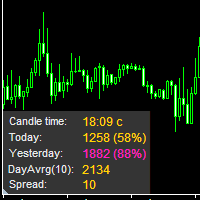
The information panel displays important trading information on the chart. Visual display of the information will help you to make a prompt and precise trading decision. Screenshots depict information which I use in my trading system. But you can add any other desired information. To do this contact me via MQL5 web-site. Displayed information: Time till the end of the current candle and formation of a new one. Time set format: hh:mm, if there is at least one full hour, or mm:ss, if you have les
FREE
Il MetaTrader Market è un negozio online unico di robot di trading e indicatori tecnici.
Leggi il promemoria utente di MQL5.community per saperne di più sui servizi unici che offriamo ai trader: copia dei segnali di trading, applicazioni personalizzate sviluppate da freelance, pagamenti automatici tramite il Sistema di Pagamento e il MQL5 Cloud Network.

Ti stai perdendo delle opportunità di trading:
- App di trading gratuite
- Oltre 8.000 segnali per il copy trading
- Notizie economiche per esplorare i mercati finanziari
Registrazione
Accedi
Accetti la politica del sito e le condizioni d’uso
Se non hai un account, registrati