VectorEntry MT5

  • 지표
  • Guad Bibar
    Guad Bibar
    5 (1)
    Quantum Labs | MetaTrader tools with clear rules
    I develop MQL4/MQL5 indicators, Expert Advisors and utilities, with a focus on chart analysis, configurable trading logic and practical dashboards.
    Choosing a product
  • 버전: 1.0
  • 활성화: 20

From a closed-candle signal to a defined trade plan

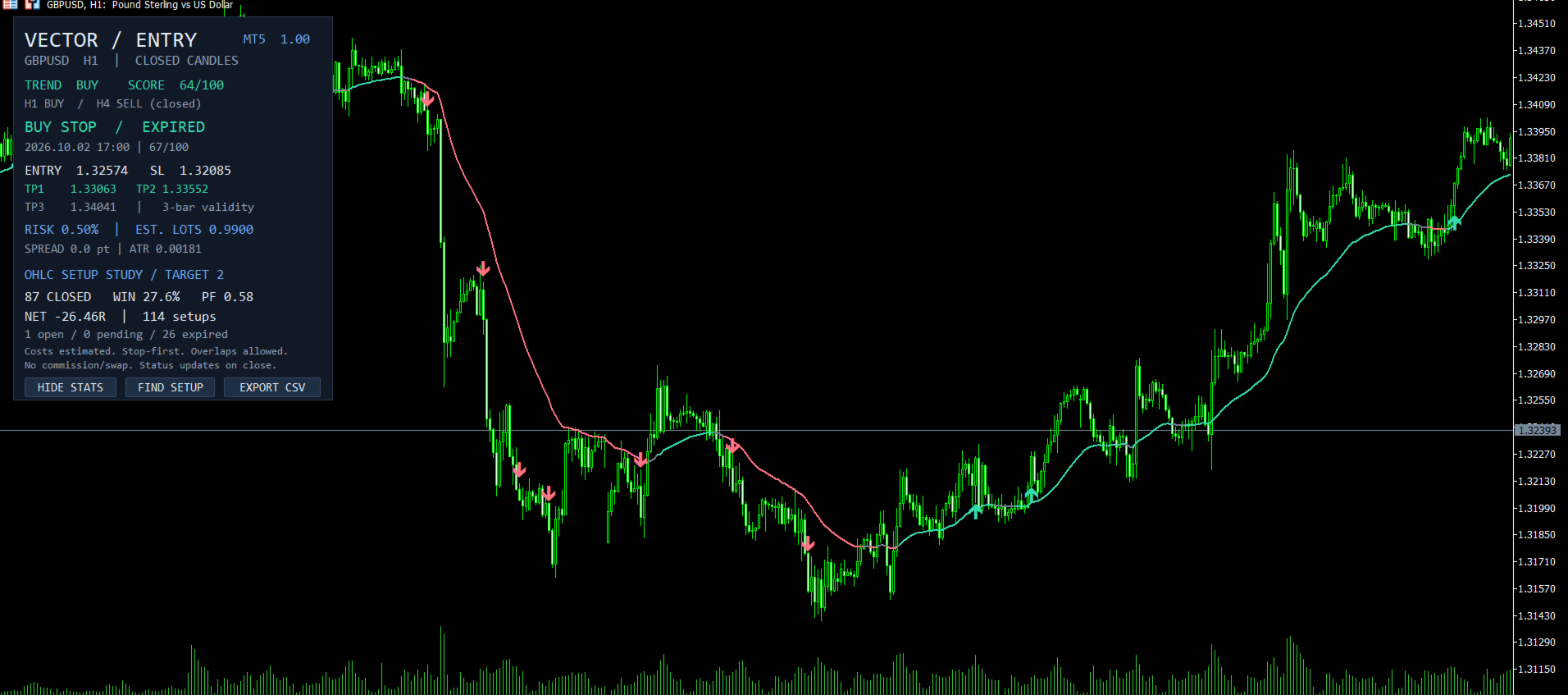
VectorEntry MT5 brings buy and sell setups, pending entry levels, stop loss, three targets and an estimated position size onto one chart. It is built for manual traders who want to see the conditions of a setup before deciding whether to trade.

The indicator combines trend direction, breakout or pullback structure, momentum and candle quality. When the conditions align on a completed candle, it marks the setup and calculates its levels. You remain in control of every trading decision.

What you see on your chart

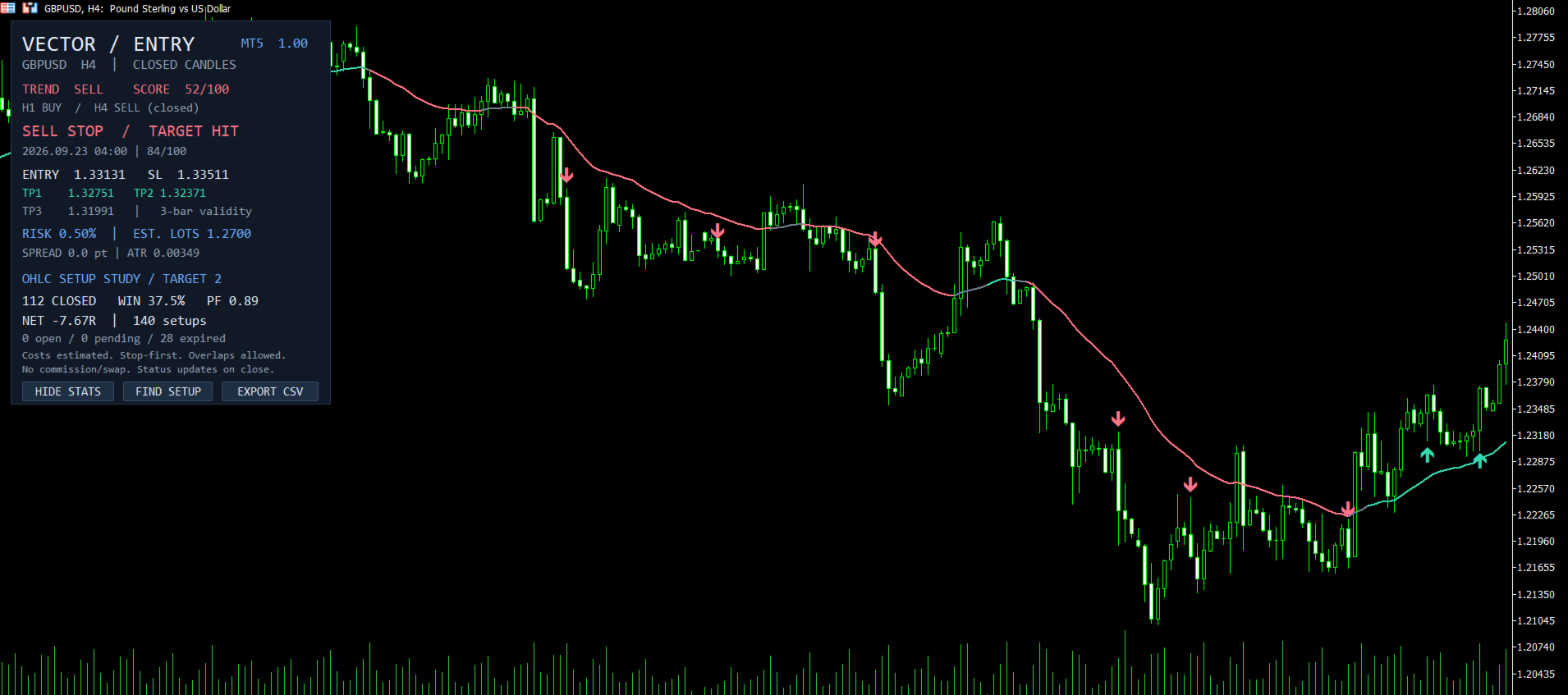
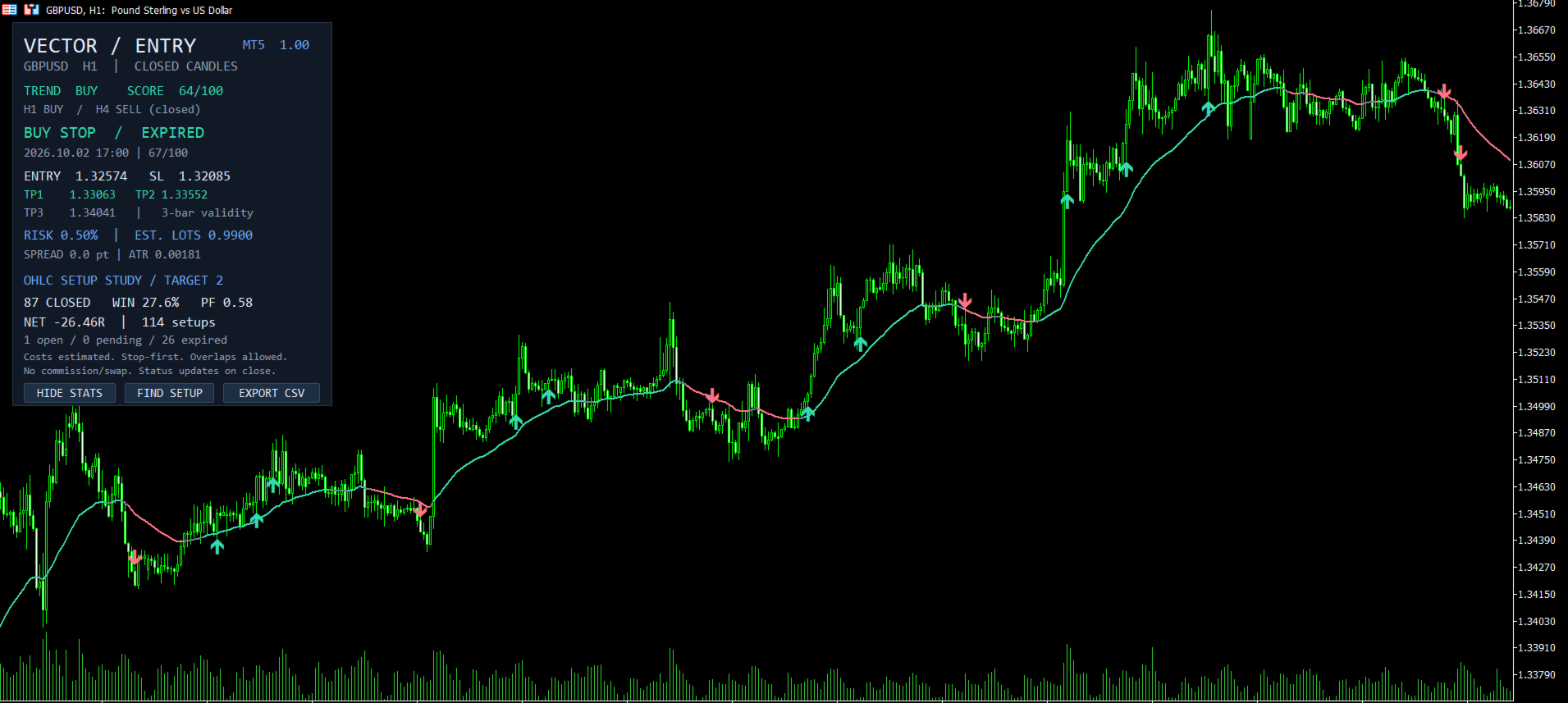
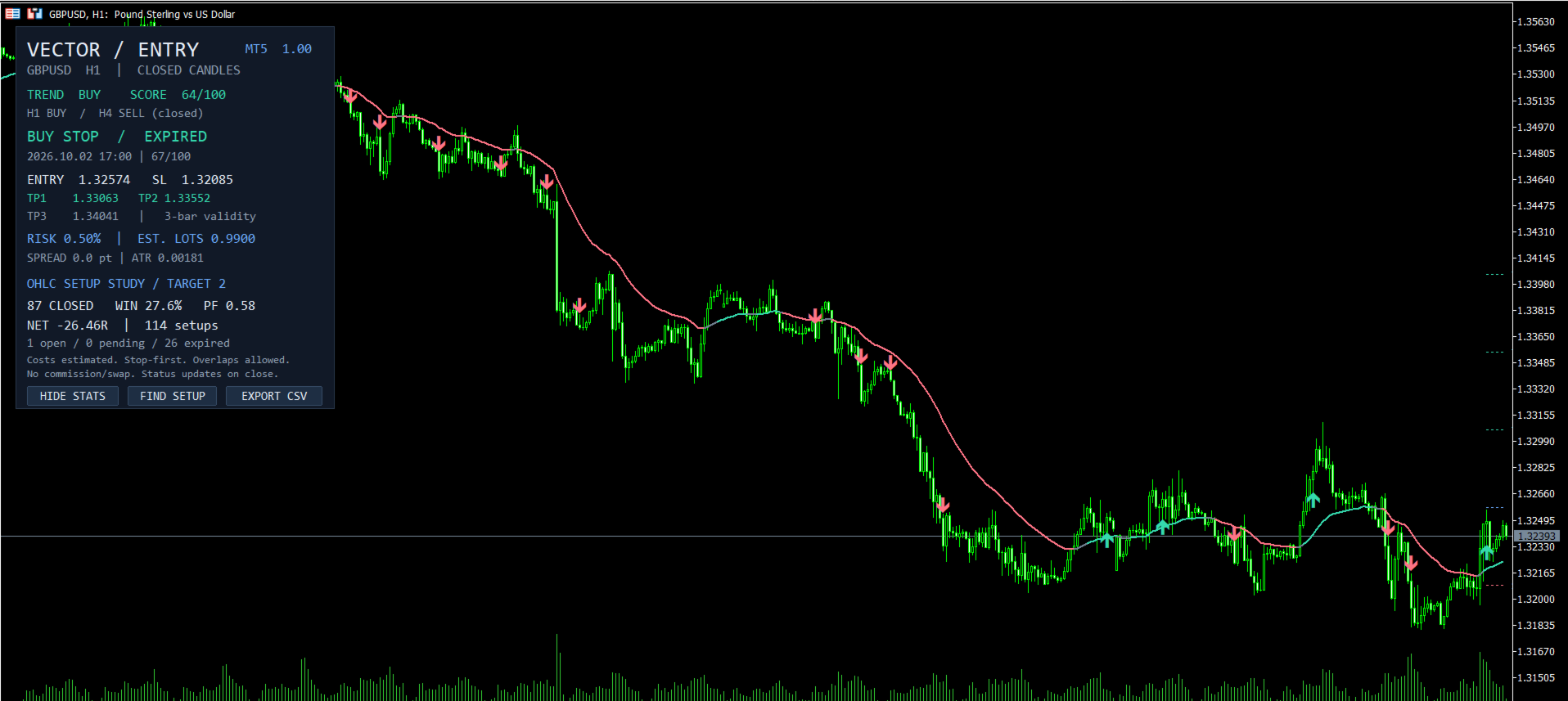
  • Closed-candle arrows: buy and sell candidates appear after the signal candle closes.
  • A defined entry and stop: a Buy Stop or Sell Stop level beyond the signal candle, with a stop based on volatility and nearby price structure.
  • Three targets: adjustable reward-to-risk levels, with 1R, 2R and 3R defaults.
  • Estimated position size: lot sizing from your chosen risk percentage, equity and the symbol's tick values.
  • Chart context: a trend baseline, a rule-based setup score and completed-candle H1/H4 trend context.
  • Review tools: historical setup statistics, CSV export, a button to find the latest setup, and optional popup, sound, push and email alerts.

A simple three-step workflow

  1. Wait for a signal candle to close and an arrow to appear.
  2. Review the pending entry, stop, targets and estimated lots. Check the broker's spread, margin and order-distance requirements.
  3. Decide whether to place an order. The default setup expires if its breakout entry is not reached within the next three bars.

The indicator displays a plan; it does not open or manage account trades. Its pending, triggered and completed statuses belong to the historical study and update on candle close.

Signals that can be reviewed

VectorEntry uses only the signal candle and earlier data. It does not move a completed signal because later candles appeared. Entry, stop and target levels are calculated from that setup's data. Changing inputs or corrected broker history can change historical results; bars outside the selected rolling history window are removed from the display. The current candle has no signal.

The 0–100 score summarizes rule alignment; it is not a win probability. H1/H4 context is informational and does not retrospectively filter chart signals.

Statistics with stated assumptions

The dashboard evaluates historical setups on the selected chart. It shows completed outcomes, win rate, profit factor, aggregate R, and counts of open, pending and expired setups. You can choose which target to study and set a maximum holding period.

This is an OHLC approximation of independent, potentially overlapping setups, not an account-performance record. The model uses estimated spread and slippage, treats ambiguous stop/target candles adversely, and excludes commission and swap. Aggregate R is not an account return. Lot estimates require valid broker data and do not guarantee execution risk.

Setup and customization

Attach VectorEntry to an MT5 desktop chart with sufficient history. Default inputs require at least 111 candles. Choose breakout, pullback or combined mode, then adjust trend periods, score thresholds, volatility filters, pending validity, risk percentage and target ratios. Settings apply to the selected symbol and timeframe and should be evaluated on a demo account.

No DLL imports, API keys or external services are required. Alerts are disabled by default; enable the desired channels in Inputs and configure MT5 push or email settings first. The indicator also exposes signal and price buffers for developers.

Try the demo and review the behavior

Use the Market demo in MT5's visual Strategy Tester to inspect the arrows, levels and controls before buying. Gallery screenshots show the interface on GBPUSD H1 and H4. Their dashboard statistics are historical model estimates, include losing results, and are not a verified trading-account record. Real-market profitability has not been established, and no trading result is promised.

For setup questions, use the product comments or contact the author through MQL5 private messages.
추천 제품
Xiao Dan Kuai Pao is a fast and clean one-click order panel for MetaTrader 5. Open and manage your trades instantly, with Stop Loss and Take Profit placed automatically — no more typing TP distances by hand. Key features: - One-click buttons: BUY, SELL, CLOSE, BREAK EVEN - Custom Stop Loss and Take Profit (in points) — set any distance you want - Flexible risk/reward — combine SL and TP freely to build any ratio, such as 1:1, 1:2, 1:3, 1:4 or 1:5 - Real-time price display (Bid) - Bar countdown t
Trade Control Panel
Jerry Jilun Anak Liban
Trade Control Panel Function Normal One Click Function Close All Close All Profit Close All Loss Close All Pending Order Close All Sell Close All Buy Advance One Click Function 1.  Close Partial Lot Sell by Percent It will help you partial close for all open position by desire percent you wanted. No longer partial close one by one for every open position Manual input for desire percent 2. Close Partial Lot Buy by Percent It will help you partial close for all open position by desire percent
Volume Display Indicator – Clean and Powerful Volume Visualization This professional MT5 indicator displays tick volume as a color-coded histogram and automatically adds clear volume labels above each bar for the current trading day. Rising candles are painted blue, falling candles red, giving you instant insight into market strength and momentum. Key Features: Colored volume histogram (blue/red) Automatic volume labels for each bar of the current day Smart scaling for perfect readability Auto-c
Read detailed blogpost with screenshots here: https://www.mql5.com/en/blogs/post/770947 Features at a Glance One-click symbol change across all charts simultaneously One-click timeframe change across all charts simultaneously Live trade status on every pair button — buy/sell counts, profit/loss coloring Pending order indicators shown separately on buttons Panel background color changes with your overall profit or loss Sync panel position across all charts Sync the number of buttons per row acro
FREE
Neuron News Risk Manager MT5 Neuron News Risk Manager MT5 는 MetaTrader 5용 경제 뉴스 보호, 위험 관리 및 Telegram 원격 관리 시스템입니다. MT5 경제 캘린더를 모니터링하여 다음 뉴스, 통화, 시간, 중요도, 영향 및 남은 시간을 표시합니다. Low, Medium, High 중요도별 필터링과 차트 뉴스 라인을 지원합니다. Global Algo Trading Guard 는 뉴스 발표 전에 Algo Trading을 자동으로 비활성화하고 설정된 보호 기간이 끝난 후 다시 활성화할 수 있습니다. 보호 시작 전에는 아무 작업도 하지 않기, 수익 포지션 청산, 손실 포지션 청산 또는 모든 포지션 청산 을 선택할 수 있습니다. 패널에서는 Close Winning, Close Losing, Close All 기능과 오픈 포지션, Floating P/L 및 Drawdown을 모니터링할 수 있습니다. Telegram 원격 관리 MT5가
TraderStart Structure Break Alerts Track recent market structure breaks across multiple timeframes in one clean on-chart panel. TraderStart Structure Break Alerts is a free MetaTrader 5 indicator that helps you monitor the latest market structure break on up to three configurable timeframes. It reports the most recent BOS (Break of Structure) or CHoCH (Change of Character), shows the break level, how many bars ago it occurred, and summarises the current structure bias and alignment. The indi
FREE
Basket Risk Planner MT5 is a chart-based utility for monitoring and planning existing MetaTrader 5 position baskets. It does not generate trading signals and it does not open or add trades. Attach it to the chart of the symbol whose positions you want to review. The panel updates with current market quotes and presents the basket in account currency. What the utility shows Basket Risk Planner MT5 displays the current position count, floating profit/loss and estimated net basket result. Open p
AI QUANT SYSTEM EA — Institutional Neural Engine (v52.0) Fully Automatic Trading EA Please Note:- First that this is an EXPERT ADVISOR, not a Utility. However, due to certain restrictions, I have to publish this  EXPERT ADVISOR  under the Utilities category.  We are  Provided  including a FREE OpenAI API key with this product, so you do not need to purchase AI API KEYS one separately, With Lifetime FREE Upgardes in Future. The AI Quant System EA is a next-generation, high-frequency quantitative
FREE
Time in Trade
Denis Diakonov
Time in Trade Expert Advisor는 지정된 시간에 지정가 주문을 여는 전략을 적용하고 자동 전환과 함께 겨울 및 여름 시간도 사용합니다. 신호가 발생하면 거래 로봇은 구매 및 판매를 위해 동일한 수량의 대기 중인 주문을 엽니다. 거래에 사용되는 시간은 5분입니다. 지정가 주문의 트리거는 다음에 따라 급격한 가격 변동입니다. 거래 세션의 시작/마감; 중요한 경제 지표 발표; 최대 거래자 수의 시간 간격. 사용자는 다음 설정을 사용할 수 있습니다. Open Price - BID 및 AKS 가격을 기준으로 주문 개시 수준을 설정합니다. Stop Loss - 원하지 않는 가격 변동이 있을 경우 손절 레벨; Trailing - 부동 손절매 수준; Volume - 고정 거래량(위험 = 0인 경우에만 유효) RISK - 위험 수준(%): 0 - 설정된 위험이 없습니다. 고정 볼륨이 적용됩니다. 1 이상 - 무료 자금의 위험 수준 %. HOUR_n - 지정된 시간(서버 시간)에
This Expert Advisor monitors all open positions across all symbols in MetaTrader 5. Whenever a Stop Loss (SL) or Take Profit (TP) is manually set or adjusted on any position, the EA automatically applies that value to all other open positions , regardless of symbol or order type (Buy/Sell). This ensures consistent and synchronized SL and TP levels across your account. Perfect for mobile trading via tablet or smartphone!
Advanced PolyLines
Felipe Monteiro Rodrigues
제품이 마음에 드셨다면 댓글과 평가를 남겨주시는 것을 잊지 마세요! Advanced PolyLines는 MetaTrader 5 차트에서 직접 폴리라인을 생성하고 편집할 수 있는 도구입니다. 여러 개의 선분을 하나의 구조로 연결할 수 있어 차트 분석에 사용하는 라인의 생성과 관리를 편리하게 할 수 있습니다. 여러 선분으로 구성된 구조를 쉽게 관리할 수 있도록 설계되었습니다. 연결된 포인트를 함께 이동할 수 있어 각 라인을 개별적으로 편집하지 않고도 전체 구조를 조정할 수 있습니다. 주요 기능 도구 인터페이스 차트에 통합된 인터페이스를 통해 그리기 모드를 활성화하고, 컨트롤을 숨기거나 생성된 폴리라인을 삭제할 수 있습니다. Magnetic Snap 마우스 커서가 캔들의 OHLC 가격 수준에 가까워지면 포인트를 해당 가격에 자동으로 정렬할 수 있습니다. 이를 통해 시가, 고가, 저가 및 종가에 라인을 배치할 수 있습니다. Joint Dragging 여러 선분이 공유하는 포인트를 차트에서
FREE
Easy Lot Calculator
Sergey Ermolov
5 (1)
Easy Lot Calculator — MT5를 위한 빠르고 직관적인 로트 계산기. 차트에서 Stop Loss 및 Open Price 레벨을 직접 이동하면 계산기가 포지션 크기와 거래 리스크를 실시간으로 즉시 다시 계산합니다. 왜 Easy Lot Calculator인가? Easy Lot Calculator는 실제 트레이딩 환경에서의 단순함, 속도, 편의성에 중점을 두고 개발되었습니다. 복잡한 인터페이스나 수동 계산 없이 올바른 포지션 크기를 즉시 계산할 수 있도록 도와줍니다. Easy Lot Calculator의 특징: 깔끔하고 미니멀한 인터페이스; 차트에서 바로 가능한 즉시 로트 계산; Forex, Metals(Gold, Silver), Crypto, Indices 및 기타 상품에 대한 정확한 리스크 계산; 초보자부터 숙련된 트레이더까지 모두를 위한 부드러운 트레이딩 경험. Easy Lot Calculator를 사용하면 복잡한 설정이나 수동 계산 대신 트레이딩 자체에 집중할 수 있
FREE
Prop Risk Meter
Brahim Ben Abla
Prop Risk Meter — The Free Drawdown Dashboard for Prop Firm Traders Prop Risk Meter is a free, read-only drawdown dashboard and risk panel for prop firm and funded-account traders. It monitors your daily loss, daily drawdown and equity drawdown in real time — built for FTMO, FundedNext, Funding Pips, The5ers, E8 and any funded account. It shows, live on your chart: - Today's loss vs. your configurable daily-loss limit (amount, % used, traffic-light bar) - Current drawdown from the equity peak
FREE
반자동 마틴 시스템 소개하다 이 도구는 반자동 Martin 거래에 사용되며 패널을 클릭하여 주문하면 EA가 위치를 관리합니다. 거래의 방향만 정하고 나머지는 EA 경영진에 맡김 자동 마틴, 설정된 그리드에 따라 창고 추가, 이 기능을 비활성화할 수도 있습니다. 원클릭 청산 하나의 키 잠금 기능 시간 제어 경고음 안내 특성 거래 차트: 아무거나 거래 가능한 통화: 아무거나 자동 이익실현 마감 백테스트에 사용할 수 있습니다. 클리어 패널 디스플레이 매개변수 주요 설정 매개변수 로그 레벨 = LOG_LEVEL_INFO; //로그 작성 레벨 UseAutoMagic = true; //매직넘버 사용 여부 매직넘버 = 6; //매직 넘버 0-2000 설정 로트 = 0.01; //초기 거래량 UseMartin = 참; //마틴 함수 사용 여부 부스터 = 1.7; //증가의 배수 넷갭 = 10; //그리드의 거리(포인트) 테이크프로핏 = 13; //이익을 얻다(포인트) MaxBuyOr
Smart Trade Manager Pro is the ultimate all-in-one trading panel designed to give you complete control over your manual trading. Built for both professional traders and prop-firm challenges (like FTMO), it brings TradingView-style visual planning directly into your MetaTrader 5 charts. KEY FEATURES: 1. Visual Chart Planning (TradingView Style) Plan your trades visually before execution! The EA draws interactive Profit/Loss boxes directly on the chart. Drag the edges of the boxes to seamlessly
Trade Planner Pro
Martin Alejandro Bamonte
Now free. Plan every trade before you click, see your real risk, reward and lot size right on the chart. Plan the trade. See the risk. Trade with confidence. Trade Planner Pro turns any chart into a visual trade-planning workspace. Drag three lines — Entry, Stop Loss and Take Profit — and instantly see your risk/reward ratio, the exact lot size for your chosen risk %, the real money you put on the line, the spread cost, and clear warnings before you commit. No more manual lot math, no more gu
FREE
Telegram Trade Notifier is a professional MetaTrader 5 utility that delivers instant trade alerts directly to Telegram in real time. It can send you via an instant message and/or to a telegram channel making it ideal for both normal traders and callers/signals. Monitor your trading activity from anywhere with automatic notifications for opened and closed positions, including optional chart screenshots captured directly from your MetaTrader terminal. Designed for traders, signal providers and tra
KS Hotkey Trading Panel Pro는 빠른 키보드 기반 거래 기능과 클릭 가능한 차트 내 대시보드를 제공하는 MetaTrader 5용 Expert Advisor(EA)입니다. 주요 기능 단축키 거래 — 다음 동작을 위한 단일 키 조작: 시장가 매수 / 매도 지정가 매수(Buy Limit) / 지정가 매도(Sell Limit) 역지정가 매수(Buy Stop) / 역지정가 매도(Sell Stop) 모든 포지션 청산 매수 포지션만 청산 / 매도 포지션만 청산 모든 대기 주문 삭제 랏(Lot) 사이즈 증감 (위/아래 화살표 키) 패널 표시 / 숨기기 차트 내 대시보드 — 모든 단축키, 현재 랏 사이즈, 실시간 계좌 정보(잔고, 평가금액, 스프레드, 매수/매도 포지션 수) 및 각 동작을 실행할 수 있는 "GO" 버튼을 표시합니다. 접이식 패널 — 토글 버튼(또는 단축키)을 사용하여 전체 패널을 얇은 바(bar) 형태로 접거나 펼칠 수 있습니다. 설정 가능
EA Smile 3 MT5
Luis Enrique Ricales
Working with pending orders Buy Stop and Sell Stop. A channel of two indicators iMA (Moving Average, MA). Input parameters Take Profit   - Take Profit; Trailing Stop   - trailing; Trailing Step   - trailing step; Lots   - lot size is set manually (a NECESSARY CONDITION:   Risk   must be equal to zero!); Risk   - lot size is calculated automatically, in risk percents per trade (a NECESSARY CONDITION: "Lots" must be equal to zero!); Difference   - offsets from the channel borders; Expert Every Ti
FREE
Visual Panel Pro: High-Speed Precision Trading Trade faster. Manage risk smarter. Take control of your execution. Are you tired of manually calculating lot sizes, fighting with terminal windows, or missing out on quick-moving scalping opportunities? Visual Panel Pro is the ultimate all-in-one trade management dashboard designed to turn your chart into a professional trading terminal . Why Traders Choose Visual Panel Pro Insanely Fast Execution: Place market and pending orders instantly with pre-
- What does this do? This indicator draws the standard session boxes used in Steve Mauro's BTMM (Beat the Market Maker) method:     • Asian session boxes     • Brinks boxes: London and New York session changeover boxes     • New York session boxes     • Stop-hunt boxes - Is this for me? If you use the BTMM trading system and you are on MetaTrader5, this is for you.     • The one provided by Steve Mauro was for MetaTrader4. This is its first MetaTrader5 adaptation. You cannot find this anyw
The EA supports closing orders based on the preset amount. It can close all orders on all pairs, or it can close orders based on Magic ID. Button "Close All" manual Input - Magic Number: Magic Number = 0: Close All pairs Magic Number diffrent 0: Close All with Magic - Money TP: Profitable in money.  the EA will close all orders - Money SL: Loss in money. the EA will close all orders Contact: t.me/nguyenvanbo128
FREE
Telegram Messenger Signal
Rene Thristan Ferreira Da Silva
Monitor de Operações em Tempo Real + Integração com Telegram (MT5) Transforme sua conta MetaTrader 5 em um sistema automatizado de monitoramento e envio de operações diretamente para o Telegram. Este Expert Advisor NÃO abre operações. Ele funciona exclusivamente como um monitor inteligente, detectando automaticamente qualquer nova operação aberta na conta e enviando os dados em tempo real para um grupo ou canal no Telegram. ️ O QUE O SISTEMA FAZ • Detecta automaticamente qualquer operação ab
Stop and Take EA
Luis Enrique Ricales
3.67 (3)
The Expert Advisor is only designed for manual trading. The EA sets stop loss and take profit for positions and pending orders on the current symbol. It also has trailing stop and breakeven functions. Input Parameters Stop loss   - stop loss value; Take profit   - take profit value; Close all if profit reached the x percent of balance or   - close all positions once the total profit reaches x percent of balance; close all if profit reached the x profit amount in currency   - close all positions
FREE
Overview The SMC indicator is a versatile tool that helps traders automate chart analysis using price action. Its main goal is to identify where large institutions place orders (liquidity) to find optimal entry/exit points. Core Features Market Structure: Automatically labels BOS (Breakout Structure) and CHoCH (Change of Character) in real time for both internal and main swing waves. Supply & Demand Zones: Identifies bullish and bearish Order Blocks. Liquidity & Price Gaps: Identifies equal
FREE
MMTrade
Alexander Martynov
5 (4)
This tool is designed to quickly calculate the lot depending on the Stop Loss. The control is done by hot keys By default: 1 - Limit order price level 2 - Stop Loss Level 3 - Take Profit Level Space Bar - Open an order Escape - Cancel All 9 - Open 2 orders Market Order To open a Market order, click (2) and set up Stop Loss with the mouse If you want to put Take Profit - click (3) and set up Take Profit with the mouse
FREE
Trade Manager – BreakEven and Global Stop Loss with one click This Expert Advisor (EA) is designed to help traders manage their positions faster and more efficiently. It comes with two main features, accessible through on-chart buttons: BreakEven function: Instantly moves all open trades to the entry price with a single click. Option to add a configurable margin (e.g., +2 pips) to cover spreads or commissions. Global Stop Loss function: Instantly applies the same stop loss level to
FREE
KS Fibonacci Level Alert는 MetaTrader 5용 사용자 친화적인 맞춤형 피보나치 되돌림(Retracement)/확장(Extension) 지표입니다. 주요 기능 1. 클릭 및 드래그 방식의 피보나치 도구 "+ New Fibonacci" 버튼을 클릭하여 차트에 새로운 피보나치 객체를 즉시 생성합니다. 드래그 기능을 완벽하게 지원하며, 앵커 포인트(기준점)를 드래그하여 스윙 고점/저점을 설정할 수 있습니다. 되돌림(0~1 사이의 레벨)과 확장(1 초과 또는 음수 레벨)을 모두 기본적으로 지원합니다. 2. 차트 내 설정 패널 "Show/Hide Panel" 버튼으로 패널을 표시하거나 숨길 수 있습니다. 실시간 설정 변경: 색상 (사전 설정된 색상 순환 변경) 스타일 (실선, 점선, 파선 등) 선 두께 (1~5) 라벨 (레벨별 백분율 및 가격 라벨 표시/숨김) 알림음 (MT5 내장 사운드 또는 사용자 지정 .wav 파일) 푸시 알림 (모바일 M
Bohemia Gold MT5
Vladislav Taska
4.8 (5)
Bohemia Gold MT5 is  Trend & Volatility EA trading system designed specifically for Gold (XAUUSD) . It combines higher-timeframe trend filtering , trend detection , volatility-based SL management , and advanced trade management to adapt market conditions. It uses style logic focused on trend strength, volatility, and capital protection. NOTE:   Based on backtests, I found better trading results with the following setup: D1/H4/H2 (Trend/ADX/ATR & trade). The SET file can be downloaded here … bohe
FREE
XFlow CHF
Maxim Kuznetsov
XFlow shows an expanding price channel that helps determine the trend and the moments of its reversal. It is also used when accompanying transactions to set take profit/stop loss and averages. It has practically no parameters and is very easy to use - just specify an important moment in the history for you and the indicator will calculate the price channel. This is a demo version limited to CHF currency pairs. Designed to familiarize you with the interactive use of XFlow DISPLAYED LINES ROTATE
FREE
이 제품의 구매자들이 또한 구매함
Trend Sniper X
Sarvarbek Abduvoxobov
4.9 (40)
Trend Sniper X 는 트레이더가 추세 방향과 잠재적 반전 지점을 명확하고 정확하게 포착할 수 있도록 도와주는 MetaTrader 5용 멀티 타임프레임 추세 추종 지표입니다. MT4용: https://www.mql5.com/en/market/product/193245 가격 정보: 현재 가격은 프로모션 할인가이며, 향후 업데이트 및 새로운 기능이 출시됨에 따라 변동될 수 있습니다. 보너스 혜택: 본 지표 전용 무료 자동매매 Assistant EA를 받으시려면 구매 후 작성자에게 메시지를 보내주시기 바랍니다. Code2Profit 채널 멀티 타임프레임 분석으로 시장을 마스터하세요! Trend Sniper X로 승률을 극대화하는 방법: 핵심 규칙 및 세션 팁 기술 사양 플랫폼 MetaTrader 5 지표 유형 멀티 타임프레임 추세 지표 운용 타임프레임 모든 차트 타임프레임 지원, 독립적으로 선택 가능한 상위 타임프레임(M1–MN1) 주요 상품 외환, 금(XAUUSD) 및 기타 C
Smart Trend Trading System — MetaTrader 5 구매 후 MQL5에서 저에게 메시지를 보내시면 Smart Universal Expert Advisor를 무료로 받으실 수 있으며, 온라인 강좌, PDF 매뉴얼 및 비공개 그룹 이용 권한도 함께 제공됩니다. STTS는 추세 방향, 진입·청산 신호, 반전 구간, 주요 가격 수준을 차트에 모아 보여줍니다. 시스템을 참고해 수동으로 거래하거나, 별도의 호환 EA를 연결하여 선택한 설정에 따라 자동으로 거래를 실행할 수 있습니다. 하나의 시스템, 네 가지 트레이딩 접근법 STTS의 트레이딩 접근법은 크게 네 가지로 나뉩니다. • 스캘핑 — 단기 신호와 시장 움직임을 살펴봅니다. • 추세 매매 — 방향을 평가하고 추세 안에서 기회를 찾습니다. • 반전 매매 — 잠재적인 전환 구간과 방향 변화를 파악합니다. • 거래량 매매 — 거래량 기반 정보로 시장 활동을 평가합니다. 진입·청산 화살표, 추세 정보, 지지·저항 수
ARIPoint
Temirlan Kdyrkhan
1 (4)
ARIPoint is a powerful trading companion designed to generate high-probability entry signals with dynamic TP/SL/DP levels based on volatility. Built-in performance tracking shows win/loss stats, PP1/PP2 hits, and success rates all updated live. Key Features: Buy/Sell signals with adaptive volatility bands Real-time TP/SL/DP levels based on ATR Built-in MA Filter with optional ATR/StdDev volatility Performance stats panel (Success, Profit/Loss, PP1/PP2) Alerts via popup, sound, push, or email Cu
Zoryk Gold
Reda El Koutbane
5 (15)
ZORYK — MetaTrader 5용 XAUUSD 전문 신호 및 트레이드 플래닝 시스템 이런 경험이 있을 것입니다. 골드를 분석하고 진입을 기다린 뒤 마침내 포지션을 열었지만 가격이 곧바로 반대 방향으로 움직입니다. 너무 일찍 청산하거나 Stop Loss를 옮기거나 몇 초 동안 망설입니다. 그 후 시장은 내가 없이도 처음 예상했던 목표까지 정확히 움직입니다. 문제는 항상 방향이 아니었습니다. 진짜 문제는 불확실성이었습니다. 정확한 진입 위치를 몰랐습니다. 어느 지점에서 원래의 트레이드 아이디어가 무효가 되는지 몰랐습니다. 가까운 수익을 확보해야 할지 더 큰 움직임을 기다려야 할지 판단하기 어려웠습니다. 현재 setup이 정말 강한지 아니면 단지 새로운 거래를 억지로 찾고 있는지도 확신하기 어려웠습니다. 골드는 매우 빠르게 움직입니다. 명확한 계획이 없다면 좋은 분석도 몇 초 만에 나쁜 결정으로 바뀔 수 있습니다. ZORYK는 이 문제를 해결하기 위해 개발되었습니다.
SuperScalp Pro
Van Minh Nguyen
4.66 (35)
SuperScalp Pro - Professional Multi-Layer Confluence Scalping System SuperScalp Pro는 클래식 Supertrend에 여러 지능형 확인 필터를 추가한 고급 스캘핑 지표입니다. 더 높은 확률의 Buy/Sell 거래 기회를 식별하는 데 도움을 주며, 잘못된 신호를 크게 줄이는 데 도움을 줍니다. 명확한 Buy 및 Sell 화살표가 차트에 직접 표시되며, ATR 기반 Stop Loss 및 Take Profit 수준이 실시간으로 자동 계산됩니다. 구매 후 설정 방법 및 권장 구성에 대한 안내가 필요하시면 저에게 문의해 주세요. SuperScalp Pro Auto Trader를 사용하여 신호를 쉽게 자동화할 수 있습니다: [Auto Trader] 권장 설정 파일 다운로드: [Set File] 전체 문서는 제품 블로그에서 확인할 수 있습니다: [User Guide] 업데이트를 확인하려면 공식 채널에 참여하세요: [Official C
Gann Made Easy MT5
Oleg Rodin
5 (10)
Gann Made Easy 는 mr.의 이론을 사용하여 최고의 거래 원칙을 기반으로 하는 전문적이고 사용하기 쉬운 Forex 거래 시스템입니다. W.D. 간. 이 표시기는 Stop Loss 및 Take Profit Levels를 포함하여 정확한 BUY 및 SELL 신호를 제공합니다. PUSH 알림을 사용하여 이동 중에도 거래할 수 있습니다. 구매 후 거래 방법 안내 및 유용한 추가 지표를 무료로 받으시려면 저에게 연락주세요! 아마도 Gann 거래 방법에 대해 이미 여러 번 들었을 것입니다. 일반적으로 Gann의 이론은 초보자 거래자뿐만 아니라 이미 거래 경험이 있는 사람들에게도 매우 복잡한 것입니다. Gann의 거래 방식은 이론적으로 적용하기 쉽지 않기 때문입니다. 나는 그 지식을 연마하고 Forex 지표에 최고의 원칙을 적용하기 위해 몇 년을 보냈습니다. 표시기는 적용하기가 매우 쉽습니다. 차트에 첨부하고 간단한 거래 권장 사항을 따르기만 하면 됩니다. 지표는 지속적으로 시장 분석
SMC Intraday Formula
VividMind Digital Solutions
5 (26)
먼저 솔직하게 말하겠습니다. 어떤 인디케이터도 단독으로 당신을 수익성 있게 만들어주지 않습니다. 누군가 그렇게 말한다면, 그는 당신에게 꿈을 파는 것입니다. 완벽한 매수/매도 화살표를 보여주는 모든 인디케이터는 완벽하게 보이도록 만들 수 있습니다 — 단지 올바른 과거 구간을 확대하고 승리한 거래만 캡처하면 됩니다. 우리는 그렇게 하지 않습니다.  SMC Intraday Formula는 도구입니다. 시장 구조를 읽고, 가장 높은 확률의 가격 구간을 표시하며, 현재 스마트 머니의 흐름이 어떻게 보이는지 아주 단순한 언어로 보여줍니다. 최종 결정은 여전히 당신이 합니다. 실행도 당신이 합니다. 하지만 이제는 희망이 아니라 정확성으로 거래하게 됩니다. 우리는 이 인디케이터를 지난 약 3년 동안 골드(XAUUSD) 및 주요 외환 통화쌍의 데이 트레이딩 스캘핑에 사용해 왔습니다. M1, M5, M15, M30에서 우리의 핵심 도구입니다. 이 도구는 미래를 예측하려 하지 않습니다 — 지금 형성
GoldenX Entry MT5
VividMind Digital Solutions
5 (16)
GoldenX Entry는 MT5용 인디케이터로, 적응형 Smart Entry Trend 알고리즘, 신호 스코어링 시스템, 시장 레짐 감지 기능, 그리고 변동성 필터를 포함합니다. 각 신호에는 계산된 진입 레벨, 3개의 익절(TP1, TP2, TP3) 레벨, 그리고 손절(Stop-Loss) 레벨이 포함됩니다. 이 인디케이터는 다양한 시장 환경에 적응하도록 설계된 다중 분석 레이어 구조 위에 구축되어 있으며, 내장 최적화기와 통계 추적 시스템을 결합합니다. 또한 Risk-to-Reward(RR) 지표와 과거 거래 행동 기반의 정량 분석을 제공합니다. 시작은 간단합니다 — 선택한 타임프레임에서 최적화기를 실행한 뒤 차트에서 바로 인디케이터를 사용하면 됩니다. 핵심 기능 GoldenX Entry는 하나의 차트에서 신호 엔진, 트레이드 관리 기능, 그리고 과거 통계 추적을 통합합니다: - 내장 최적화기: 최적화기는 차트에서 원클릭으로 실행됩니다. 200개의 파라미터 조합을 두 단계 탐색
새로운 왕의 등장 - 인디케이터 + 주문 관리 표시(TP1 + TP2 + TP3) + 선택형 텔레그램 시그널 전송 기능 포함 (무료) (완전한 트레이딩 및 시그널 시스템) 골드를 위한 최고의 EA: Gold Slayer 이 인디케이터는 고급 전략, 사용자 지정 가능한 주문 관리 시스템, 그리고 엔벨로프 확장을 결합한 평균 회귀(mean reversion) 시스템을 포함하고 있습니다. 또한 RSI와 같은 여러 지능형 확인 필터를 통해 높은 확률의 반전 진입 구간을 포착하여 BUY 및 SELL 시그널을 제공합니다. 단순히 거래 방법만 배우는 것이 아니라, 여러 포지션을 효과적으로 관리하고 이전에 수익 중인 오픈 포지션으로 손실 거래를 커버하는 방법까지 익힐 수 있습니다. M5 전용으로 설계 및 최적화되었으며, 유동성이 풍부해 시그널이 더 깔끔하고 신뢰도 높은 BTCUSD와 XAUUSD에서 뛰어난 성능을 발휘합니다. 이 인디케이터는 ATR 기반으로 자동 계산된 진입가, 손절가, 익절가와
Neuro Poseidon MT5
Daria Rezueva
4.75 (52)
Neuro Poseidon is a new indicator by Daria Rezueva. It combines precise trading signals with adaptive TP/SL levels - creating best possible trades as a result! Message me and get  Neuro Poseidon Assistant  as a gift to automize your trading process! What makes it stand out? 1. Proven profitability on all assets and timeframes 2. Only confirmed BUY and SELL signals present on the chart 3. Adaptive TP & SL levels generated by the software for each trade 4. Easy to understand - suitable for al
Auto Optimized SpeedAngle 은 지속적인 워크포워드 최적화(Walk-Forward Optimization, WFO)를 통해 곡선 적합(curve-fitting)을 제거한 기관 수준의 모멘텀 벡터화 시스템입니다. 시장 체제가 바뀔 때 성능이 떨어지는 정적 입력에 의존하는 대신, 이 지표는 표본 외(Out-of-Sample, OOS) 검증을 사용하여 매개변수를 동적으로 재보정하며, 표시되는 신호가 과거의 우연이 아닌 진정한 통계적 우위를 나타내도록 보장합니다. 핵심 기관용 프레임워크 워크포워드 최적화 엔진: 핵심 알고리즘은 수천 가지의 룩백(lookback) 및 임계값 조합을 지속적으로 스캔하며, 데이터를 인샘플(in-sample)과 표본 외(out-of-sample) 세트로 엄격하게 분리합니다. 미지의 데이터 환경에서 수학적 우수성이 증명된 경우에만 새로운 매개변수 구성을 채택합니다. 정량적 목적 함수: 순수한 총이익을 쫓는 대신, 최적화 엔진은 기관 수준의 안정성
Entry Points Pro for MT5
Yury Orlov
4.52 (151)
전설이 돌아왔습니다: Entry Points Pro 10. MQL5 마켓 Top-3 자리를 3년간 지켜온 전설적인 지표의 재출시입니다. 수백 개의 호평 리뷰(두 버전 합산 589개), 매일 이 지표로 거래하는 수천 명의 트레이더, 31,000회 이상의 데모 다운로드   MT4+MT5 . 지난 5년간 여러분이 남긴 리뷰를 하나도 빠짐없이 읽었고, 약속 대신 그 답을 버전 10에 담았습니다. 1999년부터 시장에서 활동하며 정직함과 자신의 평판, 그리고 고객을 소중히 여기는 개발자가 만들었습니다. Entry Points Pro의 진입 시그널은 절대 리페인팅되지 않습니다. 그리고 이번에는 개발자의 말뿐이 아니라 검증 가능한 사실입니다: 확정 시그널은 캔들 종가에서만 표시되며, 자동화 테스트에서 리페인팅 0건 이 확인되었습니다(EURUSD, XAUUSD, BTCUSD에서 2,486,568회의 불변조건 검사 — 위반 0건). 검증 방법은 공개되어 있으니 전략 테스터에서 직접 재현해 보실 수
FiboSniper Pro
Van Minh Nguyen
5 (3)
FiboSniper Pro – Multi-Filter Fibonacci System with Auto SL/TP and Control Panel FiboSniper Pro는 동적 Fibonacci Envelopes와 여러 확인 필터를 결합하여 선별된 Buy 및 Sell 신호를 생성하는 기술적 지표입니다. Fibonacci 레벨은 Moving Average와 ATR을 기반으로 계산된 후 ADX, EMA, RSI, ATR, Volume, Time 및 Candle 구조를 통해 필터링됩니다. 이 지표는 ATR 기반의 자동 Stop Loss 및 Take Profit 레벨을 차트에 직접 표시하며, 빠른 설정 조정을 위한 인터랙티브 Control Panel을 제공합니다. 구매 후 권장 설정 파일과 자세한 사용 방법을 받으려면 저에게 문의해 주세요. Auto Trader X를 사용하여 FiboSniper Pro 신호를 자동화할 수 있습니다: [Auto Trader X] User Guide 및 Se
Welcome to ENTRY IN THE ZONE AND SMC MULTI TIMEFRAME SPECIAL BENEFIT / FOR OUR MQL5 CUSTOMERS FREE ACCESS TO THE NEW TOOL  — COMING SOON — Learn more on our official website  : https://www.fableedge.net Entry In The Zone and SMC Multi Timeframe is a real-time market analysis tool based on Smart Money Concepts (SMC), designed to analyze market structure, price direction, and key trading zones. It supports both Single-Timeframe Analysis and Multi-Timeframe Analysis, providing a clearer view of the

Unix Scalper
Issam Kassas
4 (4)
Unix Scalper — MetaTrader 5 구매 후 MQL5에서 저에게 메시지를 보내시면 Smart Universal Expert Advisor를 무료로 받으실 수 있으며, 온라인 강좌, PDF 매뉴얼 및 비공개 그룹 이용 권한도 함께 제공됩니다. 매매 기회를 찾고, 거래 계획을 확인하고, 실행 방법을 선택하세요. UNIX Scalper는 시장 분석, BUY/SELL/WAIT 판단, Entry, Stop Loss, TP1 및 TP2 가격 수준을 하나의 정돈된 패널에 제공합니다. 신호와 거래 계획을 한눈에 • 명확한 판단: BUY, SELL 또는 WAIT. • 구체적인 가격 수준: Entry, Stop Loss, TP1 및 TP2. • 다중 시간대 개요: 패널의 여러 시간대 신호를 비교하세요. • 판단을 돕는 분석: 추세, 모멘텀, 거래량, 변동성, 지지와 저항, 시장 품질. • 다양한 레이아웃: Minimized, Compact, Standard 또는 Full. 신호와
M1 Sniper MT5
Oleg Rodin
5 (7)
M1 SNIPER 는 사용하기 쉬운 거래 지표 시스템입니다. M1 시간대에 맞춰 설계된 화살표 지표입니다. 이 지표는 M1 시간대 스캘핑을 위한 단독 시스템으로 사용할 수 있으며, 기존 거래 시스템의 일부로도 사용할 수 있습니다. 이 거래 시스템은 M1 시간대 거래용으로 특별히 설계되었지만, 다른 시간대에도 사용할 수 있습니다. 원래는 XAUUSD와 BTCUSD 거래를 위해 이 방법을 설계했지만, 다른 시장 거래에도 유용하다는 것을 알게 되었습니다. 이 지표의 신호는 추세 방향과 반대로 거래될 수 있습니다. 저는 지표의 신호를 활용하여 양방향으로 거래할 수 있도록 돕는 특별한 거래 기법을 알려드립니다. 이 방법은 특별한 동적 지지선과 저항선 가격 영역을 활용하는 것을 기반으로 합니다. 구매하시면 M1 SNIPER 화살표 지표를 바로 다운로드하실 수 있습니다. 또한, 아래 스크린샷에 표시된 Apollo Dynamic SR 지표는 M1 SNIPER 도구를 사용하는 모든 사용자에게 무료로
Adaptive Price Action Engine 지표를 구매하면 EA(자동매매 프로그램)가 무료 멀티 타임프레임 기반 자기 최적화 추세 & 캔들 패턴 분석 시스템 시장은 끊임없이 변화하며, 모든 Price Action 패턴이 모든 시장 환경에서 동일한 가치를 가지는 것은 아닙니다. Adaptive Price Action Engine 은 변화하는 시장 환경에 적응할 수 있도록 설계되었으며, 추세 구조, 멀티 타임프레임 분석, 캔들 패턴 및 통계적 최적화 를 하나의 분석 프레임워크로 결합합니다. 두 가지 적응형 모드 Dual Alpha Trend Mode 낮은 타임프레임과 높은 타임프레임에서 적합한 Alpha Trend 파라미터를 자동으로 탐색하여, 최근 시장 움직임에 맞춰 추세 분석을 조정합니다. Candlestick + Alpha Mode Alpha Trend를 통한 시장 국면 분석과 22개의 상승 및 하락 캔들 패턴 을 결합합니다. 모든 패턴을 동일하게 취급하는 대신, 다양
Tokyo mt5 Indicator
Vasiliy Strukov
5 (4)
Tokyo Indicator는 추세 방향, 잠재적 거래 신호 및 시장 상황을 명확하고 시각적으로 보여줍니다. 색상으로 구분된 계단식 추세선은 강세 구간(파란색)과 약세 구간(자홍색)을 명확히 구별해 줍니다. 추세가 전환될 때 나타나는 방향성 화살표는 잠재적인 매수 및 매도 기회를 강조하여 보여줍니다. 통합 대시보드는 현재 신호, 시장 성향(bias), 모멘텀, 변동성, 신호 품질 등의 정보를 한눈에 파악할 수 있도록 구성되어 있습니다. 이를 통해 트레이더는 별도의 패널을 오갈 필요 없이 가격 움직임(price action)과 지표의 데이터를 동시에 분석할 수 있습니다. 깔끔한 차트 화면과 간결한 시장 개요를 제공하는 Tokyo Indicator는 체계적인 추세 분석과 거래 결정을 지원합니다. 모든 시간대와 다양한 자산(특히 금)에서 활용할 수 있습니다. 추세 방향, 잠재적 거래 신호 및 시장 상황을 명확하고 시각적으로 보여줍니다. 색상으로 구분된 계단식 추세선은 강세 구간(파란색)
Scalper Vault 는 성공적인 스캘핑에 필요한 모든 것을 제공하는 전문 스캘핑 시스템입니다. 이 표시기는 외환 및 바이너리 옵션 거래자가 사용할 수 있는 완전한 거래 시스템입니다. 권장 시간 프레임은 M5입니다. 시스템은 추세 방향으로 정확한 화살표 신호를 제공합니다. 또한 상단 및 하단 신호와 Gann 시장 수준을 제공합니다.  이 시스템은 사용하기가 매우 쉽습니다. 원하는 시장 지역의 화살표만 따라가면 됩니다. 엑시트는 가격이 적정 수준에 도달하거나 시장의 고점 또는 저점 신호가 나타날 때 수행됩니다.  표시기는 PUSH 알림을 포함한 모든 유형의 경고를 제공합니다. 인디케이터 구매 후 연락주세요. 내 개인 거래 권장 사항과 훌륭한 보너스 지표를 무료로 공유합니다! 나는 당신에게 행복하고 유익한 거래를 기원합니다!
FX Trend MT5 NG
Daniel Stein
5 (6)
FX Trend NG: 차세대 멀티 마켓 트렌드 인텔리전스 개요 FX Trend NG 는 다중 시간 프레임 기반의 전문 트렌드 분석 및 시장 모니터링 도구입니다. 몇 초 만에 전체 시장 구조를 파악할 수 있도록 설계되었습니다. 여러 차트를 일일이 전환할 필요 없이, 어떤 종목이 추세에 있는지, 어디에서 모멘텀이 약화되고 있는지, 그리고 어떤 시간 프레임이 서로 정렬되어 있는지 즉시 확인할 수 있습니다. 출시 기념 특별 혜택 – FX Trend NG 를 $30 (6개월) 또는 $80 평생 라이선스 로 이용할 수 있습니다. 이미 Stein Investments 고객이신가요? -> 메시지를 보내 전용 고객 그룹에 참여하세요. 설정이나 사용 방법이 필요하신가요? -> Stein Investments 공식 페이지 를 방문하세요. 1. FX Trend NG가 특별한 이유 3단계 추세 로직 – 단순한 Buy / Sell이 아닙니다 • 대부분의 지표는 Buy 또는 Sell 두 가지 상태만 제
FX Power MT5 NG
Daniel Stein
5 (33)
FX Power: 통화 강세 분석으로 더 스마트한 거래 결정을 개요 FX Power 는 어떤 시장 상황에서도 주요 통화와 금의 실제 강세를 이해하기 위한 필수 도구입니다. 강한 통화를 매수하고 약한 통화를 매도함으로써 FX Power 는 거래 결정을 단순화하고 높은 확률의 기회를 발견합니다. 트렌드를 따르거나 극단적인 델타 값을 사용해 반전을 예측하고자 한다면, 이 도구는 귀하의 거래 스타일에 완벽히 적응합니다. 단순히 거래하지 말고, FX Power 로 더 스마트하게 거래하세요. 1. FX Power가 거래자에게 매우 유용한 이유 통화와 금의 실시간 강세 분석 • FX Power 는 주요 통화와 금의 상대적 강세를 계산하고 표시하여 시장 역학에 대한 명확한 통찰력을 제공합니다. • 어떤 자산이 앞서고 있고 어떤 자산이 뒤처지는지 모니터링하여 보다 현명한 거래 결정을 내릴 수 있습니다. 포괄적인 멀티 타임프레임 뷰 • 단기, 중기 및 장기 타임프레임에서 통화와 금의 강세를
Smart Price Action Concepts — MetaTrader 5 구매 후 MQL5에서 저에게 메시지를 보내시면 Smart Universal Expert Advisor를 무료로 받으실 수 있으며, 온라인 강좌, PDF 매뉴얼 및 비공개 그룹 이용 권한도 함께 제공됩니다. 구조를 확인하고, 구간을 파악하고, 거래 계획을 세우세요. Smart Money Concepts(SMC), ICT 방식의 분석, 가격 행동 분석을 하나의 정돈된 차트에서 활용하세요. 시장 구조, 오더 블록, 유동성 참고 수준과 불균형을 파악하고, Smart Panel에서 표시할 요소를 선택할 수 있습니다. 시장을 더 체계적으로 분석하세요 • 시장 구조: 내부 및 스윙 구조, HH/HL/LL/LH, BOS와 CHoCH, 상위 시간대 분석 및 다중 시간대 대시보드. • 주요 구간: 내부 및 스윙 오더 블록, 수요와 공급, Fair Value Gaps, 프리미엄·균형·디스카운트 구간. • 유동성 참고 수준:
Power Candles MT5
Daniel Stein
4.58 (12)
Power Candles V3 - 자체 최적화 강도 지표 파워 캔들 V3는 적용된 모든 차트에서 통화 및 상품의 강세를 실행 가능한 거래 계획으로 전환합니다. 단순히 캔들에 색상을 입히는 대신, 백그라운드에서 실시간 자동 최적화를 수행하여 현재 보고 있는 종목에 대한 최적의 손절매, 익절 및 신호 임계값을 제공합니다. 한 번의 클릭으로 실시간 거래에 적용할 수 있으며, 진입점, 손절매 및 익절 선이 정확한 가격에 맞춰 차트에 표시되고, 방향과 함께 알림이 발령됩니다. 이 도구는 Stein Investments 에코시스템의 일부입니다. 18개 이상의 도구와 함께 당신의 1대1 AI 트레이딩 멘토 Max.  항상 대기 중, 모든 인디케이터를 깊이 있게 이해, 무언가를 차근차근 생각해보고 싶은 순간에 도움을 줍니다.  https://stein.investments 에서 만나보세요 매 종가 바마다 3,000회 이상의 트레이딩 시뮬레이션. 9가지 강도 상태. 2가지 전략을 병렬로 테스트.
M1 Quantum MT5
Hamed Dehgani
4.2 (10)
M1 Quantum을 이용한 실시간 트레이딩 신호 : 신호   ( Quantum Trade Assistant 에 의해 거래가 자동으로 실행되며, 이 제품에 무료 로 포함되어 있습니다.) 최신 소식: 버전 1.64가 출시되었습니다. 이제 모든 거래에는 해당 지지/저항 구간 뒤에 Stop Loss가 설정됩니다. 또한 이번 버전에서는 EA의 성능을 향상시키기 위해 Smart Close 기능이 개선되었습니다. 8월 9일부터 라이브 신호는 버전 1.64로 운영되고 있습니다. 가격 계획: 현재 가격: $169 (얼리 어답터 혜택) 다음 예정 가격: $189 예정 소매 가격: $299 개발자 안내: 구매 후 저에게 연락하시면 최신 권장 설정 파일(Set File) , 사용 팁, 그리고 다른 M1 Quantum 사용자들과 소통할 수 있는 VIP 지원 그룹 초대장을 받으실 수 있습니다. 자주 묻는 질문 - 설정 파일 - 설치 가이드 M1 Quantum 은 M1 전용 전문 트레이딩 시스템으로, 손
Market Structure Order Block Dashboard MT5는 시장 구조와 주요 가격 반응 구역을 차트에서 직접 읽고자 하는 트레이더를 위해 설계된 MT5 지표입니다. BOS, ChoCH, 오더 블록, Fair Value Gap (FVG), 유동성, Kill Zones, Volume Profile 그리고 빠른 분석을 위한 콤팩트한 대시보드를 결합합니다. 이 지표는 시장 구조, ICT 및 Smart Money 개념을 의사결정 프레임워크로 사용하는 트레이더를 대상으로 합니다. 추세 지속, 가능한 반전, 가격 불균형, 유동성 타겟 및 관심 구역을 보다 체계적으로 식별하는 데 도움을 줄 수 있습니다. 구매자를 위한 포함 리소스 구매 후 MQL5 개인 메시지로 요청하시면 완전한 PDF 사용 설명서와 파라미터 설정 팁을 제공해 드립니다. MQL5 개인 메시지를 통한 직접 기술 지원. 1.20 버전은 두 가지 주요 추가 기능을 제공합니다: Pending BOS / Pending
Atomic Analyst MT5
Issam Kassas
4.47 (60)
Atomic Analyst — MetaTrader 5 구매 후 MQL5에서 저에게 메시지를 보내시면 Smart Universal Expert Advisor를 무료로 받으실 수 있으며, 온라인 강좌, PDF 매뉴얼 및 비공개 그룹 이용 권한도 함께 제공됩니다. Atomic Analyst는 가격 움직임 분석, 추세 방향, 진입·청산 신호, 손절 수준, 여러 익절 수준을 차트에 모아 보여줍니다. 신호를 확인하고 매매 상황을 이해하세요 Atomic Analyst는 분석 결과를 명확한 시각 정보로 정리합니다. • 잠재적인 진입 기회를 확인할 수 있는 매수·매도 화살표. • 거래 계획에 도움이 되는 손절 수준과 여러 익절 수준. • 시장 방향을 평가할 수 있는 추세, 강도, 모멘텀 수치. • 더 넓은 시장 맥락을 비교할 수 있는 여러 시간대 분석. • 변화하는 시장 상황을 따라갈 수 있는 색상별 캔들과 알림. 신호와 보조 분석을 함께 검토한 다음, 해당 매매 상황이 자신의 거래 규칙에
Crystal Heikin Ashi Signals
Muhammad Jawad Shabir
5 (4)
Crystal Heikin Ashi Signals—Professional Trend & Signal Detection Indicator Advanced Heikin Ashi Visualization with Intelligent Signal System for Manual & Automated Trading Final Price: $149 ---------> Price goes up $10 after every 10 sales . Limited slots available — act fast . Overview User Guide PDF Crystal Heikin Ashi Signals is a professional-grade MetaTrader 5 indicator that combines pure Heikin Ashi candle visualization with an advanced momentum-shift detection system. Designed for both m
Divergence Bomber
Ihor Otkydach
4.89 (94)
이 지표를 구매하신 분께는 다음과 같은 혜택이 무료로 제공됩니다: 각 거래를 자동으로 관리하고, 손절/익절 수준을 설정하며, 전략 규칙에 따라 거래를 종료하는 전용 도우미 툴 "Bomber Utility" 다양한 자산에 맞게 지표를 설정할 수 있는 셋업 파일(Set Files) "최소 위험", "균형 잡힌 위험", "관망 전략" 모드로 설정 가능한 Bomber Utility의 셋업 파일 이 전략을 빠르게 설치, 설정, 시작할 수 있도록 돕는 단계별 영상 매뉴얼 주의: 위의 모든 보너스를 받기 위해서는 MQL5 개인 메시지 시스템을 통해 판매자에게 연락해 주세요. 독창적인 커스텀 지표인 “Divergence Bomber(다이버전스 봄버)”를 소개합니다. 이 지표는 MACD 다이버전스(괴리) 전략을 기반으로 한 올인원(All-in-One) 거래 시스템입니다. 이 기술 지표의 주요 목적은 가격과 MACD 지표 간의 다이버전스를 감지하고, **향후 가격이 어느 방향으로 움직일지를 알려주
Quant Direction MT5
Georgios Kalomoiropoulos
Quant Direction 은 3D 시장 분석 도구입니다. 다양한 매개변수에 걸쳐 정확한 백분율 편차를 계산하면서 완벽하게 객관적인 알고리즘 기반 시장 분석을 제공합니다. 첨단 AI 기반 모델링 도구와 엄격한 테스트를 거쳐 개발된 이 알고리즘은 타의 추종을 불허하는 정확도로 시장을 분석합니다. 플랫폼에서 모든 통화쌍 또는 금융 상품을 분석할 수 있습니다. 단기 거래, 데이 트레이딩, 스윙 트레이딩 등 어떤 유형의 거래를 하든 Quant Direction은 최적의 선택입니다. 운영자가 되는 것의 진정한 이점 퀀트 디렉션의 진정한 장점은 감정, 눈의 피로, 과도한 분석을 완전히 배제한다는 점입니다. 더 이상 수십 개의 차트를 일일이 살펴보며 방향을 찾거나 자신의 판단에 끊임없이 의문을 품을 필요가 없습니다. 이 시스템은 8개의 시간 간격(5개월에서 수개월까지)을 밀리초 단위로 처리합니다. 특정 시점의 주요 시장 참여자를 정확하게 식별하여 항상 성공 확률이 가장 높은 방향으로 거래할
Smc Pro ToolKit
Talal N Z Aljarusha
5 (13)
SMC PRO TOOLKIT — SMART MONEY ANALYSIS & STRUCTURED TRADE PLANNING SMC Pro ToolKit is a professional Smart Money Concepts analysis workspace for MetaTrader 5. It combines market structure, multi-timeframe analysis, institutional price zones, setup evaluation, confirmation tools, volume context, alerts, and risk planning inside one organized chart environment. One workspace. Multiple layers of confirmation. One structured trading plan. OPEN COMPLETE USER GUIDE MULTI-CONDITION SETUP ENGINE At
제작자의 제품 더 보기
CandlePulse Candle Timer MT5 shows the time remaining in the current candle, with a dashboard for up to four timeframes and optional candle-close alerts. Choose a full panel, a compact corner timer, or a countdown beside the latest candle. All features are included at no charge. There is no subscription, external account, or DLL requirement. Main features Multi-timeframe dashboard: monitor the chart timeframe plus up to three additional periods. Duplicate periods are combined into one row. Three
FREE
Northstar Flow Candles MT5 is a free chart indicator for traders who use Heikin Ashi candles to review trend context. Its purpose is visual analysis, with candle states and optional markers on the MetaTrader 5 chart. This is a visual tool. It does not place trades or provide popup, push or email notifications. Chart context Five candle states: strong bullish, bullish, balanced, bearish and strong bearish. Context settings based on fast and slow exponential moving averages, ADX and ATR-normalize
FREE
Regime Structure Pro MT5 is an analysis indicator for traders who want to review market regime, support and resistance, and price interaction with chart levels in one workspace. Use the dashboard and chart markings as context for your own decisions. The indicator does not automatically open, modify or close trades. What the display covers Market-regime labels: uptrend, downtrend, range and chop. Support and resistance, market structure and level-interaction context. Liquidity, fair value gap, o
Northstar Flow Arrow Trader MT5 is an Expert Advisor for traders who want to evaluate automated entries and position management based on the Northstar Flow approach. This is an automated trading tool. Review the direction, fixed volume, filters and exit settings in the Strategy Tester before allowing it to trade a demo account. Configuration areas Flow signal settings: EMA, ATR, ADX, candle-body, breakout and signal-spacing inputs. Optional range/choppiness, higher-timeframe Ichimoku and Fibona
Trend Ensemble Pro MT5 is a trend-following Expert Advisor intended for traders evaluating an automated XAUUSD H4 strategy with configurable entry, exit and risk settings. Begin with a Strategy Tester evaluation and a demo account. Review the operating dashboard and all inputs before enabling trading. What to configure Trend-entry and confirmation settings, including direction and higher-timeframe context. Position sizing, spread limits and free-margin reserve. Daily activity limits, loss/drawdo
Prism Regime MT5 Prism Regime is a chart indicator for traders who want trend context, completed-candle signals and reference trade levels in one view. Choose Trend, Scalp or Reversal mode and see why the current market does or does not qualify for a setup. Its distinguishing feature is an explicit regime gate: directional efficiency, relative volatility, historical spread and completed higher-timeframe direction filter the candidate signals. The dashboard names the condition currently blocking
VectorScalp Pro brings closed-candle signals, configurable technical filters and reference price levels into one MetaTrader 5 chart. It is an analysis indicator for reviewing trend and momentum conditions. It does not open, modify or close orders. Signals and filters The engine combines a Supertrend regime with eight optional filters: fast/slow exponential moving averages, server-day tick-volume VWAP, RSI, ADX with directional movement, relative tick volume, Bollinger bands, MACD momentum and
필터:
리뷰 없음
리뷰 답변