Calendar Pulse

Calendar Pulse turns MetaTrader 5's economic calendar into a clean, always-visible panel directly on your chart — no more alt-tabbing to a browser or the terminal's calendar tab to check what's coming up.


Key Features:

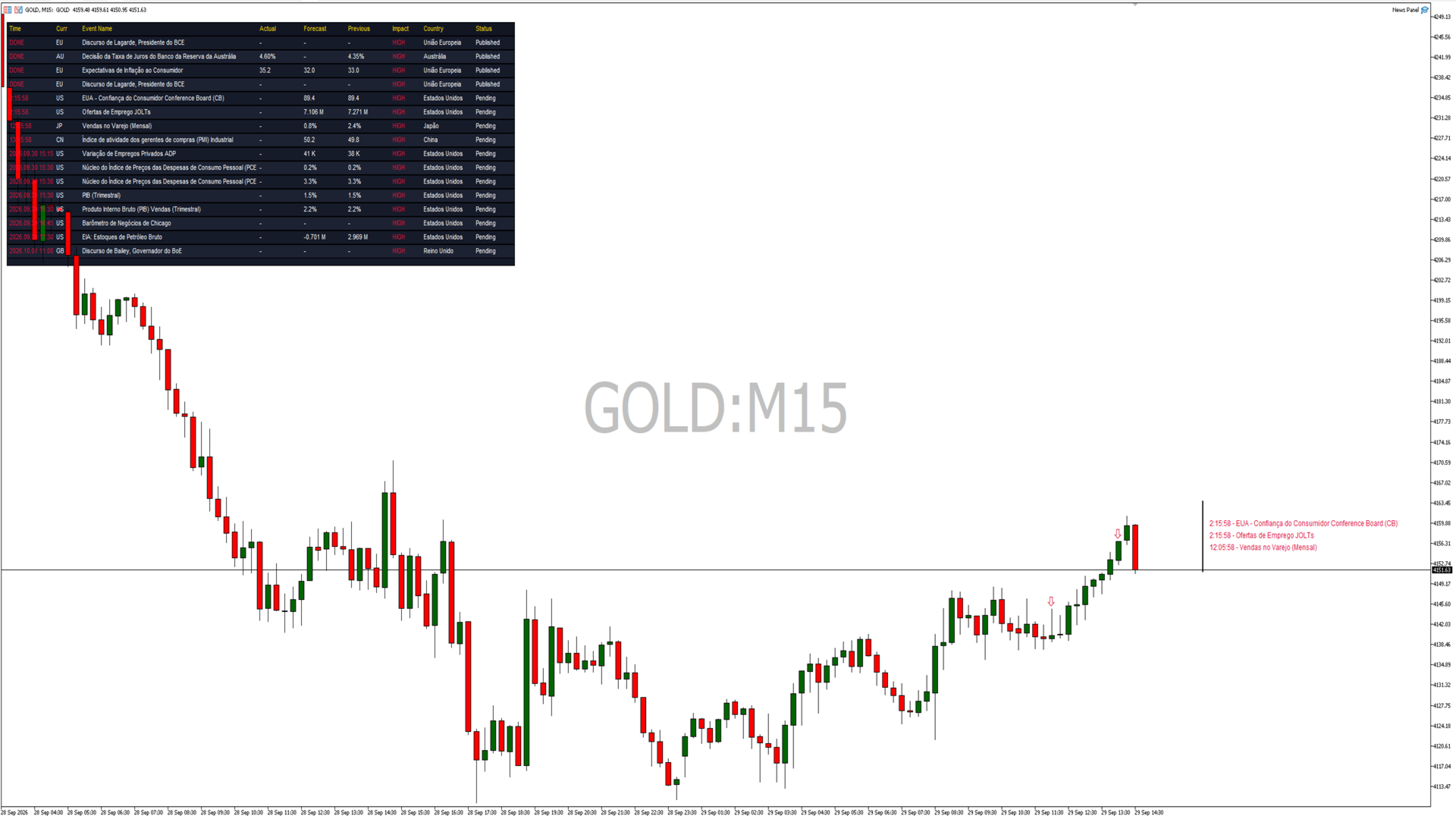
Live panel showing Time, Currency, Event Name, Actual, Forecast, Previous, Impact and Status for every calendar event in your selected window, refreshed automatically (default every second).

Actual / Forecast / Previous values are formatted exactly like MetaTrader's native calendar — correct decimals, currency symbol, percent sign, and K/M/B/T magnitude suffixes — so the numbers always match what you see in the built-in calendar.

Filter by impact (Low / Medium / High, each independently switchable) and by country/currency (a simple comma-separated whitelist, default set to the major economies).

On-chart alert for upcoming news: a vertical line placed a configurable number of candles ahead of price, with a stacked countdown list of the next events (name + time remaining), color-coded by impact. Three vertical placement modes (auto, below price, or centered) so it never overlaps price action.

On-chart marker for past news: a single arrow above the high of any candle where a news event occurred, within a configurable lookback window (default: last 20 candles). If several events landed on the same candle, you still get exactly one marker — never a cluttered stack of arrows — color-coded by the highest-impact event, with a hover tooltip listing every event and its actual/forecast/previous values.

Auto-scaling interface: one input keeps the whole panel and chart text proportionally sized whether you run it on a small laptop screen or a 30"+ ultrawide monitor, with a minimum font-size floor so text never becomes unreadable.

Fully customizable colors, column widths, panel position and font sizes.

Built entirely with native MQL5 chart objects — no DLLs, no external dependencies, minimal CPU footprint.

Purely informational: Calendar Pulse never places, modifies or closes trades. It only displays data.


How It Works:

On each refresh, the indicator pulls events from MetaTrader's built-in Economic Calendar (CalendarValueHistory) for your chosen lookback/lookahead window, filters them by the impact and country settings you chose, and redraws the panel plus the two chart overlays (upcoming-news line/list and past-news arrows). Everything is read-only: it never touches your open positions or pending orders.


Requirements:

MetaTrader 5 only (not compatible with MT4).

Your broker's server must provide MetaQuotes' economic calendar feed (the vast majority of MT5 brokers do; if the terminal's own Calendar tab shows events, this indicator will too).

Works on any symbol and any timeframe.

Note: the panel's own labels (column headers, "LOW/MED/HIGH", "Published/Pending") are fixed in English by design, regardless of your MetaTrader language — this keeps the values unambiguous across regions.


Who It's For:

Any discretionary or semi-automated trader who wants high-impact news visible on the chart at a glance, without switching windows — especially useful for news-based or news-avoidance strategies, and for traders running EAs that need a human eye on upcoming volatility spikes.


About the Author:

[Add your MQL5 profile link and a line about your trading/development background here]
추천 제품
MQL5 블로그: https://www.mql5.com/en/blogs/post/761446 MT4 버전: https://www.mql5.com/en/market/product/136790 MT5 버전: https://www.mql5.com/en/market/product/136791 Time Wizard는 속도, 타이밍, 실행 제어 기능을 하나의 깔끔한 대시보드에서 필요로 하는 트레이더를 위해 설계된 전문 트레이딩 어시스턴트입니다. 이 Expert Advisor는 이벤트 기반 트레이딩, 예약 실행, 빠른 반자동 주문 관리 기능을 제공합니다. 주문을 미리 준비하고, 정확한 실행 시간을 지정하고, 계층형 대기 주문을 설정하고, 손절매 및 이익 실현으로 위험을 관리하고, 차트의 간편한 인터페이스에서 모든 것을 모니터링할 수 있습니다. 경제 이벤트, 개장 시간, 돌파 시점 또는 사용자 지정 일정 등 어떤 시점을 기준으로 거래하든 Time Wizard는 체계적이고 규율 있는 실행을
Trade Copilot - 금(XAUUSD) 및 모든 상품을 위한 반자동 리스크 관리 패널 Trade Copilot는 자신의 진입 결정권을 유지하면서도 EA와 같은 규율을 원하는 재량 트레이더를 위해 설계된 반자동 트레이딩 패널입니다. 방향과 가격대는 사용자가 결정하고, 리스크 사이징, 손절 설정, 익절 관리, 포지션 보호는 패널이 자동으로 처리합니다. 주요 기능 - 리스크 기반 로트 계산 - Risk %, Risk $, 고정 로트 중 선택 가능; 손절 거리에 따라 패널이 포지션 크기를 자동 계산 - 3가지 손절 모드 - ATR 배수, 고정 포인트, 고정 $ 거리 - 원클릭 시장가/예약 주문(Buy/Sell Now, Pending Buy/Sell), 드래그 가능한 진입가/SL/TP 라인 - 그리드 트레이딩 - 가격 범위에 걸쳐 벨커브 로트 분배로 다수의 예약 주문 배치(마틴게일이 아님 - 로트 크기는 중심으로부터의 거리로 고정되며 손실 시 절대 두 배로 늘어나지 않음) -
Magic Number Manager 는 단일 계정에서 동시에 실행되는 20개 이상의 전문가 자문(EA)을 중앙 집중식으로 모니터링하고 제어할 수 있는 MetaTrader 5용 전문 트레이드 관리 유틸리티입니다. 주요 기능: 성과 대시보드   - 각 EA의 총 거래 수, 승률, 총 수익, 평균 거래, 최고/최악 거래, 현재 인출 및 이익 계수를 실시간으로 표시하는 테이블입니다. 즉각적인 시각적 평가를 위한 컬러 코딩된 메트릭. 일괄 거래 관리   - 한 번의 클릭으로 특정 EA의 모든 미결제 포지션을 청산하거나 비상 "모두 청산" 버튼을 사용하여 모든 포지션을 즉시 청산합니다. 위험 모니터링   - EA가 사용자 정의 인출 임계값에 도달하면 자동 경고. 구성 가능한 백분율 경고로 계정을 보호합니다. 20+ EA 지원   - 최대 20개의 다른 매직 넘버를 사용자 정의 이름과 표시 색상으로 구성할 수 있습니다. 추가 EA를 위해 쉽게 확장 가능. 경량 및 비간섭   - 최소한의 CPU
Boleta de negociação, adiciona automáticamente as ordens Take Profit e Stop Loss quando excutada uma ordem de compra ou venda. Ao apertar as teclas de atalho (A, D, ou TAB), serão inseridas duas linhas de pre-visualização, representando as futuras ordens de take profit (azul) e stop loss (vermelho), as quais irão manter o distanciamento especificado pelo usuário. Ditas ordens só serão adicionadas ao ser executada a ordem inicial. Ao operar a mercado, as ordens pendentes de take profit, e stop lo
DDKiller Pro
Njaratahiry Michael Randrianiaina
Stop Blowing Your Account. Once and For All. DDKiller Pro is the MT5 risk guardian that runs silently on your chart and shuts down trading the moment you hit a limit — whether you're grinding a prop firm challenge or managing your own CFD account. The problem every trader knows: You set your rules. You break them anyway. One revenge trade. One overleveraged position. One session that erases a month of gains. DDKiller Pro removes that decision from your hands entirely. What it does: The second yo
Pattern Recognition EA
Claudiu-georgian Zavera
Pattern Recognition EA - From Learn to Earn. The market repeats itself. This EA finds every past repeat of the current candle sequence - and lets history vote the direction. ONE SHAPE. EVERY REPEAT IN HISTORY VOTES. The last N candles on your signal timeframe form a shape. The EA scans the history you choose - a fixed number of bars or everything your broker provides - for the SAME shape, and checks what happened next, every single time. Only when enough repeats exist AND a clear majority of t
TradeInfoDisplay – Risk/Reward Visualiser Visualises profit/loss zones, RR ratio, Risk% and Reward% for all pending orders and positions directly on the chart. CPU-optimised. FULL DESCRIPTION TradeInfoDisplay draws colour-coded zones on the chart for every pen
Easy Order Watcher — 스마트한 거래 모니터링 및 알림 어디서든 거래를 관리하세요. Easy Order Watcher는 가볍고 강력한 전문가 자문(EA)으로, 실시간 거래를 추적하고 사용자가 설정한 기준값에 따라 포지션이 주요 손익 수준에 도달하면 즉시 알림을 제공합니다. 또한, 사용자의 시간대에 맞춰 실시간 증거금 수준과 시간별 알림을 표시합니다. 자리에 없든 여러 거래를 관리하든, 이 EA는 전략에 맞춰 정밀한 알림을 제공하여 항상 최신 정보를 제공합니다. v1.10의 새로운 기능: 사용자 지정 시간대 지원 현지 시간에 맞춰 시간대(+/- 시간)를 조정하세요. 알림을 확인할 때 더 이상 혼란스럽지 않습니다. 사용자 정의 손익 이정표 고정된 값에 얽매이지 않고 원하는 기준값(예: $50 이익 증가 또는 $100 손실 감소)을 설정할 수 있습니다. 주요 기능: 제로 투 포지티브 알림: 거래가 손실에서 수익으로 전환되는 순간 알림을
FREE
Price Action Builder Premium
Florea E. Sorin-Mihai Persoana Fizica Autorizata
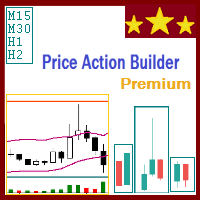
The Price Action Builder Premium expert advisor is an extension of the freely available Price Action Builder Basic :     it provides 2 new candlestick patterns besides the pinbar (already available in the basic edition);     in most configurations, backtesting usually shows an average yearly return rate increased by approximately 50%;     the account growth curve is also smoother, due to larger number of trades, almost double (2x) compared to the free version. While aimed primarily at obtaining
BerelzBridge
Barend Willem Van Den Berg
BerelzBridge Pro 계정 정보를 포함한 모든 시간대를 위한 MT5-to-JSON 데이터 브리지입니다. 개요 BerelzBridge Pro는 실시간 시장 데이터를 디스크의 JSON 파일로 내보내는 MT5 인디케이터입니다. 매수/매도 호가, 스프레드, 틱 볼륨, 일간 통계, 계정 정보 및 9개 모든 시간대에 대한 OHLCV 봉을 기록합니다. 파일은 구성 가능한 간격(기본값 2초)으로 업데이트됩니다. 이 인디케이터는 동일 차트에서 Expert Advisors와 충돌 없이 함께 실행됩니다. DLL, WebRequest 또는 기타 외부 종속성을 사용하지 않습니다. 여러 인스턴스를 다른 차트에서 실행하여 동시에 여러 종목의 데이터를 내보낼 수 있습니다. 내보내는 데이터 전체 소수점 정밀도를 갖는 매수/매도 호가 포인트 단위의 스프레드 현재 봉의 틱 볼륨 일간 고가, 저가 및 시가 M1, M5, M15, M30, H1, H4, D1, W1 및 MN1에 대한 OHLCV 봉 시간대당 최
GENESIS SYNDICATE PRIME — The 3-in-1 Institutional Algo "Trade like the Banks. Don't become their Liquidity." > Engineered to simulate institutional trading footprints using Advanced Smart Money Concepts (SMC). Are you tired of retail strategies that get hunted by institutional players? Genesis Syndicate Prime- is a revolutionary 3-in-1 algorithm designed to track, identify, and trade alongside the "Smart Money." It features three independent, powerful trading engines built into a single, hi
## UMNi-STATE **MT5 Market Condition Classification System** UMNi-STATE analyses live market conditions using ATR, ADX, and Bollinger Bands, then classifies the current environment into one of nine distinct states. It alerts you whenever the market condition changes — so your awareness stays current without manual analysis. KEY FEATURES • Real-time market state classification (9 states) • Instant Telegram alert on state change • Session open notifications with current
Welcome to the Ultimate Harmonic Patterns recognition indicator that is focused to detect advanced patterns. The Gartley pattern, Bat pattern, and Cypher pattern  are popular technical analysis tools used by traders to identify potential reversal points in the market. Our Ultimate Harmonic Patterns recognition Indicator is a powerful tool that uses advanced algorithms to scan the markets and identify these patterns in real-time. With our Ultimate Harmonic Patterns recognition Indicator, you ca
Have you ever take a long time to watch a Symbol when the network link is not good ? Have you ever wait for a long time when you switch chart between different Symbols or different TimeFrames ? If you do long-term backtesting , Have you ever to be downloaded datas for a long time ? Yes, If there is no data in the system, those will happen.  1. What is this: Download all the Symbol data in Market Watch to the system. PS: This is not outputting data to Files. This Link go to Demo version: https:/
Candlestick Pattern Scanner is a multi-timeframe and multi-symbol dashboard and alert system that checks all timeframes and currency pairs for different candlestick patterns that are formed in them. Scanner is integrated   with support and resistance zones so you can check the candlestick patterns in most important areas of the chart to find breakout and reversal patterns in the price chart. Download demo version   (works on M4,M6,M12,H3,H8 timeframes and 20 symbols of Market Watch window) Read
TradeKit Manager
Cassio Jose Da Silva Santos
제품명 TraderToolkit Pro — Professional Trading Panel for MT5 (MT5용 프로페셔널 트레이딩 패널) 짧은 설명   올인원 플로팅 패널: 원클릭 주문, 차트 상의 부분 청산 버튼, 캔들 타이머, 자(Ruler), 정보 바 — 5개 언어, 4가지 테마, Netting & Hedging 완벽 지원. 상세 설명 TraderToolkit Pro는 MetaTrader 5(MT5) 전용 프로페셔널 유틸리티 패널입니다. 다른 EA(자동매매 로봇)나 수동 매매를 전혀 방해하지 않으면서, 트레이딩에 가장 필수적인 도구들을 하나의 우아한 플로팅(부동형) 인터페이스로 통합해 줍니다. 외부 라이브러리(DLL) 호출 없이 100% MQL5 네이티브 객체로만 제작되었습니다. 어떠한 팝업 광고나 불필요한 알림도 포함되어 있지 않습니다. 많은 트레이더들이 TraderToolkit Pro를 선택하는 이유 시중의 대부분의 거래 패널들은 '간결함'과 '강력
CosmiCLab FIBO
Kirils Subins
CosmiCLab SMC FIBO CosmiCLab SMC FIBO is a professional trading indicator designed for traders who use Smart Money Concepts (SMC), market structure analysis and Fibonacci retracement levels. The indicator automatically detects market swings and builds Fibonacci levels based on the latest impulse movement. It also identifies market structure changes such as BOS (Break of Structure) and CHOCH (Change of Character), helping traders understand the current market direction. CosmiCLab SMC FIBO also pr
TradersOS
Mario El Kallab
TraderOS – MetaTrader 5용 전문가용 트레이딩 운영 대시보드 개요 TraderOS는 재량적 트레이더가 직관적인 단일 인터페이스에서 시장을 모니터링하고, 거래 결정을 체계화하고, 위험을 관리할 수 있도록 설계된 종합적인 트레이딩 운영 대시보드입니다. TraderOS는 자동 거래 기능을 제공하는 대신, 시장 분석, 거래 모니터링, 위험 관리를 하나의 전문적인 작업 공간에 통합하여 트레이딩 운영의 중심 역할을 합니다. 단기 트레이더, 스윙 트레이더, 포지션 트레이더 등 어떤 유형의 트레이더이든 TraderOS는 트레이딩 워크플로우를 간소화하고 필수 시장 정보를 항상 확인할 수 있도록 지원합니다. 주요 기능 전문가용 트레이딩 대시보드 깔끔하고 체계적인 컨트롤 센터 실시간 시장 모니터링 읽기 쉬운 정보 패널 MetaTrader 5에 최적화 다중 종목 시장 스캐너 사용자 지정 가능한 관심 목록에서 여러 종목을 동시에 모니터링할 수 있습니다. 기본 관심 종목 목록:
One question: after an economic release, did the first move hold or fade? AfterRelease takes the most recent high-impact releases on your broker's calendar and prices and shows how many times the first move held and how many times it faded a few bars later, always with the number of cases. - TODAY'S CASE: one button loads today's release that already has an actual value, and the market it moves. - Choose the market and timeframe in the inputs; the panel always says which market it analysed. -
Symbol Information The   Symbol Info   indicator provides an intuitive panel on the chart that displays essential information about the current trading symbol. This includes basic trading data, instrument properties, and trading rules, all designed to give traders a clear view of the market conditions and product specifications. Key Features: Symbol Name and Description: The indicator displays the name and a detailed description of the current trading symbol, helping users identify the instrume
This utility solves the problem of Metatrader not having the capacity to create custom session times, all markets are displayed forcefully in a 24h format. Lots of traders prefer to ignore the overnight action and focus only on NY session and use the overnight gaps as part of their trading strategy. ICT teaches this as "opening range gap", it's the gap between NY session end (16:15) and NY session start (09:30). The default setting in this utility reflects the RTH (Regular Trading Hours) opti
Recovery Manager Panel MT5 is a manual order management panel for traders who want to manage open positions directly from the chart in a clearer and more organized way. This tool is not a signal robot. It does not predict market direction, generate entry signals, or trade automatically based on market forecasts. Instead, it helps traders work with positions that are already open. You can calculate possible recovery lot sizes, view estimated target levels on the chart, and use available floating
TradePilotmt5
Hossein Khalil Alishir
TradePilot Expert Advisor (EA) for MetaTrader 5 TradePilot is a professional and user-friendly Expert Advisor (EA) for MetaTrader 5 (MT5) . It simplifies automated trading , risk management , and trade execution with a smart trading panel . Perfect for beginners and experienced traders looking for a reliable trade manager EA with automated lot size calculation and smart position management. Key Advantages User-Friendly Trading Panel: Customizable panel with buttons and hotkeys for fast ex
try the free limited version first: https://www.mql5.com/en/market/product/188573?source=Site +Profile+Seller Unlock the full power of MT5 with NGA Pro Next Gen Assistant Pro — the most advanced trading assistant designed to give you full control over your trades… even from your phone! . -Risk calculation, dollars stop loss based: by using NGA you can set the exact amount you willing to lose each time, without having to deal with manual pips calculation,     just   drag the visual Stop lo
Account Protector Metatrader 5
Emmanuel Lovski Ijeawele Maduagwuna
Account Protector Meta Trader 5 This utility prevents risk of ruin per trading cycle. Retail forex trading accounts are designed with stop-out levels that make it nearly impossible to restore lost capital after a trader — human or algorithmic — blows an account . This is especially frustrating for traders who have grown their account to multiples of its starting value, only to suffer irreparable losses from a series of bad trade entries. The Account Protector solves this by enforcing a specified
You can see Binance Spot data instantly in Metatrader 5 and it allows you to use all the features that Metatrader has provided to you. You can access the data of all symbols listed on Binance Futures. Don't forget to set the timezone. Binance it's 00:00 UTC. You need to fix it according to your own country You need to install the free Binance Spot Symbol List plugin. https://www.mql5.com/tr/market/product/83507 After loading, it automatically downloads the data of the cryptos in the market obser
Precision Lot gives you the lot size that keeps your real loss at the stop within your risk. Besides the stop distance it counts the live spread, the slippage you really got on your past stop-outs, and the commission. What you get - Drag the ENTRY and SL lines on the chart, or use a fixed stop or an ATR stop. - The real-cost lot next to the textbook lot, so you see the difference at a glance. - Your own costs: stop slippage and commission measured on your closed trades. Until you have history,
Telegram to mt5 pro
Janet Abu Khalil
4 (4)
Telegram to MT5 Pro — Advanced Telegram Signal Copier with Auto-Fix, Multi-TP, Risk Control and Full Trade Management Telegram to MT5 Pro — 전문 텔레그램 신호 복사기 Telegram to MT5 Pro는 텔레그램 신호를 MetaTrader 5 계정으로 자동으로 직접 실행하는 고성능 트레이드 복사기로, 리스크, 실행, 트레이드 관리에 대한 완전한 제어를 제공합니다. 이 시스템은 두 가지 구성 요소로 이루어져 있습니다: • MetaTrader 5 내부에서 실행되는 Expert Advisor (EA) • 텔레그램에 연결되어 신호를 로컬로 EA에 전송하는 데스크톱 브리지 애플리케이션 두 구성 요소는 동일한 컴퓨터에서 실행되어야 합니다. MQL5 플랫폼 제한으로 인해 EA는 텔레그램에 직접 연결할 수 없습니다. 브리지는 텔레그램을 처리하고 EA는 거래를 실행합니다. 지원 및 설치
Rollback Renegade
Alex Amuyunzu Raymond
Rollback Renegade — Entry on a Rollback After a Breakout Rollback Renegade is a fully automated trend-following Expert Advisor built around one of the most reliable price-action patterns in trading: a structural breakout followed by a controlled retracement entry. Rather than chasing price the moment a breakout occurs — which exposes traders to poor fill prices and false breakouts — Rollback Renegade waits patiently for the market to pull back to a calculated level before committing capital. Thi
LT Trade Panel Pro 2 - 궁극의 리스크 관리 및 빠른 실행 도구 LT Trade Panel Pro 는 MetaTrader 5에서 정밀함, 속도, 그리고 완벽한 리스크 관리를 원하는 트레이더를 위한 최고의 도구입니다. 스캘퍼(Scalper)와 데이 트레이더(Day Trader)를 위해 설계된 이 패널은 복잡한 주문 실행을 단 한 번의 클릭으로 간단하게 해결해 줍니다. 새로운   2 버전 에서는 시스템이 완전히 최적화되어 지연 시간을 없앴으며, 독점적인 자본 보호 기능을 추가하여 최상의 퍼포먼스를 제공합니다. 왜 LT Trade Panel Pro를 선택해야 하나요? 대부분의 트레이더는 리스크 관리 원칙을 지키지 못해 실패합니다.   LT Trade Panel Pro 는 가장 중요한 프로세스인 '리스크를 일정하게 유지하고 적절한 타이밍에 거래를 보호하는 것'을 자동화합니다.   프랍 펌(Prop Firms)   또는 전문 계좌를 운영하는 트레이더에게는 필수적인 도구입
이 제품의 구매자들이 또한 구매함
Trade Assistant MT5
Evgeniy Kravchenko
4.43 (216)
거래당 위험 계산, 라인을 사용한 손쉬운 신규 주문, 부분 청산 기능을 통한 주문 관리, 7가지 유형의 트레일링 스탑 및 기타 유용한 기능을 제공합니다. 추가 자료 및 지침 설치 지침   -   애플리케이션 지침   라인 기능       - 차트에 개시선, 손절매, 차익실현을 표시합니다. 이 기능을 사용하면 새로운 주문을 쉽게 하고 개봉 전에 추가 특성을 볼 수 있습니다. 위기 관리       -       위험 계산 기능은 설정된 위험과 손절매 주문의 크기를 고려하여 새 주문의 볼륨을 계산합니다. 이를 통해 손절매 크기를 설정하고 동시에 설정된 위험을 존중할 수 있습니다. 로트 계산 버튼 - 위험 계산을 활성화/비활성화합니다. 필요한 위험 값은 위험 필드에 0에서 100 사이의 백분율 또는 예금 통화로 설정됩니다. 설정 탭에서 위험 계산 옵션을 선택합니다. $ 통화, % 잔액, % 지분, % 자유 마진, % 사용자 정의, % AB 이전 일, % AB 이전 주, % AB 이전
Farmed Hedge Yield Farming | All Markets (Manual - Hybrid - Semi/Automated EA) VERIFIED TRADING RESULTS - Farmed Hedge Yield Axi Copy:  https://www.mql5.com/en/signals/2356376 - Farmed Hedge Yield Exn Copy:   https://www.mql5.com/en/signals/2356404 - Farmed Hedge Yield V Copy:  https://www.mql5.com/en/signals/2357156 IMPORTANT NOTICE: FarmedHedge is a MANUAL-FOCUSED TRADING UTILITY ,not a fully automated EA. Results shown on this Signal include manual trades and overall strategic management.
Trade Manager EA에 오신 것을 환영합니다. 이 도구는 거래를 보다 직관적이고 정확하며 효율적으로 만들기 위해 설계된 궁극적인 리스크 관리 도구 입니다. 단순한 주문 실행 도구가 아닌, 원활한 거래 계획, 포지션 관리 및 리스크 제어를 위한 종합 솔루션입니다. 초보자부터 고급 트레이더, 빠른 실행이 필요한 스캘퍼에 이르기까지 Trade Manager EA는 외환, 지수, 상품, 암호화폐 등 다양한 시장에서 유연성을 제공합니다. Trade Manager EA를 사용하면 복잡한 계산은 이제 과거의 일이 됩니다. 시장을 분석하고 진입, 손절 및 익절 수준을 차트의 수평선으로 표시한 후 리스크를 설정하면, Trade Manager가 이상적인 포지션 크기를 즉시 계산하고 SL 및 TP 값을 실시간으로 표시합니다. 모든 거래가 간편하게 관리됩니다. 주요 기능: 포지션 크기 계산기 : 정의된 리스크에 따라 거래 크기를 즉시 결정합니다. 간단한 거래 계획 : 진입, 손절, 익절을 위한
Telegram to MT5 Multi-Channel Copier   는 Telegram 및 Discord 채널의 트레이딩 시그널을 MetaTrader 5로 자동 복사합니다. 봇도, 브라우저 확장도, 수동 복사도 필요 없습니다. Telegram이나 Discord에 시그널이 도착하면 EA가 몇 초 안에 터미널에서 주문을 실행합니다. 그리고 채널을 복사하기 전에, 내장 백테스터가 그 채널이 내 계좌에서 어떤 결과를 냈을지 보여줍니다. 제품은 두 가지 구성 요소로 이루어집니다: Telegram 채널을 수신하는 Windows 애플리케이션과, MT5 터미널에서 시그널을 실행하는 본 EA입니다. MT4 버전도 제공됩니다   여기 . 구매 전에 사용해 보세요:   애플리케이션은 무료로 다운로드할 수 있습니다. 본인의 채널을 연결하고 각 시그널이 어떻게 읽히는지 확인하세요. Backtest 탭과 실제 거래에는 구매하거나 임대한 EA가 필요합니다. 이 페이지의 무료 데모는 전략 테스터에서만 실행되며
Local Trade Copier EA MT5
Juvenille Emperor Limited
4.94 (150)
Local Trade Copier EA MT5는 동일한 Windows 컴퓨터 또는 Windows VPS에서 여러 MetaTrader 5 계정 간에 거래를 복사하고 관리할 수 있는 빠르고 유연한 거래 복사기입니다. 로컬 거래 동기화 기능과 함께 Receiver 측에서 로트 크기, 리스크 관리, 거래 필터링, 심볼 매핑, 거래 관리 및 계정 보호를 독립적으로 설정할 수 있습니다. Transmitter와 Receiver 터미널을 약 1분 안에 설정하고, 동일한 브로커 또는 서로 다른 브로커의 계정 간에 수동 거래 또는 EA 거래를 복사할 수 있습니다. 적절한 조건에서는 로컬 MetaTrader 터미널 간의 거래 정보가 0.5초 이내 에 동기화될 수 있습니다. 실제 체결 속도는 브로커 지연 시간, 네트워크 상태, 컴퓨터/VPS 성능 및 터미널 부하에 따라 달라집니다. 구매 전에 무료 데모를 사용해 보세요 MT5 데모 계정에서 Local Trade Copier EA MT5의 모든 기능을
TradePanel MT5
Alfiya Fazylova
4.89 (174)
Trade Panel은 다기능 거래 도우미입니다. 이 애플리케이션에는 50개 이상의 수동 거래 기능이 포함되어 있으며 대부분의 거래 작업을 자동화할 수 있습니다. 앱 사용 설명서: https://www.mql5.com/en/blogs/post/756482 데모 계정용 앱 체험판: https://www.mql5.com/en/blogs/post/750865 앱 설치 방법: https://www.mql5.com/en/blogs/post/756239 시각 모드에서 앱 테스트 방법: https://www.mql5.com/en/blogs/post/770277 VPS MetaTrader에 앱 설치 방법: https://www.mql5.com/en/blogs/post/770190 거래. 한 번의 클릭으로 거래를 수행할 수 있습니다: 리스크 자동 계산과 함께 예약 주문 및 포지션 열기. 한 번의 클릭으로 여러 주문 및 포지션 열기. 주문 그리드 열기. 예약 주문 및 포지션을 그룹별로 닫기. 포지션
EA Overfitter
Stephen J Martret
5 (4)
That backtest looks great. But will it still be making money tomorrow, next week, next month? EA Overfitter re-runs your EA on 100 price histories it has never seen. One score tells you if the edge is real. A backtest tells you what an EA did on one price history — the one that happened to occur. What you cannot tell from it is how much of that result was the strategy and how much was the particular path. EA Overfitter answers that. It builds up to 100 synthetic price histories your EA has n
내 거래 규칙에 맞춰 Telegram 신호 복사 Telegram to MT5 Signal Trader 는 공개 및 비공개 Telegram 채널과 그룹의 텍스트 기반 거래 신호를 MetaTrader 5로 자동 복사합니다. 하나의 데스크톱 앱에서 여러 신호 제공자와 MT5 계좌를 관리하고, 제공자마다 위험 관리 및 거래 설정을 개별적으로 지정 할 수 있습니다. 신호 복사에는 Telegram 봇이나 API 설정이 필요하지 않습니다. 전화번호 또는 QR 코드로 본인의 Telegram 계정에 로그인한 후, 이미 가입한 채널이나 그룹을 선택하면 됩니다. 봇을 만들거나 Telegram API 토큰, API ID 또는 API 해시를 입력할 필요가 없습니다. 포지션 크기를 선택하고, 여러 익절 목표에 청산 물량을 배분하며, 손익분기점 이동과 트레일링 스톱을 자동화하세요. 제공자의 신호를 따르면서도 실제 거래 방식은 직접 설정할 수 있습니다. 이 제품은 MT5 Expert Advisor와 필수 Win
Exp COPYLOT CLIENT for MT5
Vladislav Andruschenko
3.97 (35)
MetaTrader 5용 전문 트레이드 복사기 MetaTrader 용 빠르고 전문적이며 신뢰할 수 있는 트레이드 복사기 입니다. COPYLOT 은 MT4와 MT5 터미널 간의 Forex 거래 복사를 지원하며, Hedge 및 Netting 계좌를 모두 지원합니다. COPYLOT MT5 버전 지원 구성: - MT5 Hedge → MT5 Hedge - MT5 Hedge → MT5 Netting - MT5 Netting → MT5 Hedge - MT5 Netting → MT5 Netting - MT4 → MT5 Hedge - MT4 → MT5 Netting MT4 버전 전체 설명 + DEMO + PDF 구매 방법 설치 방법 로그 파일 확인 방법 테스트 및 최적화 방법 Expforex의 모든 제품 MT4 터미널로도 거래를 복사할 수 있습니다(MT4 → MT4, MT5 → MT4): COPYLOT CLIENT for MT4 COPYLOT은 2개, 3개, 심지어 10개의 터미널과 동시에 작동할
News Trade EA MT5
Konstantin Kulikov
4.55 (11)
제가 몇 년 동안 사용하고 있는 유용한 로봇을 소개드립니다. 반자동뿐만 아니라 자동 모드로도 사용할 수 있습니다. >>> Chat <<< 본 프로그램에는 경제 캘린더의 뉴스별로 유연한 거래 설정이 포함되어 있습니다. 전략 테스터에서 확인할 수 없습니다. 진짜 작업뿐입니다. 최신 설정 아카이브 다운로드: https://www.mql5.com/en/blogs/post/747929 신호 모니터링: https://www.mql5.com/en/signals/author/test-standart 이 전문가를 위해 고유 설정 세트를 만들 때 블로그의 모든 매개변수에 대한 설명을 참조하십시오: https://www.mql5.com/en/blogs/post/748545 . 기본 설정 설명 작업은 한 차트에서 GBP(GBPUSD, EURGBP, GBPJPY, GBPCAD, GBPAUD, GBPCHF)와 쌍으로 이루어집니다. GBP는 가장 변동성이 큰 통화로서 거래 수행 시 거래를 성공적으로
================================================================================ POC BREAKOUT - V20.72. Full Professional Grade Toolkit ================================================================================ POC Breakout is a full MetaTrader 5 trading dashboard for discretionary traders who want breakout signals, Point of Control (POC) context, volume profiles, order flow, market structure, news, alerts, and advanced trade planning in one professional workspace. Attached directly to you
The product will copy all telegram signal to MT5 ( which you are member) , also it can work as remote copier.  Easy to set up, copy order instant, can work with almost signal formats, image signal,  s upport to translate other language to English Work with all type of channel or group, even channel have "Restrict Saving Content", work with  multi channel, multi MT5 Work as remote copier: with signal have ticket number, it will copy exactly via ticket number. Support to backtest signal. How to s
다음 업데이트 — 버전 2.52 곧 출시! [신규] 시장 분석 및 트레이딩 워크플로를 향상시키기 위해 설계된 4가지 주요 신규 기능을 기대해 주세요. 트레이딩 요구 사항을 충족하도록 설계된 4가지 새로운 기능으로 시장 분석을 한 단계 더 발전시킵니다. 다음 기능을 소개합니다: 1. TRADE OVERVIEW DASHBOARD 2. CONFLUENCE AT ZONE 3. STRONG & WEAK HIGH/LOW 4. OTE 1. TRADE OVERVIEW DASHBOARD 시장 전체 상황을 더 쉽게 파악할 수 있도록 도와주는 대시보드입니다. 트레이딩 의사결정을 지원하는 가이드를 제공하며, 하나의 화면에서 시장을 분석하고 체계적으로 트레이딩을 계획할 수 있도록 도와줍니다. 멀티 타임프레임 시장 개요 (Multi-Timeframe Market Overview) 시장 방향과 가격 구조를 더욱 명확하게 파악 시장 상황을 빠르게 확인 체계적인 시장 분석 및 진입 계획을 위한 가이드 2. CO
EA Auditor
Stephen J Martret
5 (7)
EA Auditor is an independent analysis tool for traders evaluating Expert Advisors and trading signals on MetaTrader 5. It audits backtest reports, reviews posted developer signals, and cross-verifies the two against each other to help traders assess strategies before committing capital. The MQL5 market offers a wide range of Expert Advisors from many developers, with varying approaches, quality, and transparency. EA Auditor provides a consistent, data-driven framework for reviewing them, answer
Telegram To MT5 Ultra
Mirel Daniel Gheonu
5 (5)
Telegram To MT5 — 시그널 카피어 텔레그램 채널의 트레이딩 콜을 실제 MT5 주문으로 바꿔 드립니다 — 자동으로, 원하는 만큼의 계좌에서, 리스크와 규칙을 완전히 당신의 통제 아래 둡니다. Telegram To MT5는 이미 텔레그램에서 팔로우하고 있는 VIP / 시그널 채널을 당신의 MetaTrader 5 터미널에 연결합니다. 무료 동반 데스크톱 앱이 메시지를 읽고(봇을 차단하는 채널에서도 가능), 이 EA가 당신의 계좌에서 이를 실행합니다 — 당신만의 리스크 설정, 심볼 매핑, 익절(TP) 처리, 세션 및 뉴스 필터를 적용합니다. 이것은 블랙박스 전략이 아니라 시그널 카피어입니다. 어떤 채널을 신뢰할지, 각 거래의 수량과 관리 방식을 당신이 결정합니다. 단계별 설정 및 동반 앱 설치 가이드 작동 방식 [당신의 텔레그램 채널] -> [동반 데스크톱 앱] -> [MT5 + 이 EA] -> 주문 동반 데스크톱 앱(무료, 포함)은 당신의 텔레그램 계정으로 로그인하여 선택한
Telegram to MT5 Coppy
Sergey Batudayev
5 (10)
Telegram에서 MT5로:   최고의 신호 복사 솔루션 DLL 없이도 Telegram 채널과 채팅에서 MetaTrader 5 플랫폼으로 거래 신호를 직접 복사하는 최신 도구인 Telegram to MT5를 사용하여 거래를 간소화하세요. 이 강력한 솔루션은 정밀한 신호 실행, 광범위한 사용자 정의 옵션을 제공하고 시간을 절약하며 효율성을 높여줍니다. [ Instructions and DEMO ] 주요 특징 직접 Telegram API 통합 전화번호와 보안 코드를 통해 인증하세요. 사용자 친화적인 EXE 브리지를 통해 채팅 ID를 쉽게 관리하세요. 여러 채널/채팅을 추가, 삭제, 새로 고침하여 동시에 신호를 복사합니다. 고급 필터를 사용한 신호 파싱 예외 단어(예: "보고서", "결과")가 포함된 원치 않는 신호를 건너뜁니다. 유연한 SL 및 TP 형식을 지원합니다: 가격, 핍 또는 포인트. 가격 대신 포인트를 지정하는 신호에 대한 진입 포인트를 자동으로 계산합니다. 주문 맞춤화 및
AW Shepherd Safety MT5
AW Trading Software Limited
5 (5)
AW Shepherd Safety EA는 열린 포지션을 관리하는 EA입니다. 첫 주문은 트레이더가 패널에서 열고, 이후에는 EA가 바스켓을 직접 관리합니다: 추세 필터를 거쳐 복구 주문을 추가하고, TakeProfit, 트레일링 또는 손절로 해당 측을 청산하며, 청산 수준을 차트에 표시합니다. 매수와 매도는 따로 관리되며 양 측을 동시에 열어 둘 수 있습니다. 복구 주문은 가격 간격만으로 열리지 않고, Parabolic SAR, 두 개의 MA 또는 캔들 색상 기준으로 포지션 방향으로의 반전이 확인된 뒤에 열립니다. Orders Magic number가 일치하면 수동으로 또는 다른 EA가 연 포지션도 EA가 넘겨받아 관리합니다. EA가 포지션을 관리하는 방식: 1 트레이더가 Open Buy 또는 Open Sell 버튼으로 Order Size 필드의 거래량만큼 첫 주문을 엽니다. 2 가격이 포지션에 불리한 방향으로 Minimal step between recovery orders만큼 움
News Filter EA
Rashed Samir
5 (2)
News Filter EA: Advanced Algo Trading Assistant News Filter EA is an advanced algo trading assistant designed to enhance your trading experience. By using the News Filter EA , you can integrate a Forex economic news filter into your existing expert advisor, even if you do not have access to its source code. In addition to the news filter, you can also specify trading days and hours for your expert. The News Filter EA also includes risk management  and equity protection features. MT4 Version Ma
MT5 to Telegram Signal Provider 는 사용하기 쉽고 완전히 커스터마이즈 가능한 유틸리티로, 특정 신호를 Telegram의 채팅, 채널 또는 그룹으로 전송하고, 귀하의 계정을 신호 제공자 로 만듭니다. 경쟁 제품과 달리 DLL 임포트를 사용하지 않습니다. [ 데모 ] [ 매뉴얼 ] [ MT4 버전 ] [ 디스코드 버전 ] [ 텔레그램 채널 ]  New: [ Telegram To MT5 ] 설정 단계별 사용자 가이드 가 제공됩니다. 텔레그램 API에 대한 지식은 필요하지 않습니다; 개발자가 제공하는 모든 것이 필요합니다. 주요 특징 구독자에게 보낸 주문 상세 정보를 커스터마이즈할 수 있습니다. 예를 들어, 브론즈, 실버, 골드와 같은 계층 구독 모델을 만들 수 있습니다. 골드 구독에서는 모든 신호를 받습니다. id, 심볼, 또는 코멘트로 주문을 필터링할 수 있습니다. 주문이 실행된 차트의 스크린샷이 포함됩니다 보낸 스크린샷에 닫힌 주문을 그려 추가 검증을 합니다
Timeless Charts
Samuel Manoel De Souza
5 (9)
Timeless Charts is an all-in-one trading utility for professional traders. It combines custom chart types such as Seconds Charts and Renko with advanced order flow analysis using Footprints , Clusters , Volume Profiles , VWAP studies, and anchored analysis tools for deeper market insight. Trading and position management are handled directly from the chart through an integrated trade management panel , while Market Replay and Virtual Accounts provide environments for practicing trading skills and
VirtualTradePad PRO SE MT5 — MetaTrader 5용 전문 트레이딩 컨트롤 센터 VirtualTradePad PRO SE 는 MetaTrader 5 용 프리미엄 차트 기반 트레이딩 패널이자 거래 관리 워크스페이스입니다. 더 빠른 주문 실행, 더 명확한 포지션 관리, 구조화된 거래 관리, 시각적인 레벨 계획, 그리고 차트에서 직접 작업하는 전문적인 워크플로를 원하는 트레이더를 위해 설계되었습니다. 이 제품은 단순한 BUY / SELL 패널이 아닙니다. PRO SE는 수동 트레이딩, 예약 주문, 포지션 관리, 부분 청산, 바스켓 손익 관리, 평균가 레벨, ATM 규칙, 신호 모니터링, 실시간 시장 정보, 전략 테스터 (Strategy Tester) 워크플로, VPS 중심 운용을 하나의 연결된 인터페이스로 통합합니다. MT4 버전 | 전체 설명 및 스크린샷 | 구입 방법 | 설치 방법 | 로그 파일을 얻는 방법 | 테스트 및 최적화 방법 | Expforex의 모든
Trader Evolution
Siarhei Vashchylka
5 (7)
" Trader Evolution " - A utility designed for traders who use wave and technical analysis in their work. One tab of the utility is capable of money management and opening orders, and the other can help in making Elliott wave and technical analysis. Manual (Be sure to read before purchasing) | Version for MT4 Advantages 1. Trading in a few clicks. Immediate and pending orders are available in the panel 2. Money management. The program automatically selects the appropriate lot size 3. Simplifies
AW Trade Manager
AW Trading Software Limited
AW Trade Manager는 차트에 손익비(리스크/리워드) 도구를 갖춘 MetaTrader 5용 거래 패널입니다. 거래는 마우스로 끌어 놓는 Entry, Stop Loss, Take Profit 선으로 계획합니다: 라벨에는 가격, 거리, 금액이 표시되고, 구역은 수익과 손실을 보여 주며, 거래량은 리스크를 기준으로 계산됩니다. 주문을 보내기 전에 확인 창에서 리스크, 증거금, 포지션 규칙을 포함한 거래 전체를 보여 줍니다. 매뉴얼과 사용 설명 -> 여기 / 무료 LIVE 데모 -> 여기 진입 후 포지션 관리를 위해 패널에는 손익분기 이동, 트레일링, 부분 청산, 시간 기준 청산, 숨김 레벨 기능이 있습니다. 이 기능들은 Rules 탭에서 모든 신규 거래에 켜거나, 포지션 창에서 개별 포지션에만 켤 수 있습니다. 개별 거래보다 상위 수준에서는 계좌 리스크 한도, 바스켓, 예약 작업, 알림, MT5 경제 캘린더가 작동합니다. 장점: 차트 위의 거래 계획: 라벨, 구역, R:R이 표시
RETAILBERG FOOTPRINT CHART PRO — Order-Flow Workspace for MetaTrader 5 Version 7.00  |  Professional System  |  31 tools  |  One chart A full 150-page illustrated User Manual is included. Please read the full manual to understand this feature packed footprint chart elements and ui. https://www.mql5.com/en/blogs/post/777982 DEMO / STRATEGY TESTER — PLEASE READ FIRST
MetaTrader 5용 트레이딩 패널 — 차트와 키보드에서 실행하는 프로페셔널 원클릭 트레이딩 활동적인 트레이더를 위해 설계된 고급 Trading Panel로, MetaTrader 기본 인터페이스보다 훨씬 빠르고 직관적으로 포지션과 주문을 열고, 관리하고, 종료할 수 있습니다. 이 패널은 포지션 관리, 대기 주문 제어, 총수익 관리, 체결 속도를 하나의 전문적인 작업 공간에 통합하고 싶은 트레이더를 위한 솔루션입니다. 이것은 단순한 보조 유틸리티가 아닙니다. MetaTrader 5를 위한 진정한 trading cockpit입니다. 차트에서 직접 거래하고, 키보드로 빠르게 명령을 실행하며, 자동 계산과 시각적 가이드를 통해 수동 트레이딩을 더 빠르고, 더 명확하고, 더 편리하게 만들어 줍니다.  이 패널을 사용하면 차트에서 단 한 번의 클릭으로 거래를 실행할 수 있으며, 표준 MetaTrader 컨트롤보다 최대 30배 빠르게 거래 작업을 수행할 수 있습니다. 새로운 프리미엄 버전
차트 기반 거래 어시스턴트 및 리스크 관리 패널 다양한 모드의 SL 및 TP(ATR, 손익비 R:R, 포인트, 계좌 통화), 실시간 분석 및 경제 캘린더를 탑재한 차트 기반 거래 종합 도구 Ergotick Trade Manager 는 주관 거래자, 프랍 챌린지 트레이더 및 스캘퍼를 위해 설계된 올인원 전문 거래 패널입니다. 이 도구는 즉각적인 자동 랏 크기 계산, 다중 모드 손절매(SL) 및 익절매(TP) 설정, 고급 바스켓(Basket) 주문 관리, 실시간 계좌 통계, 그리고 내장된 경제 뉴스 캘린더를 MetaTrader 5의 단일하고 깔끔한 인터페이스 하나로 결합했습니다. 수동으로 포지션 크기를 계산하던 번거로움에서 벗어나세요! 밀리초 단위로 랏 크기를 자동 계산하고, 리스크가 관리된 주문을 즉시 실행하며, 내장된 일일 손실 한도 보호 기능으로 소중한 자본을 지킬 수 있습니다. 주요 특징 1. 대화형 시각적 도구 및 자동 랏 크기 계산기 차트 상 드래그 앤 드롭(Drag & Dr
RS Trade Copier - 진짜 그래픽 인터페이스를 갖춘 초고속 로컬 트레이드 카피어입니다. 계좌번호를 일일이 입력하지 마세요. 200개가 넘는 복잡한 입력 파라미터 목록은 이제 끝입니다. 여러 MT5와 MT4 터미널 간 거래 작업을 복사하기 위한 안정적이고 유연한 도구입니다. 이 도구는 경험 많은 트레이더, 신호 서비스, 개인 투자자 모두에게 적합합니다. 하나 또는 여러 시그널 소스(Provider)에서 하나 또는 여러 리시버(Client)로 트레이딩을 동기화 하여 높은 정밀도와 최소 지연 시간을 제공합니다. 간단한 자동 설정부터 고급 수동 구성까지 지원합니다. 수동 또는 다른 EA로 열린 주문에 간섭하지 않습니다. 모든 작업이 MT5 내부에서 로컬로 처리 되며 외부 서버 의존성 없이 실행됩니다. RS Trade Copier와 다른 솔루션 비교 RS Trade Copier 다른 솔루션 설정 시각적 단계별 마법사. 설정에 약 1분 소요. 200개 이상의 불분명한 입력 매개변수.
Master Your Trading Discipline   Stop losing your hard-earned gains to overtrading and emotional decisions. The Discipline Tool is your ultimate trading assistant, ensuring strict risk management in real-time. Key Protection Features: Advanced Drawdown Defense : Automatically halts trading if your daily drawdown exceeds a preset threshold (percentage or dollar amount). Real-Time Equity Lock : Safeguard profits by referencing peak equity, ensuring drawdown stays within control. Hard Profit Target
Trade Dashboard MT5
Fatemeh Ameri
4.94 (135)
Trade Dashboard simplifies how you open, manage, and control your trades, with built-in lot size calculation. It allows you to execute trades, manage risk, and control positions directly on the chart, with tools such as partial close, breakeven, and trailing stop. Designed to reduce manual work and help you stay focused on your trading decisions. A demo version is available for testing. Detailed explanations of features are provided within the MQL5 platform. Installation instructions are include
Dealer's Panel No signal decides anything here — a hand does. One click, and the panel calculates what's underneath: lot size from risk, target from a 30-step balance ladder that remembers exactly how far an account has climbed. Toggle between market and pending without touching an input field. Set a stop, and the take-profit can write itself — a fixed share of the balance, translated into price with no arithmetic left for the trader to get wrong. One trade live at a time; it won't let a seco
제작자의 제품 더 보기
Daily High Low Danilo Monteiro
Danilo Hudson Couto Monteiro
4 (2)
# Indicador Daily High - Danilo Monteiro - MT5 ## Descrição O Daily High/Low Labels é um indicador personalizado para MetaTrader 5 que exibe automaticamente as máximas e mínimas diárias no gráfico, facilitando a identificação rápida dos níveis importantes de preço. O indicador marca os preços com etiquetas e linhas horizontais, permitindo uma visualização clara dos níveis críticos do dia atual e anterior. ## Principais Características ### 1. Marcação Automática - Exibe automaticamente as máxi
FREE
MACD Linhas Danilo Monteiro
Danilo Hudson Couto Monteiro
5 (2)
MACD Lines - Indicador MACD com Visualização em Linhas Descrição Este é um indicador MACD (Moving Average Convergence Divergence) modificado que apresenta uma visualização mais limpa e elegante em comparação com o MACD padrão do MT5. A principal diferença é que ele remove o histograma tradicional e mantém apenas as linhas MACD e Signal, permitindo uma melhor visualização dos cruzamentos e tendências. Características Principais Linha MACD em azul escuro com espessura 2 Linha Signal em vermelho co
FREE
Rate of Change ROC
Danilo Hudson Couto Monteiro
Indicador ROC (Rate of Change) para MT5 Descrição O indicador ROC (Rate of Change) é uma ferramenta essencial para análise de momentum no mercado. Ele mede a variação percentual do preço em relação a um período anterior, fornecendo insights valiosos sobre a força e velocidade dos movimentos de preço. Esta versão personalizada para MetaTrader 5 oferece recursos avançados de visualização e alerta, com múltiplas opções de personalização para atender às suas necessidades específicas de trading. Cara
FREE
Moving Average Color
Danilo Hudson Couto Monteiro
Moving Average Color - Indicador Inteligente para MT5 Descrição Geral O Moving Average Color é um indicador avançado que combina média móvel tradicional com sistema visual inteligente de cores. O indicador muda automaticamente as cores da média móvel e das velas (candlesticks) baseado na posição do preço em relação à média, oferecendo uma análise visual clara e instantânea da tendência do mercado. Principais Características Funcionalidades Principais: Média Móvel Configurável : Suporte a
FREE
Intraday Momentum Index IMI
Danilo Hudson Couto Monteiro
Indicador IMI (Intraday Momentum Index) Descrição O Indicador IMI (Intraday Momentum Index) é uma poderosa ferramenta de análise técnica desenvolvida para identificar a força do momentum e potenciais reversões no mercado. Este indicador quantifica a relação entre ganhos e perdas durante um período específico, ajudando traders a avaliar a dinâmica atual do mercado. Características Oscila entre 0 e 100, facilitando a interpretação das condições de mercado Identifica com precisão áreas de sobrecomp
FREE
필터:
리뷰 없음
리뷰 답변