Thiago MT5
- 지표
- 버전: 3.2
- 업데이트됨: 18 8월 2026
- 활성화: 15

THIAGO MT5
Trading Performance & Drawdown Dashboard for MetaTrader 5
Everything that matters about your trading account — directly on your MT5 chart.
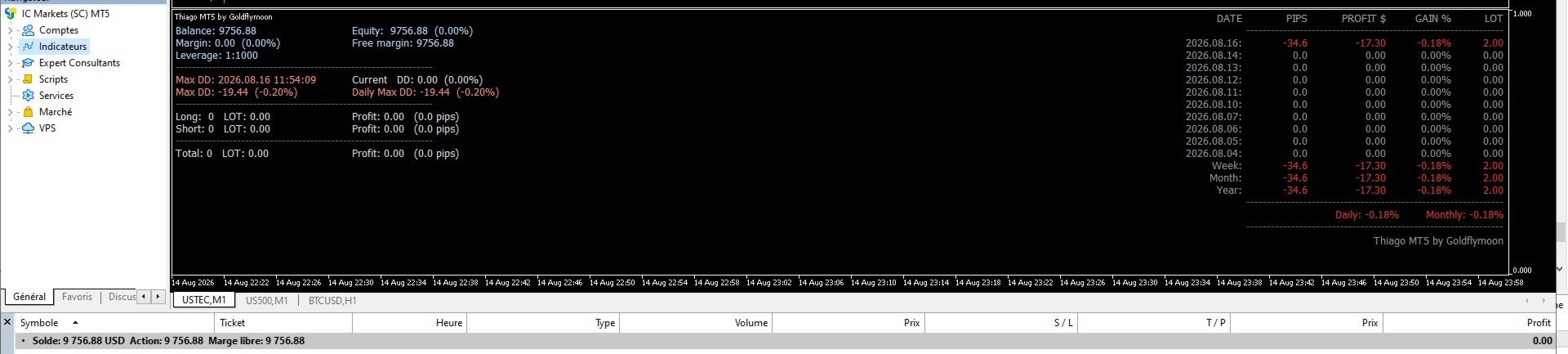
Thiago MT5 is a compact real-time dashboard for traders who want to instantly monitor their performance, exposure and drawdown without switching between MT5 windows or external spreadsheets.
One indicator. One dashboard. Full visibility.
📊 EVERYTHING AT A GLANCE
ACCOUNT
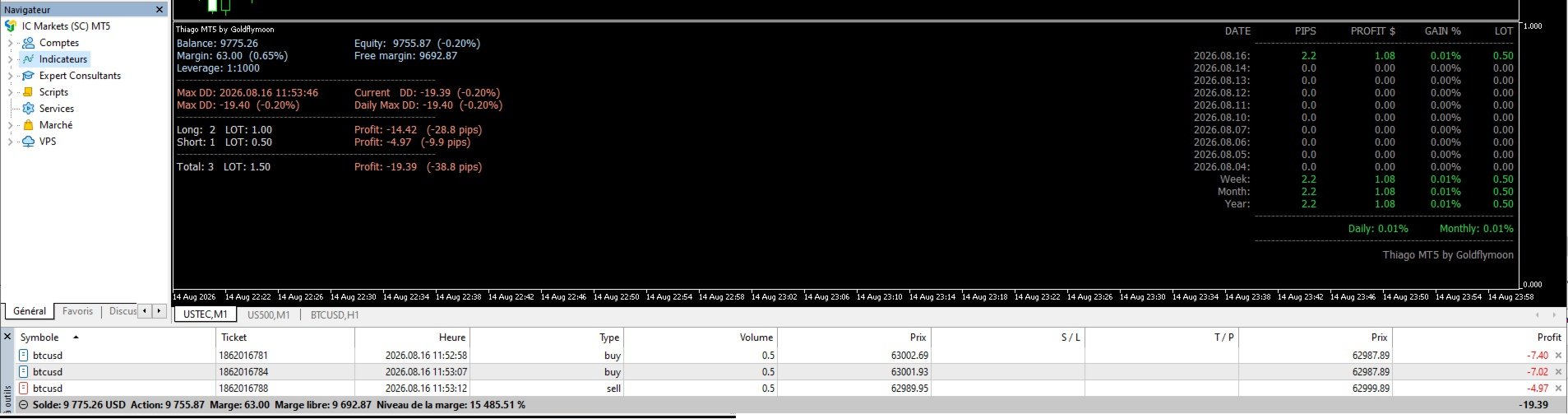
Balance • Equity • Margin • Free Margin • Leverage
OPEN POSITIONS
Longs • Shorts • Lots • Floating P/L • Floating Pips
DRAWDOWN
Current DD • Daily Max DD • Historical Max DD + Date
PERFORMANCE
Daily • Weekly • Monthly • Yearly
TRADING HISTORY
Date • Pips • Profit/Loss • Gain % • Lots
Your essential trading statistics remain visible and continuously updated while you trade.
🎯 MONITOR EXACTLY WHAT YOU WANT
Full Account
OnlyAttachedSymbol = false
Monitor your entire MT5 account, including activity across multiple instruments.
Single Symbol
OnlyAttachedSymbol = true
Monitor only the instrument of the chart where Thiago MT5 is attached.
Trading XAUUSD, NASDAQ, Forex and BTC simultaneously?
Use Full Account mode.
Want a dedicated dashboard for XAUUSD only?
Use Single Symbol mode.
🤖 EA & STRATEGY FILTERING
Running several Expert Advisors on the same account?
Thiago MT5 can isolate specific trading activity using:
Magic Number 1 • Magic Number 2 • Trade Comment • Start Date
Monitor your complete account or focus on one or two specific EAs without mixing their statistics with the rest of your trading.
⚙️ QUICK SETTINGS
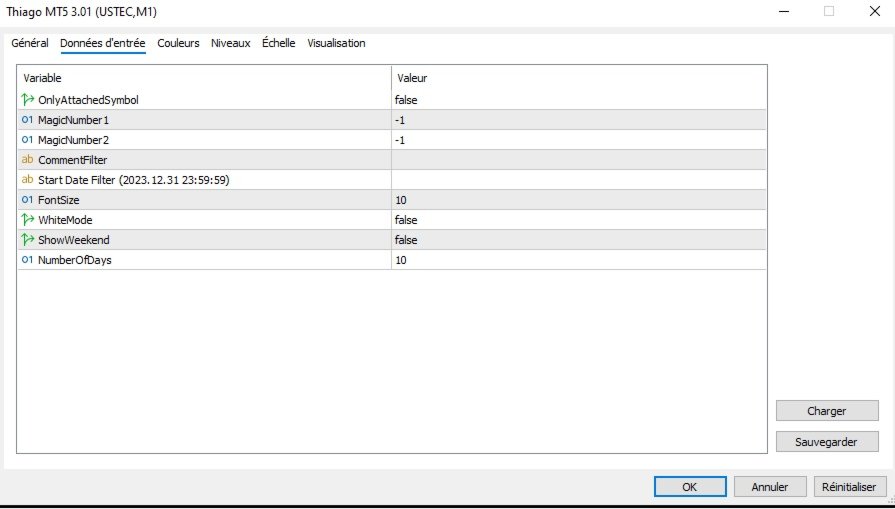
OnlyAttachedSymbol — Full account or attached symbol only
Default: false
MagicNumber1 / MagicNumber2 — Filter specific EAs
Default: -1 = disabled
CommentFilter — Filter trades by comment
Default: empty = disabled
StartDateFilter — Starting date for historical statistics
Example: 2026.01.01 00:00:00
FontSize — Dashboard text size
Default: 10
WhiteMode — Adapt colors to your chart
false = Dark charts
true = Light charts
ShowWeekend — Weekend display
Default: false
Inactive weekends are hidden, but weekend trading activity is still displayed automatically — ideal for crypto traders.
NumberOfDays — Number of daily results displayed
Default: 10
➡️ For most traders, the default settings are ready to use. Simply attach Thiago MT5 to a chart.
📉 REAL-TIME DRAWDOWN CONTROL
Thiago MT5 keeps three drawdown measurements visible:
CURRENT DD
Your floating drawdown right now, in money and %.
DAILY MAX DD
The worst floating drawdown recorded during the current trading day.
MAX DD
The worst floating drawdown recorded by Thiago MT5, including its date and time.
⚠️ Important: MetaTrader 5 does not store the complete historical floating equity excursion of past trades. Daily Max DD and Max DD are therefore recorded while Thiago MT5 is running and cannot be reconstructed retrospectively.
🌙 DARK OR LIGHT — YOUR CHOICE
Thiago MT5 includes dedicated color schemes for both:
🌙 Dark charts — WhiteMode = false
☀️ Light charts — WhiteMode = true
Colors automatically distinguish positive results, negative results, account information and drawdown.
👤 MADE FOR REAL TRADING WORKFLOWS
Thiago MT5 works whether you are a:
Manual Trader • Scalper • Day Trader • EA User • Algo Trader • Multi-Symbol Trader • Crypto Trader
It monitors your trading.
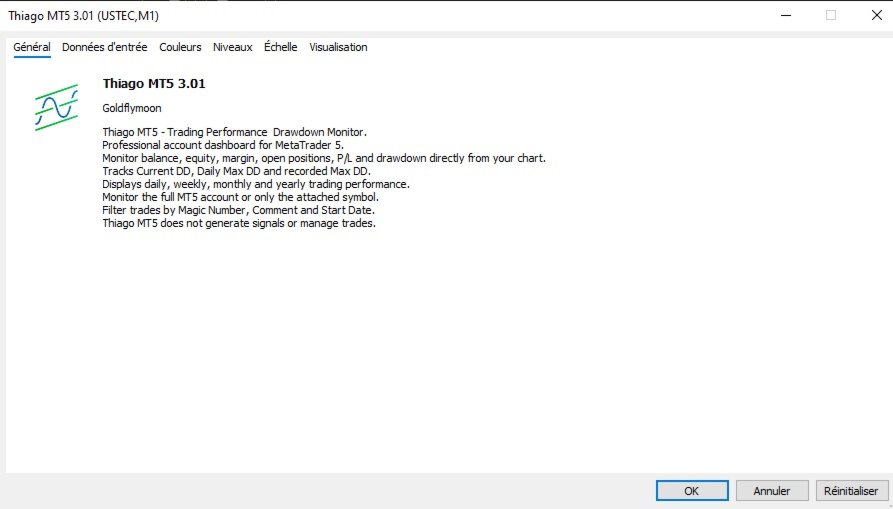
It does not generate signals, predict markets, open trades or modify positions.
⚠️ IMPORTANT
Thiago MT5 is a monitoring and performance tool, not a trading system.
It does not promise or guarantee trading results.
Its job is simple:
See your performance. See your exposure. Control your drawdown.
THIAGO MT5by Goldflymoon
📊 Performance • 📈 Exposure • 📉 Drawdown
Your trading account. One dashboard. Directly inside MetaTrader 5.