Donchian Dawn
- 지표
-
Teng Fei Zhu
 MQL5 거래 시스템에 머신러닝과 딥러닝을 깊이 융합하는 데 전문화. 독립적으로 300개 이상의 EA와 커스텀 인디케이터를 개발하여 실거래 운영 중. 신경망, LSTM, Transformer, 강화학습, XGBoost/LightGBM에 능숙하며, 피처 엔지니어링, Walk-Forward, 몬테카를로 시뮬레이션, 파라미터 섭동 분석, 분포 이동 테스트를 결합해 과적합을 철저히 방지합니다.
 - 버전: 1.1
Donchian Dawn Breakout System
My other products: https://www.mql5.com/zh/users/bitksk/seller
1. What Problem Does It Solve
Manually identifying trend breakouts often relies on subjective judgment and lacks consistency. This indicator programmatically and visually implements the Donchian channel breakout logic, solving three core problems:
-
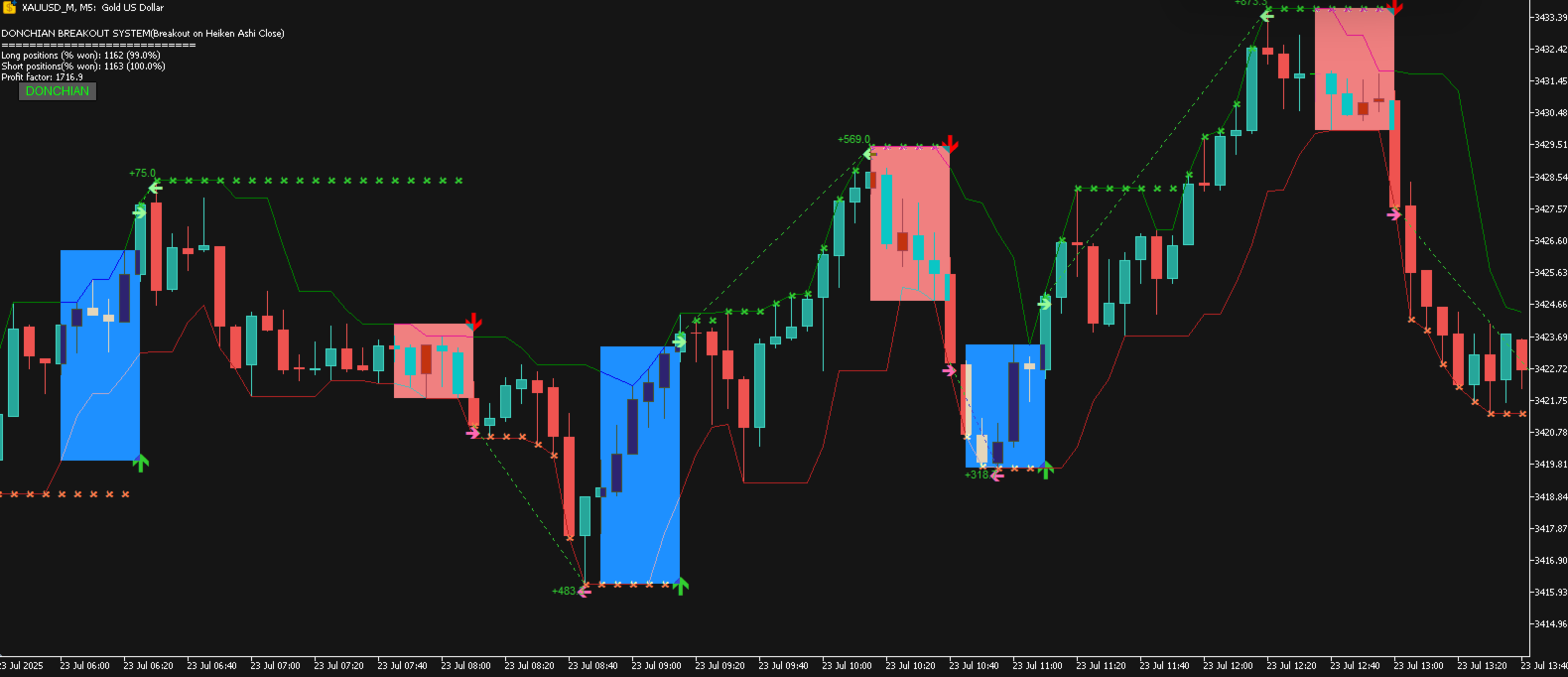
Signal Standardization: Automatically generates arrow signals when the price breaks through the upper or lower band of the dynamic channel, eliminating subjective guesswork.
-
Position Management Visualization: Uses colored rectangles to mark the boundaries of the current trend, making stop-loss and target levels clear at a glance.
-
Strategy Review Datafication: Automatically records the entry point, exit point, and profit/loss result of every simulated trade, and aggregates statistics on win rate and profit/loss ratio, allowing you to evaluate strategy performance without manual backtesting.
2. Who Is It For
-
Traders looking for a clearly defined, reproducible trend-following strategy
-
Technical analysis users who wish to reduce reliance on subjective judgment and use objective signals to assist decision-making
-
Traders who need to filter trade direction by trend to avoid counter-trend operations when using existing strategies
-
Users familiar with breakout strategies such as Donchian channels or the Turtle Trading rules, seeking a modern MT5 implementation
-
Users who prefer a clean chart and do not want visual clutter from loading multiple indicators simultaneously
3. Usage Scenarios
| Scenario | Description |
|---|---|
| Trending Market | Performs best when the channel expands and the price runs consistently on one side of the channel |
| Breakout Confirmation | Signal reliability is higher on the first breakout from the channel after consolidation |
| Trend Filter | Combine with oscillators (RSI, Stochastic) and only trade in the direction of the trend |
| Multi-Timeframe Analysis | Determine the major direction on H1/D1; find entry timing on M15/M30 |
| Instrument Suitability | Instruments with stronger trending characteristics (e.g., Gold, major currency pairs, indices) are more suitable |
4. Parameter Explanation
| Parameter | Default | Description |
|---|---|---|
| Price | Heiken Ashi Close | Price type used for breakout calculation. 8 options available: Close, Median, Typical, Weighted Close, and the corresponding 4 Heiken Ashi variants. The Heiken Ashi series effectively filters false breakouts |
| ChannelPeriod | 5 | Base calculation period for the channel. Smaller values produce more sensitive breakout signals but may increase false signals |
| MaxChannelPeriod | 30 | Maximum period for adaptive channel expansion. When market volatility contracts and channel width falls below MinChannelWidth , the system will progressively extend the period until the width meets the requirement or this upper limit is reached |
| Margin | 0 | Scaling factor for channel boundaries. 0 uses the original high/low; a positive value shrinks the channel inward, making breakout signals more conservative |
| MinChannelWidth | 10 (points) | Minimum allowed channel width. Falling below this value triggers the adaptive expansion mechanism, avoiding excessive invalid signals during narrow consolidations |
| ShowFilledBoxes | true | Whether to fill trend boxes. When enabled, draws semi-transparent rectangles for each trend segment after a breakout, visually showing the trend running area |
| ShowAnalysis | true | Whether to enable simulated trade analysis. When disabled, only signal arrows and channel lines remain; trade data is no longer recorded |
| ShowStatsComment | true | Whether to display the statistics panel in the corner of the chart (number of trades, win rate, profit/loss ratio) |
| AlertOn | true | Whether to enable pop-up alerts |
| UpTrendSound / DnTrendSound | alert.wav / alert2.wav | Custom sound files for up-break and down-break signals |
| EmailOn / PushNotificationOn | false | Email and mobile push notification switches, default to off |
5. Risk Notes
-
Signal Lag: Breakout signals are determined based on the relationship between the candlestick closing price (or the selected price type) and the upper/lower band of the channel; therefore, signal confirmation occurs at candle close, not at the moment of breakout. In fast-moving markets, the entry price may deviate from the breakout moment.
-
False Breakouts: Any breakout strategy inevitably encounters false breakouts. When the price briefly breaks through the channel and then quickly returns, an invalid signal is generated. It is recommended to use in combination with volume or auxiliary filtering conditions.
-
Underperformance in Ranging Markets: In sideways markets without a clear trend, the channel may be repeatedly broken in both directions, potentially resulting in consecutive losses. The MinChannelWidth and adaptive period expansion mechanism partially mitigate this, but cannot completely avoid it.
-
Historical Statistics Do Not Represent the Future: The win rate and profit/loss ratio displayed on the indicator panel come from simulated backtest statistics of historical candlestick data and do not represent future live performance. Live trading involves factors such as slippage, spread, and overnight interest; the statistical results are for strategy evaluation reference only.
-
Single Indicator Risk: This indicator is based solely on price breakout logic and should not be used as a standalone trading system. It is recommended to use in combination with other analytical methods (support/resistance, volume, money management rules).
6. Unsuitable Situations
-
Scalping: Signals are confirmed at candle close and are not suitable for tick-level high-frequency operations
-
Ultra-short M1 timeframe: When the period is too short, market noise increases and the signal-to-noise ratio of channel breakouts decreases
-
Instruments with extremely low volatility: Such as certain minor altcoins or highly correlated cross-pairs, where the channel runs narrow for extended periods and effective signals are sparse
-
During major news events: In extreme volatility during events such as NFP or central bank rate decisions, prices may quickly penetrate the channel and then sharply reverse, reducing signal reliability
-
Pure reversal strategies: This indicator is a trend-following tool intended to trade with the trend and is not suitable for trading styles that seek tops and bottoms
7. Broker Requirements
-
Broker type: No special restrictions; suitable for any broker that supports the MT5 platform
-
Data quality: It is recommended to choose a broker that provides stable real-time quotes and complete historical data. Missing historical data will affect the accuracy of backtest statistics upon initial loading
-
Spread and execution: Signals are generated based on chart prices and do not include spread. In live trading, high floating spreads may cause slippage during news events; an ECN or low-spread account is recommended during major trading sessions
-
Sound/Email/Push: To use alert functions, please ensure that the MT5 terminal settings allow sound playback, email sending, and in-app push notifications
-
Platform version: Requires MT5 build 2085 or above
8. Frequently Asked Questions
Q1: The indicator shows no signals or lines after loading?
A1: Check the "DONCHIAN" button in the upper left corner of the chart and confirm it is green (enabled). Upon initial loading, a sufficient number of candlesticks may need to be completed for calculation (depending on the settings of ChannelPeriod and MaxChannelPeriod ).
Q2: The trend box (rectangle) appears very wide and takes up too much chart time. What should I do?
A2: This is normal. Within a trend segment, the box extends from the breakout point until the next candle, as long as the trend persists. When a new trend emerges, the current box will be truncated by the box of the next signal, ending the previous trend.
Q3: Why do signal arrows sometimes appear without corresponding trend boxes?
A3: When ShowFilledBoxes is set to false, all boxes will not be drawn. If set to true, ensure sufficient candle data and that no accidental deletion has occurred; toggling the master switch off and back on will force recalculation and redraw all objects.
Q4: The simulated trade statistics show "Too few trades"?
A4: This message appears when the analysis function is enabled ( ShowAnalysis is true) but there are few breakout events in the chart history. Switching to a longer timeframe (such as H4 or D1) and loading more historical data can effectively increase the statistical sample.
Q5: How do I change the Heiken Ashi price type?
A5: Adjust the Price parameter in the indicator parameter panel. Options 4-7 correspond to the four Heiken Ashi variants. The indicator will recalculate all historical signals after switching.
Q6: Will the signal become less responsive after adaptive channel expansion?
A6: Yes, this is a double-edged sword. After expansion, the channel widens, and a breakout requires a larger price movement, which reduces false signals but lowers sensitivity. You can balance this by adjusting MinChannelWidth according to the volatility characteristics of the instrument.
Q7: Can multiple copies of the indicator with different timeframes be loaded on the same chart?
A7: Yes. Each copy has an independent UniqueName prefix and will not interfere with others. It is recommended to assign different color configurations to copies of different timeframes for easy distinction.
Q8: The chart becomes laggy after loading?
A8: The initial calculation may consume some resources when processing a large amount of historical candlesticks. It is recommended to set a reasonable limit for "Max bars in chart" in the options (e.g., 5000-10000 bars), or disable ShowAnalysis to keep only the basic signal functions.
Updates & Feedback
This indicator is under continuous maintenance. If you encounter any issues or have feature suggestions, please feel free to contact via private message.