BKT ZeroFlow
- 지표
-
Khac Thanh Bui
 트레이딩 로직을 알고리즘의 정밀함으로 바꿉니다. 저는 실제 트레이딩의 요구 사항과 최고 수준의 소프트웨어 개발 사이의 격차를 해소하며, FX 및 골드 시장을 위한 전문가용 도구를 개발합니다.
제가 만드는 것들:
- ⚙️ 알고리즘 시스템: 프랍펌(Prop-Firm)의 엄격한 기준을 충족하는 로직(안전한 돌파, 노 마틴게일)부터 역동적인 고수익 엔진(스마트 그리드/DCA)까지 모두 제공합니다.
- 📊 고급 유틸리티: 원활한 수동 거래를 위해 전문가급 UI를 갖춘 고성능 대시보드 및 포지션 관리자.
나의 약속: - 버전: 1.0
BKT ZeroFlow
Zero Lag EMA와 ATR 변동성 밴드를 결합하여 다섯 개의 타임프레임에서 동시에 추세 방향을 식별하는 MetaTrader 5용 멀티 타임프레임 추세 지표입니다.
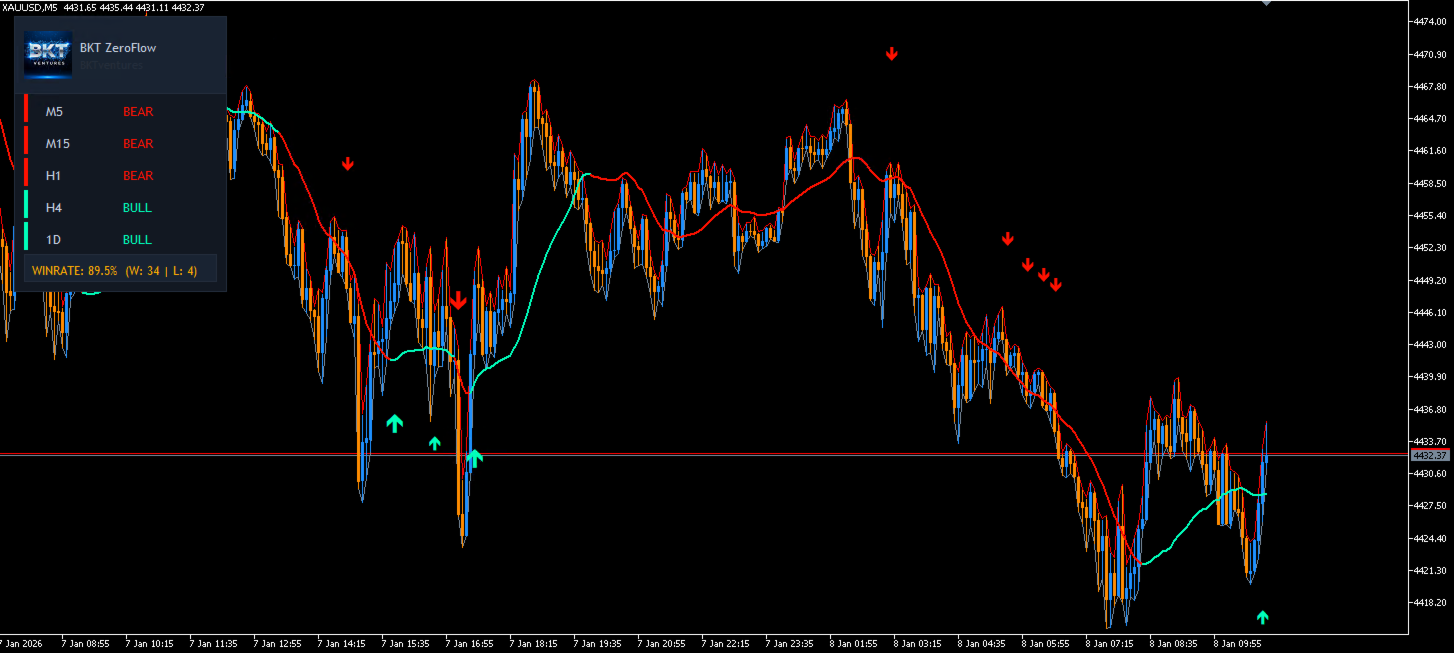
BKT ZeroFlow는 MetaTrader 5용 추세 추종 지표입니다. ATR 기반 변동성 밴드로 평활화된 Zero Lag EMA를 적용하여 시장이 강세 또는 약세 국면에 있는지 판단합니다. 추세 전환 화살표는 가격이 밴드 경계를 돌파하는 순간을 표시하고, 진입 화살표는 확인된 추세 내 되돌림 구간에 나타납니다. 5개 타임프레임 대시보드와 가상 승률 추적기가 차트에 직접 내장되어 있습니다.
개요
핵심 라인은 Zero Lag EMA로, 룩백 보정 항을 포함하여 표준 지수 이동 평균에 내재된 지연을 줄입니다. 이 라인을 중심으로 설정 가능한 윈도우에 걸친 ATR 값의 롤링 최대값을 사용하여 상단 및 하단 ATR 밴드가 구성됩니다. 가격이 상단 밴드 위에서 마감되면 강세 추세가 등록되고, 하단 밴드 아래에서 마감되면 약세 추세가 등록됩니다. 추세 상태는 반대 방향 교차가 발생할 때까지 유지됩니다.
선택적 ATR 기준선 필터는 현재 ATR을 단기 ATR 평균과 비교합니다. ATR이 기준선 아래에 있으면 시장은 횡보로 간주되어 새로운 신호가 생성되지 않으므로 통합 기간 중 노이즈를 줄입니다.
좌측 상단 대시보드는 M5, M15, H1, H4, D1의 추세 상태를 동시에 표시합니다. 각 행은 해당 타임프레임에 독립적으로 적용된 동일한 Zero Lag EMA 로직을 기반으로 BULL, BEAR 또는 WAIT를 표시합니다. 차트의 진입 화살표는 설정 가능한 최소 타임프레임 수가 방향에 동의할 때만 표시되어 추가적인 컨플루언스 필터를 제공합니다.
가상 신호 추적기는 모든 추세 전환 및 진입 화살표를 기록하고, 각각에 ATR 기반 동적 익절 및 손절을 할당하며, 패널 하단에 표시되는 승률을 실시간으로 업데이트합니다.
지표 읽는 방법
Zero Lag EMA 라인은 추세에 따라 색상이 변합니다. 청록색은 강세 국면, 빨간색은 약세 국면을 나타냅니다. 큰 화살표는 가격이 ATR 밴드를 처음 돌파하는 추세 전환 지점에 나타납니다. 작은 화살표는 이미 확립된 추세 내에서 가격이 Zero Lag EMA 라인을 다시 넘을 때 나타나 추세 방향으로의 재진입 가능성을 알립니다.
대시보드에서 각 타임프레임 행의 왼쪽에는 컬러 강조 바가 표시됩니다. BULL은 청록색, BEAR는 빨간색, WAIT 또는 비활성화는 회색입니다. 하단 통계 행에는 지표 로드 이후 가상 신호로부터 계산된 누적 승률이 표시됩니다.
권장 사용법
이 지표는 모든 통화쌍, 지수 또는 원자재에서 작동합니다. D1 대시보드 확인을 더한 H1 및 H4의 추세 추종 설정은 더 명확한 신호를 제공하는 경향이 있습니다. 스캘퍼는 M15를 기본 차트로 사용하고 M5, H1, H4 대시보드 행을 필터로 활용할 수 있습니다. ATR 기준선 필터는 아시아 세션 시간대의 통화쌍처럼 저변동성 통합 국면이 빈번하게 발생하는 상품을 거래할 때 활성화하는 것을 권장합니다.
매개변수
핵심 로직:
- EMA 및 ATR 기간 — Zero Lag EMA 및 ATR의 계산 기간 — 기본값: 60
- ATR 밴드 배수 — 상단 및 하단 ATR 밴드의 너비를 조정 — 기본값: 1.158
- 최대 히스토리 봉 수 — 로드 시 계산할 봉의 수; 0은 사용 가능한 모든 히스토리를 처리 — 기본값: 500
- 강세 색상 — 강세 추세 중 라인과 화살표에 적용되는 색상 — 기본값: 청록색
- 약세 색상 — 약세 추세 중 라인과 화살표에 적용되는 색상 — 기본값: 빨간색
변동성 필터:
- ATR 기준선 필터 활성화 — ATR이 단기 평균 아래일 때 신호를 차단 — 기본값: true
- 기준선 기간 — ATR 기준선 이동 평균을 위한 봉의 수 — 기본값: 30
통계:
- SL/TP에 동적 ATR 사용 — ATR로부터 가상 익절 및 손절을 계산 — 기본값: true
- 동적 TP 배수 — 가상 익절 거리를 위한 ATR 배수 — 기본값: 0.5
- 동적 SL 배수 — 가상 손절 거리를 위한 ATR 배수 — 기본값: 2.5
- 고정 익절 포인트 — 동적 모드가 꺼진 경우 포인트 단위 익절 — 기본값: 50
- 고정 손절 포인트 — 동적 모드가 꺼진 경우 포인트 단위 손절 — 기본값: 200
MTF 대시보드:
- M5 사용 — 대시보드에 M5 타임프레임 포함 — 기본값: true
- M15 사용 — 대시보드에 M15 타임프레임 포함 — 기본값: true
- H1 사용 — 대시보드에 H1 타임프레임 포함 — 기본값: true
- H4 사용 — 대시보드에 H4 타임프레임 포함 — 기본값: true
- D1 사용 — 대시보드에 D1 타임프레임 포함 — 기본값: true
- 최소 동의 타임프레임 수 — 진입 화살표가 그려지기 전에 같은 방향을 나타내는 활성 타임프레임의 최소 수 — 기본값: 2
알림:
- 알림 활성화 — 모든 알림 출력을 위한 마스터 스위치 — 기본값: true
- 신호 레이블 — 모든 알림 메시지에 표시되는 텍스트 레이블 — 기본값: BKT ZeroFlow
- 추세 전환 알림 — 추세 전환 화살표가 나타날 때 알림 전송 — 기본값: true
- 진입 화살표 알림 — 진입 화살표가 나타날 때 알림 전송 — 기본값: true
- 팝업 표시 — MT5 알림 대화 상자를 표시 — 기본값: true
- 이메일 전송 — 이메일로 알림 전송 (MT5 이메일 설정 필요) — 기본값: false
- 푸시 알림 — MetaTrader 모바일 앱에 푸시 알림 전송 — 기본값: false