Precision Candle Timer MT5
- 지표
- 버전: 1.0

1. Description (The Sales Pitch)
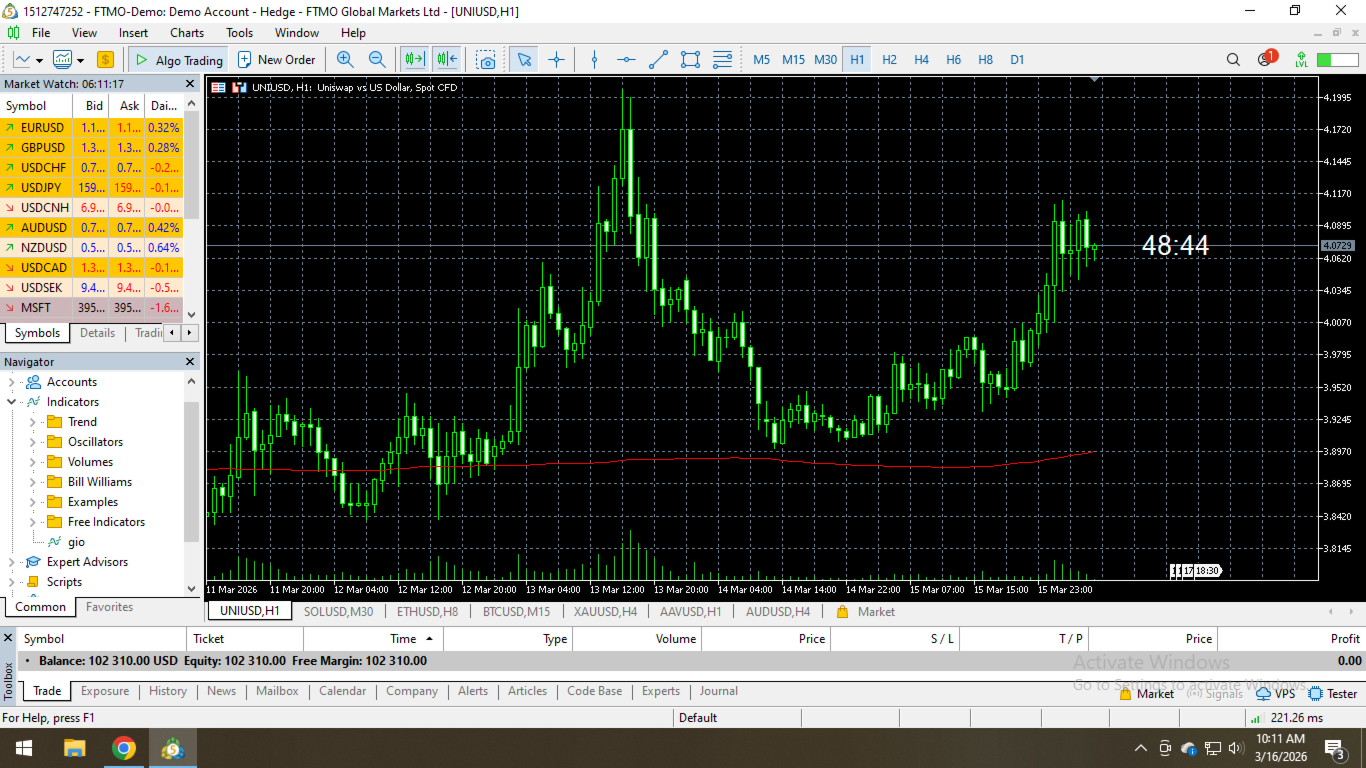
Never miss a trade setup again! Timing is everything in forex and stock trading. The Precision Candle Timer for MT5 is a lightweight, professional-grade tool designed to show you exactly how much time is left before the current candle closes.
Unlike other clunky timers that clutter your screen, this indicator sits elegantly right next to the current price action, ensuring your eyes stay on the market.
Key Features:
- Real-time Countdown: High-precision countdown updated every second, even during low liquidity.
- Dynamic Positioning: Automatically follows the price (Bid line), so it’s always in your line of sight.
- Smart Visual Alerts: The timer changes color (e.g., to Yellow or Red) when the candle is about to close (last 10 seconds), alerting you to prepare for the next bar.
- Zero Lag: Highly optimized MQL5 code that won't slow down your platform or charts.
- Fully Customizable: Easily change colors, font sizes, and offsets to match your chart theme.
2. Installation Guide (For your Users)
To install and use the Precision Candle Timer, follow these simple steps:
- Download: Purchase and download the indicator from the MQL5 Market.
- Open MT5: Launch your MetaTrader 5 terminal.
- Find the Indicator: Open the Navigator window ( Ctrl+N ), look under the Indicators > Market folder.
- Attach to Chart: Drag and drop "CandleTimer_Pro" onto any open chart.
- Configure Settings:
- In the Common tab, ensure "Allow DLL imports" is checked.
- In the Inputs tab, customize your preferred colors and font size.
- Chart Setup: To ensure the timer isn't hidden by the right edge, click the "Shift End of Chart" button (the green arrow icon) on the MT5 top toolbar.
- Enjoy: The countdown will now appear next to the current price level!
3. Input Parameters Explained- InpColor: The default color of the timer text.
- InpAlertColor: The color the text changes to when the candle has less than 10 seconds remaining.
- InpFontSize: Adjust the size of the text to fit your screen resolution (ideal for 4K monitors).
- InpFontName: Choose your favorite font (e.g., Arial, Verdana).