Scanner RSI
- 지표
- Dione Da Silva Ribas
- 버전: 1.0
- 활성화: 5
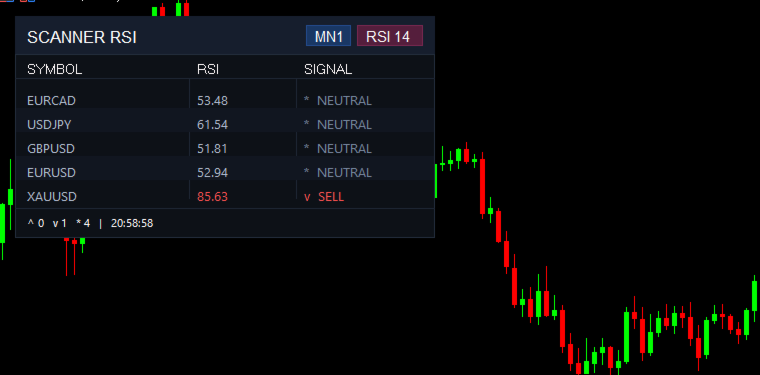
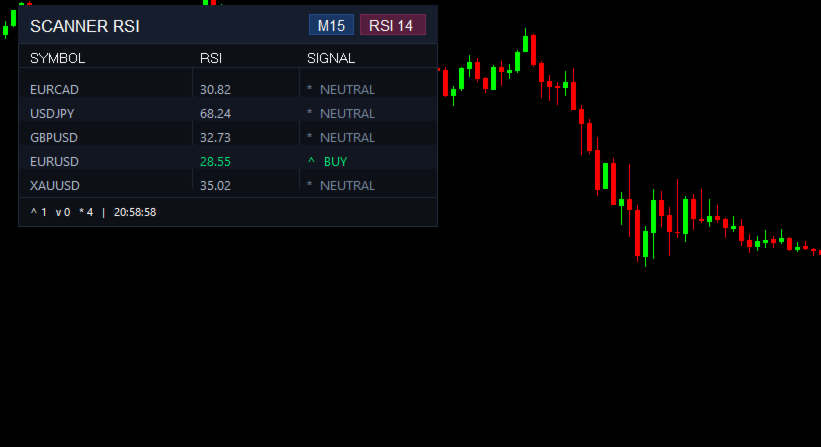
📊 SCANNER RSI — Multi Symbol RSI Scanner with Real Time Signals
Monitor multiple assets simultaneously! Scanner RSI displays a professional
dashboard on your chart showing RSI values and Buy/Sell/Neutral signals
for all your favorite symbols — updated in real time.
━━━━━━━━━━━━━━━━━━━━━━━━━━━━━━━━━━
✅ WHY SCANNER RSI?
━━━━━━━━━━━━━━━━━━━━━━━━━━━━━━━━━━
▸ Monitor unlimited symbols in a single chart
▸ Real time RSI values with automatic color coding
▸ Clear Buy / Sell / Neutral signals at a glance
▸ Professional dark theme — fully customizable
▸ Dynamic badges showing Timeframe and RSI Period
▸ Footer with signal summary and last update time
▸ Alternating row colors for easy reading
▸ Lightweight — no impact on performance
▸ Works with Forex, Crypto, Indices, Stocks — any symbol available on your broker
━━━━━━━━━━━━━━━━━━━━━━━━━━━━━━━━━━
📋 SIGNAL LOGIC
━━━━━━━━━━━━━━━━━━━━━━━━━━━━━━━━━��
▲ BUY — RSI below oversold level (default: 30)
▼ SELL — RSI above overbought level (default: 70)
● NEUTRAL — RSI between the two levels
━━━━━━━━━━━━━━━━━━━━━━━━━━━━━━━━━━
⚙️ HOW TO USE
━━━━━━━━━━━━━━━━━━━━━━━━━━━━━━━━━━
1. Drag the indicator to any chart
2. Enter your symbols separated by comma (e.g.: EURUSD,GBPUSD,XAUUSD,BTCUSD)
3. Choose the Timeframe and RSI Period
4. Adjust colors and size to your preference
5. Click OK — the dashboard appears immediately
━━━━━━━━━━━━━━━━━━━━━━━━━━━━━━━━━━━━━━━━━━━━━
📖 CONFIGURATION MANUAL
━━━━━━━━━━━━━━━━━━━━━━━━━━━━━━━━━━━━━━━━━━━━━
──── 0. RSI PARAMETERS ────
▸ Symbols — Assets to monitor, separated by comma. Add as many as you want.
Example: EURUSD,GBPUSD,USDJPY,XAUUSD,BTCUSD
▸ RSI Period (default: 14) — Number of candles used for RSI calculation.
Lower values (7, 9) = more sensitive, more signals.
Higher values (21, 25) = smoother, fewer signals.
▸ Timeframe (default: Current) — Timeframe for RSI calculation.
If set to PERIOD_CURRENT, it uses the chart's timeframe.
▸ Update Interval (default: 2 sec) — How often values are refreshed.
Recommended: 1 to 5 seconds.
▸ Overbought Level (default: 70) — RSI above this value = SELL signal.
▸ Oversold Level (default: 30) — RSI below this value = BUY signal.
──── 1. COLORS ────
BACKGROUND & STRUCTURE:
▸ Main Background — Background color of the entire dashboard
▸ Title Background — Color of the top bar ("SCANNER RSI")
▸ External Border — Border color around the dashboard
▸ Separator Lines — Color of lines between header, data, and footer
▸ Alternating Row — Subtle background for even rows (easier reading)
TEXT:
▸ Title Color — Color of "SCANNER RSI" text
▸ Column Header — Color of "ATIVO", "RSI", "SINAL" headers
▸ Symbol Names — Color of asset names (EURUSD, GBPUSD, etc.)
▸ Footer — Color of the summary text at the bottom
SIGNALS:
▸ Buy Color (default: vibrant green) — Color for ▲ BUY signal
▸ Sell Color (default: vibrant red) — Color for ▼ SELL signal
▸ Neutral Color (default: bluish gray) — Color for ● NEUTRAL signal
BADGES:
▸ Timeframe Badge — Background and border color of the TF badge (e.g.: H1)
▸ RSI Badge — Background and border color of the RSI badge (e.g.: RSI 14)
💡 Tip: All colors are fully customizable. Adapt to your chart theme.
──── 2. SIZE & POSITION ────
▸ Anchor Corner — Which chart corner the dashboard is positioned from.
Options: Upper Left, Upper Right, Lower Left, Lower Right.
▸ Position X (default: 20px) — Horizontal distance from the chosen corner.
▸ Position Y (default: 30px) — Vertical distance from the chosen corner.
▸ Table Width (default: 420px) — Total width of the dashboard.
Increase if you use long symbol names.
▸ Row Height (default: 24px) — Height of each data row.
▸ Title Height (default: 38px) — Height of the "SCANNER RSI" top bar.
▸ Horizontal Padding (default: 12px) — Internal side margins.
▸ Vertical Padding (default: 8px) — Internal top/bottom margins.
SIZE SUGGESTIONS:
▸ Compact (laptop): Width 320px / Row Height 20px
▸ Standard: Width 420px / Row Height 24px
▸ Large (wide monitor): Width 520px / Row Height 28px
──── 3. COLUMNS ────
▸ RSI Column Start (default: 43%) — Where the RSI column begins,
as a percentage of the table width.
▸ Signal Column Start (default: 70%) — Where the SIGNAL column begins,
as a percentage of the table width.
💡 Tip: If your symbols have long names, increase the RSI column percentage
to give more space to the symbol names.
──── 4. FONT ────
▸ Font Name (default: Segoe UI) — Font used across the dashboard.
Recommended: Segoe UI, Arial, Consolas, Tahoma.
▸ Font Size (default: 10) — Size of data text (symbols, RSI values, signals).
▸ Title Font Size (default: 13) — Size of "SCANNER RSI" text.
▸ Header Font Size (default: 10) — Size of column headers.
▸ Footer Font Size (default: 8) — Size of footer summary text.
━━━━━━━━━━━━━━━━━━━━━━━━━━━━━━━━━━
📋 FOOTER — REAL TIME SUMMARY
━━━━━━━━━━━━━━━━━━━━━━━━━━━━━━━━━━
The footer automatically shows:
▲ 1 ▼ 2 ● 2 │ 15:42:30
▸ ▲ 1 — Number of assets with BUY signal
▸ ▼ 2 — Number of assets with SELL signal
▸ ● 2 — Number of assets with NEUTRAL signal
▸ 15:42:30 — Time of last update
━━━━━━━━━━━━━━━━━━━━━━━━━━━━━━━━━━
❓ FAQ
━━━━━━━━━━━━━━━━━━━━━━━━━━━━━━━━━━
Q: How many symbols can I monitor?
A: Unlimited. Just add names separated by comma.
Q: Does it work with crypto, stocks, and indices?
A: Yes. Any symbol available on your broker.
Q: Does it affect chart performance?
A: No. RSI calculation is lightweight and update interval is configurable.
Q: Can I use it on multiple charts?
A: Yes. Each instance works independently.
Q: Do I need the symbols open in other charts?
A: No. The indicator loads data automatically for each symbol.
━━━━━━━━━━━━━━━━━━━━━━━━━━━━━━━━━━
If you have questions or suggestions, please leave a comment or send me a message.
If you like the indicator, please leave a ⭐⭐⭐⭐⭐ review — it helps a lot!