SMC Structure Engine
- 지표
- 버전: 1.0
- 활성화: 5

Key Features
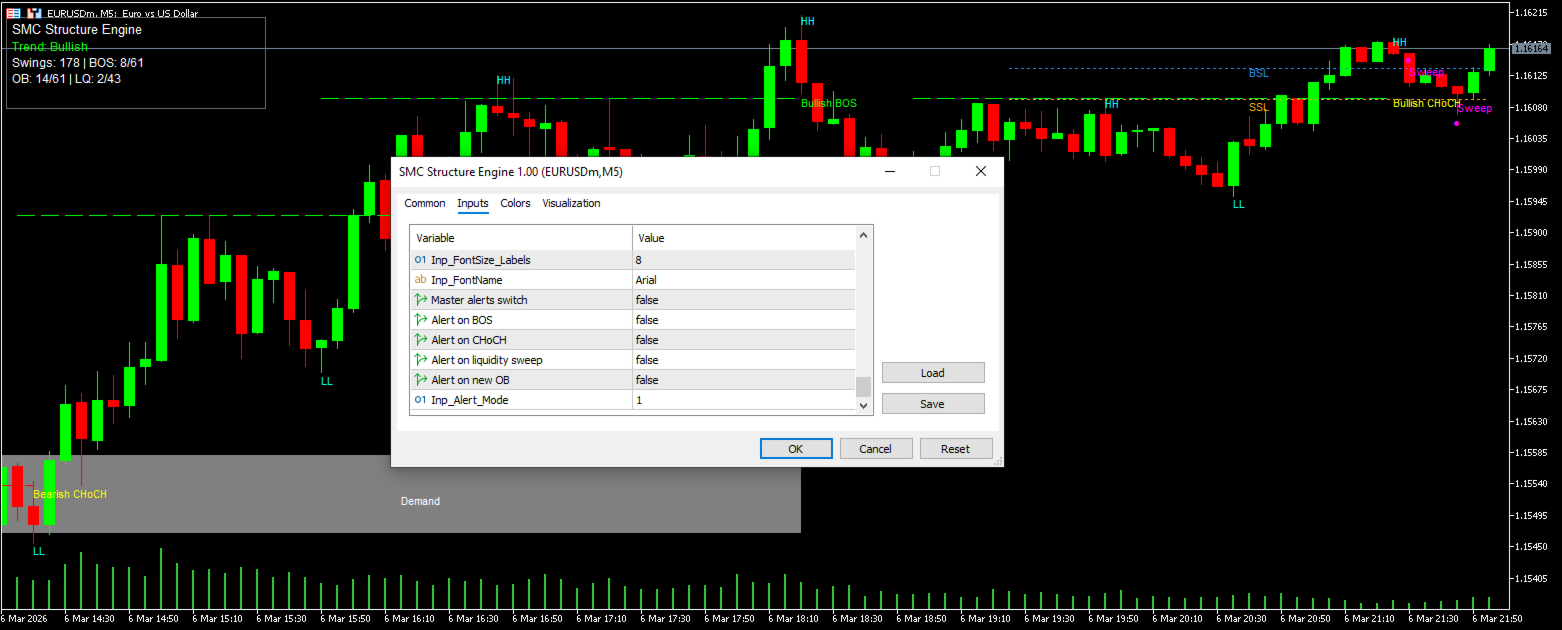
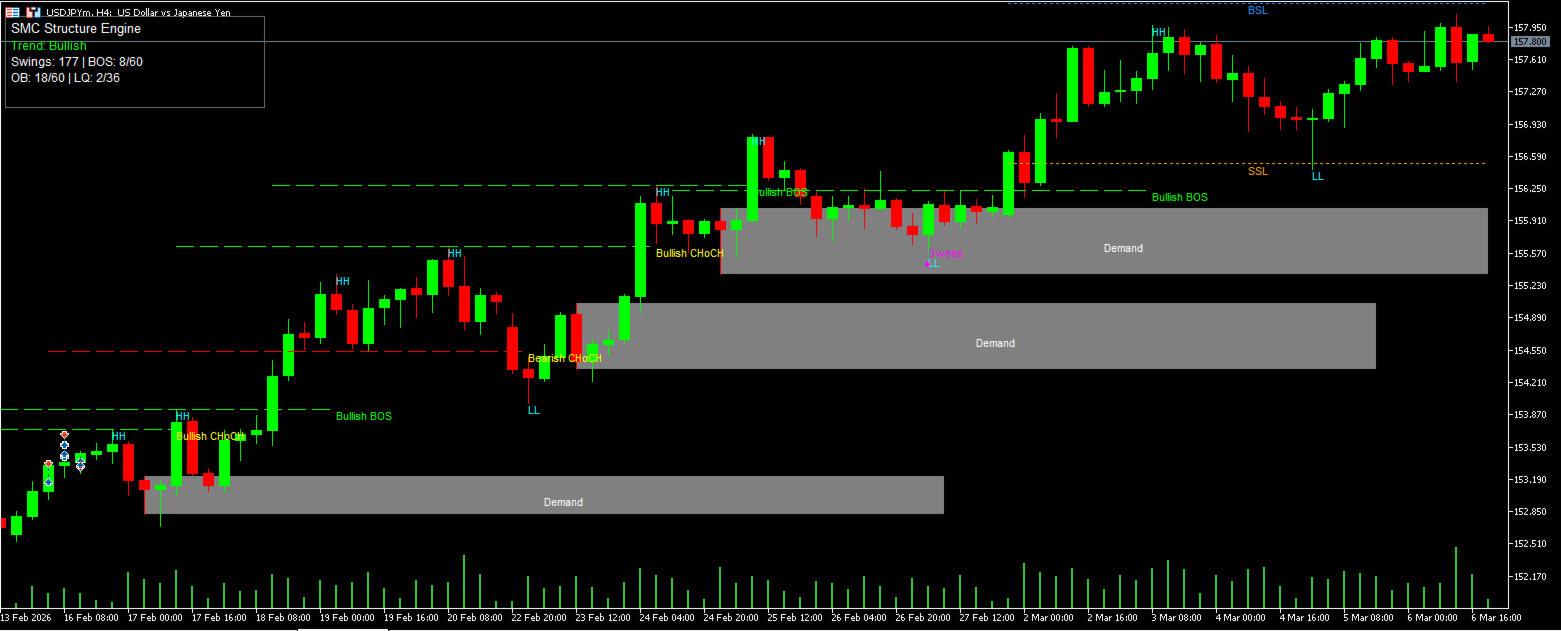
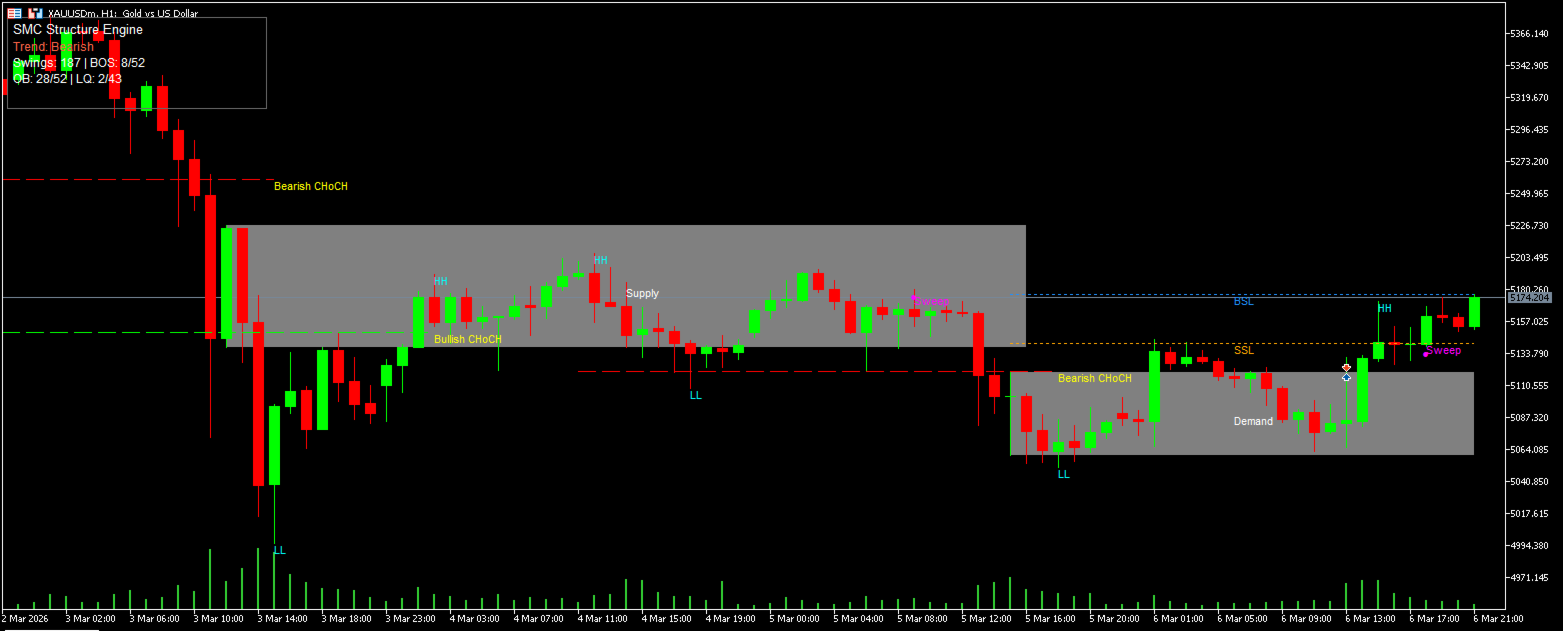
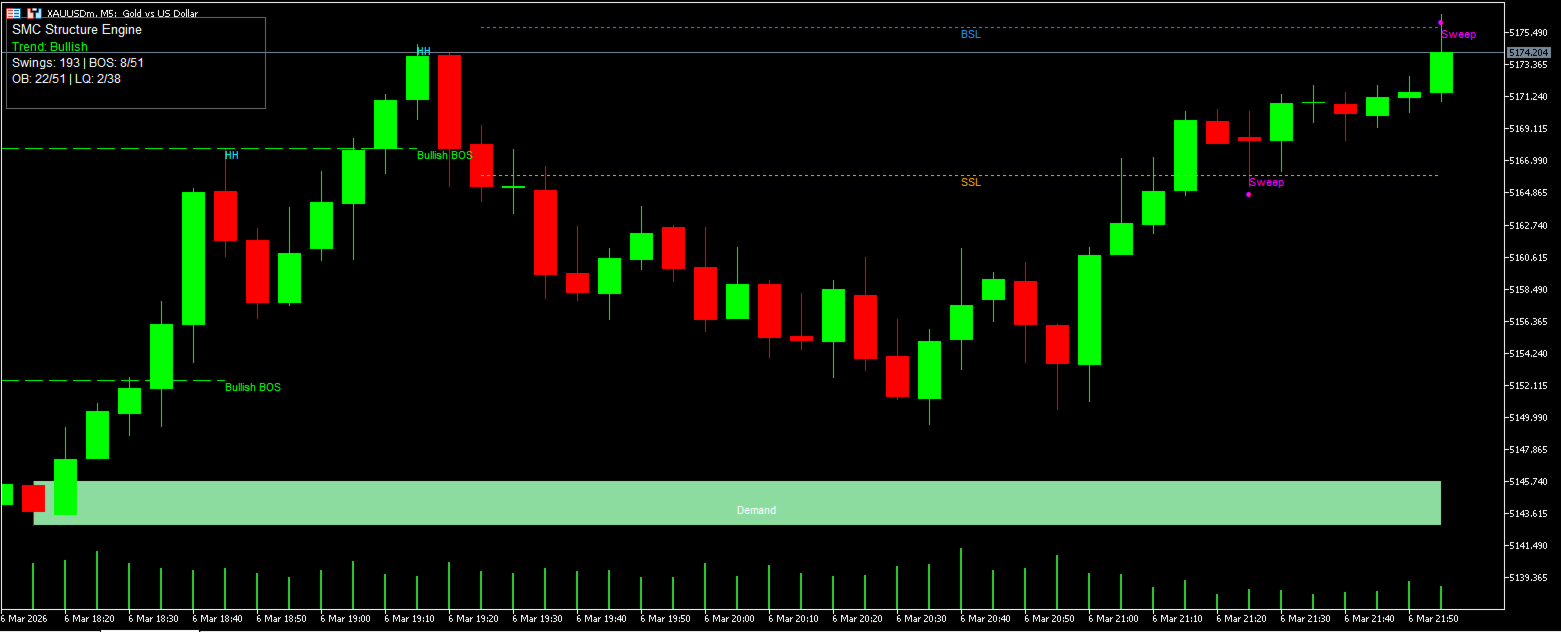
• Automatic Smart Money Concepts market structure detection (HH, HL, LH, LL)
• BOS (Break of Structure) and CHoCH (Change of Character) signals
• Automatic Demand and Supply Order Block detection
• Buy-Side Liquidity (BSL) and Sell-Side Liquidity (SSL) identification
• Liquidity sweep detection
• Built-in market structure info panel
• Customizable display settings
• Optional trading alerts
Overview
SMC Structure Engine is a Smart Money Concepts (SMC) indicator designed to automatically identify market structure and institutional-style price levels used in SMC analysis.
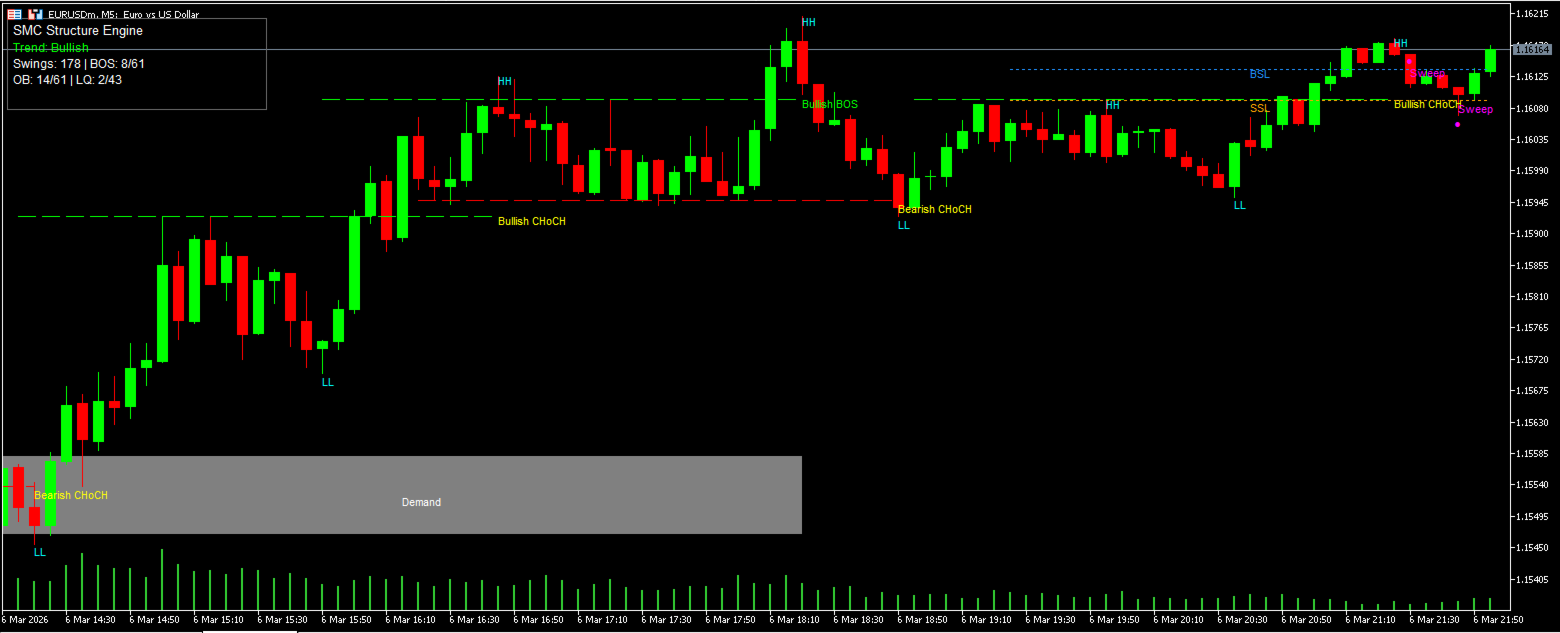
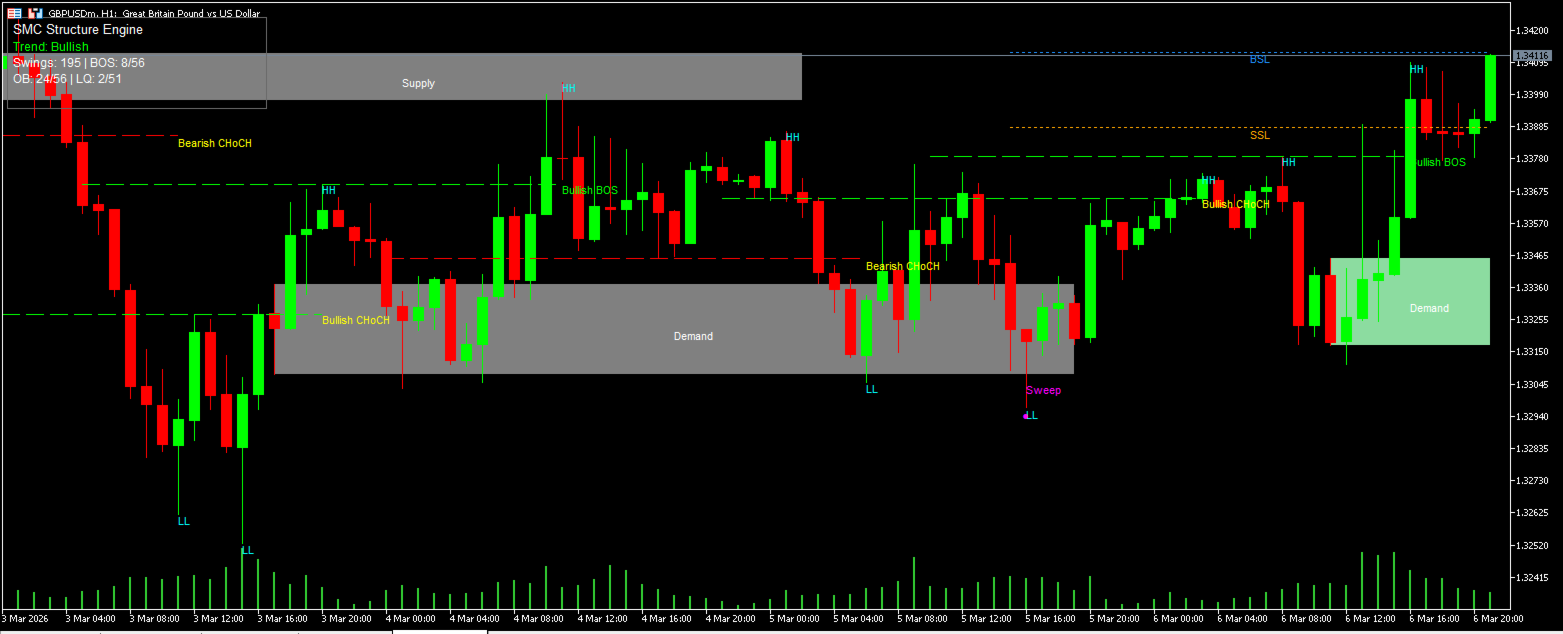
The indicator detects key structural events such as Break of Structure (BOS) and Change of Character (CHoCH), highlights supply and demand zones commonly referred to as order blocks, and maps liquidity levels that often act as price targets.
SMC Structure Engine helps traders quickly understand the current market structure without manually drawing levels.
The indicator works on any timeframe and supports Forex, Gold (XAUUSD), Indices and Crypto markets.
✔ Automatic Market Structure Detection
Identifies BOS (Break of Structure) and CHoCH (Change of Character) events.
✔ Order Blocks
Automatically detects supply and demand zones commonly referred to as order blocks.
✔ Liquidity Level Mapping
Displays Buy-Side Liquidity (BSL) and Sell-Side Liquidity (SSL) where stop clusters often accumulate.
✔ Smart Money Market Bias
Displays the current trend bias directly on the chart.
✔ Equal Highs and Equal Lows Detection
Helps identify potential liquidity pools.
✔ Fully Customizable Settings
Control which elements are displayed on the chart.
✔ Built-in Alerts
Optional alerts for:
BOS
CHoCH
Liquidity sweep
New order block formation
How the Indicator Works
The indicator analyzes market swings using pivot detection and identifies structural changes in price action.
When a significant structure break occurs, the indicator marks:
• Break of Structure (BOS)
• Change of Character (CHoCH)
Order blocks are detected using price action patterns, and liquidity levels are calculated from significant highs and lows.
These elements help traders identify:
• Potential reversal zones
• Liquidity targets
• Institutional trading areas
SMC Structure Engine is ideal for traders using:
• Smart Money Concepts (SMC)
• ICT trading strategies
• Price Action trading
• Supply and Demand trading
The indicator works on all instruments including:
• XAUUSD (Gold)
• EURUSD
• GBPUSD
• USDJPY
• Crypto pairs
• Indices
Works on all timeframes.
Popular choices:
• M5 / M15 for scalping
• M15 / H1 for intraday trading
• H1 / H4 for swing trading
Alerts
The indicator can generate alerts for:
• Break of Structure (BOS)
• Change of Character (CHoCH)
• Liquidity sweeps
• New order block creation
Alerts help traders monitor multiple charts efficiently.
1. Attach the indicator to any chart
The indicator works on all symbols and timeframes.
2. Identify market structure
Watch the structure labels:
-
HH / HL → bullish structure
-
LH / LL → bearish structure
These help determine the current market bias.
3. Watch for BOS and CHoCH
-
BOS (Break of Structure) confirms continuation of the current trend.
-
CHoCH (Change of Character) signals a possible trend reversal.
4. Use Demand and Supply zones
The indicator automatically marks institutional Order Blocks:
-
Demand zones → potential buying areas
-
Supply zones → potential selling areas
Price often reacts when revisiting these zones
5. Monitor liquidity levels
Liquidity levels show areas where stop-loss orders accumulate:
-
BSL (Buy-Side Liquidity) - located above equal highs
-
SSL (Sell-Side Liquidity) - located below equal lows
Markets frequently target these levels before reversing.
6. Watch for liquidity sweeps
A Sweep occurs when price briefly breaks a liquidity level before reversing
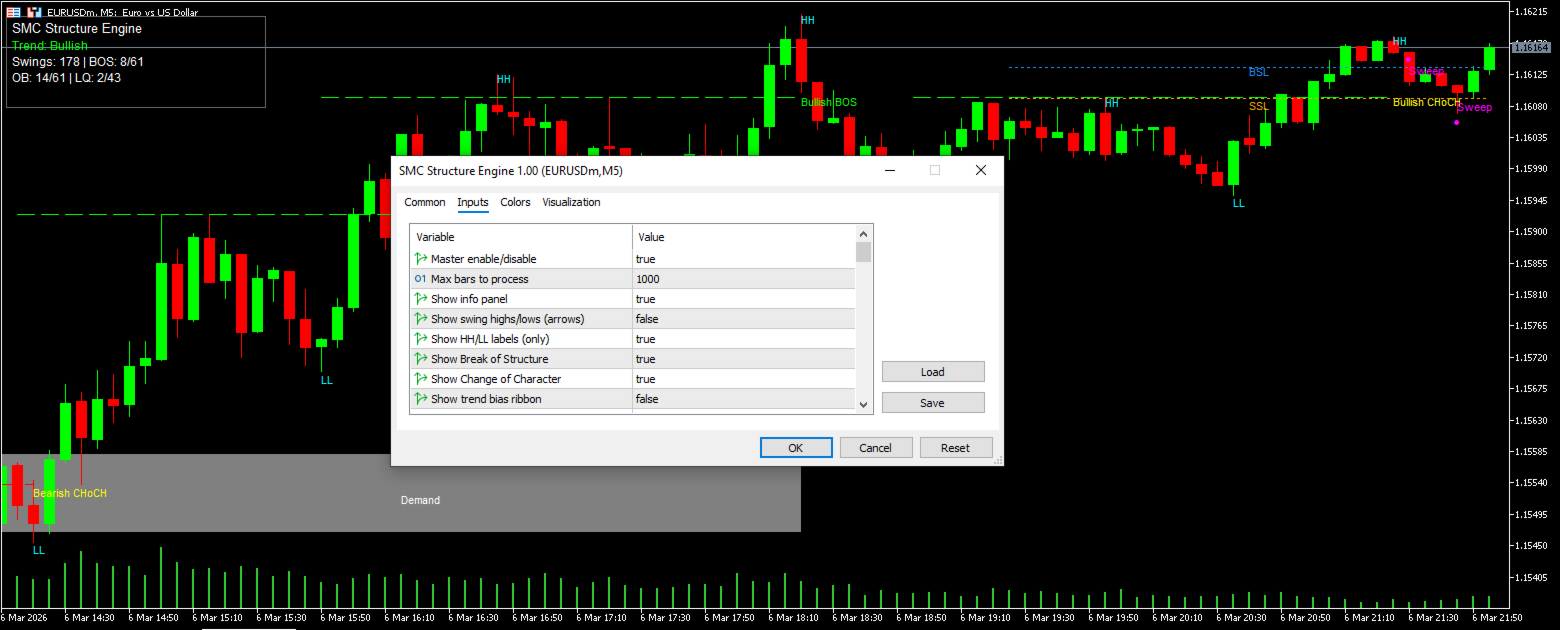
General Settings
Master enable/disable
-Enables or disables the indicator completely.
true = indicator active
false = indicator disabled
Max bars to process
-Limits how many historical candles the indicator analyzes.
Example:
1000 = analyze the last 1000 candles
Lower values increase performance.
Show info panel
-Displays the information panel on the chart showing current structure statistics.
Market Structure Settings
Show swing highs/lows (arrows)
-Displays arrows marking detected swing highs and swing lows.
true = show arrows
false = hide arrows
Show HH/LL labels (only):
-Shows only Higher High (HH) and Lower Low (LL) labels without arrows.
Show Break of Structure
-Displays BOS labels when price breaks previous structural levels.
Show Change of Character
-Displays CHoCH labels when the market structure shifts direction.
Order Block Settings
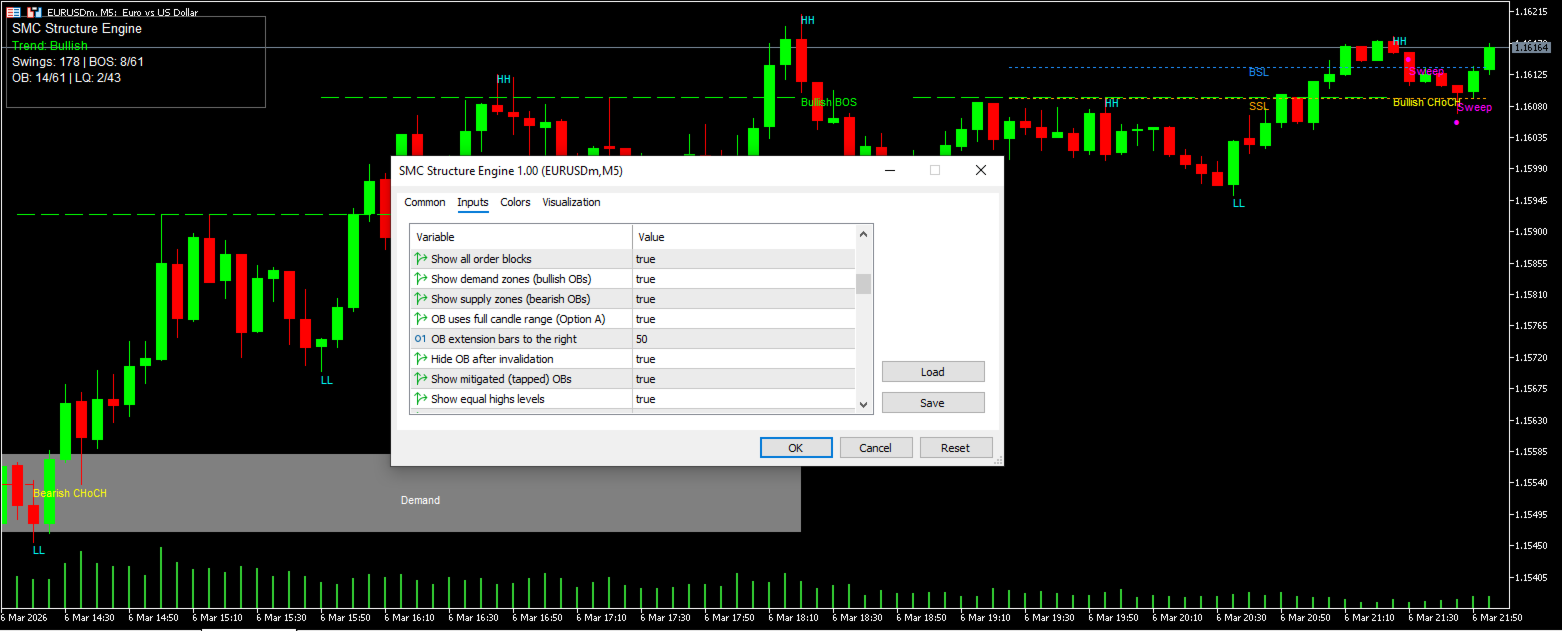
Show all order blocks
-Displays all detected order blocks.
Show demand zones (bullish OBs)
-Displays bullish order blocks.
Show supply zones (bearish OBs)
-Displays bearish order blocks.
OB uses full candle range
-Defines how order blocks are calculated.
true = use full candle range
false = use candle body only
OB extension bars to the right
-Defines how far order blocks extend into the future.
Example:
50 = OB extends 50 candles to the right
Hide OB after invalidation
-Automatically hides order blocks once price invalidates the zone.
Show mitigated (tapped) OBs
-Displays order blocks that were already touched by price.
-Mitigated order blocks are usually considered weaker zones.
Liquidity Settings
Show equal highs levels
-Detects equal highs that represent Buy-Side Liquidity (BSL).
Show equal lows levels
-Detects equal lows that represent Sell-Side Liquidity (SSL).
Show liquidity sweeps
-Displays sweep markers when liquidity is taken.
-A sweep occurs when price temporarily breaks a liquidity level before reversing.
Alert Settings(Disabled on Default)
Master alerts switch
-Enables or disables all alerts.
Alert on BOS
-Triggers alert when Break of Structure occurs.
Alert on CHoCH
-Triggers alert when Change of Character occurs.
Alert on liquidity sweep
-Triggers alert when liquidity is swept.
Alert on new OB
-Triggers alert when a new order block is detected.
Alert mode
-Defines how alerts are delivered.
Examples:
1 = popup alert
2 = sound alert
3 = push notification
The Info Panel summarizes current market structure information.
Example:
Trend: Bullish
Swings: 178
BOS: 8/61
OB: 14/61
LQ: 2/43
Explanation:
Trend
-Current market bias determined from structure.
Bullish = market making higher highs
Bearish = market making lower lows
Swings
-Total detected swing points used to build market structure.
BOS (visible/total)
-Break of Structure events.
Example:
8 / 61
8 = currently visible BOS
61 = total detected BOS
OB (visible/total)
-Order Blocks.
Example:
14 / 61
14 = currently displayed zones
61 = total detected historically
LQ (visible/total)
-Liquidity levels.
Example:
2 / 43
2 = currently visible liquidity levels
43 = total detected internally
Notes
This indicator is a technical analysis tool designed to assist traders in identifying market structure and price levels.
This indicator should be used together with proper risk management and trading confirmation techniques.
It does not guarantee profits and should be used as part of a complete trading strategy.
Version 1.00 – Initial release