 MetaTrader 5
 Experts
 지표
지표
 라이브러리
라이브러리
 유틸리티
유틸리티
 위젯
위젯
 규칙
규칙
MetaTrader 5용 새 트레이딩 유틸리티 - 47
 다음은 MetaTrader 5의 거래를 단순화하는 거래 프로그램입니다. 유틸리티의 설명과 목적을 읽으려면 유틸리티 위에 마우스를 놓으십시오.
Indique facilmente zonas de preço com espaçamento fixo!
O Price Steps Marker desenha linhas horizontais automáticas a cada 5 unidades. Price Steps Marker é um indicador visual simples que organiza o gráfico em zonas de preço equidistantes.
Ele marca automaticamente linhas horizontais a cada valor de 5 em 5 unidades, tanto acima quanto abaixo do preço atual — facilitando a leitura de volume.

This EA help traders close their open positions at a specific MT5 server time before news or before ending of H4 timeframe of the morning New York session to protect their profit or prevent from unexpected loss. The default setting is 19:30 (HH:MM) and you can adjust as require to fit trading strategies. It very user friendly where contain only single input parameter to specify a time that position will be closed.
여기를 클릭하여 제 모든 무료 제품을 확인하세요
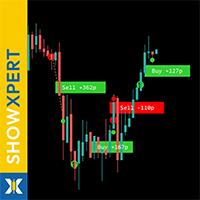
ShowXpert 는 MetaTrader 5 를 위한 시각적 컨트롤 센터 입니다. ShowXpert 는 종료된 Buy 와 Sell 거래를 차트에 직접 표시 하며, 결과를 포인트와 통화 로 보여주는 지능형 도구입니다. 수익 거래는 초록색, 손실 거래는 빨간색으로 표시되며, 모든 것이 명확하고 직관 이며 실시간으로 업데이트됩니다. 한눈에 어떤 세트업이 효과적이었는지, 그리고 현재 거래가 어떻게 진행 중인지 확인할 수 있습니다. 전략 분석, 실시간 모니터링 , 또는 트레이딩을 시각적으로 이해하는 데 최적화되어 있습니다. 모든 요소는 완전하게 사용자 정의가 가능합니다: 색상, 폰트, 라인 스타일, 표시 형식(pips 또는 USD). 그 결과는 정확하고 투명하며 동기부여가 되는 당신만의 퍼포먼스 패널입니다. ShowXpert 는 원시 데이터를 가시적인 결과로 바꾸어 트레이딩을 실제처럼 느끼게 해줍니다. 또한 높은 기준을 가진 트레이더를
FREE

SmartLimits - 시각적 예약 주문 관리자 SmartLimits 는 차트에서 직접 예약 주문을 완전한 시각적 제어로 관리할 수 있는 전문 트레이딩 도구입니다.
MetaTrader의 주문 창을 열지 않고도, 직관적인 온차트 패널을 통해 Buy 또는 Sell Limit/Stop 주문을 생성, 조정 및 확인할 수 있습니다. 이 도구는 반복적인 작업을 최소화하고 입력 오류를 줄이면서, 빠르고 체계적으로 주문을 시각적으로 관리하고자 하는 트레이더를 위해 설계되었습니다. 주요 기능 “New Order” 버튼을 사용하여 차트에서 직접 새 예약 주문을 생성합니다. 라인을 드래그하거나 패널의 값을 수정하여 진입가(Entry), 손절매(SL), 이익실현(TP) 수준을 조정합니다. 한 번의 클릭으로 즉시 주문을 수정하거나 삭제할 수 있습니다. 각각의 제어 패널을 가진 여러 예약 주문을 동시에 관리할 수 있습니다. 가격, 거리, 손익비(R:R) 등 실시간 데이터를 표시하는 시각적 인터페이스. 가격
FREE
VM Auto SLTP Pro - Advanced Order and Risk Management EA VM Auto SLTP Pro는 MetaTrader 5를 위한 전문적인 거래 관리 및 리스크 관리 Expert Advisor입니다. 수동으로 또는 다른 Expert Advisor에 의해 열린 포지션에 대해 Stop Loss, Take Profit, Trailing Stop, Breakeven 및 Partial Close를 자동으로 설정하고 관리합니다. 또한 자동 랏 계산, Recovery 모드, Prop Firm 필터, 뉴스 및 세션 필터, 예약 주문 도구와 Smart Money Concepts (SMC) 기능을 제공하며, 모든 기능은 깔끔한 차트상의 패널을 통해 제어할 수 있습니다. 전체 문서는 제품 블로그에서 확인할 수 있습니다: [User Guide] EA는 ATR, 고정 포인트, 고정 가격, USD 금액, 잔고 대비 비율 및 리스크 기반 포지션 크기 계산을 포함한 다양한 방법

Trade2Telegram — MetaTrader에서 Telegram으로 자동 거래 알림을 보내는 플러그인입니다. 이 도구는 자금을 관리하는 트레이더, 시그널 채널을 운영하는 사람, 또는 교육 커뮤니티를 이끄는 사람을 위해 설계되었습니다. 이 플러그인은 터미널의 모든 거래를 복사하여 선택한 Telegram 채팅, 그룹 또는 채널에 게시합니다. 포지션이 열리거나 닫힐 때, 손절/익절 수준이 변경될 때, 미결 주문이 실행될 때, 또는 거래가 부분적으로 종료될 때 메시지가 자동으로 전송됩니다. 메시지 형식은 다음을 포함하도록 맞춤 설정할 수 있습니다: 거래 상품, 거래 방향, 거래량, 진입 및 청산 가격, SL/TP 수준, 포인트 및 금액 기준 결과. 해시태그와 코멘트 추가, 서버 시간 또는 로컬 시간 선택도 지원합니다. 이 플러그인은 제3자 서비스 없이 Telegram Bot API를 직접 사용하여 작동합니다. 연결하려면 봇 토큰과 원하는 채팅 또는 채널 ID를 제공하면 됩니다. 주요
FREE

Strifor SmartTrade Expert — 전문 트레이더를 위한 솔루션으로, 거래 오픈의 핵심 단계를 자동화합니다: 즉시 스톱로스와 테이크프로핏 설정 거래당 고정 리스크 (Expert 설정에서 지정) 시간 절약 및 수동 입력 오류 방지 Strifor Lot Calculator 와 완벽 연동 (계산기에서 계산된 로트를 Expert에서 동일 리스크로 설정) 단축키
ALT+F4 — 빠른 주문. 한 번 누르면 SL/TP와 고정 리스크가 적용된 주문이 열립니다. 장점 속도 — 즉시 주문 개시, 수동 조작 불필요 규율 — 리스크 항상 동일, 휴먼 에러 제거 범용성 — 모든 상품과 타임프레임에서 사용 가능 신뢰성 — 모든 거래가 보호됨 Strifor SmartTrade Expert — ALT+F4 단축키로 거래 오픈: SL/TP 자동 설정, 거래 리스크 고정.
Strifor Lot Calculator와 완벽 조합. 빠르고, 규율있게, 오류 없이. 설정 Risk per Trade (%)
FREE

Telegram2MT5 Signal Copier — Telegram 신호를 MetaTrader 5에서 자동으로 복사하세요 Telegram2MT5 Signal Copier를 사용하면, Telegram에서 받는 모든 신호가 여러분의 MetaTrader 5 계좌에서 즉시 자동으로 실행됩니다. 빠르고, 신뢰할 수 있으며, 완전히 사용자 지정 가능합니다.
Windows Bridge APP 파일 및 튜토리얼 을 받아보세요 Bridge 파일은 로컬 웹 패널을 MT5 EA와 연결하는 데 필요합니다. Windows 10 & Windows 11 — 64비트 — 그리고 2016년 이후 버전의 Windows Server와 호환됩니다 Main Features 완전 호환: 공개/비공개 채널 모두에서 완벽하게 작동하며, 어떠한 제한도 없습니다. 즉시 실행: ENTRY, STOP LOSS 및 최대 5개의 TAKE PROFIT 레벨을 밀리초 단위로 감지하고 주문을 실행합니다. (현재는 대기 주문 사용 권장)

SFG Grid Manager MT5 – Intelligentes Grid- und Spiegel-System Der SFG Grid Manager MT5 ist ein professioneller, automatischer Grid-Manager, der eine bestehende Position (manuell oder durch einen anderen EA eröffnet) verfolgt und bei jedem definierten Schritt ( GridPips ) eine Durchschnittsorder eröffnet. Sobald die Hauptposition geschlossen oder entfernt wird, schließt der Manager automatisch alle von ihm eröffneten Grid-Trades.
Er funktioniert mit allen Brokern, die Netting- oder Hedging-Kon

RM Pro – 고급 트레이드 매니저
더 똑똑하게 거래하라, 더 어렵게가 아니라
로트 크기, 리스크 비율 또는 스톱로스 수준을 계산하느라 고민하지 마세요. RM Pro는 당신이 전략과 타이밍에만 집중할 수 있도록 정신적 여유를 제공합니다. 단지 리스크 금액과 스톱로스 가격을 설정하고 Buy 또는 Sell 버튼을 한 번 클릭하기만 하면, EA(전문가 어드바이저)가 즉시 주문을 실행하고 올바른 로트 크기를 자동으로 계산하며, 스톱로스를 설정하고 당신이 정의한 리스크에 따라 거래를 관리합니다. 심지어 Buy Limit과 Sell Limit 주문도 자동으로 정확하게 설정되고 관리됩니다.
RM Pro는 복잡한 계산이나 인간적인 실수를 피하고 싶은 트레이더를 위해 설계되었습니다. Prop Firm(펀딩 계좌) 챌린지를 통과하려는 트레이더, PAMM 계좌 매니저, 또는 개인 계좌로 거래하는 트레이더에게 완벽합니다. 규율, 정확성, 그리고 자신감을 가지고 거래하세요.
---
트레이더들

**Sync MT5 – Real-Time Multi-Chart Analysis Manager** chart sync
Transform your MT5 platform into a professional analysis workstation. Sync is a comprehensive tool that synchronizes charts, objects, and crosshairs across multiple windows, allowing you to trade with unprecedented precision and efficiency.
**MAIN FEATURES**
1. **Smart Chart Synchronization** - Synchronize symbols and timeframes across multiple charts with one click. - Group system – Organize your charts by strategy or as

이 도구는 거래 관리에 도움이 됩니다. 목표 1, 2, 3을 포인트 단위로 설정하고, 이 목표가에 청산하고자 하는 랏 수의 백분율을 설정할 수 있습니다. 예를 들어 목표 1, 2, 3을 5달러, 10달러, 15달러로 설정하고, 각 랏 수를 40%, 30%, 30%로 설정했습니다. 이제 4220달러에서 xauusd에 0.1랏으로 진입하면, 목표 5달러에 0.04랏, 목표 10달러에 0.03랏, 나머지 수량은 목표 15달러에 청산됩니다.
손절매는 포인트 단위로도 설정할 수 있습니다.
손절매와 목표는 거래 체결 시 자동으로 설정됩니다.
또한, 추적 손절매 조건이 있어 tp1에 도달하면 sl이 진입 지점으로 이동하고, tp2에 도달하면 sl이 tp1로 이동할 수 있습니다. 이 조건을 켜고 끌 수 있습니다.
차트에는 tp와 sl의 모든 세부 정보를 보여주는 패널이 있어서 포인트를 쉽게 볼 수 있습니다.

Operative Management Pro – Advanced Trading Utility Operative Management Pro is a smart visual tool for traders who want to analyze and simulate their trades before placing them on the market. This panel displays in real-time the most important parameters of the current symbol: Current price and minimum lot size Required margin Spread cost in USD and pips Take Profit and Stop Loss value in USD Automatic risk and reward calculation With just a click on the chart, you can simulate BUY or SELL t

Imagine flying a real aircraft without ever stepping into a flight simulator. That's what trading is like. You have to simulate your strategy before you can take it to a live market. It is good if you can simulate things speedily before even stepping into any live market, or before coming up with an automated system. People don't have all day to stare at a higher timeframe chart until the entry signal finally arrives. That's why I built this so that you can simulate your strategy with speed. Th
FREE

[Regarding Investment Issues]
Question 1:
When market opportunities arise, most investors tend to place orders frantically. However, when placing orders in such a frantic manner, you have no way of knowing whether you will be liquidated. The only reference is the margin ratio, but the margin ratio cannot accurately determine whether you will be liquidated.
If the order quantity is large or the product order quantity is even larger, you cannot calculate the loss and profit. If there is a t

Followgram EA: Advanced Automated Trading Expert for MT5 Check out our Telegram or contact us for a free trial.( https://t.me/Followgram_EA )
We continue to develop the EA further.
We focus on one pair with both buy and sell trades.
We also have a test account that anyone can follow.
(This is not about profits, but about the features.)
Type: MT5 Demo ECN Number: 67167230 Password: Followgram2025! Server: RoboForex-ECN
Overview The Followgram EA is a sophisticated Expert Advisor for MetaTr

TradeVision is a simple and elegant performance indicator for MetaTrader 5. It was designed to give traders a clear and instant overview of their results. Gone are the days of digging through your account history! TradeVision displays a comprehensive and visually intuitive dashboard directly on your trading chart. At a glance, you can assess your efficiency and make more informed decisions. The widget displays your real-time performance statistics, segmented by key periods for a detailed and re
ATTENTION ! Utilities do not have a good functionality on backtest mode. For Having a Demo Trial, message me from message box and receive 3 days trial.
Our Team Services: If you are want to see our products click the link: LINK If you have an idea you'd like to develop into an application, click the link: LINK
Instant on-chart stop & target levels, from 1:1 up to 1:6. Trade Ratio Lines MT5 draws an open stop line and objective lines (take-profit) at fixed R-multiples relative to your entry

Auto-Shutdown MT5 Terminal - Saves you from Over-Trading by automatically closing MT5 Termial when daily loss limits are breached Love it? Hate it? Let me know in a review! Feature requests and ideas for new tools are highly appreciated. :)
Try "The AUDCAD Trader":
https://www.mql5.com/en/market/product/151841 ️ Your Automated Discipline Enforcer "I'll just make back what I lost..."
"One more trade to break even..."
"I can't end the day red..."
Sound familiar? These thoughts have d
FREE
Manual trading panel — opens one test trade for validation only.
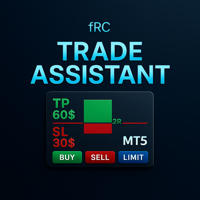
fRC Trade Assistant — Smart Manual Trading Panel fRC Trade Assistant is an intelligent trading panel designed for manual traders.
It allows you to open positions with one click, calculate lot size based on your predefined risk, and automatically place Stop Loss (SL) and Take Profit (TP) levels. For example, if your balance is $1000 and you set a 1% risk ,
the panel automatically calculates the appropriate lot size.
When the trad

Overview:
The Drawdown Control Limiter MT5 is a robust and efficient tool designed for traders who aim to monitor and limit drawdown levels in their MetaTrader5 Live/Demo accounts. This Expert Advisor provides real-time tracking of drawdown percentages or amounts and automatically closes positions if the specified limits are exceeded, helping protect your capital. EA account drawdown protector is designed for normal trading Live and Demo accounts (not for Prop Firms) . Key Features: Customiza

Short Description:
Prop Firm Protector EZ MT5 is an EA designed to protect your funded account by managing risk and ensuring compliance with the Prop Firm's trading rules. This EA automatically monitors equity levels, closes trades when profit targets or drawdown limits are reached, and provides a visual display of key account metrics. The EA features a Super Easy setup, is simple to use, and works with all different Prop Firm service providers.
Overview:
Prop Firm Protector EZ MT5 is an Draw
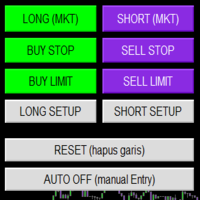
Smart Trade Panel
Trading Assistant is a powerful and elegant one-click trading panel for MetaTrader 5 — designed for professional traders who value speed, precision, and clarity.
Whether you scalp XAUUSD, swing trade indices, or run tight risk management, this tool gives you complete control with a clean visual layout, automatic ATR-based setups, and adaptive risk calculation.
️ Main Features One-Click Execution
Instant Buy/Sell Market Orders with pre-defined SL/TP
Supports Buy Stop
FREE

NiceProTrader Manager - Professional Risk & Trade Management Panel Trade with Confidence, Not with Fear! Control Your Exact Risk in Dollars with One Click. 2. Product Overview (The "Why") "Tired of complex lot size calculations and the fear of risking more than you planned? NiceProTrader Manager is a powerful and intuitive panel for MetaTrader 5 that revolutionizes how you manage your trades. Set your exact risk, stop loss, and take profit in dollars , not pips, and let the EA handle all the co

The Trade Panel Dashboard is a powerful, user-friendly interface designed to streamline and enhance your trading experience. This centralized hub provides real-time data visualization, advanced analytics, and seamless execution tools, empowering traders to make informed decisions with precision and speed. Key Features: Real-Time Market Data
Access live price feeds, market trends for multiple assets (stocks, cryptocurrencies, forex, commodities, etc.) in one consolidated view. Order Management
여기를 클릭하여 제 모든 무료 제품을 확인하세요
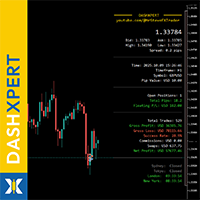
DashXpert 는 MetaTrader 5 를 위한 완전 무료의 강력한 대시보드로, 모든 핵심 시장 데이터, 계정 정보, 성과 통계 를 차트에 직접 표시합니다. 여러 창과 탭을 오가야 할 필요 없이, DashXpert 는 중앙 집중식의 스마트한 개요 화면 을 제공합니다 - 최대한의 명확성, 최소한의 방해 요소, 그리고 전문적인 디자인을 위해 최적화되어 있습니다. 이를 통해 당신은 보유 중인 포지션, 손익, 승률, 계정 잔액 을 실시간으로 명확하게 파악할 수 있습니다. 이로 인해 DashXpert 는 일상적인 편의 기능을 넘어서, 당신의 트레이딩을 이해하고 개선하며 투명하게 시각화할 수 있는 완전한 성과 모니터링 도구 가 됩니다. 또한 이 대시보드는 가장 중요한 트레이딩 세션(Sydney, Tokyo, London, New York) 을 상태와 함께 자동 표시하여, 시장이 언제 어디에서 움직이는지 즉시 확인할 수 있습니다. 모던하
FREE
여기를 클릭하여 제 모든 무료 제품을 확인하세요
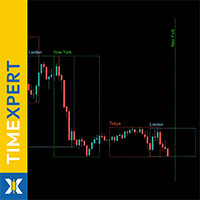
TimeXpert 는 MetaTrader 5 를 위한 완전 무료 도구로, 전 세계 트레이딩 세션 - Tokyo, Sydney, London, New York - 을 차트에 직접 표시합니다. 시간을 수동으로 계산할 필요 없이, 자동 색상 코드 개요 를 제공하여 시장이 언제 열리고, 겹치고, 닫히는지 를 한눈에 확인할 수 있습니다. 이를 통해 변동성이 어디에서 발생하는지 , 유동성이 언제 증가하는지 , 그리고 어떤 시간대가 당신의 트레이딩 전략에 가장 적합한지 즉시 파악할 수 있습니다. 모든 요소는 완전히 사용자 정의 가능 하며, 색상, 선 스타일, 표시할 세션 수까지 설정할 수 있어 TimeXpert 는 모든 트레이더에게 유연한 도구가 됩니다. TimeXpert 는 당신의 트레이드 타이밍을 완벽하게 조정 할 수 있도록 도와주며, 움직임이 언제 시작되고 어떤 세션이 가장 강한 시장 임펄스를 제공하는지 정확히 보여줍니다. 이는 모든
FREE

AIX GROK FJU ASSISTANT | MetaTrader 5 AI 기반 트레이딩 어드바이저 AIX GROK FJU ASSISTANT로 트레이딩을 혁신하세요. 이 첨단 MetaTrader 5(MT5) 전문 어드바이저(EA)는 xAI에서 개발한 GROK의 최첨단 AI 기술을 활용하여 실시간 기술적 분석과 트레이딩 인사이트를 제공합니다. 초보자와 숙련된 트레이더 모두를 위해 설계된 이 EA는 MT5 차트를 GROK AI에 연결하여 데이터 기반의 감정에 영향을 받지 않는 트레이딩 신호를 Discord 또는 Telegram으로 직접 전송합니다. 매 캔들 마감 시 차트 데이터를 분석함으로써 AIX GROK FJU ASSISTANT는 더 스마트하고 빠른 의사결정을 가능하게 하여 AI 정밀도로 수동 트레이딩 전략을 강화합니다. 스캘핑, 스윙 트레이딩, 또는 장기 포지션 관리를 하든, 이 EA는 비교할 수 없는 유연성과 실시간 지원을 제공하여 변동성이 큰 시장에서 앞서 나갈 수 있도록 돕습니

Manual position management. Missing SL. Price moves against you. No protection.
Trade Manager Lite automates Stop Loss, Take Profit, Trailing Stop, and Break-Even for your open positions. Attach to one chart. Configure your default SL/TP distance. Let it manage your positions automatically. What's Included (FREE Version) Auto SL/TP: Applies missing Stop Loss and Take Profit to positions based on your configured distance in points Trailing Stop: Adjusts SL dynamically as price moves in your favor
FREE


R.E.A. Automatic Risk Monetary (MT5) – Per-symbol manager for manual entries & pending orders Summary (hero) Automate risk management for manual trades (magic 0) and pending orders on the chart’s symbol : SL/TP by % of balance or fixed amount , BreakEven and Trailing (for positions), with instant reaction on order placement/execution. What it does Locked to the symbol where you attach it, this EA manages only: Your manual positions on that symbol. Your pending orders on that symbol (limit/stop/s
FREE

Take your technical execution to the highest level with the Fimathe Robot Designed specifically for professional traders who demand absolute precision, stability, and tactical flexibility, this Expert Advisor automates the time-tested Fimathe methodology by combining the intelligence of modern algorithms with a robust, high-performance interface. With a modern visual layout, the Painel Pro 5.5 offers complete operational freedom: execute trades in 100% manual mode with panel assistance or activ

TM Assistant Trade is a trading assistant tool designed for MetaTrader 5 (MT5). It helps users configure, monitor and manage trades directly on the chart through an interactive interface, minimizing manual operations and improving trading consistency. Introduction to TM Assistant Trade 1. Trading Interface
Line Function - Display on the trading screen (Entry price - Take profit - Stop loss) through icons and lines to help traders perform operations more conveniently.
Main area with screens displ

PGS Trade Panel – Professional Trade Management Tool for MT5 Take full control of your trading with structured execution, real-time feedback, and customizable automation, all directly on your chart. Profit Guard System Trade Panel is an advanced on-chart trading tool designed to give you discipline, clarity, and precision in every trade. It supports manual, semi-automated, and automated workflows with multiple strategies that can be enabled, customized, or disabled at any time. Automatic Take P

Risk Panel VIP (MT5) Risk Panel VIP is a professional tool for MetaTrader 5 designed for fast, disciplined execution. It calculates position size from your balance risk and places Stop Loss / Take Profit accordingly. This is a trade management utility; it does not provide trading signals and does not guarantee any profit. Main functions Draggable Stop Line : place the stop on chart; the panel auto-calculates lot size from your configured risk % of balance (default 2%, editable). Context-aware a

Telegram Trade Notifier for MT5 is a professional notification system that sends instant messages to your Telegram group or channel every time a trade is opened or closed on your MT5 account. MAIN FEATURES Sends notifications for every trade open and close
Compatible with Telegram Groups, Channels, and Topics (threads)
️ Customizable scan frequency and filters
Persistent memory (no duplicate messages after restart)
Ignores trade history — sends only new events
️ 100% safe: no DLLs
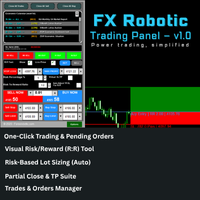
FX Robotic Trading Panel — v1.0 by Forex Robotic All-in-one MT5 panel for one-click execution, visual R:R control, risk-based lot sizing, partial closes (incl. virtual TPs), news, and MA signals—right on your chart. Overview FX Robotic Trading Panel is a professional, on-chart control center for MetaTrader 5 that blends lightning-fast trade execution , visual Risk/Reward management , auto lot sizing from risk% , staged partial take-profits (real or virtual ), an economic calendar , and a multi
FREE

RiskManager is a simple yet powerful script for MetaTrader 5 that helps traders calculate the optimal lot size for every trade. By entering your desired risk amount and stop loss in pips, RiskManager instantly calculates the correct lot size using live market prices. This ensures you never risk more than you intend, making your trading safer and more consistent. Importance: Proper risk management is essential for long-term trading success. RiskManager takes the guesswork out of position sizing,

Category: Utilities → Trade Panels
Version: 1.2 (auto-sizing buttons + adjustable font size) ClickCloserExpress is a super-lightweight panel for MetaTrader 5 that lets you close positions instantly by profit/loss, symbol, side (Buy/Sell), and magic number— without opening new trades or cluttering your chart. Perfect for manual/semi-auto management, scalping, and fast portfolio clean-ups. What it does One-click closing of: All positions. Profitable only or losing only . Symbol on chart o

Adaptive ATR Trailing Stop (MT5)
Overview Adaptive ATR Trailing Stop is a utility Expert Advisor for MetaTrader 5 that manages stop loss levels for existing open positions. It uses the Average True Range (ATR) to calculate a volatility-based trailing distance.
This EA does not open trades. It only modifies the Stop Loss (SL) of existing positions and keeps the current Take Profit (TP) unchanged.
How it works - The EA runs on every tick of the chart where it is attached. - For each open posit
FREE

Candle Time (MT5) The Candle Time indicator shows the remaining time for the current candle on the active chart timeframe. It adapts automatically to the chart period and updates on every tick. This is a charting utility; it does not provide trading signals and does not guarantee any profit. Main functions Display the time remaining for the current candle on any timeframe (M1 to MN). Color-coded state: green when price is above the open (up), gray when unchanged, and red when below the open (do
FREE

Elsna Alert (MT5 EA) is a lightweight Expert Advisor that monitors your trading account in real time and alerts you whenever a trade is opened or closed . It uses MetaTrader 5’s built-in OnTradeTransaction event to instantly detect any new executed deals—manual or automated—and plays a custom sound for each event.
You can choose whether it tracks all symbols or only the chart’s symbol . Key features: Instant audio alert when a trade opens or closes. Works with both manual and EA-driven trades. O
FREE

Trendline Toolbox (MT5) Trendline Toolbox is a utility indicator for MetaTrader 5 that helps manage trendlines and common chart objects. It is a charting tool; it does not provide trading signals and does not guarantee any profit. Main functions Clone the selected trendline (keeps style, angle, and price levels). Toggle the Extend/Ray property for the selected trendline. Delete the selected trendline. Purge all objects on the current chart. Draggable panel: double-click the hand icon and drag t
FREE

Помощник для ручной торговли. Рассчитывает лот по вашему риску, показывает все параметры сделки до её открытия.
Два режима: Market - для входа по текущей цене. Линия Open следит за Ask/Bid автоматически. Breakout - для отложенных ордеров. Выбираешь свечу и таймфрейм, линии ставятся на High/Low.
Можно менять цвета линий, переназначать клавиши, двигать панель куда удобно.
FREE
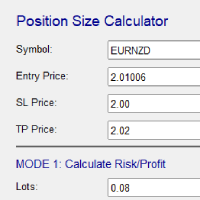
Risk and Position Size Calculator – Expert Advisor Utility A powerful and easy-to-use EA utility designed to help traders manage risk with precision. It automatically calculates the optimal position size based on your account balance, chosen risk percentage, and stop loss. In addition, it calculates potential profit and displays take profit levels directly on the chart. Fully customizable and compatible with all instruments and timeframes, it's the perfect tool for improving your risk management

TradeMind Pro EA - Description Why TradeMind Pro EA is Essential for Your Trading Success Revolutionary LLM-Powered Trading: The world's first Expert Advisor built entirely on Large Language Model technology, bringing the power of advanced AI reasoning directly to your MetaTrader 5 platform. TradeMind Pro EA doesn't rely on traditional technical indicators or hardcoded algorithms – instead, it leverages cutting-edge Language Models (GPT-4, Claude, Gemini) to analyze market conditions with hu

BTC Trading Assistant EA (MT5) Manual trading assistant that helps place and manage trades with automated risk and stop management. Overview BTC Trading Assistant EA is a utility Expert Advisor for MetaTrader 5 intended for manual traders. It provides a chart interface to execute BUY/SELL/CLOSE actions and automates selected trade management functions such as position sizing, initial SL/TP placement, break-even, trailing stop and optional partial profit taking. This EA does not generate trade si

Trade History By Magic Indicator Unlock Your Trading Insights with Trade History By Magic! Enhance your MetaTrader 5 experience with this powerful indicator designed for traders who demand precision and clarity. Trade History By Magic provides a clear, real-time display of your trading history, organized by magic numbers, directly on your chart. Perfect for both automated and manual traders, this tool helps you track performance effortlessly. Key Features: Organized Trade Tracking : Displays tra

# Trading Info Panel - Your Complete Trading Dashboard
## Why This Indicator Was Created
As a fullscreen trader, I was constantly frustrated with the hassle of: - Exiting fullscreen mode to check positions - Switching between charts and the terminal window - Losing focus on price action while checking account status - Missing critical margin levels during active trading
**I needed a simple, elegant solution that kept all vital trading information visible at a glance - without disruptin
FREE

Product Name: Magic Simulator “ Find your own 'Signature Setup ” Version: 1.0
From 'I Missed It' to 'I Took It' Transform those frustrating near misses into consistent winners. Practice each setup until your reaction becomes automatic and hesitation-free.
Full Product Description: Become a Confident, Disciplined Trader – Risk-Free Have you ever felt the sting of a bad trade and wished you could rewind time? Do you struggle with fear, greed, or hesitation? Ever spotted the perfect setup but mi

sTrade UI is a compact, lightweight alternative for O ne-Click Trading which built-in MT5 didn't offer.
Designed for traders especially scalpers who want a clean and fast trade execution. Key features: Minimal CPU footprint Docked One-click Right Panel to Perform New Position*
One-click Close at Position's Price* Ability to Close All Position* Option to stick Position's PL info to latest candle and able to colorize it *: Tied to EA's Magic number (EA's Id), set to 0 if want Globally This is m
MT5 → Telegram Notifier (Utility · Informers) Send trading events from MetaTrader 5 directly to Telegram. Perfect for journaling, team alerts, or remote monitoring. What it does Trade Open : posts BUY/SELL, BUY/SELL Limit, BUY/SELL Stop, lots, entry, SL/TP, local time. (Optional chart screenshot.) SL/TP Update : short message — only what changed (new SL or TP), posted as reply to the original trade message. Partial / Full Close : posts closed volume, price, Net P/L (swap + commission included),

이 유용한 전문가 고문 은 Parabolic SAR 지표를 활용하여, 오픈된 주문의 손절매(SL) 수준을 동적으로 설정하고 트레일 하여, 이익을 보호하고 수동 거래 관리를 최소화합니다. 주요 특징 동적 SL 조정: EA는 새로운 바마다 현재 Parabolic SAR 지점이 나타내는 수준으로 모든 오픈 포지션의 손절매(SL)를 자동으로 조정합니다. 추세 추종 보호: Parabolic SAR의 가속 특성 덕분에 강력한 추세 동안 SL이 가격을 밀접하게 추종하도록 보장합니다. 사용자 정의 가능한 민감도: 사용자는 SARSteps 및 SARMax 매개변수를 지정하여 트레일링 스톱 메커니즘의 가속도와 민감도를 미세 조정할 수 있습니다. 손쉬운 작동: 차트에 한 번 첨부되면, EA는 백그라운드에서 자동으로 작동하며, 수동 개입 없이 SL을 업데이트합니다. 사용 방법 오픈된 거래 포지션이 있는 차트에 EA를 첨부합니다. EA는 지정된 매개변수를 기반으로 현재 Parabolic SAR 수준을 계산

수동 헬퍼 TP (Manual Helper TP) 이 도구는 수익을 보호하고 위험을 줄이는 데 도움이 되도록 설계되었습니다. 거래에 대한 손절(Stop Loss)을 설정하고 트레일링 스톱(Trailing Stop)을 관리합니다. 사용 방법 거래하는 종목의 차트에 첨부하면 규칙에 따라 포지션을 처리합니다. 모든 설정은 포인트 단위입니다. 사용하는 종목과 전략에 맞게 조정하는 것이 중요합니다. 기본 설정은 XAUUSD에서 작동할 수 있습니다. 스캘핑의 경우 더 작은 SL, BE 및 TP를 사용하는 것이 좋습니다. 이 EA(Expert Advisor)는 절대로 스스로 거래를 시작하지 않습니다. 이 EA의 유일한 임무는 개인 설정에 따라 기존 거래의 손절을 관리하는 것입니다. 수동 거래 또는 다른 EA가 연 거래를 관리하는 강력한 보조 도구입니다. 주요 기능 초기 손절(Initial Stop Loss): 손절 없이 거래가 시작된 경우, 이 유틸리티는 설정에 따라 자동으로 손절을 추가합니다.
FREE
OVERVIEW Transform your MT5 trading account into an automated signal execution station! This Expert Advisor automatically receives and executes trading signals from Telegram channels in real-time, enabling seamless copy trading operations from master accounts.
SYSTEM NOTICE: This EA receives and executes trading signals FROM Telegram channels. To broadcast signals TO Telegram, you need the companion EA: " Telegram Signal Broadcaster MT5 " (sold separately). KEY FEATURES: Automated signal recept

Play Trading: Get started in trading by playing and learning how Limit (rebound) and Stop (continuation) orders work. From a mobile and transparent panel (by clicking on the header), anticipate market developments and place Limit and/or Stop orders. Set the initial distance to generate the grid with the number of orders you want (for each type of order). Set the take profit points and lot size as you wish. Set the type of orders you want: BUY – SELL – NO (delete orders) – BOTH (Buy and Sell
FREE

EdgeZone EA Inspector - FREE Edition Monte Carlo Analysis Tool for Trading Strategies Important: This is an analysis tool, not a trading robot. It does not execute trades but analyzes strategy data through statistical simulations. The Problem Many Expert Advisors show impressive backtest results but fail in live trading. The most common reason: over-optimization - the strategy was adjusted until it looks perfect for past data, but doesn't work for the future. The Solution: EdgeZone EA Inspector
FREE
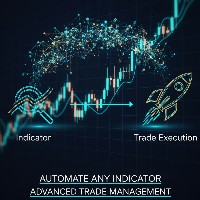
Indicator Automator EA: The Ultimate Indicator Automation Tool Tired of being chained to your desk, waiting for signals from your favorite indicator? Do you want to eliminate emotional trading and unlock the true potential of your manual strategy? Indicator Automator EA is a powerful and highly versatile Expert Advisor for MetaTrader 5 designed to automate any trading indicator that provides clear Buy and Sell signals through its indicator buffers. You don't need to be a programmer. If you have

Product Overview The Simple Telegram Copy Trader is a FREE unified Expert Advisor that combines both Master and Slave functionality in a single EA with easy mode switching. This simplified version focuses on OPEN TRADES ONLY , making it perfect for basic copy trading setups without the complexity of advanced features.
Get professional-grade copy trading with complete lifecycle management: Telegram Signal Broadcaster MT5 (Master)
Telegram Signal Subscriber MT5 (Slave) Key Features Unified Des
FREE

TA Ideas is a smart assistant for traders who rely on technical analysis. It automatically identifies potential support and resistance zones, marks key extremum points, and considers trading volumes on each bar. This tool helps you spot meaningful structures on the chart faster and with greater precision. Its clear, minimalist visualization makes analysis more intuitive, while flexible customization options allow adaptation to your individual strategy.
FREE

OVERVIEW Transform your MT5 trading account into a professional signal broadcasting station! This Expert Advisor automatically publishes your trading activity to Telegram channels in real-time, enabling seamless copy trading operations.
SYSTEM NOTICE: This EA broadcasts trading signals TO Telegram channels. To receive and execute signals FROM Telegram, you need the companion EA: " Telegram Signal Subscriber MT5 " (sold separately).
KEY FEATURES: Real-time trade broadcasting to Telegram Support

TradeDataLogger - Essential Data Collection Tool for Professional Trading Analytics Suite EA TradeDataLogger is a powerful MQL5 utility designed to seamlessly integrate with the Professional Trading Analytics Suite, enabling comprehensive analysis of your trading performance. This tool automatically captures and logs critical trading data from your MetaTrader 5 platform, making it ready for in-depth analysis and visualization. The logger systematically records all essential trading metrics inclu

Overview The MT5 Local Trade Copier synchronizes trades from a Master account to one or more Slave accounts. It copies positions and pending orders with duplicate protection, symbol mapping, and adjustable lot sizes. Time and day filters can be applied for flexible operation Features Copy positions and pending orders from Master to Slave accounts. Select which trades to copy: all trades, positions only, orders only, buy-only, or sell-only. Adjust lot sizes using fixed lots, risk percentage of ac
FREE
Symbol Cycler & Sync Tool - User Guide This Expert Advisor (EA) is a powerful utility designed to streamline the management of multiple charts in MetaTrader 5. It allows you to group charts together and control them simultaneously, saving you time and improving your workflow. Core Features Multi-Chart Syncing: Create "Sync Groups" by assigning the same SyncGroupID to multiple charts. All charts in a group act as one, allowing you to change their symbols and sync objects across them instantly. Cu
Session Timers (MT5) Session Timers adds a clean ribbon at the bottom of the chart showing the time until open and time until close for major FX sessions. While a session is open, a progress bar fills in real time. Vertical separators also mark session open and close directly on the chart. This is a charting utility; it does not provide trading signals and does not guarantee any profit. Sessions covered Sydney Tokyo Frankfurt London New York Main functions Countdown to each session’s next open/
FREE

Equity Risk Manager EA is a smart tool designed to protect your trading capital by monitoring equity performance in real time. It automatically blocks new trades when your profit or loss thresholds are reached, based on your selected period — daily, weekly, or monthly. No more accidental overtrading or commission losses: once your target is hit, the EA alerts you and halts further entries. Ideal for prop trading firms traders.

# Scorpion 75 - Advanced Adaptive Grid Trading Robot. ## Product Overview
Scorpion 75 is a sophisticated fully automated grid trading Expert Advisor that employs adaptive algorithms to dynamically adjust trading positions based on market conditions. Unlike traditional grid systems, Scorpion 75 features intelligent repositioning, comprehensive risk management, and multiple operational modes to optimize performance across various market environments.
## Key Features
### **Adaptive Grid

# Higher-Lower Pending Bot - Advanced Multi-Pending Orders System
## Revolutionize Your Trading with Smart Pending Order Automation
Welcome to the **Higher-Lower Pending Bot** - the most sophisticated pending order management system available on MQL5. Designed for traders who want to maximize opportunities while minimizing manual effort, this EA combines intelligent order placement with comprehensive profit tracking in one powerful package.
## What Makes Our Bot Unique?
### Smart D

MT5 TradeZone Manager – Advanced Position Cluster Control EA Trade Smarter – Earn Steady Profits.
MT5 TradeZone Manager is a powerful Expert Advisor designed for traders who use high-volume or full-margin trading strategies within specific pip ranges. It automatically manages your positions inside a defined “Trade Zone,” ensuring your stop loss and take profit levels stay perfectly synchronized — saving you time and reducing risk. Key Features Zone-Based SL/TP Management
When you modi
Trades Manager Pro – Only Buy is a professional trade management tool designed to fully automate risk control and profit-taking for BUY trades only, on any symbol, pair, or instrument you apply it to . It calculates a risk-based stop loss once per position, ensuring consistent capital protection without repeated modifications. The system supports up to three customizable partial take profit levels (TP1, TP2, TP3), each closing a defined percentage of trade volume to secure profits step by step,
MetaTrader 마켓 - 트레이더를 위한 로봇 및 기술 지표는 거래 터미널에서 바로 사용할 수 있습니다.
The MQL5.community 결제 시스템은 MQL5.com 사이트의 모든 등록된 사용자가 MetaTrader 서비스에서 트랜잭션을 수행할 수 있습니다. 여러분께서는 WebMoney, 페이팔, 또는 은행 카드를 통해 자금을 예치하거나 인출하실 수 있습니다.
