 MetaTrader 5
 Experts
 지표
 스크립트
 라이브러리
 보관함
거래 로봇을 무료로 다운로드 하는 법을 시청해보세요
당사를 Facebook에서 찾아주십시오!
당사 팬 페이지에 가입하십시오
스크립트가 마음에 드시나요? MetaTrader 5 터미널에서 시도해보십시오

Backtest Data Preflight: check broker bar and tick history - MetaTrader 5용 스크립트
George Ciprian Mandache

Mostly writing code that does stuff...
User guides are on my blog. For questions or bugs, write in the product's Comments tab or send me a message.
- 조회수:
- 111
- 게시됨:
- 업데이트됨:
-
 이 코드를 기반으로 한 로봇이나 지표가 필요하신가요? 프리랜스로 주문하세요
프리랜스로 이동


Backtest Data Preflight shows what price history your MetaTrader terminal can read for a symbol, timeframe and date range. Check the report before starting a backtest if you want to see whether the broker returned bars near the dates you asked for.
The script also runs on MetaTrader 4. Save the downloaded source as BacktestDataPreflight.mq4 in MQL4/Scripts and compile it in MetaEditor.
Run a check
- Compile the script in MetaEditor and drag it from Navigator onto a chart.
- Use the chart symbol and timeframe, or pick a timeframe and enter another symbol from Market Watch.
- Set From and To in broker server time. The check includes From and excludes To. Leave both at zero for the last 30 days.
- On MetaTrader 5, turn on Check tick history to inspect ticks as well. Read the report in Experts.
Read the report
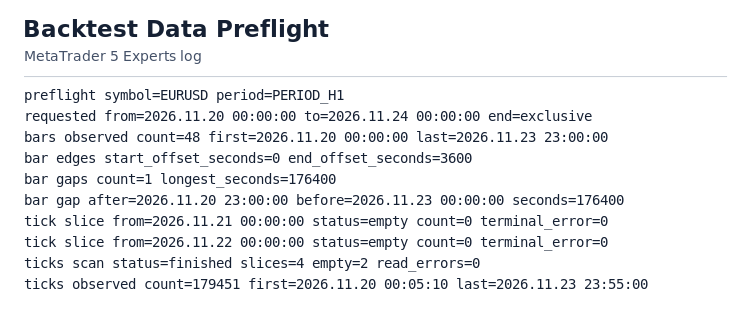
- The bar count and first and last opens show what the terminal returned. The edge offsets show how far those opens are from the requested dates.
- A gap is a pair of opens farther apart than the selected timeframe. Check the dates against normal trading hours. Weekends and holidays can produce gaps. Monthly bars show the observed dates without a gap count.
- The MT5 tick scan checks each server date separately. Empty reads and reads that returned an error have separate totals. When ticks are available, the report gives their count and the first and last timestamps.
Try it on an hourly currency chart over a weekend. The report shows the interval between Friday's last open and the next one. Use the Strategy Tester report to check what the test actually ran on.
 TradeGateway: Fake Broker for Trade Management Tests
A library for MetaTrader 5 that puts trade management code behind an interface and tests it against a fake broker, without a trade server. The fake checks stops level, freeze level, tick grid and volume step, answers with retcodes chosen by the test and logs every request. An example break-even rule and 26 test cases come with it.
 Trailing Stop That Starts at the Take-Profit Level
Starts a trailing stop when the price reaches the take-profit zone of a position you already have open. The take profit is removed, extended or kept. It never opens trades.
 Symbol Trading Hours: broker trade sessions, countdown and off-session bars
An indicator that reads the broker's weekly trade-session schedule for the chart symbol and shows whether trading is open, when the next close or open happens and a live countdown to it. It also marks bars that lie completely outside the trade sessions.
Range Expansion Clock: When the Day's Range Actually Gets Made.
A per-hour profile of when the day's range actually gets built, plus a live readout of whether today is running ahead of or behind its usual pace