George Ciprian Mandache
  • 정보
5+ 년도
경험
5
제품
7
데모 버전
0
작업
0
거래 신호
0
구독자
Mostly writing code that does stuff...

User guides are on my blog. For questions or bugs, write in the product's Comments tab or send me a message.
George Ciprian Mandache
Video of the rule language: https://youtu.be/i5lHA5d0JRE Multi Timeframe Signal Workshop marks every bar where a signal you build fires. Every signal is a rule written in a small text language: the condition cards write it for you as you click, and a signal file takes it as you type it...
George Ciprian Mandache
Multi Timeframe Signal Workshop watches signals you build from indicators on any timeframe and marks every bar where one fires...
George Ciprian Mandache 출시돈 제품

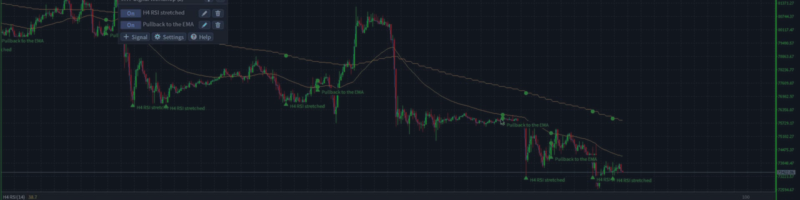
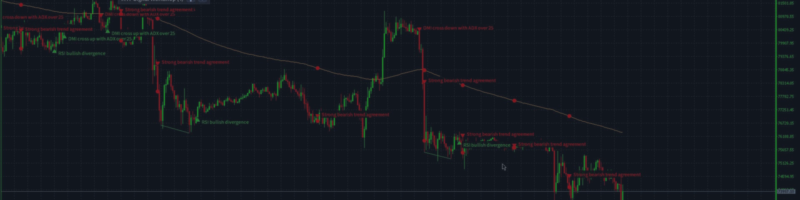
Multi Timeframe Signal Workshop은 어떤 타임프레임의 지표로든 직접 만든 시그널을 감시하고, 시그널이 발생한 모든 봉에 표시하는 MetaTrader 4용 지표입니다. "H4 RSI 과매도이면서 가격이 일봉 EMA 200 위에 있음" 같은 시그널을 코드 없이 클릭만으로 만들 수 있고, 발생할 때마다 시그널이 읽은 구역, 라인, 지표 값과 함께 차트에 그려집니다. 36개의 기본 시그널이 함께 제공되며, 새로운 발생이 나타나면 알림을 보냅니다. 출시 가격: 처음 10카피는 49 USD, 이후에는 79 USD입니다. 기능 클릭으로 시그널 만들기. 타임프레임, 지표와 그 매개변수(RSI의 기간, 볼린저 밴드의 편차), 확인할 내용(과매도, 교차, 다이버전스, 구역 안의 가격, 한 라인이 다른 라인보다 위)과 언제 성립해야 하는지를 고릅니다. 조건은 그룹으로 묶을 수 있습니다. 모두, 그중 하나, 또는 지정한 개수 이상입니다. 한 시그널에 여러 타임프레임. 한 조건은

George Ciprian Mandache 출시돈 제품

Multi Timeframe Signal Workshop은 어떤 타임프레임의 지표로든 직접 만든 시그널을 감시하고, 시그널이 발생한 모든 봉에 표시하는 MetaTrader 5용 지표입니다. "H4 RSI 과매도이면서 가격이 일봉 EMA 200 위에 있음" 같은 시그널을 코드 없이 클릭만으로 만들 수 있고, 발생할 때마다 시그널이 읽은 구역, 라인, 지표 값과 함께 차트에 그려집니다. 36개의 기본 시그널이 함께 제공되며, 새로운 발생이 나타나면 알림을 보냅니다. 출시 가격: 처음 10카피는 49 USD, 이후에는 79 USD입니다. 기능 클릭으로 시그널 만들기. 타임프레임, 지표와 그 매개변수(RSI의 기간, 볼린저 밴드의 편차), 확인할 내용(과매도, 교차, 다이버전스, 구역 안의 가격, 한 라인이 다른 라인보다 위)과 언제 성립해야 하는지를 고릅니다. 조건은 그룹으로 묶을 수 있습니다. 모두, 그중 하나, 또는 지정한 개수 이상입니다. 한 시그널에 여러 타임프레임. 한 조건은

George Ciprian Mandache
Multi Timeframe Indicator Suite 1.9 for MT5 and MT4:
- Fixed: on a chart with docks of different timeframes or different Draw last settings, a dock could stay blank and leave empty space at the bottom of the chart, or draw its line off its candles. Every dock now draws under its own candles.

MT5: https://www.mql5.com/en/market/product/203076
MT4: https://www.mql5.com/en/market/product/203387
User guide: https://www.mql5.com/en/blogs/post/779070
George Ciprian Mandache
Multi Timeframe Indicator Suite 1.8 for MT5 and MT4:
- On every new bar, an entry updates only the bars it draws (its Draw last setting) instead of every bar on the chart. Charts with a long history, such as M1 charts, and the Strategy Tester use much less CPU.

MT5: https://www.mql5.com/en/market/product/203076
MT4: https://www.mql5.com/en/market/product/203387
User guide: https://www.mql5.com/en/blogs/post/779070
George Ciprian Mandache
Multi Timeframe Indicator Suite 1.7 for MT5 and MT4:
- Trend settings: each method shows its On/Off button first and its own numbers right under it, two per line, while it is On. A VWAP's band widths sit under Bands the same way.
- Hovering over a Trend method shows what it checks, with your numbers.
- A settings window of several pages no longer splits a method from its numbers or ends a page on a heading.

MT5: https://www.mql5.com/en/market/product/203076
MT4: https://www.mql5.com/en/market/product/203387
User guide: https://www.mql5.com/en/blogs/post/779070
George Ciprian Mandache
Multi Timeframe Indicator Suite 1.6 for MT5 and MT4:
- Supertrend flips on the bar where the close crosses the current band, one bar earlier than before; new entries use ATR period 10.
- Parabolic SAR never moves inside the range of the two bars before it.
- Bollinger Bands use the population standard deviation, so at 20 bars they are about 2.6% narrower.
- Keltner Channels are the 20 EMA plus and minus 2 times the ATR, with a new ATR period setting.
- S/R zones break only on a close from the other side; supply and demand zones need opposite moves into and out of the base; a fair value gap needs a middle candle that closes past the first candle and fills only when price trades past its edge.
- The Trend entry's settings window shows each method's own numbers.
- Fixed: a click into a number box of the settings window no longer loses what you type next.

MT5: https://www.mql5.com/en/market/product/203076
MT4: https://www.mql5.com/en/market/product/203387
User guide: https://www.mql5.com/en/blogs/post/779070
George Ciprian Mandache
Multi Timeframe Indicator Suite 1.5 for MT5 and MT4:
- Fixed: closing MetaTrader with the indicator on a chart could leave errors about deleting its panel and drawings ("Wrong chart ID") in the Experts log.

MT5: https://www.mql5.com/en/market/product/203076
MT4: https://www.mql5.com/en/market/product/203387
User guide: https://www.mql5.com/en/blogs/post/779070
George Ciprian Mandache
All my MQL code lives in one repository: a library of shared headers and the experts, indicators and scripts built on it. Every program ships for MetaTrader 5 and MetaTrader 4 from the same source...
George Ciprian Mandache
Multi Timeframe Indicator Suite 1.4 for MT5 and MT4:
- MT4: the weekly VWAP of the Default and MA Ribbon + VWAP + Quad Stoch presets stayed empty when the terminal held only a few days of M1 history. It now draws on coarser bars from the start of the week, with a note such as "(on M15 bars until M1 history loads)", and moves to M1 once that history is there.
- MT5: a VWAP does the same while its M1 history loads, instead of staying empty.

MT5: https://www.mql5.com/en/market/product/203076
MT4: https://www.mql5.com/en/market/product/203387
User guide: https://www.mql5.com/en/blogs/post/779070
George Ciprian Mandache
Multi Timeframe Indicator Suite 1.3 for MT5 and MT4:
- Fixed: in the settings window, an On/Off button could keep showing its old state after a click when the window had just changed to another indicator, such as Trend picked after adding Supply/Demand. The setting itself changed and was saved; the button now shows it too.
- Calculations are unchanged: every indicator shows the same values as in 1.2.

MT5: https://www.mql5.com/en/market/product/203076
MT4: https://www.mql5.com/en/market/product/203387
User guide: https://www.mql5.com/en/blogs/post/779070
George Ciprian Mandache
Multi Timeframe Indicator Suite 1.2 is out for MT5 and MT4, free as before.

What changed:
- Eight price structure indicators: Swings, Market structure with BOS and CHoCH, Fib, FVG, Order blocks, S/R, Supply/Demand, and Trend, a dock strip that shows where the trend methods you switch on agree. Their labels, lines and boxes do not count toward the 32 lines.
- The Indicator list groups the indicators under headers, and typing filters it by an indicator's name or its group's.
- Number fields have - and + buttons, On/Off settings are toggle buttons, and the panel's buttons carry icons.
- A space in a dropdown's filter no longer opens the terminal's quick navigation bar.
- MT4: switching the chart's timeframe no longer takes about two seconds.
- Calculations of the indicators from 1.1 are unchanged: they show the same values.

MT5: https://www.mql5.com/en/market/product/203076
MT4: https://www.mql5.com/en/market/product/203387
User guide: https://www.mql5.com/en/blogs/post/779070
George Ciprian Mandache
Multi Timeframe Indicator Suite 1.1 is out for MT5 and MT4, free as before.

What changed:
- ATR and Volume can draw the average of their line in the same dock. Set its length with Average; it is off by default.
- On a timeframe where the broker keeps only a short history, an indicator now draws the bars there are and says so, instead of showing (loading) forever.
- Every dropdown has a filter on top, and a refused Save shows its reason in red.
- MT5: switching the timeframe with the indicator editor open no longer freezes the chart.
- MT4: the indicator no longer drops off the chart after a timeframe switch.
- Calculations are unchanged: every indicator shows the same values as in 1.0.

MT5: https://www.mql5.com/en/market/product/203076
MT4: https://www.mql5.com/en/market/product/203387
User guide: https://www.mql5.com/en/blogs/post/779070
George Ciprian Mandache
Multi Timeframe Indicator Suite draws indicators from any timeframe on one chart. You pick an indicator, a timeframe and how many bars to draw...
George Ciprian Mandache 출시돈 제품

Multi Timeframe Indicator Suite는 상위 타임프레임의 이동평균선, 밴드, 일목균형표, VWAP, 오실레이터, 가격 구조를 지금 거래하는 MetaTrader 4 차트에 표시합니다. H4 일목균형표 구름대, 일봉 지지·저항 구역, 쿼드 스토캐스틱(quad stochastic)을 M15 차트 하나에 함께 띄울 수 있고, 각각 자기 타임프레임에서 계산되므로 차트를 전환하지 않고도 큰 흐름을 볼 수 있습니다. 오실레이터는 하위 창이 아니라 메인 차트 하단에 그려지는 도크(dock)에 표시됩니다. 기능 항목별 타임프레임. 지표마다 타임프레임, 파라미터, 색상을 따로 정하며, 같은 지표를 여러 번 추가할 수 있습니다. 차트 안의 도크. 오실레이터는 메인 창 하단, 높이를 직접 정하는 영역에 차례로 쌓이고, 캔들은 그 위에 표시됩니다. 앵커드 VWAP. 일, 주, 월, 분기, 연 단위 또는 직접 입력한 날짜와 시간을 기준으로 하며, 1, 2 표준편차 밴드를 선택해 표시할 수

George Ciprian Mandache 출시돈 제품

Multi Timeframe Indicator Suite는 상위 타임프레임의 이동평균선, 밴드, 일목균형표, VWAP, 오실레이터, 가격 구조를 지금 거래하는 MetaTrader 5 차트에 표시합니다. H4 일목균형표 구름대, 일봉 지지·저항 구역, 쿼드 스토캐스틱(quad stochastic)을 M15 차트 하나에 함께 띄울 수 있고, 각각 자기 타임프레임에서 계산되므로 차트를 전환하지 않고도 큰 흐름을 볼 수 있습니다. 오실레이터는 하위 창이 아니라 메인 차트 하단에 그려지는 도크(dock)에 표시됩니다. 기능 항목별 타임프레임. 지표마다 타임프레임, 파라미터, 색상을 따로 정하며, 같은 지표를 여러 번 추가할 수 있습니다. 차트 안의 도크. 오실레이터는 메인 창 하단, 높이를 직접 정하는 영역에 차례로 쌓이고, 캔들은 그 위에 표시됩니다. 앵커드 VWAP. 일, 주, 월, 분기, 연 단위 또는 직접 입력한 날짜와 시간을 기준으로 하며, 1, 2 표준편차 밴드를 선택해 표시할 수

George Ciprian Mandache 출시돈 제품

Average Trader는 MetaTrader 4용 엑스퍼트 어드바이저(EA)로, 목표가 작은 짧은 거래를 수동, 자동 또는 두 방식 모두로 엽니다. 거래가 반대 방향으로 가면 거래를 추가해 평균 진입가를 시장 가격 쪽으로 옮깁니다. 매수는 아래로, 매도는 위로 물타기를 합니다. 기능 수동, 자동 또는 하이브리드. 직접 거래를 열거나, Sven 신호가 열게 하거나, 같은 차트에서 두 방식을 함께 쓸 수 있습니다. 매수와 매도는 각각 끌 수 있습니다. 작은 목표. 모든 거래는 핍 단위로 설정한 목표 수익을 노립니다. 안전 거래. 가격이 첫 거래와 반대로 설정한 핍 수만큼 움직이면 EA가 안전 거래를 열어 평균 가격을 현재 가격에 더 가깝게 만듭니다. 허용한 최대 거래 수까지만 엽니다. 자동 안전 거래는 끌 수 있습니다. 잔액에 따른 로트 크기. Conservative는 사용 가능한 잔액 1000당 0.01로트, 공격적 스타일은 0.02로트로 거래합니다. 거래 전 확인. 거래를 열기

George Ciprian Mandache
MQL5.커뮤니티에 등록됨