 MetaTrader 5
 Experts
 지표
 스크립트
 라이브러리
 보관함
거래 로봇을 무료로 다운로드 하는 법을 시청해보세요
당사를 Twitter에서 찾아주십시오!
당사 팬 페이지에 가입하십시오
스크립트가 마음에 드시나요? MetaTrader 5 터미널에서 시도해보십시오

Symbol Trading Hours: broker trade sessions, countdown and off-session bars - MetaTrader 5용 지표

- 조회수:
- 130
- 게시됨:
-
 이 코드를 기반으로 한 로봇이나 지표가 필요하신가요? 프리랜스로 주문하세요
프리랜스로 이동


Every symbol in MetaTrader 5 has a weekly trade-session schedule set by the broker (Symbol specification, "Sessions"). This indicator reads that schedule and shows one status line on the chart, for example "EURUSD: trade session OPEN, closes Sat 00:00 in 1d 04:23:01" or "EURUSD: trade session CLOSED, opens Mon 00:05 in 1d 02:00:10". A symbol that trades all week shows "no scheduled close".
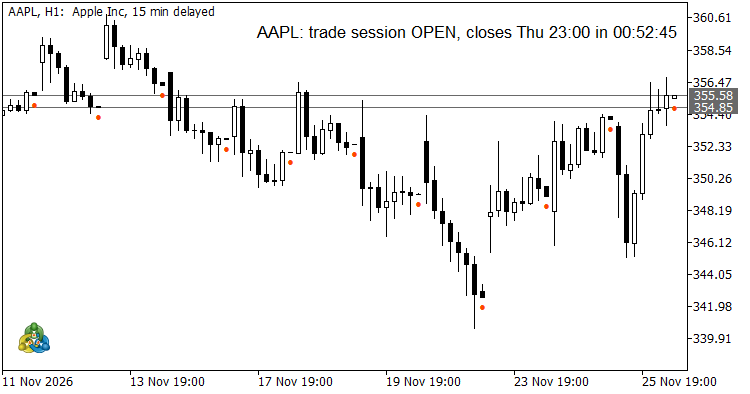
All times are broker server time, the same time as the bars, so no time zone setting is needed. The indicator also marks with a small dot every bar whose whole period lies outside the trade sessions. These are bars where the broker sent quotes while its schedule says trading is closed, for example pre-market and after-hours quotes on stocks.
How the schedule is read
- All sessions of each weekday are read, so a day can have two or more. During a break the line shows CLOSED, and the countdown points to the start of the next session.
- A session whose end is earlier than its start is read as ending the next day.
- Sessions that touch are joined, including the step from Saturday into Sunday. A forex symbol that trades from Monday to Friday without a break counts down to the end of the week, for example "closes Sat 00:00" when the last session ends on Friday at 24:00.
- A bar counts as in session when any part of its period overlaps a session. A D1 bar that opens at 00:00 is in session when the session starts at 00:05.
Use in an Expert Advisor
Buffer 0 ("Outside trade session") holds the bar low for bars outside the trade sessions and is empty otherwise; it is the dot on the chart. Buffer 1 ("In trade session") is 1 when the bar overlaps a trade session and 0 otherwise. Read it with iCustom(_Symbol, _Period, "SymbolTradingHours") and CopyBuffer(handle, 1, ...). A bar's value depends only on its open time, the timeframe and the schedule, so it does not change after it is written.
Inputs
- InpCorner: chart corner for the status line. Default: lower left.
- InpTextColor: colour of the status line. Default: Silver.
- InpFontSize: font size of the status line. Values below 6 are raised to 6. Default: 9.
The colour and the visibility of the dots are set on the standard Colors and Visualization tabs.
Behaviour worth knowing
- The status line is updated every second by a timer that uses the trade server time, so the countdown keeps running on a weekend or on a symbol without ticks.
- Right after a terminal start the symbol schedule may not be available yet. The indicator reads it again every second until it arrives, then recalculates all bars.
- If the broker has disabled trading for the symbol, the line says "trading disabled by broker". If the broker defines no sessions at all, the line says so and the message is printed once in the Experts log.
- Several copies on one chart each get their own label. Removing the indicator or changing the timeframe leaves no label behind.
Known limits
- MetaTrader 5 only provides a weekly template of the sessions. Holidays and early closes are not part of it, so the line can say OPEN on a holiday.
- Older bars are checked against today's schedule. If the broker changed its hours in the past, for example around a daylight saving change, older dots can be off by that difference.
- On W1 and MN1 every bar counts as in session when the schedule has any session.
 Backtest Data Preflight: check broker bar and tick history
Check the first and last available bars, gaps between bars, and available MT5 tick history for a date range before a backtest.
 TradeGateway: Fake Broker for Trade Management Tests
A library for MetaTrader 5 that puts trade management code behind an interface and tests it against a fake broker, without a trade server. The fake checks stops level, freeze level, tick grid and volume step, answers with retcodes chosen by the test and logs every request. An example break-even rule and 26 test cases come with it.
Range Expansion Clock: When the Day's Range Actually Gets Made.
A per-hour profile of when the day's range actually gets built, plus a live readout of whether today is running ahead of or behind its usual pace
Round Number Reaction Map: Touch, Reject or Break at 00 and 50 Levels
Tracks every touch of a round "00" or "50" level and keeps a running scorecard of how often price rejects versus breaks through — then maps that history onto the levels nearest to current price.