 MetaTrader 5
 Experts
 지표
지표
 스크립트
스크립트
 라이브러리
라이브러리
 보관함
보관함
당사 팬 페이지에 가입하십시오

Close All Positions Panel - MetaTrader 5용 expert

9년 동안, 대부분 XAUUSD 차트 앞에서 보낸 뒤, 제가 실제 매매에서 쓰는 도구들을 공개하기로 했습니다. 팔기 위해 만든 것은 하나도 없습니다. 모두 제게 필요해서 만들었습니다. 더 명확한 차트 해석, 모든 거래를 위한 계획, 정직한 통계, 통제된 리스크, 그리고 휴대폰으로 오는 알림입니다.
- 조회수:
- 145
- 게시됨:
-
 이 코드를 기반으로 한 로봇이나 지표가 필요하신가요? 프리랜스로 주문하세요
프리랜스로 이동
이 코드를 기반으로 한 로봇이나 지표가 필요하신가요? 프리랜스로 주문하세요
프리랜스로 이동

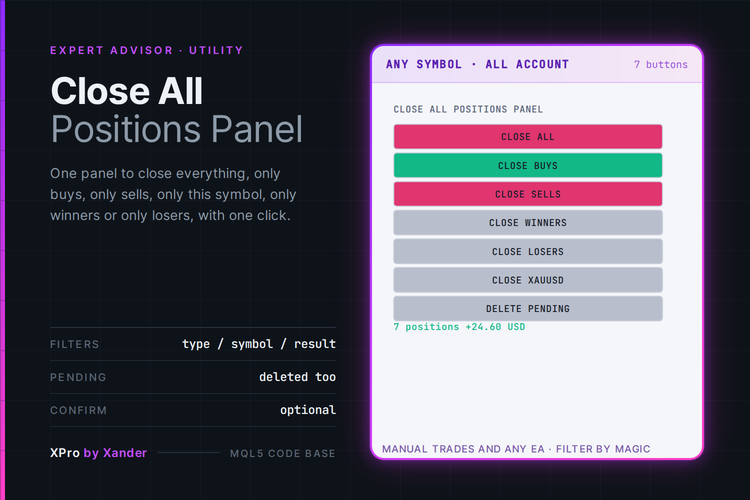
Seven buttons on the chart to close positions on Gold (XAUUSD), EURUSD or any symbol in one click: close all, close buys, close sells, close winners, close losers, close only the chart symbol, and delete pending orders. It works on manual trades and on positions opened by any other EA.
A magic number filter decides what the panel touches. 0 means everything on the account, manual trades included, any other value limits it to that EA. A scope switch limits the panel to the chart symbol or opens it to all symbols, and a line under the buttons shows how many positions it would close and their floating result.
Before each close an optional confirmation box asks Yes or No, so a misclick does not wipe the account. The positions are closed one by one with market orders, so in a fast market each one fills at its own price. The panel never opens a trade.
Settings
Close / Exit
- Delete pending orders with Close All (true): the Close All button also removes the pending orders that pass the filters.
- Ask for confirmation before closing (true): a Yes or No box before every close button. Delete Pending works without it.
Filters
- Positions the panel works on (All symbols): or Chart symbol only. The Close symbol button always works on the chart symbol.
- Magic number (0): 0 means all positions, manual trades included. Any other number limits every button to that magic.
Panel
- Panel corner, Horizontal offset (12 px), Vertical offset (28 px).
- Button width (134 px), Button height (24 px), Font size (9).
- Colors for the text, the neutral, buy, sell and Close All buttons, and the info line.
Expert settings
- Max slippage (30 points).
- Print every action to the Experts log (true): each closed ticket with its symbol and result.
- Object prefix (XP_CAP_): only objects with this prefix are created and removed.
What it needs
- MetaTrader 5 with Algo Trading enabled. Hedging and netting accounts.
- It is an expert advisor, so it takes the EA slot of the chart. If another EA runs on that chart, open a second chart of any symbol and attach the panel there. With All symbols it manages the whole account from that chart.
- Winners and losers are decided by profit plus swap. Commission is not included in that check.
Make it yours
Keep it on a spare chart next to a grid or martingale EA on XAUUSD, EURUSD, GBPUSD, US30, NAS100 or BTCUSD, set its magic number in the filter, and you have an emergency exit for that basket alone without touching your manual trades. Pair it with my Basket Pair Closer, which closes the best winner with the worst loser automatically, and use this panel when you want to decide by hand. If you build your own EA, the close loop is a short function that walks the positions from the end and can be copied as it is.
About this code
Open source. Use it as it is, adapt it, build your own version on top of it.
New versions and new tools are announced first on my MQL5 channel: https://www.mql5.com/en/channels/xander
Questions, suggestions and your own backtests are welcome in the Xander Lab group: https://www.mql5.com/en/messages/02eec85e4364dd01
More tools on my profile: https://www.mql5.com/en/users/09151993a
Provided as is, use at your own risk.
Related
- Basket Pair Closer
- Partial Close Multi TP Manager
- XPro Trade Panel
- Supply Demand Zones
- Smart Money Concepts BOS CHoCH
Changelog
- v1.0 - 2026-10-25 - Initial release
 Auto Fibo Extended
Auto Fibo Extended is a MetaTrader 5 indicator designed to automatically identify significant swing highs and swing lows and draw Fibonacci Retracement and Extension levels directly on the chart.
 Risk Lot Sizing Library - four risk bases, tick-value scaling, margin cap, daily limit
A stop distance in points is not money until the tick size and tick value make it one. This library turns four risk bases into a lot size, floors it to the volume step, caps it against free margin and tracks a daily loss limit. Two MQL5 headers, no DLL.
Accelerator Oscillator (AC)
The Acceleration/Deceleration Indicator (AC) measures acceleration and deceleration of the current driving force.
MACD Signals
Indicator edition for new platform.