 MetaTrader 5
 Experts
 지표
지표
 스크립트
스크립트
 라이브러리
라이브러리
 보관함
보관함
당사 팬 페이지에 가입하십시오

Order Watchdog - alerts on unknown magic, duplicates, no SL, stop outs (read-only) - MetaTrader 5용 expert

I help traders answer two questions before real money is at risk:
1) Is this strategy real, or just fitted to the past?
2) Will the account survive when something goes wrong?
Protection against overfitting
- 조회수:
- 86
- 평가:
- 게시됨:
-
 이 코드를 기반으로 한 로봇이나 지표가 필요하신가요? 프리랜스로 주문하세요
프리랜스로 이동
이 코드를 기반으로 한 로봇이나 지표가 필요하신가요? 프리랜스로 주문하세요
프리랜스로 이동


Order Watchdog is a read-only Expert Advisor that watches your whole MT5 account and tells you when something looks wrong. On a live or demo chart it never opens, closes or modifies anything. It only reads positions, orders and deal history, and sends you an alert.
It is meant for people who run one or more EAs on their own PC or on a VPS and want to know quickly when a "ghost" trade appears, for example after a reconnect, a restart or a broker issue.
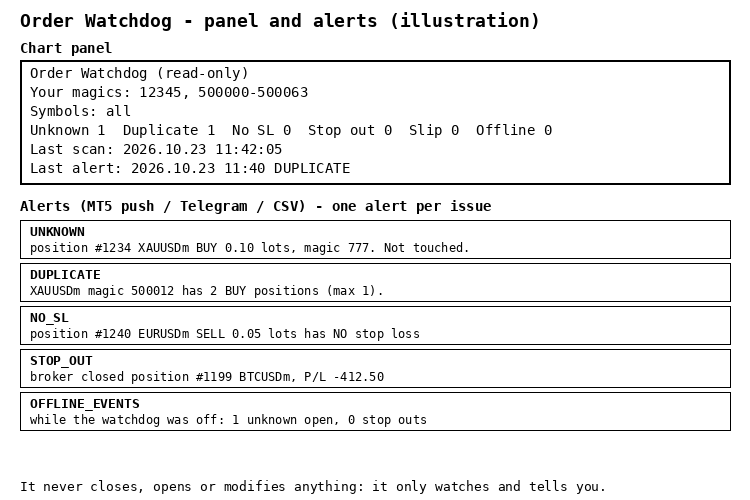
What it alerts on
- Unknown magic numbers: positions or pending orders whose magic number is not in your list (manual trades can be allowed).
- Duplicate positions: more positions than you allow for the same magic number, symbol and direction (for example two buys after a reconnect).
- No stop loss: one of your positions still has no SL after a grace period.
- Stop outs: positions closed by the broker because of a margin stop out.
- SL slippage: a stop loss that filled more points worse than your limit.
- While it was off: on start it reads the deal history and reports unknown-magic positions that were opened and stop outs that happened while the watchdog was not running.
Quick start
- Attach the EA to any one chart (it watches all symbols).
- Enter your EAs' magic numbers in InpMagics, for example 12345, 500000-500063 . Ranges and lists both work.
- Optional: set InpMaxPerMagic (for example 1) and turn on InpRequireSL.
- Alerts go to the MT5 mobile app (push), a CSV log, and optionally Telegram.
Design choices
- One alert per issue until the issue goes away. Alerts found in one scan are merged into one message, so there is no alert storm and the MT5 push limit is not reached.
- Alerted issues and the "last seen" time are kept in a state file, so a restart neither repeats old alerts nor forgets the downtime.
- Scans only run while the terminal is connected. The downtime check waits until the connection has been up for 15 seconds.
- Invalid inputs stop the EA at start: a malformed magic list, a symbol that does not exist on your account (for example a missing suffix), or a check that needs magic numbers when none are given.
- InpRunWhere lets you run it anywhere, only on an MQL5 VPS, or only on your PC.
- Telegram is optional and only used from the timer. Add https://api.telegram.org to Tools > Options > Expert Advisors > Allow WebRequest.
Strategy Tester
In the tester, InpTesterDemo opens a few example trades (an unknown magic number, a duplicate without SL, then closes them) so you can see the alerts. This only happens in the Strategy Tester. A built-in self-test (InpRunSelfTest) checks the input parsing and alert logic.
What was tested
- Compiled with 0 errors and 0 warnings. Self-test: 35 checks passed.
- Strategy Tester runs on EURUSD and XAUUSD: unknown magic, duplicate and no-SL alerts were raised once per issue, with no repeats.
- Live demo account (hedging, EURUSD): an unknown-magic position was reported at once, two positions with the same magic raised one DUPLICATE alert, and both raised NO_SL after the grace period.
- After a restart nothing was reported again. An unknown-magic position opened while the watchdog was off was reported about 20 seconds after it came back (OFFLINE_EVENTS). Closing the test positions raised no false alerts.
- Without a MetaQuotes ID the push fails with one clear message in the Experts log (error 4517) instead of repeating.
- Not yet confirmed: push delivery to a phone, Telegram, SL slippage and real stop outs. Please report anything that does not work as described.
Free to use. Feedback in the comments is welcome.
 Opening Gap Tracker: daily and weekend gaps with fill tracking, alerts and a CSV log
Marks daily and weekend opening gaps on any chart, tracks when each gap is filled, alerts on new gaps, logs one CSV line per gap and exposes the gap to iCustom.
 Trade Environment Check: account mode, symbol trading rules and open positions in one report
Script that reports what an EA has to cope with here: hedging or netting, trade permissions, filling modes, stop and freeze levels, volume rules, swaps and the positions already open on the symbol. Saves a report file you can attach to a Freelance order.
Accelerator Oscillator (AC)
The Acceleration/Deceleration Indicator (AC) measures acceleration and deceleration of the current driving force.
MACD Signals
Indicator edition for new platform.