 MetaTrader 5
 Experts
 지표
지표
 스크립트
스크립트
 라이브러리
라이브러리
 보관함
보관함
당사 팬 페이지에 가입하십시오

Opening Gap Tracker: daily and weekend gaps with fill tracking, alerts and a CSV log - MetaTrader 5용 지표

- 조회수:
- 83
- 평가:
- 게시됨:
-
 이 코드를 기반으로 한 로봇이나 지표가 필요하신가요? 프리랜스로 주문하세요
프리랜스로 이동
이 코드를 기반으로 한 로봇이나 지표가 필요하신가요? 프리랜스로 주문하세요
프리랜스로 이동


GapTracker finds opening gaps on any symbol and timeframe: bars whose open is at least a chosen number of points away from the previous bar's close. Each gap is classified as a daily gap (the first bar of a new trading day), a weekend or holiday gap (the first bar after a pause longer than a threshold, 36 hours by default) or, if you ask for it, a plain bar-to-bar gap inside the day.
For every gap the indicator then watches the following bars and records when the gap is filled, that is when price trades back to the previous close: a gap up is filled when a later low reaches the previous close, a gap down when a later high reaches it. The gap bar itself counts, so a gap that is closed within its first bar is reported as filled after 0 bars. You can stop waiting after a given number of bars.
On the chart
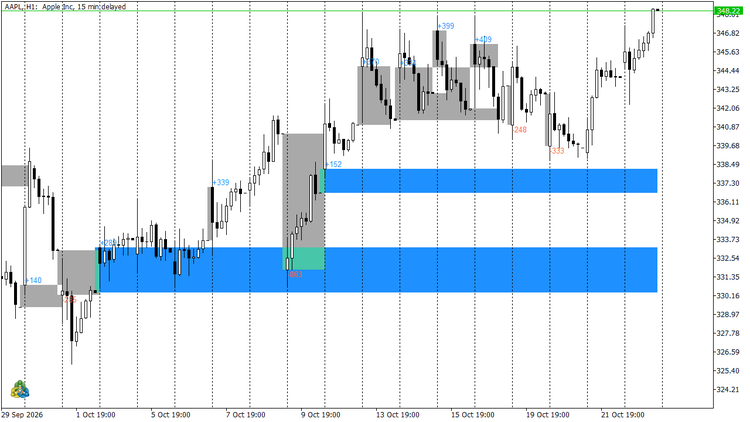
- every gap is a filled rectangle from the previous close to the open, stretched to the bar that filled it, or to the current bar while the gap stays open;
- the size in points is written next to the gap bar, blue for a gap up and red for a gap down (the colours are inputs);
- a filled gap turns grey;
- hovering a box or a label shows the details: type, direction, size, previous close, open, fill time and bars to fill;
- only the most recent gaps are drawn (200 by default), so a long history does not clutter the chart.
The screenshot shows AAPL H1: the grey boxes are daily gaps that were filled later, the blue boxes are gaps up that are still open and therefore extend to the last bar.
Alerts
When a new gap appears in real time the indicator can show a pop-up alert, send a push notification to the mobile terminal and play a sound. The message carries the symbol, timeframe, type, direction, size in points, previous close and open. Historical gaps found when the indicator is attached are not announced.
CSV log
The file is rewritten whenever a gap appears or gets filled and holds one line per gap:
time, symbol, period, type, direction, prev_close, open, gap_points, filled, fill_time, bars_to_fill
It goes to MQL5\Files (or to the common Files folder) and is named GapTracker_<symbol>_<period>.csv unless you set a name. It is meant for research in a spreadsheet, for example how often the weekend gaps of your symbol fill within the first day, or how big a gap has to be before it stays open.
Use from an Expert Advisor
Two buffers are plotted as DRAW_NONE, so they appear in the Data Window and can be read with CopyBuffer:
- buffer 0: signed gap size in points on the gap bar, 0 on every other bar;
- buffer 1: gap type on the gap bar: 1 daily, 2 weekend or holiday, 3 bar.
The indicator deliberately has no input groups: a group header takes a parameter slot in iCustom and silently shifts every value an EA passes after it. Parameters are passed in the order of the inputs, for example:
int handle = iCustom(_Symbol, _Period, "GapTracker", 0, 50, 36, 5000); // scope, minimum points, weekend hours, bars to scan double gap[1], type[1]; CopyBuffer(handle, 0, 1, 1, gap); // gap size in points of the last closed bar, 0 = no gap CopyBuffer(handle, 1, 1, 1, type); // 1 daily, 2 weekend, 3 bar
Inputs
- Bars to check: first bar of every day (weekend and holiday gaps marked separately), weekend only, or every bar.
- Minimum gap size (points): smaller differences are ignored. A point is the symbol's smallest price step, so 50 points is 5 pips on a 5-digit pair and 0.50 on gold with two decimals.
- Pause longer than this = weekend/holiday gap (hours): 36 by default, which catches the Friday-to-Monday pause on every timeframe and a one-day holiday on D1.
- Bars to scan back: 0 scans the whole history.
- Track when the gap is filled, and Stop waiting after this many bars (0 = never).
- Draw gaps on the chart, Most recent gaps to keep drawn, Label each gap with its size, and the three colours for gap up, gap down and filled gap.
- Pop-up alert, Push notification, Sound and Sound file.
- Write one line per gap (CSV), File name and Write to the common Files folder.
Notes
- Gap detection happens on the first tick of the gap bar and never changes afterwards; only the fill status of an open gap is updated as new bars arrive.
- The day change is taken from bar times, that is server time. On symbols without a daily session break the "daily gap" is simply the difference between the day's open and the previous day's close.
- The indicator draws objects with the prefix GapTracker_ and removes them when it is detached.
Compiled with MetaTrader 5 build 6182, 0 errors and 0 warnings.
 Trade Environment Check: account mode, symbol trading rules and open positions in one report
Script that reports what an EA has to cope with here: hedging or netting, trade permissions, filling modes, stop and freeze levels, volume rules, swaps and the positions already open on the symbol. Saves a report file you can attach to a Freelance order.
Extreme Price Filter
An indicator to reveal the the time candles breached an extreme price boundary
 Order Watchdog - alerts on unknown magic, duplicates, no SL, stop outs (read-only)
Read-only watchdog for MT5: alerts on unknown magic numbers, duplicate positions after reconnects, missing SL, stop outs and what happened while it was off. Never trades.
MACD Signals
Indicator edition for new platform.