 MetaTrader 5
 Experts
 지표
 스크립트
 라이브러리
 보관함
거래 로봇을 무료로 다운로드 하는 법을 시청해보세요
당사를 Telegram에서 찾아주십시오!
당사 팬 페이지에 가입하십시오
스크립트가 마음에 드시나요? MetaTrader 5 터미널에서 시도해보십시오

XPro Trade Panel — Full Trade Management Panel for MT5/MT4 - MetaTrader 5용 expert
Cristhian Alexander Gaibor Cuasquer

2017년부터 트레이더이자 MQL5 회원입니다.
9년 동안, 대부분 XAUUSD 차트 앞에서 보낸 뒤, 제가 실제 매매에서 쓰는 도구들을 공개하기로 했습니다. 팔기 위해 만든 것은 하나도 없습니다. 모두 제게 필요해서 만들었습니다. 더 명확한 차트 해석, 모든 거래를 위한 계획, 정직한 통계, 통제된 리스크, 그리고 휴대폰으로 오는 알림입니다.
- 조회수:
- 7011
- 평가:
- 게시됨:
- 업데이트됨:
-
 이 코드를 기반으로 한 로봇이나 지표가 필요하신가요? 프리랜스로 주문하세요
프리랜스로 이동

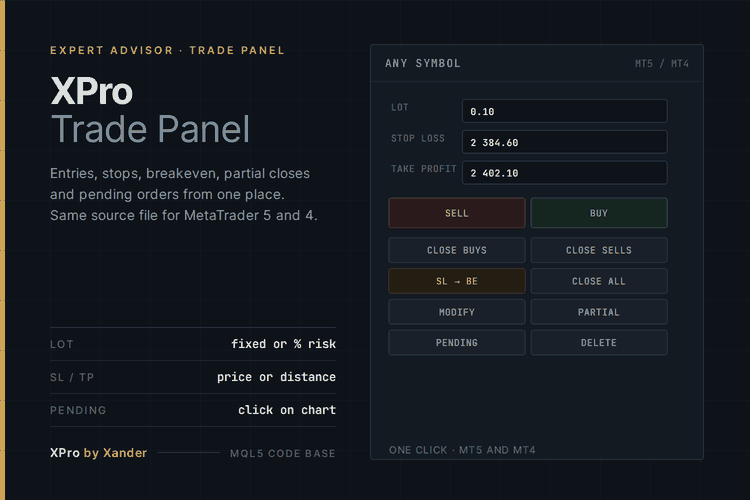
A trade panel that lives on the chart and takes the keyboard out of the way. Buy and sell buttons with the lot calculated as fixed size or as a percent of balance, stop loss and take profit typed as a price or as a distance in points, and a price reference you can switch between bid and ask. Works on Gold (XAUUSD), forex and indices, on MetaTrader 5 and MetaTrader 4 from the same source file.
Once positions are open the panel manages them: close all buys, close all sells, move the stop to breakeven, close everything, modify stop and target of the open trades or close a part of them. Pending orders are placed by clicking the chart, a line follows the mouse until you confirm the level, and the same panel deletes them. An optional switch lets it touch trades opened by hand or by other EAs.
It is management, not a signal system. The panel remembers its position between sessions, uses its own magic number for what it opens and works inside the strategy tester in visual mode, which is the right place to learn the buttons before touching a live account.
Update v1.1 (October 2026): header and documentation rewritten, link to my MQL5 channel for updates, community input removed from the panel inputs. Buttons and logic unchanged.
Settings
- Risk calculation mode: fixed lots or percentage of balance.
- SL / TP mode: type a price or a distance in points from the open price.
- Price reference for SL and TP: normal (bid for sell, ask for buy), inverted, only ask or only bid.
- Maximum slippage (points), Expert Magic number and Modify trades from other EAs: off by default, turn it on when you want the panel to manage manual trades or another EA's positions.
- Buttons: eight switches to show or hide each group, buy and sell, close buys and sells, breakeven and close all, modify SL and TP, partial close, pending orders, delete pending orders, trade comment editor.
- Display: pick the stop loss by dragging the crosshair in distance mode, font size, automatic take profit from a stop loss ratio, automatic stop loss when the take profit changes, asynchronous orders.
How to use it
Compile it in MetaEditor (F7) and drag it onto the chart you want to trade with Algo Trading enabled. Type the lot or the risk percent, type the stop and the target, press Buy or Sell. For a pending order press the pending button, click the chart at the level you want and confirm. Drag the panel by its title bar, it stays where you leave it. On MT4 compile the same file as .mq4.
Make it yours
The panel is built on the standard Controls library (CAppDialog, CButton, CEdit), so adding a button is a matter of copying one of the existing groups. Natural additions are a close by profit button, a risk in money field, one click hedging of the current position or a hotkey layer. It pairs well with my Basket Pair Closer when you run grids, and with any indicator you use for entries, Smart Money Concepts or support and resistance included.
About this code
Open source. Use it as it is, adapt it, build your own version on top of it. New versions and new tools are announced first on my MQL5 channel: https://www.mql5.com/en/channels/xander. Questions, suggestions and your own backtests are welcome in the Xander Lab group: https://www.mql5.com/en/messages/02eec85e4364dd01. More tools on my profile: https://www.mql5.com/en/users/09151993a
Based on SimpleOrderPanel v2.08 from the MQL5 Code Base, reworked layout, colors, input panel and defaults.
Related: Basket Pair Closer, XANDER Grid XAUUSD, XANDER Pulse Candles.
Changelog
v1.1 (2026-10-25): documentation and header update, MQL5 channel link, community input removed.
v1.0 (2026-04-09): initial release.
 Mini Prop-Firm Traders Utility Dashboard
This mini custom-built MetaTrader 5 dashboard is a robust, comprehensive risk management and performance based monitoring tool and utility created to give both Prop firm and personal funded traders full visibility and control over their trading activity in real time.
RSI Grid EA Pro
RSI Grid Overlap Pro is a professional MT5 Expert Advisor combining RSI-based market entries with an adaptive grid recovery system. It features intelligent overlap order management to reduce drawdown, plus virtual trailing stop, breakeven, and three lot sizing modes — fixed, balance-proportional, and risk-based — making it suitable for both conservative and aggressive trading styles.
BEC Lockin Dashboard Manager
BEC Trade Manager helps you manage active positions on the current symbol using one-click controls for breakeven, trailing logic, partial close, stop-loss removal, profit-side closing, loss-side closing, and fast scalp entries. It also displays key account and symbol information on the chart, including equity, floating profit, daily profit, stop-loss labels, and basket breakeven preview.
XANDER Grid XAUUSD
Bidirectional grid EA for Gold (XAUUSD). Candle direction filter, lot doubling up to a cap, basket exit by average take profit or partial close. Daily target and drawdown pause. Updated November 2026 (v1.2), entry guard against fast loops. Open source code.