• 情報
11+ 年
経験
17
製品
379
デモバージョン
0
ジョブ
0
シグナル
0
購読者
Roman Zhitnik パブリッシュされたプロダクト

Portfolio Matrix combines nine rule-based modules across eight markets: AUDCAD, AUDUSD, GBPJPY, USDJPY, XAUUSD, US500, NAS100 and GER40. It is not built around one symbol and one trading idea as the majority of other Expert Advisors.  The modules react to different market behaviours and use intraday, hourly and daily horizons. The entire portfolio runs from one chart, while every symbol can be enabled or disabled separately in the settings. You don’t need to spend days and weeks on

Roman Zhitnik
パブリッシュされた投稿Supply and Demand Indicator 1.7 for MT4: Complete User Manual
Supply and Demand Indicator 1.7 for MT4: Complete User Manual Supply and Demand Indicator is a chart-window indicator for MetaTrader 4...
Roman Zhitnik
パブリッシュされた投稿RiskManager 2.2 for MT4: Complete User Manual
RiskManager 2.2 for MT4: Complete User Manual 1. What RiskManager Does RiskManager is an account-level protection Expert Advisor for MetaTrader 4. It watches account equity, daily and weekly results, individual trades, open-order counts, and same-direction grid exposure...
Roman Zhitnik
パブリッシュされた投稿Currency Strength Meter Premium 1.52 for MT4: Complete User Manual
Currency Strength Meter Premium 1.52 for MT4: Complete User Manual Currency Strength Meter Premium is an analytical indicator for MetaTrader 4...
Roman Zhitnik
パブリッシュされた投稿Supply and Demand with Swap Zones MT4 1.90: Complete User Manual
Supply and Demand with Swap Zones MT4 1.90: Complete User Manual The Supply and Demand with Swap zones indicator is a MetaTrader 4 chart indicator for displaying supply, demand, and swap zones from as many as three selected timeframes on one chart...
Roman Zhitnik
パブリッシュされた投稿Supertrend Indicator MTF 1.1 for MT4: Complete User Manual
Supertrend Indicator MTF 1.1 for MT4: Complete User Manual This manual describes the current public version 1.1 of Supertrend indicator MTF for MetaTrader 4. It is based on the matching source version 1.01 and the current MQL5 Market product page...
Roman Zhitnik
パブリッシュされた投稿Supply and Demand MTF MT5 1.22: Complete User Manual
Supply and Demand MTF MT5 1.22: Complete User Manual Supply and Demand MTF MT5 is a chart indicator for MetaTrader 5. It displays supply and demand zones from as many as three selected timeframes on one chart and can notify you when zones form, break, or contain the current price...
Roman Zhitnik
パブリッシュされた投稿Gold Adaptive EA MT5 1.0: Complete User Manual
Gold Adaptive EA MT5 1.0: Complete User Manual Gold Adaptive EA MT5 is an automated Expert Advisor for MetaTrader 5 designed specifically for Gold trading. The current public Market release is version 1.0, corresponding to source version 1.00...
Roman Zhitnik
パブリッシュされた投稿Swaps Indicator 1.0 for MetaTrader 4: Complete User Manual
Swaps Indicator 1.0 for MetaTrader 4 — Complete User Manual 1. What the Indicator Does Swaps Indicator is a display-only MetaTrader 4 indicator that shows the broker's current long and short swap values for several instruments in one separate chart window...
Roman Zhitnik
パブリッシュされた投稿MT5 Trade Panel 3.17: Complete User Manual
MT5 Trade Panel 3.17 - Complete User Manual 1. What Trade Panel Does MT5 Trade Panel is a manual trading assistant for MetaTrader 5...
Roman Zhitnik
パブリッシュされた投稿MT5 Risk Manager: Setup Daily Loss Limits and Account Protection
MT5 Risk Manager 1.61 — Complete User Manual 1. What Risk Manager MT5 Does Risk Manager Pro MT5 is an account-level protection Expert Advisor for MetaTrader 5...
Roman Zhitnik
パブリッシュされた投稿Binance MT5 Copier 1.25: Setup, API Security, Symbol Mapping, and Risk Controls
Binance MT5 Copier 1.25 - Setup and User Manual 1. Copy Trades Between MT5 and Binance Futures Binance MT5 Copier synchronizes supported positions and orders between MetaTrader 5 and Binance USD-M Futures...
Roman Zhitnik
パブリッシュされた投稿How to Connect Binance to MT5 - MT5 to Binance 2.33 Manual
How to Connect Binance to MT5 - MT5 to Binance 2.33 Manual 1. Connect Binance to MT5: How the Workflow Works To connect Binance to MT5, install MT5 to Binance on a normal MetaTrader 5 chart, allow the required Binance endpoints in WebRequest, and use a dedicated Binance API key...
Roman Zhitnik
パブリッシュされた投稿MT5 to Binance vs Binance MT5 Copier: Which One Do You Need?
MT5 to Binance vs Binance MT5 Copier: Which One Do You Need? Many traders see two Binance-related tools in the Market and ask the same question: what is the difference between MT5 to Binance and Binance MT5 Copier ? The short answer is simple: MT5 to Binance is a trading panel...
Roman Zhitnik パブリッシュされたプロダクト

Gold Adaptive EA MT5 is an automated Expert Advisor for MetaTrader 5 designed for trading Gold (XAUUSD). The EA uses several internal trading models and market filters to adapt to different phases of Gold price movement. Instead of relying on one fixed entry pattern, Gold Adaptive EA MT5 analyzes market behavior and selects suitable logic for trend continuation, impulse moves, pullbacks and selected recovery conditions. The main goal of the Expert Advisor is to provide a structured Gold trading

Roman Zhitnik パブリッシュされたプロダクト

Binance Copier allows to seamlessly and easily copy trades between MT5 and Binance Futures! The tool's main feature is to replicate trades and all available orders between MetaTrader 5 and Binance that can be applied to both Expert Advisors and manually opened ones. Before purchase please familiarize with comparison between MT5 to Binance and Binance Copier Key Features: Bidirectional Copying - MT5 → Binance (Master Mode): Copy your MT5 trades to Binance - Binance → MT5 (Slave Mode): Mirror

Roman Zhitnik
パブリッシュされた投稿Stop losing money due to failed discipline
Trading platforms excel at execution speed, charting, even automation—but they leave self-discipline entirely up to the human at the keyboard...
Roman Zhitnik
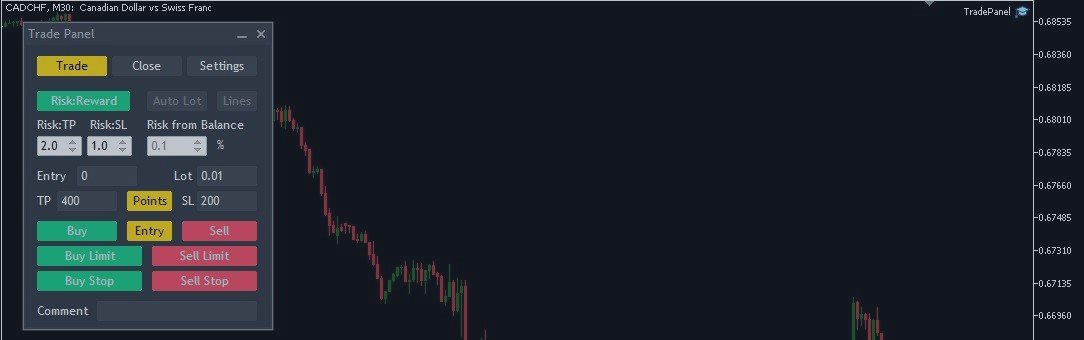
Trade Panel MetaTrader 5 - feature-rich tool that adds the desired and highly-demanded functions to the terminal to enhance trading experience. The full version of the panel is available in the MQL5 Market via the link...
Roman Zhitnik パブリッシュされたプロダクト
レビュー: 2
30.00 USD

Trade Panel MetaTrader 5 - feature-rich tool that adds the desired and highly-demanded functions to the terminal to enhance trading experience. Orders execution with one click You can open and close orders easily, using the panel. Buttons to open Market, Limit and Stop orders in both buy and sell directions are located on the Main tab, while there are multiple options to close already existing positions and cancel orders: Close/cancel all Close/cancel buy and sell positions/orders separately

123