Wasin Thonkaew / プロファイル
- 情報
|
3 年
経験
|
4
製品
|
5
デモバージョン
|
|
0
ジョブ
|
0
シグナル
|
0
購読者
|
Products in Market
> TCandleClose — remaining time until candle close - Indicator MT5 - https://www.mql5.com/en/market/product/89264
> MarketSchedule — display asset operating hours on broker - Script MT5 - https://www.mql5.com/en/market/product/89736
> MarketOpenSessions — visual clue for 4 configurable major market sessions, ICT concepts - Indicator MT5 - https://www.mql5.com/en/market/product/90408
> DomDom — turns MetaTrader 5 into an order-flow workstation: read the book and the tape, trade by click or hotkey, and replay the session after hours.
Publications
> Develop a Proof-of-Concept DLL with C++ multi-threading support for MetaTrader 5 on Linux - https://www.mql5.com/en/articles/12042
> Understand and efficiently use OpenCL API by recreating built-in support as DLL on Linux (Part 1): Motivation and validation - https://www.mql5.com/en/articles/12108
> Understand and Efficiently use OpenCL API by Recreating built-in support as DLL on Linux (Part 2): OpenCL Simple DLL implementation - https://www.mql5.com/en/articles/12387
DomDom は MetaTrader 5 を order flow 分析の ワークステーションに 変えます。 DOM と tape を読み、 クリックや ホットキーで 発注し、 取引時間外には セッションを replay できます。 DomDom は、futures のように、ブローカーが Depth of Market と実際の約定を配信する取引所銘柄向けに作られています。DOM を推測で補うことはありません。ブローカーが数量を送ってこない場合、そのセルは空欄のままです。 パネルの概要 パネルは、上部のツールバー、中央の価格 ladder、下部のステータスラインの 3 つで構成されています。ツールバーのボタンにマウスを少し重ねると、ヒントが表示されます。 ツールバー(左から右): Ladder ボタン:パネルの表示・非表示を切り替えます。非表示にすると価格チャートが戻り、再表示すると再びチャートを覆います。セッションの出来高は保持されます。 マイナス・数量・プラス:次の注文の数量です。マイナスとプラスで 1 volume step ずつ増減します。 Mkt Buy と Mkt
Continued from the part 1 in the series, now we proceed to implement as a simple DLL then test with MetaTrader 5. This will prepare us well before developing a full-fledge OpenCL as DLL support in the following part to come.

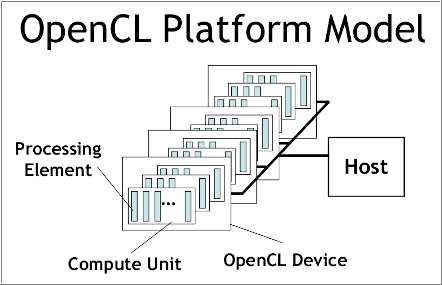
Bulit-in OpenCL support in MetaTrader 5 still has a major problem especially the one about device selection error 5114 resulting from unable to create an OpenCL context using CL_USE_GPU_ONLY, or CL_USE_GPU_DOUBLE_ONLY although it properly detects GPU. It works fine with directly using of ordinal number of GPU device we found in Journal tab, but that's still considered a bug, and users should not hard-code a device. We will solve it by recreating an OpenCL support as DLL with C++ on Linux. Along the journey, we will get to know OpenCL from concept to best practices in its API usage just enough for us to put into great use later when we deal with DLL implementation in C++ and consume it with MQL5.
Still considered a bug, if MT5 developers see this message, please collect my comment as a bug report.

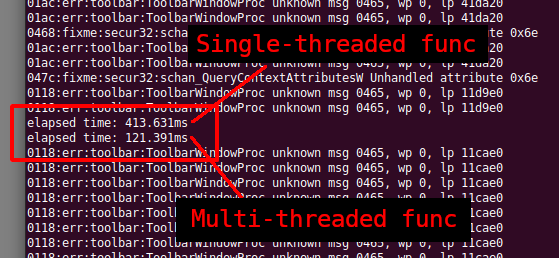
最終製品がWindowsとLinuxシステムの両方でシームレスに動作するMetaTrader 5プラットフォームの開発をLinuxシステムのみでおこなう方法のステップとワークフローを探索する旅を始めます。WineとMinGWについて学ぶことができます。これらはどちらも、クロスプラットフォーム開発を機能させるために不可欠なツールです。特に、MinGWのスレッド実装(POSIXおよびWin32)については、どれを使用するかを選択する際に考慮する必要があります。次に、概念実証のDLLを構築し、それをMQL5コードで使用して、最後に両方のスレッド実装のパフォーマンスを比較します。すべては読者の基盤が自力でさらに拡大するようにするためです。この記事を読めば、LinuxでMT関連のツールを快適に構築できるはずです。
MarketOpenSessions is an indicator helps as a visual clue for which market session is at the time being. If you consider killzone, market open/close as important factor, this indicator would help you reduce effort in converting from one time zone to another. It has the following features 2 display styles: section (as colored line), and histogram 4 major configurable market sessions i.e. Asia, London, New York, and London-Close session. In additional to end of trading session of the day. Female
MarketSchedule displays market sessions' open/close time for each day through out the week, also broker's timezone. It also supports instruments that have more than 1 session per day (maximum of 2 as most instruments don't have more than this) e.g. crypto market such as BTCUSD which usually has a few hours break mid-day thus it spans into 2 market sessions. You don't have to spend time looking for such information on broker's website. It's an on-demand script that you can drop onto the chart to
A simple indicator to help showing the remaining time until the candle closes for all pre-defined chart periods with the following formats depending on which timeframe the chart is on. DD:HH:MM:SS - in case of W1, and MN period HH:MM:SS - in case of other periods Included with some of configurations as follows (please see attached inputs screenshot) X/Y distance to the upper right corner of the chart window Text size Text color Show/hide