Macd Zero Pullback
- インディケータ
-
Ich Khiem Nguyen
 AlphaOnChart is now available on Android! If you trade and use an Android phone, do not miss this.
I just launched the Android version to help traders get ready-to-execute daily trade plans, key levels, and real-time M15 chart alerts right on their phones. - バージョン: 1.0
- アクティベーション: 10
Trend Momentum Pullback MT5
Systematic Trend-Continuation and Pullback Re-engagement Engine
The Trend Momentum Pullback indicator for MetaTrader 5 provides an objective technical framework designed to identify high-probability trend-continuation entries following corrective pullbacks. Unfiltered price action frequently displays choppy intraday fluctuations, where buying at local swing highs or selling into swing lows exposes positions to liquidity sweeps and premature stop-outs.
This software algorithmically evaluates trend structure and momentum re-engagement, filtering out low-conviction consolidation phases. By confirming directional flow only when an expansion candle decisively breaks local structure in alignment with the dominant trend, the indicator delivers structured on-chart validation strictly upon candle close, ensuring fully non-repainting execution references.
Algorithmic Logic and Trade Validation
The calculation engine operates exclusively on closed bar data. Historical signal markers remain anchored to their respective price bars and do not recalculate, shift, or repaint over time.
Bullish Momentum Setup (BUY)
- Trend Baseline: The algorithm validates an established upward market structure.
- Pullback Exhaustion: Price completes a corrective retracement phase and displays dominant buying candles signaling directional re-engagement.
- Execution Reference: Confirmation is locked strictly at the bar close. The opening price of the immediate subsequent candle serves as the operational execution reference.
Bearish Momentum Setup (SELL)
- Trend Baseline: The algorithm validates a confirmed downward market structure.
- Pullback Exhaustion: Price completes a corrective counter-move and prints strong selling candles breaking local structure.
- Execution Reference: Confirmation is locked strictly at the bar close. The opening price of the immediate subsequent candle serves as the operational execution reference.
Integrated Risk Architecture and Target Ladder
Rather than providing isolated visual markers, the indicator projects an end-to-end trade execution structure directly onto the active chart:
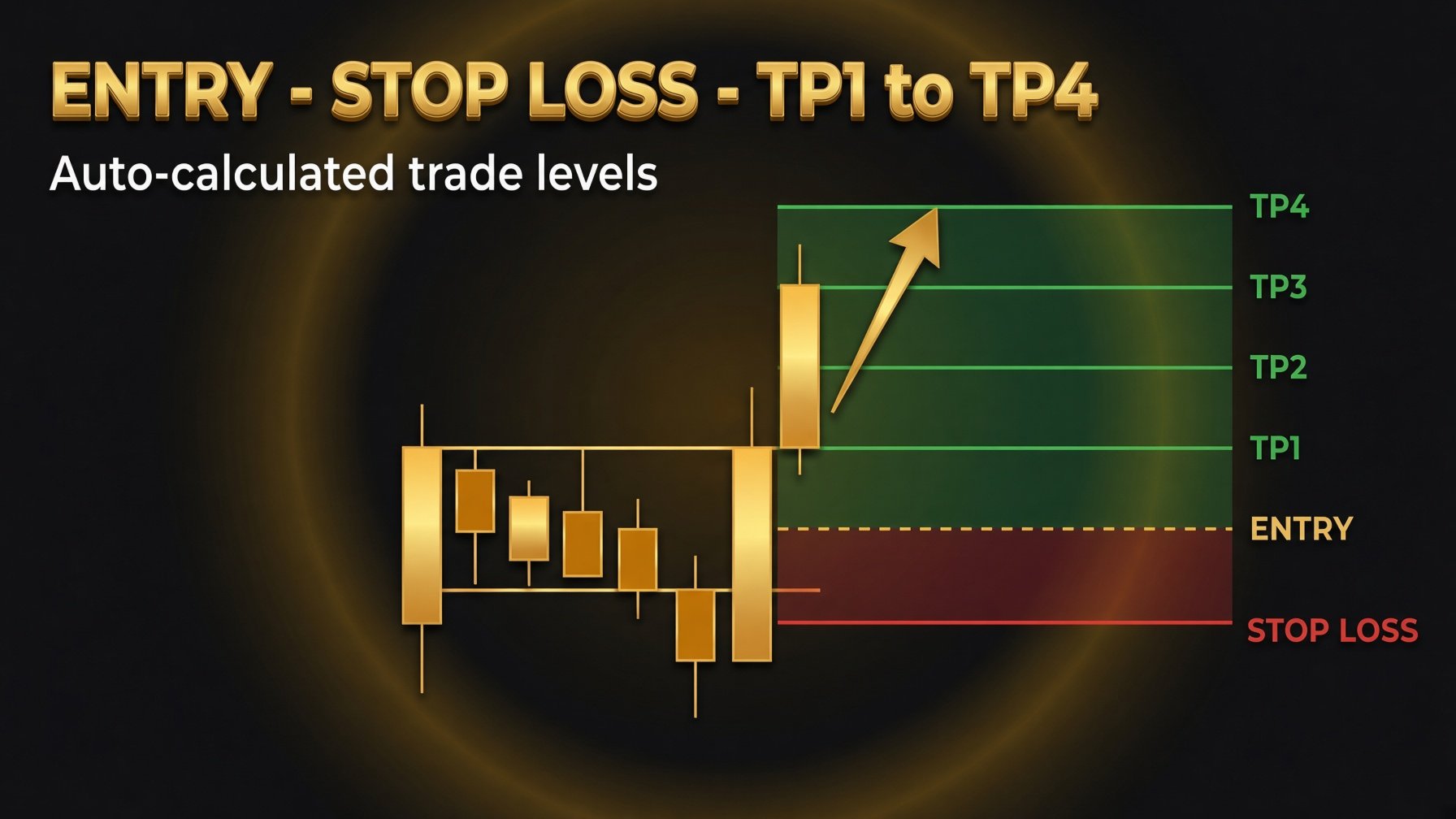
- Dynamic Structural Invalidation (Stop Loss): The Stop Loss reference is automatically positioned outside the recent swing extreme formed during the pullback phase, incorporating a calculated buffer to accommodate ordinary market volatility while maintaining strict risk boundaries.
- Standardized 4-Tier R-Multiple Targets: Profit objectives are mathematically projected based on the initial calculated risk distance (1R):
- TP1: Near-term target designed to secure initial structural moves.
- TP2: Intermediate target capturing standard momentum extensions for balanced risk-to-reward.
- TP3: Extended target capturing broader trending impulse legs.
- TP4: Full expansion runner target designed to capture large directional moves during prolonged momentum phases.
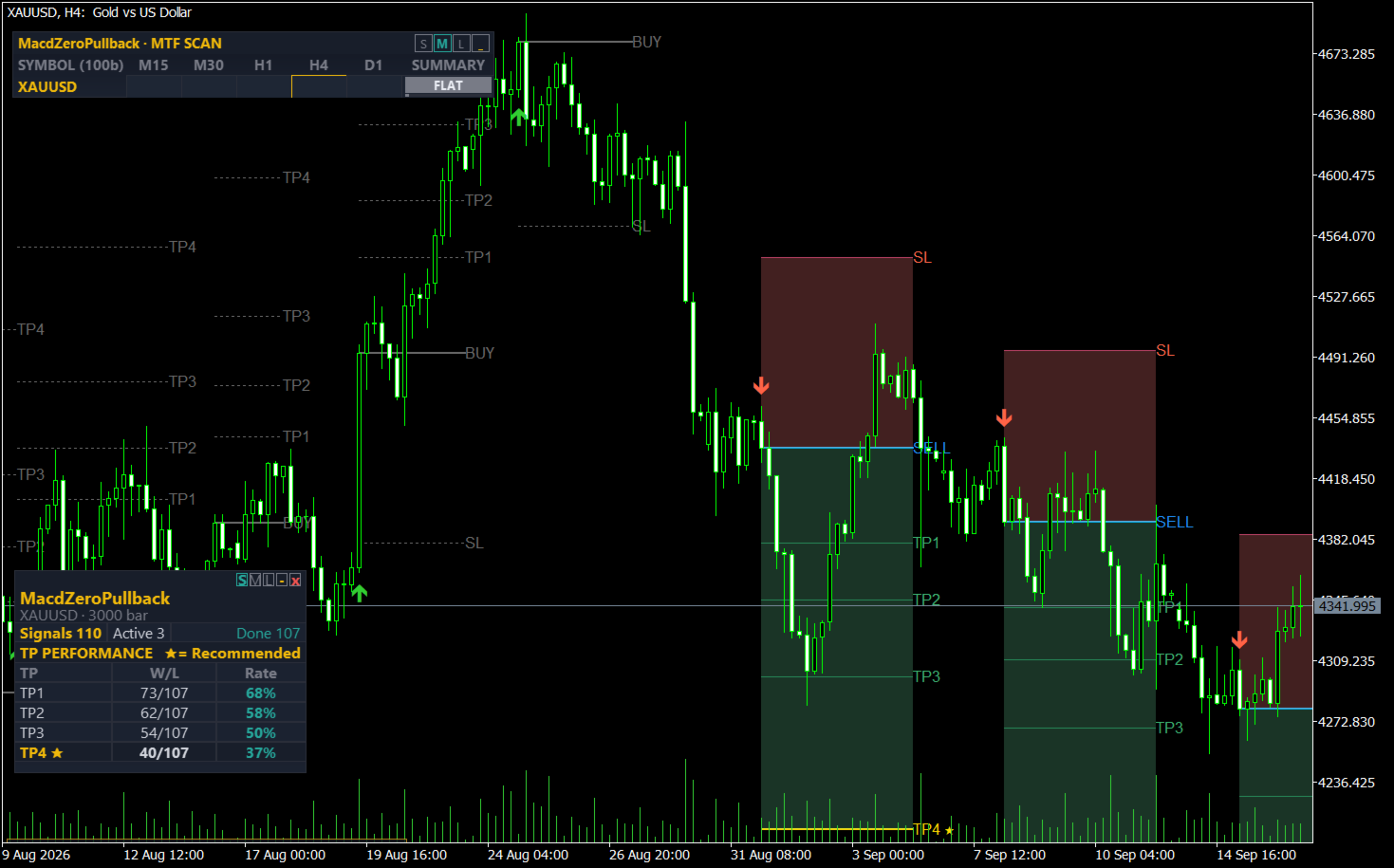
- Lifecycle State Tracking: Each projected setup is tracked on-chart with dedicated real-time lifecycle states (Active, TP Hit, SL Hit).
Analytical Modules and Dashboard Capabilities
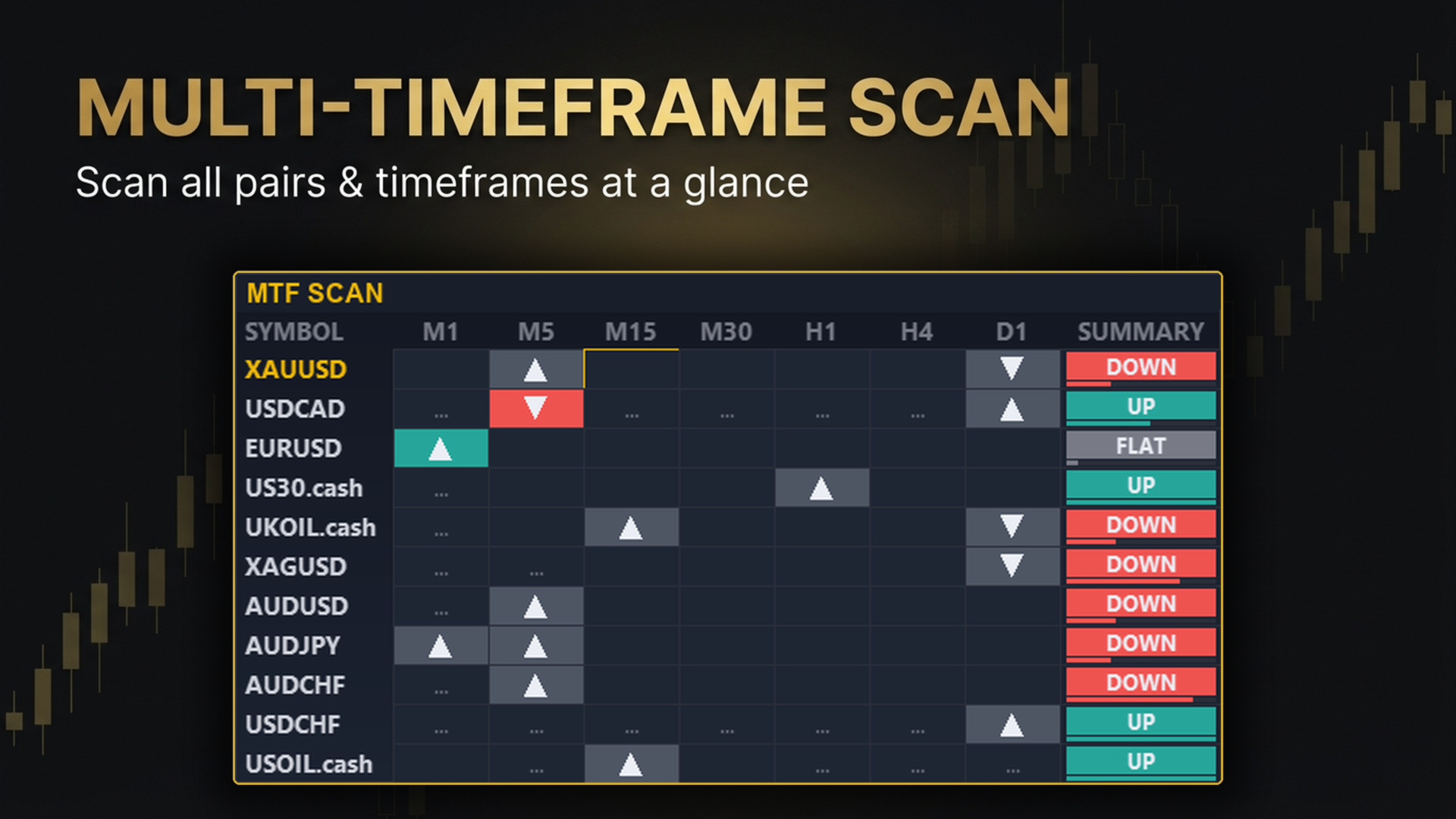
Multi-Symbol & Multi-Timeframe Scanner Dashboard
- Monitors multiple assets simultaneously across standard timeframes: M15, M30, H1, H4, and D1.
- Active Signal Discovery: Scans and displays active BUY and SELL setups across all monitored symbols from a single workspace.
- Signal Status Tracking: Displays real-time progress of active setups (active, approaching TP, approaching SL).
- Higher Timeframe Confluence: Validates directional alignment between lower-timeframe execution triggers and higher-timeframe trends.
- Market Bias Summary: Provides an integrated directional reading (UP, DOWN, or FLAT) derived from the indicator's trend filter.
- One-Click Chart Navigation: Clicking any dashboard cell immediately switches the active chart to the selected symbol and timeframe.
Whipsaw Mitigation Engine (Signal Brake)
- Suppresses rapid, alternating BUY/SELL flip-flopping within tight consolidation ranges.
- Restricts redundant same-direction signals while a prior setup remains active.
- Enforces a minimum structural R-distance before a new setup in the same direction can trigger.
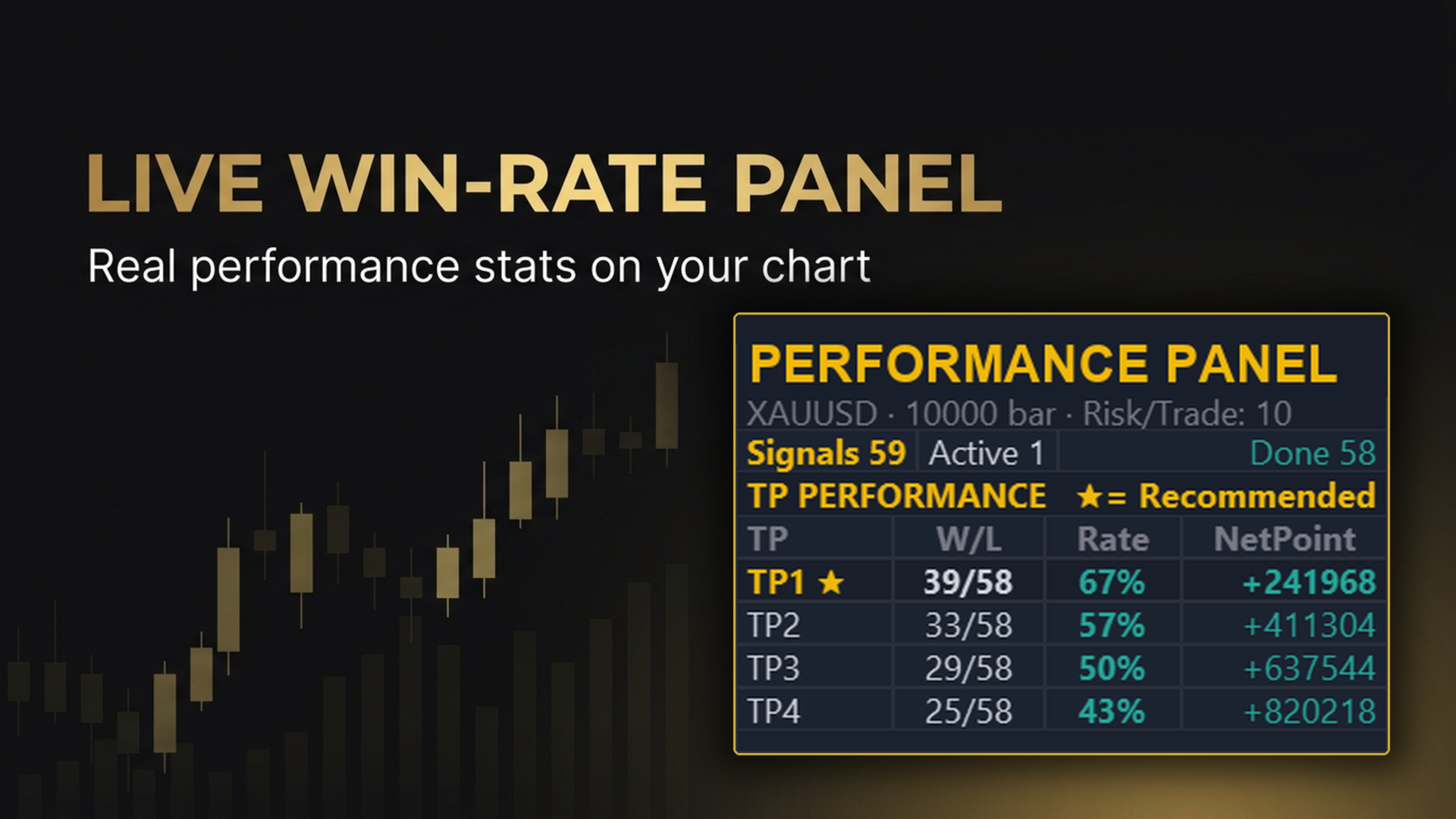
On-Chart Historical Backtest Panel
- Summarizes historical performance metrics for the currently applied settings directly on the chart:
- Historical hit-rate breakdown across TP1, TP2, TP3, and TP4.
- Sample size display over the configured historical lookback period.
- Highlights the historically optimal target tier for the active configuration.
- Integrated sample-size indicator to assist in judging statistical relevance.
Statistical Notice: Historical distribution figures reflect past price data under specific settings. Past results do not guarantee future performance.
Multi-Channel Alert Architecture
- MetaTrader 5 desktop pop-up notifications.
- Audible sound alerts (.wav).
- Instant push notifications sent to mobile devices via MetaQuotes ID.
Non-Intrusive Graphic Interface
- Three size presets: Small (S), Medium (M), and Large (L).
- One-click minimize and expand toggle.
- Draggable control panel that preserves custom chart coordinates across timeframe changes.
Operational Specifications
- Recommended Assets: Highly liquid symbols including major currency pairs, spot commodities, and major stock indices during active sessions.
- Recommended Timeframes: M15, M30, and H1 provide balanced structural clarity and trend persistence.
- Broker Environment: Compatible with both Netting and Hedging accounts. Low-spread ECN/Raw trading accounts are recommended to maximize target realization fidelity.
Support and Free Demo
- A free demo version can be evaluated directly in the Strategy Tester and on demo charts through the standard MQL5 Market demo feature.
- For setup questions or technical support, please send a message through the author's MQL5 profile.