Kiwi Multi Pairs Indicator MT4
- インディケータ
-
- Nguyen Ngoc Diep
 KiwiBots — Expert Advisors, Indicators & Trading Utilities for MetaTrader 4 and MetaTrader 5.
We develop the KiwiBots collection with a focus on practical automated trading systems, trading tools, market analysis and risk management. - バージョン: 1.0
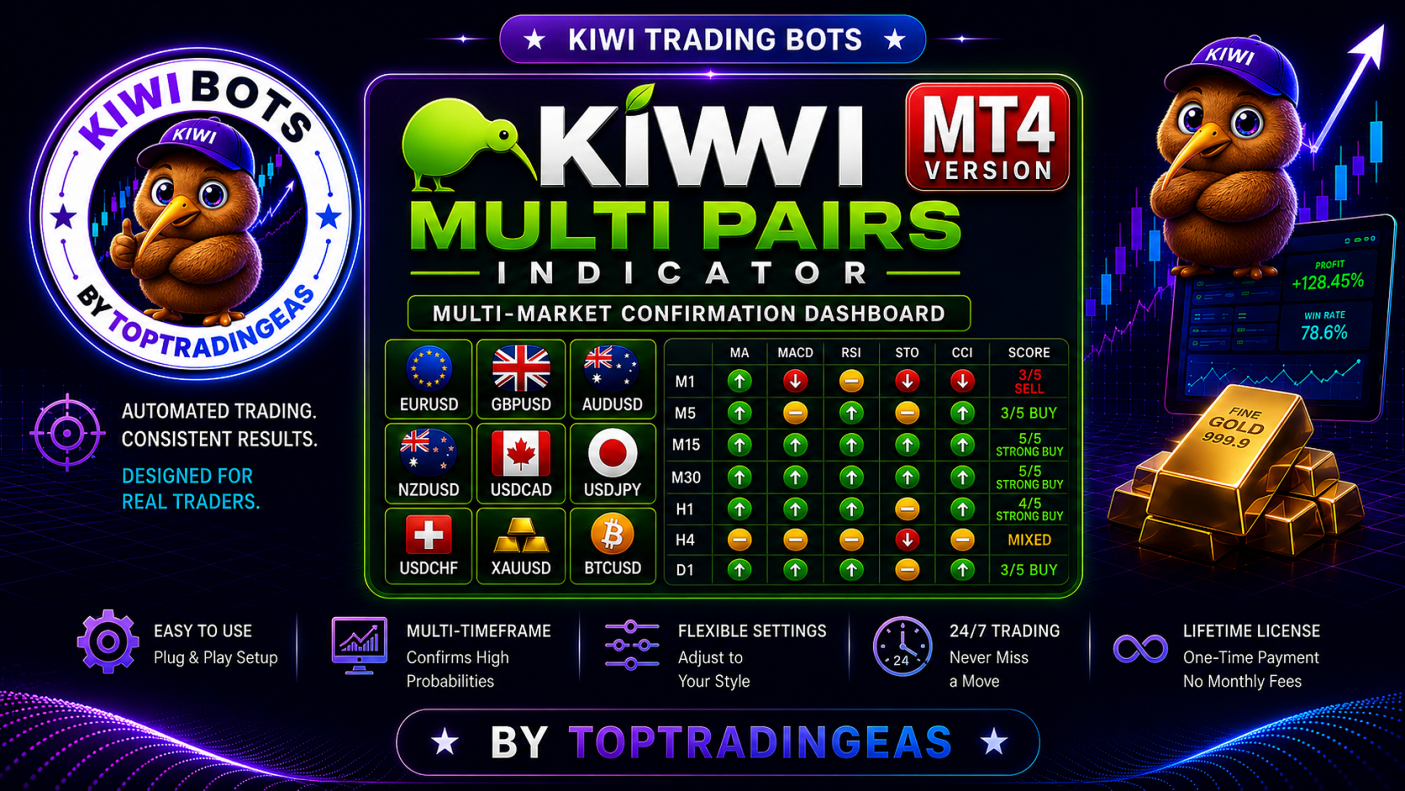
Kiwi Multi Pairs Indicator MT4 is a free multi-market confirmation dashboard for MetaTrader 4, designed to help traders analyse multiple Forex, Gold and supported crypto markets from a single chart.
Instead of opening many charts and manually checking several indicators, Kiwi Multi Pairs Indicator combines 5 technical indicators into one easy-to-read dashboard and produces a simple BUY, SELL, NEUTRAL or MIXED market consensus.
The indicator includes two interactive analysis views, allowing traders to analyse the market either by timeframe or by symbol.
Multi-Market Analysis From One Chart
The default dashboard monitors:
- EURUSD
- GBPUSD
- AUDUSD
- NZDUSD
- USDCAD
- USDJPY
- USDCHF
- XAUUSD / Gold
- BTCUSD when available from your broker
If a particular instrument is unavailable from the broker, the indicator can display it as N/A rather than preventing the dashboard from operating.
This makes the indicator more compatible with different broker symbol configurations.
5-Indicator Confirmation System
Kiwi Multi Pairs Indicator analyses each market using five commonly used technical indicators:
Moving Average (MA) — identifies general trend direction.
MACD — measures directional momentum.
RSI — evaluates momentum and relative market strength.
Stochastic Oscillator — provides additional momentum confirmation.
CCI — evaluates price momentum relative to its recent average.
Each component is independently classified before being combined into an overall consensus.
Possible dashboard readings include:
5/5 STRONG BUY
4/5 STRONG BUY
3/5 BUY
2/5 BUY
MIXED
2/5 SELL
3/5 SELL
4/5 STRONG SELL
5/5 STRONG SELL
The purpose is not to predict the market with certainty, but to make multi-indicator confirmation much faster to interpret.
Two Interactive Dashboard Views
TIMEFRAME View
Select a timeframe and compare all supported markets simultaneously.
Available analysis timeframes include:
M1 | M5 | M15 | M30 | H1 | H4 | D1
This view can quickly identify which instruments currently have the strongest indicator agreement.
The dashboard also highlights the strongest BUY and SELL candidates.
SYMBOL View
Select an individual market and analyse it across multiple timeframes.
For example, selecting XAUUSD allows you to compare its MA, MACD, RSI, Stochastic and CCI readings from M1 through D1.
This can help traders determine whether short-term and higher-timeframe conditions are aligned or conflicting.
The dashboard highlights the strongest bullish and bearish timeframe for the selected market.
Designed for Different Trading Styles
Because the analysis timeframe can be changed directly from the dashboard, the indicator can assist different approaches:
Scalping: M1–M5
Intraday trading: M5–M30
Day trading: M15–H1
Swing analysis: H1–D1
Traders can therefore use the same dashboard while focusing on the timeframe appropriate for their own strategy.
Main Features
✓ Built specifically for MetaTrader 4
✓ Multi-pair market scanner
✓ 9 default markets
✓ 7 selectable timeframes
✓ 5-indicator confirmation engine
✓ MA analysis
✓ MACD analysis
✓ RSI analysis
✓ Stochastic analysis
✓ CCI analysis
✓ BUY / SELL / NEUTRAL classification
✓ Consensus strength scoring
✓ Strong BUY / SELL identification
✓ TIMEFRAME-selective analysis
✓ SYMBOL-selective analysis
✓ Multi-timeframe confirmation
✓ Interactive chart buttons
✓ Optional alerts
✓ Handles unavailable broker symbols safely
✓ No external indicators required
✓ No DLL required
✓ Analysis-only indicator
✓ Does not automatically open or close trades
Optional Signal Alerts
Alerts can be enabled when stronger confirmation conditions are detected.
They are disabled by default, allowing traders to use the dashboard without unwanted popup notifications.
Users who prefer signal notifications can activate the alert functionality from the indicator settings.
Important Information
Platform: MetaTrader 4
Product Type: Indicator
Recommended Chart: Any supported symbol
Timeframes analysed: M1, M5, M15, M30, H1, H4, D1
Trading: Manual analysis only
Automatic trading: No
Kiwi Multi Pairs Indicator is an analysis and confirmation tool. It does not open, modify or close trades.
Indicator readings should not be treated as guaranteed trading signals. Market conditions can change rapidly, and traders should apply their own strategy and risk-management rules.
Installation
Install the indicator into:
MQL4 → Indicators
Compile or refresh the MT4 Navigator if necessary, then attach Kiwi Multi Pairs Indicator MT4 to a chart.
The dashboard will perform its analysis independently of the chart symbol and provides interactive controls for selecting the required market or timeframe.
Kiwi Multi Pairs Indicator MT4 — Multi-Market Confirmation Dashboard
5 Indicators • 9 Markets • 7 Timeframes • 2 Analysis Views • One MT4 Dashboard