Smart Easy Dashboard MT5
- エキスパート
- バージョン: 1.1
- アップデート済み: 30 7月 2026
- アクティベーション: 5

Smart Easy Dashboard turns MetaTrader 5 into a complete manual and semi-automated trading cockpit: risk-based one-click execution, full basket and position management, an on-chart Smart Money Concepts engine, a Google Gemini AI co-pilot and a multi-source alert center — all in one draggable panel.
The dashboard does not trade on its own. It executes only the actions you configure or click. Because almost everything is managed visually on the chart and on the panel, you rarely need to reopen the EA inputs window.
AI market co-pilot
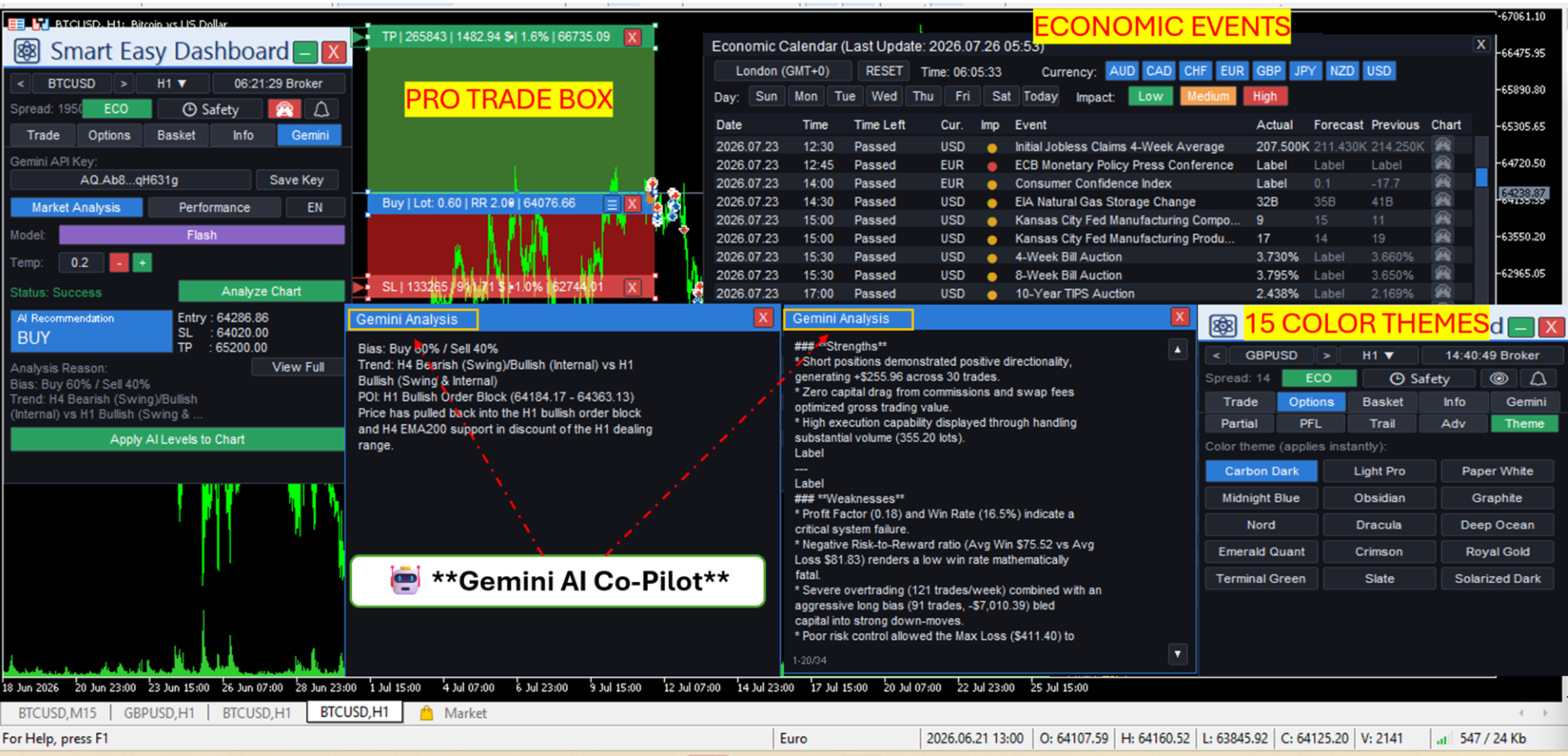
On-demand market analysis powered by Google Gemini, fed with multi-timeframe Smart Money Concepts and EMA context. It returns a structured read: bias percentage, trend, points of interest and order blocks, wait-for levels, and a buy or sell suggestion with entry, stop loss and take profit that you apply to the chart in one click. A second mode reviews your closed trades for a week, month or year and returns written feedback on what worked and what did not. The feature uses your own free Google Gemini API key, stored locally on your computer.
Smart Money Concepts overlay
An SMC engine draws order blocks, BOS and CHoCH lines (each line stops exactly at the breaking candle), buy-side and sell-side liquidity, equal highs and lows, premium and discount zones, and the strong high and low protecting the current structure — directly on your chart, computed from the last 1500 bars. One click toggles the whole overlay. The same engine feeds the SMC zone alert and gives the AI co-pilot its market-structure context.
Alert center
A single alert engine covering nine triggers: price lines, trendline breaks, EMA breaks, SMC point-of-interest touch, order filled, take profit or stop loss hit, equity drawdown, overtrading and pre-news warnings. Alerts are delivered as terminal notifications, mobile push and e-mail, with an anti-spam cooldown.
Economic calendar
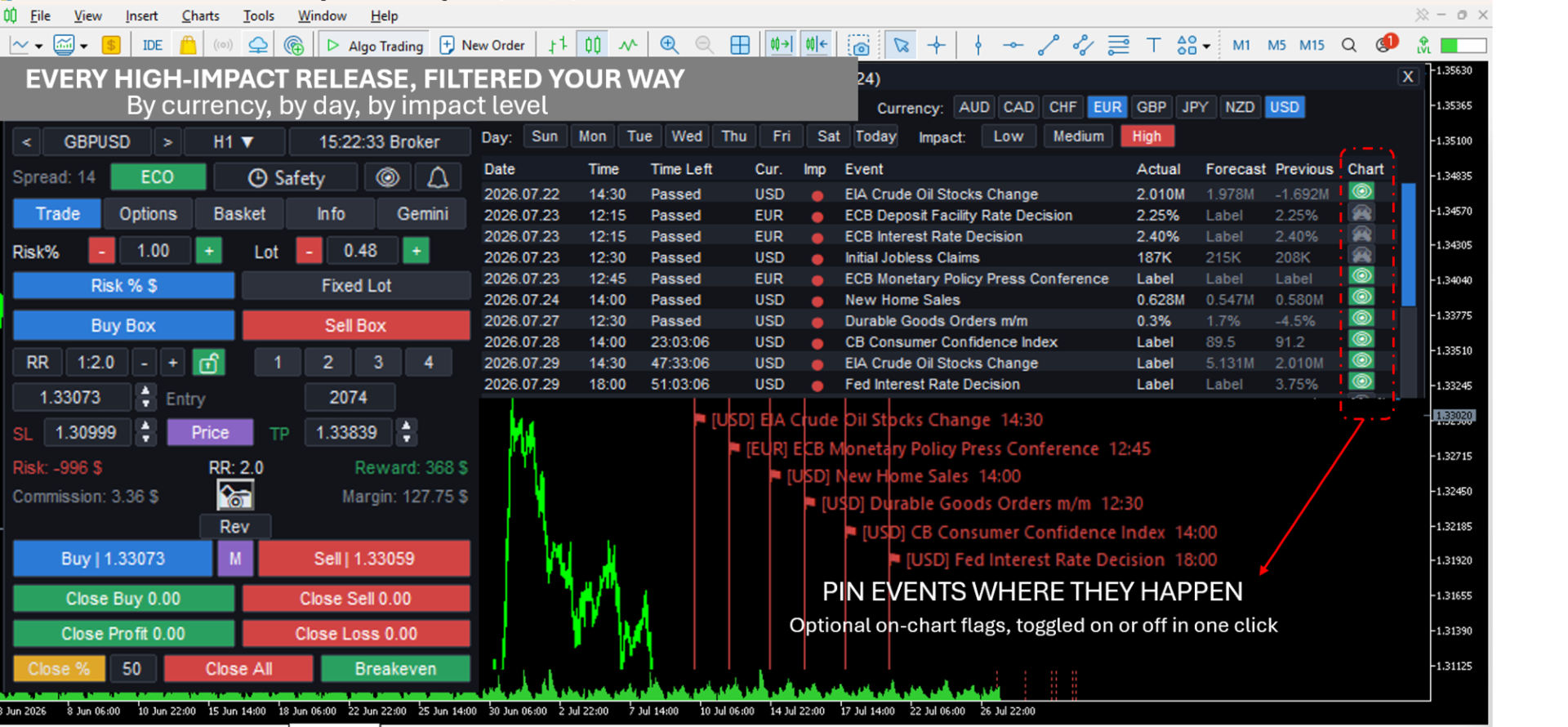
The built-in calendar shows upcoming and past events with forecast, actual and previous values and a live countdown, in any of 31 timezones. Filter by currency, by day or by impact level, and pin an event to highlight its window on the chart. The same feed powers the Events Protect guard, which blocks new trades around releases affecting the chart symbol.
Execution safety
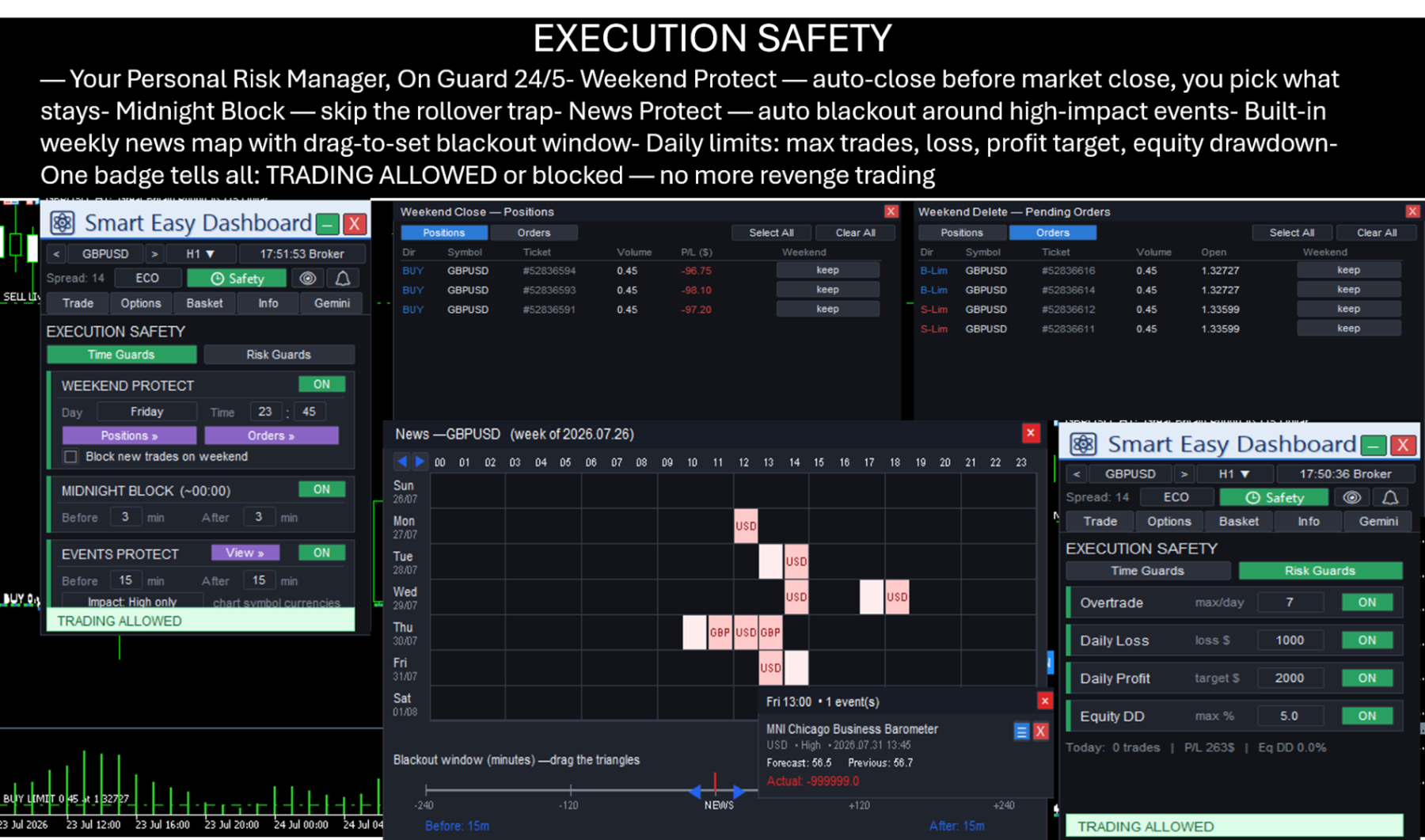
Optional guards block new trades once a limit is reached. Time guards cover weekend closing at a day and time you choose, a midnight block around the rollover period, and a news blackout window you set by dragging on a weekly event map. Risk guards cover maximum trades per day, a daily loss limit, a daily profit target and an equity drawdown percentage. A status badge always shows why trading is blocked, and a live line reports today's trade count, profit and drawdown.
Position and basket management
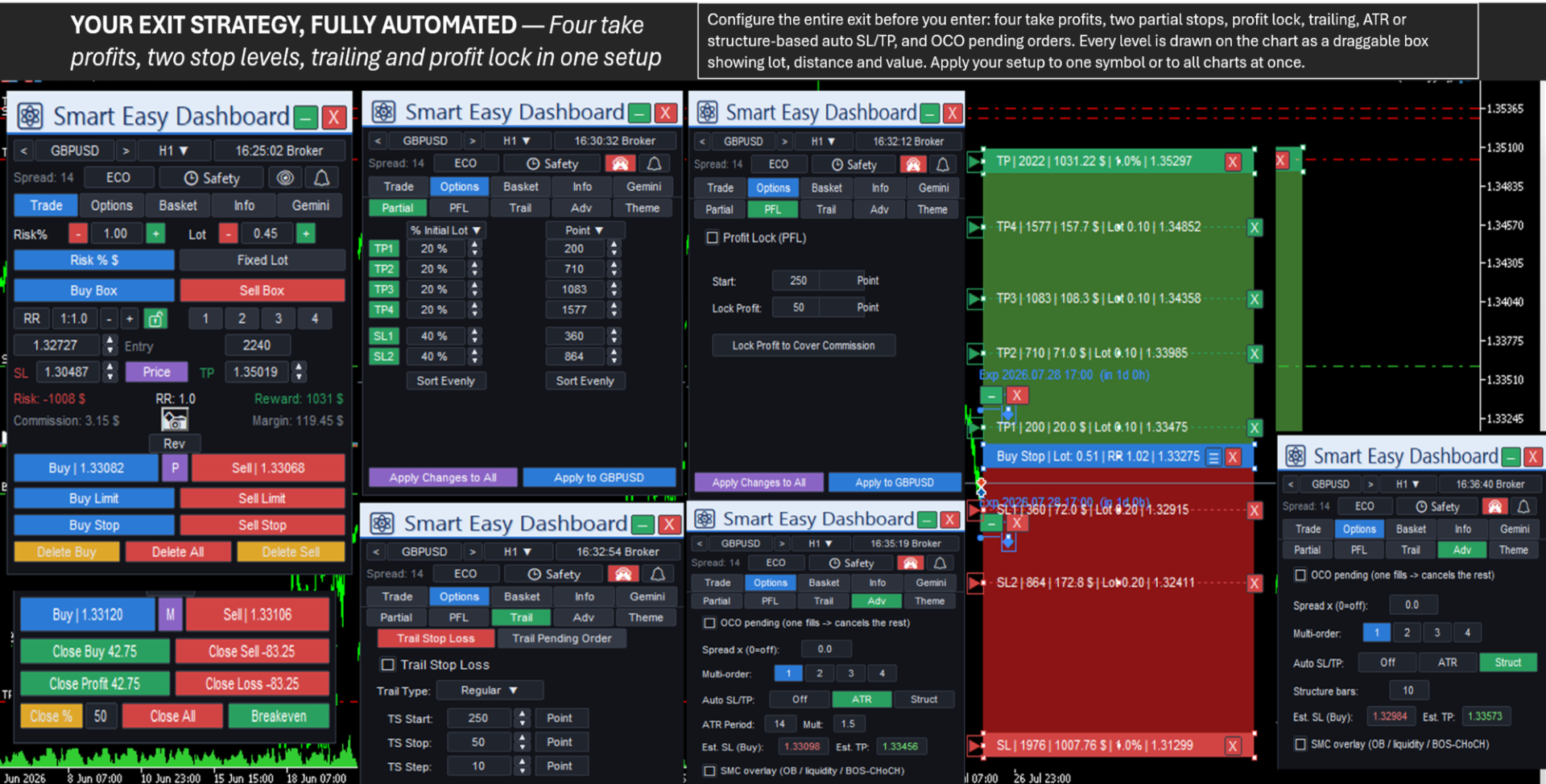
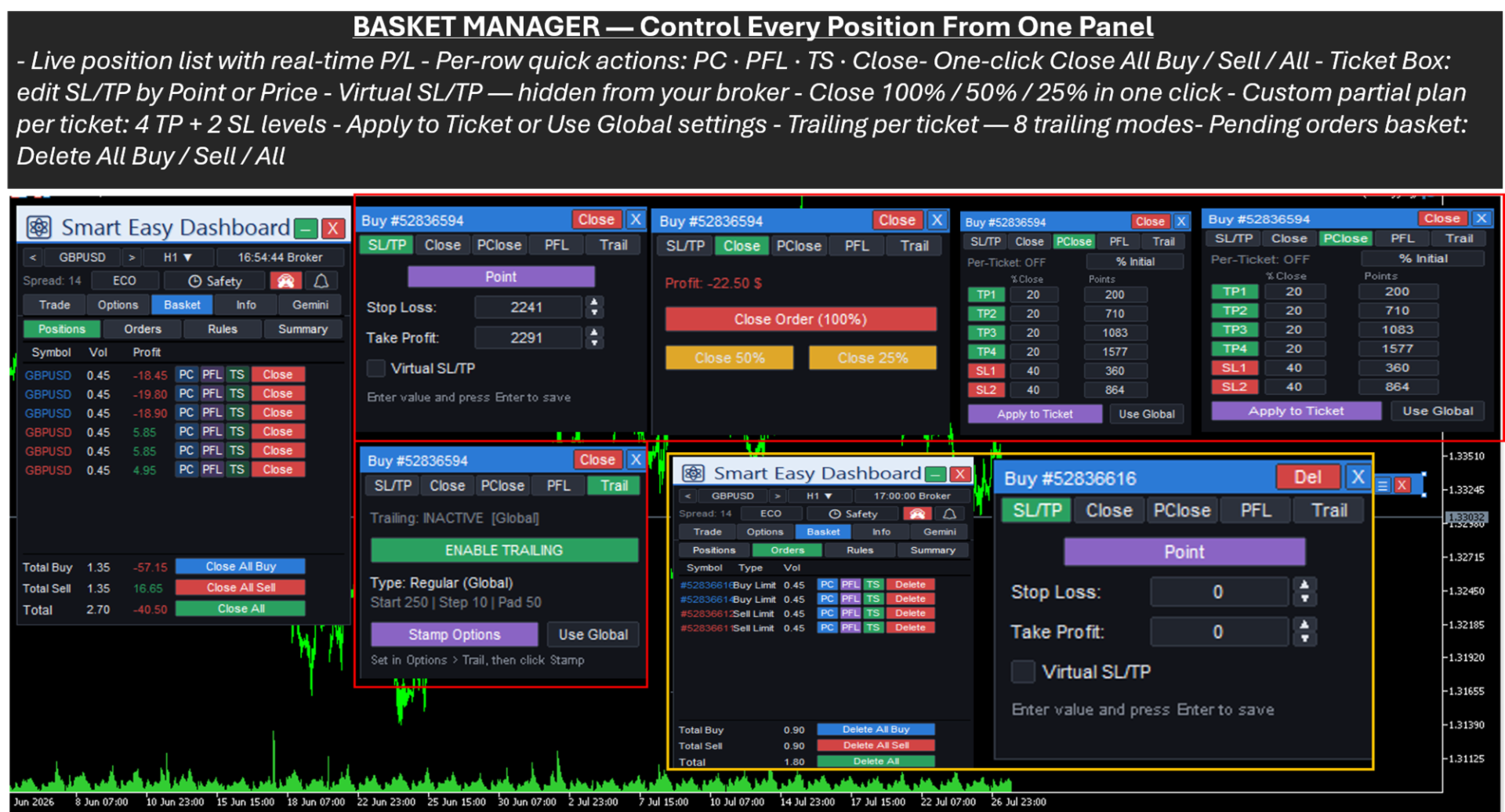
Up to four partial take-profit levels and two partial stop-loss levels, each measured in points, as a multiple of your risk, or as a percentage of the take-profit distance. Profit lock moves the stop to entry plus a buffer once the trade is far enough ahead, with a one-click preset that covers commission. Eight trailing modes are available: regular, risk-reward based, candle high/low, profit-based, moving average, Parabolic SAR, ATR and fractals — for positions and for pending orders.
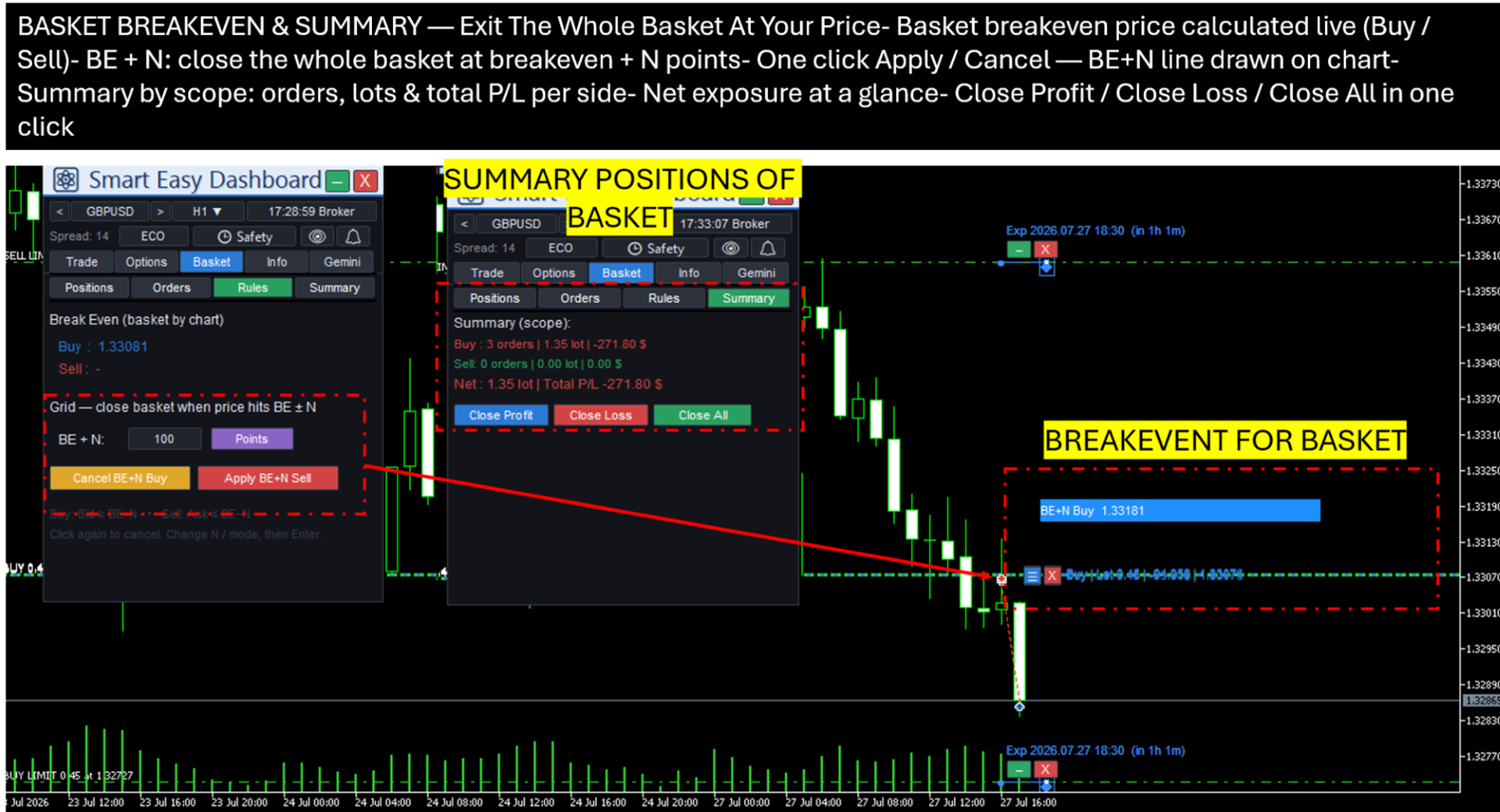
The basket view lists every managed position and pending order with per-row partial close, breakeven, trailing and close actions. A breakeven-plus-buffer rule closes a whole side at its combined volume-weighted breakeven price plus the buffer you set, drawn as a labelled line on the chart. A summary view shows buy, sell and net exposure with three bulk exits.
Order entry
The visual buy and sell boxes let you drag entry, stop loss and take profit lines on the chart while risk in account currency, risk-reward ratio, reward, commission and margin update live. Position size can be calculated as a percentage of balance or equity, as a fixed cash risk, or as a fixed lot. Market and pending orders, hedging mode, risk-reward presets and a fast multi-symbol switcher are included. Additional execution options cover OCO pending orders, a spread multiplier, multi-order split, and automatic stop and target placement from ATR or from market structure.
Reporting
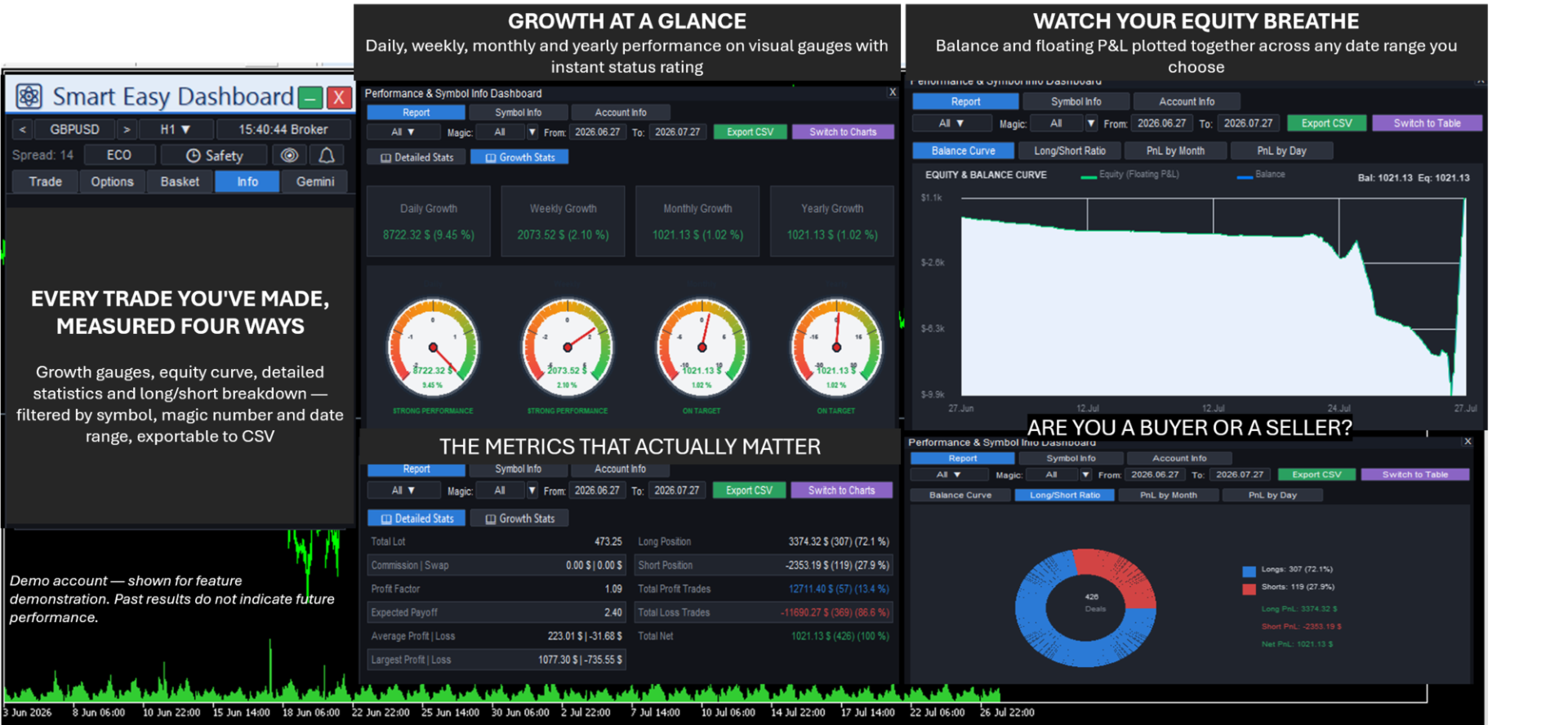
A reporting window turns your trade history into readable analytics: daily, weekly, monthly and yearly growth on visual gauges, an equity and balance curve, long and short ratio, and profit broken down by month and by day. Filter by symbol, magic number and date range, then export the whole report to CSV.
Daily use
Fifteen colour themes, a fully draggable and minimisable panel, per-symbol or global settings, on-chart trade boxes, a screenshot button, four keyboard shortcuts, an on-chart expiry slider for pending orders, an optional virtual stop and target mode held inside the EA, and live account and profit information with daily and monthly breakdown.
Requirements
- MetaTrader 5 with a hedging or netting account.
- Calendar features use the terminal's built-in economic calendar, which most brokers provide.
- AI features require an internet connection and a free Google Gemini API key, and the Gemini API address must be added under Tools, Options, Expert Advisors, Allow WebRequest.
Input parameters
Risk management:
- Magic number: unique identifier for the trades opened by the panel.
- Management scope: which trades the panel manages — this magic number only, the current symbol, or all trades.
- Lot sizing mode: risk percentage, fixed cash risk, or fixed lot.
- Risk value: the amount used by the selected sizing mode.
- Use equity for risk: size risk from equity when enabled, from balance when disabled.
- Max spread in points: blocks execution when the spread is too wide.
- Round-turn commission per lot: used for accurate risk and commission display.
Virtual levels and interface:
- Enable virtual stop loss, take profit and pending orders: levels are hidden from the broker and managed by the panel.
- Object prefix: chart object name prefix, only needs changing when running several copies on one chart.
Most day-to-day settings — risk, risk-reward presets, themes, guards, alerts and AI — are controlled directly from the panel and do not require reloading the input parameters.
Documentation
Detailed explanations of every tab and feature, including the Smart Money Concepts overlay and the Gemini AI co-pilot, are provided within the MQL5 platform.
Licensing
Available for outright purchase or monthly and yearly rental. Every buyer receives ongoing updates.
Support
For questions or issues, please use the Comments section of this product page or send a private message on MQL5. Include your MT5 build number and a screenshot of the Experts or Journal tab when reporting a problem.
Important note
This is a trade-management tool. It is not a signal service and not a set-and-forget robot. It helps you execute and manage trades faster and more safely, and it does not guarantee profit. Please test on a demo account first.