Trade Today
- インディケータ
- Gayathiri Gopalakrishnan
- バージョン: 6.0
- アップデート済み: 6 5月 2026
- アクティベーション: 5
TRADE TODAY — Advanced Pattern Recognition Indicator for MetaTrader 5
TRADE TODAY is a chart pattern recognition indicator that detects price structures in real time, scores each signal using trend and momentum filters, and displays entry, stop-loss, and take-profit levels directly on the chart. Push notifications, email, and sound alerts are supported.
How It Works
The indicator scans recent price action for swing points at multiple depths and identifies the following structures: Double Top, Double Bottom, Triple Top, Triple Bottom, Head and Shoulders, Inverted Head and Shoulders, Rising Wedge, Falling Wedge, Ascending Triangle, Descending Triangle, Bullish Flag, and Bearish Flag.
Each detected pattern receives a score from 0 to 99 based on four factors: symmetry and alignment of the structure, trend direction relative to the EMA, momentum from the RSI, and trend strength from the ADX. Patterns aligned with the trend score higher. Patterns against a strong trend are penalized. Only patterns that meet the minimum score threshold display an arrow and trigger alerts.
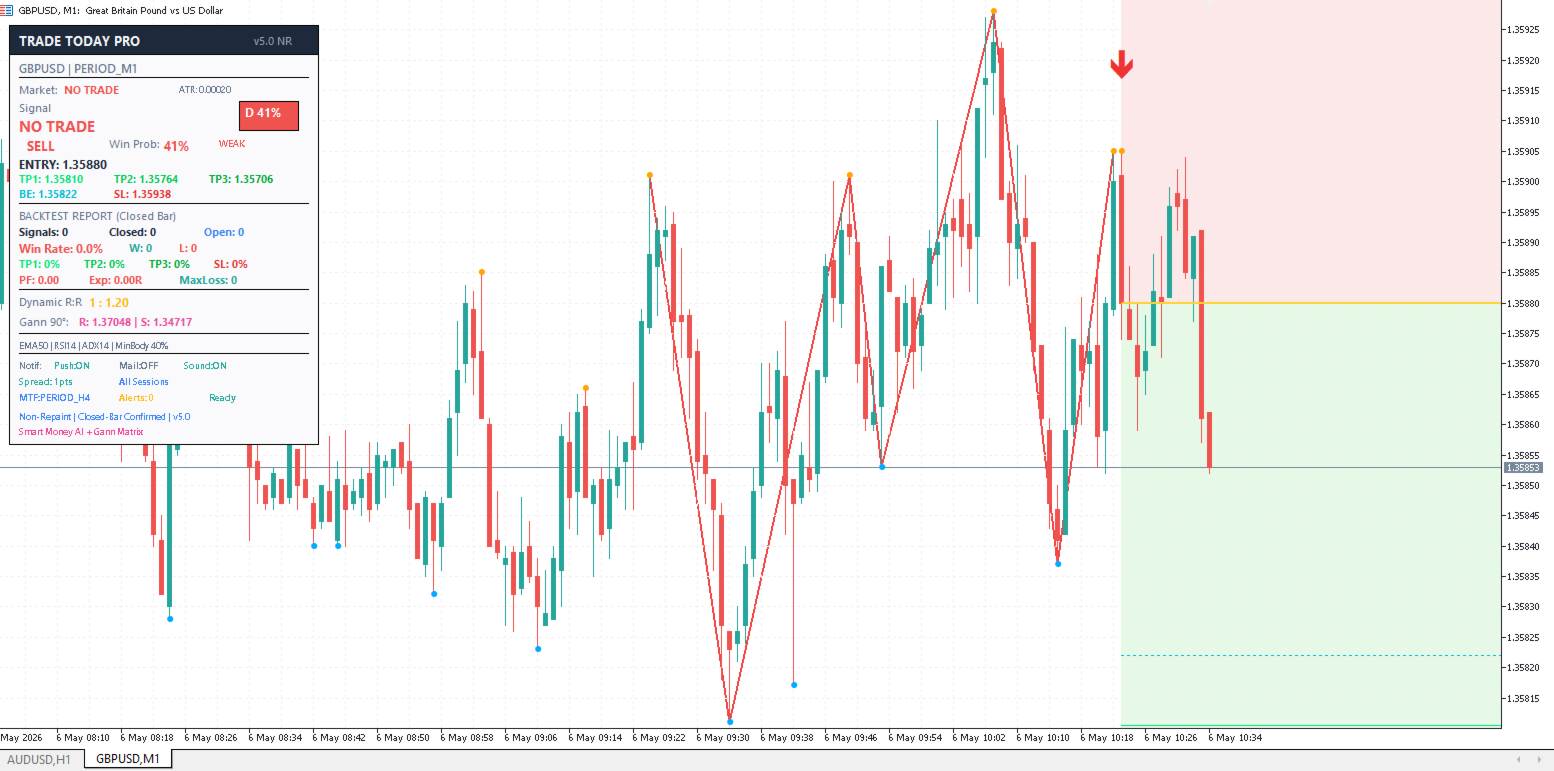
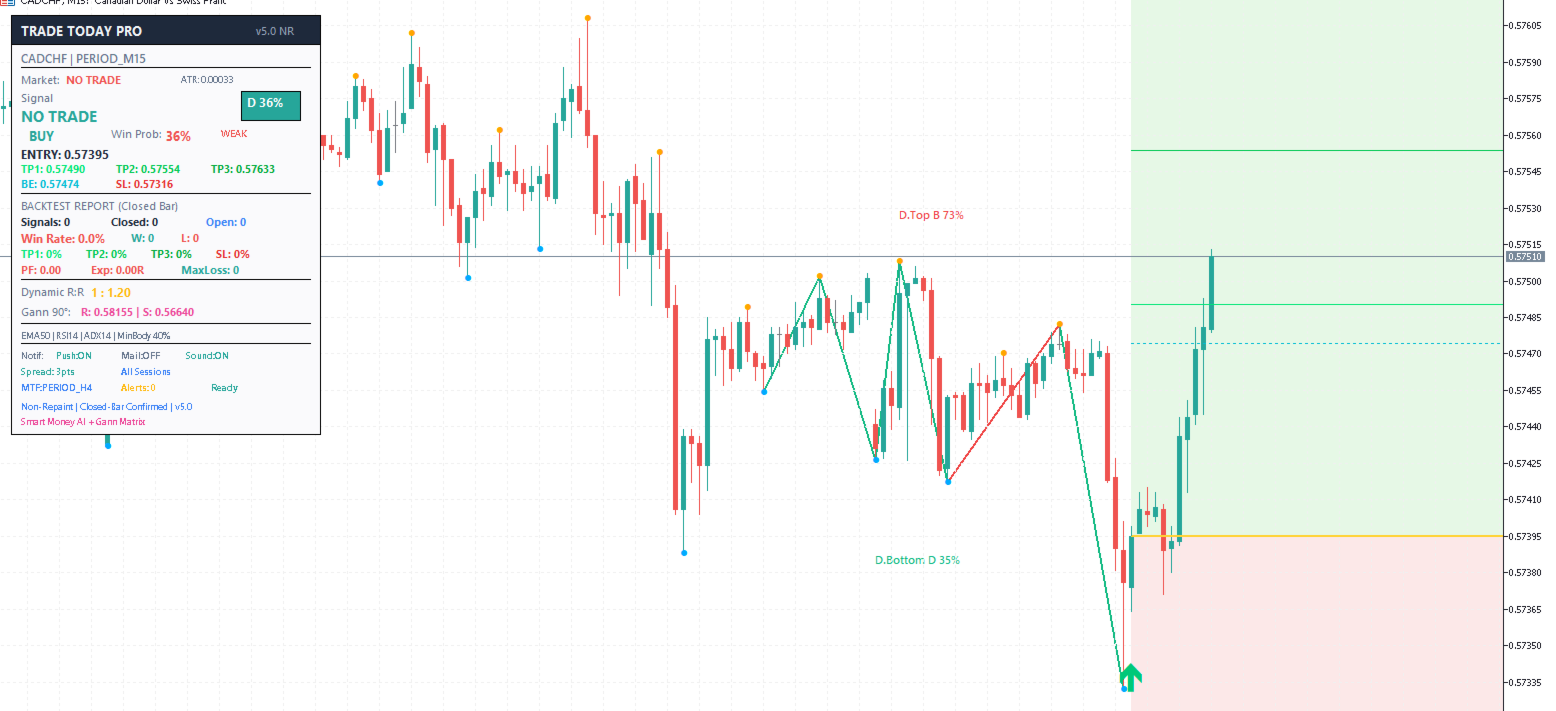
When a qualifying pattern forms at the live edge of the chart, the indicator draws entry, stop-loss, breakeven, and three take-profit levels as horizontal lines and updates the dashboard.
Dashboard
The dashboard is shown in the top-left corner. It displays the pattern name, direction (BUY or SELL), score, grade from A+ to D, win probability, entry price, stop-loss, breakeven, TP1 at 1.5R, TP2 at 2.0R, TP3 at 3.0R, risk-reward ratio, current spread, session status, MTF confirmation status, and alert cooldown timer.
How to Use
Attach the indicator to any chart on any symbol or timeframe. Set the minimum score in the inputs. A score of 35 to 50 produces more signals. A score of 55 to 70 filters for higher-quality setups only. Enable MTF Confirmation to require the higher timeframe EMA to agree with the signal direction before alerts fire.
When a signal appears, enter near the ENTRY level shown on the dashboard. Place the stop-loss at the SL level. Once price reaches TP1, close part of the position and move the stop to breakeven. Close more at TP2 and exit the remainder at TP3. Never move the stop-loss further from entry after placing it.
Setting Up Push Notifications
Install MetaTrader 5 on your phone. Open the app, go to Settings, and copy your MetaQuotes ID. On your desktop terminal, go to Tools, then Options, then Notifications, enable push notifications, and paste your MetaQuotes ID. In the indicator inputs, set Push Notification to true. Each alert sent to your phone includes the signal direction, symbol, timeframe, entry, stop-loss, breakeven, and all three take-profit levels.
Input Parameters
Engine: Swing Depth controls how significant a swing must be (default 5). Scan Bars sets how many bars to analyze (default 500). Min Score sets the minimum score for arrows and alerts (default 35).
AI Filters: MA Period for the trend EMA (default 50). RSI Period for momentum (default 14). ADX Period for trend strength (default 14).
Alerts: Min Win Probability for alerts (default 95%). Push Notification, Email Alert, Sound Alert can each be enabled or disabled. Alert Cooldown sets the minimum minutes between alerts (default 5).
Session Filter: Enable to restrict alerts to a set range of server hours.
Spread Filter: Enable to block alerts when the spread exceeds a defined maximum in points (default 30).
Multi-Timeframe: Enable MTF Confirmation and select the higher timeframe (default H4).
Display: Choose light or dark theme. Toggle swing points, pattern lines, level lines, and the dashboard individually.
Notes
This indicator is intended for analytical use. It identifies price structures based on pattern geometry, trend alignment, and momentum. No indicator can guarantee future results. The win probability figure is a relative confidence score derived from the internal model, not a statistically back-tested result. Arrows are not repainting on closed bars. A minimum of 200 bars is required. Compatible with all symbols and timeframes on MetaTrader 5.